

來源:先知安全技術社區
作者:nearg1e@YSRC
PIL (Python Image Library) 應該是 Python 圖片處理庫中運用最廣泛的,它擁有強大的功能和簡潔的 API。很多 Python Web 應用在需要實現處理圖片的功能時,都會選擇使用 PIL。
PIL 在對 eps 圖片格式進行處理的時候,如果環境內裝有 GhostScript,則會調用 GhostScript 在 dSAFER 模式下處理圖片,即使是最新版本的PIL模塊,也會受到 GhostButt CVE-2017-8291 dSAFER 模式 Bypass 漏洞的影響,產生命令執行漏洞。
據說大牛們看源碼和 dockerfile 就可以了:https://github.com/neargle/PIL-RCE-By-GhostButt
一個簡單常見的 Demo
from PIL import Image
def get_img_size(filepath=""):
    '''獲取圖片長寬'''
    if filepath:
        img = Image.open(filepath)
        img.load()
        return img.size
    return (0, 0)
我們在 Demo 里調用了 PIL 的 Image.open, Image.load 方法加載圖片,最后返回圖片的長和寬。
In [2]: get_img_size('/tmp/images.png')
Out[2]: (183, 275)
分析
Image.open 圖片格式判斷的問題
PIL在 Image.open 函數里面判斷圖片的格式,首先它調用 _open_core 函數, 在 _open_core 里面則是調用各個格式模塊中的 _accept 函數,判斷所處理的圖片屬于哪一個格式。
def _open_core(fp, filename, prefix):
    for i in ID:
        try:
            factory, accept = OPEN[i]
            if not accept or accept(prefix):
                fp.seek(0)
                im = factory(fp, filename)
                _decompression_bomb_check(im.size)
                return im
        except (SyntaxError, IndexError, TypeError, struct.error):
            # Leave disabled by default, spams the logs with image
            # opening failures that are entirely expected.
            # logger.debug("", exc_info=True)
            continue
    return None

im = _open_core(fp, filename, prefix)
這里 _accept(prefix) 函數中的參數 prefix 就是圖片文件頭部的內容
# PIL/GifImagePlugin.py
def _accept(prefix):
    return prefix[:6] in [b"GIF87a", b"GIF89a"]

# PIL/EpsImagePlugin.py
def _accept(prefix):
    return prefix[:4] == b"%!PS" or \
           (len(prefix) >= 4 and i32(prefix) == 0xC6D3D0C5)
可以發現 PIL 使用文件頭來判斷文件類型,也就是說即使我們用它處理一個以 .jpg 結尾的文件,只要文件內容以 %!PS 開頭,那么 PIL 就會返回一個 PIL.EpsImagePlugin.EpsImageFile 對象,使用 eps 格式的邏輯去處理它。之后調用的 load 方法也是 EpsImageFile 里面的 load 方法。
Image.load 到 subprocess.check_call
真實的環境中,程序員可能不會刻意去調用 load() 方法,但是其實 Image 文件中幾乎所有的功能函數都會調用到 load()。在 PIL/EpsImagePlugin.py 文件內我們關注的調用鏈為: load() -> Ghostscript() -> subprocess.check_call(), 最后使用 subprocess.check_call 執行了 gs 命令。
command = ["gs",
            "-q",                         # quiet mode
            "-g%dx%d" % size,             # set output geometry (pixels)
            "-r%fx%f" % res,              # set input DPI (dots per inch)
            "-dBATCH",                    # exit after processing
            "-dNOPAUSE",                  # don't pause between pages,
            "-dSAFER",                    # safe mode
            "-sDEVICE=ppmraw",            # ppm driver
            "-sOutputFile=%s" % outfile,  # output file
            "-c", "%d %d translate" % (-bbox[0], -bbox[1]),
                                            # adjust for image origin
            "-f", infile,                 # input file
            ]

# 省略判斷是GhostScript是否安裝的代碼
try:
    with open(os.devnull, 'w+b') as devnull:
        subprocess.check_call(command, stdin=devnull, stdout=devnull)
    im = Image.open(outfile)
最后其執行的命令為 gs -q -g100x100 -r72.000000x72.000000 -dBATCH -dNOPAUSE -dSAFER -sDEVICE=ppmraw -sOutputFile=/tmp/tmpi8gqd19k -c 0 0 translate -f ../poc.png, 可以看到 PIL 使用了 dSAFER 參數。這個參數限制了文件刪除,重命名和命令執行等行為,只允許 gs 打開標準輸出和標準錯誤輸出。而 GhostButt CVE-2017-8291 剛好就是 dSAFER 參數的 bypass。
GhostButt CVE-2017-8291
該漏洞的詳細的分析可以看 binjo 師傅的文章:GhostButt - CVE-2017-8291利用分析,原先我復現和構造POC的時候花費了很多時間,后來看了這篇文章,給了我很多幫助。
這里我們用的 poc 和文章里面一樣使用,也就是 msf 里面的 poc:poc.png。雖然這里修改 eps 后綴為 png ,但其實文件內容確實典型的 eps 文件。截取部分內容如下:
%!PS-Adobe-3.0 EPSF-3.0
%%BoundingBox: -0 -0 100 100

... 省略

currentdevice null false mark /OutputFile (%pipe%touch /tmp/aaaaa)
我們需要構造的命令執行payload就插入在這里 : (%pipe%touch /tmp/aaaaa)。
真實環境(偽)和復現
我使用之前寫的的 demo 函數和 Flask file-upload-sample 寫了一個簡單的 Web app:app.py,使這個本地命令執行變成一個遠程命令執行。主要代碼如下:
UPLOAD_FOLDER = '/tmp'
ALLOWED_EXTENSIONS = set(['png'])

app = Flask(__name__)
app.config['UPLOAD_FOLDER'] = UPLOAD_FOLDER

def get_img_size(filepath=""):
    '''獲取圖片長寬'''
    if filepath:
        img = Image.open(filepath)
        img.load()
        return img.size
    return (0, 0)

def allowed_file(filename):
    '''判斷文件后綴是否合法'''
    return '.' in filename and \
           filename.rsplit('.', 1)[1].lower() in ALLOWED_EXTENSIONS

@app.route('/', methods=['GET', 'POST'])
def upload_file():
    '''文件上傳app'''
    if request.method == 'POST':
        if 'file' not in request.files:
            flash('No file part')
            return redirect(request.url)
        image_file = request.files['file']
        if image_file.filename == '':
            flash('No selected file')
            return redirect(request.url)
        if image_file and allowed_file(image_file.filename):
            filename = secure_filename(image_file.filename)
            img_path = os.path.join(app.config['UPLOAD_FOLDER'], filename)
            image_file.save(img_path)
            height, width = get_img_size(img_path)
            return '<html><body>the image\'s height : {}, width : {}; </body></html>'\
                .format(height, width)

    return '''
    <!doctype html>
    <title>Upload new File</title>
    <h1>Upload new File</h1>
    <form method=post enctype=multipart/form-data>
      <p><input type=file name=file>
         <input type=submit value=Upload>
    </form>
    '''
考慮到在 Windows 上面安裝 PIL 和 GhostScript 可能會比較費勁,這里給大家提供一個 dockerfile。
git clone https://github.com/neargle/PIL-RCE-By-GhostButt.git && cd PIL-RCE-By-GhostButt
docker-compose build
docker-compose up -d
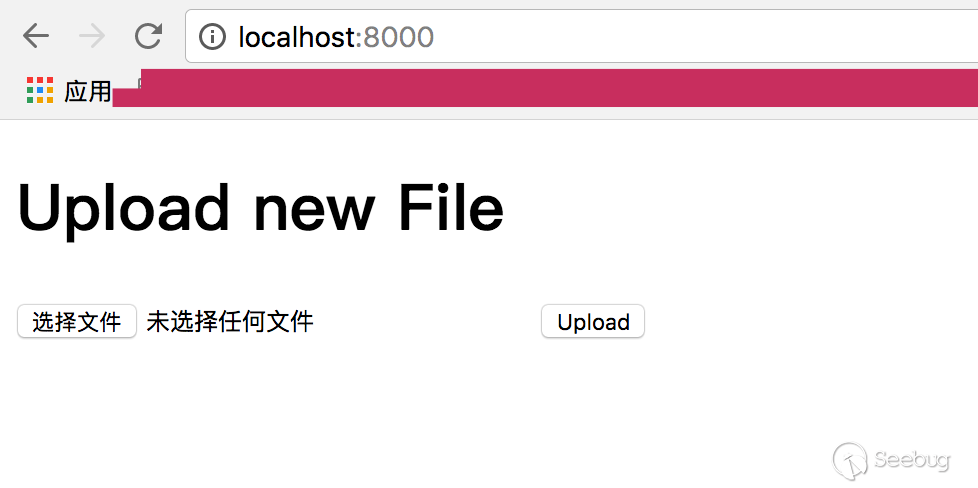
訪問 http://localhost:8000/ 可以看到文件上傳頁面。程序只使用允許后綴為 png 的文件上傳,并在上傳成功之后使用PIL獲取圖片長寬。我們修改 poc,使用 dnslog 來驗證漏洞。
頁面截圖:
DNSlog:

總結
什么情況下我們的web服務會受到該漏洞影響
- 使用 Python PIL 庫處理圖片(應該是任意版本)
- 環境中有 GhostScript(version <= 9.21)
如何修復?
一個是升級 GhostScript 版本。當然更新 PIL 的版本并不能解決問題,因為 pip 不會幫我們升級 GhostScript。
另外在 Python 代碼里面,如果我們的 web 程序不需要處理 eps 格式,除了對文件頭進行判斷排除 eps 文件之外,借用PIL自帶的程序邏輯,也可以避免產生命令執行漏洞。PIL.Image 會在 init() 里面加載 PIL 目錄下的所有圖片格式的處理方法。
def init():
    global _initialized
    if _initialized >= 2:
        return 0

    for plugin in _plugins:
        try:
            logger.debug("Importing %s", plugin)
            __import__("PIL.%s" % plugin, globals(), locals(), [])
        except ImportError as e:
            logger.debug("Image: failed to import %s: %s", plugin, e)
    ...
但同時也為我們提供了preinit()方法,該方法只加載 Bmp, Gif, Jpeg, Ppm, Png,這五種常見圖片格式的處理方法。只需在用open函數打開圖片文件之前,使用 preinit(),并設置 _initialized 的值大于等于2,即可避免 Image 調用 GhostScript 去解析 eps 文件:
Image.preinit()
Image._initialized = 2
最后
其實 Python 開發過程中有很多經典的代碼執行或者命令執行問題,包括但不限于以下幾種:
pickle.loads(user_input): yaml, pickle等庫在反序列化時產生的代碼執行Template(user_input): 模板注入(SSTI)所產生的代碼執行eval(user_input): eval等代碼執行函數所導致的任意代碼執行subprocess.call(user_input, shell=True): popen, subprocess.call等函數所導致的命令執行
PIL 這里出現的問題是比較少被提及的,實際的生產環境中到底常不常見就只能期待大家的反饋了。歡迎任何角度的糾錯以及觀點獨到的建議。感謝祝好。
Link
- https://github.com/neargle/PIL-RCE-By-GhostButt
- https://github.com/ArtifexSoftware/ghostpdl-downloads/releases/download/gs921/ghostscript-9.21-linux-x86_64.tgz
- http://www.bjnorthway.com/310/
 本文由 Seebug Paper 發布,如需轉載請注明來源。本文地址:http://www.bjnorthway.com/405/
暫無評論