

作者:深信服千里目安全實驗室
原文鏈接:https://mp.weixin.qq.com/s/QbfUkU0Fj7Bjk--21H2UQA
簡介
網絡爬蟲一直以來是讓網站維護人員頭痛的事情,即要為搜索引擎開方便之門,提升網站排名、廣告引入等,又要面對惡意爬蟲做出應對措施,避免數據被非法獲取,甚至出售。因此促生出爬蟲和反爬蟲這場曠日持久的戰斗。
爬蟲的開發從最初的簡單腳本到PhantomJs、selenium再進化到puppeteer、playwright等,和瀏覽器結合越來越密切。
反爬蟲的手段從ua、Header檢測到IP頻率檢測再到網站重構、驗證碼、JS加密等,手段越來越多樣。
下表是爬蟲攻防手段發展一個簡單的對比
| 階段 | 攻擊 | 防御 |
|---|---|---|
| 1 | 簡單腳本編寫爬蟲,Python、Java等 | 通過檢測User-Agent、HTTP Headers來區分是否為機器人 |
| 2 | 添加正常瀏覽器請求頭部,偽裝成正常用戶訪問 | 通過檢測IP訪問頻率,分析出短時間出現訪問次數異常的IP,進行封禁 |
| 3 | 使用IP代理池,秒撥等技術,擁有大量IP | 避免通過HTML訪問直接獲取數據,進行網站重構,使用Ajax動態傳輸數據 |
| 4 | 分析數據傳輸接口,直接訪問接口獲取數據 | 添加驗證碼、JS參數加密 |
| 5 | 深度學習破解驗證碼、JS調試破解參數加密 | 尋求第三方安全產品 |
反爬蟲的手段到現在已經成體系化了,訪問令牌(身份認證)、驗證碼(滑動、邏輯、三維等)、行為&指紋檢測(人機區分)、請求&響應加密等。所有這些功能的實現都是依靠前端JS代碼,對于攻擊者,如何去繞過反爬蟲手段,分析前端JS代碼就成為了必經之路。那么JS如何不被破解,也成為了反爬蟲的關鍵。
本文只探討JS如何防破解,其它反爬蟲手段不展開討論
JS防破解
JS防破解主要客戶分為兩個部分:代碼混淆和反調試。
代碼混淆
從代碼布局、數據、控制三個方面入手,進行混淆。
布局混淆
常見手段有無效代碼刪除,常量名、變量名、函數名等標識符混淆等。
無效代碼刪除
1.注釋文本對于理解代碼邏輯有很多幫助,生產環境需要刪除。
2.調試信息對于開發者調試Bug有很大的幫助,生產環境需要刪除。
3.無用函數和數據需要刪除,避免攻擊者能夠猜到開發者意圖,和垃圾代碼添加不同。
4.縮進、換行符刪除,減小代碼體積,增加閱讀難度。
標識符重命名
1.單字母。還可以是aa、a1等,需要注意避免作用域內標識符沖突。
var animal = 'shark' //源代碼
var a = 'shark' //重命名
2.十六進制。
var animal = 'shark' //源代碼
var _0x616e696d616c = 'shark' //重命名使用十六進制重命名可以衍生到其它方法,但重命名最重要的還要使用簡短的字符替換所有的標識符,并且作用域內不碰撞,不同作用域盡量碰撞。
這種重命名方式對于常量同樣有效。
var _$Qo = window , _$Q0 = String, _$Q0O = Array, _$QO = document, _$$Q0O = Date變量名不同作用碰撞。函數名和函數局部變量碰撞,不用函數內局部變量碰撞,全局變量和局部變量碰撞等等。
function _$QQO(){
    var _$QQO,
}
垃圾代碼
在源代碼中填寫大量的垃圾代碼達到混淆視聽的效果。
數據混淆
常見數據類型混淆有數字、字符串、數組、布爾等。
數字
數字類型混淆主要是進制轉換,還有一些利用數學技巧。
var number = 233 //十進制
var number = 0351 //八進制
var number = 0xe9 //十六進制
var number = 0b11101001 //二進制
字符串
字符串的混淆主要是編碼。 還有其它的手法,比如拆分字符串,加密字符串然后解密,這里不展開說明。
1.十六進制
var user = 'shark' //混淆前
var user = '\x73\x68\x61\x72\x6b' //十六進制
2.Unicode
var user = 'shark' //混淆前
var user3 = '\u0073\u0068\u0061\u0072\u006b' //unicode編碼
3.轉數組,把字符串轉為字節數組
     console.log('s'.charCodeAt(0)) //115
     console.log('h'.charCodeAt(0)) //104
     console.log('a'.charCodeAt(0)) //97
     console.log('r'.charCodeAt(0)) //114
     console.log('k'.charCodeAt(0)) //107
     console.log(String.fromCharCode(115,104,97,114,107)) //shark

     function stringToByte(str){
         var bytearr = [];
         for(var i =0;i<str.length;i++){
             bytearr.push(str.charCodeAt(i));
         }
         return bytearr
     }
     stringToByte('shark')
     Array(5) [ 115, 104, 97, 114, 107 ]
4.Base64
     var user = 'shark'
     var user = 'c2hhcms=' //base64編碼后

     常量編碼
     'slice' ---> 'c2xpY2U='
還有其它的手法,比如拆分字符串,加密字符串然后解密,這里不展開說明。
數組
數組的混淆主要是元素引用和元素順序。
  var arr = ['log','Date','getTime']
  console[arr[0]](new window[arr[1]]()[arr[2]]()) // console.log(new window.Date().getTime())

  加入編碼后字符串
  var arr = ['\u006C\u006F\u0067','\u0044\u0061\u0074\u0065','\u0067\u0065\u0074\u0054\u0069\u006D\u0065']
  console[arr[0]](new window[arr[1]]()[arr[2]]()) //同上
在對元素做編碼之后,之后進行引用會有一個問題,數組索引和數組元素是一一對應的,這樣可以很直觀的找出元素。可以進行元素順序打亂,再通過函數還原。
  var arr = ['\u006C\u006F\u0067','\u0044\u0061\u0074\u0065','\u0067\u0065\u0074\u0054\u0069\u006D\u0065']
  (function(arr,num){
    var shuffer = function(nums)  {
        while(--nums){
            arr.unshift(arr.pop());
        }
    };
    shuffer(++num);
  }(arr,0x10)) //打亂數組元素
  Array(3) [ "getTime", "log", "Date" ]
  console[arr3[1]](new window[arr3[2]]()[arr3[0]]()) //同上
布爾值
主要是使用一些計算來替代true和false。
  undefined //false
  null //false
  +0、-0、NaN //false

  !undefined //true
  !null //true
  !0 //true
  !NaN //true
  !"" //true
  !{} //true
  ![] //true
  !void(0) //true
控制混淆
通過上面的混淆手段可以把代碼混淆的已經很難讀了,但是代碼的執行流程沒有改變,接下來介紹下混淆代碼執行流程的方法。
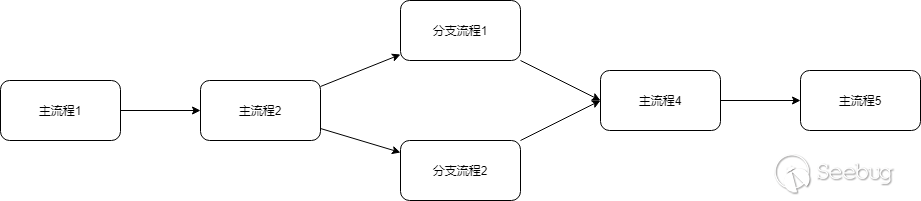
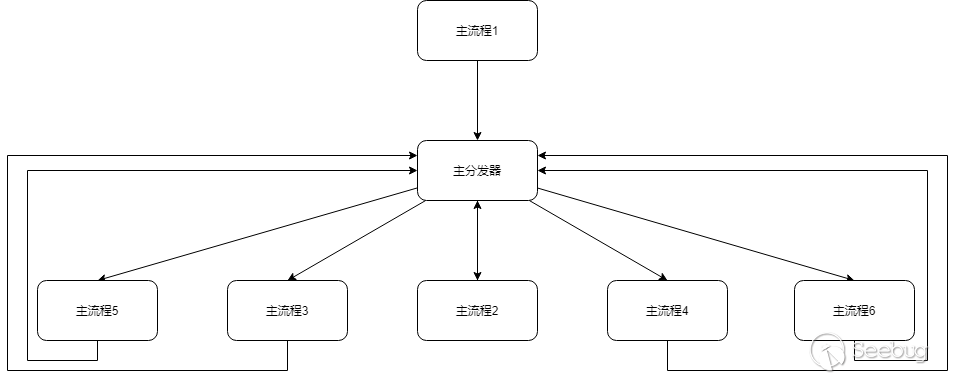
控制流平坦化
代碼原始流程是一個線性流程執行,通過平坦化之后會變成一個循環流程進行執行。
原流程
平坦化流程
  function source(){
      var a = 1;
      var b = a + 10;
      var c = b + 20;
      var d = c + 30;
      var e = d + 40;
      return e;
  }
  console.log(source()); //101

  函數內執行流程進行平坦化
  switch(seq){
      case '1':
          var e = d + 40;
          continue;
      case '2':
          var d = c + 30;
          continue;
      case '3':
          var b = a + 10;
          continue;
      case '4':
          var c = b + 20;
          continue;
      case '5':
          var a = 1;
          continue;
      case '6':
          return e;
          continue;
  }

  加上分發器
  function controlflow(){
      var controlflow_seq = '5|3|4|2|1|6'.split('|'),i = 0
      while(!![]){
          switch(controlflow_seq[i++]){
              case '1':
                  var e = d + 40;
                  continue;
              case '2':
                  var d = c + 30;
                  continue;
              case '3':
                  var b = a + 10;
                  continue;
              case '4':
                  var c = b + 20;
                  continue;
              case '5':
                  var a = 1;
                  continue;
              case '6':
                  return e;
                  continue;
          }
          break;
      }
  }
console.log(controlflow()); //101上面是一個比較簡單示例,平坦化一般有幾種表示,while...switch...case、while...if....elesif。
while...if...eleseif的還原難度更高。比如if(seq == 1)...elseif...可以優化成if(seq & 0x10 ==1)...elseif...。
逗號表達式
通過逗號把語句連接在一起,還可以結合括號進行變形。
  function source(){
      var a = 1;
      var b = a + 10;
      var c = b + 20;
      var d = c + 30;
      var e = d + 40;
      return e;
  }
  console.log(source()); //101

  function source(){
      var a,b,c,d,e;
      return a = 1,b = a + 10,c = b + 20,d = c + 30,e = d + 40,e
  }
  console.log(source());

   function source(){
      var a,b,c,d,e;
      return e = (d = ( c = (b = (a = 1, a+10),b+20),c+30),d+40);
  }
  console.log(source());
混淆工具
在線混淆
能夠滿足基本混淆的力度,但也要自己調整,否則可能會很耗性能。不過ob的混淆現在網上有很多還原的工具。
AST
對Javascript來說,用AST可以按照自己的需求進行混淆,也可以很好的用來解混淆。是一個終極工具。
AST在線轉換,利用這個網站進行AST解析后,再本地使用AST庫進行語法樹轉換、生成。
1.AST處理控制流平坦化
     var array = '4|3|8|5|4|0|2|3'.split('|'), index = 0;

     while (true) {
         switch (array[index++]) {
             case '0':
                 console.log('This is case 0');
                 continue;
             case '1':
                 console.log('This is case 1');
                 continue;
             case '2':
                 console.log('This is case 2');
                 continue;
             case '3':
                 console.log('This is case 3');
                 continue;
             case '4':
                 console.log('This is case 4');
                 continue;
             case '5':
                 console.log('This is case 5');
                 continue;
             case '6':
                 console.log('This is case 6');
                 continue;
             case '7':
                 console.log('This is case 7');
                 continue;
             case '8':
                 console.log('This is case 8');
                 continue;
             case '9':
                 console.log('This is case 9');
                 continue;
             default:
                 console.log('This is case [default], exit loop.');
         }
         break;
     }
先把上面的代碼放到AST網站進行解析生成語法樹。
這里使用babel進行轉換。
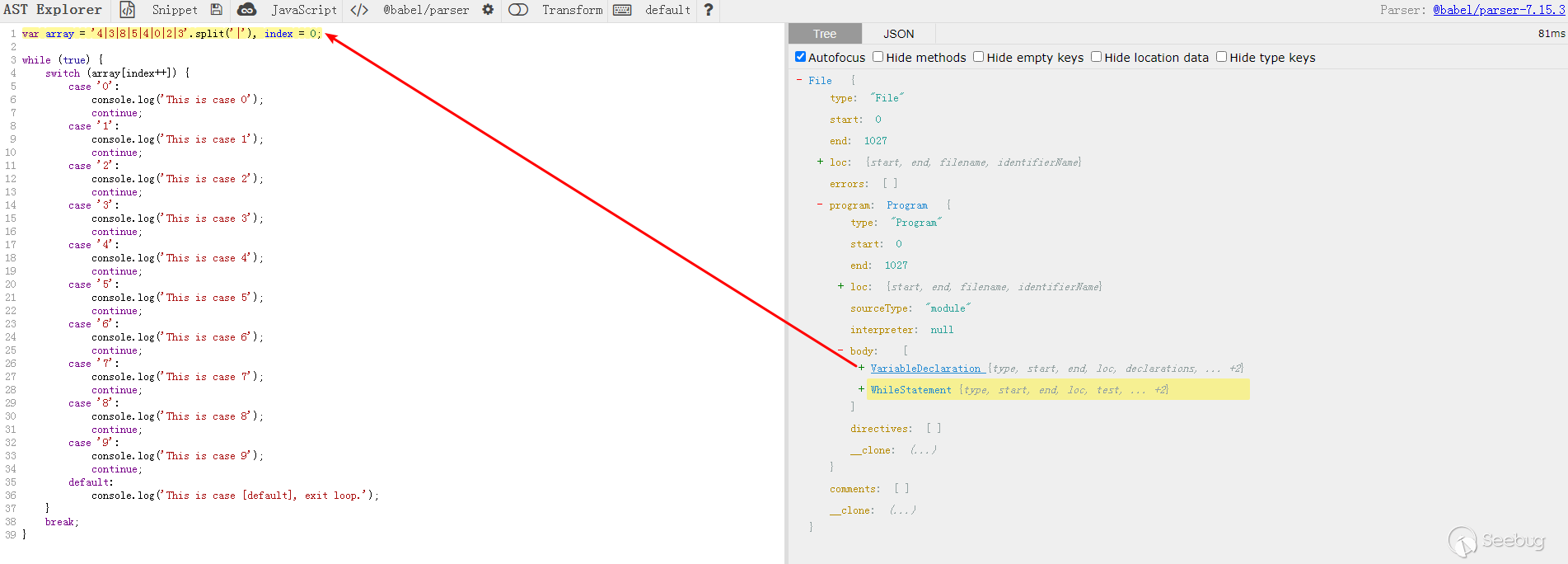
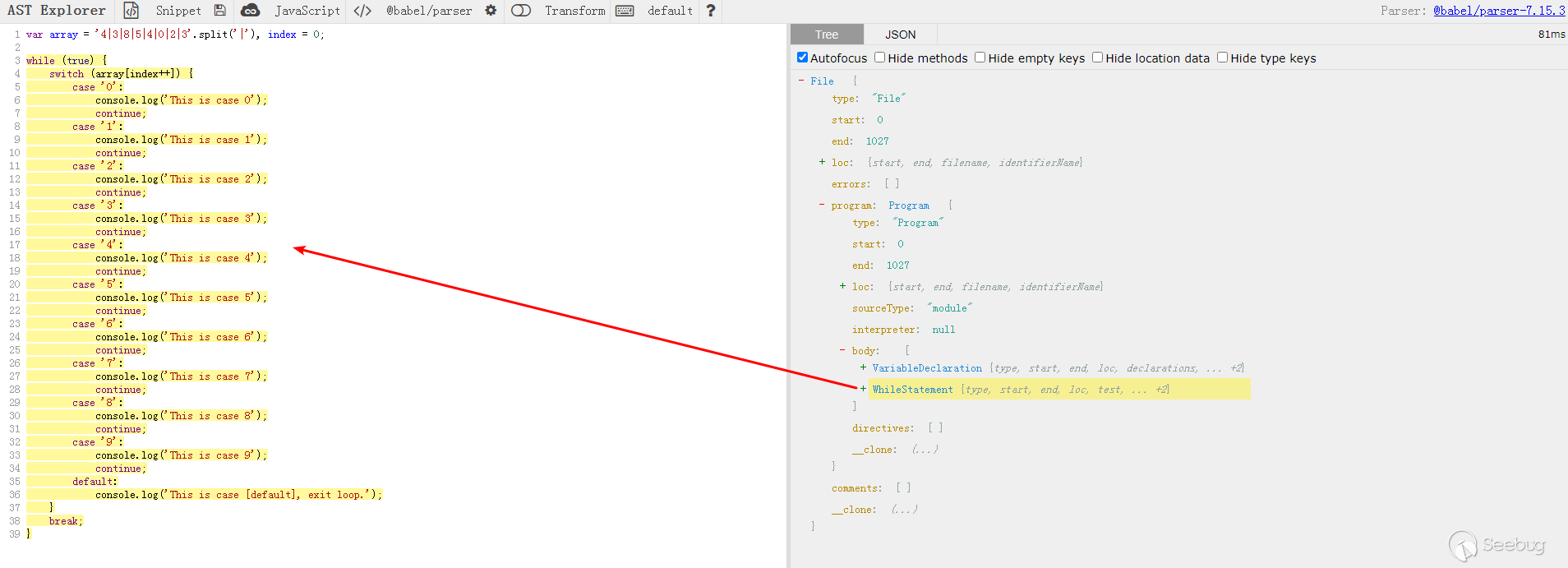
還原的思路:先獲取分發器生成的順序,隨后把分支語句和條件對應生成case對象,再利用分發器順序從case對象獲取case,最后輸出即可。
     // 轉換為 ast 樹
     let ast = parser.parse(jscode);

     const visitor =
     {
       WhileStatement(path){
         let {body} = path.node;
         let switch_statement = body.body[0]; //獲取switch的節點
         //判斷switch結構
         if (!types.isSwitchStatement(switch_statement)) {
           return;
         }
         //獲取條件表達式和case組合
         let { discriminant, cases } = switch_statement;
         // 條件表達式進一步進行特征判斷
         if (!types.isMemberExpression(discriminant) || !types.isUpdateExpression(discriminant.property)) {
           return;
         }
         //獲取條件表示引用的變量名,"array"
         let array_binding = path.scope.getBinding(discriminant.object.name)
         //表達式執行,獲取"array"的值,"['4', '3', '8', '5', '4', '0', '2', '3']"
         let {confident, value} = array_binding.path.get('init').evaluate()
         if (!confident) {
           return;
         }
         let array = value,case_map = {},tmp_array = [];
         /**
          * 遍歷所有case,生成case_map
          */
         for (let c of cases){
           let {consequent, test} = c;
           let test_value;
           /**
            * case值
            */
           if (test){
             test_value = test.value;
           }
           else{
             test_value = 'default_case';
           }
           /**
            * 獲取所有的case下語句
            */
           let statement_array = [];
           for (let i of consequent)
           {
             /**
              * 丟棄continue語句
              */
             if (types.isContinueStatement(i)) {
               continue;
             }
             statement_array.push(i)
           }
           case_map[test_value] = statement_array;
         }
         /**
          * 根據array執行順序拼接case語句
          */
         for (let i of array){
           tmp_array = tmp_array.concat(case_map[i]);
         }
         if (case_map.hasOwnProperty('default_case')) {
           tmp_array = tmp_array.concat(case_map['default_case'])
         }
         //替換節點
         path.replaceWithMultiple(tmp_array);
         /**
          * 手動更新scope
          */
         path.scope.crawl();
       }
     }

     //調用插件,處理待處理 js ast 樹
     traverse(ast, visitor);
上面時AST處理的核心代碼,轉換后如下
     var array = '4|3|8|5|4|0|2|3'.split('|'),
         index = 0;
     console.log('This is case 4');
     console.log('This is case 3');
     console.log('This is case 8');
     console.log('This is case 5');
     console.log('This is case 4');
     console.log('This is case 0');
     console.log('This is case 2');
     console.log('This is case 3');
     console.log('This is case [default], exit loop.');
當然其它的控制流平坦化也是可以還原的,有興趣的可以自己探索,有問題可以探討交流。
反調試
代碼混淆只能給攻擊者增加代碼閱讀的難度,但是如果進行動態調試分析結合本地靜態代碼分析還是可以找到代碼關鍵邏輯。那么如何防調試就是很重要的一點。
下面從JS調試的攻防角度做一個統計
| 攻擊手法 | 防御手法 |
|---|---|
| 控制臺打開 | 控制臺快捷刪除,寬度檢測 |
| 控制臺調試器打開 | debugger |
| 控制臺輸出 | 控制臺清空,內置函數重寫 |
| 控制臺打斷點 | scope檢測、debugger |
| 控制臺調用DOM事件 | 堆棧檢測 |
| 函數、對象屬性修改 | 函數防劫持、對象凍結 |
| NodeJS本地調式分析 | 代碼格式化檢測 |
控制臺
打開
刪除打開控制臺的快捷鍵阻止控制臺打開。
繞過:從菜單啟動開發者工具。
window.addEventListener('keydown', function(event){
    console.log(event);
    if (event.key == "F12" || ((event.ctrlKey || event.altKey) && (event.code == "KeyI" || event.key == "KeyJ" || event.key == "KeyU"))) {
        event.preventDefault();
        return false;
    }
});
window.addEventListener('contextmenu', function(event){
    event.preventDefault();
    return false;
});
寬度檢測判斷窗口是否變化。可能會存在誤檢測的情況,需要注意。
(function () {
    'use strict';

    const devtools = {
        isOpen: false,
        orientation: undefined
    };

    const threshold = 160;

    const emitEvent = (isOpen, orientation) => {
        let string = "<p>DevTools are " + (isOpen ? "open" : "closed") + "</p>";
        console.log(string);
        document.write(string);
    };

    setInterval(() => {
        const widthThreshold = window.outerWidth - window.innerWidth > threshold;
        const heightThreshold = window.outerHeight - window.innerHeight > threshold;
        const orientation = widthThreshold ? 'vertical' : 'horizontal';

        if (
            !(heightThreshold && widthThreshold) &&
            ((window.Firebug && window.Firebug.chrome && window.Firebug.chrome.isInitialized) || widthThreshold || heightThreshold)
        ) {
            if (!devtools.isOpen || devtools.orientation !== orientation) {
                emitEvent(true, orientation);
            }

            devtools.isOpen = true;
            devtools.orientation = orientation;
        } else {
            console.log(devtools.isOpen);
            if (devtools.isOpen) {
                emitEvent(false, undefined);
            }

            devtools.isOpen = false;
            devtools.orientation = undefined;
        }
    }, 500);

    if (typeof module !== 'undefined' && module.exports) {
        module.exports = devtools;
    } else {
        window.devtools = devtools;
    }
})();
調試器
開發者工具打開之后,需要選擇調試器功能進行調試分析。通過設置debugger來阻止調試器調試。
1.定時debugger
function debug() {
    debugger;
    setTimeout(debug, 1);
}
debug();
這種debugger會一直停住,對調試影響很大。
2.時間差debugger
   addEventListener("load", () => {
       var threshold = 500;
       const measure = () => {
           const start = performance.now();
           debugger;
           const time = performance.now() - start;
           if (time > threshold) {
               document.write("<p>DevTools were open since page load</p>");
           }
       }
       setInterval(measure, 300);
   });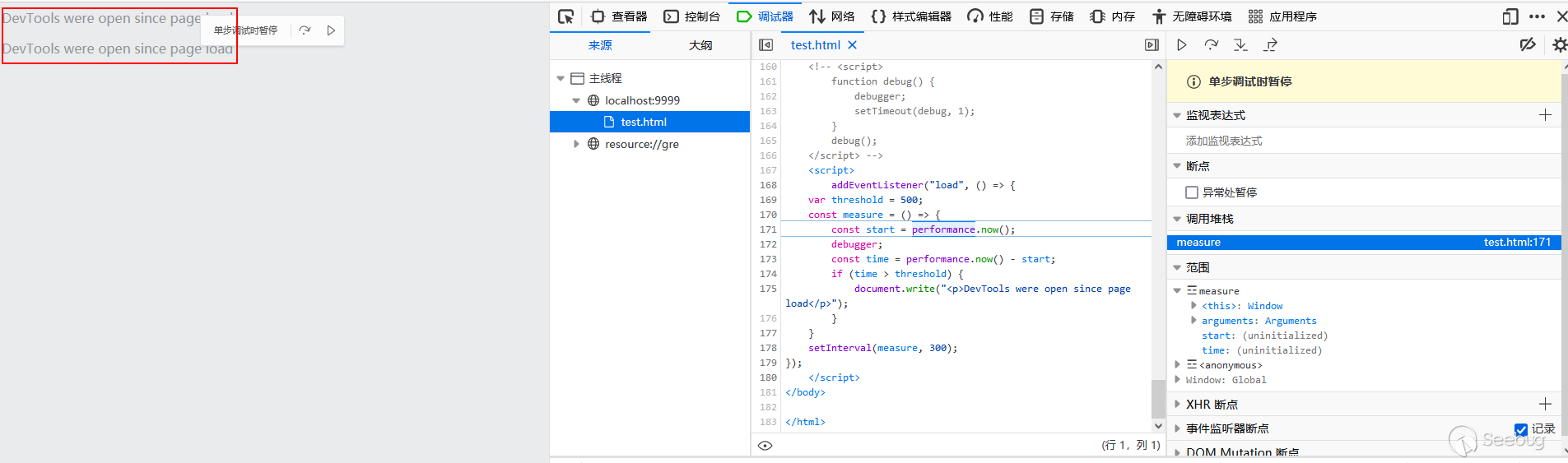
由于debugger會停止使調試器停止,可以通過計算時間差來判斷時否打開調試器。還可以單獨時間差進行檢測,debugger放在其它地方。
繞過:借助的調試器的"條件斷點"、'"Never pause here"'功能。
輸出
清空控制臺的打印,可以避免攻擊者修改代碼打印對象等。
function clear() {
    console.clear();
    setTimeout(clear, 10);
}
clear();
繞過:對于直接在控制臺打印變量沒有影響,并且調試時可以直接查看變量。
斷點調試
如何去檢測攻擊者是否在打斷點調試,有兩種思路,一種是通過時間來檢測,另外一種是依靠scope來檢測。兩種都有各自的問題。
1.時間檢測斷點調試
   var timeSinceLast;
   addEventListener("load", () => {
       var threshold = 1000;
       const measure = () => {
           if (!timeSinceLast) {
               timeSinceLast = performance.now();
           }
           const diff = performance.now() - timeSinceLast;
           if (diff > threshold) {
               document.write("<p>A breakpoint was hit</p>");
           }
           timeSinceLast = performance.now();
       }
       setInterval(measure, 300);
   });
當頁面加載完成時,執行函數,定義一個時間基線,檢測代碼執行時間差是不是超過時間基線,一旦存在斷點,必然會超過時間基線,那么就檢出斷點調試。但這里有個問題是如果瀏覽器執行代碼的時間差也超過時間基線也會被檢出,也就是誤檢。這種情況出現的機率還挺高,如果業務前端比較復雜(現在一般都是),使用性能不好的瀏覽器就會出現誤檢。
2.scope檢測
      function malicious() {
          const detect = (function(){
              const dummy = /./;
              dummy.toString = () => {
                  alert('someone is debugging the malicious function!');
                  return 'SOME_NAME';
              };
              return dummy;
          }());
      }
      function legit() {
          // do a legit action
          return 1 + 1;
      }
      function main() {
          legit();
          malicious();
      }
      debugger;
      main();
變量在被定義之后,調試器在斷點執行的時候獲取其scope,從而觸發toString函數。瀏覽器的兼容性是這個方法的缺陷。
事件調用
攻擊者經常利用控制臺執行事件調用,例如通過獲取按鈕元素后,點擊,提交用戶名和密碼登錄。函數堆棧就可以檢測出這種情況。
function test(){
            console.log(new Error().stack); //Chrome、Firefox

            IE 11
             try {
                 throw new Error('');
             } catch (error) {
                stack = error.stack || '';
             }

             console.log(stack);

            console.log(1);
        }
        test()
1.Firefox

2.Chrome

從Firefox和Chrome的結果可以看出來,代碼自執行的堆棧和控制臺執行的堆棧是不同的。
函數、對象屬性修改
攻擊者在調試的時,經常會把防護的函數刪除,或者把檢測數據對象進行篡改。可以檢測函數內容,在原型上設置禁止修改。
// eval函數
function eval() {
    [native code]
}

//使用eval.toString進行內容匹配”[native code]”,可以輕易饒過
window.eval = function(str){
        /*[native code]*/
        //[native code]
        console.log("[native code]");
    };

//對eval.toString進行全匹配,通過重寫toString就可以繞過
window.eval = function(str){
        //....
    };
    window.eval.toString = function(){
        return `function eval() {
            [native code]
        }`
    };

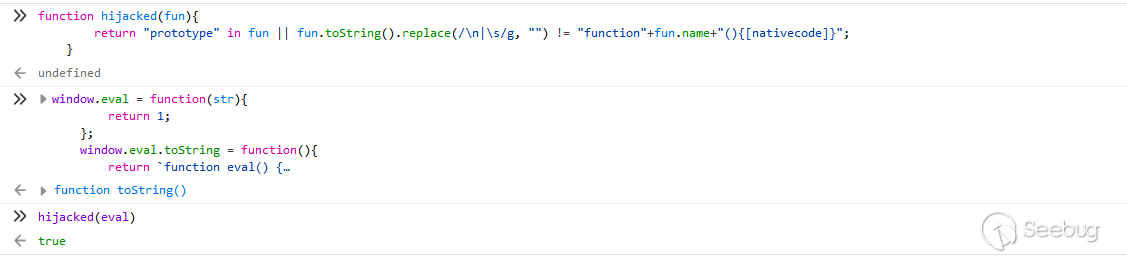
//檢測eval.toString和eval的原型
function hijacked(fun){
        return "prototype" in fun || fun.toString().replace(/\n|\s/g, "") != "function"+fun.name+"(){[nativecode]}";
    }
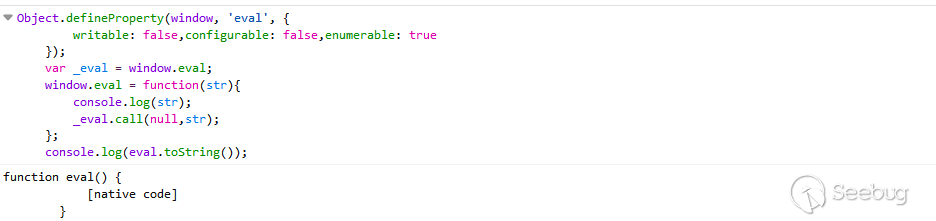
//設置函數屬性之后,無法被修改
Object.defineProperty(window, 'eval', {
        writable: false,configurable: false,enumerable: true
    });
NodeJS調試
攻擊者在本地分析調試時需要把代碼進行格式化后才能夠分析。
//格式化后
function y() {
    var t = (function() {
        var B = !![];
        return function(W, i) {
            var F = B ? function() {
                if (i) {
                    var g = i['apply'](W, arguments);
                    i = null;
                    return g;
                }
            } : function() {};
            B = ![];
            return F;
        };
    }());
    var l = t(this, function() {
        return l['toString']()['search']('(((.+)+)+)+$')['toString']()['constructor'](l)['search']('(((.+)+)+)+$');
    });
    l();
    console['log']('aaaa');
    console['log']('ccc');
};
y();

function Y() {
    console['log']('bbbbb');
};
Y();

//格式化前
function y(){var t=(function(){var B=!![];return function(W,i){var F=B?function(){if(i){var g=i['apply'](https://images.seebug.org/content/images/2022/05/13/1652429959000-W,arguments-w331s);i=null;return g;}}:function(){};B=![];return F;};}());var https://images.seebug.org/content/images/2022/05/13/1652429959000-l-w331s=t(this,function(){return https://images.seebug.org/content/images/2022/05/13/1652429959000-l-w331s['toString']()['search']('(((.+)+)+)+$')['toString']()['constructor'](https://images.seebug.org/content/images/2022/05/13/1652429959000-l-w331s)['search']('(((.+)+)+)+$');});l();console['log']('aaaa');console['log']('ccc');};y();function Y(){console['log']('bbbbb');};Y();
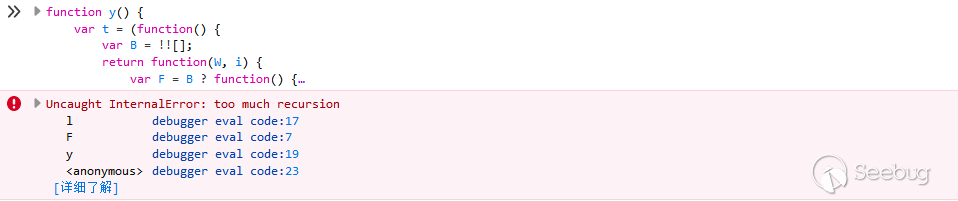
執行格式化后的代碼會出現遞歸爆炸的情況,因為匹配了換行符。
結語
本文只列舉了一些常見的前端JS防破解手段,還有一些更高級的手段,例如:自定義編譯器、WebAssembly、瀏覽器特性挖掘等。結合自身的業務合理的使用代碼混淆和反調試手法,來保證業務不被惡意分析,避免遭到爬蟲的危害。
 本文由 Seebug Paper 發布,如需轉載請注明來源。本文地址:http://www.bjnorthway.com/1900/
暫無評論