

作者: 深信服千里目安全實驗室
原文鏈接:https://mp.weixin.qq.com/s/K4icyU6tmZYMrvgNL_jYDw
使用的Pin版本:3.20
1. 簡介
Pin 是一個動態二進制插樁工具,支持 Linux, macOS 和 Windows 操作系統以及可執行程序。Pin可以通過pintools在程序運行期間動態地向可執行文件的任意位置插入任意代碼(C/C++),也可以attach到一個正在運行的進程。
Pin 提供了豐富的 API,可以抽象出底層指令集特性,并允許將進程的寄存器數據等的上下文信息作為參數傳遞給注入的代碼。Pin會自動存儲和重置被注入代碼覆蓋的寄存器,以恢復程序的繼續運行。對符號和調試信息也可以設置訪問權限。
Pin內置了大量的樣例插樁工具的源碼,包括基本塊分析其、緩存模擬器、指令跟蹤生成器等,根據自己的實際需求進行自定義開發也十分方便。
2. 使用Pin進行插樁
1. Pin
對 Pin 的一個最合適的理解是可以將 Pin 當作一個 JIT 編譯器,只是它的輸入不是字節碼,而是可執行文件。Pin 會攔截可執行文件的第一條指令,然后對從該指令開始的后續的指令序列重新“compile”新的代碼,然后控制權限轉移到新生成的代碼。生成的代碼與原始代碼幾乎一致,但是 Pin 會保證在分支退出代碼序列時重新獲得控制權限。重新獲得控制權后,Pin 會基于分支生成更多的代碼,然后繼續運行。Pin 將所有生成的代碼都保存在內存中,這樣可以實現代碼重用。
在這種 JIT 模式下,執行的是生成的代碼,原始代碼僅作為參考。當生成代碼時,Pin 會給到用戶注入自己想執行的代碼(插樁)的機會。
Pin 對所有實際執行的代碼進行插樁,不管代碼具體處于哪個 section 。雖然對于一些條件分支會存在異常,但是如果指令沒有被執行過,就一定不會被插樁。
Pin的完整架構如下:
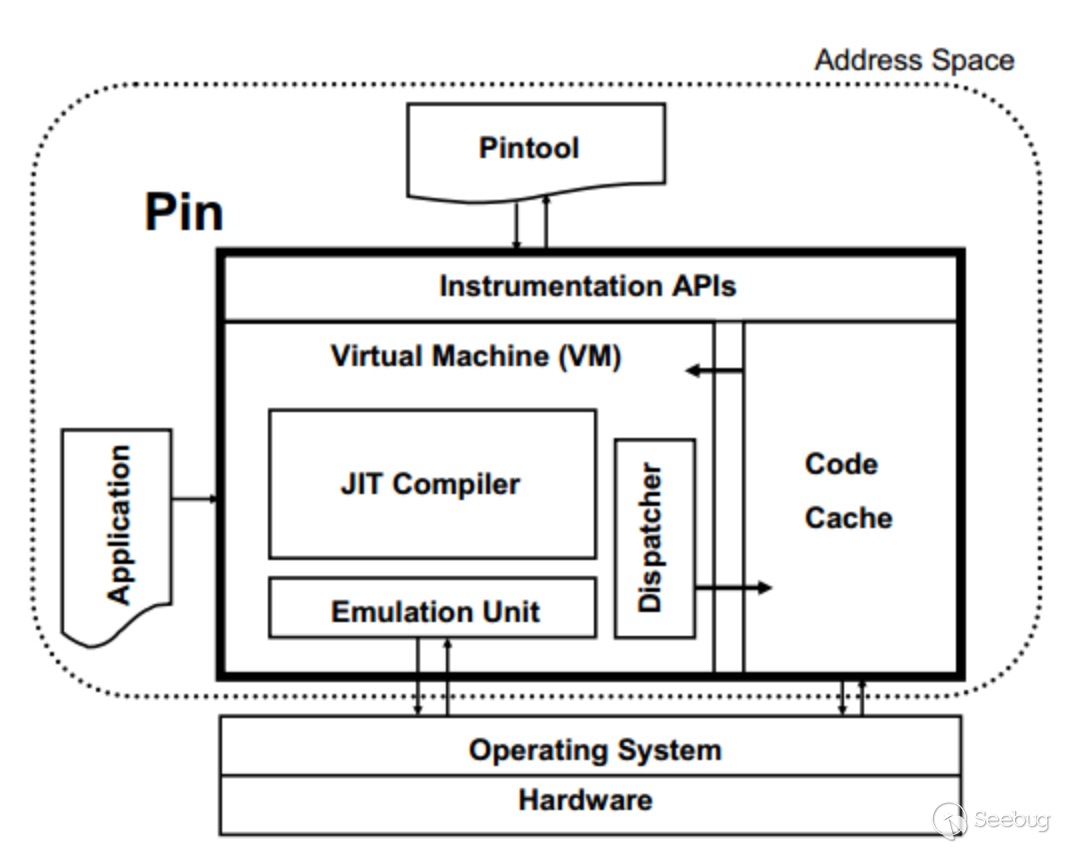
Pin工作在操作系統之上,所以只能捕獲用戶級別的指令。在一個經過插樁的程序運行時,同時有3個程序運行:應用程序本身、Pin、Pintool。Pin是對應用程序進行插樁的引擎,Pintool中包含了插樁的指令,可以看作是Pin的一個library。三者共享同一個地址空間,但不共享庫,避免了沖突。
2. Pintools
在概念上,插樁主要包含兩部分內容:
- 插樁機制(instrumentation code)
在什么位置插入什么樣的代碼
- 分析代碼(analysis code)
在插樁點執行的代碼
這兩部分內容都通過 Pintool 這個可執行文件來實現。Pintool 可以看作是 Pin 中可以實現修改代碼生成過程的插件。
Pintool 會向 Pin 注冊插樁回調例程,每當需要生成新代碼時, Pin 會調用這些回調例程。回調例程承擔了檢測插樁內容的作用,它會檢查要生成的代碼,檢查其靜態屬性,并決定是否以及在何處注入對分析函數的調用。
分析功能收集有關應用程序的數據。Pin 確保根據需要保存和恢復整數和浮點寄存器狀態,并允許將參數傳遞給函數。
Pintool 還可以為諸如線程創建或 fork 之類的事件注冊通知回調例程,這些回調通常用于收集數據或工具初始化和清理。
因為 Pintool 采用的是類似插件的工作機制,所以必須運行在和 Pin 及插樁的可執行文件相同的地址空間內,所以 Pintool 可以訪問可執行文件的全部數據,還會與可執行文件共享 fd 和其他進程信息。
在 Pintool 的開發過程中,分析代碼的調優比插樁代碼更重要,因為插樁代碼只執行一次,但是分析代碼會調用很多次。
3. 插樁粒度
1. trace instrumentation
在一個代碼序列第一次執行前進行插樁,這種粒度的插樁稱為“trace instrumentation”。在這種模式下,Pintool 一次“trace”執行一次檢查和插樁,“trace”是指從一個 branch 開始,以一個無條件跳轉 branch 結束,包含 call 和 return。
Pin 會保證每個 trace 只有一個頂部入口,但是可能包含多個出口。如果一個分支連接到了一個 trace 的中間位置,Pin 會生成一個以該分支作為開始的新的 trace 。Pin 將 trace 切分成了基本塊,每個基本塊稱為“BBL”,每個 BBL 是一個單一入口、單一出口的指令序列。如果有分支連接到了 BBL 的中間位置,會定義一個新的 BBL 。通常以 BBL 為單位插入分析調用,而不是對每個指令都插入,這樣可以降低分析調用的性能消耗。trace instrumentation 通過 TRACE_AddInstrumentFunction API 調用。
因為 Pin 是在程序執行時動態發現程序的執行流,所以 BBL 的概念與傳統的基本塊的概念有所不同,說明如下:
swtich(i){
 case 4: total++;
 case 3: total++;
 case 2: total++;
 case 1: total++;
 case 0:
 default: break;
}
在 IA-32 架構下,會生成如下類似的指令:
.L7:
    addl   $1, -4(%ebp)
.L6:
    addl   $1, -4(%ebp)
.L5:
    addl   $1, -4(%ebp)
.L4:
    addl   $1, -4(%ebp)
傳統基本塊的計算方式是會把每個 addl 指令作為一個單獨的指令基本塊,但是對于 Pin 來說,隨著執行不同的 switch cases,Pin 會在 .L7 作為入口(從 .L7 依次向下執行)的時候生成包含所有4個指令的 BBL,在 .L6 輸入的時候生成包含3個指令的 BBL,依此類推。所以,在 Pin 的統計方式里,如果代碼分支走到了 .L7 ,只會計算一個 Pin BBL,但是4個傳統概念上的基本塊都被執行了。
Pin 在遇到一些特殊指令的時候會直接作為 trace 的結束位置,生成一個 BBL, 比如 cpuid, popf 以及 REP 為前綴的指令。REP 為前綴的指令都被當作隱式循環處理,在處理完第一次的迭代后,后面的每次迭代都作為一個單獨的 BBL ,因此這種情況下,會看到比傳統基本塊統計方式統計出更多的 BBL。
2. instruction instrumentation
Pintool 會在可執行文件的每條指令都進行插樁,這種模式使得開發者不必過多關注 trace 內部的迭代循環指令,因為如上面所說,包含循環的 trace 內部的特定的 BBL 和指令可能產生多次。instruction instrumentation 通過 INS_AddInstrumentFunction API進行調用。
3. image instrumentation
通過“caching”插樁請求實現,會有額外的內存空間要求,屬于一種“提前插樁”。image instrumentation 模式下,Pintool 在IMG:Image Object第一次加載時,對整個 imgaes 進行檢查和插樁, Pintool 可以遍歷 image 的 sections:SEC:Section Object,可以是 section 中的 routine:RTN:Routine,還可以是一個 routine 中的 instructions:INS。插入位置可以是例程或指令的前面或后面,都可以實現,使用的 API 為IMG_AddInstrumentFunction。
image instrumentation 需要有調試信息來確定 routine 的邊界,所以在調用 PIN_Init 之前,需要先初始化符號信息 PIN_InitSysmbols。
4. routine instrumentation
通過“caching”插樁請求實現,會有額外的內存空間要求,屬于一種“提前插樁”。routine instrumentation 模式下,Pintool 在 image 首次加載時就對整個 routine 進行檢查和插樁,對 routine 中的每條指令都可以插樁,但是沒有充分的信息可以將指令劃分為 BBL。插入位置可以是執行例程或指令的前后。這種模式其實更大程度上屬于 image instrumentation 的替代方法,使用的 API 為RTN_AddInstrumentFunction。
需要注意的是,在 image 和 routine instrumentation 模式下,插樁時并不確定 routine 是否會被執行,但是通過識別 routine 的開始指令,可以遍歷出執行過的 routine 的指令。
4. 符號
Pin 通過symbol object 來訪問函數名, 但是 symbol 對象只能提供程序中的函數符號相關的信息,對于數據符號之類的信息必須通過其他工具獲取。
Windows下,可以通過dbghelp.dll文件獲取,但是可能出現死鎖問題;Linux下可以通過 libelf.so或libdwarf.so 文件獲取符號信息。
3. 官方樣例
本章主要是通過運行一些 Pin 內置的樣例 Pintool,來實際感受一下 Pin 的插樁過程。實踐出真知。
1. 構建樣例工具
ia32 架構的樣例:
$ cd source/tools/ManualExamples
$ make all TARGET=ia32
ia64 架構的樣例:
$ cd source/tools/ManualExamples
$ make all TARGET=intel64
編譯并運行某個樣例:
$ cd source/tools/ManualExamples
$ make inscount0.test TARGET=intel64
編譯某個樣例但不運行:
$ cd source/tools/ManualExamples
$ make obj-intel64/inscount0.so TARGET=intel64
# $ make obj-ia32/inscount0.so TARGET=ia32
2. 簡單的指令計數(指令插樁)
功能:統計執行過的指令的總數。
運行和查看輸出:
$ ../../../pin -t obj-intel64/inscount0.so -o inscount.out -- /bin/ls
Makefile      atrace.o   imageload.out  itrace    proccount
Makefile.example  imageload   inscount0    itrace.o   proccount.o
atrace       imageload.o  inscount0.o   itrace.out
$ cat inscount.out
Count 422838

# 輸出文件存在默認名稱,可以使用-o參數指定輸出文件名。
原理:在每個指令前插入對 docount 的調用,并將結果保存在inscount.out文件中。
源碼 source/tools/ManualExamples/inscount0.cpp:
#include <iostream>
#include <fstream>
#include "pin.H"

using std::cerr;
using std::endl;
using std::ios;
using std::ofstream;
using std::string;
ofstream OutFile;
// The running count of instructions is kept here
// make it static to help the compiler optimize docount
static UINT64 icount = 0;

// 這里就是我們調用的樁代碼
VOID docount() { icount++; }

// Pin calls this function every time a new instruction is encountered
// 遇到一條新指令,調用一次該函數
VOID Instruction(INS ins, VOID* v)
{
  // Insert a call to docount before every instruction, no arguments are passed
  // 指定調用的樁代碼函數,執行插入操作,沒有對樁代碼函數進行傳參
  INS_InsertCall(ins, IPOINT_BEFORE, (AFUNPTR)docount, IARG_END);
}

// 處理輸出文件,默認文件名為“inscount.out”
KNOB< string > KnobOutputFile(KNOB_MODE_WRITEONCE, "pintool", "o", "inscount.out", "specify output file name");

// This function is called when the application exits
VOID Fini(INT32 code, VOID* v)
{
  // Write to a file since cout and cerr maybe closed by the application
  // 將輸出保存到文件*
  OutFile.setf(ios::showbase);
  OutFile << "Count " << icount << endl;
  OutFile.close();
}

/* ===================================================================== */
/* Print Help Message                         */
/* ===================================================================== */
INT32 Usage()
{
  cerr << "This tool counts the number of dynamic instructions executed" << endl;
  cerr << endl << KNOB_BASE::StringKnobSummary() << endl;
  return -1;
}
/* ===================================================================== */
/* Main                                  */
/* ===================================================================== */
/*  argc, argv are the entire command line: pin -t <toolname> -- ...   */
/* ===================================================================== */
int main(int argc, char* argv[])
{
  // Initialize pin 初始化
  if (PIN_Init(argc, argv)) return Usage();
  OutFile.open(KnobOutputFile.Value().c_str());

  // Register Instruction to be called to instrument instructions
  // 注冊插樁函數
  INS_AddInstrumentFunction(Instruction, 0);

  // Register Fini to be called when the application exits
  // 注冊程序退出時的處理函數
  PIN_AddFiniFunction(Fini, 0);

  // Start the program, never returns
  // 開始執行
  PIN_StartProgram();
  return 0;
}
3. 指令地址跟蹤(指令插樁)
功能:打印執行的指令的地址
運行和查看輸出:
$ ../../../pin -t obj-intel64/itrace.so -- /bin/ls
Makefile      atrace.o   imageload.out  itrace    proccount
Makefile.example  imageload   inscount0    itrace.o   proccount.o
atrace       imageload.o  inscount0.o   itrace.out
$ head itrace.out
0x40001e90
0x40001e91
0x40001ee4
0x40001ee5
0x40001ee7
0x40001ee8
0x40001ee9
0x40001eea
0x40001ef0
0x40001ee0
$
原理:在調用分析程序時,Pin 允許傳遞指令指針、寄存器當前值、內存操作的有效地址、常量等數據給分析程序。完整的可傳遞的參數的類型如下:IARG_TYPE。將指令計數程序中的參數更改為 INS_InsertCall來傳遞即將執行的指令的地址,將docount更改為printip來打印指令的地址,最后將輸出寫入到文件itrace.out 中。
源碼source/tools/ManualExamples/itrace.cpp:
#include <stdio.h>
#include "pin.H"
FILE* trace;
// 在每條指令執行前都會被調用,打印出當前指令的地址
VOID printip(VOID* ip) { fprintf(trace, "%p\n", ip); }
// 遇到一條新指令調用一次
VOID Instruction(INS ins, VOID* v)
{
    // 在每條指令前插入對 printip 函數的調用,并傳遞 ip 參數
    INS_InsertCall(ins, IPOINT_BEFORE, (AFUNPTR)printip, IARG_INST_PTR, IARG_END);
}
// 結束函數
VOID Fini(INT32 code, VOID* v)
{
    fprintf(trace, "#eof\n");
    fclose(trace);
}
/* ===================================================================== */
/* Print Help Message                                                    */
/* ===================================================================== */
INT32 Usage()
{
    PIN_ERROR("This Pintool prints the IPs of every instruction executed\n" + KNOB_BASE::StringKnobSummary() + "\n");
    return -1;
}
/* ===================================================================== */
/* Main                                                                  */
/* ===================================================================== */
int main(int argc, char* argv[])
{
    trace = fopen("itrace.out", "w");
    // 初始化
    if (PIN_Init(argc, argv)) return Usage();
    // 樁指令注冊
    INS_AddInstrumentFunction(Instruction, 0);
    // 結束邏輯注冊
    PIN_AddFiniFunction(Fini, 0);
    // 開始執行,不返回
    PIN_StartProgram();
    return 0;
}
4. 內存調用跟蹤(指令插樁)
功能:內存引用追蹤(只對讀寫內存的指令插樁)
運行和查看輸出:
$ ../../../pin -t obj-intel64/pinatrace.so -- /bin/ls
Makefile      atrace.o   imageload.o   inscount0.o  itrace.out
Makefile.example  atrace.out  imageload.out  itrace    proccount
atrace       imageload  inscount0    itrace.o   proccount.o
$ head pinatrace.out
0x40001ee0: R 0xbfffe798
0x40001efd: W 0xbfffe7d4
0x40001f09: W 0xbfffe7d8
0x40001f20: W 0xbfffe864
0x40001f20: W 0xbfffe868
0x40001f20: W 0xbfffe86c
0x40001f20: W 0xbfffe870
0x40001f20: W 0xbfffe874
0x40001f20: W 0xbfffe878
0x40001f20: W 0xbfffe87c
$
原理:Pin 中包含可以對指令進行分類和檢查功能的 API,通過調用該 API 可以實現對某一類功能的函數的追蹤。
源碼source/tools/ManualExamples/itrace.cpp:
/*
 *  This file contains an ISA-portable PIN tool for tracing memory accesses.*
 */
#include <stdio.h>
#include "pin.H"
FILE* trace;
// 打印地址讀的指令的地址
VOID RecordMemRead(VOID* ip, VOID* addr) { fprintf(trace, "%p: R %p\n", ip, addr); }
// 打印地址寫的指令的地址
VOID RecordMemWrite(VOID* ip, VOID* addr) { fprintf(trace, "%p: W %p\n", ip, addr); }
// 使用謂詞函數調用來檢測內存訪問
// 每個讀和寫的指令都會調用
VOID Instruction(INS ins, VOID* v)
{
  // 獲取指令中的內存操作數計數
  UINT32 memOperands = INS_MemoryOperandCount(ins);

  // 遍歷指令中的每個內存操作數
  for (UINT32 memOp = 0; memOp < memOperands; memOp++)
  {
    // 如果是內存讀
    if (INS_MemoryOperandIsRead(ins, memOp))
    {
      INS_InsertPredicatedCall(ins, IPOINT_BEFORE, (AFUNPTR)RecordMemRead, IARG_INST_PTR, IARG_MEMORYOP_EA, memOp,
                   IARG_END);
    }

    // 在某些架構下,內存操作數可以同時用作讀和寫,例如 IA-32 的 %eax,這種情況下只記錄一次*
    // 如果是寫
   if (INS_MemoryOperandIsWritten(ins, memOp))
    {
     INS_InsertPredicatedCall(ins, IPOINT_BEFORE, (AFUNPTR)RecordMemWrite, IARG_INST_PTR, IARG_MEMORYOP_EA, memOp,
                   IARG_END);
    }
  }
}
VOID Fini(INT32 code, VOID* v)
{
  fprintf(trace, "#eof\n");
  fclose(trace);
}
/* ===================================================================== */
/* Print Help Message                                                    */
/* ===================================================================== */
INT32 Usage()
{
    PIN_ERROR("This Pintool prints a trace of memory addresses\n" + KNOB_BASE::StringKnobSummary() + "\n");
    return -1;
}
/* ===================================================================== */
/* Main                                                                  */
/* ===================================================================== */
int main(int argc, char* argv[])
{
    if (PIN_Init(argc, argv)) return Usage();
    trace = fopen("pinatrace.out", "w");
    // 注冊樁函數
    INS_AddInstrumentFunction(Instruction, 0);
    // 注冊結束函數
    PIN_AddFiniFunction(Fini, 0);
    // 開始,不返回
    PIN_StartProgram();
    return 0;
}
5. 檢測image的加載和卸載(image插樁)
功能:在 image 加載和卸載時打印信息到 trace 文件中。
執行和查看輸出:
$ ../../../pin -t obj-intel64/imageload.so -- /bin/ls
Makefile      atrace.o   imageload.o   inscount0.o  proccount
Makefile.example  atrace.out  imageload.out  itrace    proccount.o
atrace       imageload  inscount0    itrace.o   trace.out
$ cat imageload.out
Loading /bin/ls
Loading /lib/ld-linux.so.2
Loading /lib/libtermcap.so.2
Loading /lib/i686/libc.so.6
Unloading /bin/ls
Unloading /lib/ld-linux.so.2
Unloading /lib/libtermcap.so.2
Unloading /lib/i686/libc.so.6
$
原理:本質上沒有對 image 文件進行插樁。
源碼source/tools/ManualExamples/imageload.cpp:
//
// This tool prints a trace of image load and unload events
//
#include "pin.H"
#include <iostream>
#include <fstream>
#include <stdlib.h>
using std::endl;
using std::ofstream;
using std::string;
KNOB< string > KnobOutputFile(KNOB_MODE_WRITEONCE, "pintool", "o", "imageload.out", "specify file name");
ofstream TraceFile;

// Pin 在 image 加載時調用該函數,在該例中沒有進行插樁
VOID ImageLoad(IMG img, VOID* v) { TraceFile << "Loading " << IMG_Name(img) << ", Image id = " << IMG_Id(img) << endl; }
// Pin 在 image 卸載時調用該函數,對于將要卸載的image無法進行插樁
VOID ImageUnload(IMG img, VOID* v) { TraceFile << "Unloading " << IMG_Name(img) << endl; }
// This function is called when the application exits
// It closes the output file.
VOID Fini(INT32 code, VOID* v)
{
    if (TraceFile.is_open())
    {
        TraceFile.close();
    }
}
/* ===================================================================== */
/* Print Help Message                                                    */
/* ===================================================================== */
INT32 Usage()
{
    PIN_ERROR("This tool prints a log of image load and unload events\n" + KNOB_BASE::StringKnobSummary() + "\n");
    return -1;
}
/* ===================================================================== */
/* Main                                                                  */
/* ===================================================================== */
int main(int argc, char* argv[])
{
    // 符號初始化
    PIN_InitSymbols();
    // pin 初始化
    if (PIN_Init(argc, argv)) return Usage();
    TraceFile.open(KnobOutputFile.Value().c_str());
    // 注冊加載樁函數
    IMG_AddInstrumentFunction(ImageLoad, 0);
    // 注冊卸載樁函數
    IMG_AddUnloadFunction(ImageUnload, 0);
    // 注冊退出函數
    PIN_AddFiniFunction(Fini, 0);
    // 開始執行,無返回
    PIN_StartProgram();
    return 0;
}
6. 進階版指令計數(trace 插樁)
功能:計算 BBL (單入口單出口)數量
執行和查看輸出:
$ ../../../pin -t obj-intel64/inscount1.so -o inscount.out -- /bin/ls
Makefile      atrace.o   imageload.out  itrace    proccount
Makefile.example  imageload   inscount0    itrace.o   proccount.o
atrace       imageload.o  inscount0.o   itrace.out
$ cat inscount.out
Count 707208
原理:在每個 BBL 進行插樁來替代在每個指令進行插樁,在進行計數時,以 bbl 為單位,每次增加每個 bbl 中的指令數量。
源碼 source/tools/ManualExamples/inscount1.cpp:
#include <iostream>
#include <fstream>
#include "pin.H"
using std::cerr;
using std::endl;
using std::ios;
using std::ofstream;
using std::string;
ofstream OutFile;
// 保存指令的運行次數,設置為靜態變量以幫助編譯器優化 docount
static UINT64 icount = 0;
// 在每個 block 前都會被調用
VOID docount(UINT32 c) { icount += c; }
// Pin 在遇到一個新的block 時進行調用,插入對 docount 函數的調用
VOID Trace(TRACE trace, VOID* v)
{
    // 訪問 trace 中的每個 bbl
    for (BBL bbl = TRACE_BblHead(trace); BBL_Valid(bbl); bbl = BBL_Next(bbl))
    {
        // 在每個 bbl 前插入對 docount 函數的調用,傳入指令數量
        BBL_InsertCall(bbl, IPOINT_BEFORE, (AFUNPTR)docount, IARG_UINT32, BBL_NumIns(bbl), IARG_END);
    }
}
KNOB< string > KnobOutputFile(KNOB_MODE_WRITEONCE, "pintool", "o", "inscount.out", "specify output file name");
// 退出函數
VOID Fini(INT32 code, VOID* v)
{
    // 寫入到文件中,程序可能會關閉 cout 和 cerr
    OutFile.setf(ios::showbase);
    OutFile << "Count " << icount << endl;
    OutFile.close();
}
/* ===================================================================== */
/* Print Help Message                                                    */
/* ===================================================================== */
INT32 Usage()
{
    cerr << "This tool counts the number of dynamic instructions executed" << endl;
    cerr << endl << KNOB_BASE::StringKnobSummary() << endl;
    return -1;
}
/* ===================================================================== */
/* Main                                                                  */
/* ===================================================================== */
int main(int argc, char* argv[])
{
    // 初始化 pin
    if (PIN_Init(argc, argv)) return Usage();
    OutFile.open(KnobOutputFile.Value().c_str());
    // 注冊插樁函數
    TRACE_AddInstrumentFunction(Trace, 0);
    // 注冊退出函數
    PIN_AddFiniFunction(Fini, 0);
    // 開始執行,不返回
    PIN_StartProgram();
    return 0;
}
7. Procedure 指令計數(routine插樁)
功能:計算一個 procedure 被調用的次數,以及每個 procedure 中執行的命令總數。
執行和檢查輸出:
$ ../../../pin -t obj-intel64/proccount.so -- /bin/grep proccount.cpp Makefile
proccount_SOURCES = proccount.cpp
$ head proccount.out
       Procedure      Image       Address     Calls Instructions
         _fini    libc.so.6     0x40144d00       1      21
__deregister_frame_info    libc.so.6     0x40143f60       2      70
 __register_frame_info    libc.so.6     0x40143df0       2      62
       fde_merge    libc.so.6     0x40143870       0       8
      __init_misc    libc.so.6     0x40115824       1      85
      __getclktck    libc.so.6     0x401157f4       0       2
         munmap    libc.so.6     0x40112ca0       1       9
          mmap    libc.so.6     0x40112bb0       1      23
      getpagesize    libc.so.6     0x4010f934       2      26
$
源碼 source/tools/ManualExamples/proccount.cpp:
//
// This tool counts the number of times a routine is executed and
// the number of instructions executed in a routine
//
#include <fstream>
#include <iomanip>
#include <iostream>
#include <string.h>
#include "pin.H"
using std::cerr;
using std::dec;
using std::endl;
using std::hex;
using std::ofstream;
using std::setw;
using std::string;
ofstream outFile;
// 保存 procedure 的指令數
typedef struct RtnCount
{
    string _name;
    string _image;
    ADDRINT _address;
    RTN _rtn;
    UINT64 _rtnCount;
    UINT64 _icount;
    struct RtnCount* _next;
} RTN_COUNT;
// 每個 procedure 的指令數的鏈表
RTN_COUNT* RtnList = 0;
// 每條指令執行前調用
VOID docount(UINT64* counter) { (*counter)++; }
const char* StripPath(const char* path)
{
    const char* file = strrchr(path, '/');
    if (file)
        return file + 1;
    else
        return path;
}
// Pin 在一個新的 rtn 執行時調用該函數
VOID Routine(RTN rtn, VOID* v)
{
    // 對該routine設置一個計數器
    RTN_COUNT* rc = new RTN_COUNT;
    // image unloaded 時, RTN 數據消失,所以在此處直接保存,后續 fini 中還要使用
    rc->_name     = RTN_Name(rtn);
    rc->_image    = StripPath(IMG_Name(SEC_Img(RTN_Sec(rtn))).c_str());
    rc->_address  = RTN_Address(rtn);
    rc->_icount   = 0;
    rc->_rtnCount = 0;
    // 添加到routines列表
    rc->_next = RtnList;
    RtnList   = rc;
    RTN_Open(rtn);
    // 在routine入口處插入一個call,增加call計數
    RTN_InsertCall(rtn, IPOINT_BEFORE, (AFUNPTR)docount, IARG_PTR, &(rc->_rtnCount), IARG_END);
    // 對于routine中的每條指令
    for (INS ins = RTN_InsHead(rtn); INS_Valid(ins); ins = INS_Next(ins))
    {
        // 插入對docount函數的調用,增加該rtn中的指令計數
        INS_InsertCall(ins, IPOINT_BEFORE, (AFUNPTR)docount, IARG_PTR, &(rc->_icount), IARG_END);
    }
    RTN_Close(rtn);
}
// 退出函數,打印每個procedure的名字和計數
VOID Fini(INT32 code, VOID* v)
{
    outFile << setw(23) << "Procedure"
            << " " << setw(15) << "Image"
            << " " << setw(18) << "Address"
            << " " << setw(12) << "Calls"
            << " " << setw(12) << "Instructions" << endl;
    for (RTN_COUNT* rc = RtnList; rc; rc = rc->_next)
    {
        if (rc->_icount > 0)
            outFile << setw(23) << rc->_name << " " << setw(15) << rc->_image << " " << setw(18) << hex << rc->_address << dec
                    << " " << setw(12) << rc->_rtnCount << " " << setw(12) << rc->_icount << endl;
    }
}
/* ===================================================================== */
/* Print Help Message                                                    */
/* ===================================================================== */
INT32 Usage()
{
    cerr << "This Pintool counts the number of times a routine is executed" << endl;
    cerr << "and the number of instructions executed in a routine" << endl;
    cerr << endl << KNOB_BASE::StringKnobSummary() << endl;
    return -1;
}
/* ===================================================================== */
/* Main                                                                  */
/* ===================================================================== */
int main(int argc, char* argv[])
{
    PIN_InitSymbols();
    outFile.open("proccount.out");

    if (PIN_Init(argc, argv)) return Usage();
    // 注冊樁函數
    RTN_AddInstrumentFunction(Routine, 0);
    // 注冊程序退出時的 fini函數
    PIN_AddFiniFunction(Fini, 0);
    // 開始執行,不返回
    PIN_StartProgram();
    return 0;
}
下面是一些Pin的功能性特征說明樣例。
8. PIN_SafeCopy() API
功能:從源內存區域復制指定數量的字節數到目的內存區域。即使源或目的區域不可訪問,此函數也可保證安全返回給caller。此外,該API還可以讀寫程序的內存數據。
執行和查看輸出:
$ ../../../pin -t obj-ia32/safecopy.so -- /bin/cp makefile obj-ia32/safecopy.so.makefile.copy
$ head safecopy.out
Emulate loading from addr 0xbff0057c to ebx
Emulate loading from addr 0x64ffd4 to eax
Emulate loading from addr 0xbff00598 to esi
Emulate loading from addr 0x6501c8 to edi
Emulate loading from addr 0x64ff14 to edx
Emulate loading from addr 0x64ff1c to edx
Emulate loading from addr 0x64ff24 to edx
Emulate loading from addr 0x64ff2c to edx
Emulate loading from addr 0x64ff34 to edx
Emulate loading from addr 0x64ff3c to edx源碼source/tools/ManualExamples/safecopy.cpp:
\#include <stdio.h>
\#include "pin.H"
\#include <iostream>
\#include <fstream>
using std::cerr;
using std::endl;
std::ofstream* out = 0;
//=======================================================
//  Analysis routines
//=======================================================
// 從內存轉移到寄存器中
ADDRINT DoLoad(REG reg, ADDRINT* addr)
{
  *out << "Emulate loading from addr " << addr << " to " << REG_StringShort(reg) << endl;
  ADDRINT value;
  PIN_SafeCopy(&value, addr, **sizeof**(ADDRINT));
  return value;
}
//=======================================================
// Instrumentation routines
//=======================================================
VOID EmulateLoad(INS ins, VOID* v)
{
  // Find the instructions that move a value from memory to a register
  if (INS_Opcode(ins) == XED_ICLASS_MOV && INS_IsMemoryRead(ins) && INS_OperandIsReg(ins, 0) && INS_OperandIsMemory(ins, 1))
  {
    // op0 <- \*op1
    INS_InsertCall(ins, IPOINT_BEFORE, AFUNPTR(DoLoad), IARG_UINT32, REG(INS_OperandReg(ins, 0)), IARG_MEMORYREAD_EA,IARG_RETURN_REGS, INS_OperandReg(ins, 0), IARG_END);
    // Delete the instruction
    INS_Delete(ins);
  }
}
/* ===================================================================== */
/* Print Help Message                           */
/* ===================================================================== */
INT32 Usage()
{
  cerr << "This tool demonstrates the use of SafeCopy" << endl;
  cerr << endl << KNOB_BASE::StringKnobSummary() << endl;
  return -1;
}
/* ===================================================================== */
/* Main                                  */
/* ===================================================================== */
int main(int argc, char* argv[])
{
  // Write to a file since cout and cerr maybe closed by the application
  out = new std::ofstream("safecopy.out");
  // 初始化Pin,初始化符號
  if (PIN_Init(argc, argv)) return Usage();
  PIN_InitSymbols();
  // 注冊EmulateLoad函數以進行插樁
  INS_AddInstrumentFunction(EmulateLoad, 0);
  // 開始執行,不返回
  PIN_StartProgram();
  return 0;
}
9. 插樁順序
Pin提供了多種方式來控制analysis call的執行順序,主要取決于insertion action(IPOINT)和call order(CALL_ORDER)。
執行和查看輸出:
$ ../../../pin -t obj-ia32/invocation.so -- obj-ia32/little_malloc
$ head invocation.out
After: IP = 0x64bc5e
Before: IP = 0x64bc5e
Taken: IP = 0x63a12e
After: IP = 0x64bc5e
Before: IP = 0x64bc5e
Taken: IP = 0x641c76
After: IP = 0x641ca6
After: IP = 0x64bc5e
Before: IP = 0x64bc5e
Taken: IP = 0x648b02源碼source/tools/ManualExamples/invocation.cpp:
#include "pin.H"
#include <iostream>
#include <fstream>
using std::cerr;
using std::dec;
using std::endl;
using std::hex;
using std::ios;
using std::ofstream;
using std::string;
KNOB< string > KnobOutputFile(KNOB_MODE_WRITEONCE, "pintool", "o", "invocation.out", "specify output file name");
ofstream OutFile;
/*
 * Analysis routines
 */
VOID Taken(const CONTEXT* ctxt)
{
    ADDRINT TakenIP = (ADDRINT)PIN_GetContextReg(ctxt, REG_INST_PTR);
    OutFile << "Taken: IP = " << hex << TakenIP << dec << endl;
}
VOID Before(CONTEXT* ctxt)
{
    ADDRINT BeforeIP = (ADDRINT)PIN_GetContextReg(ctxt, REG_INST_PTR);
    OutFile << "Before: IP = " << hex << BeforeIP << dec << endl;
}
VOID After(CONTEXT* ctxt)
{
    ADDRINT AfterIP = (ADDRINT)PIN_GetContextReg(ctxt, REG_INST_PTR);
    OutFile << "After: IP = " << hex << AfterIP << dec << endl;
}
/*
 * Instrumentation routines
 */
VOID ImageLoad(IMG img, VOID* v)
{
    for (SEC sec = IMG_SecHead(img); SEC_Valid(sec); sec = SEC_Next(sec))
    {
        // RTN_InsertCall()和INS_InsertCall()誰先出現誰先執行
        // 在下面的代碼中,IPOINT_AFTER在IPOINT_BEFORE之前執行。
        for (RTN rtn = SEC_RtnHead(sec); RTN_Valid(rtn); rtn = RTN_Next(rtn))
        {
            // 打開RTN.
            RTN_Open(rtn);
            // IPOINT_AFTER通過在一個routine中對每個return指令插樁實現。
            // Pin會嘗試查找所有的return指令,成不成功則是另外一回事(有點可愛23333)。
            RTN_InsertCall(rtn, IPOINT_AFTER, (AFUNPTR)After, IARG_CONTEXT, IARG_END);
            // 檢查routine中的每條指令
            for (INS ins = RTN_InsHead(rtn); INS_Valid(ins); ins = INS_Next(ins))
            {
                if (INS_IsRet(ins))
                {
                    // 插樁每條return指令
                    // IPOINT_TAKEN_BRANCH總是最后使用
                    INS_InsertCall(ins, IPOINT_BEFORE, (AFUNPTR)Before, IARG_CONTEXT, IARG_END);
                    INS_InsertCall(ins, IPOINT_TAKEN_BRANCH, (AFUNPTR)Taken, IARG_CONTEXT, IARG_END);
                }
            }
            // 關閉RTN.
            RTN_Close(rtn);
        }
    }
}
VOID Fini(INT32 code, VOID* v) { OutFile.close(); }
/* ===================================================================== */
/* Print Help Message                                                    */
/* ===================================================================== */
INT32 Usage()
{
    cerr << "This is the invocation pintool" << endl;
    cerr << endl << KNOB_BASE::StringKnobSummary() << endl;
    return -1;
}
/* ===================================================================== */
/* Main                                                                  */
/* ===================================================================== */
int main(int argc, char* argv[])
{
    //  初始化
    if (PIN_Init(argc, argv)) return Usage();
    PIN_InitSymbols();
    // 注冊ImageLoad函數
    IMG_AddInstrumentFunction(ImageLoad, 0);
    PIN_AddFiniFunction(Fini, 0);
    // 寫入到文件
    OutFile.open(KnobOutputFile.Value().c_str());
    OutFile.setf(ios::showbase);
    // 開始執行,無返回
    PIN_StartProgram();
    return 0;
}
10. 查看函數參數值
功能:使用RTN_InsertCall()查看函數參數
執行和查看輸出:
$ ../../../pin -t obj-intel64/malloctrace.so -- /bin/cp makefile obj-intel64/malloctrace.so.makefile.copy
$ cat malloctrace.out
malloc(0x5a1)
 returns 0x7f87d8ce2190
malloc(0x4a1)
 returns 0x7f87d8ce2740
malloc(0x10)
 returns 0x7f87d8ce2bf0
malloc(0x9d)
 returns 0x7f87d8ce2c00
malloc(0x28)
 returns 0x7f87d8ce2ca0
malloc(0x140)
 returns 0x7f87d8ce2cd0
malloc(0x26)
 returns 0x7f87d8ce2e10
free(0)
malloc(0x4b0)
 returns 0x7f87c4428000
malloc(0x26)
 returns 0x7f87c44284b0
malloc(0x22)
 returns 0x7f87c44284e0
free(0)
... ...源碼source/tools/ManualExamples/malloctrace.cpp:
#include "pin.H"
#include <iostream>
#include <fstream>
using std::cerr;
using std::endl;
using std::hex;
using std::ios;
using std::string;
/* ===================================================================== */
/* Names of malloc and free */
/* ===================================================================== */
#if defined(TARGET_MAC)
#define MALLOC "_malloc"
#define FREE "_free"
#else
#define MALLOC "malloc"
#define FREE "free"
#endif
/* ===================================================================== */
/* Global Variables */
/* ===================================================================== */
std::ofstream TraceFile;
/* ===================================================================== */
/* Commandline Switches */
/* ===================================================================== */
KNOB< string > KnobOutputFile(KNOB_MODE_WRITEONCE, "pintool", "o", "malloctrace.out", "specify trace file name");
/* ===================================================================== */

/* ===================================================================== */
/* Analysis routines                                                     */
/* ===================================================================== */
VOID Arg1Before(CHAR* name, ADDRINT size) { TraceFile << name << "(" << size << ")" << endl; }
VOID MallocAfter(ADDRINT ret) { TraceFile << "  returns " << ret << endl; }

/* ===================================================================== */
/* Instrumentation routines                                              */
/* ===================================================================== */
VOID Image(IMG img, VOID* v)
{
    // 對malloc和free函數進行插樁,打印出每個malloc或free函數的輸入參數以及malloc的返回值
    // 首先,查找malloc函數
    RTN mallocRtn = RTN_FindByName(img, MALLOC);
    if (RTN_Valid(mallocRtn))
    {
        RTN_Open(mallocRtn);
        // 對查找到的malloc()函數進行插樁打印其參數
        RTN_InsertCall(mallocRtn, IPOINT_BEFORE, (AFUNPTR)Arg1Before, IARG_ADDRINT, MALLOC, IARG_FUNCARG_ENTRYPOINT_VALUE, 0,IARG_END);
        // 打印返回值
        RTN_InsertCall(mallocRtn, IPOINT_AFTER, (AFUNPTR)MallocAfter, IARG_FUNCRET_EXITPOINT_VALUE, IARG_END);
        RTN_Close(mallocRtn);
    }
    // 查找free()
    RTN freeRtn = RTN_FindByName(img, FREE);
    if (RTN_Valid(freeRtn))
    {
        RTN_Open(freeRtn);
        // 插樁,打印輸入參數
        RTN_InsertCall(freeRtn, IPOINT_BEFORE, (AFUNPTR)Arg1Before, IARG_ADDRINT, FREE, IARG_FUNCARG_ENTRYPOINT_VALUE, 0,
                       IARG_END);
        RTN_Close(freeRtn);
    }
}
VOID Fini(INT32 code, VOID* v) { TraceFile.close(); }
/* Print Help Message                                                    */
INT32 Usage()
{
    cerr << "This tool produces a trace of calls to malloc." << endl;
    cerr << endl << KNOB_BASE::StringKnobSummary() << endl;
    return -1;
}
/* ===================================================================== */
/* Main                                                                  */
/* ===================================================================== */
int main(int argc, char* argv[])
{
    // 初始化
    PIN_InitSymbols();
    if (PIN_Init(argc, argv))
    {
        return Usage();
    }
    // 寫入到文件
    TraceFile.open(KnobOutputFile.Value().c_str());
    TraceFile << hex;
    TraceFile.setf(ios::showbase);
    // 注冊Image函數
    IMG_AddInstrumentFunction(Image, 0);
    PIN_AddFiniFunction(Fini, 0);
    // 開始執行,不返回
    PIN_StartProgram();
    return 0;
}
11. 插樁線程應用
功能:在應用開啟了線程環境下進行插樁,使用的callback為ThreadStart()和ThreadFini()。在使用時,為了防止與其他分析routine發生共享資源競爭的問題,可以使用PIN_GetLock()函數進行加鎖處理。
執行和查看輸出:
$ ../../../pin -t obj-ia32/malloc_mt.so -- obj-ia32/thread_lin
$ head malloc_mt.out
thread begin 0
thread 0 entered malloc(24d)
thread 0 entered malloc(57)
thread 0 entered malloc(c)
thread 0 entered malloc(3c0)
thread 0 entered malloc(c)
thread 0 entered malloc(58)
thread 0 entered malloc(56)
thread 0 entered malloc(19)
thread 0 entered malloc(25c)源碼source/tools/ManualExamples/malloc_mt.cpp:
#include <stdio.h>
#include "pin.H"
using std::string;
KNOB< string > KnobOutputFile(KNOB_MODE_WRITEONCE, "pintool", "o", "malloc_mt.out", "specify output file name");
//==============================================================
//  Analysis Routines
//==============================================================
// Note:  threadid+1 作為PIN_GetLock()的參數使用,它的值也就是lock的值,所以不能為0
// lock會序列化對輸出文件的訪問。
FILE* out;
PIN_LOCK pinLock;

// 每次創建線程,該routine都會被調用執行。
VOID ThreadStart(THREADID threadid, CONTEXT* ctxt, INT32 flags, VOID* v)
{
    PIN_GetLock(&pinLock, threadid + 1); // 加鎖
    fprintf(out, "thread begin %d\n", threadid);
    fflush(out);
    PIN_ReleaseLock(&pinLock);  // 解鎖
}
// 每次銷毀線程,該routine都會被調用執行
VOID ThreadFini(THREADID threadid, const CONTEXT* ctxt, INT32 code, VOID* v)
{
    PIN_GetLock(&pinLock, threadid + 1);
    fprintf(out, "thread end %d code %d\n", threadid, code);
    fflush(out);
    PIN_ReleaseLock(&pinLock);
}
// 每次調用malloc函數,該routine都會被調用執行
VOID BeforeMalloc(int size, THREADID threadid)
{
    PIN_GetLock(&pinLock, threadid + 1);
    fprintf(out, "thread %d entered malloc(%d)\n", threadid, size);
    fflush(out);
    PIN_ReleaseLock(&pinLock);
}
//====================================================================
// Instrumentation Routines
//====================================================================
// 對每個image都執行
VOID ImageLoad(IMG img, VOID*)
{
    RTN rtn = RTN_FindByName(img, "malloc");
    if (RTN_Valid(rtn))
    {
        RTN_Open(rtn);
        RTN_InsertCall(rtn, IPOINT_BEFORE, AFUNPTR(BeforeMalloc), IARG_FUNCARG_ENTRYPOINT_VALUE, 0, IARG_THREAD_ID, IARG_END);
        RTN_Close(rtn);
    }
}
// 在結束時執行一次
VOID Fini(INT32 code, VOID* v) { fclose(out); }
/* ===================================================================== */
/* Print Help Message                                                    */
/* ===================================================================== */
INT32 Usage()
{
    PIN_ERROR("This Pintool prints a trace of malloc calls in the guest application\n" + KNOB_BASE::StringKnobSummary() + "\n");
    return -1;
}
/* ===================================================================== */
/* Main                                                                  */
/* ===================================================================== */
int main(INT32 argc, CHAR** argv)
{
    // 初始化pin的lock
    PIN_InitLock(&pinLock);
    // 初始化pin
    if (PIN_Init(argc, argv)) return Usage();
    PIN_InitSymbols();
    out = fopen(KnobOutputFile.Value().c_str(), "w");
    // 注冊ImageLoad函數
    IMG_AddInstrumentFunction(ImageLoad, 0);
    // 注冊線程創建或結束時的分析routine
    PIN_AddThreadStartFunction(ThreadStart, 0);
    PIN_AddThreadFiniFunction(ThreadFini, 0);
    // 注冊程序退出時的fini函數
    PIN_AddFiniFunction(Fini, 0);
    // 開始執行,不返回
    PIN_StartProgram();
    return 0;
}
12. 使用TLS(Thread Local Storage)
功能:可以使工具創建線程特定的數據
執行和查看輸出:
$ ../../../pin -t obj-ia32/inscount_tls.so -- obj-ia32/thread_lin
$ head
Count[0]= 237993
Count[1]= 213296
Count[2]= 209223
Count[3]= 209223
Count[4]= 209223
Count[5]= 209223
Count[6]= 209223
Count[7]= 209223
Count[8]= 209223
Count[9]= 209223源碼source/tools/ManualExamples/inscount_tls.cpp:
#include <iostream>
#include <fstream>
#include "pin.H"
using std::cerr;
using std::cout;
using std::endl;
using std::ostream;
using std::string;
KNOB< string > KnobOutputFile(KNOB_MODE_WRITEONCE, "pintool", "o", "", "specify output file name");
INT32 numThreads = 0;
ostream* OutFile = NULL;
// 強制每個線程的數據存儲在自己的數據緩存行中,確保多線程不會發生同一數據緩存行的競爭問題。
// 避免錯誤共享的問題。
#define PADSIZE 56 // 64 byte line size: 64-8
// 運行的指令計數
class thread_data_t
{
  public:
    thread_data_t() : _count(0) {}
    UINT64 _count;
    UINT8 _pad[PADSIZE];
};
// 存儲在線程中的訪問TLS的key,只在main函數中初始化一次
static TLS_KEY tls_key = INVALID_TLS_KEY;
// 該函數在每個block前調用
VOID PIN_FAST_ANALYSIS_CALL docount(UINT32 c, THREADID threadid)
{
    thread_data_t* tdata = static_cast< thread_data_t* >(PIN_GetThreadData(tls_key, threadid));
    tdata->_count += c;
}
VOID ThreadStart(THREADID threadid, CONTEXT* ctxt, INT32 flags, VOID* v)
{
    numThreads++;
    thread_data_t* tdata = new thread_data_t;
    if (PIN_SetThreadData(tls_key, tdata, threadid) == FALSE)
    {
        cerr << "PIN_SetThreadData failed" << endl;
        PIN_ExitProcess(1);
    }
}
// 遇到新的代碼塊時調用,插入對docount函數的調用
VOID Trace(TRACE trace, VOID* v)
{
    // 檢查trace中的每個基本塊
    for (BBL bbl = TRACE_BblHead(trace); BBL_Valid(bbl); bbl = BBL_Next(bbl))
    {
        // 對每個bbl插入對docount的調用,并傳遞參數:指令的數量
        BBL_InsertCall(bbl, IPOINT_ANYWHERE, (AFUNPTR)docount, IARG_FAST_ANALYSIS_CALL, IARG_UINT32, BBL_NumIns(bbl),
                       IARG_THREAD_ID, IARG_END);
    }
}
// 線程退出時調用
VOID ThreadFini(THREADID threadIndex, const CONTEXT* ctxt, INT32 code, VOID* v)
{
    thread_data_t* tdata = static_cast< thread_data_t* >(PIN_GetThreadData(tls_key, threadIndex));
    *OutFile << "Count[" << decstr(threadIndex) << "] = " << tdata->_count << endl;
    delete tdata;
}
// 程序退出時調用
VOID Fini(INT32 code, VOID* v) { *OutFile << "Total number of threads = " << numThreads << endl; }
/* ===================================================================== */
/* Print Help Message                                                    */
/* ===================================================================== */
INT32 Usage()
{
    cerr << "This tool counts the number of dynamic instructions executed" << endl;
    cerr << endl << KNOB_BASE::StringKnobSummary() << endl;
    return 1;
}
/* ===================================================================== */
/* Main                                                                  */
/* ===================================================================== */
int main(int argc, char* argv[])
{
    PIN_InitSymbols();
    if (PIN_Init(argc, argv)) return Usage();
    OutFile = KnobOutputFile.Value().empty() ? &cout : new std::ofstream(KnobOutputFile.Value().c_str());
    // 設置key
    tls_key = PIN_CreateThreadDataKey(NULL);
    if (tls_key == INVALID_TLS_KEY)
    {
        cerr << "number of already allocated keys reached the MAX_CLIENT_TLS_KEYS limit" << endl;
        PIN_ExitProcess(1);
    }
    // 注冊線程創建時調用的ThreadStart函數
    PIN_AddThreadStartFunction(ThreadStart, NULL);
    // 注冊線程結束時調用的ThreadFini函數
    PIN_AddThreadFiniFunction(ThreadFini, NULL);
    // 注冊程序結束時的Fini函數
    PIN_AddFiniFunction(Fini, NULL);
    // 注冊指令插樁時調用的Trace函數
    TRACE_AddInstrumentFunction(Trace, NULL);
    // Start the program, never returns
    PIN_StartProgram();
    return 1;
}
13. 查看image的靜態屬性
功能:不對binary文件進行插樁,靜態獲取文件的指令數量。
源碼source/tools/ManualExamples/staticcount.cpp:
//
// This tool prints a trace of image load and unload events
//
#include <stdio.h>
#include <iostream>
#include "pin.H"
using std::cerr;
using std::endl;
// 在img加載時調用該函數,計算image中的靜態指令數量
VOID ImageLoad(IMG img, VOID* v)
{
    UINT32 count = 0;
    for (SEC sec = IMG_SecHead(img); SEC_Valid(sec); sec = SEC_Next(sec))
    {
        for (RTN rtn = SEC_RtnHead(sec); RTN_Valid(rtn); rtn = RTN_Next(rtn))
        {
            // 準備處理RTN,RTN并不會分解成bbl,只是INS的一個序列
            RTN_Open(rtn);
            for (INS ins = RTN_InsHead(rtn); INS_Valid(ins); ins = INS_Next(ins))
            {
                count++;
            }
            // 在處理完與RTN相關的數據后就進行釋放,以節省空間
            RTN_Close(rtn);
        }
    }
    fprintf(stderr, "Image %s has  %d instructions\n", IMG_Name(img).c_str(), count);
}
/* ===================================================================== */
/* Print Help Message                                                    */
/* ===================================================================== */
INT32 Usage()
{
    cerr << "This tool prints a log of image load and unload events" << endl;
    cerr << " along with static instruction counts for each image." << endl;
    cerr << endl << KNOB_BASE::StringKnobSummary() << endl;
    return -1;
}
/* ===================================================================== */
/* Main                                                                  */
/* ===================================================================== */
int main(int argc, char* argv[])
{
    // 初始化符號
    PIN_InitSymbols();
    // 初始化pin
    if (PIN_Init(argc, argv)) return Usage();
    // 注冊img加載后要調用的ImageLoad函數
    IMG_AddInstrumentFunction(ImageLoad, 0);
    // 開始執行,不返回
    PIN_StartProgram();
    return 0;
}
14. 插樁子進程
功能:在通過execv類命令獲得進程開始前執行自定義的函數。
執行和查看輸出:在執行時添加-follow_execv選項。
$ ../../../pin -follow_execv -t obj-intel64/follow_child_tool.so -- obj-intel64/follow_child_app1 obj-intel64/follow_child_app2

$ make follow_child_tool.test
源碼source/tools/ManualExamples/follow_child_tool.cpp:
#include "pin.H"
#include <iostream>
#include <stdio.h>
#include <unistd.h>
/* ===================================================================== */
/* Command line Switches */
/* ===================================================================== */
BOOL FollowChild(CHILD_PROCESS cProcess, VOID* userData)
{
    fprintf(stdout, "before child:%u\n", getpid());
    return TRUE;
}
/* ===================================================================== */
int main(INT32 argc, CHAR** argv)
{
    PIN_Init(argc, argv);
    // 注冊子進程剛創建時要執行的FollowChild函數
    PIN_AddFollowChildProcessFunction(FollowChild, 0);
    // 開始執行,不返回
    PIN_StartProgram();
    return 0;
}
15. 在fork前和fork后插樁
功能:使用PIN_AddForkFunction()和PIN_AddForkFunctionProbed()回調函數來在以下的FPOINT處執行自定義函數:
FPOINT_BEFORE       Call-back in parent, just before fork.
FPOINT_AFTER_IN_PARENT  Call-back in parent, immediately after fork.
FPOINT_AFTER_IN_CHILD Call-back in child, immediately after fork.PIN_AddForkFunction()工作在JIT模式下,PIN_AddForkFunctionProbed()工作在Probe模式下。
執行和查看輸出:
$ make fork_jit_tool.test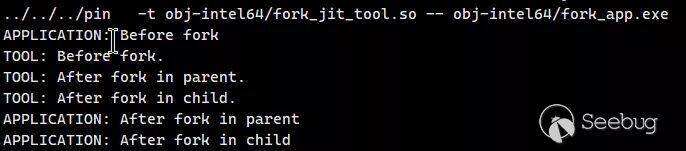
源碼source/tools/ManualExamples/fork_jit_tool.cpp:
#include <stdio.h>
#include <sys/types.h>
#include <unistd.h>
#include <stdlib.h>
#include "pin.H"
#include <iostream>
#include <fstream>
using std::cerr;
using std::endl;
INT32 Usage()
{
    cerr << "This pin tool registers callbacks around fork().\n"
            "\n";
    cerr << KNOB_BASE::StringKnobSummary();
    cerr << endl;
    return -1;
}
pid_t parent_pid;
PIN_LOCK pinLock;
VOID BeforeFork(THREADID threadid, const CONTEXT* ctxt, VOID* arg)
{
    PIN_GetLock(&pinLock, threadid + 1);
    cerr << "TOOL: Before fork." << endl;
    PIN_ReleaseLock(&pinLock);
    parent_pid = PIN_GetPid();
}
VOID AfterForkInParent(THREADID threadid, const CONTEXT* ctxt, VOID* arg)
{
    PIN_GetLock(&pinLock, threadid + 1);
    cerr << "TOOL: After fork in parent." << endl;
    PIN_ReleaseLock(&pinLock);
    if (PIN_GetPid() != parent_pid)
    {
        cerr << "PIN_GetPid() fails in parent process" << endl;
        exit(-1);
    }
}
VOID AfterForkInChild(THREADID threadid, const CONTEXT* ctxt, VOID* arg)
{
    PIN_GetLock(&pinLock, threadid + 1);
    cerr << "TOOL: After fork in child." << endl;
    PIN_ReleaseLock(&pinLock);
    if ((PIN_GetPid() == parent_pid) || (getppid() != parent_pid))
    {
        cerr << "PIN_GetPid() fails in child process" << endl;
        exit(-1);
    }
}
int main(INT32 argc, CHAR** argv)
{
    PIN_InitSymbols();
    if (PIN_Init(argc, argv))
    {
        return Usage();
    }
    // Initialize the pin lock
    PIN_InitLock(&pinLock);
    // Register a notification handler that is called when the application
    // forks a new process.
    PIN_AddForkFunction(FPOINT_BEFORE, BeforeFork, 0);
    PIN_AddForkFunction(FPOINT_AFTER_IN_PARENT, AfterForkInParent, 0);
    PIN_AddForkFunction(FPOINT_AFTER_IN_CHILD, AfterForkInChild, 0);
    // Never returns
    PIN_StartProgram();
    return 0;
}
4. 回調
這部分主要介紹幾個Pin的用于注冊回調函數的API:
-
INS_AddInstrumentFunction (INSCALLBACK fun, VOID *val):注冊以指令粒度插樁的函數
-
TRACE_AddInstrumentFunction (TRACECALLBACK fun, VOID *val):注冊以trace粒度插樁的函數
-
RTN_AddInstrumentFunction (RTNCALLBACK fun, VOID *val):注冊以routine粒度插樁的函數
-
IMG_AddInstrumentFunction (IMGCALLBACK fun, VOID *val):注冊以image粒度插樁的函數
-
PIN_AddFiniFunction (FINICALLBACK fun, VOID *val):注冊在應用程序退出前執行的函數,該類函數不進行插樁,可以有多個。
-
PIN_AddDetachFunction (DETACHCALLBACK fun, VOID *val):注冊在Pin通過
PIN_Detach()函數放棄對應用程序的控制權限之前執行的函數,一個進程只調用一次,可以被任何線程調用,此時Pin的內存并沒有釋放。
對于每個注冊函數的第二個參數val將在“回調”時傳遞給回調函數。如果在實際的場景中不需要傳遞第二個參數,為了保證安全,可以傳遞將val的值設置為0進行傳遞。val的理想使用方式是傳遞一個指向類實例的指針,這樣回調函數在取消引用該指針前需要將其轉換回一個對象。
所有的注冊函數都會返回一個PIN_CALLBACK對象,該對象可以在后續過程中用于操作注冊的回調的相關屬性。
PIN回調操作相關API
在注冊函數返回PIN_CALLBACK對象后,可以使用PIN_CALLBACKAPI對其進行操作,來檢索和修改在Pin中已注冊的回調函數的屬性。
聲明:
typedef COMPLEX_CALLBACKVAL_BASE * PIN_CALLBACK函數:
- CALLBACK_GetExecutionOrder()
聲明:
VOID CALLBACK_GetExecutionOrder (PIN_CALLBACK callback)作用:獲取已注冊回調函數的執行順序。越靠前,越早被執行。
參數:callback,從_AddFuncxtion()函數返回的注冊的回調函數
- CALLBACK_SetExecutionOrder()
聲明:
VOID CALLBACK_SetExecutionOrder (PIN_CALLBACK callback, CALL_ORDER order)
作用:設置已注冊回調函數的執行順序。越靠前,越早被執行。
參數:callback,從_AddFuncxtion()函數返回的注冊的回調函數;order,新設置的回調函數的執行順序。
- PIN_CALLBACK_INVALID()
聲明:
const PIN_CALLBACK PIN_CALLBACK_INVALID(0)
PIN回調的無效值。
CALL_ORDER
CALL_ORDER是一個枚舉類型,預定義了IARG_CALL_ORDER的值。其作用就是當指令有多個分析函數調用時,控制每個分析函數的調用順序,默認值為CALL_ORDER_DEFAULT。
-
CALL_ORDER_FIRST:首先執行該調用,整數值為100.
-
CALL_ORDER_DEFAULT:未指定
IARG_CALL_ORDER時的默認值,整數值為200. -
CALL_ORDER_LAST:最后執行該調用,整數值為300.
在進行數值設定時,可以使用類似CALL_ORDER_DEFAULT + 5的格式來設置。
針對在相同插樁回調環境中的針對同一指令的、具備同樣CALL_ORDER的多個分析調用,Pin會按照插入的順序進行調用。
5. 修改程序指令
雖然Pin的主要用途是對二進制程序進行插樁,但是它也可以實現對程序指令的修改。
5.1 實現方式
最簡單的實現方式是插入一個分析routine來模擬指令執行,然后調用INS_Delete()來刪除指令。也可以通過直接或間接插入程序執行流分支(使用INS_InsertDirectJump和INS_InsertIndirectJump)實現,這種方式會改變程序的執行流,但是會更容易實現指令模擬。
INS_InsertDirectJump()
聲明:
VOID INS_InsertDirectJump(INS ins, IPOINT ipoint, ADDRINT tgt)
參數:
-
ins:輸入的指令
-
ipoint:與ins相關的location(僅支持IPOINT_BEFORE和IPOINT_AFTER)
-
tgt:target的絕對地址
作用:插入相對于給定指令的直接跳轉指令,與INS_Delete()配合使用可以模擬控制流轉移指令。
INS_InsertIndirectJump()
聲明:
VOID INS_InsertIndirectJump ( INS ins, IPOINT ipoint, REG reg)參數:
-
ins:輸入的指令
-
ipoint:與ins相關的location(僅支持IPOINT_BEFORE和IPOINT_AFTER
-
reg:target的寄存器
作用:插入相對于給定指令的間接跳轉指令,與INS_Delete()配合使用可以模擬控制流轉移指令。
5.2 指令內存修改
對于原始指令使用到的內存的訪問,可以通過使用INS_RewriteMemoryOperand來引用通過分析routine計算得到的值來替代。
需要注意的是,對于指令的修改操作,會在所有的指令插樁操作完成后進行,因此在進行指令插樁時,插樁routine看到的都是原始的、沒有經過修改的程序指令。
INS_RewriteMemoryOperand()
聲明:
VOID INS_RewriteMemoryOperand(INS ins, UINt32 memindex, REG newBase)參數:
-
ins:輸入指令
-
memindex:控制需要重寫的內存操作數(0,1,...)
-
newBase:包含新操作數地址的寄存器,通常是通過PIN_ClainToolRegister分配的臨時寄存器
作用:更改此內存訪問指令以飲用包含在給定特定寄存器中的虛擬內存地址。
在IA-32和Intel 64平臺上,修改后的操作數僅使用具有新基址寄存器newBase的基址寄存器進行尋址。原始指令中該操作數的任何index, scale或者offset filed都會被刪除。
該函數可以用于重寫內存操作數,包括隱式的(如call、ret、push、pop),唯一不能重寫的指令是第二個操作數大于0的enter。
newBase中的地址是中是該操作數將訪問的最低地址,如果操作數在內存訪問之前被指令修改,如push,則newBase中的值將不是堆棧指針,而是指令訪問的內存地址。
用于內存地址重寫的一個樣例插樁代碼如下:
// 映射originalEa到一個翻譯后的地址
static ADDRINT ProcessAddress(ADDRINT originalEa, ADDRINT size, UINT32 access);
...
   for (UINT32 op = 0; op<INS_MemoryOperandCount(ins); op++) // 首先遍歷內存操作指令進行計數
   {
       UINT32 access = (INS_MemoryOperandIsRead(ins,op)    ? 1 : 0) |  // 判斷是內存讀還是內存寫
                       (INS_MemoryOperandIsWritten(ins,op) ? 2 : 0);
       INS_InsertCall(ins, IPOINT_BEFORE,
                      AFUNPTR(ProcessAddress),
                      IARG_MEMORYOP_EA,   op,
                      IARG_MEMORYOP_SIZE, op,
                      IARG_UINT32,        access,
                      IARG_RETURN_REGS,   REG_INST_G0+i,
                      IARG_END);  // 在指令處進行插樁
       INS_RewriteMemoryOperand(ins, i, REG(REG_INST_G0+i));  // 重寫內存指令的操作數
   }
6. 應用Pintool
命令行:
pin [pin-option]... -t [toolname] [tool-options]... -- [application] [application-option]..6.1 Pin命令行選項
如下是Pin的命令行的完整option列表:
| Option | Description |
|---|---|
| -follow_execv | 使用Pin執行由execv類系統調用產生的所有進程 |
| -help | 幫助信息 |
| -pause_tool | 暫停并打印PID以可以在tool加載后attach到debugger,處理過程在‘n’秒后重啟 |
| -logfile | 指定log文件的名字和路徑,默認路徑為當前工作目錄,默認文件名為pin.log |
| -unique_logfile | 添加pid到log文件名中 |
| -error_file | 指定error文件的名字和路徑,默認路徑為當前工作目錄。如果設置了error文件,則所有error都會寫入到文件中,并且不會在console中顯示。如果沒有指定,則不創建文件。 |
| -unique_error_file | 添加pid到error文件名中 |
| -injection | 的選項為dynamic, self, child, parent,只能在UNIX中使用,詳看Injection,默認使用dynamic。 |
| -inline | 內聯簡單的分析routine |
| -log_inline | 在pin.log文件中記錄哪些分析routine被設置成了內聯 |
| -cc_memory_size | 最大代碼緩存,字節為單位。0為默認值,表示不做限制。必須設置為代碼緩存塊大小的對齊倍數。 |
| -pid |
使用Pin和Pintool attach一個正在運行的進程 |
| -pin_memory_range | 限制Pin到一個內存范圍內,0x80000000:0x90000000 or size: 0:0x10000000. |
| -restric_memory | 阻止Pin的動態加載器使用該地址范圍:0x10000000:0x20000000 |
| -pin_memory_size | 限制Pin和Pintool可以動態分配的字節數。Pin分配的字節數定義為Pin分配的內存頁數乘以頁大小。 |
| -tool_load_option | 加載有附加標志的tool。 |
| -t | 指定加載的Pintool。 |
| -t64 <64-bit toolname> | 指定針對Intel 64架構的64-bit的Pintool。 |
| -p32 | 指定IA-32架構下的Pintool |
| -p64 | 指定針對Intel 64架構的Pintool |
| -smc-support | 是否開啟app的SMC功能,1開啟,0關閉。默認開啟 |
| -smc_strict | 是否開啟基本塊內部的SMC,1開始,0關閉。默認關閉 |
| -appdebug | 調試目標程序,程序運行后立即在debugger中斷下 |
| -appdebug_enable | 開啟目標程序調試功能,但是在程序運行后不暫停 |
| -appdebug_silent | 當程序調試功能開啟時,Pin打印消息告知如何連接外部debugger。但是在-appdebug_connection選項開啟時不打印。 |
| -appdebug_exclude | 當程序調試功能開啟,并指定了-follw_execv時,默認在所有子進程上啟用調試。 |
| -appdebug_allow_remote | 允許debugger與Pin不運行在同一系統上,而是以遠程方式進行連接。指定 -appdebug_connection 時會忽略該選項的值,因為 -appdebug_connection 明確指定了運行debugger的machine。 |
| -appdebug_connection | 當程序開啟調試時,Pin默認會開啟一個TCP端口等待debugger的連接。在開啟該選項時,會在debugger中開啟一個TCP端口來等待Pin的連接,相當于反置了默認的機制。該選項的格式為"[ip]:port",“ip”以點十進制格式表達,如果省略了ip,則會連接本地的端口,端口號為十進制表示。需要注意的是,debugger為GDB時,不使用該選項。 |
| -detach_reattach | 允許在probe模式下進行detach和reattach,僅在Windows平臺下使用。 |
| -debug_instrumented_processes | 允許debugger對經過插樁的進程進行attach,僅在Windows平臺下使用。 |
| -show_asserts | 健全性檢查 |
此外,還支持如下的tool options,它們需要跟在tool名字后面,但是要在--符號前:
| Option | Description |
|---|---|
| -logifle | 指定log文件的名字和路徑,默認路徑為當前工作目錄,默認文件名為pintool.log |
| -unique_logfile | 添加pid到log文件名中 |
| -discard_line_info |
忽略特定模塊的信息,模塊名應該為沒有路徑的短文件名,不能是符號鏈接 |
| -discard_line_info_all | 忽略所有模塊的信息 |
| -help | 幫助信息 |
| -support_jit_api | 啟用托管平臺支持 |
| -short_name | 使用最短的RTN名稱。 |
| -symbol_path | 指定用分號分隔的路徑列表,用于搜索以查找符號和行信息。僅在Windows平臺下使用。 |
| -slow_asserts | 健全性檢查 |
6.2 在Intel(R) 64架構插樁
IA-32和Intel(R) 64架構的Pin kit是一個組合kit,均包含32-bit和64-bit的版本。這就為復雜的環境提供了極高的可運行性,例如一個稍微有點復雜的運行如下:
pin [pin-option]... -t64 <64-bit toolname> -t <32-bit toolname> [tool-options]...
-- <application> [application-option]..
需要注意的是:
-
t64選項需要用在-t選項的前面
-
當-t64和-t一起使用時,-t后面跟的時32-bit的tool。不推薦使用不帶-t的-t64,因為在這種情況下,當給定32-bit應用程序時,Pin將在不應用任何工具的情況下運行該應用程序。
-
[tool-option]會同時作用于64-bit和32-bit的tool,并且必須在-t <32-bit toolname>后面進行指定。
6.3 注入
選項-injection僅在UNIX平臺下可以使用,該選項控制著Pin注入到目標程序進程的方式。
默認情況下,建議使用dynamic模式。在該模式下,使用的是對父進程注入的方式,除非是系統內核不支持。子進程注入方式會創建一個pin的子進程,所以會看到pin進程和目標程序進程同時運行。使用父進程注入方式時,pin進程會在注入完成后退出,所以相對來說比較穩定。在不支持的平臺上使用父進程注入方式可能出現意料之外的問題。
7. 編寫Pintool
7.1 記錄Pintool的消息
Pin提供了將Pintool的messages寫入到文件的機制——LOG() api,在合適的獲取message的位置使用即可。默認的文件名為pintool.log,存儲路徑為當前工作目錄,可以使用-logfile選項來改變log文件的路徑和名字。
LOG( "Replacing function in " + IMG_Name(img) + "\n" );
LOG( "Address = " + hexstr( RTN_Address(rtn)) + "\n" );
LOG( "Image ID = " + decstr( IMG_Id(img) ) + "\n" );
7.2 編寫Pintool時的性能考量
Pintool的開發質量會很大程度上決定tool的性能如何,例如在進行插樁時的速度問題。將通過一個例子來介紹一些提高tool性能的技巧。
首先是插樁部分代碼:
VOID Instruction(INS ins, void *v)
{
   ...
   if ( [ins is a branch **or** a call instruction] )
   {
    INS_InsertCall(ins, IPOINT_BEFORE, (AFUNPTR) docount2,
            IARG_INST_PTR,
            IARG_BRANCH_TARGET_ADDR,
            IARG_BRANCH_TAKEN,
            IARG_END);
   }
   ...
}
然后是分析代碼:
VOID docount2( ADDRINT src, ADDRINT dst, INT32 taken )
{
  if(!taken) return;
  COUNTER *pedg = Lookup( src,dst );
  pedg->_count++;
}
該工具的目的是計算控制流圖中每個控制流變化的邊界被遍歷的頻率。工作原理如下:插樁組件通過調用docount2對每個分支進行插樁。傳入的參數為源分支和目標分支以及分支是否被執行。源分支和目標分支代表來控制流邊界的源和目的。如果沒有執行分支,控制流不會發生改變,因此分析routine會立即返回。如果執行了分支,就使用src和dst參數來查找與此邊界相關的計數器,并增加計數器的值。
Shifting Computation for Analysis to Instrumentation Code
在一個典型的應用程序中,大概每5條指令構成一個分支,在這些指令執行時會調用Lookup函數,造成性能下降。我們思考這個過程可以發現,在指令執行時,每條指令只會調用一次插樁代碼,但會多次調用分析代碼。所以,可以想辦法將計算工作從分析代碼轉移到插樁代碼,這樣就可以降低調用次數,從而提升性能。
首先,就大多數分支而言,我們可以在Instruction()中找到目標分支。對于這些分支,我們可以在Instruction()內部調用Lookup()而不是docount2(),對于相對較少的間接分支,我們仍然需要使用原來的方法。
因此,我們增加一個新的函數docount,原來的docount2函數保持不變:
VOID docount( COUNTER *pedg, INT32 taken )
{
  if( !taken ) return;
  pedg->_count++;
}
相應地,修改插樁函數:
VOID Instruction(INS ins, void *v)
{
   ...
  if (INS_IsDirectControlFlow(ins))
  {
    COUNTER *pedg = Lookup( INS_Address(ins), INS_DirectControlFlowTargetAddress(ins) );
    INS_InsertCall(ins, IPOINT_BEFORE, (AFUNPTR) docount,
            IARG_ADDRINT, pedg,
            IARG_BRANCH_TAKEN,
            IARG_END);
  }
  else
  {
    INS_InsertCall(ins, IPOINT_BEFORE, (AFUNPTR) docount2,
            IARG_INST_PTR,
            IARG_BRANCH_TARGET_ADDR,
            IARG_BRANCH_TAKEN,
            IARG_END);
  }
   ...
}在插樁函數內部根據不同的情況,執行不同的分析代碼,避免對所有類型的指令都籠統地調用性能要求高docount2函數。
最終實現的完整代碼如下:
/* ===================================================================== */

/*!
  對于已經進行過插樁的Edge,重用entry;否則創建一個新的。
 */

static COUNTER* Lookup(EDGE edge) // 查找邊界
{
    COUNTER*& ref = EdgeSet[edge];

    if (ref == 0)
    {
        ref = new COUNTER();
    }

    return ref;
}

/* ===================================================================== */
// 分析routine代碼

VOID docount(COUNTER* pedg) { pedg->_count++; }

/* ===================================================================== */
// 對于間接控制流,我們不知道邊界,所以需要進行查找。

VOID docount2(ADDRINT src, ADDRINT dst, ADDRINT n, ETYPE type, INT32 taken)
{
    if (!taken) return;
    COUNTER* pedg = Lookup(EDGE(src, dst, n, type));
    pedg->_count++;
}

/* ===================================================================== */

VOID Instruction(INS ins, void* v) // 插樁函數
{
    if (INS_IsDirectControlFlow(ins)) // 如果是直接控制流(ins為控制流指令,目標地址由指令指針或立即數指定)
    {
        ETYPE type = INS_IsCall(ins) ? ETYPE_CALL : ETYPE_BRANCH; // 判斷是否為call指令,是則返回ETYPE_CALL

        // 靜態目標可以在這里進行一次映射
        // 參數分別為當前指令地址、當前指令目標地址、下一指令地址、指令類型
        COUNTER* pedg = Lookup(EDGE(INS_Address(ins), INS_DirectControlFlowTargetAddress(ins), INS_NextAddress(ins), type));
        // 插樁
        INS_InsertCall(ins, IPOINT_TAKEN_BRANCH, (AFUNPTR)docount, IARG_ADDRINT, pedg, IARG_END);
    }
    else if (INS_IsIndirectControlFlow(ins)) // 如果是間接控制流(ins為控制流指令,且目標地址通過內存或寄存器提供)
    {
        ETYPE type = ETYPE_IBRANCH; // 直接指定類型為間接控制流

        if (INS_IsRet(ins)) // 是否為ret或iret
        {
            type = ETYPE_RETURN;
        }
        else if (INS_IsCall(ins))
        {
            type = ETYPE_ICALL;
        }
        // 進行插樁
        INS_InsertCall(ins, IPOINT_BEFORE, (AFUNPTR)docount2, IARG_INST_PTR, IARG_BRANCH_TARGET_ADDR, IARG_ADDRINT, INS_NextAddress(ins), IARG_UINT32, type, IARG_BRANCH_TAKEN, IARG_END);
    }
    else if (INS_IsSyscall(ins))  //  如果是syscall指令
    {
        COUNTER* pedg = Lookup(EDGE(INS_Address(ins), ADDRINT(~0), INS_NextAddress(ins), ETYPE_SYSCALL));
        INS_InsertPredicatedCall(ins, IPOINT_BEFORE, (AFUNPTR)docount, IARG_ADDRINT, pedg, IARG_END);
    }
}

/* ===================================================================== */

inline INT32 AddressHighNibble(ADDRINT addr) { return 0xf & (addr >> (sizeof(ADDRINT) * 8 - 4)); }

/* ===================================================================== */
static std::ofstream* out = 0;

VOID Fini(int n, void* v) // 程序結束時的處理函數
{
    const INT32 nibble = KnobFilterByHighNibble.Value();

    *out << "EDGCOUNT        4.0         0\n"; // profile header, no md5sum
    UINT32 count = 0;

    for (EDG_HASH_SET::const_iterator it = EdgeSet.begin(); it != EdgeSet.end(); it++)
    {
        const pair< EDGE, COUNTER* > tuple = *it;
        // skip inter shared lib edges

        if (nibble >= 0 && nibble != AddressHighNibble(tuple.first._dst) && nibble != AddressHighNibble(tuple.first._src))
        {
            continue;
        }

        if (tuple.second->_count == 0) continue;

        count++;
    }

    *out << "EDGs " << count << endl;
    *out << "# src          dst        type    count     next-ins\n";
    *out << "DATA:START" << endl;

    for (EDG_HASH_SET::const_iterator it = EdgeSet.begin(); it != EdgeSet.end(); it++)
    {
        const pair< EDGE, COUNTER* > tuple = *it;

        // skip inter shared lib edges

        if (nibble >= 0 && nibble != AddressHighNibble(tuple.first._dst) && nibble != AddressHighNibble(tuple.first._src))
        {
            continue;
        }

        if (tuple.second->_count == 0) continue;

        *out << StringFromAddrint(tuple.first._src) << " " << StringFromAddrint(tuple.first._dst) << " "
             << StringFromEtype(tuple.first._type) << " " << decstr(tuple.second->_count, 12) << " "
             << StringFromAddrint(tuple.first._next_ins) << endl;
    }

    *out << "DATA:END" << endl;
    *out << "## eof\n";
    out->close();
}

/* ===================================================================== */
/* Main                                                                  */
/* ===================================================================== */

int main(int argc, char* argv[])
{
    if (PIN_Init(argc, argv)) // 初始化
    {
        return Usage();
    }

    string filename = KnobOutputFile.Value(); // 輸出文件
    if (KnobPid)
    {
        filename += "." + decstr(getpid());
    }
    out = new std::ofstream(filename.c_str());

    INS_AddInstrumentFunction(Instruction, 0); // 注冊插樁函數
    PIN_AddFiniFunction(Fini, 0); // 注冊Fini函數

    // 開始執行,不返回

    PIN_StartProgram();

    return 0;
}

/* ===================================================================== */
/* eof */
/* ===================================================================== */
7.3 消除控制流
上面新增的docunt()函數的代碼十分簡潔,極大地提升了性能。除此之外,還可以被Pin內聯,進一步避免函數調用的開銷。
但是現在的docount()函數中存在控制流,這有可能在進行內聯時發生未知的改變。最好的解決辦法是去掉函數中的控制流,這樣進行內聯時可以保證健壯性。
考慮到docount()函數的'taken'參數要么為0,要么為1,所以可以將函數代碼修改為如下:
VOID docount( COUNTER *pedg, INT32 taken )
{
  pedg->_count += taken;
}如此修改后,docunt()函數就可以進行內聯了,并且可以保證函數的健壯性。
7.4 讓Pin決定插樁位置
在某些情況下,我們不關心具體在什么位置進行插樁,只要保證插樁代碼位于基本塊內部即可。在這種情況下,我們可以將插樁位置的選擇權交給Pin自身,Pin可以選擇需要最少寄存器進行保存和恢復的插入點,提升性能。
一個樣例如下:
#include <iostream>
#include <fstream>
#include "pin.H"
using std::cerr;
using std::endl;
using std::ios;
using std::ofstream;
using std::string;

ofstream OutFile;

// 記錄運行的指令的數量,設置為靜態變量方便編譯器優化docount函數
static UINT64 icount = 0;

// 在每個塊之前調用該函數
// 對calls使用fast linkage
VOID PIN_FAST_ANALYSIS_CALL docount(ADDRINT c) { icount += c; }

// Pin在遇到一個新塊時調用,插入對docount 函數的調用
VOID Trace(TRACE trace, VOID* v)
{
    // 檢查trace中的每個基本塊
    for (BBL bbl = TRACE_BblHead(trace); BBL_Valid(bbl); bbl = BBL_Next(bbl))
    {

        // 對每個bbl插入對docount函數的調用,將指令數量作為參數傳遞
        // IPOINT_ANYWHERE參數允許Pin在bbl內部任意位置插入call以獲取最好的性能
        // 對call使用fast linkage
        BBL_InsertCall(bbl, IPOINT_ANYWHERE, AFUNPTR(docount), IARG_FAST_ANALYSIS_CALL, IARG_UINT32, BBL_NumIns(bbl), IARG_END);
    }
}

KNOB< string > KnobOutputFile(KNOB_MODE_WRITEONCE, "pintool", "o", "inscount.out", "specify output file name");

// 程序退出時調用
VOID Fini(INT32 code, VOID* v)
{
    OutFile.setf(ios::showbase);
    OutFile << "Count " << icount << endl;
    OutFile.close();
}

/* ===================================================================== */
/* Print Help Message                                                    */
/* ===================================================================== */

INT32 Usage()
{
    cerr << "This tool counts the number of dynamic instructions executed" << endl;
    cerr << endl << KNOB_BASE::StringKnobSummary() << endl;
    return -1;
}

/* ===================================================================== */
/* Main                                                                  */
/* ===================================================================== */

int main(int argc, char* argv[])
{
    // 初始化Pin
    if (PIN_Init(argc, argv)) return Usage();

    OutFile.open(KnobOutputFile.Value().c_str());

    // 注冊插樁函數Trace
    TRACE_AddInstrumentFunction(Trace, 0);

    // 注冊Fini函數
    PIN_AddFiniFunction(Fini, 0);

    // 開始執行,不返回
    PIN_StartProgram();

    return 0;
}這里IPOINT是一個枚舉類型,決定了分析call被插入到什么地方。插入的對象可以是:INS,BBL,TRACE,RTN,其完整可用的值如下:
-
IPOINT_BEFORE:在插樁對象的第一條指令之前插入call,總是有效
-
IPOINT_AFTER:在插樁對象的最后一條指令的失敗路徑處插入call
- 如果是routine(RTN),在所有返回路徑處插樁
- 如果是instruction(INS),僅在INS_IsValidForIpointAfter()函數為真的情況下適用
- 如果是BBL,僅在
BBL_HasFallThrough()函數為真的情況下適用 -
如果是TRACE,僅在
TRACE_HasFallThrough()函數為真的情況下適用 -
IPOINT_ANYWHERE:在插樁對象的任意位置插入call,不適用
INS_InsertCall()和INS_InsertThenCall()函數 -
IPOINT_TAKEN_BRANCH:在插樁對象的控制流的執行邊界處插入call,僅適用于
INS_IsValidForIpointTakenBranch()返回真的情況。
7.5 使用Fast Call Linkages
對于一些比較“小”的函數來說,對函數的調用開銷有時與函數自身的運算開銷基本相同,因此一些編譯器會提供一些調用鏈接優化機制來降低開銷。例如,IA-32下的gcc有一個在寄存器中傳遞參數的regparm屬性。
Pin中有一定數量的備用鏈接,使用PIN_FAST_ANALYSIS_CALL來聲明分析函數即可使用,而插樁函數InsertCall則需要使用IARG_FAST_ANALYSIS_CALL。如果二者只更改了一個,那么就可能出現傳參錯誤。例如前面給出的源碼例子就使用了fast call linkages:
... ...
// 對分析函數使用fast linkage*
VOID PIN_FAST_ANALYSIS_CALL docount(ADDRINT c) { icount += c; }

VOID Trace(TRACE trace, VOID* v)
{
  // 檢查trace中的每個基本塊*
  for (BBL bbl = TRACE_BblHead(trace); BBL_Valid(bbl); bbl = BBL_Next(bbl))
  {

  // 對插樁函數使用fast linkage*
BBL_InsertCall(bbl, IPOINT_ANYWHERE, AFUNPTR(docount), IARG_FAST_ANALYSIS_CALL, IARG_UINT32, BBL_NumIns(bbl), IARG_END);
  }
}
... ...
在對比較復雜的大型函數使用該方法時,效果并不明顯,但不會造成性能的下降。
第二個調用鏈接優化是消除幀指針。如果使用gcc,則推薦加上"-fomit-frame-pointer"選項。Pin官方的標準Pintool的makefile包括該選項。與PIN_FAST_ANALYSIS_CALL一樣,該選項對“小”函數的效果比較明顯。需要注意的是,debugger會根據幀指針來顯示堆棧回溯情況,所以如果想調試Pintool的話,就不要設置該選項。如果使用標準的Pintool的makefile來進行變異,則可以通過修改OPT選項來進行改變:
make OPT=-O07.6 重寫有條件的分析例程實現Pin內聯
Pin通過自動內聯沒有控制流變化的分析routine來提升插樁性能。但是有很多分析routine是有控制流的,最典型的就是有一個簡單的“if-then”的條件語句,它只會執行少量的分析代碼,并“then”部分只執行一次。為了將這類的語句轉換為常規的沒有控制流變化的語句,Pin提供了一些插樁API來重寫分析routine。下面是一個重寫的例子:
例如我們當前想要實現的一個分析routine的代碼如下:
// IP-sampling分析routine實現:

VOID IpSample(VOID *ip)
{
    --icount;
    if (icount == 0)
    {
        fprintf(trace, "%p\n", ip);
        icount = N + rand() % M;
    }
}
在原始的IpSample()函數中有一個明顯的條件語句,會存在控制流的變化。如何消除該條件控制流的存在呢?
可以看到分析routine內部其實可以拆解為2部分功能:icount的自減和“if”語句,那么可以使用兩個單獨的函數實現。而且,前者比后者的執行頻率要更高。拆解后的代碼如下:
/*
 *  IP-sampling分析routine實現:
 *
 *        VOID IpSample(VOID *ip)
 *        {
 *            --icount;
 *            if (icount == 0)
 *            {
 *               fprintf(trace, "%p\n", ip);
 *               icount = N + rand() % M;
 *            }
 *        }
 */
// 計算icount
ADDRINT CountDown()
{
    --icount;
    return (icount == 0);
}
// 打印當前指令的IP并且icount被重置為N和N+M中的一個隨機數
VOID PrintIp(VOID* ip)
{
    fprintf(trace, "%p\n", ip);
    // 準備下次計算
    icount = N + rand() % M;
}
一個完整的實現消除控制流變化的代碼如下:
/* source/tools/ManualExamples/isampling.cpp */
#include <stdio.h>
#include <stdlib.h>
#include "pin.H"
FILE* trace;
const INT32 N = 100000;
const INT32 M = 50000;
INT32 icount = N;
/*
 *  IP-sampling分析routine實現:
 *
 *        VOID IpSample(VOID *ip)
 *        {
 *            --icount;
 *            if (icount == 0)
 *            {
 *               fprintf(trace, "%p\n", ip);
 *               icount = N + rand() % M;
 *            }
 *        }
 */
// 計算icount
ADDRINT CountDown()
{
    --icount;
    return (icount == 0);
}
// 打印當前指令的IP并且icount被重置為N和N+M中的一個隨機數
VOID PrintIp(VOID* ip)
{
    fprintf(trace, "%p\n", ip);
    // 準備下次計算
    icount = N + rand() % M;
}

VOID Instruction(INS ins, VOID* v)
{
    // 每條指令執行后都會調用CountDown()
    INS_InsertIfCall(ins, IPOINT_BEFORE, (AFUNPTR)CountDown, IARG_END);
    // 只有當CountDown返回非0值時才會調用PrintIp()
    INS_InsertThenCall(ins, IPOINT_BEFORE, (AFUNPTR)PrintIp, IARG_INST_PTR, IARG_END);
}

VOID Fini(INT32 code, VOID* v)
{
    fprintf(trace, "#eof\n");
    fclose(trace);
}
/* ===================================================================== */
/* Print Help Message                                                    */
/* ===================================================================== */
INT32 Usage()
{
    PIN_ERROR("This Pintool samples the IPs of instruction executed\n" + KNOB_BASE::StringKnobSummary() + "\n");
    return -1;
}
/* ===================================================================== */
/* Main                                                                  */
/* ===================================================================== */
int main(int argc, char* argv[])
{
    trace = fopen("isampling.out", "w");
    if (PIN_Init(argc, argv)) return Usage();
    INS_AddInstrumentFunction(Instruction, 0);
    PIN_StartProgram();
    return 0;
}
使用條件插樁API INS_InsertIfCall()和INS_InsertThenCall()來告訴Pin只有當CountDown()執行結果非0時,才執行PrintIp()。這樣一來,CountDown()函數就可以內聯在Pin中,對于沒有內聯的PrintIp()則只有在滿足條件時才會執行一次。
INS_InsertThenCall()插進去的函數只有在INS_InsertIfCall()插進去的函數返回非0值時才會執行。這個功能可以說是一個十分巧妙的功能。
8. 構建自己的Pintool
在開發自己的Pintool時,可以copy一份example目錄, 然后在makefile.rules文件中添加上自己的tool,可以以最簡單的MyPinTool為模版。
8.1 在套件目錄樹內進行構建
如果直接修改MyPinTool,并且沒有特殊的編譯需求,則直接使用默認配置就好。如果要新增tool或者需要指定特殊的構建標志,則需要修改makeifile.rules文件。
構建YourTool.so(源文件為YourTool.cpp):
make obj-intel64/YourTool.so如果想編譯成IA-32架構,則使用“obj-ia32”替換“obj-intel64”即可。
8.2 在套件目錄樹外構建
copy文件夾MyPinTool到指定位置子,然后編輯makefile.rules文件。
make PIN_ROOT=<path to Pin kit> obj-intel64/YourTool.so要更改將創建工具的目錄,可以從命令行覆蓋 OBJDIR 變量:
make PIN_ROOT=<path to Pin kit> OBJDIR=<path to output dir> <path to output dir>/YourTool.so9. Pin的makefile
9.1 配置目錄
目錄source/tools/Config中存放了make配置的基本文件,不要輕易修改這些文件,可以基于其中的模版文件進行更新。

下面對其中的幾個關鍵文件進行說明:
-
makefile.config:在include鏈中第一個應該include的文件。它保存了用戶可用的所有相關標識和變量的文檔,此外還包括特定于OS的配置文件。
-
unix.vars:該文件包含makefile使用的一些架構變量和實用程序的Unix定義。
-
makefile.default.rules:該文件包含默認的make目標、測試用例和構建規則。
9.2 測試目錄
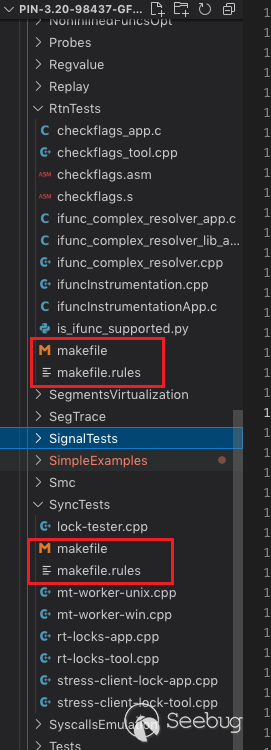
source/tools目錄下的每個測試性質的目錄中都包含makefile鏈中的兩個文件:
-
makefile:運行make時調用,不要修改。其中保存了makefile鏈的所有相關配置文件的包含指令,屬于通用文件,在所有的測試目錄中都是相同的。
-
makefile.rules:目錄特定文件,不同測試目錄,文件內容不同。它保存了當前目錄的邏輯,應該在目錄中構建和運行的所有工具、應用程序和測試等都在該文件中進行定義。
9.3 向makefile中添加測試、工具和應用
下面介紹如何通過makefile構建二進制程序并運行測試。以下描述的變量都在makefile.rules文件的"Test targets"部分進行描述:
-
TOOL_ROOTS:定義工具名稱,不帶文件擴展名,具體的文件擴展名將由make自動添加,例如YourTools.so;
-
APP_ROOTS:定義應用程序,不帶文件擴展名,具體的文件擴展名將由make自動添加,例如YourApp.exe;
-
TEST_ROOTS:定義測試,不要加.test后綴,make會自動添加,例如YourTest.test。
9.4 定義構建規則
默認使用的構建規則是source/tools/Config/makefile.default.rules,輸入為單一的c/cpp文件,生成相同名字的二進制程序。如果輸入為多個源文件,且需要自定義構建規則,可以在make.rules文件的"Build rules"部分的末尾添加。如下是規則例子:
構建單一源文件且不進行優化:
# Build the intermediate object file.
$(OBJDIR)YourTool$(OBJ_SUFFIX): YourTool.cpp
  $(CXX) $(TOOL_CXXFLAGS_NOOPT) $(COMP_OBJ)$@ $<

# Build the tool as a dll (shared object).
$(OBJDIR)YourTool$(PINTOOL_SUFFIX): $(OBJDIR)YourTool$(OBJ_SUFFIX)
  $(LINKER) $(TOOL_LDFLAGS_NOOPT) $(LINK_EXE)$@ $< $(TOOL_LPATHS) $(TOOL_LIBS)
構建多源文件且進行優化:
# Build the intermediate object file.
$(OBJDIR)Source1$(OBJ_SUFFIX): Source1.cpp
  $(CXX) $(TOOL_CXXFLAGS) $(COMP_OBJ)$@ $<

# Build the intermediate object file.
$(OBJDIR)Source2$(OBJ_SUFFIX): Source2.c Source2.h
  $(CC) $(TOOL_CXXFLAGS) $(COMP_OBJ)$@ $<

# Build the tool as a dll (shared object).
$(OBJDIR)YourTool$(PINTOOL_SUFFIX): $(OBJDIR)Source1$(OBJ_SUFFIX) $(OBJDIR)Source2$(OBJ_SUFFIX) Source2.h
  $(LINKER) $(TOOL_LDFLAGS_NOOPT) $(LINK_EXE)$@ $(^**:**%.h**=**) $(TOOL_LPATHS) $(TOOL_LIBS)
9.5 在makefile.rules定義測試片段
在"Test recipes"部分自定義自己的測試需求,例如:
YourTest.test: $(OBJDIR)YourTool$(PINTOOL_SUFFIX) $(OBJDIR)YourApp$(EXE_SUFFIX)
  $(PIN) -t $< -- $(OBJDIR)YourApp$(EXE_SUFFIX)
9.6 變量和標志
摘取makefile.config中幾個重點的標志進行說明:
IN_ROOT:在套件外構建工具時指定Pin套件的位置。
CC: 指定工具的默認c編譯器。
CXX:指定工具的默認c++編譯器。
APP_CC:指定應用程序的默認 c 編譯器。如果未定義,APP_CC 將與 CC 相同。
APP_CXX:指定應用程序的默認 c++ 編譯器。如果未定義,APP_CXX 將與 CXX 相同。
TARGET:指定默認目標架構,例如交叉編譯。
ICC: 使用英特爾編譯器構建工具時指定 ICC=1。
DEBUG: 當指定 DEBUG=1 時,在構建工具和應用程序時會生成調試信息。此外,不會執行任何編譯和/或鏈接優化。
 本文由 Seebug Paper 發布,如需轉載請注明來源。本文地址:http://www.bjnorthway.com/1742/
暫無評論