作者:w7ay @ 知道創宇404實驗室
時間:2020年8月12日
開源的域名收集工具有很多,本文會從代碼的角度去看各類開源的域名收集工具的技術特點,以及各有哪些優缺點,來幫助大家,在合適的時候選擇合適的利用工具。
這里選取了常用和知名的工具,包括subDomainBrute,Sublist3r,ESD,OneForAll,dnsprobe,subfinder,shuffledns,massdns
subDomainBrute
Github:https://github.com/lijiejie/subDomainsBrute
最早使用是lijiejie的子域名爆破工具,也是學習python時最早看的源碼。
看了下commit,最早發布是在2015年,另外最近的一次更新使它支持了Python3。
subDomainBrute是通過純DNS爆破來找到子域名,為了最大提升效率,subDomainBrute用協程+多進程的方式進行爆破。
對于python3,使用asyncio,aiodns庫進行異步dns的發包,但對于python2,使用的是dnspython gevent庫,應該是歷史原因導致的。
Dns server test
對于爆破dns來說,有足夠多且快的dns server是關鍵(爆破一段時間后,可能會有dns不再回應請求)
可以自己配置dns server在dict/dns_servers.txt文件中,subDomainBrute會在程序啟動時測試DNS。
首先測試dns server
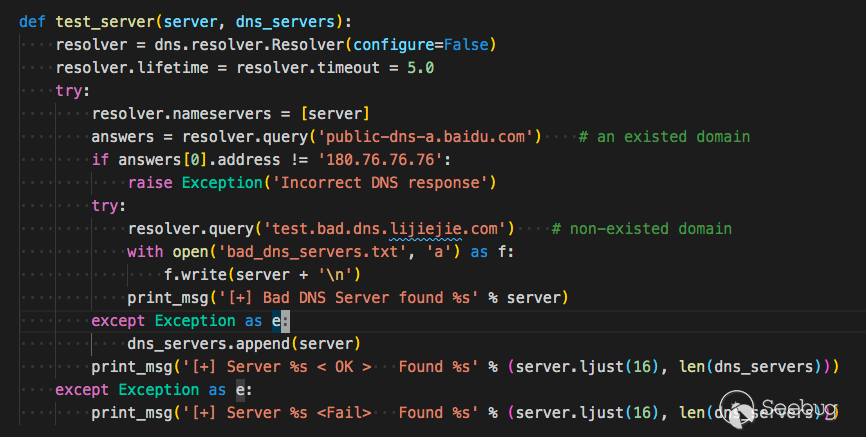
測試 public-dns-a.baidu.com 返回 180.76.76.76 是正確的dns
測試 test.bad.dns.lijiejie.com 拋出異常則為正確的dns,如果有返回結果,則不正常。
泛域名
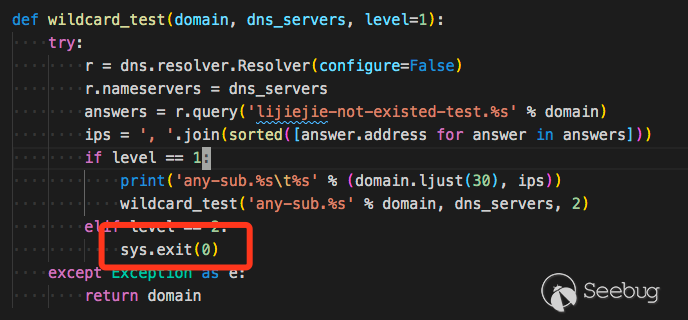
subDomainBrute沒有泛域名處理,如果存在泛域名解析,程序就會直接退出。
Sublist3r
Github https://github.com/aboul3la/Sublist3r
Sublist3r也是2015年發布的,在暴力破解的基礎上還會通過接口枚舉來獲取域名。
它的爆破模塊用的是 https://github.com/TheRook/subbrute
SubBrute是一個社區驅動的項目,旨在創建最快,最準確的子域枚舉工具。SubBrute背后的神奇之處在于它使用開放式解析器作為一種代理來規避DNS速率限制(https://www.us-cert.gov/ncas/alerts/TA13-088A)。該設計還提供了一層匿名性,因為SubBrute不會將流量直接發送到目標的名稱服務器。
提供了一層匿名性 => 用很多代理DNS來進行DNS請求
它只有多進程來運行爆破程序,如果在Windows下,它只會使用線程
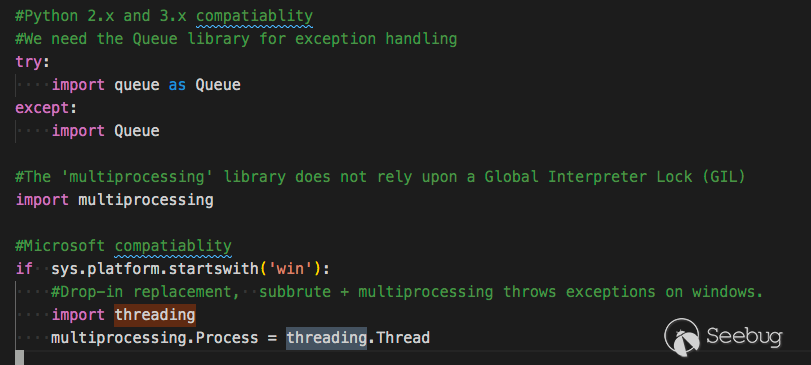
可能是覺得在Windows下難以操控多線程吧。
但這樣一來它的效率就太慢了。
它支持的搜索引擎
supported_engines = {'baidu': BaiduEnum,
                         'yahoo': YahooEnum,
                         'google': GoogleEnum,
                         'bing': BingEnum,
                         'ask': AskEnum,
                         'netcraft': NetcraftEnum,
                         'dnsdumpster': DNSdumpster,
                         'virustotal': Virustotal,
                         'threatcrowd': ThreatCrowd,
                         'ssl': CrtSearch,
                         'passivedns': PassiveDNS
                         }
用隨機數來判斷是否泛解析
#Using a 32 char string every time may be too predictable.
x = uuid.uuid4().hex[0:random.randint(6, 32)]
testdomain = "%s.%s" % (x, host)
同樣它也不支持泛解析的支持。
唯一有優勢的就是它能作為一個python包存在,通過pip就能快速安裝使用,或者把它集成在代碼中。
ESD
Github:https://github.com/FeeiCN/ESD
相比于的暴力收集手段,esd在很多方面有獨特的想法。
支持泛解析域名
基于
RSC(響應相似度對比)技術對泛解析域名進行枚舉(受網絡質量、網站帶寬等影響,速度會比較慢)基于
aioHTTP獲取一個不存在子域名的響應內容,并將其和字典子域名響應進行相似度比對。 超過閾值則說明是同個頁面,否則則為可用子域名,并對最終子域名再次進行響應相似度對比。
更快的速度
基于
AsyncIO異步協程技術對域名進行枚舉(受網絡和DNS服務器影響會導致掃描速度小幅波動,基本在250秒以內)基于
AsyncIO+aioDNS將比傳統多進程/多線程/gevent模式快50%以上。 通過掃描qq.com,共170083條規則,找到1913個域名,耗時163秒左右,平均1000+條/秒。
更全的字典
融合各類字典,去重后共170083條子域名字典
- 通用字典
- 單字母、單字母+單數字、雙字母、雙字母+單數字、雙字母+雙數字、三字母、四字母
- 單數字、雙數字、三數字
- 域名解析商公布使用最多的子域名
- DNSPod: dnspod-top2000-sub-domains.txt
- 其它域名爆破工具字典
- subbrute: names_small.txt
- subDomainsBrute: subnames_full.txt
更多的收集渠道
- 收集DNSPod接口泄露的子域名
- 收集頁面響應內容中出現的子域名
- 收集跳轉過程中的子域名
- 收集HTTPS證書透明度子域名
- 收集DNS域傳送子域名
- 收集搜索引擎子域名
- 收集zoomeye、censys、fofa、shodan的接口結果
DNS服務器
- 解決各家DNS服務商對于網絡線路出口判定不一致問題
- 解決各家DNS服務商緩存時間不一致問題
- 解決隨機DNS問題,比如fliggy.com、plu.cn等
- 根據網絡情況自動剔除無效DNS,提高枚舉成功率
很多實現都值得學習,這里貼出一些值得學習的代碼。
域傳輸漏洞實現
class DNSTransfer(object):
    def __init__(self, domain):
        self.domain = domain

    def transfer_info(self):
        ret_zones = list()
        try:
            nss = dns.resolver.query(self.domain, 'NS')
            nameservers = [str(ns) for ns in nss]
            ns_addr = dns.resolver.query(nameservers[0], 'A')
            # dnspython 的 bug,需要設置 lifetime 參數
            zones = dns.zone.from_xfr(dns.query.xfr(ns_addr, self.domain, relativize=False, timeout=2, lifetime=2), check_origin=False)
            names = zones.nodes.keys()
            for n in names:
                subdomain = ''
                for t in range(0, len(n) - 1):
                    if subdomain != '':
                        subdomain += '.'
                    subdomain += str(n[t].decode())
                if subdomain != self.domain:
                    ret_zones.append(subdomain)
            return ret_zones
        except BaseException:
            return []
HTTPS證書透明度獲取子域名
class CAInfo(object):
    def __init__(self, domain):
        self.domain = domain

    def dns_resolve(self):
        padding_domain = 'www.' + self.domain
        # loop = asyncio.get_event_loop()
        loop = asyncio.new_event_loop()
        asyncio.set_event_loop(loop)
        resolver = aiodns.DNSResolver(loop=loop)
        f = resolver.query(padding_domain, 'A')
        result = loop.run_until_complete(f)
        return result[0].host

    def get_cert_info_by_ip(self, ip):
        s = socket.socket()
        s.settimeout(2)
        base_dir = os.path.dirname(os.path.abspath(__file__))
        cert_path = base_dir + '/cacert.pem'
        connect = ssl.wrap_socket(s, cert_reqs=ssl.CERT_REQUIRED, ca_certs=cert_path)
        connect.settimeout(2)
        connect.connect((ip, 443))
        cert_data = connect.getpeercert().get('subjectAltName')
        return cert_data

    def get_ca_domain_info(self):
        domain_list = list()
        try:
            ip = self.dns_resolve()
            cert_data = self.get_cert_info_by_ip(ip)
        except Exception as e:
            return domain_list

        for domain_info in cert_data:
            hostname = domain_info[1]
            if not hostname.startswith('*') and hostname.endswith(self.domain):
                domain_list.append(hostname)

        return domain_list

    def get_subdomains(self):
        subs = list()
        subdomain_list = self.get_ca_domain_info()
        for sub in subdomain_list:
            subs.append(sub[:len(sub) - len(self.domain) - 1])
        return subs
純socket實現的check dns server
def check(self, dns):
        logger.info("Checking if DNS server {dns} is available".format(dns=dns))
        msg = b'\x5c\x6d\x01\x00\x00\x01\x00\x00\x00\x00\x00\x00\x03www\x05baidu\x03com\x00\x00\x01\x00\x01'
        sock = socket.socket(socket.AF_INET, socket.SOCK_DGRAM)
        sock.settimeout(3)
        repeat = {
            1: 'first',
            2: 'second',
            3: 'third'
        }
        for i in range(3):
            logger.info("Sending message to DNS server a {times} time".format(times=repeat[i + 1]))
            sock.sendto(msg, (dns, 53))
            try:
                sock.recv(4096)
                break
            except socket.timeout as e:
                logger.warning('Failed!')
            if i == 2:
                return False
        return True
基于文本相似度過濾泛解析域名
這個代碼跨度很大,下面是簡化版本
from difflib import SequenceMatcher
# RSC ratio
self.rsc_ratio = 0.8
self.wildcard_html # 獲取一個隨機子域名的html
ratio = SequenceMatcher(None, html, self.wildcard_html).real_quick_ratio()
                        ratio = round(ratio, 3)
if ratio > self.rsc_ratio:
    # passed
    logger.debug('{r} RSC ratio: {ratio} (passed) {sub}'.format(r=self.remainder, sub=sub_domain, ratio=ratio))
else:
  # added
其他
ESD只能用文本相似度來過濾泛解析,但以此會導致機器的內存,CPU都暴漲,機器性能小不建議使用。
另外ESD似乎不能在windows下使用,因為看最后保存的路徑寫死了是/tmp/esd

其他感覺沒有不兼容的地方,解決了這個路徑Windows應該就可以用了。
另外
- 解決各家DNS服務商對于網絡線路出口判定不一致問題
- 解決各家DNS服務商緩存時間不一致問題
- 解決隨機DNS問題,比如fliggy.com、plu.cn等
這三個不知道怎么解決的,可能代碼躲在了哪個角落,沒發現。
OneForAll
OneForAll https://github.com/shmilylty/OneForAll
OneForAll的更新很勤快,我寫這篇文章時,發現1小時前就有新的提交。

OneForAll的功能也很多,被動搜索域名,子域爆破,子域接管,端口探測,指紋識別,導出等等。
被動搜索
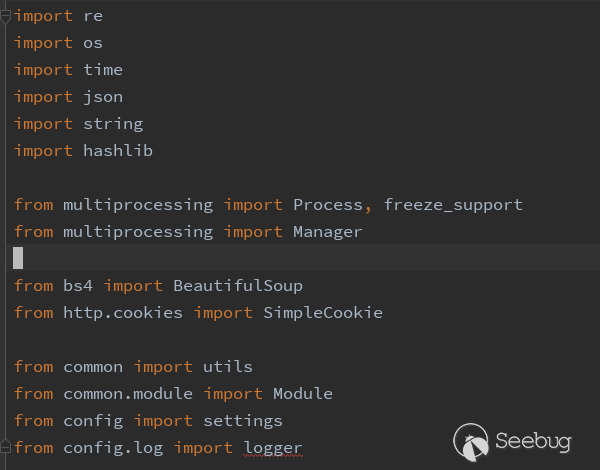
OneForAll集成了很多收集域名的web接口,每個接口為一個py文件,py文件中最后都會基于common/module.py Module這個類,這個類提供了很多需要通用方法,如網頁的請求,匹配域名,保存結果以及運行時需要的各類方法。
比較令人注意的是匹配域名的方法,因為很多web的接口返回格式都不太一樣,要每個插件都處理一遍這樣的格式嗎?不必,OneForAll編寫了通用域名匹配函數,即通過正則對最終結果匹配。
def match_subdomains(domain, html, distinct=True, fuzzy=True):
    """
    Use regexp to match subdomains

    :param  str domain: main domain
    :param  str html: response html text
    :param  bool distinct: deduplicate results or not (default True)
    :param  bool fuzzy: fuzzy match subdomain or not (default True)
    :return set/list: result set or list
    """
    logger.log('TRACE', f'Use regexp to match subdomains in the response body')
    if fuzzy:
        regexp = r'(?:[a-z0-9](?:[a-z0-9\-]{0,61}[a-z0-9])?\.){0,}' \
                 + domain.replace('.', r'\.')
        result = re.findall(regexp, html, re.I)
        if not result:
            return set()
        deal = map(lambda s: s.lower(), result)
        if distinct:
            return set(deal)
        else:
            return list(deal)
    else:
        regexp = r'(?:\>|\"|\'|\=|\,)(?:http\:\/\/|https\:\/\/)?' \
                 r'(?:[a-z0-9](?:[a-z0-9\-]{0,61}[a-z0-9])?\.){0,}' \
                 + domain.replace('.', r'\.')
        result = re.findall(regexp, html, re.I)
    if not result:
        return set()
    regexp = r'(?:http://|https://)'
    deal = map(lambda s: re.sub(regexp, '', s[1:].lower()), result)
    if distinct:
        return set(deal)
    else:
        return list(deal)
泛解析處理
通過DNS泛解析域名時返回的TTL相同。
參考的 http://sh3ll.me/archives/201704041222.txt
泛解析一直都是域名爆破中的大問題,目前的解決思路是根據確切不存在的子域名記錄(md5(domain).domain)獲取黑名單 IP,對爆破 過程的結果進行黑名單過濾。 但這種寬泛的過濾很容易導致漏報,如泛解析記錄為 1.1.1.1,但某存在子域名也指向 1.1.1.1,此時這個子域名便可能會被黑名單過 濾掉。 胖學弟提到,可以將 TTL 也作為黑名單規則的一部分,評判的依據是:在權威 DNS 中,泛解析記錄的 TTL 肯定是相同的,如果子域名 記錄相同,但 TTL 不同,那這條記錄可以說肯定不是泛解析記錄。最終的判斷代碼如下:
// IsPanDNSRecord 是否為泛解析記錄
func IsPanDNSRecord(record string, ttl uint32) bool {
    _ttl, ok := panDNSRecords[TrimSuffixPoint(record)]
    // 若記錄不存在于黑名單列表,不是泛解析
    // 若記錄存在,且與黑名單中的 ttl 不等但都是 60(1min)的倍數,不是泛解析
    if !ok || (_ttl != ttl && _ttl%60 == 0 && ttl%60 == 0) {
        return false
    }
    return true
}
這個方法是否好,我也不知道。
爆破流程
brute.py簡寫版爆破流程
wildcard_ips = list()  # 泛解析IP列表
wildcard_ttl = int()  # 泛解析TTL整型值
ns_list = query_domain_ns(self.domain) # 查詢域名NS記錄
ns_ip_list = query_domain_ns_a(ns_list)  # DNS權威名稱服務器對應A記錄列表
self.enable_wildcard = detect_wildcard(domain, ns_ip_list) # 通過域名指定NS查詢是否有泛解析

if self.enable_wildcard:
    wildcard_ips, wildcard_ttl = collect_wildcard_record(domain,
ns_ip_list)
  # 收集泛解析范圍,當大部分泛解析記錄(80%)達到同一IP出現兩次以上,則返回該IP以及TTL
ns_path = get_nameservers_path(self.enable_wildcard, ns_ip_list)

# 生成字典
dict_set = self.gen_brute_dict(domain)
dict_len = len(dict_set)
dict_name = f'generated_subdomains_{domain}_{timestring}.txt'
dict_path = temp_dir.joinpath(dict_name)
save_brute_dict(dict_path, dict_set)
del dict_set

# 調用massdns進行掃描
output_name = f'resolved_result_{domain}_{timestring}.json'
output_path = temp_dir.joinpath(output_name)
log_path = result_dir.joinpath('massdns.log')
check_dict()
logger.log('INFOR', f'Running massdns to brute subdomains')
utils.call_massdns(massdns_path, dict_path, ns_path, output_path,
log_path, quiet_mode=self.quite,
process_num=self.process_num,
concurrent_num=self.concurrent_num)
域名接管
OneForAll的域名接管主要是針對一些公共服務的域名接管,根據其指紋識別的內容
[
{
"name":"github",
"cname":["github.io", "github.map.fastly.net"],
"response":["There isn't a GitHub Pages site here.", "For root URLs (like http://example.com/) you must provide an index.html file"]
},
{
"name":"heroku",
"cname":["herokudns.com", "herokussl.com", "herokuapp.com"],
"response":["There's nothing here, yet.", "herokucdn.com/error-pages/no-such-app.html", "<title>No such app</title>"]
},
{
"name":"unbounce",
"cname":["unbouncepages.com"],
"response":["Sorry, the page you were looking for doesn’t exist.", "The requested URL was not found on this server"]
},
{
"name":"tumblr",
"cname":["tumblr.com"],
"response":["There's nothing here.", "Whatever you were looking for doesn't currently exist at this address."]
},
{
"name":"shopify",
"cname":["myshopify.com"],
"response":["Sorry, this shop is currently unavailable.", "Only one step left!"]
},
{
"name":"instapage",
"cname":["pageserve.co", "secure.pageserve.co", "https://instapage.com/"],
"response":["Looks Like You're Lost","The page you're looking for is no longer available."]
},
{
"name":"desk",
"cname":["desk.com"],
"response":["Please try again or try Desk.com free for 14 days.", "Sorry, We Couldn't Find That Page"]
},
{
"name":"campaignmonitor",
"cname":["createsend.com", "name.createsend.com"],
"response":["Double check the URL", "<strong>Trying to access your account?</strong>"]
},
{
"name":"cargocollective",
"cname":["cargocollective.com"],
"response":["404 Not Found"]
},
{
"name":"statuspage",
"cname":["statuspage.io"],
"response":["Better Status Communication", "You are being <a href=\"https://www.statuspage.io\">redirected"]
},
{
"name":"amazonaws",
"cname":["amazonaws.com"],
"response":["NoSuchBucket", "The specified bucket does not exist"]
},
{
"name":"bitbucket",
"cname":["bitbucket.org"],
"response":["The page you have requested does not exist","Repository not found"]
},
{
"name":"smartling",
"cname":["smartling.com"],
"response":["Domain is not configured"]
},
{
"name":"acquia",
"cname":["acquia.com"],
"response":["If you are an Acquia Cloud customer and expect to see your site at this address","The site you are looking for could not be found."]
},
{
"name":"fastly",
"cname":["fastly.net"],
"response":["Please check that this domain has been added to a service", "Fastly error: unknown domain"]
},
{
"name":"pantheon",
"cname":["pantheonsite.io"],
"response":["The gods are wise", "The gods are wise, but do not know of the site which you seek."]
},
{
"name":"zendesk",
"cname":["zendesk.com"],
"response":["Help Center Closed"]
},
{
"name":"uservoice",
"cname":["uservoice.com"],
"response":["This UserVoice subdomain is currently available!"]
},
{
"name":"ghost",
"cname":["ghost.io"],
"response":["The thing you were looking for is no longer here", "The thing you were looking for is no longer here, or never was"]
},
{
"name":"pingdom",
"cname":["stats.pingdom.com"],
"response":["pingdom"]
},
{
"name":"tilda",
"cname":["tilda.ws"],
"response":["Domain has been assigned"]
},
{
"name":"wordpress",
"cname":["wordpress.com"],
"response":["Do you want to register"]
},
{
"name":"teamwork",
"cname":["teamwork.com"],
"response":["Oops - We didn't find your site."]
},
{
"name":"helpjuice",
"cname":["helpjuice.com"],
"response":["We could not find what you're looking for."]
},
{
"name":"helpscout",
"cname":["helpscoutdocs.com"],
"response":["No settings were found for this company:"]
},
{
"name":"cargo",
"cname":["cargocollective.com"],
"response":["If you're moving your domain away from Cargo you must make this configuration through your registrar's DNS control panel."]
},
{
"name":"feedpress",
"cname":["redirect.feedpress.me"],
"response":["The feed has not been found."]
},
{
"name":"surge",
"cname":["surge.sh"],
"response":["project not found"]
},
{
"name":"surveygizmo",
"cname":["privatedomain.sgizmo.com", "privatedomain.surveygizmo.eu", "privatedomain.sgizmoca.com"],
"response":["data-html-name"]
},
{
"name":"mashery",
"cname":["mashery.com"],
"response":["Unrecognized domain <strong>"]
},
{
"name":"intercom",
"cname":["custom.intercom.help"],
"response":["This page is reserved for artistic dogs.","<h1 class=\"headline\">Uh oh. That page doesn’t exist.</h1>"]
},
{
"name":"webflow",
"cname":["proxy.webflow.io"],
"response":["<p class=\"description\">The page you are looking for doesn't exist or has been moved.</p>"]
},
{
"name":"kajabi",
"cname":["endpoint.mykajabi.com"],
"response":["<h1>The page you were looking for doesn't exist.</h1>"]
},
{
"name":"thinkific",
"cname":["thinkific.com"],
"response":["You may have mistyped the address or the page may have moved."]
},
{
"name":"tave",
"cname":["clientaccess.tave.com"],
"response":["<h1>Error 404: Page Not Found</h1>"]
},
{
"name":"wishpond",
"cname":["wishpond.com"],
"response":["https://www.wishpond.com/404?campaign=true"]
},
{
"name":"aftership",
"cname":["aftership.com"],
"response":["Oops.</h2><p class=\"text-muted text-tight\">The page you're looking for doesn't exist."]
},
{
"name":"aha",
"cname":["ideas.aha.io"],
"response":["There is no portal here ... sending you back to Aha!"]
},
{
"name":"brightcove",
"cname":["brightcovegallery.com", "gallery.video", "bcvp0rtal.com"],
"response":["<p class=\"bc-gallery-error-code\">Error Code: 404</p>"]
},
{
"name":"bigcartel",
"cname":["bigcartel.com"],
"response":["<h1>Oops! We couldn’t find that page.</h1>"]
},
{
"name":"activecompaign",
"cname":["activehosted.com"],
"response":["alt=\"LIGHTTPD - fly light.\""]
},
{
"name":"compaignmonitor",
"cname":["createsend.com"],
"response":["Double check the URL or <a href=\"mailto:help@createsend.com"]
},
{
"name":"simplebooklet",
"cname":["simplebooklet.com"],
"response":["We can't find this <a href=\"https://simplebooklet.com"]
},
{
"name":"getresponse",
"cname":[".gr8.com"],
"response":["With GetResponse Landing Pages, lead generation has never been easier"]
},
{
"name":"vend",
"cname":["vendecommerce.com"],
"response":["Looks like you've traveled too far into cyberspace."]
},
{
"name":"jetbrains",
"cname":["myjetbrains.com"],
"response":["is not a registered InCloud YouTrack.","is not a registered InCloud YouTrack."]
},
{
"name":"azure",
"cname":["azurewebsites.net",
".cloudapp.net",
".cloudapp.azure.com",
".trafficmanager.net",
".blob.core.windows.net",
".azure-api.net",
".azurehdinsight.net",
".azureedge.net"],
"response":["404 Web Site not found"]
},
{
"name":"readme",
"cname":["readme.io"],
"response":["Project doesnt exist... yet!"]
}
]原理是獲取域名的cname,如果cname和上述指紋匹配,并且訪問后返回內容也匹配即說明目前無人使用,可以創建一個相同域名。
但創建都需要手動,OneForAll只提供了一個GIthub的自動創建腳本modules/autotake/github.py,但沒有看到任何地方調用它。
OneForAll的域名接管只針對在線服務商。
原先以為會對每個普通域名查詢cname,然后查詢cname的域名是否注冊,但是沒有。
指紋識別
OneForAll的指紋識別使用的是 https://github.com/webanalyzer/rules
作者定義了通用指紋識別的規則
{
    "name": "wordpress",
    "author": "fate0",
    "version": "0.1.0",
    "description": "wordpress 是世界上最為廣泛使用的博客系統",
    "website": "http://www.wordpress.org/",
    "matches": [],
    "condition": "0 and (1 and not 2)",
    "implies": "PHP",
    "excludes": "Apache"
}并且集成轉化了fofa,wappalyzer,whatweb的指紋,感覺挺不錯的。
指紋識別具體的文件在modules/banner.py,根據指紋識別的規則,基本上訪問一次首頁就能識別到指紋。唯一不解的是作者只使用了多進程來識別,為什么前面是協程+多進程,指紋識別這里只用進程了,感覺效率會大大受影響。
其他
OneForAll 基于Python3,官方要求Python3.8以上,依賴項requirements.txt有38行,這樣對使用者不太友好(Python要求版本太高,依賴太多,很容易報錯)。
dnsprobe
dnsprobe https://github.com/projectdiscovery/dnsprobe
dnsprobe是go語言編寫的dns查詢工具,因為go語言隱藏了協程的細節,使用簡單的編程便可以實現并發編程。同時用go語言靜態編譯可以運行在各種平臺,也極大方便了使用者。
dnsprobe的作者也很能注意到效率的瓶頸點,例如如果是大字典的dns爆破,讀取這個字典就要花費不少時間,而dnsprobe是邊讀邊爆破,上述分析的工具都沒有注意到這個點。
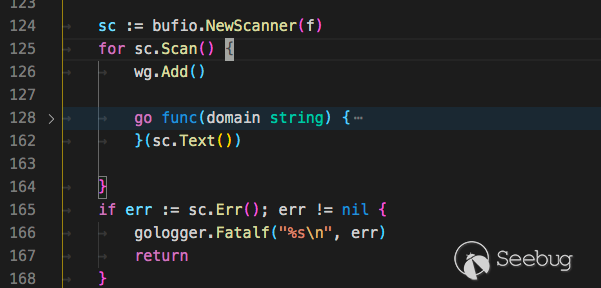
但是用Python做到還是很不容易的,使用python的協程后,需要把所有函數都變為協程,才能發揮協程的威力,如果要實現邊讀邊掃描,要將讀取文件變為協程,以及掃描變為協程。
為此需要安裝一個額外的包
pip install aiofilesimport asyncio
import aiofiles
async def scan(line):
print(line)
await asyncio.sleep(3) # 模擬耗時
async def main():
path = "subnames.txt"
async with aiofiles.open(path, 'r') as f:
async for line in f:
await scan(line.strip())
if __name__ == '__main__':
asyncio.get_event_loop().run_until_complete(main())subfinder
subfinder https://github.com/projectdiscovery/subfinder
同屬projectdiscovery項目下的子域名發現工具subfinder,它的定位是通過各種接口來發現有效子域名。
subfinder is built for doing one thing only - passive subdomain enumeration, and it does that very well.
subfinder僅用于做一件事-被動子域枚舉,它做得很好。
它的接口列表
var DefaultSources = []string{
    "alienvault",
    "archiveis",
    "binaryedge",
    "bufferover",
    "censys",
    "certspotter",
    "certspotterold",
    "commoncrawl",
    "crtsh",
    "digicert",
    "dnsdumpster",
    "dnsdb",
    "entrust",
    "hackertarget",
    "ipv4info",
    "intelx",
    "passivetotal",
    "rapiddns",
    "securitytrails",
    "shodan",
    "sitedossier",
    "spyse",
    "sublist3r",
    "threatcrowd",
    "threatminer",
    "urlscan",
    "virustotal",
    "waybackarchive",
    "zoomeye",
}
subfinder是go寫的,那么是如何加載這些接口的呢
subfinder的每個接口都需要實現Source這個接口
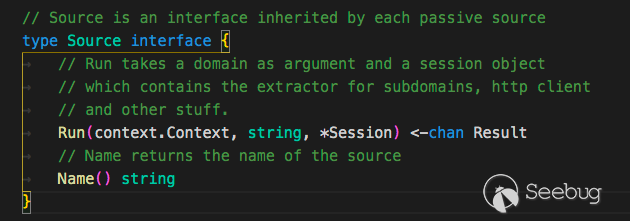
type Agent struct {
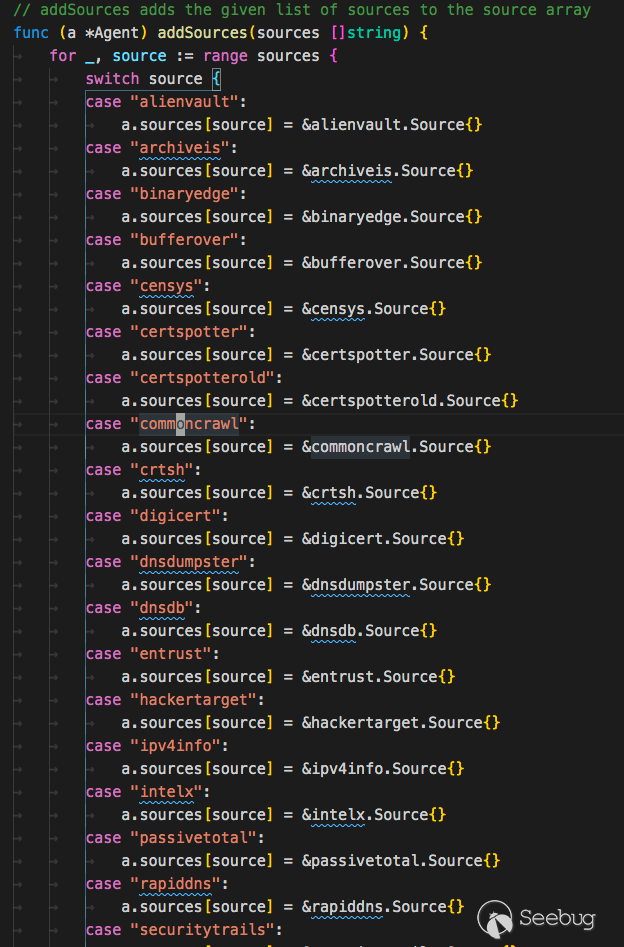
    sources map[string]subscraping.Source
}
接著定義Agent實現一個map類,map的內容為每個接口的Source
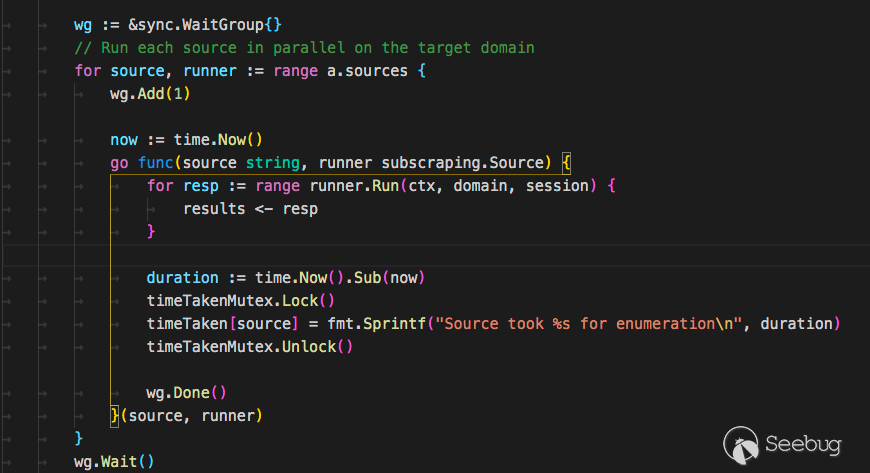
接著搜索域名時只需要遍歷這個map,執行其中的Run方法即可。
配合
subfinder -d http://hackerone.com -silent | dnsprobe -f domain.txt通過在線接口獲取域名后批量dns查詢域名保存為domain.txt文件
shuffledns
https://github.com/projectdiscovery/shuffledns
shuffledns就是調用的massdns,將返回結果處理了一下。OneForAll和shuffledns都使用了massdns那么就來看看它。
massdns
https://github.com/blechschmidt/massdns
Massdn 是一個簡單的高性能 DNS 存根解析器,針對那些尋求解析數百萬甚至數十億個大量域名的用戶。在沒有特殊配置的情況下,使用公開可用的解析器,massdn 能夠每秒解析超過350,000個名稱。
C語言編寫,第一次提交記錄在2016年。
粗略的看了下代碼,massdns使用socket發包,然后用epoll,pcap,busy-wait polling等技術來接收。
去年我寫了篇《從 Masscan, Zmap 源碼分析到開發實踐》(http://www.bjnorthway.com/1052/),當時我就想過用"無狀態掃描"技術來對DNS爆破,當時只用pcap模塊來進行發送和接收

理論速度是可以到70w/s的。
最近準備再改改然后開源出來~
總結
原本計劃還有OWASP Amass的,這個就留給下篇吧。
總結一下
subDomainBrute老牌DNS爆破工具,使用讓人感覺很穩很友好,依賴較少,很好安裝。ESD域名收集方法很多,對接的web接口比較少,支持python調用,用于集成到掃描器應該不錯。OneForAll依賴較多,功能比較全面,但功能還是有些欠缺,有些地方效率考慮的不夠好。適合對一個新的域名爆破,結果比較多。
對于子域名收集,我推薦的組合是subfinder和dnsprobe,它們都是go語言,直接下載二進制就能跑,subfinder用于收集網上接口(但接口似乎沒有OneForAll多),dnsprobe用于爆破/驗證域名。
用linux哲學,跑的可以更優雅~
subfinder -d http://hackerone.com -silent | dnsprobe -f domain.txt另外進行DNS爆破時,DNS解析器的設定非常重要,它決定了爆破的質量和數量,推薦1w字典就增加一個DNS服務器。
在寫文章的時候可能會有些錯誤或者不到的地方,可以在paper評論區回復和我討論~
 本文由 Seebug Paper 發布,如需轉載請注明來源。本文地址:http://www.bjnorthway.com/1292/