

作者:Phith0n
作者博客:https://www.leavesongs.com/PENETRATION/client-session-security.html
在Web中,session是認證用戶身份的憑證,它具備如下幾個特點:
- 用戶不可以任意篡改
- A用戶的session無法被B用戶獲取
也就是說,session的設計目的是為了做用戶身份認證。但是,很多情況下,session被用作了別的用途,將產生一些安全問題,我們今天就來談談“客戶端session”(client session)導致的安全問題。
0x01 什么是客戶端session
在傳統PHP開發中,$_SESSION變量的內容默認會被保存在服務端的一個文件中,通過一個叫“PHPSESSID”的Cookie來區分用戶。這類session是“服務端session”,用戶看到的只是session的名稱(一個隨機字符串),其內容保存在服務端。
然而,并不是所有語言都有默認的session存儲機制,也不是任何情況下我們都可以向服務器寫入文件。所以,很多Web框架都會另辟蹊徑,比如Django默認將session存儲在數據庫中,而對于flask這里并不包含數據庫操作的框架,就只能將session存儲在cookie中。
因為cookie實際上是存儲在客戶端(瀏覽器)中的,所以稱之為“客戶端session”。
0x02 保護客戶端session
將session存儲在客戶端cookie中,最重要的就是解決session不能被篡改的問題。
我們看看flask是如何處理的:
class SecureCookieSessionInterface(SessionInterface):
    """The default session interface that stores sessions in signed cookies
    through the :mod:`itsdangerous` module.
    """
    #: the salt that should be applied on top of the secret key for the
    #: signing of cookie based sessions.
    salt = 'cookie-session'
    #: the hash function to use for the signature. The default is sha1
    digest_method = staticmethod(hashlib.sha1)
    #: the name of the itsdangerous supported key derivation. The default
    #: is hmac.
    key_derivation = 'hmac'
    #: A python serializer for the payload. The default is a compact
    #: JSON derived serializer with support for some extra Python types
    #: such as datetime objects or tuples.
    serializer = session_json_serializer
    session_class = SecureCookieSession

    def get_signing_serializer(self, app):
        if not app.secret_key:
            return None
        signer_kwargs = dict(
            key_derivation=self.key_derivation,
            digest_method=self.digest_method
        )
        return URLSafeTimedSerializer(app.secret_key, salt=self.salt,
                                      serializer=self.serializer,
                                      signer_kwargs=signer_kwargs)

    def open_session(self, app, request):
        s = self.get_signing_serializer(app)
        if s is None:
            return None
        val = request.cookies.get(app.session_cookie_name)
        if not val:
            return self.session_class()
        max_age = total_seconds(app.permanent_session_lifetime)
        try:
            data = s.loads(val, max_age=max_age)
            return self.session_class(data)
        except BadSignature:
            return self.session_class()

    def save_session(self, app, session, response):
        domain = self.get_cookie_domain(app)
        path = self.get_cookie_path(app)
        # Delete case. If there is no session we bail early.
        # If the session was modified to be empty we remove the
        # whole cookie.
        if not session:
            if session.modified:
                response.delete_cookie(app.session_cookie_name,
                                       domain=domain, path=path)
            return
        # Modification case. There are upsides and downsides to
        # emitting a set-cookie header each request. The behavior
        # is controlled by the :meth:`should_set_cookie` method
        # which performs a quick check to figure out if the cookie
        # should be set or not. This is controlled by the
        # SESSION_REFRESH_EACH_REQUEST config flag as well as
        # the permanent flag on the session itself.
        if not self.should_set_cookie(app, session):
            return
        httponly = self.get_cookie_httponly(app)
        secure = self.get_cookie_secure(app)
        expires = self.get_expiration_time(app, session)
        val = self.get_signing_serializer(app).dumps(dict(session))
        response.set_cookie(app.session_cookie_name, val,
                            expires=expires, httponly=httponly,
                            domain=domain, path=path, secure=secure)
主要看最后兩行代碼,新建了URLSafeTimedSerializer類 ,用它的dumps方法將類型為字典的session對象序列化成字符串,然后用response.set_cookie將最后的內容保存在cookie中。
那么我們可以看一下URLSafeTimedSerializer是做什么的:
class Signer(object):
    # ...
    def sign(self, value):
        """Signs the given string."""
        return value + want_bytes(self.sep) + self.get_signature(value)

    def get_signature(self, value):
        """Returns the signature for the given value"""
        value = want_bytes(value)
        key = self.derive_key()
        sig = self.algorithm.get_signature(key, value)
        return base64_encode(sig)


class Serializer(object):
    default_serializer = json
    default_signer = Signer
    # ....
    def dumps(self, obj, salt=None):
        """Returns a signed string serialized with the internal serializer.
        The return value can be either a byte or unicode string depending
        on the format of the internal serializer.
        """
        payload = want_bytes(self.dump_payload(obj))
        rv = self.make_signer(salt).sign(payload)
        if self.is_text_serializer:
            rv = rv.decode('utf-8')
        return rv

    def dump_payload(self, obj):
        """Dumps the encoded object. The return value is always a
        bytestring. If the internal serializer is text based the value
        will automatically be encoded to utf-8.
        """
        return want_bytes(self.serializer.dumps(obj))


class URLSafeSerializerMixin(object):
    """Mixed in with a regular serializer it will attempt to zlib compress
    the string to make it shorter if necessary. It will also base64 encode
    the string so that it can safely be placed in a URL.
    """
    def load_payload(self, payload):
        decompress = False
        if payload.startswith(b'.'):
            payload = payload[1:]
            decompress = True
        try:
            json = base64_decode(payload)
        except Exception as e:
            raise BadPayload('Could not base64 decode the payload because of '
                'an exception', original_error=e)
        if decompress:
            try:
                json = zlib.decompress(json)
            except Exception as e:
                raise BadPayload('Could not zlib decompress the payload before '
                    'decoding the payload', original_error=e)
        return super(URLSafeSerializerMixin, self).load_payload(json)

    def dump_payload(self, obj):
        json = super(URLSafeSerializerMixin, self).dump_payload(obj)
        is_compressed = False
        compressed = zlib.compress(json)
        if len(compressed) < (len(json) - 1):
            json = compressed
            is_compressed = True
        base64d = base64_encode(json)
        if is_compressed:
            base64d = b'.' + base64d
        return base64d


class URLSafeTimedSerializer(URLSafeSerializerMixin, TimedSerializer):
    """Works like :class:`TimedSerializer` but dumps and loads into a URL
    safe string consisting of the upper and lowercase character of the
    alphabet as well as ``'_'``, ``'-'`` and ``'.'``.
    """
default_serializer = compact_json主要關注dump_payload、dumps,這是序列化session的主要過程。
可見,序列化的操作分如下幾步:
- json.dumps 將對象轉換成json字符串,作為數據
- 如果數據壓縮后長度更短,則用zlib庫進行壓縮
- 將數據用base64編碼
- 通過hmac算法計算數據的簽名,將簽名附在數據后,用“.”分割
第4步就解決了用戶篡改session的問題,因為在不知道secret_key的情況下,是無法偽造簽名的。
最后,我們在cookie中就能看到設置好的session了:
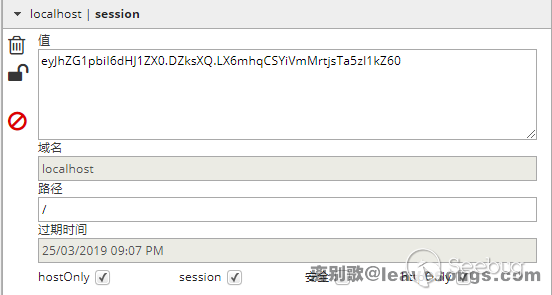
注意到,在第4步中,flask僅僅對數據進行了簽名。眾所周知的是,簽名的作用是防篡改,而無法防止被讀取。而flask并沒有提供加密操作,所以其session的全部內容都是可以在客戶端讀取的,這就可能造成一些安全問題。
0x03 flask客戶端session導致敏感信息泄露
我曾遇到過一個案例,目標是flask開發的一個簡歷管理系統,在測試其找回密碼功能的時候,我收到了服務端設置的session。
我在0x02中說過,flask是一個客戶端session,所以看目標為flask的站點的時候,我習慣性地去解密其session。編寫如下代碼解密session:
#!/usr/bin/env python3
import sys
import zlib
from base64 import b64decode
from flask.sessions import session_json_serializer
from itsdangerous import base64_decode

def decryption(payload):
    payload, sig = payload.rsplit(b'.', 1)
    payload, timestamp = payload.rsplit(b'.', 1)

    decompress = False
    if payload.startswith(b'.'):
        payload = payload[1:]
        decompress = True

    try:
        payload = base64_decode(payload)
    except Exception as e:
        raise Exception('Could not base64 decode the payload because of '
                         'an exception')

    if decompress:
        try:
            payload = zlib.decompress(payload)
        except Exception as e:
            raise Exception('Could not zlib decompress the payload before '
                             'decoding the payload')

    return session_json_serializer.loads(payload)

if __name__ == '__main__':
    print(decryption(sys.argv[1].encode()))
例如,我解密0x02中演示的session:

通過解密目標站點的session,我發現其設置了一個名為token、值是一串md5的鍵。猜測其為找回密碼的認證,將其替換到找回密碼鏈接的token中,果然能夠進入修改密碼頁面。通過這個過程,我就能修改任意用戶密碼了。
這是一個比較典型的安全問題,目標網站通過session來儲存隨機token并認證用戶是否真的在郵箱收到了這個token。但因為flask的session是存儲在cookie中且僅簽名而未加密,所以我們就可以直接讀取這個token了。
0x04 flask驗證碼繞過漏洞
這是客戶端session的另一個常見漏洞場景。
我們用一個實際例子認識這一點:https://github.com/shonenada/flask-captcha 。這是一個為flask提供驗證碼的項目,我們看到其中的view文件:
import random
try:
    from cStringIO import StringIO
except ImportError:
    from io import BytesIO as StringIO

from flask import Blueprint, make_response, current_app, session
from wheezy.captcha.image import captcha
from wheezy.captcha.image import background
from wheezy.captcha.image import curve
from wheezy.captcha.image import noise
from wheezy.captcha.image import smooth
from wheezy.captcha.image import text
from wheezy.captcha.image import offset
from wheezy.captcha.image import rotate
from wheezy.captcha.image import warp


captcha_bp = Blueprint('captcha', __name__)


def sample_chars():
    characters = current_app.config['CAPTCHA_CHARACTERS']
    char_length = current_app.config['CAPTCHA_CHARS_LENGTH']
    captcha_code = random.sample(characters, char_length)
    return captcha_code

@captcha_bp.route('/captcha', endpoint="captcha")
def captcha_view():
    out = StringIO()
    captcha_image = captcha(drawings=[
        background(),
        text(fonts=current_app.config['CAPTCHA_FONTS'],
             drawings=[warp(), rotate(), offset()]),
        curve(),
        noise(),
        smooth(),
    ])
    captcha_code = ''.join(sample_chars())
    imgfile = captcha_image(captcha_code)
    session['captcha'] = captcha_code
    imgfile.save(out, 'PNG')
    out.seek(0)
    response = make_response(out.read())
    response.content_type = 'image/png'
return response可見,其生成驗證碼后,就存儲在session中了:session['captcha'] = captcha_code。
我們用瀏覽器訪問/captcha,即可得到生成好的驗證碼圖片,此時復制保存在cookie中的session值,用0x03中提供的腳本進行解碼:
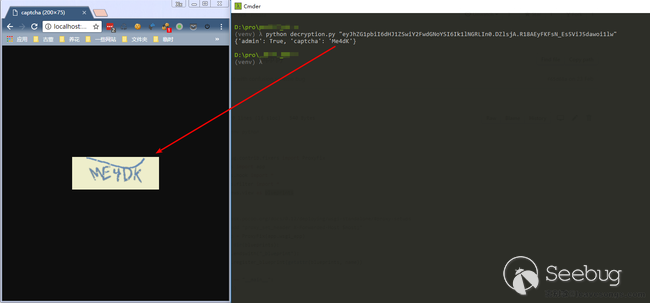
可見,我成功獲取了驗證碼的值,進而可以繞過驗證碼的判斷。
這也是客戶端session的一種錯誤使用方法。
0x05 CodeIgniter 2.1.4 session偽造及對象注入漏洞
Codeigniter 2的session也儲存在session中,默認名為ci_session,默認值如下:
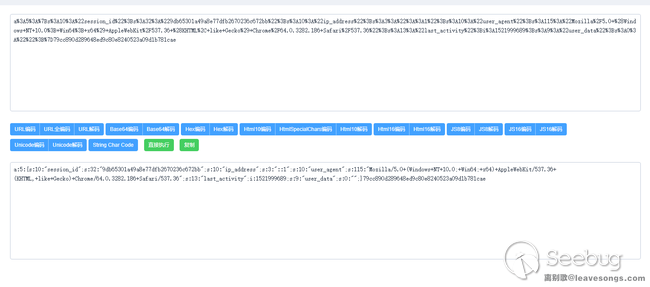
可見,session數據被用PHP自帶的serialize函數進行序列化,并簽名后作為ci_session的值。原理上和flask如出一轍,我就不重述了。但好在codeigniter2支持對session進行加密,只需在配置文件中設置$config['sess_encrypt_cookie'] = TRUE;即可。
在CI2.1.4及以前的版本中,存在一個弱加密漏洞( https://www.dionach.com/blog/codeigniter-session-decoding-vulnerability ),如果目標環境中沒有安裝Mcrypt擴展,則CI會使用一個相對比較弱的加密方式來處理session:
<?php
function _xor_encode($string, $key)
{
 $rand = '';
 while (strlen($rand) < 32)
 {
  $rand .= mt_rand(0, mt_getrandmax());
 }
 $rand = $this->hash($rand);
 $enc = '';
 for ($i = 0; $i < strlen($string); $i++)
 {
  $enc .= substr($rand, ($i % strlen($rand)), 1).(substr($rand, ($i % strlen($rand)), 1) ^ substr($string, $i, 1));
 }
 return $this->_xor_merge($enc, $key);
}

function _xor_merge($string, $key)
{
 $hash = $this->hash($key);
 $str = '';
 for ($i = 0; $i < strlen($string); $i++)
 {
  $str .= substr($string, $i, 1) ^ substr($hash, ($i % strlen($hash)), 1);
 }
 return $str;
}其中用到了mt_rand、異或等存在大量缺陷的方法。我們通過幾個簡單的腳本( https://github.com/Dionach/CodeIgniterXor ),即可在4秒到4分鐘的時間,破解CI2的密鑰。
獲取到了密鑰,我們即可篡改任意session,并自己簽名及加密,最后偽造任意用戶,注入任意對象,甚至通過反序列化操作造成更大的危害。
0x06 總結
我以三個案例來說明了客戶端session的安全問題。
上述三個問題,如果session是儲存在服務器文件或數據庫中,則不會出現。當然,考慮到flask和ci都是非常輕量的web框架,很可能運行在無法操作文件系統或沒有數據庫的服務器上,所以客戶端session是無法避免的。
除此之外,我還能想到其他客戶端session可能存在的安全隱患:
- 簽名使用hash函數而非hmac函數,導致利用hash長度擴展攻擊來偽造session
- 任意文件讀取導致密鑰泄露,進一步造成身份偽造漏洞或反序列化漏洞(鏈接地址)
- 如果客戶端session僅加密未簽名,利用CBC字節翻轉攻擊,我們可以修改加密session中某部分數據,來達到身份偽造的目的
上面說的幾點,各位CTF出題人可以拿去做文章啦~嘿嘿。
相對的,作為一個開發者,如果我們使用的web框架或web語言的session是存儲在客戶端中,那就必須牢記下面幾點:
- 沒有加密時,用戶可以看到完整的session對象
- 加密/簽名不完善或密鑰泄露的情況下,用戶可以修改任意session
- 使用強健的加密及簽名算法,而不是自己造(反例discuz)
 本文由 Seebug Paper 發布,如需轉載請注明來源。本文地址:http://www.bjnorthway.com/550/
暫無評論