

背景
筆者在2016年11月發現并報告了 HP Support Assistant (HPSA) 的權限提升漏洞,HP Product Security Response Team (HP PSRT) 響應迅速,但卻以此漏洞可以通過軟件的自動更新功能自動修復為由拒絕為其發布安全公告和 CVE。4月份想起這件事后,筆者又分析了一遍修補后的 HPSA,發現 HP 的開發人員在修補中犯了更為低級的錯誤,導致補丁可以被繞過重新實現權限提升。在隨后與 HP PSRT 的溝通與合作中,再一次利用其它技巧繞過了其后續修補,最終筆者協助 HP PSRT 完成了漏洞的修補。
本文將分析此漏洞的成因及多次補丁繞過,希望能以此為案例提高開發人員對安全的認識和理解,以減少由于對所用技術理解不到位和安全編程意識匱乏而導致的安全漏洞。
問題描述
HPSA 是惠普推出的系統管理軟件,被默認安裝在惠普的所有 PC 中。其用于維護系統及打印機,并提供自動更新等功能。HPSA 使用.Net開發,其系統服務 HPSupportSolutionsFrameworkService 使用 WCF 與客戶端通信,完成系統更新、管理等高權限敏感操作。雖然 HPSA 使用了較新的分布式處理技術WCF,然而在 Server 與 Client 通信過程中,卻采用了不正確的認證方式。導致攻擊者可以繞過認證,最終利用其敏感服務接口的缺陷,實現 everyone 到 system 的權限提升。
本文將從 WCF 技術背景、漏洞發現、漏洞利用、補丁實現和兩次繞過幾個方面進行分析。
WCF技術背景
WCF(Windows Communication Foundation) 是用于面向服務應用程序的編程框架,基于WCF的服務可以有兩種形式:1). 通過 IIS 寄宿的方式將服務寄宿于IIS中; 2). 通過自我寄宿(Self-Hosting)的方式將服務寄宿于普通應用程序、windows 服務之中。
WCF 使用 Endpoint 的概念,在服務 Endpoint 和客戶 Endpoint 之間傳輸異步消息。 Endpoint 用來描述消息發往什么地方,如何被發送等行為。一個服務端 Endpoint 主要由三部分構成:
1). Addrsss
唯一標識endpoint,是描述服務接口的URI,可以是相對地址(相對于ServiceHost(Type, Uri[])的URI),也可以是絕對地址。
2). Binding
指定綁定在endpoint上的接口類型,描述endpoint間通信時使用的協議、消息編碼方式、安全設置等。 WCF支持:HttpBindingBase, MsmqBindingBase, NetNamedPipeBinding, NetPeerTcpBinding, NetTcpBinding, UdpBinding, WebHttpBinding, WSDualHttpBinding, WSHttpBindingBase, CustomBinding多種綁定類型。
3). Contract
契約指定并設置綁定到當前 endpoint 上的服務接口,即哪些方法被導出給客戶端,方法的授權情況、消息格式等。
漏洞成因
HPSA 的系統服務 HPSupportSolutionsFrameworkService 具有 SYSTEM 權限,并開啟了多個允許 everyone 賬戶讀寫的 NamePipe。這一敏感行為引起了筆者的注意,因此dump下安裝包進一步分析。
反混淆反編譯后進行代碼審計,發現HPSA的系統服務使用WCF與Client進行交互。它創建了一個綁定在NetNamedPipeBinding(URI:”net.pipe://localhost/HPSupportSolutionsFramework/HPSA”)上的Endpoint,并允許Client調用多個綁定在此Endpoint上的服務接口:HP.SupportFramework.ServiceManager.Interfaces::IServiceInterface。
HPSA 在連接建立時對 Client 進行了認證,以阻止敏感接口被惡意程序調用。Server 與 Client 的交互過程如下表所示:
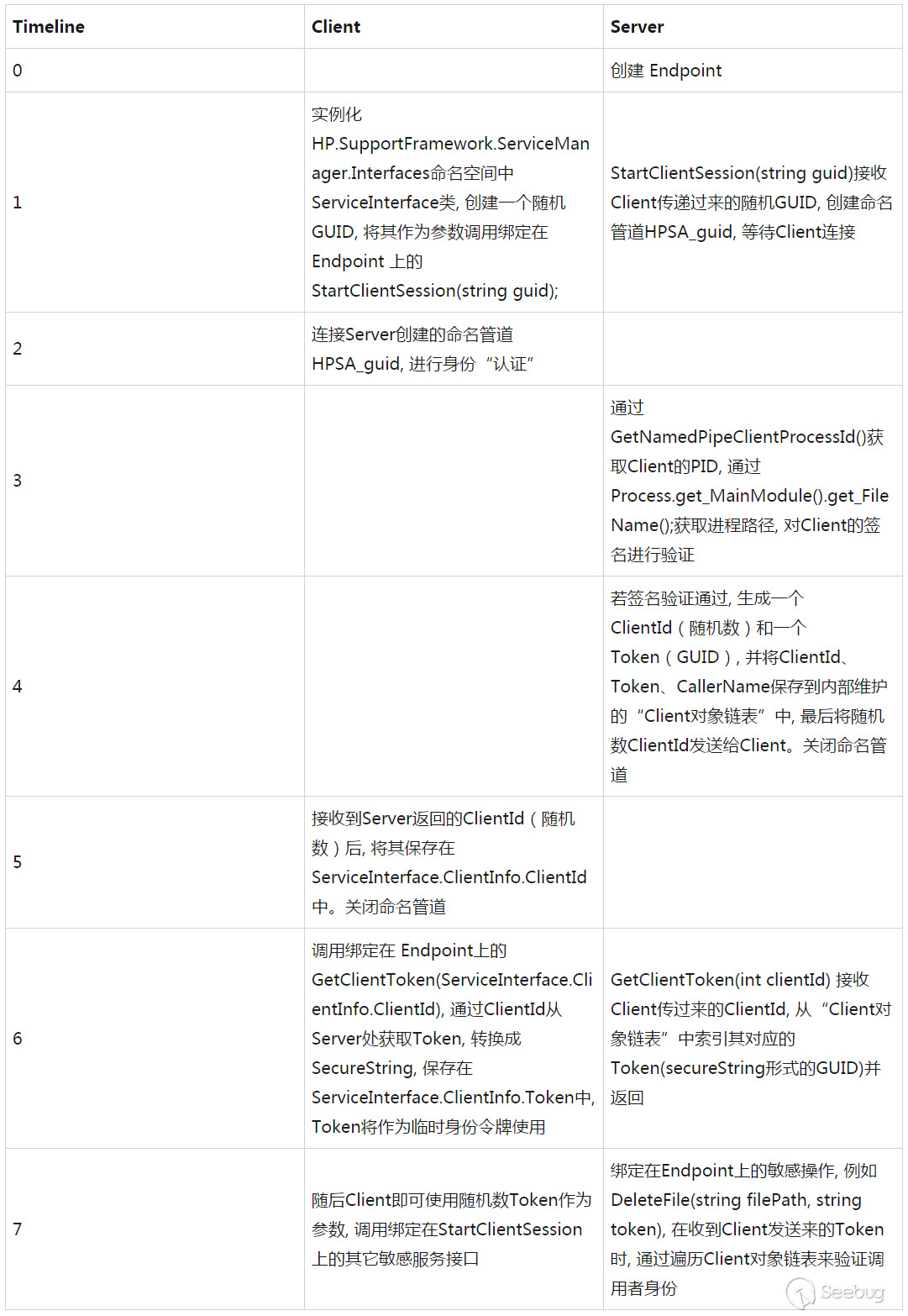
在 Server 與 Client 的交互過程中,HPSupportSolutionsFrameworkService 使用了多種途徑來確保安全:驗證 Client 是否為 HP 簽名、使用 SecureString 存儲 GUID、使用 RNGCryptoServiceProvider 生成隨機數、調用敏感接口時驗證 Client 的 Token。
千里之堤毀于蟻穴,在看似縝密的認證邏輯中卻存在安全漏洞:HPSupportSolutionsFrameworkService 使用Process.MainModule.FileName獲取 Client 的文件路徑,隨后驗證其文件簽名。然而,在C#中Process.MainModule.FileName是通過調用GetModuleFileName()索引進程的 PEB (Process Environment Block)來獲取模塊路徑的。PEB 位于進程的用戶空間中,因此可以被攻擊者修改替換。攻擊者只需在連接 Server 的 Endpoint 前修改 PEB,使模塊路徑指向一個有效的 HP 簽名文件即可繞過簽名檢測,最終通過認證。
漏洞利用
繞過 HPSA Server 的認證后,就可以調用綁定在此 Endpoint 上的服務接口函數了。接下來的工作就是從可用的服務接口函數中尋找可以利用的方法,實現權限提升。HPSupportSolutionsFrameworkService 的服務接口函數實現在HP.SupportFramework.ServiceManager.ServiceTasks::ServiceTask中,大致瀏覽一遍接口函數發現UncompressCabFile服務接口可以用于任意文件寫,DeleteFile 服務接口可以用于任意文件刪除。
UncompressCabFile 的實現邏輯如下:
public bool UncompressCabFile(string cabFilePath, string destDirectory, string token)
{
    if (!\u0004.Instance.\u0001(SharedCommon.StringToSecureString(token)))
    {
        if (DebugLog.IsDebug)
        {
            DebugLog.LogDebugMessage("signature validation failure for UncompressCabFile", DebugLog.IndentType.None);
        }
        return false;
    }

    if (!File.Exists(cabFilePath))
    {
        return false;
    }

    if (!Validation.VerifyHPSignature(cabFilePath))
    {
        File.Delete(cabFilePath);
        return false;
    }

    string text = "\"" + cabFilePath + "\"";
    string text2 = "\"" + destDirectory + "\"";
    ProcessStartInfo processStartInfo = new ProcessStartInfo();
    processStartInfo.set_WindowStyle(1);
    processStartInfo.set_Arguments("-qq " + text + " -d " + text2);
    processStartInfo.set_FileName(SupportAssistantCommon.FrameworkPath + "Modules\\unzip.exe");
    Process process = new Process();
    process.set_StartInfo(processStartInfo);
    process.Start();
    process.WaitForExit();

    if (File.Exists(cabFilePath))
    {
        File.Delete(cabFilePath);
    }
    return true;
}
UncompressCabFile 利用 unzip.exe 將壓縮文件 cabFilePath 解壓至 destDirectory,在解壓前首先驗證了 cab 文件的簽名。由于在簽名驗證和解壓縮之間存在時間差,因此這里存在 TOCTTOU(Time of Check To Time of Use)問題,可以利用條件競爭繞過簽名檢測將文件寫入任意目錄,最終可以實現權限提升。
DeleteFile 的實現邏輯如下:
public void DeleteFile(string filePath, string token)
{
    if (\u0007.Instance.\u0001(SharedCommon.StringToSecureString(token)))
    {
        try
        {
            File.Delete(filePath);
            return;
        }
        catch (Exception ex)
        {
            if (DebugLog.IsDebug)
            {
                DebugLog.LogDebugMessage("exception in DeleteFile: " + ex.Message, DebugLog.IndentType.None);
            }
            return;
        }
    }

    if (DebugLog.IsDebug)
    {
        DebugLog.LogDebugMessage("token not valid in DeleteFile", DebugLog.IndentType.None);
    }
}
因此利用過程如下所述:
-
修改PEB,將進程路徑指向合法的HP簽名程序
-
通過反射機制獲取
HP.SupportFramework.ServiceManager.Interfaces命名空間中 ServiceInterface 類的get_Instance()方法 -
實例化 ServiceInterface
-
調用
ServiceInterface::UncompressCabFile服務接口,結合條件競爭實現權限提升
補丁實現和繞過1
漏洞報告后 HP PSRT 快速響應,并在半個月內通過郵件告知已經發布了新版來解決此安全漏洞。4月初,再次分析后發現新版本的 HPSA 依舊在使用 everyone 可寫的 NamePipe,筆者決定針對 HP 的修復再次分析。
通過短暫的逆向分析,定位了補丁修復位置。補丁在HP.SupportFramework.ServiceManager.Interfaces::ServiceInterface::get_Instance()中添加了如下邏輯:
StackFrame stackFrame = new StackFrame(1);
MethodBase method = stackFrame.GetMethod();
Type declaringType = method.get_DeclaringType();
string name = method.get_Name();

if (name.ToLowerInvariant().Contains("invoke"))
{
    string text2 = new \u0007().\u0001(Process.GetCurrentProcess());
    text2 = Uri.UnescapeDataString(Path.GetFullPath(text2));
    string text3 = Assembly.GetEntryAssembly().get_Location();
    text3 = Uri.UnescapeDataString(Path.GetFullPath(text3));
    if (text3.ToLowerInvariant() != text2.ToLowerInvariant())
    {
        if (DebugLog.IsDebug)
        {
            DebugLog.LogDebugMessage(string.Concat(new string[]
            {
                "Illegal operation. Calling process (",
                text3,
                ") is not the same as process invoking method  (",
                text2,
                ")"
            }), DebugLog.IndentType.None);
        }
        throw new Exception("Invoking methods is not allowed.");
    }
}

namespace \u0007
{
    // Token: 0x02000081 RID: 129
    internal sealed class \u0007
    {
        internal string \u0001(Process \u0002)
        {
            try
            {
                string result = \u0002.get_MainModule().get_FileName();
                return result;
            }
            …
        }
        …
    }
}以上代碼在實例化時,首先通過Assembly.GetEntryAssembly().get_Location()獲取 Client 的文件路徑,并與通過Process.MainModule.FileName方法獲取的 Client 模塊路徑進行對比,如果不一致則拋出異常。
.Net的運行時環境規定,擁有同樣標識的.Net程序集只能被加載一次。由于HP.SupportFramework.ServiceManager.dll已經被 HPSupportSolutionsFrameworkService 加載,所以 HP 的開發人員認為此舉可以有效阻止攻擊者通過修改 PEB,并利用反射機制創建 ServiceInterface 來繞過認證。
然而,HP 的.Net開發人員顯然是忽視了進程空間的安全邊界。此處所做的檢測仍然位于 Client 進程空間,如同修改 PEB 那樣, Client 依舊擁有權限修改進程空間內的數據和代碼。Client 可以采取多種方案繞過檢測:
-
在實例化前,定位并修改
HP.SupportFramework.ServiceManager.dll中的檢測邏輯; -
自己實現與 Server 的交互,認證,服務接口調用等;
-
靜態 Patch 檢測邏輯,并修改程序集
HP.SupportFramework.ServiceManager.dll的標識,使修改后的文件可以被加載進 Client 進程空間。
其中方案3最為簡潔,這里可以直接利用工具修改其判斷邏輯為 if (text3.ToLowerInvariant() == text2.ToLowerInvariant()),并修改程序集的版本號(微軟官方文檔中描述了影響.Net可執行程序標識的屬性包括:AssemblyCultureAttribute, AssemblyFlagsAttribute, AssemblyVersionAttribute [3])。最終實現對補丁的繞過,重新實現權限提升。
補丁實現和繞過2
又一次,將漏洞和修補方案報告給 HP PSRT 后,HP 的開發人員從兩個方面做了修補:
-
對 Client 的認證方式做調整,Server不再使用
Process.MainModule.FileName獲取Client的文件路徑,而是通過GetProcessImageFileName()來獲取,避免從PEB獲取到被篡改的Client文件路徑。 -
在 UncompressCabFile 和 DeleteFile 中,檢查了參數里的文件/目錄路徑是否合法。
查看 UncompressCabFile 和 DeleteFile 里的文件/目錄路徑檢測邏輯,發現其僅僅使用了字符串比較來檢測路徑是否合法,而不是對規范化后的路徑進行檢測。代碼如下:
internal static bool \u0001(string \u0002)
{
    string[] array = new string[]
    {
        "AppData\\Local\\Hewlett-Packard\\HP Support Framework",
        Environment.GetFolderPath(Environment.SpecialFolder.CommonApplicationData) + "\\Hewlett-Packard\\HP Support Framework",
        SupportAssistantCommon.MainAppPath,
        SupportAssistantCommon.FrameworkPath
    };
    string[] array2 = array;

    for (int i = 0; i < array2.Length; i++)
    {
        string text = array2[i];
        if (\u0002.ToLowerInvariant().Contains(text.ToLowerInvariant()))
        {
            return true;
        }
    }

    if (DebugLog.IsDebug)
    {
        DebugLog.LogDebugMessage("Invalid File detected: " + \u0002, DebugLog.IndentType.None);
    }
    return false;
}
因此這里使用目錄穿越即可繞過路徑檢查。對 Client 的認證也很容易繞過,使用 Hewlett-Packard 安裝目錄里任意一個擁有有效簽名的程序,將漏洞利用代碼注入其中即可繞過對 Client 的認證檢測。
最終,HP PSRT 修正了路徑檢測的邏輯,增加了對目錄穿越行為的檢測,相關代碼如下所示:
    internal static bool \u0002(string \u0002)
    {
        if (!Path.IsPathRooted(\u0002) || \u0002.StartsWith("\\") || \u0002.Contains("..") || \u0002.Contains(".\\"))
        {
            if (DebugLog.IsDebug)
            {
                DebugLog.LogDebugMessage("Invalid File detected: " + \u0002, DebugLog.IndentType.None);
            }
            return false;
        }
        return true;
    }
筆者在漏洞細節中建議 HP PSRT 徹查所有服務接口的安全性,對其參數進行正確的檢測,以免再次被攻擊者利用。
總結
安全漏洞會在軟件生命周期(需求分析、設計、實現、維護等過程)內的各個階段被引入,研發人員除了需要在設計和實現階段避免安全漏洞外,還需要在出現漏洞后運用合理的修補方案。這里 HPSA 出現的問題就是在設計、實現、維護階段共同引入的。
1). 設計階段
也許是為了保證未簽名程序也可以調用服務端的非敏感接口(例如 DecryptFile, DeleteTempSession 等未驗證 Client 身份的服務接口),又或許是為了讓 Guest 用戶也可以對系統進行更新等操作。最終導致 HPSA 沒有利用系統提供的訪問權限檢查機制[2]來隔離權限邊界,使得軟件從設計之初就引入安全風險。
2). 實現階段
HPSA 的開發人員未意識到通過Process.MainModule.FileName獲取 Client 文件路徑的不安全性,從而導致認證可以被繞過;也未意識到敏感服務接口的危險性,未對敏感服務接口的參數的合法性進行正確檢測,從而導致可以被攻擊者用于權限提升。事實上,任何試圖通過進程對應的文件來檢查進程安全性的做法都是存在安全隱患的。
3). 維護階段
在對一個漏洞的三次修補過程中,HPSA的開發人員更是忽視了進程的安全邊界,使用了多種錯誤的修補方案,導致補丁被多次繞過。
從這個漏洞的成因和多次修補可以看出,HP的開發人員存在對所用技術理解不到位,缺乏安全編程經驗的問題。希望這篇文章能給研發人員帶來安全編程的思考和經驗的提升,不在設計、實現、維護階段發生類似HPSA這樣的一系列錯誤。
Timeline
- 11/30/2016 Provide vulnerability details and PoC to HP Inc. via hp-security-alert@hp.com
- 12/02/2016 HP Inc. responded that they had validated and opened case PSR-2016-0118 for the issuse
- 12/13/2016 HP Inc. released a fix for the reported issue
- 01/04/2017 HP Inc. responded that the vulnerability was fixed
- 01/05/2017 Ask for more infomation
- 01/14/2017 HP Inc. responded that they are still investigating
- 02/03/2017 HP Inc. responded that this issue can be automatically resolved, thus they don’t issue security bulletin and CVE numbers
- 04/20/2017 Report the patch can be bypass. Provide vulnerability details and PoC to HP Inc.
- 04/20/2017 HP Inc. responded that they had validated and opened case PSR-2017-0056 for the issuse
- 05/29/2017 HP Inc. responded that the fixed version will be released in mid-June 2017
- 06/07/2017 HP Inc. published a new patch and asked me confirm the vulnerability doesn’t exist
- 06/07/2017 Report the patch can be bypass again. Provide vulnerability details and PoC to HP Inc. Also provide some repair advices.
- 06/15/2017 HP Inc. published a new patch and asked me confirm the vulnerability doesn’t exist
- 06/15/2017 Confirm the patch is valid. And recommend HP Inc. make sure there no other vulnerable functions can be exploited now, nor will be in the future.
- 08/31/2017 HP Inc. published a security bulletin (https://support.hp.com/sk-en/document/c05648974) and issued a CVE (CVE-2017-2744).
Reference
-
Windows Communication Foundation Security
https://msdn.microsoft.com/en-us/library/ms732362(v=vs.110).aspx -
Authentication and Authorization in WCF Services – Part 1
https://msdn.microsoft.com/en-us/library/ff405740.aspx -
Setting Assembly Attributes
https://msdn.microsoft.com/en-us/library/4w8c1y2s(v=vs.110).aspx
 本文由 Seebug Paper 發布,如需轉載請注明來源。本文地址:http://www.bjnorthway.com/389/
暫無評論