作者:The_Itach1@知道創宇404實驗室
日期:2022年12月27日
前言:最近看到了一個github的項目,分析過后覺得里面無論是代碼還是界面都很好看,然后開始研究其代碼。
這篇文章主要分析其如何實現的輔助窗口的實現,其用到的東西有minihook+DirectX11(9) Hook+imgui。
Minihook
項目地址:TsudaKageyu/minhook: The Minimalistic x86/x64 API Hooking Library for Windows (github.com)
先來了解下Minihook,Minihook是適用于 Windows 的簡約 x86/x64 API 掛鉤庫。
一般來說,我們Hook windwos API的步驟是
- 編寫DLL,確定Hook 的API函數。
- 編寫自己的函數。
- 根據PE結構的知識點,遍歷IAT函數表,根據函數名找到函數地址,進行修改,修改為我們的函數地址。
常見Hook IAT代碼如下。
// hook_iat
BOOL hook_iat(LPCSTR szDllName, PROC pfnOrg, PROC pfnNew)
{
    HMODULE hMod;
    LPCSTR szLibName;
    PIMAGE_IMPORT_DESCRIPTOR pImportDesc;
    PIMAGE_THUNK_DATA pThunk;
    DWORD dwOldProtect, dwRVA;
    PBYTE pAddr;

    // hMod, pAddr = ImageBase of calc.exe
    //             = VA to MZ signature (IMAGE_DOS_HEADER)
    hMod = GetModuleHandle(NULL);
    pAddr = (PBYTE)hMod;

    // pAddr = VA to PE signature (IMAGE_NT_HEADERS)
    pAddr += *((DWORD*)&pAddr[0x3C]);

    // dwRVA = RVA to IMAGE_IMPORT_DESCRIPTOR Table
    dwRVA = *((DWORD*)&pAddr[0x80]);

    // pImportDesc = VA to IMAGE_IMPORT_DESCRIPTOR Table
    pImportDesc = (PIMAGE_IMPORT_DESCRIPTOR)((DWORD)hMod+dwRVA);

    for( ; pImportDesc->Name; pImportDesc++ )
    {
        // szLibName = VA to IMAGE_IMPORT_DESCRIPTOR.Name
        szLibName = (LPCSTR)((DWORD)hMod + pImportDesc->Name);
        if( !_stricmp(szLibName, szDllName) )
        {
            // pThunk = IMAGE_IMPORT_DESCRIPTOR.FirstThunk
            //        = VA to IAT(Import Address Table)
            pThunk = (PIMAGE_THUNK_DATA)((DWORD)hMod +
                                         pImportDesc->FirstThunk);

            // pThunk->u1.Function = VA to API
            for( ; pThunk->u1.Function; pThunk++ )
            {
                if( pThunk->u1.Function == (DWORD)pfnOrg )
                {
                    VirtualProtect((LPVOID)&pThunk->u1.Function,
                                   4,
                                   PAGE_EXECUTE_READWRITE,
                                   &dwOldProtect);

                    pThunk->u1.Function = (DWORD)pfnNew;

                    VirtualProtect((LPVOID)&pThunk->u1.Function,
                                   4,
                                   dwOldProtect,
                                   &dwOldProtect);

                    return TRUE;
                }
            }
        }
    }

    return FALSE;
}
可以看到過程還是比較繁瑣,Minihook就很好的幫我們簡化這個過程。
寫一個hook彈窗的樣例吧,將minihook對應的lib導入到項目后,就可以直接使用了,很方便。
#include <Windows.h>
#include <iostream>
#include "minhook/minhook.h"
#pragma comment (lib, "minhook/minhook.lib")

//typedef int (WINAPI* fMessageBoxA)(HWND, LPCSTR, LPCSTR, UINT);
using fMessageBoxA = int(WINAPI*)(HWND , LPCSTR , LPCSTR , UINT );
fMessageBoxA pMessageBoxA = NULL;

PVOID pMessageBoxAAddress;

int WINAPI MessageBoxAHooked(HWND hWnd, LPCSTR lpText, LPCSTR lpCaption, UINT uType)
{
    LPCSTR lpMyText = "Hacked by The_Itach1";
    return pMessageBoxA(hWnd, lpMyText, lpCaption, uType);
}

void SetupMessageBoxAHook()
{
    pMessageBoxAAddress = (LPVOID)MessageBoxA;

    if (MH_CreateHook(pMessageBoxAAddress, &MessageBoxAHooked, (PVOID*)&pMessageBoxA) != MH_OK)
        return;

    if (MH_EnableHook(pMessageBoxAAddress) != MH_OK)
        return;

    std::cout << "MessageBoxA Hook start!\n";
}


void initHook()
{
    if (MH_Initialize() != MH_OK)
    {
        MessageBoxA(NULL, "Error initialize minhook", "alternative hack", MB_OK | MB_ICONERROR);
    }
}

void UnHook()
{
    MH_DisableHook((PVOID)MessageBoxA);
    MH_RemoveHook((PVOID)MessageBoxA);
    MH_Uninitialize();

}

int main()
{
    //minhook的初始化
    initHook();

    //MessageBoxAHook
    SetupMessageBoxAHook();
    //測試是否hook成功
    MessageBoxA(NULL, "box1", "box1", MB_OK);

    //卸載hook
    UnHook();
    MessageBoxA(NULL, "box2", "box2", MB_OK);

    system("pause");
}
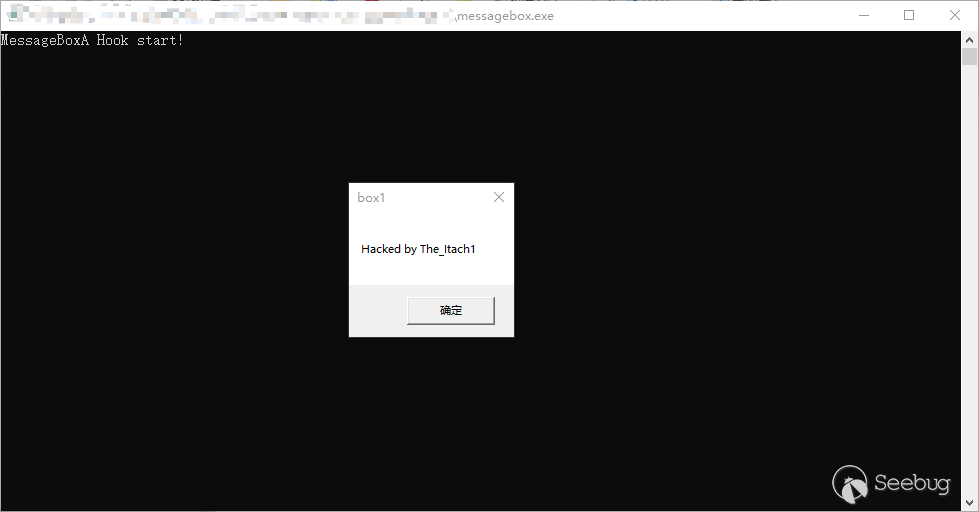
效果如下,可以看出當hook時,彈窗的內容被修改了,不hook時,就是正常的彈窗了。
而且minihook相比于IAT hook,或者Detours,感覺操作上更加的簡便。
DirectX11
DirectX 簡介
DirectX 是 Windows 中的一組組件,允許軟件(主要且尤其是游戲)直接與視頻和音頻硬件結合使用。 使用 DirectX 的游戲可以更有效地使用內置于硬件的多媒體加速器功能,從而改善你的整體多媒體體驗。
為什么要掛鉤DirectX
在為游戲創建作弊時,渲染額外的內容或修改模型在游戲中的渲染方式遲早可能需要。有多種技術可以實現這一點,但最常見的技術之一是掛鉤 DirectX API 的 3D 圖形組件。
比如說D3D HOOK實現骨骼透視,實際上就是hookD3D繪制3D模型都需要調用的DrawIndexedPrimitive()函數,然后判斷模型,修改其Z軸深度緩存,從而實現模型透視,還有就是這篇文章要講到的,通過Hook DirectX11中呈現渲染圖像的函數,來達到在游戲窗口上多添加一個imgui的輔助窗口。
Direct3D11初始化
Direct3D11學習:(三)Direct3D11初始化 - 郭小雷 - 博客園 (cnblogs.com) 可以先看上面這篇文章,初步了解下Direct3D11初始化的過程,我們需要注意的是其中的創建一個渲染目標視圖。
ID3D11RenderTargetView* mRenderTargetView;
ID3D11Texture2D* backBuffer;
// 獲取一個交換鏈的后臺緩沖區指針
mSwapChain->GetBuffer(0,__uuidof(ID3D11Texture2D), reinterpret_cast<void**>(&backBuffer));
// 創建渲染目標視圖
md3dDevice->CreateRenderTargetView(backBuffer, 0, &mRenderTargetView);
// 每調用一次GetBuffer方法,后臺緩沖區的COM引用計數就會遞增一次。我們需要在使用完之后釋放它
ReleaseCOM(backBuffer);
而什么是渲染呢 在Direct3D中,一個設備對象至少包含兩個顯示緩存區:當前緩存區(Front Buffer)和后備緩存區(Back Buffer),前者可以看成Direct3D窗口的映射。當我們渲染圖形時,實際上并不是直接在窗口上輸出,而是在后備緩存區上繪圖。渲染完畢后,交換兩個緩存區,使原來的后備緩存區變成當前緩存區,從而實現窗口刷新。快速重復此過程,就會在屏幕上形成連續的動畫。
所以想要在游戲窗口,再加一個imgui的窗口,我們就需要在其執行繪制函數前,多創建一個渲染目標視圖到其后備緩存區,這樣后面繪制的時候,就也會繪制我們新添的imgui窗口。
Imgui
Dear Imgui 是一個用于 C++ 的無膨脹圖形用戶界面庫。它輸出優化的頂點緩沖區,您可以在啟用 3D 管道的應用程序中隨時渲染這些緩沖區。它快速、可移植、與渲染器無關且自包含(無外部依賴項)。
Imgui的example很多,其中就有example_win32_directx11的例子,只不過是開發的角度,不像游戲是已經開發出來的exe,所以對于游戲,是需要對關鍵函數進行hook的。
下面來分析這個example_win32_directx11。
// Dear ImGui: standalone example application for DirectX 11
// If you are new to Dear ImGui, read documentation from the docs/ folder + read the top of imgui.cpp.
// Read online: https://github.com/ocornut/imgui/tree/master/docs

#include "imgui.h"
#include "imgui_impl_win32.h"
#include "imgui_impl_dx11.h"
#include <d3d11.h>
#include <tchar.h>

// Data
static ID3D11Device*            g_pd3dDevice = NULL;
static ID3D11DeviceContext*     g_pd3dDeviceContext = NULL;
static IDXGISwapChain*          g_pSwapChain = NULL;
static ID3D11RenderTargetView*  g_mainRenderTargetView = NULL;

// Forward declarations of helper functions
bool CreateDeviceD3D(HWND hWnd);
void CleanupDeviceD3D();
void CreateRenderTarget();
void CleanupRenderTarget();
LRESULT WINAPI WndProc(HWND hWnd, UINT msg, WPARAM wParam, LPARAM lParam);

// Main code
int main(int, char**)
{
    // Create application window
    //ImGui_ImplWin32_EnableDpiAwareness();
    WNDCLASSEXW wc = { sizeof(wc), CS_CLASSDC, WndProc, 0L, 0L, GetModuleHandle(NULL), NULL, NULL, NULL, NULL, L"ImGui Example", NULL };
    ::RegisterClassExW(&wc);
    HWND hwnd = ::CreateWindowW(wc.lpszClassName, L"Dear ImGui DirectX11 Example", WS_OVERLAPPEDWINDOW, 100, 100, 1280, 800, NULL, NULL, wc.hInstance, NULL);

    // Initialize Direct3D
    if (!CreateDeviceD3D(hwnd))
    {
        CleanupDeviceD3D();
        ::UnregisterClassW(wc.lpszClassName, wc.hInstance);
        return 1;
    }

    // Show the window
    ::ShowWindow(hwnd, SW_SHOWDEFAULT);
    ::UpdateWindow(hwnd);

    // Setup Dear ImGui context
    IMGUI_CHECKVERSION();
    ImGui::CreateContext();
    ImGuiIO& io = ImGui::GetIO(); (void)io;
    //io.ConfigFlags |= ImGuiConfigFlags_NavEnableKeyboard;     // Enable Keyboard Controls
    //io.ConfigFlags |= ImGuiConfigFlags_NavEnableGamepad;      // Enable Gamepad Controls

    // Setup Dear ImGui style
    ImGui::StyleColorsDark();
    //ImGui::StyleColorsLight();

    // Setup Platform/Renderer backends
    ImGui_ImplWin32_Init(hwnd);
    ImGui_ImplDX11_Init(g_pd3dDevice, g_pd3dDeviceContext);


    // Our state
    bool show_demo_window = true;
    bool show_another_window = false;
    ImVec4 clear_color = ImVec4(0.45f, 0.55f, 0.60f, 1.00f);

    // Main loop
    bool done = false;
    while (!done)
    {
        // Poll and handle messages (inputs, window resize, etc.)
        // See the WndProc() function below for our to dispatch events to the Win32 backend.
        MSG msg;
        while (::PeekMessage(&msg, NULL, 0U, 0U, PM_REMOVE))
        {
            ::TranslateMessage(&msg);
            ::DispatchMessage(&msg);
            if (msg.message == WM_QUIT)
                done = true;
        }
        if (done)
            break;

        // Start the Dear ImGui frame
        ImGui_ImplDX11_NewFrame();
        ImGui_ImplWin32_NewFrame();
        ImGui::NewFrame();

        // 1. Show the big demo window (Most of the sample code is in ImGui::ShowDemoWindow()! You can browse its code to learn more about Dear ImGui!).
        if (show_demo_window)
            ImGui::ShowDemoWindow(&show_demo_window);

        // Rendering
        ImGui::Render();
        const float clear_color_with_alpha[4] = { clear_color.x * clear_color.w, clear_color.y * clear_color.w, clear_color.z * clear_color.w, clear_color.w };
        g_pd3dDeviceContext->OMSetRenderTargets(1, &g_mainRenderTargetView, NULL);
        g_pd3dDeviceContext->ClearRenderTargetView(g_mainRenderTargetView, clear_color_with_alpha);
        ImGui_ImplDX11_RenderDrawData(ImGui::GetDrawData());

        g_pSwapChain->Present(1, 0); // Present with vsync
        //g_pSwapChain->Present(0, 0); // Present without vsync
    }

    // Cleanup
    ImGui_ImplDX11_Shutdown();
    ImGui_ImplWin32_Shutdown();
    ImGui::DestroyContext();

    CleanupDeviceD3D();
    ::DestroyWindow(hwnd);
    ::UnregisterClassW(wc.lpszClassName, wc.hInstance);

    return 0;
}

// Helper functions

bool CreateDeviceD3D(HWND hWnd)
{
    // Setup swap chain
    DXGI_SWAP_CHAIN_DESC sd;
    ZeroMemory(&sd, sizeof(sd));
    sd.BufferCount = 2;
    sd.BufferDesc.Width = 0;
    sd.BufferDesc.Height = 0;
    sd.BufferDesc.Format = DXGI_FORMAT_R8G8B8A8_UNORM;
    sd.BufferDesc.RefreshRate.Numerator = 60;
    sd.BufferDesc.RefreshRate.Denominator = 1;
    sd.Flags = DXGI_SWAP_CHAIN_FLAG_ALLOW_MODE_SWITCH;
    sd.BufferUsage = DXGI_USAGE_RENDER_TARGET_OUTPUT;
    sd.OutputWindow = hWnd;
    sd.SampleDesc.Count = 1;
    sd.SampleDesc.Quality = 0;
    sd.Windowed = TRUE;
    sd.SwapEffect = DXGI_SWAP_EFFECT_DISCARD;

    UINT createDeviceFlags = 0;
    //createDeviceFlags |= D3D11_CREATE_DEVICE_DEBUG;
    D3D_FEATURE_LEVEL featureLevel;
    const D3D_FEATURE_LEVEL featureLevelArray[2] = { D3D_FEATURE_LEVEL_11_0, D3D_FEATURE_LEVEL_10_0, };
    if (D3D11CreateDeviceAndSwapChain(NULL, D3D_DRIVER_TYPE_HARDWARE, NULL, createDeviceFlags, featureLevelArray, 2, D3D11_SDK_VERSION, &sd, &g_pSwapChain, &g_pd3dDevice, &featureLevel, &g_pd3dDeviceContext) != S_OK)
        return false;

    CreateRenderTarget();
    return true;
}

void CleanupDeviceD3D()
{
    CleanupRenderTarget();
    if (g_pSwapChain) { g_pSwapChain->Release(); g_pSwapChain = NULL; }
    if (g_pd3dDeviceContext) { g_pd3dDeviceContext->Release(); g_pd3dDeviceContext = NULL; }
    if (g_pd3dDevice) { g_pd3dDevice->Release(); g_pd3dDevice = NULL; }
}

void CreateRenderTarget()
{
    ID3D11Texture2D* pBackBuffer;
    g_pSwapChain->GetBuffer(0, IID_PPV_ARGS(&pBackBuffer));
    g_pd3dDevice->CreateRenderTargetView(pBackBuffer, NULL, &g_mainRenderTargetView);
    pBackBuffer->Release();
}

void CleanupRenderTarget()
{
    if (g_mainRenderTargetView) { g_mainRenderTargetView->Release(); g_mainRenderTargetView = NULL; }
}

// Forward declare message handler from imgui_impl_win32.cpp
extern IMGUI_IMPL_API LRESULT ImGui_ImplWin32_WndProcHandler(HWND hWnd, UINT msg, WPARAM wParam, LPARAM lParam);

// Win32 message handler
// You can read the io.WantCaptureMouse, io.WantCaptureKeyboard flags to tell if dear imgui wants to use your inputs.
// - When io.WantCaptureMouse is true, do not dispatch mouse input data to your main application, or clear/overwrite your copy of the mouse data.
// - When io.WantCaptureKeyboard is true, do not dispatch keyboard input data to your main application, or clear/overwrite your copy of the keyboard data.
// Generally you may always pass all inputs to dear imgui, and hide them from your application based on those two flags.
LRESULT WINAPI WndProc(HWND hWnd, UINT msg, WPARAM wParam, LPARAM lParam)
{
    if (ImGui_ImplWin32_WndProcHandler(hWnd, msg, wParam, lParam))
        return true;

    switch (msg)
    {
    case WM_SIZE:
        if (g_pd3dDevice != NULL && wParam != SIZE_MINIMIZED)
        {
            CleanupRenderTarget();
            g_pSwapChain->ResizeBuffers(0, (UINT)LOWORD(lParam), (UINT)HIWORD(lParam), DXGI_FORMAT_UNKNOWN, 0);
            CreateRenderTarget();
        }
        return 0;
    case WM_SYSCOMMAND:
        if ((wParam & 0xfff0) == SC_KEYMENU) // Disable ALT application menu
            return 0;
        break;
    case WM_DESTROY:
        ::PostQuitMessage(0);
        return 0;
    }
    return ::DefWindowProc(hWnd, msg, wParam, lParam);
}
簡單整理了下過程
|--main()
|       |--CreateWindowW() 創建一個windows窗口用于測試imgui
|       |--CreateDeviceD3D()
|       |           |--D3D11CreateDeviceAndSwapChain() 創建設備、設備上下文和交換鏈
|       |           |--CreateRenderTarget() 創建渲染目標視圖
|       |--ImGui_Init ImGui初始化
|       |--while(loop)
|       |   |--PeekMessage,檢測是否收到quit的消息
|       |   |--ImGui 場景的設置
|       |   |--g_pd3dDeviceContext->OMSetRenderTargets 將視圖綁定到輸出合并器階段
|       |   |--g_pd3dDeviceContext->ClearRenderTargetView 貌似和繪制背景有關
|       |   |--g_pSwapChain->Present(1, 0);開始繪制
|       |   |--后面就是一些結束清理過程了


|--WndProc()
|       |--ImGui_ImplWin32_WndProcHandler(hWnd, msg, wParam, lParam) 如果是Imgui的窗口,就交給Imgui的消息處理函數進行處理
|       |--switch(msg)
|       |       |--case WM_SIZE: 當窗口大小改變時產生這個消息
|       |       |   |--CleanupRenderTarget();g_pSwapChain->ResizeBuffers;CreateRenderTarget();先清理渲染目標視圖,然后在創建一個。
|       |       |--case WM_DESTROY: 接收到WM_DESTROY時
|       |       |   |--PostQuitMessage(0) 發送消息,結束main函數中的while循環。
Hook的函數
imgui的example相當于就是實現了一個使用imgui窗口的D3D11的初始化過程,但是對于游戲,我們不是開發者,不能直接修改代碼,所以就只有去hook其中的關鍵函數,在執行關鍵函數前,或者關鍵函數后,執行我們的代碼。
所以我們需要明確對于DirectX11,需要hook哪些函數,通過Imgui提供的樣例,我們可以知道在DirectX11需要Hook的有三個函數。
- IDXGISwapChain::Present,繪制函數,我們需要在繪制函數前,自己創建一個渲染目標視圖,然后是Imgui的初始化和窗口設置。
- IDXGISwapChain::ResizeBuffers,窗口大小變換時會調用的函數,為了我們的imgui窗口也能夠隨窗口size變換而正常執行,我們需要hook這個函數,對原渲染目標視圖進行release,然后重新創建。
- WndProc,游戲窗口的消息處理函數,對于imgui窗口的消息,我們需要調用ImGui_ImplWin32_WndProcHandler()來進行處理。
和DirectX9有些不同的是,DirectX11的繪制函數和RESIZE函數是不一樣的。
| DirectX9 | DirectX11 | |
|---|---|---|
| 向用戶呈現渲染圖像 | IDirect3DDevice9::EndScene | IDXGISwapChain::Present |
| 改變窗口size調用的函數 | IDirect3DDevice9::Reset | IDXGISwapChain::ResizeBuffers |
實戰某游戲
主要還是將github上那個項目中DirectX11的部分分離了出來,然后我簡化了其imgui的窗口。
dllmain.cpp,主要就是先創建一個用于輸入調試信息的控制臺,然后遍歷了窗口,準確獲取到bf1的窗口句柄,minihook的初始化。
// dllmain.cpp : 定義 DLL 應用程序的入口點。
#include "includes.h"

namespace console
{
    FILE* output_stream = nullptr;

    void attach(const char* name)
    {
        if (AllocConsole())
        {
            freopen_s(&output_stream, "conout$", "w", stdout);
        }
        SetConsoleTitle(name);
    }

    void detach()
    {
        if (output_stream)
        {
            fclose(output_stream);
        }
        FreeConsole();
    }
}


#define RAISE_ERROR(check_var, error_message, success_message) \
if (!check_var) \
{ \
    MessageBoxA(NULL, error_message, "alternative hack", MB_OK | MB_ICONERROR); \
    FreeLibraryAndExitThread(globals::hmModule, 1); \
} \
else \
{ \
    std::cout << success_message << "0x" << std::hex << check_var << std::endl; \
} \

BOOL CALLBACK EnumWindowsProc(HWND hwnd, LPARAM lParam)
{
    auto process_id_that_interests_us_very_much = GetCurrentProcessId();

    HWND* cur_hwnd = (HWND*)lParam;

    if ((!GetWindow(hwnd, GW_OWNER)) && IsWindow(hwnd))
    {
        DWORD process_id = NULL;
        GetWindowThreadProcessId(hwnd, &process_id);

        char* text_window = new char[255];

        GetWindowText(hwnd, text_window, 255);

        if (process_id_that_interests_us_very_much == process_id && strstr(text_window, "Battlefield") && !strstr(text_window, ".exe"))
        {
            std::cout << "Window: " << text_window << std::endl;
            *cur_hwnd = hwnd;
            return 0;
        }
    }

    return 1;
}

void SetupHackThread(void)
{
    //開啟一個控制臺用來輸出一些信息。
    console::attach("bf1 console debug");

    //獲取Battlefield窗口的句柄
    EnumWindows(&EnumWindowsProc, (LPARAM)&globals::hGame);

    RAISE_ERROR(globals::hGame, "Error find window", "window handle: ");

    //minhook的初始化
    if (MH_Initialize() != MH_OK)
    {
        MessageBoxA(NULL, "Error initialize minhook", "alternative hack", MB_OK | MB_ICONERROR);
    }
    //DirectX11 Hook
    m_pHook->SetupDX11Hook();

    RAISE_ERROR(m_pHook->pPresentAddress, "Error hook DX11", "present: ");
    RAISE_ERROR(m_pHook->pResizeBuffersAddress, "Error hook DX11", "resizebuffers: ");

    //調用SetWindowLongPtr函數修改了游戲窗口的WndProc,也就是窗口的消息處理函數,具體的消息處理函數將在對應函數位置進行分析。
    m_pHook->SetupWndProcHook();
    RAISE_ERROR(m_pHook->pWndProc, "Error hook wndproc", "wndproc: ")

    while (true)
    {
        Sleep(228);
    }

}

BOOL APIENTRY DllMain( HMODULE hModule,
                       DWORD  ul_reason_for_call,
                       LPVOID lpReserved
                     )
{
    switch (ul_reason_for_call)
    {
    case DLL_PROCESS_ATTACH:
        CreateThread(NULL, NULL, (LPTHREAD_START_ROUTINE)SetupHackThread, NULL, NULL, NULL);
    case DLL_THREAD_ATTACH:
    case DLL_THREAD_DETACH:
    case DLL_PROCESS_DETACH:
        break;
    }
    return TRUE;
}
hook.h,hook類的定義,以及聲明了幾個變量,交換鏈、設備、設備上下文、渲染目標子資源。
#pragma once
class CHook
{
public:
    PVOID pPresentAddress;
    PVOID pResizeBuffersAddress;
    WNDPROC pWndProc;
    void SetupDX11Hook();
    void SetupWndProcHook();
};
//智能指針類,相當于創建了一個指向CHook類的空指針。
extern std::unique_ptr<CHook>m_pHook;
extern IDXGISwapChain* swapchain;
extern ID3D11Device* device;
extern ID3D11DeviceContext* context;
extern ID3D11RenderTargetView* render_view;
hook.cpp,主要就是之前提到三個函數的hook,然后代碼流程和example_win32_directx11差不多。
#include "../includes.h"

std::unique_ptr<CHook>m_pHook = std::make_unique<CHook>();

IDXGISwapChain* swapchain = nullptr;
ID3D11Device* device = nullptr;
ID3D11DeviceContext* context = nullptr;
ID3D11RenderTargetView* render_view = nullptr;

using fPresent = HRESULT(__fastcall*)(IDXGISwapChain*, UINT, UINT);
fPresent pPresent = NULL;

using fResizeBuffers = HRESULT(__fastcall*)(IDXGISwapChain*, UINT, UINT, UINT, DXGI_FORMAT, UINT);
fResizeBuffers pResizeBuffers = NULL;

static bool renderview_lost = true;


namespace vars
{
    static bool bMenuOpen=true;
}


enum IDXGISwapChainvTable //for dx10 / dx11
{
    QUERY_INTERFACE,
    ADD_REF,
    RELEASE,
    SET_PRIVATE_DATA,
    SET_PRIVATE_DATA_INTERFACE,
    GET_PRIVATE_DATA,
    GET_PARENT,
    GET_DEVICE,
    PRESENT,
    GET_BUFFER,
    SET_FULLSCREEN_STATE,
    GET_FULLSCREEN_STATE,
    GET_DESC,
    RESIZE_BUFFERS,
    RESIZE_TARGET,
    GET_CONTAINING_OUTPUT,
    GET_FRAME_STATISTICS,
    GET_LAST_PRESENT_COUNT
};


void InitImGui()
{
    IMGUI_CHECKVERSION();
    ImGui::CreateContext();
    ImGuiIO& io = ImGui::GetIO(); (void)io;
    ImGui_ImplWin32_Init(globals::hGame);
    ImGui_ImplDX11_Init(device, context);
}


void BeginScene()
{
    ImGui_ImplDX11_NewFrame();
    ImGui_ImplWin32_NewFrame();
    ImGui::NewFrame();
    bool show_demo_window = true;
    ImGui::ShowDemoWindow(&show_demo_window);
    ImGui::Begin("Another Window", &show_demo_window);   // Pass a pointer to our bool variable (the window will have a closing button that will clear the bool when clicked)
    ImGui::Text("Hello from another window!");
    static int counter = 0;
    if (ImGui::Button("Button"))                            // Buttons return true when clicked (most widgets return true when edited/activated)
        counter++;
    ImGui::Text("counter = %d", counter);
    ImGui::End();
    ImGui::Render();
    ImGui_ImplDX11_RenderDrawData(ImGui::GetDrawData());
}

HRESULT __fastcall Present_Hooked(IDXGISwapChain* pChain, UINT SyncInterval, UINT Flags)
{
    //第一次調用時,創建渲染目標視圖
    if (renderview_lost)
    {
        if (SUCCEEDED(pChain->GetDevice(__uuidof(ID3D11Device), (void**)&device)))
        {
            device->GetImmediateContext(&context);

            ID3D11Texture2D* pBackBuffer;
            pChain->GetBuffer(0, __uuidof(ID3D11Texture2D), (LPVOID*)&pBackBuffer);
            device->CreateRenderTargetView(pBackBuffer, NULL, &render_view);
            pBackBuffer->Release();

            std::cout << __FUNCTION__ << " > renderview successfully received!" << std::endl;
            renderview_lost = false;
        }
    }
    //ImGui的初始化代碼,套路代碼
    static auto once = [pChain, SyncInterval, Flags]()
    {
        InitImGui();
        std::cout << __FUNCTION__ << " > first called!" << std::endl;
        return true;
    }();

    //將視圖綁定到輸出合并器階段
    context->OMSetRenderTargets(1, &render_view, NULL);

    //imgui窗口的繪制
    BeginScene();

    return pPresent(pChain, SyncInterval, Flags);
}


HRESULT __fastcall ResizeBuffers_hooked(IDXGISwapChain* pChain, UINT BufferCount, UINT Width, UINT Height, DXGI_FORMAT NewFormat, UINT Flags)
{
    static auto once = []()
    {
        std::cout << __FUNCTION__ << " > first called!" << std::endl;
        return true;
    }();

    //釋放掉渲染目標視圖
    render_view->Release();
    render_view = nullptr;
    //將標志改為true,這樣下次Present_Hooked,又會創建一個渲染目標視圖。
    renderview_lost = true;

    //這兩個沒看懂,imgui的example_win32_directx9有類似的代碼,但是
    ImGui_ImplDX11_CreateDeviceObjects();
    ImGui_ImplDX11_InvalidateDeviceObjects();

    return pResizeBuffers(pChain, BufferCount, Width, Height, NewFormat, Flags);
}

void CHook::SetupDX11Hook()
{
    //創建設備、設備上下文和交換鏈,只需要一個東西,就是目標窗口的hWnd
    D3D_FEATURE_LEVEL feature_level = D3D_FEATURE_LEVEL_11_0;
    DXGI_SWAP_CHAIN_DESC scd{};
    ZeroMemory(&scd, sizeof(scd));
    scd.BufferCount = 1;
    scd.BufferDesc.Format = DXGI_FORMAT_R8G8B8A8_UNORM;
    scd.BufferDesc.Scaling = DXGI_MODE_SCALING_UNSPECIFIED;
    scd.BufferDesc.ScanlineOrdering = DXGI_MODE_SCANLINE_ORDER_UNSPECIFIED;
    scd.BufferUsage = DXGI_USAGE_RENDER_TARGET_OUTPUT;
    scd.Flags = DXGI_SWAP_CHAIN_FLAG_ALLOW_MODE_SWITCH;
    scd.OutputWindow = globals::hGame;
    scd.SampleDesc.Count = 1;
    scd.SwapEffect = DXGI_SWAP_EFFECT_DISCARD;
    scd.Windowed = TRUE;
    scd.BufferDesc.RefreshRate.Numerator = 60;
    scd.BufferDesc.RefreshRate.Denominator = 1;

    //https://learn.microsoft.com/en-us/windows/win32/api/d3d11/nf-d3d11-d3d11createdeviceandswapchain
    if (FAILED(D3D11CreateDeviceAndSwapChain(NULL, D3D_DRIVER_TYPE_HARDWARE, NULL, NULL, &feature_level, 1, D3D11_SDK_VERSION, &scd, &swapchain, &device, NULL, &context)))
    {
        std::cout << "failed to create device\n";
        return;
    }

    //*取一級指針的值,獲取到IDXGISwapChain接口,https://learn.microsoft.com/en-us/windows/win32/api/dxgi/nn-dxgi-idxgiswapchain
    void** pVTableSwapChain = *reinterpret_cast<void***>(swapchain);

    //獲取需要hook的兩個函數的地址,就是IDXGISwapChain接口提供的兩個函數。

    //向用戶呈現渲染圖像。IDXGISwapChain::Present
    this->pPresentAddress = reinterpret_cast<LPVOID>(pVTableSwapChain[IDXGISwapChainvTable::PRESENT]);
    //更改交換鏈的后臺緩沖區大小、格式和緩沖區數量。這應該在應用程序窗口大小調整時調用。IDXGISwapChain::ResizeBuffers
    this->pResizeBuffersAddress = reinterpret_cast<LPVOID>(pVTableSwapChain[IDXGISwapChainvTable::RESIZE_BUFFERS]);

    //開始hook,主要過程就是在執行原Present函數前,創建渲染目標視圖,然后imgui初始化,繪制
    if (MH_CreateHook(this->pPresentAddress, &Present_Hooked, (LPVOID*)&pPresent) != MH_OK
        || MH_EnableHook(this->pPresentAddress) != MH_OK)
    {
        std::cout << "failed create hook present\n";
        return;
    }

    //這個函數就是當目標窗口的size改變時會調用的。
    if (MH_CreateHook(pResizeBuffersAddress, &ResizeBuffers_hooked, (LPVOID*)&pResizeBuffers) != MH_OK
        || MH_EnableHook(pResizeBuffersAddress) != MH_OK)
    {
        std::cout << "failed create hook resizebuffers\n";
        return;
    }
}

LRESULT ImGui_ImplWin32_WndProcHandler(HWND hwnd, UINT msg, WPARAM wParam, LPARAM lParam);

LRESULT CALLBACK WndProc_Hooked(HWND hwnd, UINT uMsg, WPARAM wParam, LPARAM lParam)
{
    static auto once = []()
    {
        std::cout << __FUNCTION__ << " first called!" << std::endl;

        return true;
    }();

    //如果按下INS鍵,就打開或關閉外掛設置界面,如果之前是關閉的就打開,如果是打開的就關閉。
    if (uMsg == WM_KEYDOWN && wParam == VK_INSERT)
    {
        vars::bMenuOpen = !vars::bMenuOpen;
        return FALSE;
    }

    //如果外掛設置界面是打開狀態,則調用ImGui的消息處理
    if (vars::bMenuOpen && ImGui_ImplWin32_WndProcHandler(hwnd, uMsg, wParam, lParam))
    {
        return TRUE;
    }

    //調用原窗口處理消息的函數來處理其他消息,https://blog.csdn.net/wangpengk7788/article/details/55053053
    return CallWindowProc(m_pHook->pWndProc, hwnd, uMsg, wParam, lParam);
}

void CHook::SetupWndProcHook()
{
    this->pWndProc = (WNDPROC)SetWindowLongPtr(globals::hGame, GWLP_WNDPROC, (LONG_PTR)WndProc_Hooked);
}
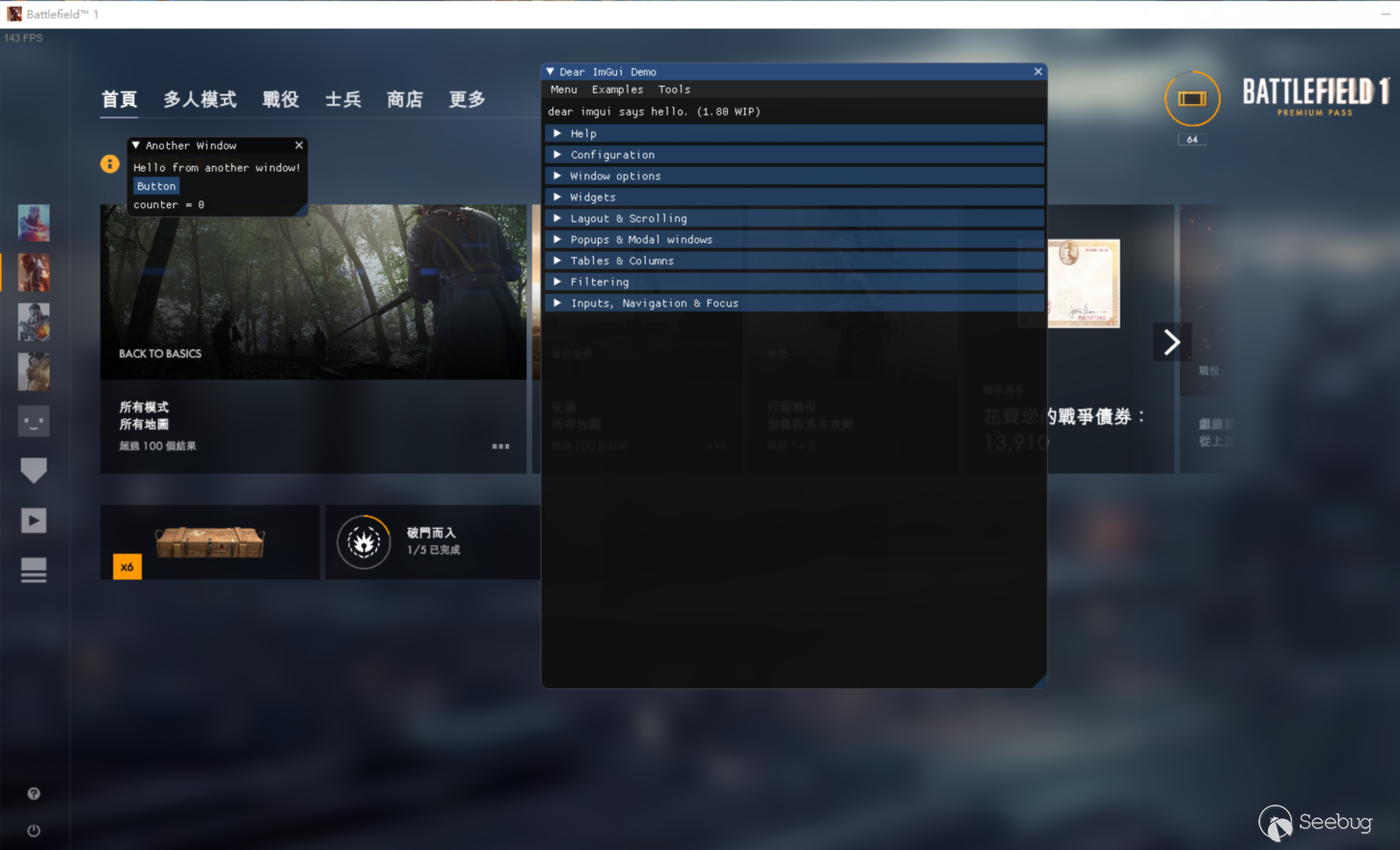
最后效果如下。
DirectX9
前面已經提到DirectX11和DirectX9,是有些細微差別的,實際上其過程還相對于DirectX11減少了許多步驟,這里我同樣編寫了下DirectX9 Hook的代碼,并找了一款游戲進行測驗。
其代碼過程也可參考imgui中的example_win32_directx9,同樣我們需要hook一些函數。
實戰某游戲
dllmain.cpp
// dllmain.cpp : 定義 DLL 應用程序的入口點。
#include "includes.h"

namespace console
{
    FILE* output_stream = nullptr;

    void attach(const char* name)
    {
        if (AllocConsole())
        {
            freopen_s(&output_stream, "conout$", "w", stdout);
        }
        SetConsoleTitle(name);
    }

    void detach()
    {
        if (output_stream)
        {
            fclose(output_stream);
        }
        FreeConsole();
    }
}

#define RAISE_ERROR(check_var, error_message, success_message) \
if (!check_var) \
{ \
    MessageBoxA(NULL, error_message, "csgo hack", MB_OK | MB_ICONERROR); \
    FreeLibraryAndExitThread(globals::hmModule, 1); \
} \
else \
{ \
    std::cout << success_message << "0x" << std::hex << check_var << std::endl; \
} \

BOOL CALLBACK EnumWindowsProc(HWND hwnd, LPARAM lParam)
{
    auto process_id_that_interests_us_very_much = GetCurrentProcessId();

    HWND* cur_hwnd = (HWND*)lParam;

    if ((!GetWindow(hwnd, GW_OWNER)) && IsWindow(hwnd))
    {
        DWORD process_id = NULL;
        GetWindowThreadProcessId(hwnd, &process_id);

        char* text_window = new char[255];

        GetWindowText(hwnd, text_window, 255);

        if (process_id_that_interests_us_very_much == process_id && strstr(text_window, "Counter-Strike") && !strstr(text_window, ".exe"))
        {
            std::cout << "Window: " << text_window << std::endl;
            *cur_hwnd = hwnd;
            return 0;
        }
    }

    return 1;
}

void SetupHackThread(void)
{
    //開啟一個控制臺用來輸出一些信息。
    console::attach("csgo console debug");

    //獲取窗口的句柄
    EnumWindows(&EnumWindowsProc, (LPARAM)&globals::hGame);

    RAISE_ERROR(globals::hGame, "Error find window", "window handle: ");


    //minhook的初始化
    if (MH_Initialize() != MH_OK)
    {
        MessageBoxA(NULL, "Error initialize minhook", "csgo hack", MB_OK | MB_ICONERROR);
    }
    //DirectX9 Hook
    m_pHook->SetupDX9Hook();

    RAISE_ERROR(m_pHook->pEndSceneAddress, "Error hook DX9", "EndScene");
    RAISE_ERROR(m_pHook->pResetAddress, "Error hook DX9", "Reset: ");

    //調用SetWindowLongPtr函數修改了游戲窗口的WndProc,也就是窗口的消息處理函數,具體的消息處理函數將在對應函數位置進行分析。
    m_pHook->SetupWndProcHook();
    RAISE_ERROR(m_pHook->pWndProc, "Error hook wndproc", "wndproc: ")

        while (true)
        {
            if (globals::unload_dll) break;
            Sleep(228);
        }


    Sleep(30);

    ImGui_ImplDX9_Shutdown();
    ImGui_ImplWin32_Shutdown();
    ImGui::DestroyContext();
    Sleep(100);

    MH_DisableHook(m_pHook->pEndSceneAddress);
    MH_RemoveHook(m_pHook->pEndSceneAddress);
    Sleep(100);

    MH_DisableHook(m_pHook->pResetAddress);
    MH_RemoveHook(m_pHook->pResetAddress);

    MH_Uninitialize();
    Sleep(100);

    SetWindowLongPtr(globals::hGame, GWLP_WNDPROC, (LONG_PTR)m_pHook->pWndProc);

    Sleep(100);

    //free library
    std::cout << "free library...\n\n";
    FreeLibraryAndExitThread(globals::hmModule, 0);
}

BOOL APIENTRY DllMain( HMODULE hModule,
                       DWORD  ul_reason_for_call,
                       LPVOID lpReserved
                     )
{
    switch (ul_reason_for_call)
    {
    case DLL_PROCESS_ATTACH:
        globals::hmModule = hModule;
        CreateThread(NULL, NULL, (LPTHREAD_START_ROUTINE)SetupHackThread, NULL, NULL, NULL);
    case DLL_THREAD_ATTACH:
    case DLL_THREAD_DETACH:
    case DLL_PROCESS_DETACH:
        break;
    }
    return TRUE;
}
hook.h
#pragma once
class CHook
{
public:
    PVOID pEndSceneAddress;
    PVOID pResetAddress;
    PVOID pSetCursorPosAddress;
    WNDPROC pWndProc;
    void SetupDX9Hook();
    void SetupWndProcHook();
};
//智能指針類,相當于創建了一個指向CHook類的空指針。
extern std::unique_ptr<CHook>m_pHook;

extern IDirect3D9* g_pD3D;
extern IDirect3DDevice9* device;
hook.cpp
#include "../includes.h"

std::unique_ptr<CHook>m_pHook = std::make_unique<CHook>();

using fEndscene = HRESULT(__stdcall*)(IDirect3DDevice9*);
fEndscene pEndscene = NULL;
using fReset = long(__stdcall*)(IDirect3DDevice9*, D3DPRESENT_PARAMETERS*);
fReset pReset = NULL;

IDirect3D9* g_pD3D= nullptr;
IDirect3DDevice9* device = nullptr;
ID3D11DeviceContext* context = nullptr;

enum IDirect3DDevice9vTable //for dx9
{
    RESET = 16,
    ENDSCENE=42
};


namespace vars
{
    static bool bMenuOpen = true;
}
void InitImGui(IDirect3DDevice9* pd3dDevice)
{
    IMGUI_CHECKVERSION();
    ImGui::CreateContext();
    ImGuiIO& io = ImGui::GetIO(); (void)io;
    ImGui_ImplWin32_Init(globals::hGame);
    ImGui_ImplDX9_Init(pd3dDevice);
}

void BeginScene()
{
    // 界面開始繪制
    ImGui_ImplDX9_NewFrame();
    ImGui_ImplWin32_NewFrame();

    ImGui::NewFrame();
    bool show_demo_window = true;
    ImGui::ShowDemoWindow(&show_demo_window);
    ImGui::Begin("Another Window", &show_demo_window);   // Pass a pointer to our bool variable (the window will have a closing button that will clear the bool when clicked)
    ImGui::Text("Hello from another window!");
    static int counter = 0;
    if (ImGui::Button("Button"))                            // Buttons return true when clicked (most widgets return true when edited/activated)
        counter++;
    ImGui::Text("counter = %d", counter);
    ImGui::End();
    ImGui::Render();
    ImGui_ImplDX9_RenderDrawData(ImGui::GetDrawData());

}

HRESULT __stdcall EndScene_Hooked(IDirect3DDevice9* pd3dDevice)
{
    static auto once = [pd3dDevice]()
    {
        std::cout << __FUNCTION__ << " > first called!" << std::endl;
        InitImGui(pd3dDevice);
        return true;
    }();

    BeginScene();

    return pEndscene(pd3dDevice);
}

HRESULT __stdcall Reset_Hooked(IDirect3DDevice9* pd3dDevice, D3DPRESENT_PARAMETERS* pPresentationParameters)
{
    static auto once = []()
    {
        std::cout << __FUNCTION__ << " > first called!" << std::endl;
        return true;
    }();

    ImGui_ImplDX9_InvalidateDeviceObjects();
    //HRESULT ret= pReset(pd3dDevice, pPresentationParameters);
    ImGui_ImplDX9_CreateDeviceObjects();

    return pReset(pd3dDevice, pPresentationParameters);
}


void CHook::SetupDX9Hook()
{

    g_pD3D =Direct3DCreate9(D3D_SDK_VERSION);

    D3DPRESENT_PARAMETERS g_d3dpp = {};
    ZeroMemory(&g_d3dpp, sizeof(g_d3dpp));
    g_d3dpp.Windowed = TRUE;
    g_d3dpp.SwapEffect = D3DSWAPEFFECT_DISCARD;
    g_d3dpp.BackBufferFormat = D3DFMT_UNKNOWN;
    g_d3dpp.EnableAutoDepthStencil = TRUE;
    g_d3dpp.AutoDepthStencilFormat = D3DFMT_D16;
    //g_d3dpp.PresentationInterval = D3DPRESENT_INTERVAL_ONE;           // Present with vsync

    if (g_pD3D->CreateDevice(D3DADAPTER_DEFAULT, D3DDEVTYPE_HAL, globals::hGame, D3DCREATE_HARDWARE_VERTEXPROCESSING, &g_d3dpp, &device) < 0)
    {
        std::cout << "failed to create device\n";
        return;
    }

    void** pVTabledevice = *reinterpret_cast<void***>(device);


    this->pEndSceneAddress = reinterpret_cast<LPVOID>(pVTabledevice[IDirect3DDevice9vTable::ENDSCENE]);
    this->pResetAddress = reinterpret_cast<LPVOID>(pVTabledevice[IDirect3DDevice9vTable::RESET]);

    if (MH_CreateHook(this->pEndSceneAddress, &EndScene_Hooked, (LPVOID*)&pEndscene) != MH_OK
        || MH_EnableHook(this->pEndSceneAddress) != MH_OK)
    {
        std::cout << "failed create hook EndScene\n";
        return;
    }

    if (MH_CreateHook(this->pResetAddress, &Reset_Hooked, (LPVOID*)&pReset) != MH_OK
        || MH_EnableHook(this->pResetAddress) != MH_OK)
    {
        std::cout << "failed create hook Reset\n";
        return;
    }
}


LRESULT ImGui_ImplWin32_WndProcHandler(HWND hwnd, UINT msg, WPARAM wParam, LPARAM lParam);

LRESULT CALLBACK WndProc_Hooked(HWND hwnd, UINT uMsg, WPARAM wParam, LPARAM lParam)
{
    static auto once = []()
    {
        std::cout << __FUNCTION__ << " first called!" << std::endl;

        return true;
    }();

    //如果按下INS鍵,就打開或關閉外掛設置界面,如果之前是關閉的就打開,如果是打開的就關閉。
    if (uMsg == WM_KEYDOWN && wParam == VK_INSERT)
    {
        vars::bMenuOpen = !vars::bMenuOpen;
        return FALSE;
    }

    //如果設置界面是打開狀態,則調用ImGui的消息處理
    if (vars::bMenuOpen && ImGui_ImplWin32_WndProcHandler(hwnd, uMsg, wParam, lParam))
    {
        return TRUE;
    }

    //調用原窗口處理消息的函數來處理其他消息,https://blog.csdn.net/wangpengk7788/article/details/55053053
    return CallWindowProc(m_pHook->pWndProc, hwnd, uMsg, wParam, lParam);
}

void CHook::SetupWndProcHook()
{
    this->pWndProc = (WNDPROC)SetWindowLongPtr(globals::hGame, GWLP_WNDPROC, (LONG_PTR)WndProc_Hooked);
}
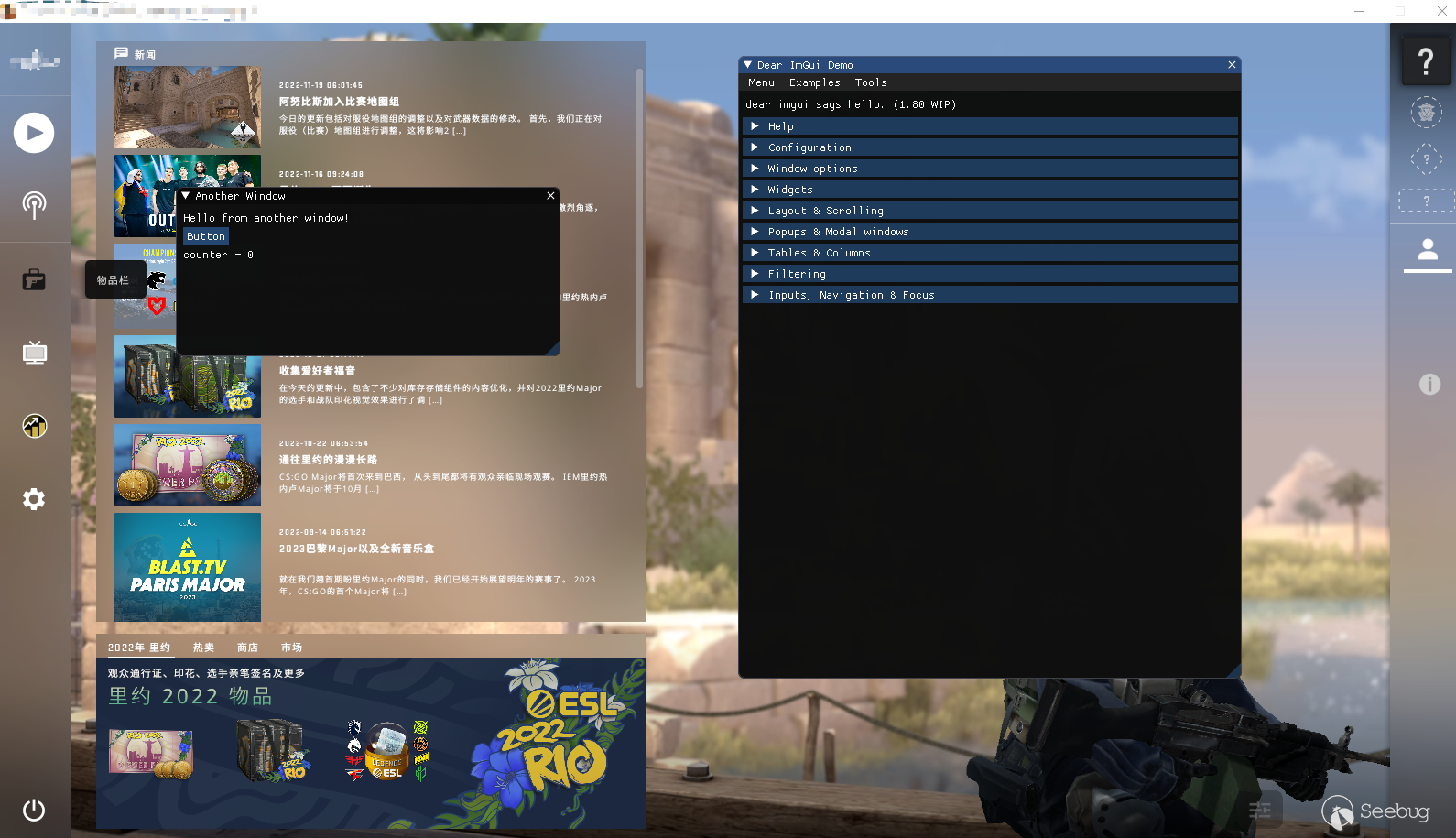
最終效果如下。
結語
實際上關于DirectX 還有很多有意思的地方,比如說經典的WalkHack,通過鉤取函數,實現獲取人物模型編號,以及修改Z軸深度緩存來達到想要的目的。還有對于imgui,也是有很多可以學習的地方,對比古老的Mfc窗口,或者自定義窗口,imgui的窗口簡單而美觀,并且實現起來也很方便。
 本文由 Seebug Paper 發布,如需轉載請注明來源。本文地址:http://www.bjnorthway.com/2037/