

作者:Ricter Z
原文鏈接:http://noahblog.#/vcenter-6-5-7-0-rce-lou-dong-fen-xi/
0x01. 漏洞簡介
vSphere 是 VMware 推出的虛擬化平臺套件,包含 ESXi、vCenter Server 等一系列的軟件。其中 vCenter Server 為 ESXi 的控制中心,可從單一控制點統一管理數據中心的所有 vSphere 主機和虛擬機,使得 IT 管理員能夠提高控制能力,簡化入場任務,并降低 IT 環境的管理復雜性與成本。
vSphere Client(HTML5)在 vCenter Server 插件中存在一個遠程執行代碼漏洞。未授權的攻擊者可以通過開放 443 端口的服務器向 vCenter Server 發送精心構造的請求,從而在服務器上寫入 webshell,最終造成遠程任意代碼執行。
0x02. 影響范圍
vmware:vcenter_server7.0 U1c 之前的 7.0 版本vmware:vcenter_server6.7 U3l 之前的 6.7 版本vmware:vcenter_server6.5 U3n 之前的 6.5 版本
0x03. 漏洞影響
VMware已評估此問題的嚴重程度為 嚴重 程度,CVSSv3 得分為 9.8。
0x04. 漏洞分析
vCenter Server 的 vROPS 插件的 API 未經過鑒權,存在一些敏感接口。其中 uploadova 接口存在一個上傳 OVA 文件的功能:
    @RequestMapping(
        value = {"/uploadova"},
        method = {RequestMethod.POST}
    )
    public void uploadOvaFile(@RequestParam(value = "uploadFile",required = true) CommonsMultipartFile uploadFile, HttpServletResponse response) throws Exception {
        logger.info("Entering uploadOvaFile api");
        int code = uploadFile.isEmpty() ? 400 : 200;
        PrintWriter wr = null;
...
        response.setStatus(code);
        String returnStatus = "SUCCESS";
        if (!uploadFile.isEmpty()) {
            try {
                logger.info("Downloading OVA file has been started");
                logger.info("Size of the file received  : " + uploadFile.getSize());
                InputStream inputStream = uploadFile.getInputStream();
                File dir = new File("/tmp/unicorn_ova_dir");
                if (!dir.exists()) {
                    dir.mkdirs();
                } else {
                    String[] entries = dir.list();
                    String[] var9 = entries;
                    int var10 = entries.length;

                    for(int var11 = 0; var11 < var10; ++var11) {
                        String entry = var9[var11];
                        File currentFile = new File(dir.getPath(), entry);
                        currentFile.delete();
                    }

                    logger.info("Successfully cleaned : /tmp/unicorn_ova_dir");
                }

                TarArchiveInputStream in = new TarArchiveInputStream(inputStream);
                TarArchiveEntry entry = in.getNextTarEntry();
                ArrayList result = new ArrayList();
代碼邏輯是將 TAR 文件解壓后上傳到 /tmp/unicorn_ova_dir 目錄。注意到如下代碼:
                while(entry != null) {
                    if (entry.isDirectory()) {
                        entry = in.getNextTarEntry();
                    } else {
                        File curfile = new File("/tmp/unicorn_ova_dir", entry.getName());
                        File parent = curfile.getParentFile();
                        if (!parent.exists()) {
                            parent.mkdirs();
直接將 TAR 的文件名與 /tmp/unicorn_ova_dir 拼接并寫入文件。如果文件名內存在 ../ 即可實現目錄遍歷。
對于 Linux 版本,可以創建一個包含 ../../home/vsphere-ui/.ssh/authorized_keys 的 TAR 文件并上傳后利用 SSH 登陸:
$ ssh 192.168.1.34 -lvsphere-ui

VMware vCenter Server 7.0.1.00100

Type: vCenter Server with an embedded Platform Services Controller

vsphere-ui@bogon [ ~ ]$ id
uid=1016(vsphere-ui) gid=100(users) groups=100(users),59001(cis)
針對 Windows 版本,可以在目標服務器上寫入 JSP webshell 文件,由于服務是 System 權限,所以可以任意文件寫。
0x05. 漏洞修復
升級到安全版本:
- vCenter Server 7.0 版本升級到 7.0.U1c
- vCenter Server 6.7版本升級到 6.7.U3l
- vCenter Server 6.5版本升級到 6.5 U3n
臨時修復建議
(針對暫時無法升級的服務器)
- SSH遠連到vCSA(或遠程桌面連接到Windows VC)
- 備份以下文件:
- Linux系統文件路徑為:/etc/vmware/vsphere-ui/compatibility-matrix.xml (vCSA)
- Windows文件路徑為:C:\ProgramData\VMware\vCenterServer\cfg\vsphere-ui (Windows VC)
- 使用文本編輯器將文件內容修改為:
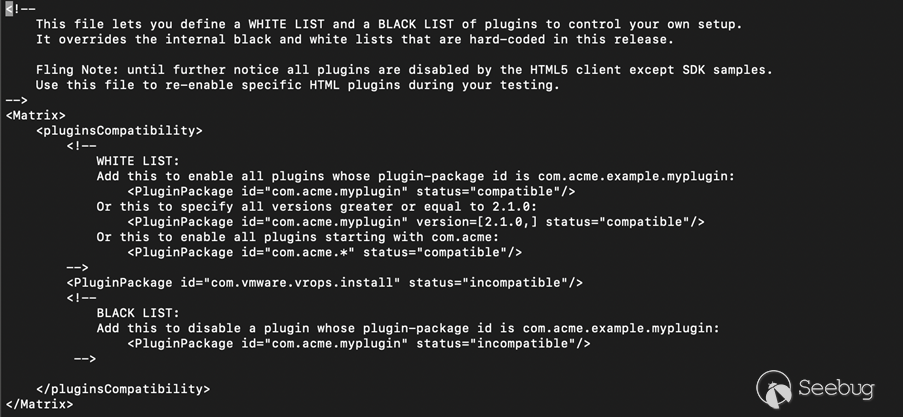
- 使用vmon-cli -r vsphere-ui命令重啟vsphere-ui服務
- 訪問https:///ui/vropspluginui/rest/services/checkmobregister,顯示404錯誤

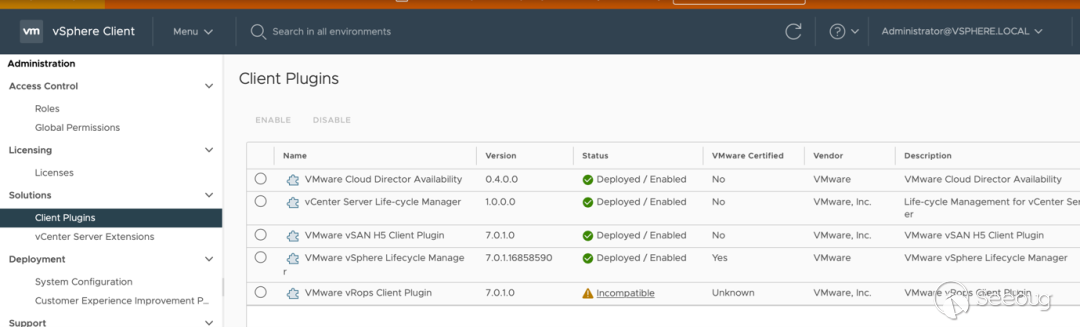
- 在vSphere Client的Solutions->Client Plugins中VMWare vROPS插件顯示為incompatible
0x06. 參考鏈接
- VMware官方安全通告 https://www.vmware.com/security/advisories/VMSA-2021-0002.html
- 360Cert漏洞預警通告 https://mp.weixin.qq.com/s/7x5nBpHIVOl5c1kqfsIhSQ
- 官方漏洞緩釋措施 https://kb.vmware.com/s/article/82374
 本文由 Seebug Paper 發布,如需轉載請注明來源。本文地址:http://www.bjnorthway.com/1701/
暫無評論