

作者:極光無限維陣漏洞團隊負責人—仙果
原文鏈接:https://mp.weixin.qq.com/s/4TXJrYWnSVeGaM6-p0K8QA
一. 題記
網絡設備或其他IoT設備提取到固件之后進行安全分析和漏洞挖掘工作,對 Sophos UTM 進行安全分析時,發現其具體提供Web 功能的是一個Linux 文件,并沒有發現web功能實現的html代碼,通過 Burp Suite 抓包Web 請求發現所有web頁面的請求展示都是通過該Linux 文件實現,自然必須對其進行解析才行繼續分析,但難度非常大,一度束手無策,經過幾天的詳細排查分析,最終得以解決。
由于國內外資料網站均沒有對Sophos UTM 固件文件的反編譯資料,故梳理成文,分享給大家。
二. 分析
UTM 是Unified Threat Management的縮寫 ,簡稱為統一威脅管理,各個安全廠商都有自己的 UTM 產品,比較出名的是 Fortinet、WatchGuard、Sophos等等,此次需要進行安全分析的產品就是 Sophos UTM,官方網站為:
https://www.sophos.com/en-us/products/unified-threat-management.aspx
獲取到的固件文件為一個完整打包好的 ISO 光盤文件,使用 VmWare Workstation 安裝之后, 就可以進入到UTM 頁面中。
本地訪問的地址是 https://192.168.21.100:4444/
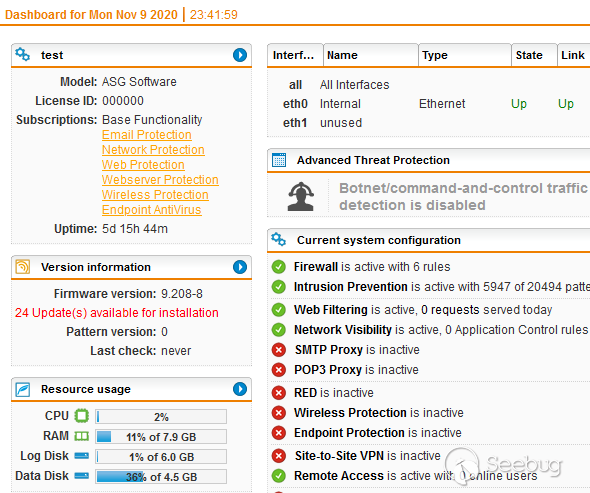
一般來說獲取一個ssh shell 將會非常有助于安全分析,比完全從Web 入手難度就要下降幾個等級,下面就先來獲取命令行shell。
1. 獲取ssh shell & root shell
Sophos UTM 默認情況下不允許使用ssh shell,必須在web頁面中開啟,Management-System Settings-Shell Acess 開啟shell 功能。
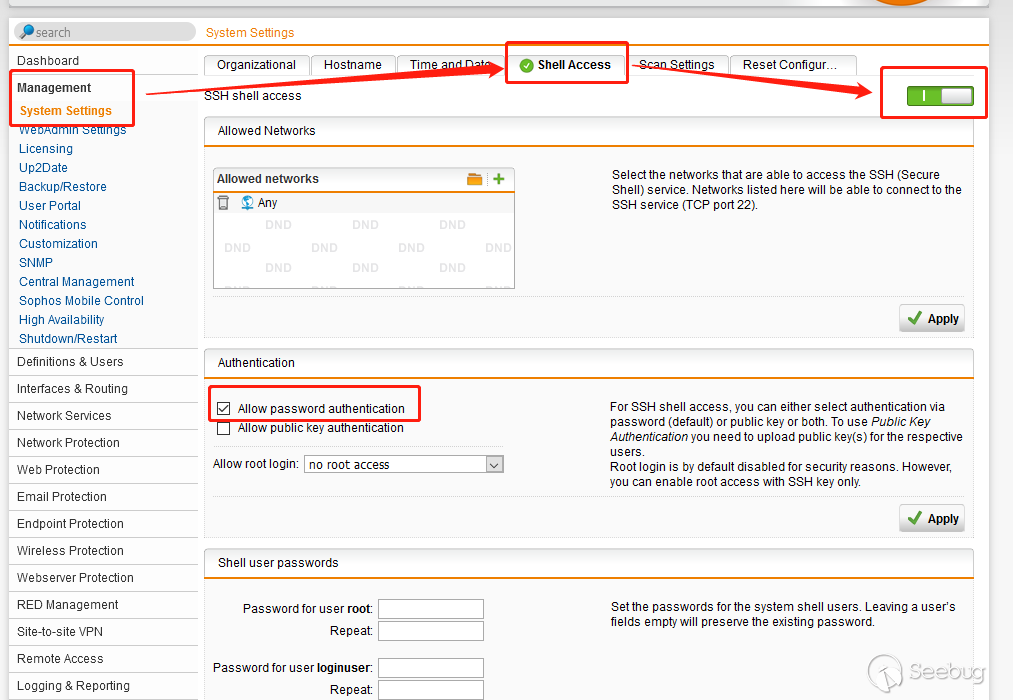
注意要選擇 "Allow password authentication",否則要使用證書驗證,比較麻煩,不方便分析。
接著輸入 root 和 loginuser 兩個用戶的密碼,并使用 loginuser ssh 登錄。
a@DESKTOP-22L12IV:$ ssh loginuser@192.168.21.100
loginuser@192.168.21.100's password:
Last login: Mon Nov  9 05:34:23 2020 from 192.168.21.1


Sophos UTM
(C) Copyright 2000-2014 Sophos Limited and others. All rights reserved.
Sophos is a registered trademark of Sophos Limited and Sophos Group.
All other product and company names mentioned are trademarks or registered
trademarks of their respective owners.

For more copyright information look at /doc/astaro-license.txt
or http://www.astaro.com/doc/astaro-license.txt

NOTE: If not explicitly approved by Sophos support, any modifications
      done by root will void your support.

loginuser@test:/home/login > su
Password:
test:/home/login # id
uid=0(root) gid=0(root) groups=0(root),890(xorp)
test:/home/login # uname -a
Linux test 3.8.13.27-0.176377654.gd7350fc-smp64 #1 SMP Wed Sep 17 10:45:23 UTC 2014 x86_64 x86_64 x86_64 GNU/Linux
test:/home/login # cat /proc/version
Linux version 3.8.13.27-0.176377654.gd7350fc-smp64 (abuild@axgbuild) (gcc version 4.3.4 [gcc-4_3-branch revision 152973] (SUSE Linux) ) #1 SMP Wed Sep 17 10:45:23 UTC 2014
test:/home/login # cat /etc/version
 9.208008
test:/home/login #
2. 登錄抓包
接下來就是登錄抓包進行登錄驗證分析,使用的工具是Burp Suite Pro,正確配置之后,就可以有完整的登錄驗證包。
POST /webadmin.plx HTTP/1.1
Host: 192.168.21.100:4444
User-Agent: Mozilla/5.0 (Windows NT 10.0; Win64; x64; rv:80.0) Gecko/20100101 Firefox/80.0
Accept: text/javascript, text/html, application/xml, text/xml, */*
Accept-Language: zh-CN,zh;q=0.8,zh-TW;q=0.7,zh-HK;q=0.5,en-US;q=0.3,en;q=0.2
Accept-Encoding: gzip, deflate
X-Requested-With: XMLHttpRequest
X-Prototype-Version: 1.5.1.1
Content-type: application/x-www-form-urlencoded; charset=UTF-8
Content-Length: 287
Origin: https://192.168.21.100:4444
Connection: close
Referer: https://192.168.21.100:4444/

{"objs": [{"elements": {"login_username": "admin", "login_password": "test0011"}, "FID": "login_process"}], "SID": "0", "browser": "gecko", "backend_version": -1, "loc": "english", "_cookie": null, "wdebug": 0, "RID": "1604979704552_0.8572369473251601", "current_uuid": "", "ipv6": true}
發現登陸是使用 json 格式進行網絡請求,方法是 POST ,請求的的接口文件是 webadmin.plx,同時登陸之后的頁面請求和展示都是通過webadmin.plx進行數據交互,接下來就是對webadmin.plx進行解析分析。
三. 疑難問題
截止到此處,還沒有遇到無法解決的問題,但深入文件分析時卻給了沉重的一擊,先來看webadmin.plx的文件屬性:
test:/var/sec/chroot-httpd/var/webadmin # file webadmin.plx
webadmin.plx: ELF 32-bit LSB executable, Intel 80386, version 1 (SYSV), for GNU/Linux 2.2.5, dynamically linked (uses shared libs), stripped
32位可執行文件,沒有異常,但是當使用 GDB 調試的時候提示:
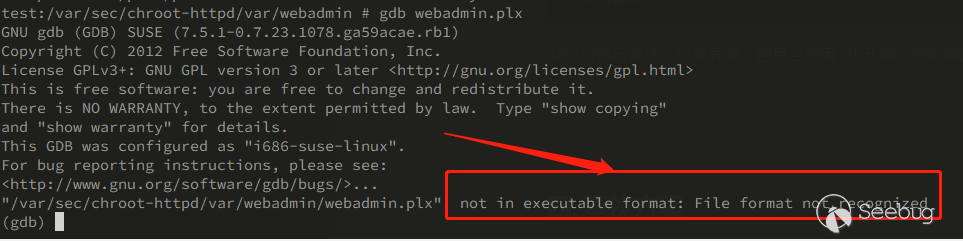
GDB 提示文件格式不正確,事實是該文件可以執行:
test:/var/sec/chroot-httpd/var/webadmin # ./webadmin.plx
[19370] WARN: Use of uninitialized value $ENV{"REQUEST_METHOD"} in string eq at /</var/sec/chroot-httpd/var/webadmin/webadmin.plx>wfe/asg/modules/asg_fcgi.pm line 59.
test:/var/sec/chroot-httpd/var/webadmin #有正常的錯誤返回,說明webadmin.plx文件正常,執行正常。
又發現該文件沒有任何的 Section:
a@DESKTOP-22L12IV:$ readelf -S webadmin.plx
There are no sections in this file.
IDA Pro 又能夠正常解析elf 文件,只有 LOAD節。
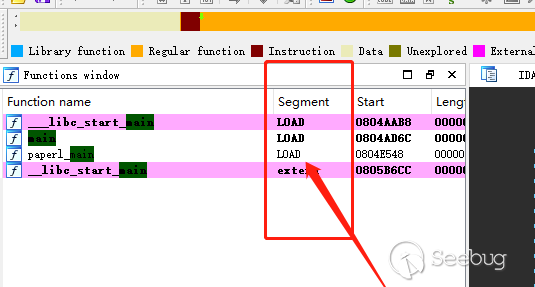
兩眼一抓瞎,這可怎么辦?
GDB 調試進程,失敗。
嘗試使用GDB 附加調試進程,失敗+1,not in executable format: File format not recognized。
嘗試GDB 附加父進程,然后調試子進程,失敗+1,not in executable format: File format not recognized。
嘗試GDB dumps內存,失敗+1,not in executable format: File format not recognized。
GDB Server 遠程調試,失敗+1,not in executable format: File format not recognized。
獲取兩個不同版本的webadmin.plx文件,進行補丁對比,無差別,失敗+1。
查找分析 ELF 反調試手段,失敗+1。
最后得出結論,GDB 調試無效,繼續接著找其他辦法。
梳理一下目前得到的信息:
webadmin.plx負責處理UTM 系統登錄,頁面交互處理等等工作,是一個主體處理文件。- ELF 可執行程序,32位。
- 可正常執行。
- GDB 調試無效
- 無反調試
- 補丁對比無效
若進行安全分析和漏洞挖掘,就必須剁掉webadmin.plx,接著分析吧。
四. 確認Perl 編譯器
分析 webadmin.plx,查找ELF 中的字符串,其中幾個字段尤為可疑:
a@DESKTOP-22L12IV:Sophos_UTM$ strings webadmin.plx |grep Perl
psym_Perl_newSVpv
psym_Perl_stack_grow
psym_Perl_Itmps_floor_ptr
psym_Perl_sv_setiv
psym_Perl_markstack_grow
psym_Perl_Iexit_flags_ptr
psym_Perl_save_int
psym_Perl_push_scope
psym_Perl_Isv_no_ptr
psym_Perl_call_sv
psym_Perl_Imarkstack_max_ptr
psym_Perl_Istack_base_ptr
psym_Perl_Gop_mutex_ptr
psym_Perl_eval_pv
psym_Perl_Gthr_key_ptr
psym_Perl_call_list
psym_Perl_Icurstackinfo_ptr
psym_Perl_get_context
psym_Perl_Guse_safe_putenv_ptr
psym_Perl_IXpv_ptr
psym_Perl_pop_scope
很明顯,跟Perl有很大的關系。
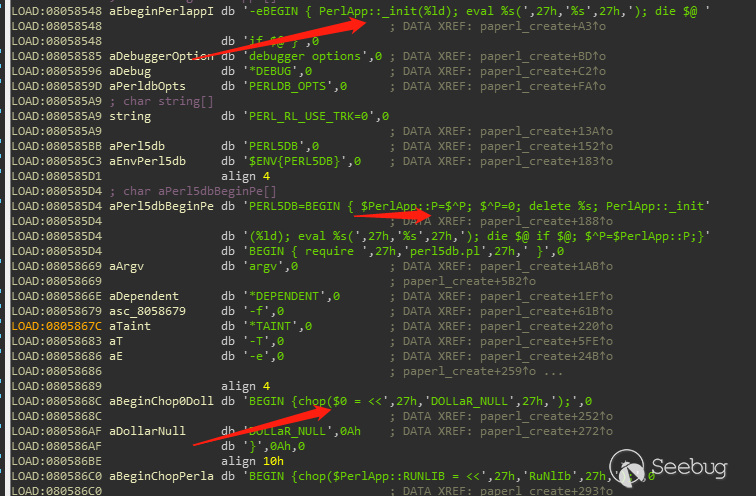
IDA 中也顯示同樣的結果,懷疑該webadmin.plx是由Perl 編譯出來的,接下來就是驗證自己的想法。
搜索引擎中查找資料,發現主流有三款程序可以從 Perl 代碼編譯成 ELF 軟件:PerlAPP,PerlCC,Perl2EXE,而針對 Perl ELF 反編譯就只有52破解網站上有一份PerlAPP 在Windows 下的資料,Linux 下的資料一無所有,也是奇葩,Perl 越混越差了。
從IDA對webadmin.plx的反編譯代碼中分析查找,找到一處關鍵字:
 v1 = *(_DWORD *)psym_Perl_Istack_sp_ptr(a1);
  v2 = (int **)psym_Perl_Imarkstack_ptr_ptr(a1);
  v3 = **v2;
  --*v2;
  v4 = (v1 - (*(_DWORD *)psym_Perl_Istack_base_ptr(a1) + 4 * v3)) >> 2;
  v18 = sub_804E6EC();
  v33 = a1;
  v34 = psym_Perl_get_hv(a1, "PerlApp::lic", 1); //PerlApp::lic,此處為關鍵字
  if ( v4 )
    v19 = *(_DWORD *)(*(_DWORD *)psym_Perl_Istack_base_ptr(a1) + 4 * (v3 + 1));
  else
    v19 = psym_Perl_Isv_undef_ptr(a1);
  v20 = *(int **)(v18 + 48);
  licFree(*(_DWORD *)(v18 + 56));
*(_DWORD *)(v18 + 56) = 0;從PerlApp::lic關鍵字來分析,基本可以確認 webadmin.plx是使用 PerlAPP 編譯而成的ELF文件。
五. 問題復現
webadmin.plx確認是由 PerlAPP工具編譯而來,接下來就來驗證一下,在Linux 環境下搭建一套PerlAPP環境。
PerlAPP的全稱是 Perl Dev Kit(PDK),有ActiveState 公司開發,但是其已經在2016年不再進行更新維護,在2020年10月份正式終止軟件生命周期。
https://www.activestate.com/blog/perl-dev-kit-pdk-now-end-of-life/
軟件終止更新還好,影響不大,但網絡上Linux 版本的PerlAPP非常難找,最終是在一個不起眼的小網站上下載到了低版本的安裝包(這又是一個辛酸的故事),進行安裝測試。
PerlApp安裝需要 32位Active Perl(必須),而非操作系統自帶的perl,又下載了一個低版本的Active Perl,才算完成PDK的安裝(一把辛酸淚)。
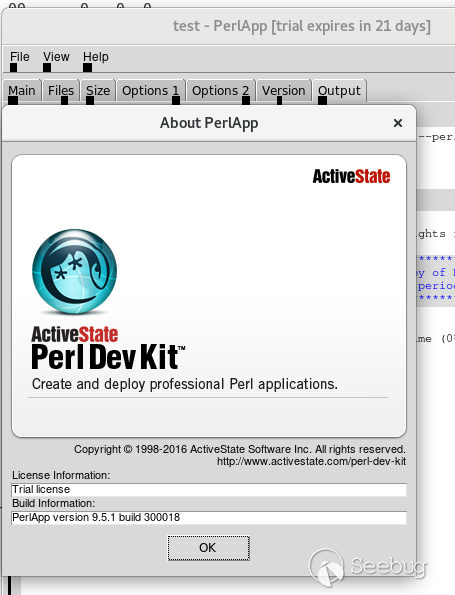
最后拿一個最簡單的 perl 示例代碼來進行測試:
[test@192 Desktop]$ cat test.pl
#!/usr/bin/perl

print "Hello, World!\n";
[test@192 Desktop]$ perl test.pl
Hello, World!
[test@192 Desktop]$
使用PerlApp進行編譯測試:
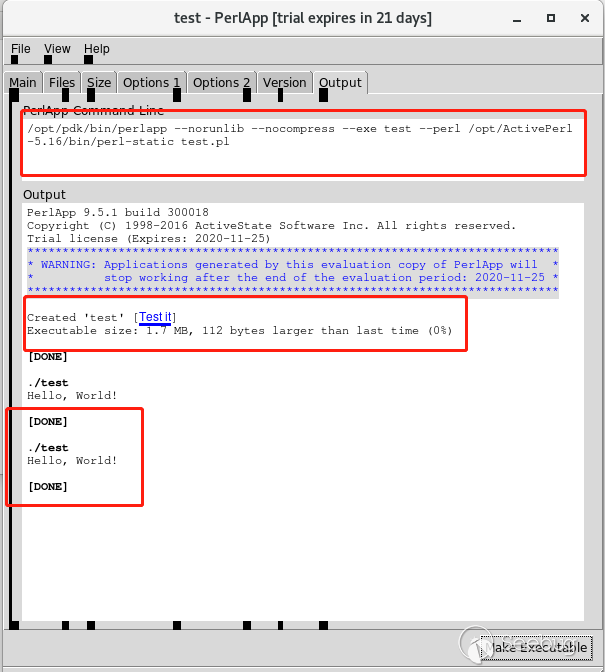
shell中也能夠正常執行:
[test@192 Desktop]$ ./test
Hello, World! # 正常執行
[test@192 Desktop]$
使用GDB 調試編譯好的程序:
[test@192 Desktop]$ gdb test
GNU gdb (GDB) Red Hat Enterprise Linux 7.6.1-119.el7
Copyright (C) 2013 Free Software Foundation, Inc.
License GPLv3+: GNU GPL version 3 or later <http://gnu.org/licenses/gpl.html>
This is free software: you are free to change and redistribute it.
There is NO WARRANTY, to the extent permitted by law.  Type "show copying"
and "show warranty" for details.
This GDB was configured as "x86_64-redhat-linux-gnu".
For bug reporting instructions, please see:
<http://www.gnu.org/software/gdb/bugs/>...
"/home/test/Desktop/test": not in executable format: File format not recognized # 同樣的報錯提示
(gdb) 好吧,同樣的not in executable format: File format not recognized報錯提示,完美復刻webadmin.plx遇到的問題。
六. 反編譯 Perl 源碼
現在來梳理一下目前的信息:
webadmin.plx是使用PerlApp編譯而成的ELF 文件- 不能使用GDB 調試,GDB Server也不行
- 網絡上沒有 Linux 反編譯Perl 的資料
在團隊小伙伴 ztop(此處應該有掌聲)的幫助下,發現使用 IDA 的 linux_server,結合IDA 遠程調試,就可以完美繞過 GDB 無法調試的問題。在Centos 7 中無法使用IDA 遠程調試,不知道具體原因是什么,遂放棄,選擇使用 Kali 2018 R4,IDA的主機為Windows。
root@kali:~# chmod +x linux_server
root@kali:~# ./linux_server
IDA Linux 32-bit remote debug server(ST) v1.22. Hex-Rays (c) 2004-2017
Listening on 0.0.0.0:23946...
=========================================================
[1] Accepting connection from 192.168.21.1...
Warning: Section header string table index 26 is out of bounds
Hello, World!
Looking for GNU DWARF file at "/usr/lib32/2651bcf6f5569acd1dba629eaaaa5f002af684.debug"... no.
Looking for GNU DWARF file at "/usr/lib32/.debug/2651bcf6f5569acd1dba629eaaaa5f002af684.debug"... no.
[1] Closing connection from 192.168.21.1...
==========================================================
linux_server 的監聽23946端口,需要在宿主機進行配置。
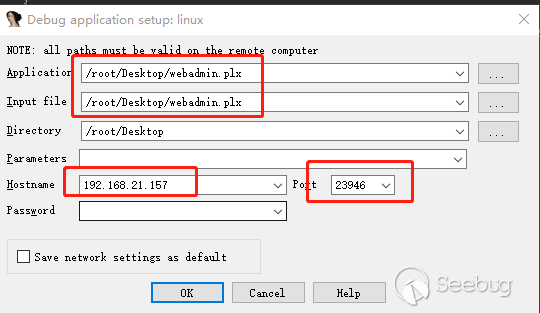
webadmin.plx的main函數中:
signed int __cdecl paperl_main(int a1, int a2, int a3, _DWORD *a4, int (__cdecl *a5)(int))
{
  signed int v5; // ebx
  int v7; // [esp+10h] [ebp-8h]

  v7 = dword_805B4F8;
  v5 = paperl_create((int ***)&v7, a1, a2, a3, a4, a5, 1); //此函數內部進行perl 代碼執行。
  paperl_destruct(v7);
  return v5;
}
進入到 paperl_create()函數內部:
      ptr = sub_804C370(**v43, "*SCRIPTNAME", (int)"scriptname");
        if ( ptr )
        {
          v27 = (int *)sub_804C370(**v43, ptr, (int)"script"); //此函數對perl代碼進行初始化
          v43[9] = v27;
          if ( !v27 || (v28 = (char *)sub_804C2D0(strlen(ptr) + 14, (int)"hashline"), (v43[8] = (int *)v28) == 0) )
找到關鍵代碼位置:
LOAD:0804E224 jz      loc_804E32E
LOAD:0804E22A mov     eax, [edi]
LOAD:0804E22C mov     ecx, offset aScript             ; "script"
LOAD:0804E231 mov     edx, [ebp+ptr]
LOAD:0804E237 mov     eax, [eax]
LOAD:0804E239 call    sub_804C370                   ; 函數執行后,解密出perl代碼
LOAD:0804E23E mov     [edi+24h], eax
LOAD:0804E241 test    eax, eax
LOAD:0804E243 jz      loc_804E517
LOAD:0804E249 mov     edx, [ebp+ptr]
LOAD:0804E24F cld
LOAD:0804E250 mov     ecx, 0FFFFFFFFh
LOAD:0804E255 xor     eax, eax
經過一系列的仔細調試和分析,最終發現 0804E239 call sub_804C370函數執行后,eax 指向堆的內存中出現了 #!/usr/bin/perl字符,
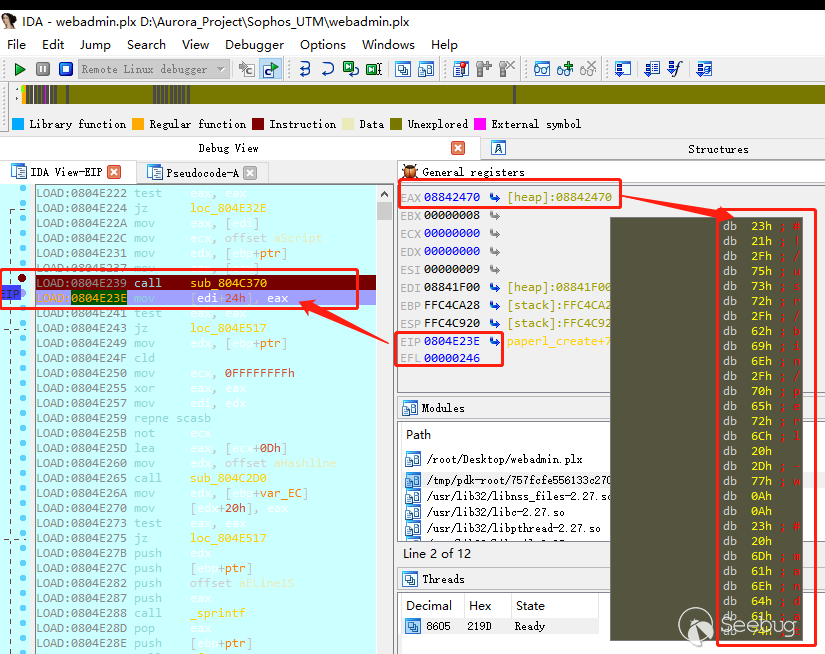
驗證它:
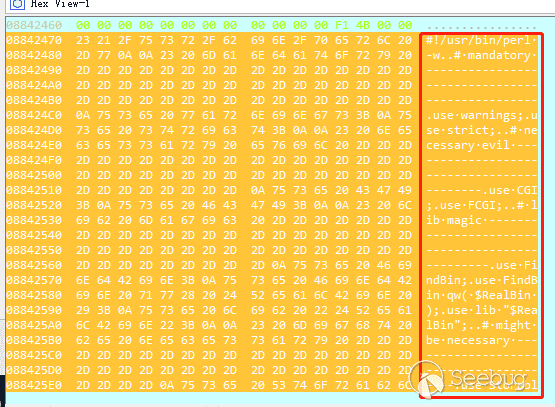
很明顯都是明文字符,dump 出來進行校驗,獲取到完整的webadmin.plx功能的 perl 源碼:
# setting line discipline to utf8 --------------------------
binmode( STDOUT, ':utf8' );
binmode( STDIN, ':utf8' );

# getting our paths
my ( $apppath, $appname ) = &get_path_and_appname();

# load core config ------------------------------------------
die '[' . $$ . '] DIED: core configuration could not be found' unless -e $RealBin . '/core/res/config.ph';
my $config_basic = read_ph( $RealBin . '/core/res/config.ph' );
die "Could not read core config in [$RealBin/core/res/config.ph]!" unless $config_basic;

# fetching application config ------------------------------
die '[' . $$ . '] DIED: application configuration could not be found' unless -l $RealBin . '/config';
my $config_app = read_ph( $RealBin . '/config' );
die "Could not read config for [" . $appname . "] in [" . $RealBin . "/config]!" unless $config_app;

# initialize Astaro::Logdispatcher -------------------------
Astaro::Logdispatcher->init({
  syslogname      => 'webadmin',
  myname          => 'webadmin',
  redirect_stdout => 0,
  redirect_stderr => 0,
  configfile      => 'core/res/core-log.conf',
  configset       => {
    logvars         => {
      logbitmask       => 7,
      syslogmtypeinfo  => 1,
      syslogcallerinfo => 1,
      tofilehandle     => 0
    }
  },
  logfiler        => [
    '+ .',
  ],
  printfile       => '/dev/null'
});
至此完整的獲取到 Sophos UTM webadmin 功能的perl 源代碼,剩余的工作就是基礎的代碼審計和漏洞挖掘。
七. 梳理總結
Perl 編譯的ELF 文件在執行時,會在/tmp/目錄下生成libperl.so 文件,perl 代碼通過調用so文件接口j來執行,本次調試釋放路徑是
/tmp/pdk-root/757fcfe556133c27007d41e4e52f4425/libperl.so ,也可以通過hook so 的函數來達到獲取perl 源碼的目的。
Perl 語言編譯的ELF文件,如何進行反編譯,網絡上沒有任何有價值的信息,之前對python 和go 編譯的ELF 文件都有過反編譯經驗,按道理來說同樣是能夠通過反編譯來獲取源代碼,但是GDB 無法調試 ELF 困擾了很長時間,動態獲取源碼相對于靜態去逆向解密算法要簡單很多,雖然最后也并不簡單。
其中的工作并沒有去逆向解密算法,理清楚算法的情況下,可以編寫腳本靜態還原perl 源代碼,但以安全分析或漏洞挖掘為目標,算是告一段落了,后續工作也可以編寫IDA 的python 腳本,動態提取源代碼。
八. 資料索引
1. demo
2. 從PDK打包的可執行程序里面解出完整的Perl源碼
https://www.52pojie.cn/thread-317216-1-1.html
九. 注意事項
- VmWare Workstation 安裝固件 ISO 需要選擇低版本的兼容性,否則無法安裝。
- Active Perl 要選擇 X32位安裝包,X64的安裝包無法安裝 PDK
 本文由 Seebug Paper 發布,如需轉載請注明來源。本文地址:http://www.bjnorthway.com/1397/
暫無評論