

譯者:知道創宇404實驗室翻譯組
原文鏈接:https://www.gdatasoftware.com/blog/trat-control-via-smartphone
前言
惡意軟件攻擊者希望通過便利功能吸引客戶。現在,攻擊者只需使用智能手機和Telegram應用程序,就可以遠程控制惡意軟件。
俄羅斯論壇上的廣告
研究人員@3xp0rtblog發現了T-rat2.0,并在Twitter上發布了它,其中包括示例哈希值和銷售線程。一個奢侈的廣告如下所示。
下圖顯示了lolz.guru(由3xp0rtblog發現并報告)上張貼廣告的部分內容。它贊揚了使用T-RAT時的舒適性和便利性,因為它可以通過帶有Telegram應用程序的智能手機進行控制。
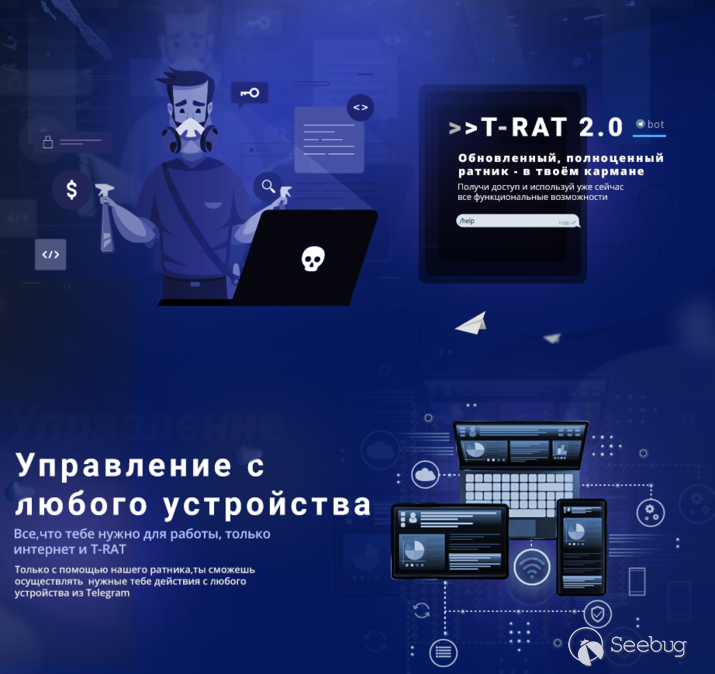 翻譯:更新的,成熟的RAT。放在口袋里就可以訪問和使用所有功能。只需Internet和T-RAT就可以從任何設備進行控制,使其正常工作。
 翻譯:優點:舒適,方便,控制簡單,功能豐富,匿名性和可靠性……
感染鏈和持久性
第一個已知階段是下載器[4],它從hxxps://hgfhhdsf.000webhostapp.com/1DJjnw(dot)jpg獲取加密的文件[6],并將其保存到%TEMP%/gfdggfd.jpg。
為了解密有效負載,下載程序將密鑰0x01應用于XOR。生成的文件是一個ZIP存檔,它將保存到%TEMP%/hrtghgesd.zip中。下載程序將刪除%TEMP%/gfdggfd.jpg并提取ZIP存檔。注意:這兩個硬編碼名稱均由QWERTY鍵盤上的按鍵彼此相鄰的字符組成,因此攻擊者可能只是在鍵盤上滾動來創建它們。
提取的惡意軟件的位置確定如下:
(1)下載器檢查當前用戶是否具有管理員權限。如果有,則路徑的第一部分是以下內容之一(隨機選擇)。
- %APPDATA%\Microsoft\Windows\
- %USERPROFILE%\Windows\System32\
- %LOCALAPPDATA%\Microsoft\Windows\?
如果他們沒有管理員權限,則路徑的第一部分為以下內容之一:
- %SYSTEM%\Microsoft\Protect\
- %COMMONAPPDATA%\Microsoft\Windows\?????????
- %USERPROFILE%\AppData\LocalLow\Microsoft\Windows\????????????
- C:\Windows\assembly\GAC\?
(2)對于惡意軟件路徑的第二部分,下載程序生成一個介于347和568203之間的隨機數,將其轉換為字符串,然后使用MD5,SHA1或SHA256生成哈希。它使用哈希的十六進制表示形式作為惡意軟件路徑的第二部分。
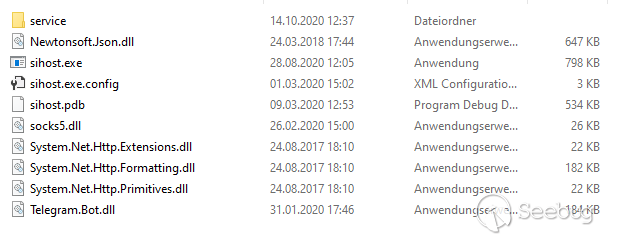
該檔案包含實際的T-RAT可執行文件sihost.exe,以及幾個DLL文件。一些值得注意的庫是Telegram.Bot.dll和socks5.dll。
名為service的子文件夾包含另外六個文件(哈希在IoC列表中):

該下載程序通過安排日常任務來保留sihost.exe。任務的名稱是系統的處理器ID。如果當前用戶具有管理員權限,則會將運行級別設置為HIGHEST。之后,下載程序將在批處理文件的幫助下刪除自己。??
封隔器和混淆器
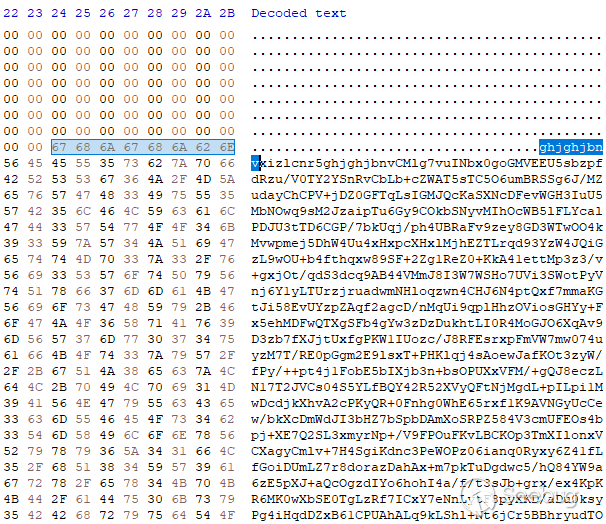
原始的T-RAT示例[1]和下載程序[4]是.NET程序集,他們以相同的方式打包。打包的部分作為base64字符串嵌入在文件的疊加層中。字符串的開頭和結尾由序列“ghjghjbnv”標記。打包程序存根會搜索序列以找到打包的圖像,解碼base64字符串并動態加載生成的.NET程序集。
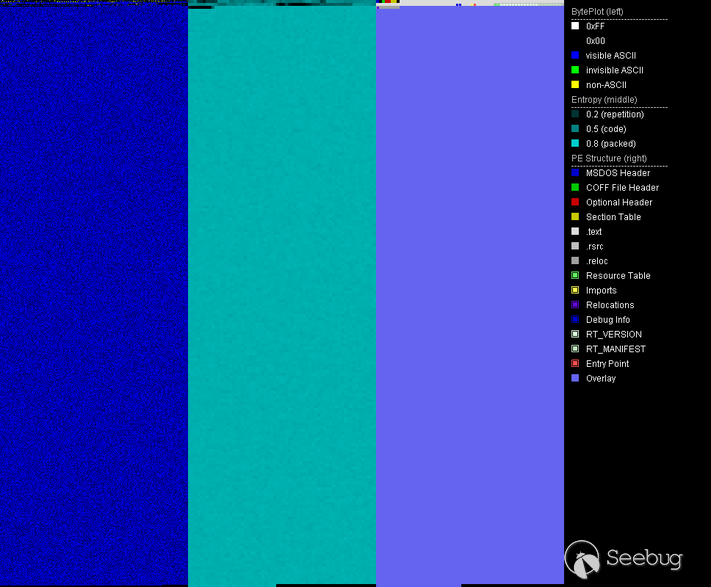
解壓縮的.NET程序集被ConfuserEx的變體所模糊。某些俄語字符串是可見的,但大多數引用的字符串都是base64編碼的。
用NoFuserEx對程序集進行模糊處理后,將保留base64編碼的字符串。我編寫了一個小的Python腳本來完成其余的工作(請參閱附錄A)。它用NOP替換了對FromBase64String的調用的IL代碼,并將base64字符串替換為其已解碼的對應字符串。由于解碼的字符串較短,因此其余部分將填充為U + 200B,這是零寬度空間Unicode字符。(注意:這是一個相當懶惰的解決方案,它不會創建完美運行的可執行文件,但足以進行持續的靜態分析。)
此程序集的混淆處理中最耗時的部分無法自動化。方法和類的符號名稱已由混淆器消除。因此,在分析T-RAT的代碼時,我在此過程中添加了自己的名稱。該代碼庫具有98個不同的命令來控制T-RAT客戶端。

功能概述
攻擊者使用基于文本的命令和RAT提供的命令按鈕,通過電報控制T-RAT。命令使用英語,幫助消息大多為俄語。廣告橫幅的一部分展示了這些控件以及它們在手機上的外觀(請參見下圖)。
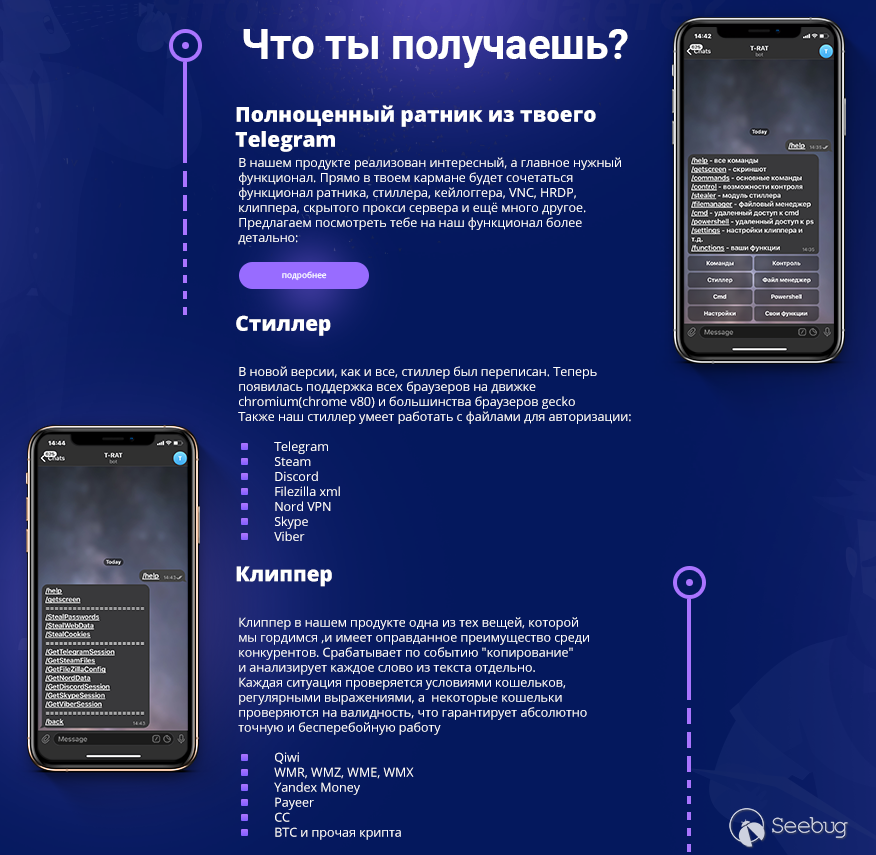 第一段翻譯:您將獲得什么?成熟RAT。我們的產品具有有趣且最重要的必需功能:RAT、竊取程序、鍵盤記錄程序VNC、HRDP、Clipper、隱藏代理服務器等等。我們邀請您更詳細地了解我們的功能。
U-RAT有98條命令。我沒有在主要文章中描述每個命令,而是將它們分為幾組,下面將對其進行說明。完整的命令清單在附錄B中。
-
Menu navigation
這些用于進入或退出某些模塊(如文件管理器)。它們有助于通過智能手機進行更方便的控制。 -
File manager
T-RAT可以在文件系統上導航,顯示有關驅動器和可用空間,文件夾內容以及修改文件和文件夾的信息。它還可以將文件發送給攻擊者。有趣的是,它混入了Unix命令名稱。例如,文件列表是通過ls完成的。 -
Stealer
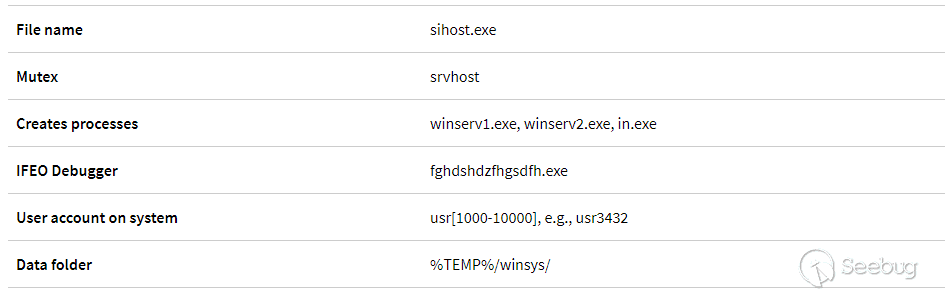
該模塊允許從瀏覽器獲取密碼,Cookie,自動填充數據,Telegram、Discord、Steam、Nord、Viber、Skype和Filezilla的會話或配置數據。在發送到Telegram之前,大多數數據文件除了將T-RAT可執行文件保存在文本文件中外,還保存在%TEMP%/winsys/中的ZIP存檔中。 -
Clipper
Clipper檢查剪貼板上的硬幣地址并替換它們,因此,任何數字貨幣都會被發送到攻擊者的錢包中。它支持Qiwi、WMR、WMZ、WME、WMX、Yandex money、Payer、CC、BTC、BTCG、Ripple、Doge和Tron。攻擊者使用clipper命令保存指定加密貨幣的地址,并啟動或停止clipper的執行。 -
Monitoring and spying
攻擊者可以運行鍵盤記錄器,創建屏幕截圖,通過麥克風錄制音頻,通過網絡攝像頭拍照,發送剪貼板內容。 -
Evasion
T-RAT有多種繞過UAC的方法,包括Fodhelper,Cmstp,Cleanup和Computerdefaults。它可以禁用Windows Defender和智能屏幕通知。它可以禁用各種安全設置,例如,可以更改關聯策略以將“.exe”設置為低風險文件擴展名,并可以關閉ZoneIdentifiers。它可以檢查沙箱和虛擬機。 -
Disruption
這些命令殺死進程、通過主機文件阻止網站、通過圖像文件執行選項設置調試器來阻止和重定向程序(因為阻止調試器是不存在的)、禁用任務欄和任務管理器。 -
Remote control
T-RAT通過電報提供Powershell或CMD終端。也可以通過HRDP或VNC進行遠程控制。
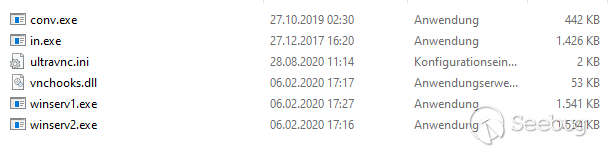
T-RAT運行名為service \ in.exe的HRDP客戶端,該客戶端位于可執行文件的位置。然后,它將創建一個具有隨機密碼和名稱的新用戶帳戶,并將憑據發送給攻擊者。它將新創建的用戶添加到“遠程桌面用戶”組,并通過將fDenyTSConnections設置為“0”來啟用遠程訪問。
VNC服務器在32位系統上為service\winserv1.exe,在64位系統上為service\winserv2.exe。
IoC
Hashes
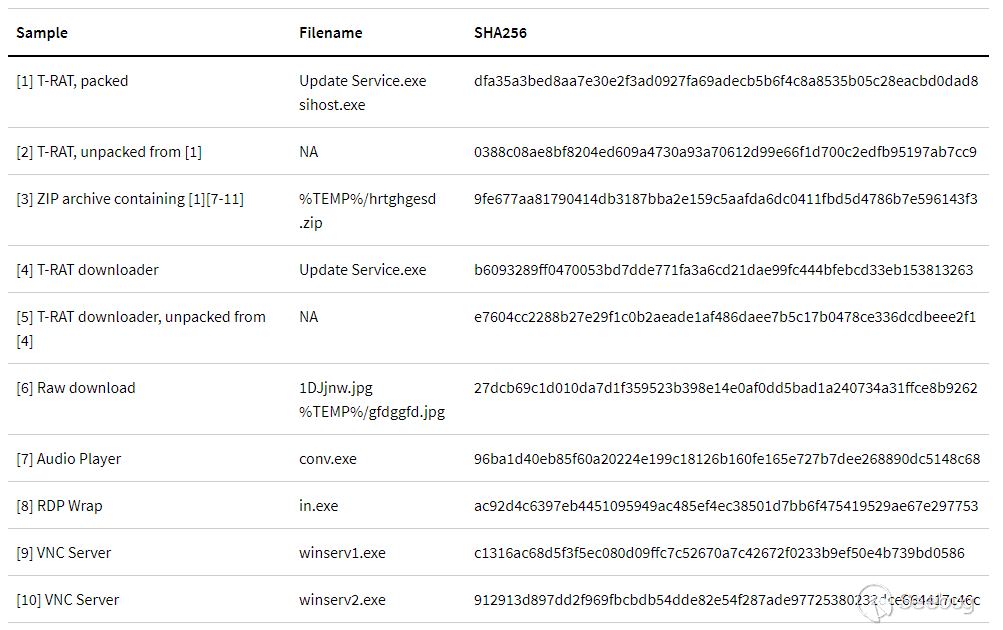
IoCs for downloader[4]
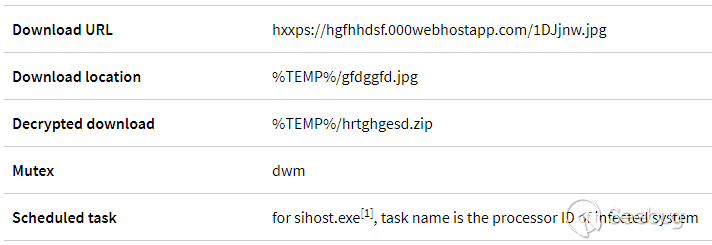
IoCs for T-RAT[1]
附錄A:去模糊腳本
#!/usr/bin/env python2.7
import re
import base64
import sys
import os
import argparse
from shutil import copyfile

def isBase64(s):
    try:
        return base64.b64encode(base64.b64decode(s)) == s
    except Exception:
        return False


def searchAndReplace(search, replace, binfile):
    content = ""

    with open(binfile,"rb") as bif:
        content = bif.read()
        new_content = content.replace(search, replace)
        if new_content == content:
            print "Search string not found."
            return

    with open(binfile,"wb+") as wif:
        wif.write(new_content)

if __name__ == "__main__":
    parser = argparse.ArgumentParser(description='Decode and replace base64 strings in binary. Karsten Hahn @ G DATA CyberDefense')
    parser.add_argument('str_listing', help='Text file with strings listing of sample. E.g. use Sysinternals strings.exe')
    parser.add_argument('sample', help='Sample file where base64 strings should be replaced')

    args = parser.parse_args()
    inputfile = args.sample
    outputfile = args.sample + ".decoded"

    copyfile(inputfile, outputfile)

    base64Regex = re.compile(r'^(?:[A-Za-z0-9+/]{4})*(?:[A-Za-z0-9+/]{2}==|[A-Za-z0-9+/]{3}=)?$')

    str_listing = args.str_listing

    with open(str_listing) as ref_file:
        print 'Extracting base64 strings...'
        base_strings = []
        for line in ref_file:
            base_strings += base64Regex.findall(line)
        print "Replacing base64 strings..."
        for base_str in sorted(base_strings, key=len, reverse=True):
            if len(base_str) > 3 and isBase64(base_str):
                decoded_string = base64.b64decode(base_str)
                decoded_bytes = bytearray(str(decoded_string).decode('utf-8').encode("utf-16le"))
                base_bytes = bytearray(str(base_str).decode('utf-8').encode("utf-16le"))
                while len(decoded_bytes) < len(base_bytes):
                    decoded_bytes.extend(b'\x0B\x20')
                #print decoded_bytes
                searchAndReplace(base_bytes, decoded_bytes, outputfile)
        print "Replacing calls to decode Base64..."

        # Optional: remove calls to Base64 conversion, this is specific to the sample
        # for T-RAT
        # searchAndReplace(b'\x28\x27\x00\x00\x0A', b'\x00\x00\x00\x00\x00', outputfile)
        # for T-RAT downloader
        # searchAndReplace(b'\x28\x17\x00\x00\x0A', b'\x00\x00\x00\x00\x00', outputfile)

    print 'All done'
    print 'Deobfuscated file written to', outputfile
附錄B:T-RAT命令
這些是T-RAT 2.0命令以及其中一些命令的說明。
| Command | Description |
|---|---|
| /help | Print available commands (shows different commands depending on the state of the menu) |
| /getscreen | Takes a screenshot and sends as photo to Telegram |
| /webcam | Takes a picture using the webcam and sends as photo to Telegram |
| /record | Records audio using the microphone. Saves it to record.wav in the executable's folder. |
| /sysinfo | Shows: username, IP, MAC, computername, processor model, number of cores, processor size, graphics card model, RAM, operating system, architecture, system directory, antivirus, firewall, drive info and available space |
| /isadmin | Checks if executable has admin rights |
| /activewindow | |
| /openwindows | |
| /programs | Shows list of installed programs by obtaining all DisplayName values for all subkeys of SOFTWARE\Microsoft\Windows\CurrentVersion\Uninstall |
| /processlist | |
| /killprocess [process] | |
| /run [path] | Creates a hidden folder in %TEMP% named winsys. Puts a VBScript file named |
| It uses a template called "Run2" in the resources for the VBScript and replaces "lmao" with [path] | |
| /clipboard | Posts clipboard content to Telegram |
| /location | |
| /path | |
| /blocksite [example google.com] | Blocks a site via hosts file redirection to localhost |
| /redirectprogram [first] [second] | Sets the second parameter as debugger for the first via Image File Execution Options (IFEO) |
| /blockprogram [name] [block | unblock] |
| unblock: Removes the IFEO debugger from registry | |
| /CmstpUACBypass | UAC bypass via cmstp.exe |
| /CleanupUACBypass | UAC bypass via SilentCleanup |
| /FodHelperUACBypass | UAC bypass via fodhelper.exe |
| /ComputerDefUACBypass | UAC bypass via computerdefaults.exe |
| /OffCertChecking | In Attachment Policies sets: HideZoneInfoOnProperties to "1" and SaveZoneInformation to "2" (= Off) |
| In Associations Policies sets: DefaultFileTypeRisk to "6152" (= Low) and LowRiskFileTypes to ".exe" (yes, only ".exe") | |
| /DisableWindowsDefender | Disables TamperProtection; enables DisableAntiSpyware, DisableBehaviorMonitoring, DisableOnAccessProtection and DisableScanOnRealtimeEnable |
| /OffAvNotification | Disables SmartScreen and sets registry values to "0" for: EnableLUA, ConsentPromptBehaviorAdmin, PromptOnSecureDesktop |
| /cmd | Provides a remote cmd terminal |
| /powershell | Provides a remote powershell console |
| /settings | |
| /disconnect | |
| /opencd | Calls mciSendStringA with "set cdaudio door open" |
| /closecd | Calls mciSendStringA with "set cdaudio door closed" |
| /exploreroff | Sets DisableTaskMgr to "1" |
| /exploreron | Deletes subkey tree for Software\Microsoft\Windows\CurrentVersion\Policies\System |
| /hidetaskbar | Calls user32.dll ShowWindow with SW_HIDE parameter |
| /showtaskbar | Calls user32.dll ShowWindow for Shell_TrayWnd |
| /wallpaper | Asks the user to send a picture to set as wallpaper |
| /collapsewindows | |
| /reboot | |
| /kill | |
| /suicide | |
| cd [directory] | Sets working directory |
| back | Goes one step back in the command listing |
| ls | |
| drives | |
| action [name] | Provides file operations: info, run, delete, read, send, cd |
| mkdir [NameFileInFolder] | Creates a directory |
| remove [NameFileInFolder],[AnotherDirectory] | |
| rename [NameFileInFolder],[NewName] | |
| /hrdp | 1) Runs service\in.exe from executable folder. 2) Sets fDenyTSConnections to "0" 3) Creates new user account named usr |
| /StartProxyServer | Starts a Socks5 proxy using port 5901 |
| /StopProxyServer | Stops above proxy |
| /StartVNC | Runs service\winserv1.exe for 32 bit architecture, or service\winserv2.exe for 64 bit architecture. Both reside in the executable folder. |
| /StopVNC | Kills any process with a name containing the substring winserv1 (32 bit)or winserv2 (64 bit) |
| /CheckVNC | Returns if a process name containing winserv1 or winserv2 exists |
| /commands | Menu navigation |
| /control | Menu navigation |
| /stealer | Menu navigation |
| /filemanager | Menu navigation |
| /StealPasswords | |
| /StealWebData | Searches for Web Data folder in the %LOCALAPPDATA% directory and extracts autofill information. This folder is part of Chrome. |
| /StealCookies | Saves cookies to Cookies.txt in the executable folder and uploads it to Telegram |
| /GetTelegramSession | Steal Telegram data |
| /GetSteamFiles | Steal Steam data |
| /GetNordData | Steal Nord data |
| /GetFilezillaConfig | Steal Filezilla configuration |
| /GetSkypeSession | Saves skype appdata folder contents to %TEMP%/winsys/Skype.zip and uploads this file to Telegram |
| /GetDiscordSession | Saves Discord\Local Storage\leveldb folder contents to %TEMP%/winsys/Discord.zip and uploads this to Telegram |
| /GetViberSession | Steal Viber data |
| /SetQiwi [wallet] | Set Qiwi wallet for clipper |
| /SetWMR [wallet] | Set WMR wallet for clipper |
| /SetWMZ [wallet] | Set WMZ wallet for clipper |
| /SetWME [wallet] | Set WME wallet for clipper |
| /SetWMX [wallet] | Set WMX wallet for clipper |
| /SetYandexMoney [wallet] | Set Yandex Money wallet for clipper |
| /SetCC [wallet] | Set CC wallet for clipper |
| /SetPayeer [wallet] | Set Payeer wallet for clipper |
| /SetRipple [wallet] | Set Ripple wallet for clipper |
| /SetDogechain [wallet] | Set Doge wallet for clipper |
| /SetTron [wallet] | Set Tron wallet for clipper |
| /SetBTCG [wallet] | Set BTCG wallet for clipper |
| /SetBTC [wallet] | Set BTC waller for clipper |
| /wallets | |
| /SaveConfig | |
| /SendConfig | |
| /StartScreenLogger | |
| /StartKeyLogger | |
| /SendLog | |
| /StopKeyLogger | |
| /SendScreenshots | |
| /StopScreenLogger | |
| /ClipperStart | |
| /ClipperStop | |
| /ClipboardLoggerStart | |
| /ClipboardLoggerSend | |
| /ClipboardLoggerStop | |
| /clipboard | |
| /functions | |
| /exit | Menu navigation |
 本文由 Seebug Paper 發布,如需轉載請注明來源。本文地址:http://www.bjnorthway.com/1379/
暫無評論