作者:Hcamael@知道創宇404實驗室
時間:2019年11月29日
最近在研究IoT設備的過程中遇到一種情況。一個IoT設備,官方不提供固件包,網上也搜不到相關的固件包,所以我從flash中直接讀取。因為系統是VxWorks,能看到flash布局,所以能很容易把uboot/firmware從flash中分解出來。對于firmware的部分前一半左右是通過lzma壓縮,后面的一半,是相隔一定的區間有一部分有lzma壓縮數據。而固件的符號信息就在這后半部分。因為不知道后半部分是通過什么格式和前半部分代碼段一起放入內存的,所以對于我逆向產生了一定的阻礙。所以我就想著看看uboot的邏輯,但是uboot不能直接丟入ida中進行分析,所以有了這篇文章,分析uboot格式,如何使用ida分析uboot。
uboot格式
正常的一個uboot格式應該如下所示:
$ binwalk bootimg.bin

DECIMAL       HEXADECIMAL     DESCRIPTION
--------------------------------------------------------------------------------
13648         0x3550          CRC32 polynomial table, big endian
14908         0x3A3C          uImage header, header size: 64 bytes, header CRC: 0x25ED0948, created: 2019-12-02 03:39:51, image size: 54680 bytes, Data Address: 0x80010000, Entry Point: 0x80010000, data CRC: 0x3DFB76CD, OS: Linux, CPU: MIPS, image type: Firmware Image, compression type: lzma, image name: "u-boot image"
14972         0x3A7C          LZMA compressed data, properties: 0x5D, dictionary size: 33554432 bytes, uncompressed size: 161184 bytes
而這uboot其實還得分為三部分:
1.從0x00 - 0x346C是屬于bootstrap的部分
2.0x346C-0x34AC有0x40字節的uboot image的頭部信息
3.從0x34AC到結尾才是uboot image的主體,經過lzma壓縮后的結果
那么uboot是怎么生成的呢?Github上隨便找了一個uboot源碼: https://github.com/OnionIoT/uboot,編譯安裝了一下,查看uboot的生成過程。
1.第一步,把bootstrap和uboot源碼使用gcc編譯成兩個ELF程序,得到bootstrap和uboot
2.第二步,使用objcopy把兩個文件分別轉換成二進制流文件。
$ mips-openwrt-linux-uclibc-objcopy --gap-fill=0xff -O binary bootstrap bootstrap.bin
$ mips-openwrt-linux-uclibc-objcopy --gap-fill=0xff -O binary uboot uboot.bin
$ binwalk u-boot/bootstrap

DECIMAL       HEXADECIMAL     DESCRIPTION
--------------------------------------------------------------------------------
0             0x0             ELF, 32-bit MSB executable, MIPS, version 1 (SYSV)
13776         0x35D0          CRC32 polynomial table, big endian
28826         0x709A          Unix path: /uboot/u-boot/cpu/mips/start_bootstrap.S

$ binwalk u-boot/bootstrap.bin

DECIMAL       HEXADECIMAL     DESCRIPTION
--------------------------------------------------------------------------------
13648         0x3550          CRC32 polynomial table, big endian

$ binwalk u-boot/u-boot

DECIMAL       HEXADECIMAL     DESCRIPTION
--------------------------------------------------------------------------------
0             0x0             ELF, 32-bit MSB executable, MIPS, version 1 (SYSV)
132160        0x20440         U-Boot version string, "U-Boot 1.1.4  (Dec  2 2019, 11:39:50)"
132827        0x206DB         HTML document header
133794        0x20AA2         HTML document footer
134619        0x20DDB         HTML document header
135508        0x21154         HTML document footer
135607        0x211B7         HTML document header
137363        0x21893         HTML document footer
137463        0x218F7         HTML document header
138146        0x21BA2         HTML document footer
138247        0x21C07         HTML document header
139122        0x21F72         HTML document footer
139235        0x21FE3         HTML document header
139621        0x22165         HTML document footer
139632        0x22170         CRC32 polynomial table, big endian
179254        0x2BC36         Unix path: /uboot/u-boot/cpu/mips/start.S

$ binwalk u-boot/u-boot.bin

DECIMAL       HEXADECIMAL     DESCRIPTION
--------------------------------------------------------------------------------
132032        0x203C0         U-Boot version string, "U-Boot 1.1.4  (Dec  2 2019, 11:39:50)"
132699        0x2065B         HTML document header
133666        0x20A22         HTML document footer
134491        0x20D5B         HTML document header
135380        0x210D4         HTML document footer
135479        0x21137         HTML document header
137235        0x21813         HTML document footer
137335        0x21877         HTML document header
138018        0x21B22         HTML document footer
138119        0x21B87         HTML document header
138994        0x21EF2         HTML document footer
139107        0x21F63         HTML document header
139493        0x220E5         HTML document footer
139504        0x220F0         CRC32 polynomial table, big endian
3.把u-boot.bin使用lzma算法壓縮,得到u-boot.bin.lzma
$ binwalk u-boot/u-boot.bin.lzma

DECIMAL       HEXADECIMAL     DESCRIPTION
--------------------------------------------------------------------------------
0             0x0             LZMA compressed data, properties: 0x5D, dictionary size: 33554432 bytes, uncompressed size: 161184 bytes
4.使用mkimage,給u-boot.bin.lzma加上0x40字節的頭部信息得到u-boot.lzming
$ binwalk u-boot/u-boot.lzimg

DECIMAL       HEXADECIMAL     DESCRIPTION
--------------------------------------------------------------------------------
0             0x0             uImage header, header size: 64 bytes, header CRC: 0x25ED0948, created: 2019-12-02 03:39:51, image size: 54680 bytes, Data Address: 0x80010000, Entry Point: 0x80010000, data CRC: 0x3DFB76CD, OS: Linux, CPU: MIPS, image type: Firmware Image, compression type: lzma, image name: "u-boot image"
64 0x40 LZMA compressed data, properties: 0x5D, dictionary size: 33554432 bytes, uncompressed size: 161184 bytes5.最后把bootstrap.bin和u-boot.lzming合并到一起,然后根據需要uboot的實際大小,比如需要一個128k的uboot,在末尾使用0xff補齊到128k大小
使用ida處理bootstrap二進制流文件
在上面的結構中,需要注意幾點:
1.Data Address: 0x80010000, Entry Point: 0x80010000 表示設備啟動后,會把后續uboot通過lzma解壓出來的數據存入內存地址0x80010000,然后把$pc設置為: 0x80010000,所以uboot最開頭4字節肯定是指令。
2.uncompressed size: 161184 bytes,可以使用dd把LZMA數據單獨取出來,然后使用lzma解壓縮,解壓縮后的大小要跟這個字段一樣。如果還想確認解壓縮的結果有沒有問題,可以使用CRC算法驗證。
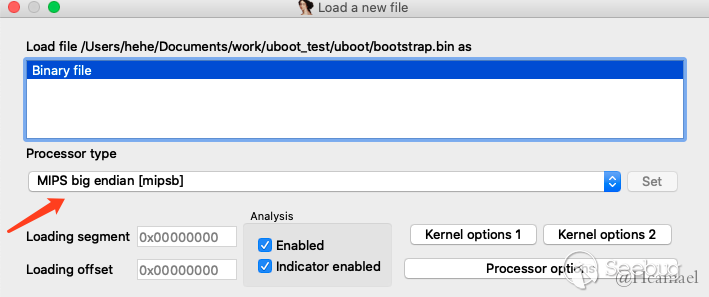
接下來就是通過dd或者其他程序把二進制流從uboot中分離出來,再丟到ida中。先來看看bootstrap,首先指定相應的CPU類型,比如對于上例,則需要設置MIPS大端。
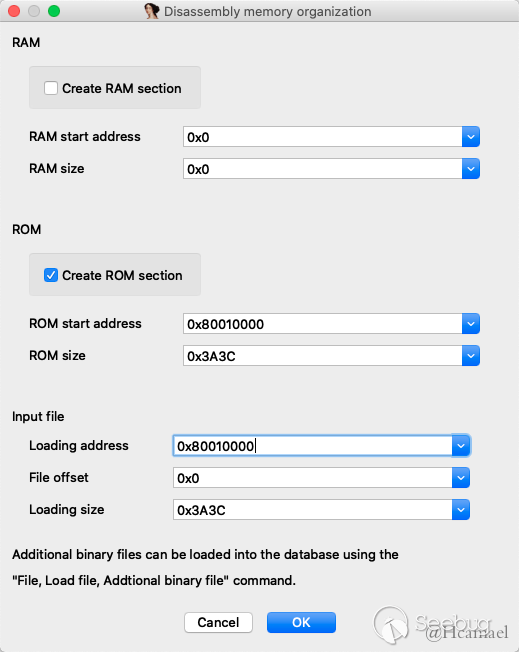
隨后我們暫時設置一下起始地址為0x80010000,通電以后CPU第一個執行的地址默認情況下我們是不知道的,不同CPU有不同的起始地址。設置如下圖所示:
bootstrap最開頭也指令,所以按C轉換成指令,如下圖所示:

跳轉到0x80010400, 隨后是一段初始化代碼,下一步我們需要確定程序基地址,因為是mips,所以我們可以根據$gp來判斷基地址。
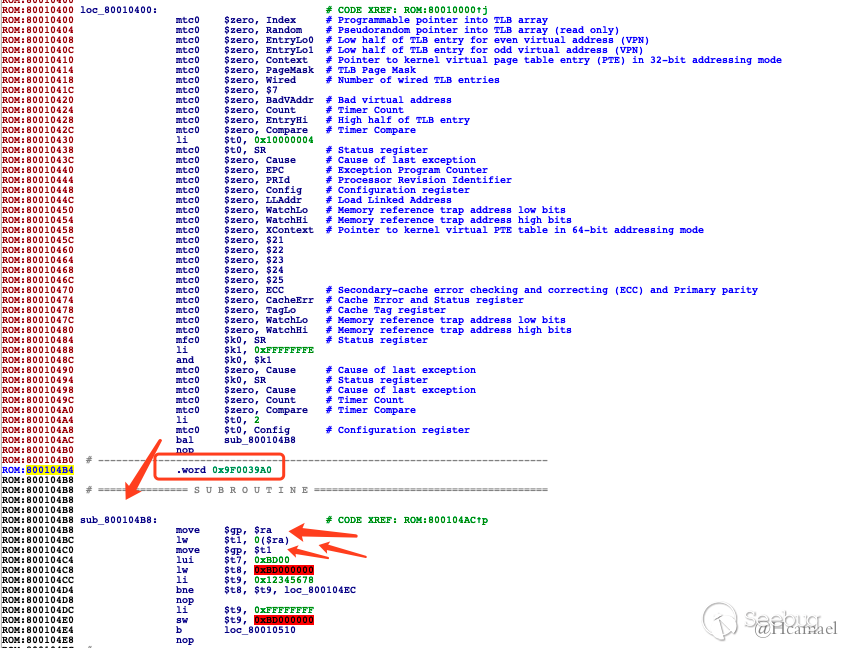
如上圖所示,因為bootstrap的大小為0x3a3c bytes,所以可以初步估計基地址為0x9f000000,所以下面修改一下基地址:
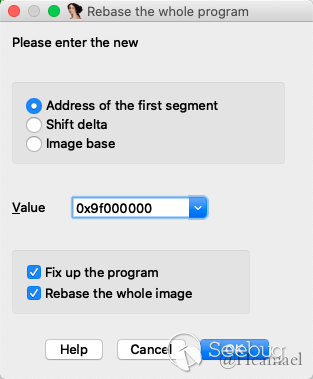
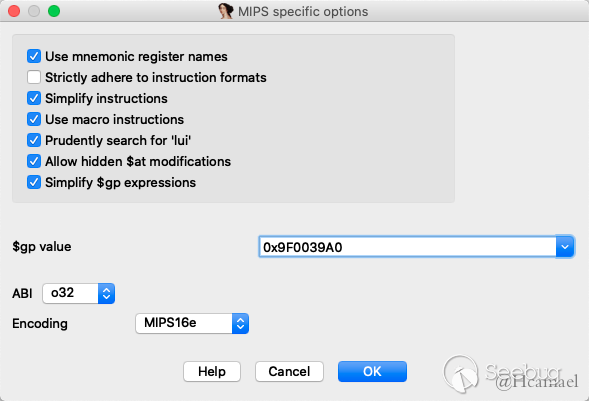
并且修改在Options -> General -> Analysis -> Processor specific ......設置$gp=0x9F0039A0
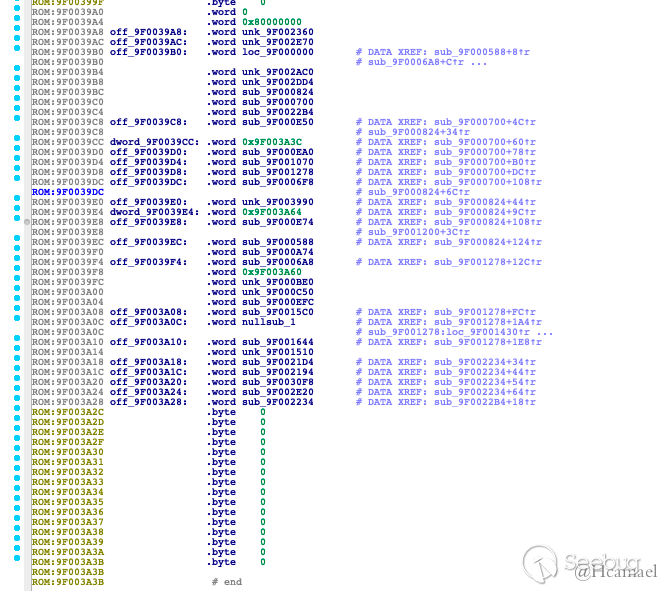
0x9F0039A0地址開始屬于got表的范圍,存儲的是函數地址,所以把0x9F0039A0地址往后的數據都轉成word:
到此就處理完畢了,后面就是存逆向的工作了,具體bootstrap代碼都做了什么,不是本文的重點,所以暫不管。
使用ida處理uboot流文件
處理bootstrap,我們再看看uboot,和上面的處理思路大致相同。
1.使用dd或其他程序,把uboot數據先分離出來。 2.使用lzma解壓縮 3.丟到ida,設置CPU類型,設置基地址,因為uboot頭部有明確定義基地址為0x80010000,所以不用再自己判斷基地址 4.同樣把第一句設置為指令
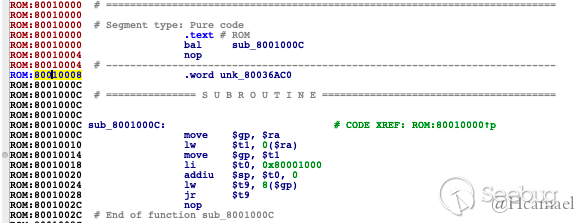
正常情況下,uboot都是這種格式,0x80010008為got表指針,也是$gp的值。
5.根據0x80010008的值,去設置$gp 6.處理got表,該地址往后基本都是函數指針和少部分的字符串指針。結尾還有uboot命令的結構體。
到此uboot也算基礎處理完了,后續也都是逆向的工作了,也不是本文的關注的內容。
編寫idapython自動處理uboot
拿uboot的處理流程進行舉例,使用Python編寫一個ida插件,自動處理uboot二進制流文件。
1.我們把0x80010000設置為__start函數
idc.add_func(0x80010000)
idc.set_name(0x80010000, "__start")
2.0x80010008是got表指針,因為我們處理了0x80010000,所以got表指針地址也被自動翻譯成了代碼,我們需要改成word格式。
idc.del_items(0x80010008)
idc.MakeDword(0x80010008)
got_ptr = idc.Dword(0x80010008)
idc.set_name(idc.Dword(0x80010008), ".got.ptr")
3.把got表都轉成Word格式,如果是字符串指針,在注釋中體現出來
def got():
    assert(got_ptr)
    for address in range(got_ptr, end_addr, 4):
        value = idc.Dword(address)
        if value == 0xFFFFFFFF:2019-12-03 15:36:56 星期二
            break
        idc.MakeDword(address)
        idaapi.autoWait()
        if idc.Dword(value) != 0xFFFFFFFF:
            func_name = idc.get_func_name(value)
            if not idc.get_func_name(value):
                idc.create_strlit(value, idc.BADADDR)
            else:
                funcs.append(func_name)
基本都這里就ok了,后面還可以加一些.text段信息,但不是必要的,最后的源碼如下:
#!/usr/bin/env python
# -*- coding=utf-8 -*-
import idc
import idaapi
class Anlysis:
def __init__(self):
self.start_addr = idc.MinEA()
self.end_addr = idc.MaxEA()
self.funcs = []
def uboot_header(self):
idc.add_func(self.start_addr)
idc.set_name(self.start_addr, "__start")
idc.del_items(self.start_addr + 0x8)
idc.MakeDword(self.start_addr + 0x8)
self.got_ptr = idc.Dword(self.start_addr+8)
idc.set_name(idc.Dword(self.start_addr+8), ".got.ptr")
def got(self):
assert(self.got_ptr)
for address in range(self.got_ptr, self.end_addr, 4):
value = idc.Dword(address)
if value == 0xFFFFFFFF:
break
idc.MakeDword(address)
idaapi.autoWait()
if idc.Dword(value) != 0xFFFFFFFF:
func_name = idc.get_func_name(value)
if not idc.get_func_name(value):
idc.create_strlit(value, idc.BADADDR)
else:
self.funcs.append(func_name)
def get_max_text_addr(self):
assert(self.funcs)
max_addr = 0
for func_name in self.funcs:
addr = idc.get_name_ea_simple(func_name)
end_addr = idc.find_func_end(addr)
if end_addr > max_addr:
max_addr = end_addr
if max_addr % 0x10 == 0:
self.max_text_addr = max_addr
else:
self.max_text_addr = max_addr + 0x10 - (max_addr % 0x10)
def add_segment(self, start, end, name, type_):
segment = idaapi.segment_t()
segment.startEA = start
segment.endEA = end
segment.bitness = 1
idaapi.add_segm_ex(segment, name, type_, idaapi.ADDSEG_SPARSE | idaapi.ADDSEG_OR_DIE)
def start(self):
# text seg
self.uboot_header()
self.got()
self.get_max_text_addr()
self.add_segment(self.start_addr, self.max_text_addr, ".text", "CODE")
# end
idc.jumpto(self.start_addr)
if __name__ == "__main__":
print("Hello World") 本文由 Seebug Paper 發布,如需轉載請注明來源。本文地址:http://www.bjnorthway.com/1090/