作者:al0ne
本文為作者投稿,Seebug Paper 期待你的分享,凡經采用即有禮品相送!
投稿郵箱:paper@seebug.org
此文章記錄了我在18年部署Suricata時的一些經驗與心得。
硬件配置
CPU:雙路e5
內存:128G
硬盤:越多越好
網卡:管理口:千兆網卡,鏡像口:intel 萬兆網卡
系統:Debian GNU/Linux 8.11 (jessie)
內核版本:3.16.0-6-amd64
IDS:suricata 4.0.5
告警分析:splunk
規則自動更新:suricata-update
掛載硬盤
傳統分區不能掛載超過2t的硬盤,這里使用的raid 容量12t所以必須將其轉換為gpt分區才行不然會有以下錯誤
The size of this disk is DOS partition table format can not be used on drives for volumes larger than 2199023255040 bytes for 512-byte sectors. Use GUID partition table format (GPT).
硬盤設置
parted /dev/sdb     選擇第二塊硬盤
(parted) mklabel    創建分區表
New disk label type?  [msdos]? Gpt
(parted) mkpart
Partition name?  []? disk1   #為新建的分區命名
File system type?  [ext2]? ext4   #設置文件系統格式為ext4
Start? 0                           #分區開始硬盤大小
End? 2345.3GB #分區結束硬盤大小,支持mb、gb、tb
(parted) print   #查看分區信息
mkfs -t ext4 -c /dev/sdb1#格式化
mkdir /data#創建數據目錄
mount /dev/sdb1 /data#掛載硬盤
sudo fdisk –l
vim /etc/fstab   #開機自動掛載第二塊硬盤
UUID=xxxx-xxxx-xxxx-xxxx-xxxx /data           ext4    defaults        0       2
網卡驅動
在選擇萬兆網卡時最好使用intel的網卡,pfring ZC自帶了intel網卡全套驅動,兼容性與性能最好
驅動下載地址 https://sourceforge.net/projects/e1000/files/
1 Gbit
e1000e (RX and TX)
igb (RX and TX)
10 Gbit
ixgbe (RX and TX)
10/40 Gbit
i40e (RX and TX)
10/40/100 Gbit
fm10k (RX and TX)
查看網卡硬件
lspci -vvv | grep Ethernet
這里使用的是萬兆x520網卡下載最新的ixgbe驅動
tar xzvf ixgbe-5.0.4.tar.gz
cd ixgbe-5.0.4/src
make
sudo make install
sudo insmod ./ixgbe         加載驅動
sudo modprobe ixgbe RSS = 4,4   加載驅動時設置參數
sudo modinfo ixgbe                 查看驅動信息
sudo rmmod ixgbe         刪除驅動
加載ixgbe網卡時優化參數
modprobe ixgbe MQ=0,0 RSS=1,1 VMDQ=0,0 InterruptThrottleRate=12500,12500 FCoE=0,0 LRO=0,0
鏡像接口配置
桌面版本的Debian會有2個網絡管理程序,networking與network-manager優先級不同,服務器需要禁用network-manager否則interfaces不起作用
vim /etc/network/interfaces
auto eth5
分配一個無ip的接口
iface eth5 inet manual
up ifconfig $IFACE -arp up
開啟混雜模式
up ip link set $IFACE promisc on
down ip link set $IFACE promisc off
down ifconfig $IFACE down
禁用掉不必要的功能
#post-up for i in rx tx sg tso ufo gso gro lro; do ethtool -K $IFACE $i off; done 禁用掉ipv6
post-up echo 1 > /proc/sys/net/ipv6/conf/$IFACE/disable_ipv6
/etc/init.d/networking restart
Suricata安裝編譯
安裝依賴庫
apt-get -y install libpcre3 libpcre3-dbg libpcre3-dev \
build-essential autoconf automake libtool libpcap-dev libnet1-dev \
libyaml-0-2 libyaml-dev zlib1g zlib1g-dev libmagic-dev libcap-ng-dev \
libjansson-dev pkg-config

apt-get install libgeoip1 libgeoip-dev
下載安裝包
wget https://www.openinfosecfoundation.org/download/suricata-4.0.5.tar.gz
tar -zxvf suricata-4.0.5.tar.gz
Hyperscan安裝
apt-get install cmake ragel libboost-dev python-dev libbz2-dev
wget http://downloads.sourceforge.net/project/boost/boost/1.60.0/boost_1_60_0.tar.gz
tar xvzf boost_1_60_0.tar.gz
ln -s /opt/hyperscan/build/boost_1_60_0/boost /opt/hyperscan/include/boost
cd /opt
git clone https://github.com/01org/hyperscan
cd hyperscan
mkdir build
cd build
cmake -DBUILD_STATIC_AND_SHARED=1 ../
make && make install
suricata --build-info|grep Hyperscan
安裝pfring
apt-get install build-essential bison flex linux-headers-$(uname -r)
https://sourceforge.net/projects/ntop/files/PF_RING/PF_RING-6.6.0.tar.gz/download
cd /opt/PFring
make
cd kernel
make install
    如果提示make[1]: *** /lib/modules/3.16.0-6-amd64/build: No such file or directory.  Stop.
    則需要 安裝內核頭 apt install linux-headers-3.16.0-6-amd64
cd ../userland/lib
./configure –prefix=/usr/local/pfring  &&  make install
cd /opt/PF_RING-6.6.0/userland/libpcap-1.7.4
./configure && make install
sudo ldconfig
sudo modprobe pf_ring
從github中安裝
git clone https://github.com/ntop/PF_RING.git
cd PF_RING / kernel
make
sudo insmod ./pf_ring.ko
cd ../userland
make
modprobe pf_ring  transparent_mode=1 enable_tx_capture=0 min_num_slots=65534 quick_mode=1
modinfo pf_ring
安裝Lua-jit
http://luajit.org/download/LuaJIT-2.0.4.tar.gz
tar -zxvf LuaJIT-2.0.4.tar.gz
cd LuaJIT-2.0.4
make && make install
開始編譯
./configure --prefix=/usr --sysconfdir=/etc --localstatedir=/var --enable-pfring --with-libpfring-includes=/usr/local/pfring/include --with-libpfring-libraries=/usr/local/pfring/lib --enable-geoip  --enable-luajit --with-libluajit-includes=/usr/local/include/luajit-2.0/ --with-libluajit-libraries=/usr/local/lib/ --with-libhs-includes=/usr/local/include/hs/ --with-libhs-libraries=/usr/local/lib/ --enable-profiling
make clean && make && make install && ldconfig
make install-conf
日志輪訓
suricata通過logrotate配置日志輪訓,bro自帶broctl已經包括日志輪訓
vim /etc/logrotate.d/suricata
/data/suricata/eve.json {
   daily
   rotate 30
   olddir /data/suricata/old/
   compress
   missingok
   notifempty
   dateext
   postrotate
   /bin/kill -HUP $(cat /var/run/suricata.pid)
   endscript
}
強制執行,測試是否配置成功
sudo logrotate -f /etc/logrotate.d/suricata
每天自動執行
cat /etc/cron.daily/logrotate
#!/bin/sh
test -x /usr/sbin/logrotate || exit 0
/usr/sbin/logrotate /etc/logrotate.conf
配置splunk
從官網下載splunk 需要注冊用戶,splunk免費版每天只能導入500MB數據
dpkg -i splunk.deb
安裝完成后會在/opt/splunk目錄中,進入/opt/splunk/bin  ./splunk start --accept-license  啟動splunk
安裝suricata 插件到splunk
下載[https://github.com/jorritfolmer/TA-suricata](https://github.com/jorritfolmer/TA-suricata "https://github.com/jorritfolmer/TA-suricata")
應用--管理應用--從文件中安裝,選擇下載的zip文件導入
設置--數據輸入--文件 & 目錄
添加監控/data/suricata/eve.json 文件,來源類型:suricata_eve
索引新建alert   app選擇TA-suricata-master
Ethtool工具
ethtool工具主要用來查看與設置網卡信息,一般小寫字母是查看網卡信息,大寫字母是修改網卡信息。例如-g 查看 網卡ring大小,-G 修改
ethtool –S ethx 查看網卡狀態主要是接收字節、丟包或者接收錯誤
ethtool –g ethx 查看網卡ring buffer
ethtool –l eth4 查看網卡RSS隊列
ethtool –L eth4 combined 1 將網卡隊列設置為1
ethtool –k eth4 查看協議卸載功能
網卡丟包優化
丟包主要是網卡丟包或者內核丟包,網卡丟包在ifconfig里面就可以看到,具體原因還得通過ethtool來定位
查看網卡具體丟包原因
sudo ethtool -S eth4 |ag 'error|drop'
rx_errors: 584
tx_errors: 0
rx_dropped: 0
tx_dropped: 0
rx_over_errors: 0
rx_crc_errors: 0
rx_frame_errors: 0
rx_fifo_errors: 0
# 之前遇到rx_missed_errors瘋狂上漲,這種情況一般是網卡緩沖區滿了,多余的數據會被丟棄。與網卡ring buffer和rss隊列有關
rx_missed_errors: 0
tx_aborted_errors: 0
tx_carrier_errors: 0
tx_fifo_errors: 0
網卡優化
sudo ethtool -K eth4 rx off
sudo ethtool -K eth4 tx off
sudo ethtool -K eth4 sg off
sudo ethtool -K eth4 tso off
sudo ethtool -K eth4 gso off
sudo ethtool -K eth4 gro off
sudo ethtool -K eth4 lro off
sudo ethtool -K eth4 rxvlan off
sudo ethtool -K eth4 txvlan off
sudo ethtool -K eth4 ntuple off
sudo ethtool -K eth4 rxhash off
sudo ethtool -A eth4 rx off tx off
網卡RSS隊列,對于ids設備來說 影響性能,默認cpu有多少核心就會有多少隊列數,如果設置為1導致rx_missed_errors可以改成2
sudo ethtool -L eth4 combined 1
巨型幀 將最大傳輸單元增加到9000 默認1500 ,數據包越小產生的CPU中斷越多
sudo ifconfig eth4 mtu 9000
網卡ring buffer 的值并非越大越好 這里將原來4096降到512
sudo ethtool -g rx 512
我們需要對程序設置cpu綁定,例如40個核心 0-38,39分給suricata 最后一個負責處理網卡中斷
./set_irq_affinity.sh 39 eth3
查看網卡中斷,現在可以看到設置后由原來的CPU0處理變成了最后一個CPU39在處理中斷
cat /proc/interrupts|ag eth4
pf_ring && ZC 內核旁路
pfring是linux下高速數據包捕獲庫用來代替libpcap
pf_ring主要分為開源免費版與pfring ZC 商業版本(收費1000+rmb左右,按照網卡mac地址綁定),老版本還有pfring DNA
理論上性能pf_ring ZC>af_packet~pf_ring>libpcap
一般來講,丟包的主要原因主要在于 1.頻繁產生中斷(網卡接收到數據通過中斷通知cpu處理) 2、數據需要多次拷貝,從網卡--》內核空間--》用戶空間
Linux NAPI的方式采用了中斷+輪訓,網卡觸發的中斷會變少。 PF_RING ZC采用了內核旁路的方式,繞過內核協議棧直接進入用戶態,極大提升了處理性能。
官網地址:https://www.ntop.org/products/packet-capture/pf_ring/
github:https://github.com/ntop/PF_RING
安裝
cd PF_RING/drivers/ZC/intel/ixgbe/ixgbe-*-zc/src/
make && sudo ./load_driver.sh
加載PF-ring時優化參數
modprobe pf_ring transparent_mode=0 enable_tx_capture=0 min_num_slots=65534
千萬不能設置quick_mode=1,不然suricata會報錯,開啟了這個模式只能允許一個抓包進程
測試ZC模式是否配置完成,如果驅動沒有加載會顯示沒有找到設備
sudo pfcount -i zc:eth0
modinfo pf_ring
查看pf_ring 設備信息,如果使用了pfring zc Polling Mode字段會顯示NAPI/ZC
cat /proc/net/pf_ring/dev/eth0
Name:         eth0
Index:        23
Address:      xx:xx:xx:xx:xx:xx
Polling Mode: NAPI
Type:         Ethernet
Family:       Standard NIC
# Bound Sockets:  51
TX Queues:    2
RX Queues:    2
每開啟一個抓包進程,就會在/proc/net/pf_ring目錄下生成一個xxxxx-ethX.xxx文件,這里面主要看Tot Packets 這個是總共接收的包,Tot Pkt Lost是指丟棄的包
cat /proc/net/pf_ring/xxxxx-ethX.xxx
Appl. Name             : bro
Tot Packets            : 19085985414
Tot Pkt Lost           : 0
內核參數優化
sudo sysctl net.core.rmem_default=73400320
sudo sysctl net.core.wmem_max=134217728
sudo sysctl net.core.rmem_max=134217728
sudo sysctl net.core.netdev_max_backlog=300000
sudo sysctl net.ipv4.tcp_no_metrics_save=1
sudo sysctl net.ipv4.tcp_congestion_control=htcp
sudo sysctl net.ipv4.tcp_mtu_probing=1
sudo sysctl net.ipv4.tcp_rmem="100000000 100000000 100000000"
sudo sysctl net.ipv4.tcp_wmem="100000000 100000000 100000000"
sudo sysctl net.ipv4.tcp_mem="100000000 100000000 100000000"
sudo sysctl net.core.netdev_budget=3000
sudo sysctl -p
suricata 10GBit環境 配置優化
# 設置內部網絡地址范圍
vars:
address-groups:
HOME_NET: "[192.168.0.0/16,10.0.0.0/8,172.16.0.0/12]"
EXTERNAL_NET: "any"
# 協議這塊,將不需要的全部關閉,如果這里沒有啟用,規則里面又有相關協議規則會報錯。
app-layer:
    protocols:
        dcerpc:
            enabled: no
        ssh:
            enabled: no
        smtp:
            enabled: no
        imap:
            enabled: no
        msn:
            enabled: no
        smb:
            enabled: detection-only
            detection-ports:
            dp: 139, 445
        nfs:
            enabled: no
        tftp:
             enabled: no
        modbus:
             enabled: no
        dnp3:
             enabled: no
        enip:
             enabled: no
        ntp:
             enabled: no
# suricata 能夠同時處理多少個數據包
max-pending-packets: 8192
runmode: workers
defrag:
    memcap: 20gb
    imeout: 3
flow:
    memcap: 8gb
    hash-size: 50000
    prealloc: 50000
    emergency-recovery: 30
# 流超時信息設置,將原來的數值調小
flow-timeouts:
default:
    new: 5
    established: 60
    closed: 3
    bypassed: 30
    emergency-new: 10
    emergency-established: 30
    emergency-closed: 0
    emergency-bypassed: 50
          tcp:
    new: 5
    established: 60
    closed: 1
    bypassed: 30
    emergency-new: 3
    emergency-established: 30
    emergency-closed: 0
    emergency-bypassed: 15
udp:
    new: 5
    established: 60
    bypassed: 30
    emergency-new: 3
    emergency-established: 30
    emergency-bypassed: 15
icmp:
    new: 5
    established: 30
    bypassed: 30
    emergency-new: 10
    emergency-established: 15
    emergency-bypassed: 10
#流設置,小了影響性能
    stream:
    memcap: 10gb
    checksum-validation: no
    inline: no
    bypass: yes
    prealloc-sessions: 100000
    midstream: true
    drop-invalid: yes
    reassembly:
        memcap: 20gb
    depth: 128kb
    toserver-chunk-size: 10240
    toclient-chunk-size: 10240
    randomize-chunk-size: no
    raw: yes
    segment-prealloc: 20000
    check-overlap-different-data: true
    # 數值越大性能越好,占用資源也越高,對性能這塊影響較高。
    detect:
profile: high
custom-values:
    toclient-groups: 100000
    toserver-groups: 100000
          sgh-mpm-context: full
          inspection-recursion-limit: 1000000
# 這里將正則表達式引擎pcre替換為intel的hyperscan(需要重新編譯)
#hyperscan與pcre性能對比 https://blog.csdn.net/vevenlcf/article/details/77883178
mpm-algo: hs
spm-algo: hs
# cpu親和性設置
cpu-affinity:
- management-cpu-set:
cpu: [ 1,0]
prio:
  default: "low"
- worker-cpu-set:
cpu: [ '0-37']
mode: "exclusive"
prio:
  high: [ '2-38' ]
  default: "high"
pfring:
- interface: eth0
threads: 38
cluster-id: 99
cluster-type: cluster_flow
checksum-checks: no
運行
sudo suricata --pfring-int=eth4 --pfring-cluster-id=99 --pfring-cluster-type=cluster_flow -c /etc/suricata/suricata.yaml --runmode=workers -D
修改配置文件后不重啟程序重新加載
sudo kill -USR2 1111
規則的調整
規則對性能的影響是巨大的,ET規則默認會有26000條左右
主要刪除了以下幾項
太老的規則(cve編號帶有1999-2007,ms08之前的規則)
對環境沒有用的規則(工控類、游戲、還有一些行為檢測)
一些ioc,單純匹配一些ip或者域名
分析過程中發現容易引起大量告警的規則
在國內水土不服的告警規則
參考來源:https://github.com/suricata-rules/suricata-rules/blob/master/disable.conf
re:classtype\:not-suspicious
re:classtype\:unknown
re:classtype\:bad-unknown
re:classtype\:rpc-portmap-decode
re:classtype\:string-detect
re:classtype\:suspicious-filename-detect
re:classtype\:suspicious-login
re:classtype\:system-call-detect
re:classtype\:tcp-connection
re:classtype\:unusual-client-port-connection
re:classtype\:non-standard-protocol
re:classtype\:protocol-command-decode
re:classtype\:kickass-porn
re:classtype\:policy-violation
re:classtype\:external-ip-check
re:classtype\:pup-activity
re:classtype\:credential-theft
2004002
2013845
2013504
2200003
re:cve-200[0-7]-\d{3,5}
re:cve-199[0-9]-\d{3,5}
2024107
re:protocol-command-decode
re:IP\sgroup
re:Modbus
re:SCADA
re:Traffic\sgroup
re:Inbound\sgroup
re:GPL\sCHAT
re:ET\sCHAT
re:ET\sGAMES
re:GPL\sGAMES
re:VOIP
re:cve,200[0-7]-\d{3,5}
re:cve,199[0-9]-\d{3,5}
re:ET\sCNC
re:\d+\.\d+\.\d+\.\d+\/\d{2}
re:alert\sip
re:alert\ssmtp
re:alert\sdns
re:alert\smodbus
re:alert\sipv6
re:alert\sdnp3
re:alert\sthe
re:alert\sntp
re:alert\sdcerpc
re:alert\sattempt
re:alert\sCheckin
re:alert\sCnC
re:alert\sFake
re:alert\slabel
re:alert\sLanding
re:alert\sSpyware
re:udp.*53.*trojan-activity
re:android
re:iphone
re:ET\sMOBILE
re:xss
re:Phishing
re:Phone
re:Wordpress
re:\b200[0-7]-
re:SSL\sBlacklist
re:nbtstat
re:NBTStat
10000053
2101411
2100480
2101413
2100366
10000051
2100368
re:snmp
2011719
10000052
2013505
2002878
2012087
2016149
2024897
2013028
2101867
10000084
2016150
2013031
2402000
2003068
# ET POLICY Data POST to an image file (gif)"
2010066
# ET INFO Suspicious Mozilla User-Agent - Likely Fake (Mozilla/4.0) - disable temporarily
2003492
# ET INFO Windows OS Submitting USB Metadata to Microsoft
2025275
# ET MALWARE Suspicious User-Agent (My Session) - false positives with eu.10jqka.com.cn
2010677
# ET MALWARE Alexa Search Toolbar User-Agent 2 (Alexa Toolbar)
2008085
# ET USER_AGENTS Suspicious User-Agent (HttpDownload)
2008429
# Malicious_behavior/Maliciousbehavior.rules -  lost classtype
3013004
# ET INFO EXE IsDebuggerPresent (Used in Malware Anti-Debugging)
2015744
# ET INFO Executable Download from dotted-quad Host
2016141
# ET TROJAN Backdoor family PCRat/Gh0st CnC traffic - false positives with sangfor ssl vpn
# 2016922 2018638 2018880 2019602 2020608 2020610 2020612 2020613 2020691 2020694 2020695 2020696 2020767 2020768 2020771 2020772 2020773 2020775 2020776 2020785 2020789 2020790 2020792 2020793 2020794
re:PCRat\/Gh0st

# ET TROJAN GENERIC Likely Malicious Fake IE Downloading .exe - 360 update
2018403
# ET INFO External Host Probing for ChromeCast Devices - false positives with sangfor ssl vpn
2026758
# CobatlStrikt team servers 200 OK Space - false positives ylog.hiido.com
3016011
# ATTACK [PTsecurity] Apache2 <2.2.34 <2.4.27 Optionsbleed (CVE-2017-9798) Attempt - false positives with ATD
10001948
# ET TROJAN Generic Password Stealer User Agent Detected (RookIE) - false  positives with hq.sinajs.cn
2003635
# ET USER_AGENTS Suspicious User-Agent (MSIE) - false positives with imgcache.qq.com
2003657
# ET USER_AGENTS Suspicious User-Agent (Session) - Possible Trojan-Clicker - false positives with d1.wanyxbox.com
2009512
# ET POLICY User-Agent (Launcher) - false positives with EpicGamesLauncher
2010645
# ET INFO EXE - Served Attached HTTP - false positives with download.nanjingchenxi.com
2014520
# ET INFO Packed Executable Download - dl_dir.qq.com
2014819
#####################################################################################################################
# Potential Corporate Privacy Violation - idleimage.alicdn.com
# add flowbits:noalert; after flowbits:set,ET.http.binary;
2019240
# ET POLICY PE EXE or DLL Windows file download HTTP - false positives with wup1.cache.wps.cn
# add flowbits:noalert; after flowbits:set,ET.http.binary;
2018959
#####################################################################################################################
# ET MALWARE Double User-Agent (User-Agent User-Agent) - *.sougou.com
2003626
# ET INFO Hiloti Style GET to PHP with invalid terse MSIE headers - es.f.#
2012612
# ET P2P Bittorrent P2P Client User-Agent (Bittorrent/5.x.x) - dl1234.com
2006372
# ET INFO DYNAMIC_DNS HTTP Request to a 3322.net Domain *.3322.org - http://www.3322.org/dyndns/getip
2013213
# ET TROJAN Suspicious User-Agent (Agent and 5 or 6 digits) - cloud.10jqka.com.cn
2013315
# ATTACK [PTsecurity] Samba RCE exploitation attempt (SambaCry)
10001356
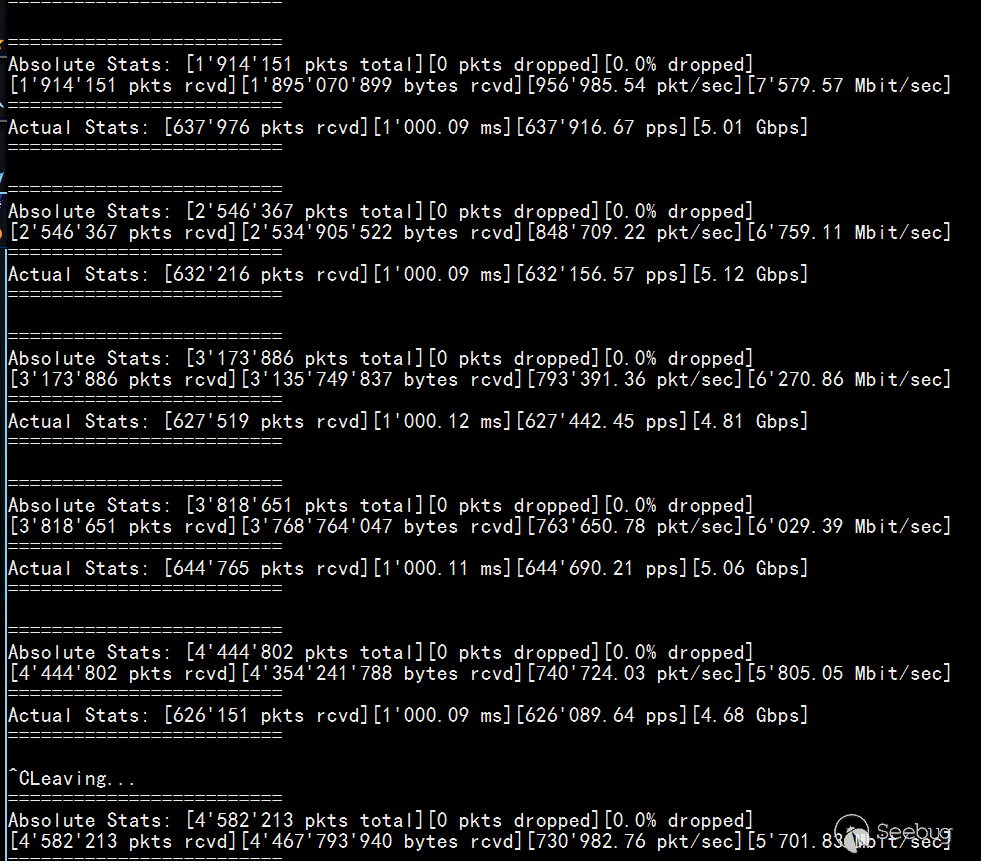
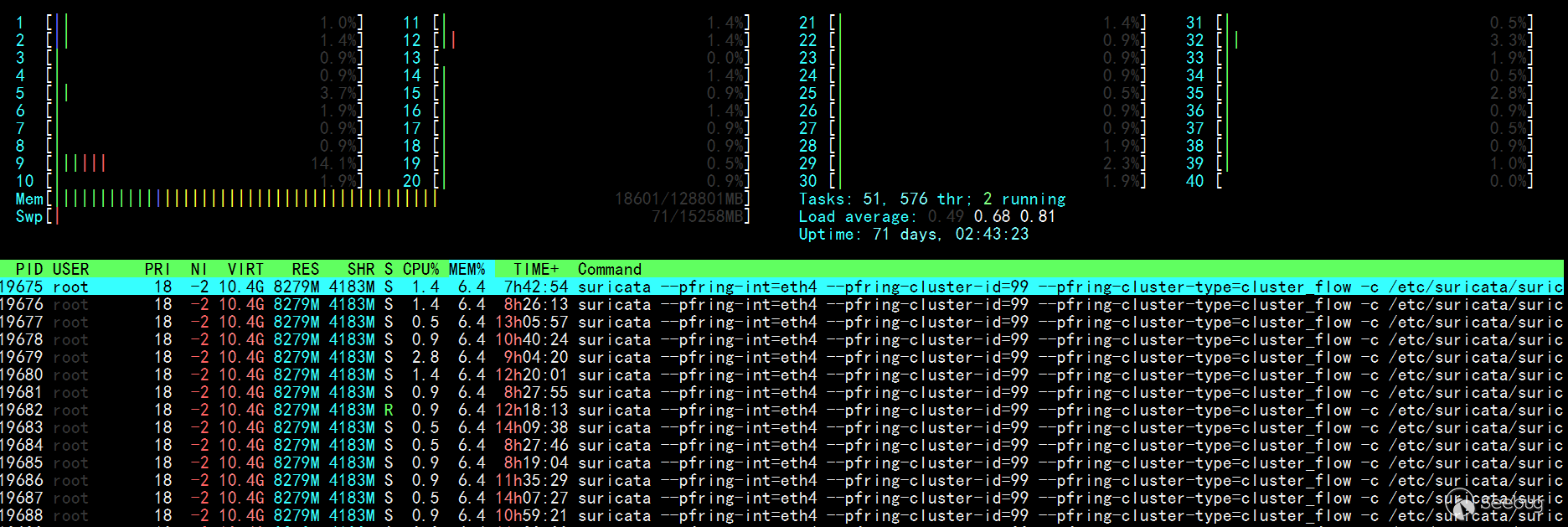
效果測試
sudo pfcount -i ethX 查看當前流量
 htop 性能占用
 IDS監控腳本
#!/bin/bash
while [ "1" ]
do
sleep 1
clear
printf "Suricata IDS 監控腳本\n\n"
nicpacket=`ifconfig eth4|ag  -o 'RX.*(?<=packets:)(\d+)'|awk -F ':' '{print $2}'`
printf "網卡總流量: %d\n" $nicpacket
nicloss=`ifconfig eth4|ag  -o 'RX.*(?<=dropped:)(\d+)'|awk -F ':' '{print $4}'`
printf "網卡丟包: %d\n" $nicloss
ethlos=`ethtool -S eth4|ag 'error|drop' |ag -v ':\s0'`
echo "    " $ethlos
nicoutput=`awk -v nicloss="$nicloss" -v nicpacket="$nicpacket" 'BEGIN{printf "%.4f%%\n",(nicloss/nicpacket)*100}'`
printf "網卡丟包率: %s\n\n" $nicoutput
packet=`grep Suricata /proc/net/pf_ring/*eth4*|awk -F ':' '{print $1}'|xargs -i{} cat {}|ag pack|awk -F ':' '{sum+=$2};END{printf "%10.0f\n",sum}'`
printf "Suricata總流量: %d \n" $packet
loss=`grep Suricata /proc/net/pf_ring/*eth4*|awk -F ':' '{print $1}'|xargs -i{} cat {}|ag los|awk -F ':' '{sum+=$2};END{printf "%10.0f\n",sum}'`
printf "Suricata丟包: %s\n" $loss
output=`awk -v loss="$loss" -v packet="$packet" 'BEGIN{printf "%.4f%%\n",(loss/packet)*100}'`
printf "Suricata丟包率: %s\n\n" $output
memory=`free -mh|ag -o '(?<=cache:)\s+[\d\.]+G'|sed 's/ //g'`
printf "內存占用: %s\n" $memory
runtime=`stat /var/run/suricata.pid|ag -o '(?<=最近更改:)\d{4}-\d{2}-\d{2}\s[\d:]{8}'`
echo "程序運行時間:" $runtime
alert=`cat /data/suricata/eve.json|wc -l`
echo "Suricata IDS產生告警:" $alert
rules=`cat /var/lib/suricata/rules/suricata.rules|ag '^alert'|wc -l`
printf "加載規則: %s 條\n" $rules
done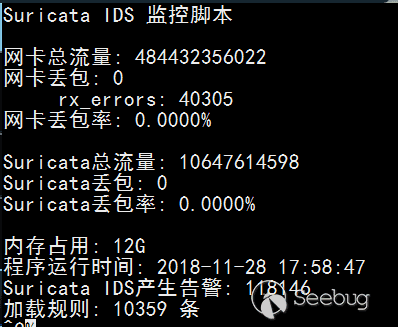
參考連接
1.http://jaseywang.me/2013/11/02/10g82599eb-%E7%BD%91%E5%8D%A1%E6%B5%8B%E8%AF%95%E4%BC%98%E5%8C%96ethtool/
2.http://dak1n1.com/blog/7-performance-tuning-intel-10gbe/
3.https://www.sans.org/reading-room/whitepapers/detection/capturing-10g-1g-traffic-correct-settings-33043
4.https://blog.because-security.com/t/network-intrusion-detection-system-workflows-for-suricata-beyond-packets/146
 本文由 Seebug Paper 發布,如需轉載請注明來源。本文地址:http://www.bjnorthway.com/1054/